Node.js/io.js
Native C++ Addons
Chris Barber
NodeMN Sept 8, 2015
About Me
• Lead Software Engineer at
Appcelerator
• JavaScript hacker since 2000
• Open source
o Titanium
o Dojo Toolkit
• @cb1kenobi
o https://github.com/cb1kenobi
o https://twitter.com/cb1kenobi
My Projects
• node-ios-device
o https://www.npmjs.com/package/node-ios-device
o Talks to Apple’s MobileDevice framework to query iOS devices, install
apps, and tail syslog
• lcdstats
o https://www.npmjs.com/package/lcdstats
o Prints system info to LCD screen using USB
What is a C++ Addon?
• Dynamically linked shared object (.so, .dll)
• Direct access to V8 APIs
• Expose C++ functions to JavaScript
Getting Started
• Python 2.7
o Python 3 won't work
o Needed by GYP
• C++ toolchain
o g++, make
o Xcode + CLI tools
o Visual Studio
Example Addon
Example Addon
• example.cpp
o Your C++ file
• binding.gyp
o GYP file that says what and how your C++ should be compiled
• package.json
o “gypfile”: true
o Tells NPM to run node-gyp
example.cpp
#include <node.h>
using namespace v8;
void helloMethod(const FunctionCallbackInfo<Value>& args) {
Isolate* isolate = Isolate::GetCurrent();
HandleScope scope(isolate);
args.GetReturnValue().Set(String::NewFromUtf8(isolate, "world"));
}
void init(Handle<Object> exports) {
NODE_SET_METHOD(exports, "hello", helloMethod);
}
NODE_MODULE(example, init)
binding.gyp
{
"targets": [
{
"target_name": "example",
"sources": [ "example.cpp" ]
}
]
}
package.json
{
"name": "example",
"version": "1.0.0",
"description": "C++ addon example",
"gypfile": true
}
Build & Run
$npm build .
> example@1.0.0 install /Users/chris/projects/nodemn/example
> node-gyp rebuild
CXX(target) Release/obj.target/example/example.o
SOLINK_MODULE(target) Release/example.node
$node
>var example = require('./build/Release/example.node')
undefined
>example.hello()
'world'
$ node –v
v0.12.7
Build System
GYP
• Generate Your Projects
• https://code.google.com/p/gyp/
• Written in Python (requires 2.7)
• Generates projects:
o Makefiles, Xcode, Visual Studio, etc
• .gyp file
o JSON + comments + double or single quotes + trailing commas
• Features:
o Variables, includes, defaults, targets, dependencies, conditions, actions
• Use to be used for V8 and Chrome
o Now replaced by gn
o V8 still ships a GYP file
node-gyp
• https://github.com/nodejs/node-gyp
• Node.js-based CLI tool that wraps GYP and builds
your C++ addons
• Bundled with NPM
Building addons
• NPM way:
$ npm build .
• node-gyp way:
$ sudo npm install -g node-gyp
$ node-gyp configure
$ node-gyp build
node-gyp configure
• Downloads Node dev files
o Stored in ~/.node-gyp
• Invokes GYP
o Creates build project files
Node.js Versions
Module API Versions
Node.js API Version
0.8.x 1
0.9.0 - 0.9.8 10
0.9.9 11
0.10.x 11
0.11.0 - 0.11.7 12
0.11.8 - 0.11.10 13
0.11.11 - 0.11.16 14
0.12.0 - 0.12.7 14
4.0.0 46
io.js API Version
1.0.x 42
1.1.0 – 1.8.4 43
2.x 44
3.x 45
Building$ node –v
v0.10.40
$ npm build .
> example@1.0.0 install /Users/chris/projects/nodemn/example
> node-gyp rebuild
CXX(target) Release/obj.target/example/example.o
../example.cpp:5:24: error: unknown type name 'FunctionCallbackInfo'
void helloMethod(const FunctionCallbackInfo<Value>& args) {
^
../example.cpp:5:44: error: expected ')'
void helloMethod(const FunctionCallbackInfo<Value>& args) {
^
../example.cpp:5:17: note: to match this '('
void helloMethod(const FunctionCallbackInfo<Value>& args) {
^
../example.cpp:7:15: error: no matching constructor for initialization of 'v8::HandleScope'
HandleScope scope(isolate);
^ ~~~~~~~
/Users/chris/.node-gyp/0.10.40/deps/v8/include/v8.h:473:3: note: candidate constructor not viable: no known conversion from 'v8::Isolate *' to 'const
v8::HandleScope' for 1st argument
HandleScope(const HandleScope&);
^
/Users/chris/.node-gyp/0.10.40/deps/v8/include/v8.h:448:3: note: candidate constructor not viable: requires 0 arguments, but 1 was provided
HandleScope();
^
../example.cpp:8:3: error: use of undeclared identifier 'args'
args.GetReturnValue().Set(String::NewFromUtf8(isolate, "world"));
^
../example.cpp:8:37: error: no member named 'NewFromUtf8' in 'v8::String'
args.GetReturnValue().Set(String::NewFromUtf8(isolate, "world"));
~~~~~~~~^
5 errors generated.
make: *** [Release/obj.target/example/example.o] Error 1
What Happened?
• Node.js 0.11 (unstable) introduced V8 3.17.13.0
o FYI: Node.js 4.0.0 uses V8 4.5.103.30
• Major breaking APIs
• Introduced "isolates"
• V8 continues to change API
Node.js 0.12 vs 0.10
// Node.js 0.12
#include <node.h>
using namespace v8;
void helloMethod(const FunctionCallbackInfo<Value>& args) {
Isolate* isolate = Isolate::GetCurrent();
HandleScope scope(isolate);
args.GetReturnValue().Set(
String::NewFromUtf8(isolate, "world")
);
}
void init(Handle<Object> exports) {
NODE_SET_METHOD(exports, "hello", helloMethod);
}
NODE_MODULE(hello, init)
// Node.js 0.10
#include <node.h>
#include <v8.h>
using namespace v8;
Handle<Value> helloMethod(const Arguments& args) {
HandleScope scope;
return scope.Close(String::New("world"));
}
void init(Handle<Object> exports) {
exports->Set(String::NewSymbol("hello"),
FunctionTemplate::New(helloMethod)->GetFunction());
}
NODE_MODULE(hello, init)
nan to the rescue
nan
• Native abstractions for Node.js
• Preprocessor macro magic
• https://www.npmjs.com/package/nan
Install
$ npm install nan --save
example2.cpp
#include <nan.h>
#include <node.h>
using namespace v8;
NAN_METHOD(helloMethod) {
info.GetReturnValue().Set(Nan::New("world").ToLocalChecked());
}
NAN_MODULE_INIT(init) {
Nan::Set(target,
Nan::New("hello").ToLocalChecked(),
Nan::GetFunction(Nan::New<FunctionTemplate>(helloMethod)).ToLocalChecked()
);
}
NODE_MODULE(example2, init)
binding.gyp
{
'targets': [
{
'target_name': 'example2',
'include_dirs': [
'<!(node -e "require('nan')")'
],
'sources': [ 'example2.cpp' ]
}
]
}
Build & Run
$ node –v
0.10.40
$ npm build .
> example2@1.0.0 install /Users/chris/projects/nodemn/example2
> node-gyp rebuild
CXX(target) Release/obj.target/example2/example2.o
SOLINK_MODULE(target) Release/example2.node
$ node
> var example2 = require('./build/Release/example2.node')
undefined
> example2.hello()
'world'
Build & Run
$ node –v
0.12.7
$ node
> var example2 = require('./build/Release/example2.node')
Error: Module did not self-register.
at Error (native)
at Module.load (module.js:355:32)
at Function.Module._load (module.js:310:12)
at Module.require (module.js:365:17)
at require (module.js:384:17)
at repl:1:16
at REPLServer.defaultEval (repl.js:132:27)
at bound (domain.js:254:14)
at REPLServer.runBound [as eval] (domain.js:267:12)
at REPLServer.<anonymous> (repl.js:279:12)
Why?
• example2.node is compiled for Node.js 0.10.40
o API Version 11
• Node.js 0.12 is API Version 14
Addon Compatibility
• API Version
• Node.js version
o 0.11 -> 0.12
• Platform (OS X, Linux, Windows)
• Architecture (32 vs 64-bit)
Solutions
• Perfect solution?
o Doesn't exist today
• Pre-build binaries in NPM package
o Pros:
• Users always have a compatible addon ready to go
• Users don't have to have C++ toolchain installed
• Redistributable without needed Internet connection
o Cons:
• Continually larger and larger package file size
• Need to publish new binary for every new Node.js/io.js version
• Need to manage version paths yourself
• node-pre-gyp
o Pros:
• Dynamically downloads binary at runtime; fallback to local build
• Users don't have to have C++ toolchain installed unless required version does
not exist
• Small package size; no binaries in NPM
• Automatically manages version paths
o Cons:
• Need to publish new binary for every new Node.js/io.js version
• Users either need an Internet connection or C++ toolchain
Only a partial solution
• New Node.js/io.js releases all the time
• Neglected addons
• Some environments possibly untested
• No way to tell NPM what platforms the addon is
targeting
o NPM just tries to build it
State of C++ Addons
August 2014
• 90,984 packages
• 66,775 on Github
• 860 are C++ addons
o 1.3% of all NPM packages that are on Github are C++ addons
0.10.30 0.11.13
OS X
Linux
Windows
473 (55%) 126 (14.7%)
417 (48.5%) 129 (15%)
295 (34.3%) 111 (12.9%)
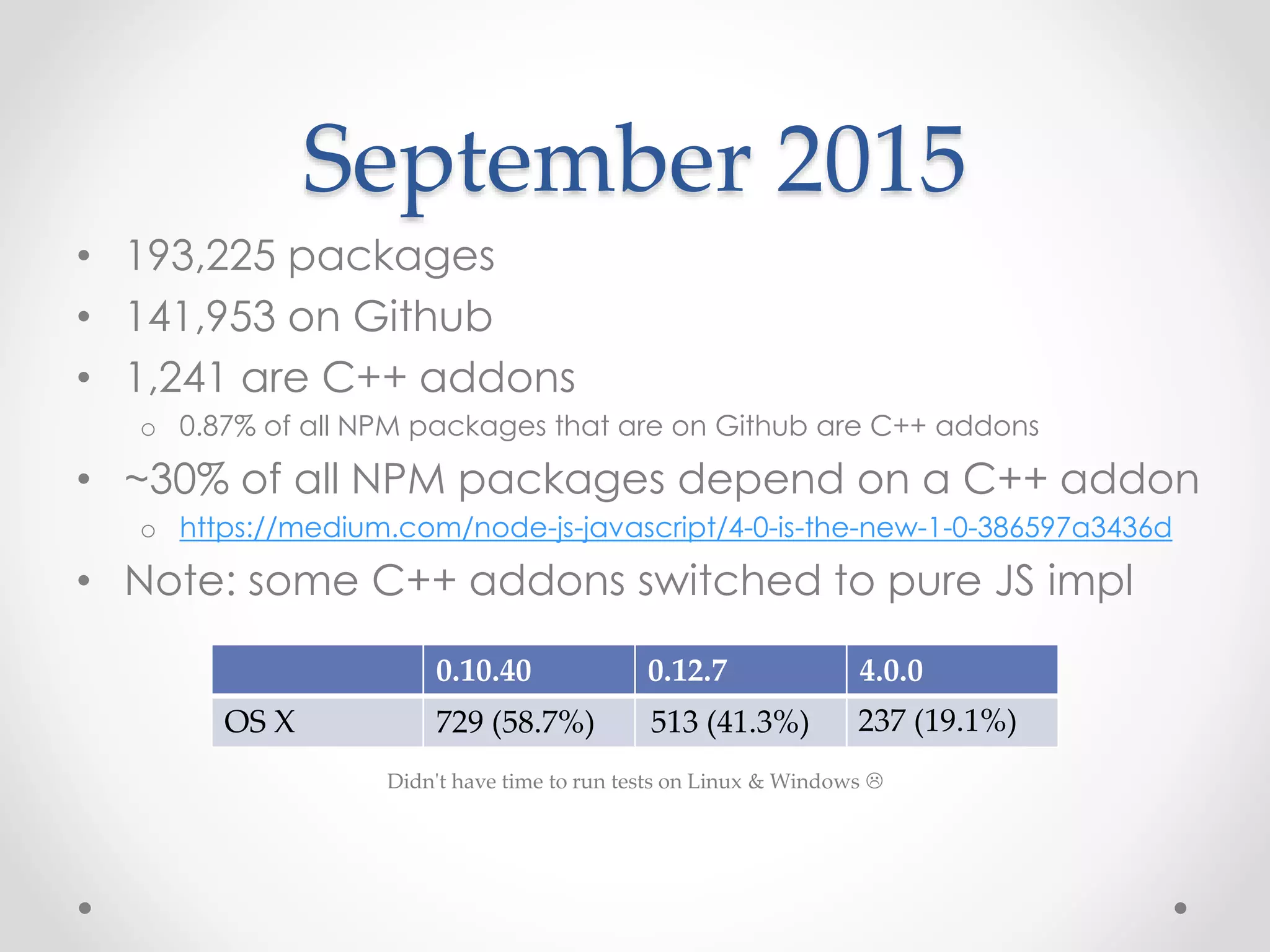
September 2015
• 193,225 packages
• 141,953 on Github
• 1,241 are C++ addons
o 0.87% of all NPM packages that are on Github are C++ addons
• ~30% of all NPM packages depend on a C++ addon
o https://medium.com/node-js-javascript/4-0-is-the-new-1-0-386597a3436d
• Note: some C++ addons switched to pure JS impl
0.10.40 0.12.7 4.0.0
OS X
Didn't have time to run tests on Linux & Windows 
729 (58.7%) 513 (41.3%) 237 (19.1%)
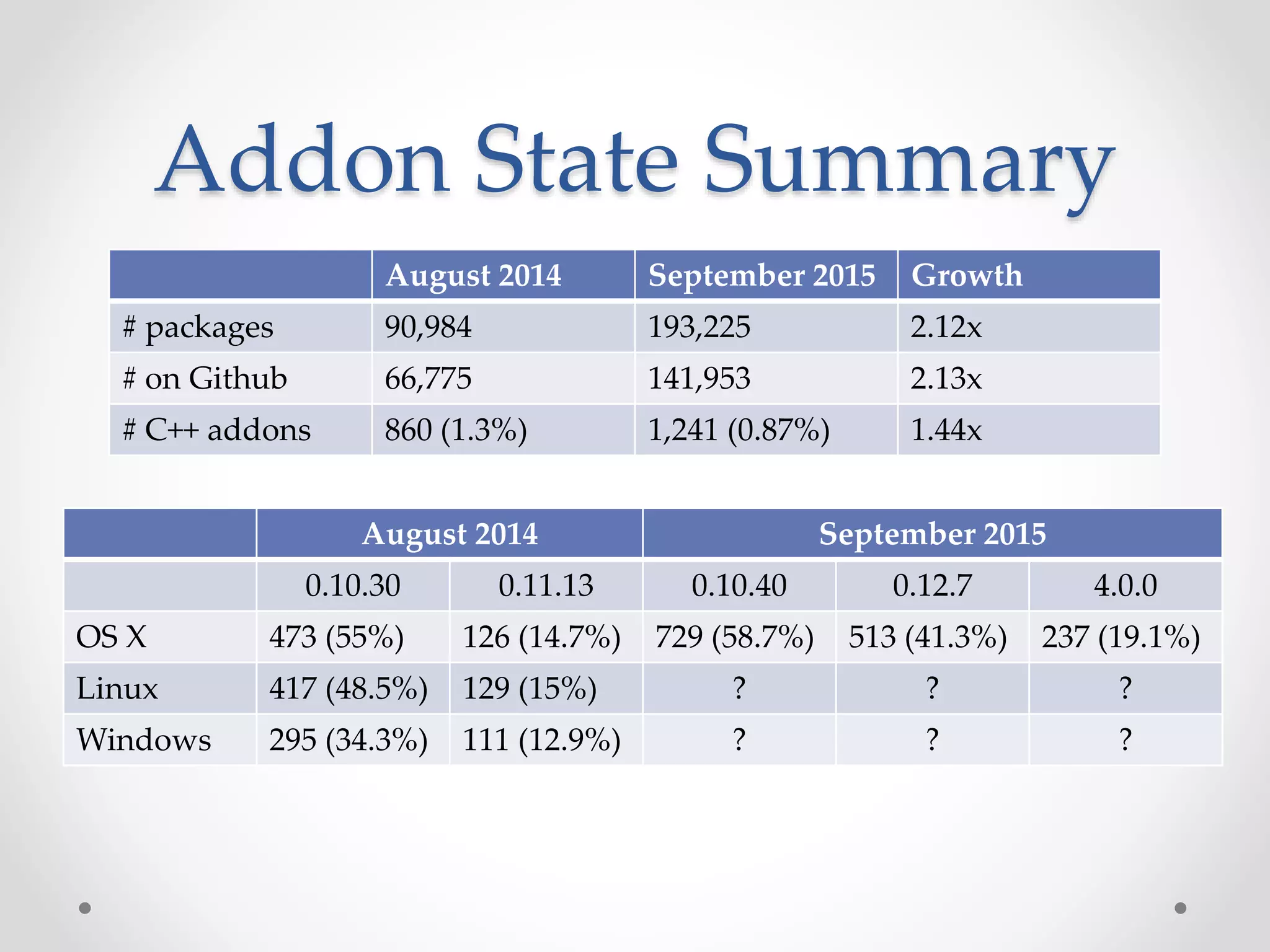
Addon State Summary
August 2014 September 2015 Growth
# packages 90,984 193,225 2.12x
# on Github 66,775 141,953 2.13x
# C++ addons 860 (1.3%) 1,241 (0.87%) 1.44x
August 2014 September 2015
0.10.30 0.11.13 0.10.40 0.12.7 4.0.0
OS X 473 (55%) 126 (14.7%) 729 (58.7%) 513 (41.3%) 237 (19.1%)
Linux 417 (48.5%) 129 (15%) ? ? ?
Windows 295 (34.3%) 111 (12.9%) ? ? ?
Back to some code!
ObjectWrap
Expose C++ Object to JS
example3.cpp#include <nan.h>
using namespace v8;
class MyObject : public Nan::ObjectWrap {
public:
static NAN_MODULE_INIT(Init) {
Local<FunctionTemplate> tpl = Nan::New<FunctionTemplate>(MyObject::New);
tpl->SetClassName(Nan::New("MyObject").ToLocalChecked());
tpl->InstanceTemplate()->SetInternalFieldCount(1);
SetPrototypeMethod(tpl, "hello", Hello);
Nan::Set(target, Nan::New("MyObject").ToLocalChecked(), tpl->GetFunction());
}
protected:
static NAN_METHOD(New) {
MyObject *obj = new MyObject();
obj->Wrap(info.This());
info.GetReturnValue().Set(info.This());
}
static NAN_METHOD(Hello) {
info.GetReturnValue().Set(Nan::New("world").ToLocalChecked());
}
};
NAN_MODULE_INIT(init) {
MyObject::Init(target);
}
NODE_MODULE(example3, init)
Build & Run
$npm build .
> example3@1.0.0 install /Users/chris/projects/nodemn/example3
> node-gyp rebuild
CXX(target) Release/obj.target/example3/example3.o
SOLINK_MODULE(target) Release/example3.node
$node
>var example3 = require('./build/Release/example3.node')
undefined
>example3.MyObject
var obj = new example3.MyObject()
undefined
>
[Function: MyObject]
>
obj.hello()
'world'
C++ Addon Public API
• Use an index.js to expose a high-level public API
o Things are generally easier in JavaScript
• C++ addon implements low-level API
o Fancy APIs are a lot of work to build in C++
libuv
• Library for async I/O
• Event loops
• Thread pools
• Thread synchronization
• Async filesystem
• Async networking
• Child processes
• Much more!
Case Study: deasync
• https://github.com/abbr/deasync
• Turns async functions into sync
var deasync = require('deasync');
var cp = require('child_process');
var exec = deasync(cp.exec);
console.log(exec('ls -la'));
Case Study: deasync
// heavily simplified
// original: https://github.com/abbr/deasync/blob/master/index.js
var binding = require(modPath); // path to deasync.node
function deasync(fn) {
return function() {
var done = false;
fn.apply(this, args);
module.exports.loopWhile(function () { return !done; });
};
}
module.exports.loopWhile = function (pred) {
while (pred()) {
process._tickDomainCallback();
if (pred()) {
binding.run();
}
}
};
Case Study: deasync
#include <uv.h>
#include <v8.h>
#include <nan.h>
using namespace v8;
NAN_METHOD(Run) {
Nan::HandleScope scope;
uv_run(uv_default_loop(), UV_RUN_ONCE);
info.GetReturnValue().Set(Nan::Undefined());
}
static NAN_MODULE_INIT(init) {
Nan::Set(target,
Nan::New("run").ToLocalChecked(),
Nan::GetFunction(Nan::New<FunctionTemplate>(Run)).ToLocalChecked()
);
}
NODE_MODULE(deasync, init)
Performance
Threading
• Node.js is single threaded
• Your C++ code can block your Node app
• Use libuv for async tasks
• uv_queue_work() makes async easy(ier)
• No V8 access from worker threads
• Threads can have their own event loops
C++ ⟷ JavaScript Bridge
#include <nan.h>
#include <node.h>
#include <math.h>
using namespace v8;
NAN_METHOD(crunch) {
double n = floor(133.7 / 3.14159265359);
info.GetReturnValue().Set(Nan::New<Number>(n));
}
NAN_MODULE_INIT(init) {
Nan::Set(target,
Nan::New("crunch").ToLocalChecked(),
Nan::GetFunction(Nan::New<FunctionTemplate>(crunch))
.ToLocalChecked()
);
}
NODE_MODULE(example4, init)
function jsCrunch() {
return Math.floor(133.7 / Math.PI);
}
var start = new Date;
for (var i = 0; i < 1e8; i++) {
jsCrunch();
}
var jsDelta = (new Date) - start;
var nativeCrunch = require(
'./build/Release/example4.node').crunch;
start = new Date;
for (var i = 0; i < 1e8; i++) {
nativeCrunch();
}
var nativeDelta = (new Date) - start;
console.log('JS took ' + jsDelta + 'ms');
console.log('Native took ' + nativeDelta + 'ms');
Borrowed from http://kkaefer.github.io/node-cpp-modules
C++ ⟷ JavaScript Bridge
$ node index.js
JS took 48ms
Native took 9397ms
JavaScript vs C++
• V8 aggressively JITs JavaScript code
o Profiles and compiles it into native instructions
• V8 is really fast
o Object allocation
• Somethings you just can't do in JavaScript
• Really depends on the use case and developer skill
o Leaving it up to you to decide
o Perform your own benchmarks
Summary
Summary
• Prefer a pure JavaScript solution over a C++ solution
o Unless A) you have to or B) you need performance
• Use nan
• Highly consider using node-pre-gyp + continuous
build server
• Use a JavaScript wrapper to implement public API
• Don't block the main thread
o Use libuv to perform async operations
Questions?

Node.js/io.js Native C++ Addons

  • 1.
    Node.js/io.js Native C++ Addons ChrisBarber NodeMN Sept 8, 2015
  • 2.
    About Me • LeadSoftware Engineer at Appcelerator • JavaScript hacker since 2000 • Open source o Titanium o Dojo Toolkit • @cb1kenobi o https://github.com/cb1kenobi o https://twitter.com/cb1kenobi
  • 3.
    My Projects • node-ios-device ohttps://www.npmjs.com/package/node-ios-device o Talks to Apple’s MobileDevice framework to query iOS devices, install apps, and tail syslog • lcdstats o https://www.npmjs.com/package/lcdstats o Prints system info to LCD screen using USB
  • 4.
    What is aC++ Addon?
  • 5.
    What is aC++ Addon? • Dynamically linked shared object (.so, .dll) • Direct access to V8 APIs • Expose C++ functions to JavaScript
  • 6.
    Getting Started • Python2.7 o Python 3 won't work o Needed by GYP • C++ toolchain o g++, make o Xcode + CLI tools o Visual Studio
  • 7.
  • 8.
    Example Addon • example.cpp oYour C++ file • binding.gyp o GYP file that says what and how your C++ should be compiled • package.json o “gypfile”: true o Tells NPM to run node-gyp
  • 9.
    example.cpp #include <node.h> using namespacev8; void helloMethod(const FunctionCallbackInfo<Value>& args) { Isolate* isolate = Isolate::GetCurrent(); HandleScope scope(isolate); args.GetReturnValue().Set(String::NewFromUtf8(isolate, "world")); } void init(Handle<Object> exports) { NODE_SET_METHOD(exports, "hello", helloMethod); } NODE_MODULE(example, init)
  • 10.
  • 11.
  • 12.
    Build & Run $npmbuild . > example@1.0.0 install /Users/chris/projects/nodemn/example > node-gyp rebuild CXX(target) Release/obj.target/example/example.o SOLINK_MODULE(target) Release/example.node $node >var example = require('./build/Release/example.node') undefined >example.hello() 'world' $ node –v v0.12.7
  • 13.
  • 14.
    GYP • Generate YourProjects • https://code.google.com/p/gyp/ • Written in Python (requires 2.7) • Generates projects: o Makefiles, Xcode, Visual Studio, etc • .gyp file o JSON + comments + double or single quotes + trailing commas • Features: o Variables, includes, defaults, targets, dependencies, conditions, actions • Use to be used for V8 and Chrome o Now replaced by gn o V8 still ships a GYP file
  • 15.
    node-gyp • https://github.com/nodejs/node-gyp • Node.js-basedCLI tool that wraps GYP and builds your C++ addons • Bundled with NPM
  • 16.
    Building addons • NPMway: $ npm build . • node-gyp way: $ sudo npm install -g node-gyp $ node-gyp configure $ node-gyp build
  • 17.
    node-gyp configure • DownloadsNode dev files o Stored in ~/.node-gyp • Invokes GYP o Creates build project files
  • 18.
  • 19.
    Module API Versions Node.jsAPI Version 0.8.x 1 0.9.0 - 0.9.8 10 0.9.9 11 0.10.x 11 0.11.0 - 0.11.7 12 0.11.8 - 0.11.10 13 0.11.11 - 0.11.16 14 0.12.0 - 0.12.7 14 4.0.0 46 io.js API Version 1.0.x 42 1.1.0 – 1.8.4 43 2.x 44 3.x 45
  • 20.
    Building$ node –v v0.10.40 $npm build . > example@1.0.0 install /Users/chris/projects/nodemn/example > node-gyp rebuild CXX(target) Release/obj.target/example/example.o ../example.cpp:5:24: error: unknown type name 'FunctionCallbackInfo' void helloMethod(const FunctionCallbackInfo<Value>& args) { ^ ../example.cpp:5:44: error: expected ')' void helloMethod(const FunctionCallbackInfo<Value>& args) { ^ ../example.cpp:5:17: note: to match this '(' void helloMethod(const FunctionCallbackInfo<Value>& args) { ^ ../example.cpp:7:15: error: no matching constructor for initialization of 'v8::HandleScope' HandleScope scope(isolate); ^ ~~~~~~~ /Users/chris/.node-gyp/0.10.40/deps/v8/include/v8.h:473:3: note: candidate constructor not viable: no known conversion from 'v8::Isolate *' to 'const v8::HandleScope' for 1st argument HandleScope(const HandleScope&); ^ /Users/chris/.node-gyp/0.10.40/deps/v8/include/v8.h:448:3: note: candidate constructor not viable: requires 0 arguments, but 1 was provided HandleScope(); ^ ../example.cpp:8:3: error: use of undeclared identifier 'args' args.GetReturnValue().Set(String::NewFromUtf8(isolate, "world")); ^ ../example.cpp:8:37: error: no member named 'NewFromUtf8' in 'v8::String' args.GetReturnValue().Set(String::NewFromUtf8(isolate, "world")); ~~~~~~~~^ 5 errors generated. make: *** [Release/obj.target/example/example.o] Error 1
  • 21.
    What Happened? • Node.js0.11 (unstable) introduced V8 3.17.13.0 o FYI: Node.js 4.0.0 uses V8 4.5.103.30 • Major breaking APIs • Introduced "isolates" • V8 continues to change API
  • 22.
    Node.js 0.12 vs0.10 // Node.js 0.12 #include <node.h> using namespace v8; void helloMethod(const FunctionCallbackInfo<Value>& args) { Isolate* isolate = Isolate::GetCurrent(); HandleScope scope(isolate); args.GetReturnValue().Set( String::NewFromUtf8(isolate, "world") ); } void init(Handle<Object> exports) { NODE_SET_METHOD(exports, "hello", helloMethod); } NODE_MODULE(hello, init) // Node.js 0.10 #include <node.h> #include <v8.h> using namespace v8; Handle<Value> helloMethod(const Arguments& args) { HandleScope scope; return scope.Close(String::New("world")); } void init(Handle<Object> exports) { exports->Set(String::NewSymbol("hello"), FunctionTemplate::New(helloMethod)->GetFunction()); } NODE_MODULE(hello, init)
  • 23.
    nan to therescue
  • 24.
    nan • Native abstractionsfor Node.js • Preprocessor macro magic • https://www.npmjs.com/package/nan
  • 25.
  • 26.
    example2.cpp #include <nan.h> #include <node.h> usingnamespace v8; NAN_METHOD(helloMethod) { info.GetReturnValue().Set(Nan::New("world").ToLocalChecked()); } NAN_MODULE_INIT(init) { Nan::Set(target, Nan::New("hello").ToLocalChecked(), Nan::GetFunction(Nan::New<FunctionTemplate>(helloMethod)).ToLocalChecked() ); } NODE_MODULE(example2, init)
  • 27.
    binding.gyp { 'targets': [ { 'target_name': 'example2', 'include_dirs':[ '<!(node -e "require('nan')")' ], 'sources': [ 'example2.cpp' ] } ] }
  • 28.
    Build & Run $node –v 0.10.40 $ npm build . > example2@1.0.0 install /Users/chris/projects/nodemn/example2 > node-gyp rebuild CXX(target) Release/obj.target/example2/example2.o SOLINK_MODULE(target) Release/example2.node $ node > var example2 = require('./build/Release/example2.node') undefined > example2.hello() 'world'
  • 29.
    Build & Run $node –v 0.12.7 $ node > var example2 = require('./build/Release/example2.node') Error: Module did not self-register. at Error (native) at Module.load (module.js:355:32) at Function.Module._load (module.js:310:12) at Module.require (module.js:365:17) at require (module.js:384:17) at repl:1:16 at REPLServer.defaultEval (repl.js:132:27) at bound (domain.js:254:14) at REPLServer.runBound [as eval] (domain.js:267:12) at REPLServer.<anonymous> (repl.js:279:12)
  • 30.
    Why? • example2.node iscompiled for Node.js 0.10.40 o API Version 11 • Node.js 0.12 is API Version 14
  • 31.
    Addon Compatibility • APIVersion • Node.js version o 0.11 -> 0.12 • Platform (OS X, Linux, Windows) • Architecture (32 vs 64-bit)
  • 32.
    Solutions • Perfect solution? oDoesn't exist today • Pre-build binaries in NPM package o Pros: • Users always have a compatible addon ready to go • Users don't have to have C++ toolchain installed • Redistributable without needed Internet connection o Cons: • Continually larger and larger package file size • Need to publish new binary for every new Node.js/io.js version • Need to manage version paths yourself • node-pre-gyp o Pros: • Dynamically downloads binary at runtime; fallback to local build • Users don't have to have C++ toolchain installed unless required version does not exist • Small package size; no binaries in NPM • Automatically manages version paths o Cons: • Need to publish new binary for every new Node.js/io.js version • Users either need an Internet connection or C++ toolchain
  • 33.
    Only a partialsolution • New Node.js/io.js releases all the time • Neglected addons • Some environments possibly untested • No way to tell NPM what platforms the addon is targeting o NPM just tries to build it
  • 34.
  • 35.
    August 2014 • 90,984packages • 66,775 on Github • 860 are C++ addons o 1.3% of all NPM packages that are on Github are C++ addons 0.10.30 0.11.13 OS X Linux Windows 473 (55%) 126 (14.7%) 417 (48.5%) 129 (15%) 295 (34.3%) 111 (12.9%)
  • 36.
    September 2015 • 193,225packages • 141,953 on Github • 1,241 are C++ addons o 0.87% of all NPM packages that are on Github are C++ addons • ~30% of all NPM packages depend on a C++ addon o https://medium.com/node-js-javascript/4-0-is-the-new-1-0-386597a3436d • Note: some C++ addons switched to pure JS impl 0.10.40 0.12.7 4.0.0 OS X Didn't have time to run tests on Linux & Windows  729 (58.7%) 513 (41.3%) 237 (19.1%)
  • 37.
    Addon State Summary August2014 September 2015 Growth # packages 90,984 193,225 2.12x # on Github 66,775 141,953 2.13x # C++ addons 860 (1.3%) 1,241 (0.87%) 1.44x August 2014 September 2015 0.10.30 0.11.13 0.10.40 0.12.7 4.0.0 OS X 473 (55%) 126 (14.7%) 729 (58.7%) 513 (41.3%) 237 (19.1%) Linux 417 (48.5%) 129 (15%) ? ? ? Windows 295 (34.3%) 111 (12.9%) ? ? ?
  • 38.
  • 39.
  • 40.
    example3.cpp#include <nan.h> using namespacev8; class MyObject : public Nan::ObjectWrap { public: static NAN_MODULE_INIT(Init) { Local<FunctionTemplate> tpl = Nan::New<FunctionTemplate>(MyObject::New); tpl->SetClassName(Nan::New("MyObject").ToLocalChecked()); tpl->InstanceTemplate()->SetInternalFieldCount(1); SetPrototypeMethod(tpl, "hello", Hello); Nan::Set(target, Nan::New("MyObject").ToLocalChecked(), tpl->GetFunction()); } protected: static NAN_METHOD(New) { MyObject *obj = new MyObject(); obj->Wrap(info.This()); info.GetReturnValue().Set(info.This()); } static NAN_METHOD(Hello) { info.GetReturnValue().Set(Nan::New("world").ToLocalChecked()); } }; NAN_MODULE_INIT(init) { MyObject::Init(target); } NODE_MODULE(example3, init)
  • 41.
    Build & Run $npmbuild . > example3@1.0.0 install /Users/chris/projects/nodemn/example3 > node-gyp rebuild CXX(target) Release/obj.target/example3/example3.o SOLINK_MODULE(target) Release/example3.node $node >var example3 = require('./build/Release/example3.node') undefined >example3.MyObject var obj = new example3.MyObject() undefined > [Function: MyObject] > obj.hello() 'world'
  • 42.
  • 43.
    C++ Addon PublicAPI • Use an index.js to expose a high-level public API o Things are generally easier in JavaScript • C++ addon implements low-level API o Fancy APIs are a lot of work to build in C++
  • 44.
  • 45.
    • Library forasync I/O • Event loops • Thread pools • Thread synchronization • Async filesystem • Async networking • Child processes • Much more!
  • 46.
    Case Study: deasync •https://github.com/abbr/deasync • Turns async functions into sync var deasync = require('deasync'); var cp = require('child_process'); var exec = deasync(cp.exec); console.log(exec('ls -la'));
  • 47.
    Case Study: deasync //heavily simplified // original: https://github.com/abbr/deasync/blob/master/index.js var binding = require(modPath); // path to deasync.node function deasync(fn) { return function() { var done = false; fn.apply(this, args); module.exports.loopWhile(function () { return !done; }); }; } module.exports.loopWhile = function (pred) { while (pred()) { process._tickDomainCallback(); if (pred()) { binding.run(); } } };
  • 48.
    Case Study: deasync #include<uv.h> #include <v8.h> #include <nan.h> using namespace v8; NAN_METHOD(Run) { Nan::HandleScope scope; uv_run(uv_default_loop(), UV_RUN_ONCE); info.GetReturnValue().Set(Nan::Undefined()); } static NAN_MODULE_INIT(init) { Nan::Set(target, Nan::New("run").ToLocalChecked(), Nan::GetFunction(Nan::New<FunctionTemplate>(Run)).ToLocalChecked() ); } NODE_MODULE(deasync, init)
  • 49.
  • 50.
    Threading • Node.js issingle threaded • Your C++ code can block your Node app • Use libuv for async tasks • uv_queue_work() makes async easy(ier) • No V8 access from worker threads • Threads can have their own event loops
  • 51.
    C++ ⟷ JavaScriptBridge #include <nan.h> #include <node.h> #include <math.h> using namespace v8; NAN_METHOD(crunch) { double n = floor(133.7 / 3.14159265359); info.GetReturnValue().Set(Nan::New<Number>(n)); } NAN_MODULE_INIT(init) { Nan::Set(target, Nan::New("crunch").ToLocalChecked(), Nan::GetFunction(Nan::New<FunctionTemplate>(crunch)) .ToLocalChecked() ); } NODE_MODULE(example4, init) function jsCrunch() { return Math.floor(133.7 / Math.PI); } var start = new Date; for (var i = 0; i < 1e8; i++) { jsCrunch(); } var jsDelta = (new Date) - start; var nativeCrunch = require( './build/Release/example4.node').crunch; start = new Date; for (var i = 0; i < 1e8; i++) { nativeCrunch(); } var nativeDelta = (new Date) - start; console.log('JS took ' + jsDelta + 'ms'); console.log('Native took ' + nativeDelta + 'ms'); Borrowed from http://kkaefer.github.io/node-cpp-modules
  • 52.
    C++ ⟷ JavaScriptBridge $ node index.js JS took 48ms Native took 9397ms
  • 53.
    JavaScript vs C++ •V8 aggressively JITs JavaScript code o Profiles and compiles it into native instructions • V8 is really fast o Object allocation • Somethings you just can't do in JavaScript • Really depends on the use case and developer skill o Leaving it up to you to decide o Perform your own benchmarks
  • 54.
  • 55.
    Summary • Prefer apure JavaScript solution over a C++ solution o Unless A) you have to or B) you need performance • Use nan • Highly consider using node-pre-gyp + continuous build server • Use a JavaScript wrapper to implement public API • Don't block the main thread o Use libuv to perform async operations
  • 56.