Cloud Debugging
A Revolutionary Approach
Alon Fliess
Chief Architect
alonf@codevalue.net
@alon_fliess
http://alonfliess.me
http://codevalue.net
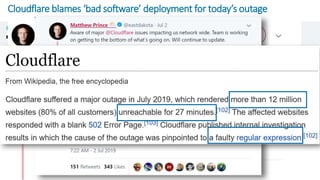
Cloudflare blames ‘bad software’ deployment for today’s outage
About Me
 Alon Fliess:
 Chief Software Architect & Co-Founder at OzCode & CodeValue
 More than 30 years of hands-on experience
 Microsoft Regional Director & Microsoft Azure MVP
 Spend most of my time in project analysis, architecture, design
 Code at night
Agenda
The Art of Debugging
Production Debugging Overview
The Debugger, Symbol Files, Source Server/Link
Remote Debugging
Core Dump
Snappoint & Cloud Debugging
OzCode Production Debugger Platform
The Art of Debugging
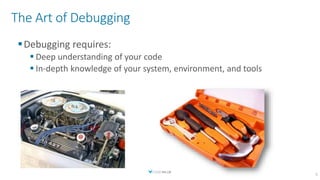
Debugging requires:
 Deep understanding of your code
 In-depth knowledge of your system, environment, and tools
5
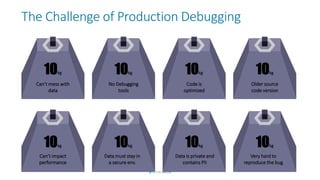
The Challenge of Production Debugging
10kg
Can’t mess with
data
10kg
No Debugging
tools
10kg
Code is
optimized
10kg
Older source
code version
10kg
Can’t impact
performance
10kg
Data must stay in
a secure env.
10kg
Data is private and
contains PII
10kg
Very hard to
reproduce the bug
Be Prepared – As Much As You Can
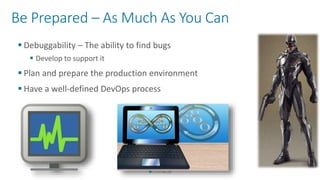
 Debuggability – The ability to find bugs
 Develop to support it
 Plan and prepare the production environment
 Have a well-defined DevOps process
The Uncertainty Principle
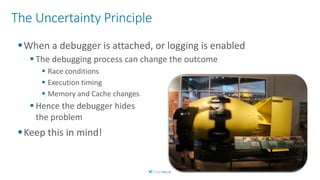
When a debugger is attached, or logging is enabled
 The debugging process can change the outcome
 Race conditions
 Execution timing
 Memory and Cache changes
 Hence the debugger hides
the problem
Keep this in mind!
Techniques & Tools
The Debugger
 Debugger AKA Tracer – A program is debugged using this tool
 Debugee, AKA “The Target” and Tracee – A debugger debugs this
program
 Debuggers are used mostly during the development phase
 The debugger in a production environment
 Run under a debugger – if possible
 Attach to a debugger
 Postmortem debugging
 Open and debug a core dump file
Symbol Files
 Symbols enable source code debugging
 Line numbers, variable names, etc.
 Generate symbols using (C++):
 Linux (gcc): gcc –g
 Windows (VS) : cl /zi
 Generate symbols (C#):
 -debug [+ | -] :{full | pdbonly}
 -pdb: filename
 Dump symbols (native):
 Linux: nm [file] – list symbols from an object file
 Windows: dumpbin /symbols [file]
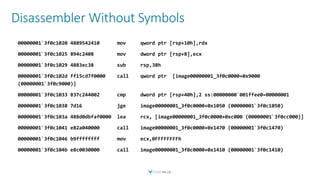
Disassembler Without Symbols
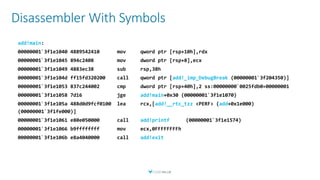
Disassembler With Symbols
add!main
add!_imp_DebugBreak
add!main
add!__rtc_tzz add
add!printf
add!exit
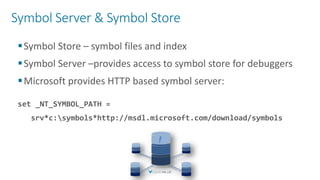
Symbol Server & Symbol Store
Symbol Store – symbol files and index
Symbol Server –provides access to symbol store for debuggers
Microsoft provides HTTP based symbol server:
set _NT_SYMBOL_PATH =
srv*c:symbols*http://msdl.microsoft.com/download/symbols
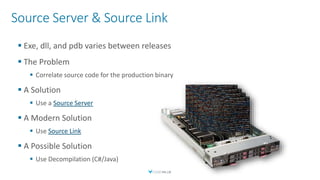
Source Server & Source Link
 Exe, dll, and pdb varies between releases
 The Problem
 Correlate source code for the production binary
 A Solution
 Use a Source Server
 A Modern Solution
 Use Source Link
 A Possible Solution
 Use Decompilation (C#/Java)
Remote Debugging
What if I can’t run the debugger on the target machine?
Both Windows and Linux, enable running a local debugger
agent on the target machine
On Windows:
 For WinDBG: dbgsrv.exe
 For Visual Studio:
 msvsmon.exe (VS: native/manage)
 vsdbg (VSCode: .NET)
On Linux/Mac:
 Dbgserver (native)
 vsdbg (manage)
Remote Debugging on Windows
 WinDBG On the target (Server) machine run:
dbgsrv.exe –t tcp:port=6160
 it needs the dbgeng.dll & dbghlp.dll
 Open the firewall for dbgsrv.exe
 On the host (client) machine run:
WinDbg –premote tcp:server=<machine ip or name>,port = 6160
 Use the Attach to Process to start debugging
 Visual Studio:
 Find msvsmon.exe in the directory matching your version of Visual Studio
 You can also download it
 Share the Remote Debugger folder on the Visual Studio computer
 On the remote computer, run msvsmon.exe
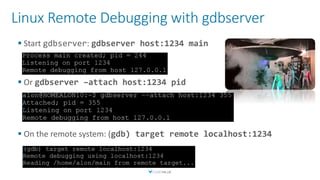
Linux Remote Debugging with gdbserver
 Start gdbserver: gdbserver host:1234 main
 Or gdbserver –attach host:1234 pid
 On the remote system: (gdb) target remote localhost:1234
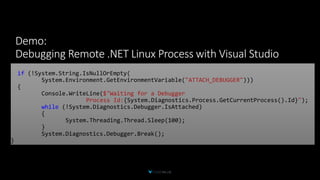
if (!System.String.IsNullOrEmpty(
System.Environment.GetEnvironmentVariable("ATTACH_DEBUGGER")))
{
Console.WriteLine($"Waiting for a Debugger
Process Id:{System.Diagnostics.Process.GetCurrentProcess().Id}");
while (!System.Diagnostics.Debugger.IsAttached)
{
System.Threading.Thread.Sleep(100);
}
System.Diagnostics.Debugger.Break();
}
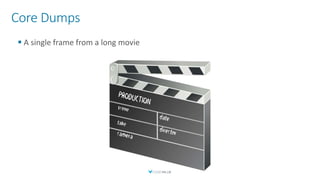
Core Dumps
 A single frame from a long movie
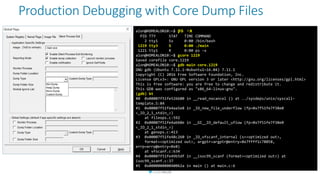
Production Debugging with Core Dump Files
alon@HOMEALON10:~$ ps -x
PID TTY STAT TIME COMMAND
2 tty1 Ss 0:00 /bin/bash
1219 tty3 S 0:00 ./main
1221 tty1 R 0:00 ps -x
alon@HOMEALON10:~$ gcore 1219
Saved corefile core.1219
alon@HOMEALON10:~$ gdb main core.1219
GNU gdb (Ubuntu 7.11.1-0ubuntu1~16.04) 7.11.1
Copyright (C) 2016 Free Software Foundation, Inc.
License GPLv3+: GNU GPL version 3 or later <http://gnu.org/licenses/gpl.html>
This is free software: you are free to change and redistribute it.
This GDB was configured as "x86_64-linux-gnu".
(gdb) bt
#0 0x00007f51fe526680 in __read_nocancel () at ../sysdeps/unix/syscall-
template.S:84
#1 0x00007f51fe4aa5e8 in _IO_new_file_underflow (fp=0x7f51fe7f38e0
<_IO_2_1_stdin_>)
at fileops.c:592
#2 0x00007f51fe4ab60e in __GI__IO_default_uflow (fp=0x7f51fe7f38e0
<_IO_2_1_stdin_>)
at genops.c:413
#3 0x00007f51fe48c260 in _IO_vfscanf_internal (s=<optimized out>,
format=<optimized out>, argptr=argptr@entry=0x7ffff1c78058,
errp=errp@entry=0x0)
at vfscanf.c:634
#4 0x00007f51fe49b5df in __isoc99_scanf (format=<optimized out>) at
isoc99_scanf.c:37
#5 0x000000000040062a in main () at main.c:6
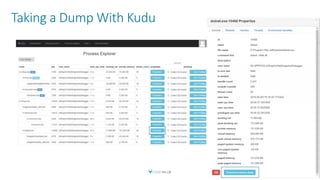
Taking a Dump With Kudu
Cloud Debugging (Huge) Challenges
 A call spans many microservices
 Rapid deployment – more bugs, many source code versions
 Services lifetime may be short
 The hosting environment is complex
 Firewalls, clusters, K8s, Serverless, etc.
 Too many: instances, calls, logs, bugs
 If a bug occurs once in a million calls in a system that has a million requests per second –
it happens every second
 Attaching a debugger is possible, but too dangerous
 Download a dump file is possible, but which dump? How? When?
 What about PII?
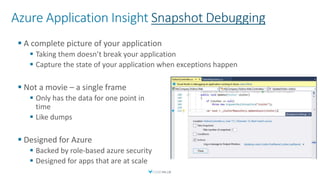
Azure Application Insight Snapshot Debugging
 A complete picture of your application
 Taking them doesn’t break your application
 Capture the state of your application when exceptions happen
 Not a movie – a single frame
 Only has the data for one point in
time
 Like dumps
 Designed for Azure
 Backed by role-based azure security
 Designed for apps that are at scale
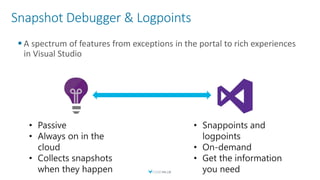
Snapshot Debugger & Logpoints
 A spectrum of features from exceptions in the portal to rich experiences
in Visual Studio
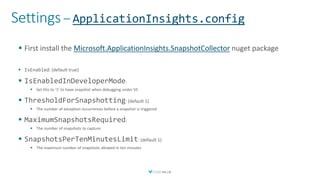
Settings – ApplicationInsights.config
 First install the Microsoft.ApplicationInsights.SnapshotCollector nuget package
 IsEnabled: (default true)
 IsEnabledInDeveloperMode:
 Set this to ‘1’ to have snapshot when debugging under VS
 ThresholdForSnapshotting: (default 1)
 The number of exception occurrences before a snapshot is triggered
 MaximumSnapshotsRequired:
 The number of snapshots to capture
 SnapshotsPerTenMinutesLimit: (default 1)
 The maximum number of snapshots allowed in ten minutes
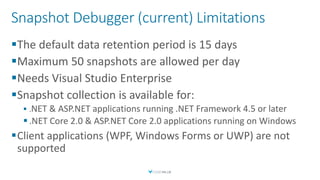
Snapshot Debugger (current) Limitations
The default data retention period is 15 days
Maximum 50 snapshots are allowed per day
Needs Visual Studio Enterprise
Snapshot collection is available for:
 .NET & ASP.NET applications running .NET Framework 4.5 or later
 .NET Core 2.0 & ASP.NET Core 2.0 applications running on Windows
Client applications (WPF, Windows Forms or UWP) are not
supported
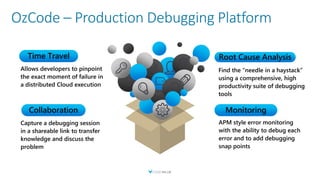
OzCode – Production Debugging Platform
Find the “needle in a haystack”
using a comprehensive, high
productivity suite of debugging
tools
Root Cause Analysis
APM style error monitoring
with the ability to debug each
error and to add debugging
snap points
Allows developers to pinpoint
the exact moment of failure in
a distributed Cloud execution
Capture a debugging session
in a shareable link to transfer
knowledge and discuss the
problem
Collaboration
Time Travel
Monitoring
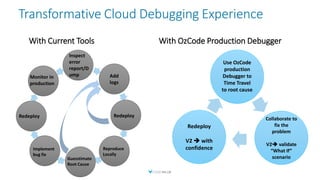
Transformative Cloud Debugging Experience
With Current Tools With OzCode Production Debugger
Add
logs
Reproduce
Locally
Inspect
error
report/D
ump
Guesstimate
Root Cause
Implement
bug fix
Redeploy
Monitor in
production
Redeploy
Use OzCode
production
Debugger to
Time Travel
to root cause
Redeploy
V2  with
confidence
Collaborate to
fix the
problem
V2 validate
“What If”
scenario
OzCode – Production Debugging Platform
In its early stages – the beta starts soon
Debug Cloud, On-Premise, Desktop Apps
App Service, On-Prem IIS, .NET Core, Linux, Windows, Docker &
K8s
C# only (JavaScript and Java support shortly)
V2: loop navigation & Snapshot debugging
V3: Support for live time travel and what-if scenarios
Summary
Production Debugging Overview
The Debugger, Symbol Files
Remote Debugging
Core Dump
Snapshot & Cloud Debugging
OzCode Production Debugger Platform
Join our beta program
Q
A
35
Alon Fliess
Chief Architect
alonf@codevalue.net
@alon_fliess
http://alonfliess.me
http://codevalue.net

C# Production Debugging Made Easy

  • 1.
    Cloud Debugging A RevolutionaryApproach Alon Fliess Chief Architect alonf@codevalue.net @alon_fliess http://alonfliess.me http://codevalue.net
  • 2.
    Cloudflare blames ‘badsoftware’ deployment for today’s outage
  • 3.
    About Me  AlonFliess:  Chief Software Architect & Co-Founder at OzCode & CodeValue  More than 30 years of hands-on experience  Microsoft Regional Director & Microsoft Azure MVP  Spend most of my time in project analysis, architecture, design  Code at night
  • 4.
    Agenda The Art ofDebugging Production Debugging Overview The Debugger, Symbol Files, Source Server/Link Remote Debugging Core Dump Snappoint & Cloud Debugging OzCode Production Debugger Platform
  • 5.
    The Art ofDebugging Debugging requires:  Deep understanding of your code  In-depth knowledge of your system, environment, and tools 5
  • 6.
    The Challenge ofProduction Debugging 10kg Can’t mess with data 10kg No Debugging tools 10kg Code is optimized 10kg Older source code version 10kg Can’t impact performance 10kg Data must stay in a secure env. 10kg Data is private and contains PII 10kg Very hard to reproduce the bug
  • 7.
    Be Prepared –As Much As You Can  Debuggability – The ability to find bugs  Develop to support it  Plan and prepare the production environment  Have a well-defined DevOps process
  • 8.
    The Uncertainty Principle Whena debugger is attached, or logging is enabled  The debugging process can change the outcome  Race conditions  Execution timing  Memory and Cache changes  Hence the debugger hides the problem Keep this in mind!
  • 9.
  • 10.
    The Debugger  DebuggerAKA Tracer – A program is debugged using this tool  Debugee, AKA “The Target” and Tracee – A debugger debugs this program  Debuggers are used mostly during the development phase  The debugger in a production environment  Run under a debugger – if possible  Attach to a debugger  Postmortem debugging  Open and debug a core dump file
  • 11.
    Symbol Files  Symbolsenable source code debugging  Line numbers, variable names, etc.  Generate symbols using (C++):  Linux (gcc): gcc –g  Windows (VS) : cl /zi  Generate symbols (C#):  -debug [+ | -] :{full | pdbonly}  -pdb: filename  Dump symbols (native):  Linux: nm [file] – list symbols from an object file  Windows: dumpbin /symbols [file]
  • 12.
  • 13.
  • 14.
    Symbol Server &Symbol Store Symbol Store – symbol files and index Symbol Server –provides access to symbol store for debuggers Microsoft provides HTTP based symbol server: set _NT_SYMBOL_PATH = srv*c:symbols*http://msdl.microsoft.com/download/symbols
  • 15.
    Source Server &Source Link  Exe, dll, and pdb varies between releases  The Problem  Correlate source code for the production binary  A Solution  Use a Source Server  A Modern Solution  Use Source Link  A Possible Solution  Use Decompilation (C#/Java)
  • 16.
    Remote Debugging What ifI can’t run the debugger on the target machine? Both Windows and Linux, enable running a local debugger agent on the target machine On Windows:  For WinDBG: dbgsrv.exe  For Visual Studio:  msvsmon.exe (VS: native/manage)  vsdbg (VSCode: .NET) On Linux/Mac:  Dbgserver (native)  vsdbg (manage)
  • 17.
    Remote Debugging onWindows  WinDBG On the target (Server) machine run: dbgsrv.exe –t tcp:port=6160  it needs the dbgeng.dll & dbghlp.dll  Open the firewall for dbgsrv.exe  On the host (client) machine run: WinDbg –premote tcp:server=<machine ip or name>,port = 6160  Use the Attach to Process to start debugging  Visual Studio:  Find msvsmon.exe in the directory matching your version of Visual Studio  You can also download it  Share the Remote Debugger folder on the Visual Studio computer  On the remote computer, run msvsmon.exe
  • 18.
    Linux Remote Debuggingwith gdbserver  Start gdbserver: gdbserver host:1234 main  Or gdbserver –attach host:1234 pid  On the remote system: (gdb) target remote localhost:1234
  • 19.
    if (!System.String.IsNullOrEmpty( System.Environment.GetEnvironmentVariable("ATTACH_DEBUGGER"))) { Console.WriteLine($"Waiting fora Debugger Process Id:{System.Diagnostics.Process.GetCurrentProcess().Id}"); while (!System.Diagnostics.Debugger.IsAttached) { System.Threading.Thread.Sleep(100); } System.Diagnostics.Debugger.Break(); }
  • 20.
    Core Dumps  Asingle frame from a long movie
  • 21.
    Production Debugging withCore Dump Files alon@HOMEALON10:~$ ps -x PID TTY STAT TIME COMMAND 2 tty1 Ss 0:00 /bin/bash 1219 tty3 S 0:00 ./main 1221 tty1 R 0:00 ps -x alon@HOMEALON10:~$ gcore 1219 Saved corefile core.1219 alon@HOMEALON10:~$ gdb main core.1219 GNU gdb (Ubuntu 7.11.1-0ubuntu1~16.04) 7.11.1 Copyright (C) 2016 Free Software Foundation, Inc. License GPLv3+: GNU GPL version 3 or later <http://gnu.org/licenses/gpl.html> This is free software: you are free to change and redistribute it. This GDB was configured as "x86_64-linux-gnu". (gdb) bt #0 0x00007f51fe526680 in __read_nocancel () at ../sysdeps/unix/syscall- template.S:84 #1 0x00007f51fe4aa5e8 in _IO_new_file_underflow (fp=0x7f51fe7f38e0 <_IO_2_1_stdin_>) at fileops.c:592 #2 0x00007f51fe4ab60e in __GI__IO_default_uflow (fp=0x7f51fe7f38e0 <_IO_2_1_stdin_>) at genops.c:413 #3 0x00007f51fe48c260 in _IO_vfscanf_internal (s=<optimized out>, format=<optimized out>, argptr=argptr@entry=0x7ffff1c78058, errp=errp@entry=0x0) at vfscanf.c:634 #4 0x00007f51fe49b5df in __isoc99_scanf (format=<optimized out>) at isoc99_scanf.c:37 #5 0x000000000040062a in main () at main.c:6
  • 22.
    Taking a DumpWith Kudu
  • 24.
    Cloud Debugging (Huge)Challenges  A call spans many microservices  Rapid deployment – more bugs, many source code versions  Services lifetime may be short  The hosting environment is complex  Firewalls, clusters, K8s, Serverless, etc.  Too many: instances, calls, logs, bugs  If a bug occurs once in a million calls in a system that has a million requests per second – it happens every second  Attaching a debugger is possible, but too dangerous  Download a dump file is possible, but which dump? How? When?  What about PII?
  • 25.
    Azure Application InsightSnapshot Debugging  A complete picture of your application  Taking them doesn’t break your application  Capture the state of your application when exceptions happen  Not a movie – a single frame  Only has the data for one point in time  Like dumps  Designed for Azure  Backed by role-based azure security  Designed for apps that are at scale
  • 26.
    Snapshot Debugger &Logpoints  A spectrum of features from exceptions in the portal to rich experiences in Visual Studio
  • 27.
    Settings – ApplicationInsights.config First install the Microsoft.ApplicationInsights.SnapshotCollector nuget package  IsEnabled: (default true)  IsEnabledInDeveloperMode:  Set this to ‘1’ to have snapshot when debugging under VS  ThresholdForSnapshotting: (default 1)  The number of exception occurrences before a snapshot is triggered  MaximumSnapshotsRequired:  The number of snapshots to capture  SnapshotsPerTenMinutesLimit: (default 1)  The maximum number of snapshots allowed in ten minutes
  • 28.
    Snapshot Debugger (current)Limitations The default data retention period is 15 days Maximum 50 snapshots are allowed per day Needs Visual Studio Enterprise Snapshot collection is available for:  .NET & ASP.NET applications running .NET Framework 4.5 or later  .NET Core 2.0 & ASP.NET Core 2.0 applications running on Windows Client applications (WPF, Windows Forms or UWP) are not supported
  • 29.
    OzCode – ProductionDebugging Platform Find the “needle in a haystack” using a comprehensive, high productivity suite of debugging tools Root Cause Analysis APM style error monitoring with the ability to debug each error and to add debugging snap points Allows developers to pinpoint the exact moment of failure in a distributed Cloud execution Capture a debugging session in a shareable link to transfer knowledge and discuss the problem Collaboration Time Travel Monitoring
  • 30.
    Transformative Cloud DebuggingExperience With Current Tools With OzCode Production Debugger Add logs Reproduce Locally Inspect error report/D ump Guesstimate Root Cause Implement bug fix Redeploy Monitor in production Redeploy Use OzCode production Debugger to Time Travel to root cause Redeploy V2  with confidence Collaborate to fix the problem V2 validate “What If” scenario
  • 31.
    OzCode – ProductionDebugging Platform In its early stages – the beta starts soon Debug Cloud, On-Premise, Desktop Apps App Service, On-Prem IIS, .NET Core, Linux, Windows, Docker & K8s C# only (JavaScript and Java support shortly) V2: loop navigation & Snapshot debugging V3: Support for live time travel and what-if scenarios
  • 32.
    Summary Production Debugging Overview TheDebugger, Symbol Files Remote Debugging Core Dump Snapshot & Cloud Debugging OzCode Production Debugger Platform
  • 33.
  • 34.
  • 35.

Editor's Notes

  • #8 Debuggability – The ability to find bugs Develop your code to support it: Monitoring – KPIs that inform the health of the system Logging – that can be tuned on/off and filtered by mechanisms and levels Configurable automatic memory dumps and error report on error situations Component decupling and loading Load only part of the system via configuration BITs – built in test that can be executed in the production environment for each component Plan and prepare the production environment Debugging and diagnostics tools that can be installed upfront Pseudo data sources that can be used in the production environment Have a well defined DevOps process Test the code in the staging environment To reduce the code-deployment-test-debug-code loop Have the ability to conduct an AB test in production environment
  • #16 Exe, dll and pdb varies between releases The Problem The latest source files in the source control are newer than the sources that used to build the released software Possible solution Keep the binaries for every release Better Solution Use a Source Server The source server client is implemented in Symsrv.dll The DbgHlp SymGetSourceFile function uses Symsrv to extract a source control command from the symbol file. This command is executed to retrieve the correct version of the source file  For more information: http://msdn.microsoft.com/en-us/library/ms680641(VS.85).aspx C:\Program Files\Debugging Tools for Windows (x64)\srcsrv\srcsrv.doc
  • #22 Core dump aka memory dump or system dump A recorded state of the working memory of a computer program in a specific time Usually of a faulted state – such in a case of a crash The name comes from magnetic core memory To work with dump you need to: Generate the dump – when a faulted state happens Analyze the dump to extract debugging vital information There are various tools that can analyze the dump However, the standard debuggers let you ‘debug’ the dump file On Linux: man core Advanced features such as controlling the dump content and redirect the dump file to a pipe On Windows, there are many tools that control dump generations: Task Manager, Gflags, ProcDump, ADPlus, WinDBG, MiniDumpWriteDump API
  • #25 Our solution becomes a system for producing logs
  • #26 The following environments are supported: Azure App Service. Azure Cloud Service running OS family 4 or later. Azure Service Fabric services running on Windows Server 2012 R2 or later. Azure Virtual Machines running Windows Server 2012 R2 or later. On-premises virtual or physical machines running Windows Server 2012 R2 or later.