For each controller there is an associated directory in the
app/views directory which holds the template files that
make up the views associated with that controller. These
files are used to display the view that results from each
controller action.
The final HTML output is a composition of three Rails
elements: Templates, Partials and Layouts
Templates
 Action View templates can be written in several ways.
If the template file has a .erb extension then it uses a
mixture of ERB (included in Ruby) and HTML. If the
template file has a .builder extension then a fresh
instance of Builder::XmlMarkup library is used.
 http://railscasts.com/episodes/269-template-
inheritance
Partials
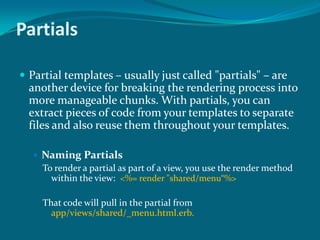
 Partial templates – usually just called "partials" – are
another device for breaking the rendering process into
more manageable chunks. With partials, you can
extract pieces of code from your templates to separate
files and also reuse them throughout your templates.
 Naming Partials
To render a partial as part of a view, you use the render method
within the view: <%= render "shared/menu“%>
That code will pull in the partial from
app/views/shared/_menu.html.erb.
 Passing Variables to Partials
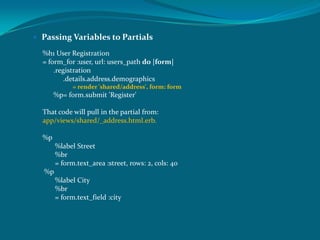
%h1 User Registration
= form_for :user, url: users_path do |form|
.registration
.details.address.demographics
= render 'shared/address', form: form
%p= form.submit 'Register'
That code will pull in the partial from:
app/views/shared/_address.html.erb.
%p
%label Street
%br
= form.text_area :street, rows: 2, cols: 40
%p
%label City
%br
= form.text_field :city
 Rendering an Object
The render method also provides a shorthand syntax to render an object into a
partial, which strictly depends on Rails naming conventions.
<%= render entry %>
The partial corresponding to _entry.html.haml and gets a local variable named
entry. This is equivalent to the following:
<%= render partial: 'entry', object: entry%>
 Rendering Collections
It is very common that a template needs to iterate over a collection and
render a sub-template for each of the elements. This pattern has
been implemented as a single method that accepts an array and
renders a partial for each one of the elements in the array.
So this example for rendering all the products:
<% @products.each do |product| %>
<%= render partial: "product", locals: { product: product } %>
<% end %>
can be rewritten in a single line:
<%= render partial: "product", collection: @products %>
You can use a shorthand syntax for rendering collections. Assuming
@products is a collection of Product instances, you can simply write
the following to produce the same result:
<%= render @products %>
Layout
 Action View decides which layout to render based on the inheritance
hierarchy of controllers being executed.
 Most Rails applications have an application.html.erb file in their layout
directory. It shares its name with the ApplicationController, which is
typically extended by all the other controllers in an application;
therefore it is picked up as the default layout for all views.
 Within a layout, you have access to three tools for combining different
bits of output to form the overall response:
 Asset tags
 yield and content_for
 Partials
 Asset Tag Helpers
Asset tag helpers provide methods for generating HTML that
link views to feeds, JavaScript, stylesheets, images, videos and
audios. There are six asset tag helpers available in Rails:
 javascript_include_tag
 stylesheet_link_tag
 image_tag
 auto_discovery_link_tag
 video_tag
 audio_tag
 Linking to JavaScript Files with the javascript_include_tag
<%= javascript_include_tag "main" %>
Rails will then output a script tag such as this:
<script src='/assets/main.js'></script>
It will looking for file in app/assets/javascripts/main.js
To include app/assets/javascripts/main.js and
app/assets/javascripts/photos/columns.js:
<%= javascript_include_tag "main", "/photos/columns" %>
To include http://example.com/main.js:
<%= javascript_include_tag "http://example.com/main.js" %>
The same thing for include stylesheet_link_tag
 Understanding yield
Within the context of a layout, yield identifies a section where content from the view should be inserted.
The simplest way to use this is to have a single yield, into which the entire contents of the view
currently being rendered is inserted:
<html>
<head>
</head>
<body>
<%= yield %>
</body>
</html>
You can also create a layout with multiple yielding regions:
<html>
<head>
<%= yield :head %>
</head>
<body>
<%= yield %>
</body>
</html>
The main body of the view will always render into the unnamed yield. To render content into a
named yield, you use the content_for method.
 Using the content_for Method
 The content_for method allows you to insert content into a named yield block in your
layout. For example, this view would work with the layout that you just saw:
<% content_for :head do %>
<title>A simple page</title>
<% end %>
<p>Hello, Rails!</p>
The result of rendering this page into the supplied layout would be this HTML:
<html>
<head>
<title>A simple page</title>
</head>
<body>
<p>Hello, Rails!</p>
</body>
</html>
The content_for method is very helpful when your layout contains distinct regions such as
sidebars and footers that should get their own blocks of content inserted. It's also useful
for inserting tags that load page-specific JavaScript or css files into the header of an
otherwise generic layout.
References
 http://guides.rubyonrails.org/layouts_and_rendering.
html
 Rails 4 way.pdf in dcserver

Templates, partials and layouts

  • 1.
    For each controllerthere is an associated directory in the app/views directory which holds the template files that make up the views associated with that controller. These files are used to display the view that results from each controller action. The final HTML output is a composition of three Rails elements: Templates, Partials and Layouts
  • 2.
    Templates  Action Viewtemplates can be written in several ways. If the template file has a .erb extension then it uses a mixture of ERB (included in Ruby) and HTML. If the template file has a .builder extension then a fresh instance of Builder::XmlMarkup library is used.  http://railscasts.com/episodes/269-template- inheritance
  • 3.
    Partials  Partial templates– usually just called "partials" – are another device for breaking the rendering process into more manageable chunks. With partials, you can extract pieces of code from your templates to separate files and also reuse them throughout your templates.  Naming Partials To render a partial as part of a view, you use the render method within the view: <%= render "shared/menu“%> That code will pull in the partial from app/views/shared/_menu.html.erb.
  • 4.
     Passing Variablesto Partials %h1 User Registration = form_for :user, url: users_path do |form| .registration .details.address.demographics = render 'shared/address', form: form %p= form.submit 'Register' That code will pull in the partial from: app/views/shared/_address.html.erb. %p %label Street %br = form.text_area :street, rows: 2, cols: 40 %p %label City %br = form.text_field :city
  • 5.
     Rendering anObject The render method also provides a shorthand syntax to render an object into a partial, which strictly depends on Rails naming conventions. <%= render entry %> The partial corresponding to _entry.html.haml and gets a local variable named entry. This is equivalent to the following: <%= render partial: 'entry', object: entry%>
  • 6.
     Rendering Collections Itis very common that a template needs to iterate over a collection and render a sub-template for each of the elements. This pattern has been implemented as a single method that accepts an array and renders a partial for each one of the elements in the array. So this example for rendering all the products: <% @products.each do |product| %> <%= render partial: "product", locals: { product: product } %> <% end %> can be rewritten in a single line: <%= render partial: "product", collection: @products %> You can use a shorthand syntax for rendering collections. Assuming @products is a collection of Product instances, you can simply write the following to produce the same result: <%= render @products %>
  • 7.
    Layout  Action Viewdecides which layout to render based on the inheritance hierarchy of controllers being executed.  Most Rails applications have an application.html.erb file in their layout directory. It shares its name with the ApplicationController, which is typically extended by all the other controllers in an application; therefore it is picked up as the default layout for all views.  Within a layout, you have access to three tools for combining different bits of output to form the overall response:  Asset tags  yield and content_for  Partials
  • 8.
     Asset TagHelpers Asset tag helpers provide methods for generating HTML that link views to feeds, JavaScript, stylesheets, images, videos and audios. There are six asset tag helpers available in Rails:  javascript_include_tag  stylesheet_link_tag  image_tag  auto_discovery_link_tag  video_tag  audio_tag
  • 9.
     Linking toJavaScript Files with the javascript_include_tag <%= javascript_include_tag "main" %> Rails will then output a script tag such as this: <script src='/assets/main.js'></script> It will looking for file in app/assets/javascripts/main.js To include app/assets/javascripts/main.js and app/assets/javascripts/photos/columns.js: <%= javascript_include_tag "main", "/photos/columns" %> To include http://example.com/main.js: <%= javascript_include_tag "http://example.com/main.js" %> The same thing for include stylesheet_link_tag
  • 10.
     Understanding yield Withinthe context of a layout, yield identifies a section where content from the view should be inserted. The simplest way to use this is to have a single yield, into which the entire contents of the view currently being rendered is inserted: <html> <head> </head> <body> <%= yield %> </body> </html> You can also create a layout with multiple yielding regions: <html> <head> <%= yield :head %> </head> <body> <%= yield %> </body> </html> The main body of the view will always render into the unnamed yield. To render content into a named yield, you use the content_for method.
  • 11.
     Using thecontent_for Method  The content_for method allows you to insert content into a named yield block in your layout. For example, this view would work with the layout that you just saw: <% content_for :head do %> <title>A simple page</title> <% end %> <p>Hello, Rails!</p> The result of rendering this page into the supplied layout would be this HTML: <html> <head> <title>A simple page</title> </head> <body> <p>Hello, Rails!</p> </body> </html> The content_for method is very helpful when your layout contains distinct regions such as sidebars and footers that should get their own blocks of content inserted. It's also useful for inserting tags that load page-specific JavaScript or css files into the header of an otherwise generic layout.
  • 12.