





July
                                      14


WordCamp Columbus
WordPress Template
    Hierarchy

Presented by Al Davis- WPTeach.com
WordCamp Developers Toronto

                                                     WordPress Developers


Who’s
                                                           Toronto
              TELUS
           SMB ‘Portal God’
                                      Al
the bald   Freelance Developer
                                     Davi
                                      s
                                                       WordCamp Toronto


guy?
                                                        Owner-wpteach.com


                                                Toronto WordPress
                           College Professor         Meetup

                                Intro to WordPress


                     Intro to WordPress Theme and Plugin Development
The        What file(s) does WordPress use when it
Question       displays a certain type of page?
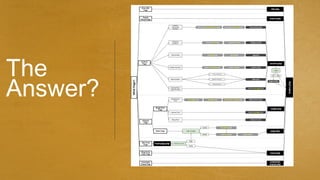
The
Answer?
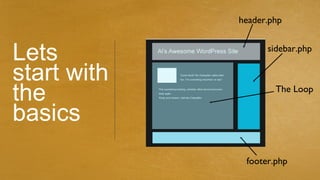
header.php


Lets               sidebar.php


start with
the                  The Loop


basics
              footer.php
A
working       index.php + style.css =

theme     A very basic but functional theme

needs:
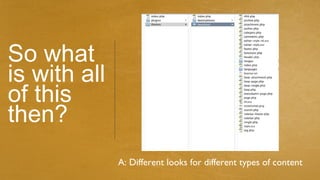
So what
is with all
of this
then?
              A: Different looks for different types of content
Home Page Display Rules   1   home.php


                          2
                          index.php
1
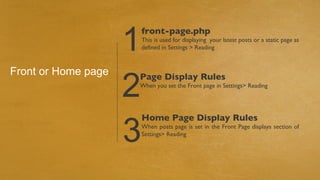
                         front-page.php
                         This is used for displaying your latest posts or a static page as
                         defined in Settings > Reading


                     2
Front or Home page   Page Display Rules
                     When you set the Front page in Settings> Reading


                     3
                         Home Page Display Rules
                         When posts page is set in the Front Page displays section of
                         Settings> Reading
1
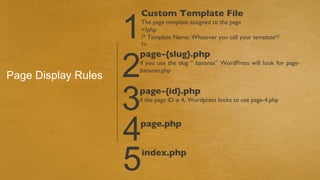
                     Custom Template File
                     The page template assigned to the page
                     <?php
                     /* Template Name: Whatever you call your template*/
                     ?>


                     2
                     page-{slug}.php
                     if you use the slug “ bananas” WordPress will look for page-
                     bananas.php
Page Display Rules

                     3
                     page-{id}.php
                     if the page ID is 4, Wordpress looks to use page-4.php


                     4
                     page.php


                     5   index.php
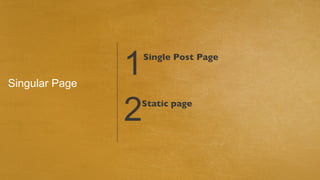
Singular Page
                1   Single Post Page


                2
                Static page
1   Attachment post


Singlular page

  Single post    2
                 Custom Post


                 3
                 Blog post
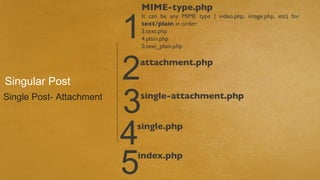
MIME-type.php


                          1
                              It can be any MIME type ( video.php, image.php, etc) for
                              text/plain in order:
                              3.text.php
                              4.plain.php
                              5.text_plain.php


Singular Post             2
                          attachment.php


Single Post- Attachment
                          3
                          single-attachment.php


                          4
                          single.php


                          5
                          index.php
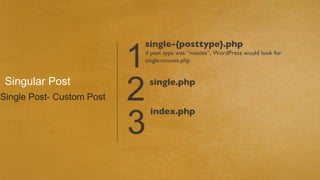
1
                           single-{posttype}.php
                           if post type was “movies”, WordPress would look for
                           single-movies.php


 Singular Post
Single Post- Custom Post   2   single.php


                           3
                               index.php
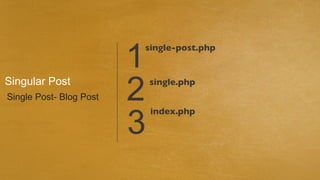
1
                         single-post.php


Singular Post
Single Post- Blog Post   2   single.php


                         3
                             index.php
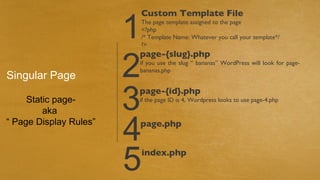
1
                        Custom Template File
                        The page template assigned to the page
                        <?php
                        /* Template Name: Whatever you call your template*/
                        ?>


                        2
                        page-{slug}.php
                        if you use the slug “ bananas” WordPress will look for page-
                        bananas.php
Singular Page

     Static page-
         aka            3
                        page-{id}.php
                        if the page ID is 4, Wordpress looks to use page-4.php


“ Page Display Rules”
                        4
                        page.php


                        5   index.php
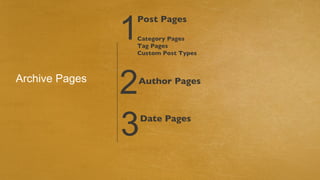
1
                Post Pages

                Category Pages
                Tag Pages
                Custom Post Types


Archive Pages
                2   Author Pages


                3   Date Pages
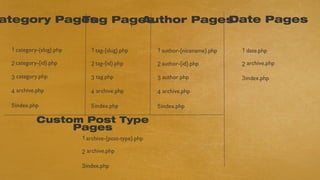
ategory Pages Pages
           Tag  1
                             Date Pages
                  Author Pages

 1 category-{slug}.php      1 tag-{slug}.php         1 author-{nicename}.php   1 date.php

 2 category-{id}.php        2 tag-{id}.php           2 author-{id}.php         2 archive.php

 3 category.php             3 tag.php                3 author.php              3 index.php

 4 archive.php              4 archive.php            4 archive.php

 5 index.php                5 index.php              5 index.php

           Custom Post Type
                Pages
                         1 archive-{post-type}.php

                         2 archive.php

                         3 index.php
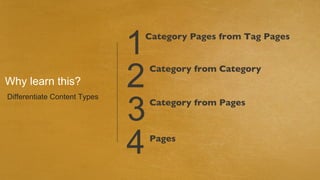
1
                              Category Pages from Tag Pages


Why learn this?               2   Category from Category


                              3
Differentiate Content Types
                                  Category from Pages


                              4   Pages
Questions?
THANKS
                   Contact
             Email- al@wpteach.com

              Twitter- @adavis3105


 FOR YOUR
 ATTENTION

Template hierarchy -WordCamp Columbus

  • 1.
    July 14 WordCamp Columbus WordPress Template Hierarchy Presented by Al Davis- WPTeach.com
  • 2.
    WordCamp Developers Toronto WordPress Developers Who’s Toronto TELUS SMB ‘Portal God’ Al the bald Freelance Developer Davi s WordCamp Toronto guy? Owner-wpteach.com Toronto WordPress College Professor Meetup Intro to WordPress Intro to WordPress Theme and Plugin Development
  • 3.
    The What file(s) does WordPress use when it Question displays a certain type of page?
  • 4.
  • 5.
    header.php Lets sidebar.php start with the The Loop basics footer.php
  • 6.
    A working index.php + style.css = theme A very basic but functional theme needs:
  • 7.
    So what is withall of this then? A: Different looks for different types of content
  • 8.
    Home Page DisplayRules 1 home.php 2 index.php
  • 9.
    1 front-page.php This is used for displaying your latest posts or a static page as defined in Settings > Reading 2 Front or Home page Page Display Rules When you set the Front page in Settings> Reading 3 Home Page Display Rules When posts page is set in the Front Page displays section of Settings> Reading
  • 10.
    1 Custom Template File The page template assigned to the page <?php /* Template Name: Whatever you call your template*/ ?> 2 page-{slug}.php if you use the slug “ bananas” WordPress will look for page- bananas.php Page Display Rules 3 page-{id}.php if the page ID is 4, Wordpress looks to use page-4.php 4 page.php 5 index.php
  • 11.
    Singular Page 1 Single Post Page 2 Static page
  • 12.
    1 Attachment post Singlular page Single post 2 Custom Post 3 Blog post
  • 13.
    MIME-type.php 1 It can be any MIME type ( video.php, image.php, etc) for text/plain in order: 3.text.php 4.plain.php 5.text_plain.php Singular Post 2 attachment.php Single Post- Attachment 3 single-attachment.php 4 single.php 5 index.php
  • 14.
    1 single-{posttype}.php if post type was “movies”, WordPress would look for single-movies.php Singular Post Single Post- Custom Post 2 single.php 3 index.php
  • 15.
    1 single-post.php Singular Post Single Post- Blog Post 2 single.php 3 index.php
  • 16.
    1 Custom Template File The page template assigned to the page <?php /* Template Name: Whatever you call your template*/ ?> 2 page-{slug}.php if you use the slug “ bananas” WordPress will look for page- bananas.php Singular Page Static page- aka 3 page-{id}.php if the page ID is 4, Wordpress looks to use page-4.php “ Page Display Rules” 4 page.php 5 index.php
  • 17.
    1 Post Pages Category Pages Tag Pages Custom Post Types Archive Pages 2 Author Pages 3 Date Pages
  • 18.
    ategory Pages Pages Tag 1 Date Pages Author Pages 1 category-{slug}.php 1 tag-{slug}.php 1 author-{nicename}.php 1 date.php 2 category-{id}.php 2 tag-{id}.php 2 author-{id}.php 2 archive.php 3 category.php 3 tag.php 3 author.php 3 index.php 4 archive.php 4 archive.php 4 archive.php 5 index.php 5 index.php 5 index.php Custom Post Type Pages 1 archive-{post-type}.php 2 archive.php 3 index.php
  • 19.
    1 Category Pages from Tag Pages Why learn this? 2 Category from Category 3 Differentiate Content Types Category from Pages 4 Pages
  • 20.
  • 21.
    THANKS Contact Email- al@wpteach.com Twitter- @adavis3105 FOR YOUR ATTENTION