$.template
Why use a template?

• Render data as markup

• Separation of display logic from
  business logic

• Reusable markup (in theory)

• Maybe it’s cleaner?

• It’s definitely faster than...
The Other Options

• String Concatenation

• Array.join

• DOM Manipulation

• jQuery.append
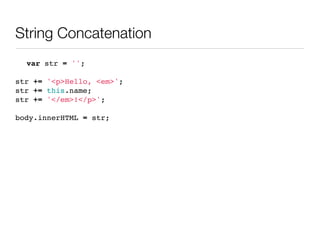
String Concatenation
  var str = '';

str += '<p>Hello, <em>';
str += this.name;
str += '</em>!</p>';

body.innerHTML = str;
Array.join
 var arr = [];

 arr.push('<p>Hello, <em>');
 arr.push(this.name);
 arr.push('</em>!</p>');

 body.innerHTML = arr.join('');
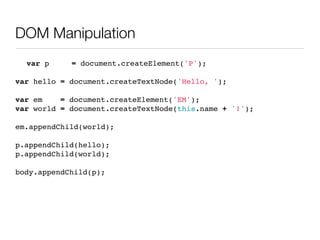
DOM Manipulation
  var p     = document.createElement('P');

var hello = document.createTextNode('Hello, ');

var em    = document.createElement('EM');
var world = document.createTextNode(this.name + '!');

em.appendChild(world);

p.appendChild(hello);
p.appendChild(world);

body.appendChild(p);
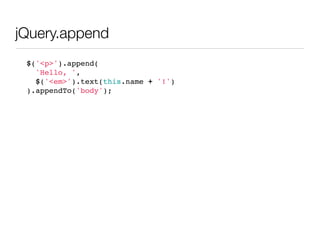
jQuery.append
 $('<p>').append(
   'Hello, ',
   $('<em>').text(this.name + '!')
 ).appendTo('body');
JavaScript Templating
Libraries

• mustache.js

• HandlebarJS

• TrimPath JST

• Resig Micro-Templating

• jQuery.template
$.template

• jQuery plugin

• Modified Resig Micro-
  Templating

• Allows inline JavaScript

• Caching

• Ajax

• Faster
$.template Basics

• Converts a string into a function

• Caches the rendered function

• Function renders data as DOM/
  HTML
Writing a template
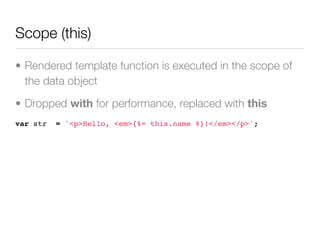
Scope (this)

• Rendered template function is executed in the scope of
  the data object

• Dropped with for performance, replaced with this
var str   = '<p>Hello, <em>{%= this.name %}!</em></p>';
Two Types of Tags

• Output tags pass their values to
  the returned output

• Functional tags execute
  arbitrary JavaScript, but do not
  output any value
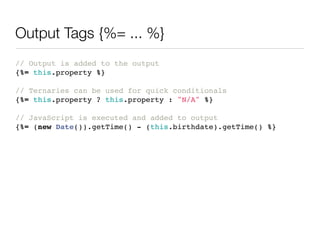
Output Tags {%= ... %}
// Output is added to the output
{%= this.property %}

// Ternaries can be used for quick conditionals
{%= this.property ? this.property : "N/A" %}

// JavaScript is executed and added to output
{%= (new Date()).getTime() - (this.birthdate).getTime() %}
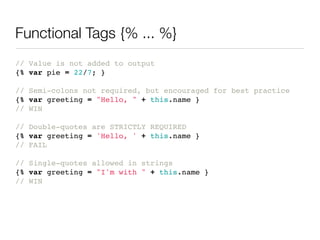
Functional Tags {% ... %}
// Value is not added to output
{% var pie = 22/7; }

// Semi-colons not required, but encouraged for best practice
{% var greeting = "Hello, " + this.name }
// WIN

// Double-quotes are STRICTLY REQUIRED
{% var greeting = 'Hello, ' + this.name }
// FAIL

// Single-quotes allowed in strings
{% var greeting = "I'm with " + this.name }
// WIN
Looping an Array
{% for (var i = 0, n = this.images.length; i < n; ++i) { %}
  {% var img = this.images[i]; }
  <img src="{%= img.src %}" alt="{%= img.description %}">
{% } %}
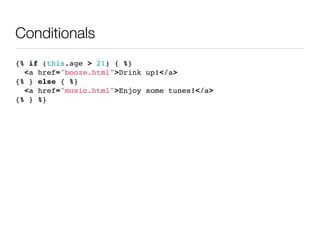
Conditionals
{% if (this.age > 21) { %}
  <a href="booze.html">Drink up!</a>
{% } else { %}
  <a href="music.html">Enjoy some tunes!</a>
{% } %}
Subtemplates
<h1>{%= this.name %}</h1>

{% function renderJob (job) { %}
  {% var verb = (job.end === "present") ? "work" : "worked"; %}

 I {%= verb %} at <strong>{%= job.company %}</strong> as a
 <em>{%= job.position %}</em>

{% } %}

<ul>
  {% for (var i = 0, n = this.jobs.length; i < n; ++i) { %}
     <li>{% renderJob(this.jobs[i]) %}</li>
  {% } %}
</ul>
Subtemplates
<h1>{%= this.name %}</h1>

{% function renderJob (job) { %}
  {% var verb = (job.end === "present") ? "work" : "worked"; %}

 I {%= verb %} at <strong>{%= job.company %}</strong> as a
 <em>{%= job.position %}</em> {% renderDate(job.start, job.end) %}

  {% function renderDate (start, end) { %}
    from {%= start %} {%= end === "present" ? "" : "to " + end %}.
  {% } %}
{% } %}

<ul>
  {% for (var i = 0, n = this.jobs.length; i < n; ++i) { %}
     <li>{% renderJob(this.jobs[i]) %}</li>
  {% } %}
</ul>
template + data = output
Template Input

• string

  • var

  • $.ajax (asynchronous)

• DOM (via $.fn.template)

• Ajax (synchronous)
Template Input (string)
var str   = '<p>Hello, <em>{%= this.name %}!</em></p>';

var data = { name: 'world' };

var func = $.template(str);
// anonymous()

var elem = $.template(str, data);
// [jquery:template]

var html = $.template(str, data, true);
// <p>Hello, <em>world!</em></p>
Template Input (DOM)
<script id="tpl" type="text/html">
Hello, {%= this.name %}!
</script>

var data = { name: 'world' };

var func = $('#tpl').template();
// anonymous()

var elem = $('#tpl').template(data);
// [jquery:template]

var html = $('#tpl').template(data, true);
// <p>Hello, <em>world!</em></p>
Template Input (Ajax)
var url   = 'hello.tpl';

var data = { name: 'world' };

var func = $.template(url);
// anonymous()

var elem = $.template(url, data);
// [jquery:template]

var html = $.template(url, data, true);
// <p>Hello, <em>world!</em></p>
Data Input

• Object

• Array (of objects)
Data Input (Object)
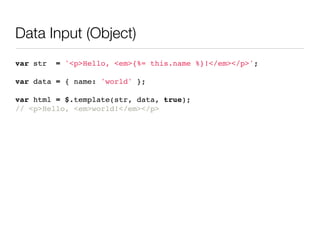
var str   = '<p>Hello, <em>{%= this.name %}!</em></p>';

var data = { name: 'world' };

var html = $.template(str, data, true);
// <p>Hello, <em>world!</em></p>
Data Input (Array of objects)
var str     = '<p>Hello, <em>{%= this.name %}!</em></p>';

var    data = [
   {   name: 'world' },
   {   name: 'Dolly' },
   {   name: 'mom' }
];

var html = $.template(str, data, true);
// <p>Hello, <em>world!</em></p>
// <p>Hello, <em>Dolly!</em></p>
// <p>Hello, <em>mom!</em></p>
Output

• function

• DOM (as a jQuery instance)

• HTML (as a string)
Output (function)
// This template...
var str = '<p>Hello, <em>{%= this.name %}</em>!</p>';
var func = $.template(str);

// becomes...
function anonymous() {
  var __ = [];
  __.push("<p>Hello, <em>", this.name, "!</em></p>");
  return __.join("");
}

// which can be used as...
var elem = func(data);

// or...
var html = func(data, true);
Output (function)
<p>Hello, <em>
{% if (this.name) { %}
 {%= this.name %}
{% } else { %}
  stranger
{% } %}
!</em></p>

function anonymous() {
  var __ = [];
  __.push("<p>Hello, <em>");
  if (this.name) {
    __.push("", this.name, "");
  } else {
    __.push("stranger");
  }
  __.push("!</em></p>");
  return __.join("");
}
Output (DOM)

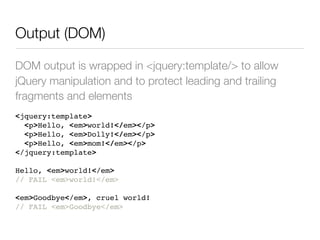
DOM output is wrapped in <jquery:template/> to allow
jQuery manipulation and to protect leading and trailing
fragments and elements
<jquery:template>
  <p>Hello, <em>world!</em></p>
  <p>Hello, <em>Dolly!</em></p>
  <p>Hello, <em>mom!</em></p>
</jquery:template>

Hello, <em>world!</em>
// FAIL <em>world!</em>

<em>Goodbye</em>, cruel world!
// FAIL <em>Goodbye</em>
Output (DOM)

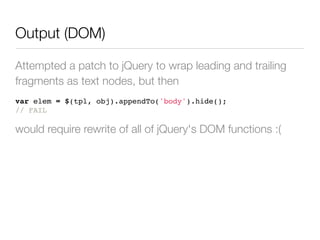
Attempted a patch to jQuery to wrap leading and trailing
fragments as text nodes, but then
var elem = $(tpl, obj).appendTo('body').hide();
// FAIL

would require rewrite of all of jQuery's DOM functions :(
Output (DOM)

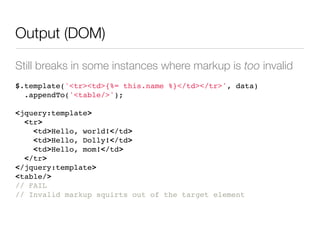
Still breaks in some instances where markup is too invalid
$.template('<tr><td>{%= this.name %}</td></tr>', data)
  .appendTo('<table/>');

<jquery:template>
  <tr>
    <td>Hello, world!</td>
    <td>Hello, Dolly!</td>
    <td>Hello, mom!</td>
  </tr>
</jquery:template>
<table/>
// FAIL
// Invalid markup squirts out of the target element
Output (HTML)

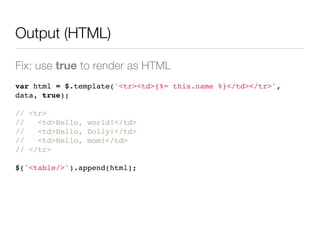
Fix: use true to render as HTML
var html = $.template('<tr><td>{%= this.name %}</td></tr>',
data, true);

// <tr>
//   <td>Hello, world!</td>
//   <td>Hello, Dolly!</td>
//   <td>Hello, mom!</td>
// </tr>

$('<table/>').append(html);
Known Issues

• Does not properly extract DOM
  text in IE (fix on the way)

• Breaks in some cases where
  markup is invalid
Thanks!

• http://github.com/furf/jquery-template

$.Template

  • 1.
  • 2.
    Why use atemplate? • Render data as markup • Separation of display logic from business logic • Reusable markup (in theory) • Maybe it’s cleaner? • It’s definitely faster than...
  • 3.
    The Other Options •String Concatenation • Array.join • DOM Manipulation • jQuery.append
  • 4.
    String Concatenation var str = ''; str += '<p>Hello, <em>'; str += this.name; str += '</em>!</p>'; body.innerHTML = str;
  • 5.
    Array.join var arr= []; arr.push('<p>Hello, <em>'); arr.push(this.name); arr.push('</em>!</p>'); body.innerHTML = arr.join('');
  • 6.
    DOM Manipulation var p = document.createElement('P'); var hello = document.createTextNode('Hello, '); var em = document.createElement('EM'); var world = document.createTextNode(this.name + '!'); em.appendChild(world); p.appendChild(hello); p.appendChild(world); body.appendChild(p);
  • 7.
    jQuery.append $('<p>').append( 'Hello, ', $('<em>').text(this.name + '!') ).appendTo('body');
  • 8.
    JavaScript Templating Libraries • mustache.js •HandlebarJS • TrimPath JST • Resig Micro-Templating • jQuery.template
  • 9.
    $.template • jQuery plugin •Modified Resig Micro- Templating • Allows inline JavaScript • Caching • Ajax • Faster
  • 10.
    $.template Basics • Convertsa string into a function • Caches the rendered function • Function renders data as DOM/ HTML
  • 11.
  • 12.
    Scope (this) • Renderedtemplate function is executed in the scope of the data object • Dropped with for performance, replaced with this var str = '<p>Hello, <em>{%= this.name %}!</em></p>';
  • 13.
    Two Types ofTags • Output tags pass their values to the returned output • Functional tags execute arbitrary JavaScript, but do not output any value
  • 14.
    Output Tags {%=... %} // Output is added to the output {%= this.property %} // Ternaries can be used for quick conditionals {%= this.property ? this.property : "N/A" %} // JavaScript is executed and added to output {%= (new Date()).getTime() - (this.birthdate).getTime() %}
  • 15.
    Functional Tags {%... %} // Value is not added to output {% var pie = 22/7; } // Semi-colons not required, but encouraged for best practice {% var greeting = "Hello, " + this.name } // WIN // Double-quotes are STRICTLY REQUIRED {% var greeting = 'Hello, ' + this.name } // FAIL // Single-quotes allowed in strings {% var greeting = "I'm with " + this.name } // WIN
  • 16.
    Looping an Array {%for (var i = 0, n = this.images.length; i < n; ++i) { %} {% var img = this.images[i]; } <img src="{%= img.src %}" alt="{%= img.description %}"> {% } %}
  • 17.
    Conditionals {% if (this.age> 21) { %} <a href="booze.html">Drink up!</a> {% } else { %} <a href="music.html">Enjoy some tunes!</a> {% } %}
  • 18.
    Subtemplates <h1>{%= this.name %}</h1> {%function renderJob (job) { %} {% var verb = (job.end === "present") ? "work" : "worked"; %} I {%= verb %} at <strong>{%= job.company %}</strong> as a <em>{%= job.position %}</em> {% } %} <ul> {% for (var i = 0, n = this.jobs.length; i < n; ++i) { %} <li>{% renderJob(this.jobs[i]) %}</li> {% } %} </ul>
  • 19.
    Subtemplates <h1>{%= this.name %}</h1> {%function renderJob (job) { %} {% var verb = (job.end === "present") ? "work" : "worked"; %} I {%= verb %} at <strong>{%= job.company %}</strong> as a <em>{%= job.position %}</em> {% renderDate(job.start, job.end) %} {% function renderDate (start, end) { %} from {%= start %} {%= end === "present" ? "" : "to " + end %}. {% } %} {% } %} <ul> {% for (var i = 0, n = this.jobs.length; i < n; ++i) { %} <li>{% renderJob(this.jobs[i]) %}</li> {% } %} </ul>
  • 20.
  • 21.
    Template Input • string • var • $.ajax (asynchronous) • DOM (via $.fn.template) • Ajax (synchronous)
  • 22.
    Template Input (string) varstr = '<p>Hello, <em>{%= this.name %}!</em></p>'; var data = { name: 'world' }; var func = $.template(str); // anonymous() var elem = $.template(str, data); // [jquery:template] var html = $.template(str, data, true); // <p>Hello, <em>world!</em></p>
  • 23.
    Template Input (DOM) <scriptid="tpl" type="text/html"> Hello, {%= this.name %}! </script> var data = { name: 'world' }; var func = $('#tpl').template(); // anonymous() var elem = $('#tpl').template(data); // [jquery:template] var html = $('#tpl').template(data, true); // <p>Hello, <em>world!</em></p>
  • 24.
    Template Input (Ajax) varurl = 'hello.tpl'; var data = { name: 'world' }; var func = $.template(url); // anonymous() var elem = $.template(url, data); // [jquery:template] var html = $.template(url, data, true); // <p>Hello, <em>world!</em></p>
  • 25.
    Data Input • Object •Array (of objects)
  • 26.
    Data Input (Object) varstr = '<p>Hello, <em>{%= this.name %}!</em></p>'; var data = { name: 'world' }; var html = $.template(str, data, true); // <p>Hello, <em>world!</em></p>
  • 27.
    Data Input (Arrayof objects) var str = '<p>Hello, <em>{%= this.name %}!</em></p>'; var data = [ { name: 'world' }, { name: 'Dolly' }, { name: 'mom' } ]; var html = $.template(str, data, true); // <p>Hello, <em>world!</em></p> // <p>Hello, <em>Dolly!</em></p> // <p>Hello, <em>mom!</em></p>
  • 28.
    Output • function • DOM(as a jQuery instance) • HTML (as a string)
  • 29.
    Output (function) // Thistemplate... var str = '<p>Hello, <em>{%= this.name %}</em>!</p>'; var func = $.template(str); // becomes... function anonymous() { var __ = []; __.push("<p>Hello, <em>", this.name, "!</em></p>"); return __.join(""); } // which can be used as... var elem = func(data); // or... var html = func(data, true);
  • 30.
    Output (function) <p>Hello, <em> {%if (this.name) { %} {%= this.name %} {% } else { %} stranger {% } %} !</em></p> function anonymous() { var __ = []; __.push("<p>Hello, <em>"); if (this.name) { __.push("", this.name, ""); } else { __.push("stranger"); } __.push("!</em></p>"); return __.join(""); }
  • 31.
    Output (DOM) DOM outputis wrapped in <jquery:template/> to allow jQuery manipulation and to protect leading and trailing fragments and elements <jquery:template> <p>Hello, <em>world!</em></p> <p>Hello, <em>Dolly!</em></p> <p>Hello, <em>mom!</em></p> </jquery:template> Hello, <em>world!</em> // FAIL <em>world!</em> <em>Goodbye</em>, cruel world! // FAIL <em>Goodbye</em>
  • 32.
    Output (DOM) Attempted apatch to jQuery to wrap leading and trailing fragments as text nodes, but then var elem = $(tpl, obj).appendTo('body').hide(); // FAIL would require rewrite of all of jQuery's DOM functions :(
  • 33.
    Output (DOM) Still breaksin some instances where markup is too invalid $.template('<tr><td>{%= this.name %}</td></tr>', data) .appendTo('<table/>'); <jquery:template> <tr> <td>Hello, world!</td> <td>Hello, Dolly!</td> <td>Hello, mom!</td> </tr> </jquery:template> <table/> // FAIL // Invalid markup squirts out of the target element
  • 34.
    Output (HTML) Fix: usetrue to render as HTML var html = $.template('<tr><td>{%= this.name %}</td></tr>', data, true); // <tr> // <td>Hello, world!</td> // <td>Hello, Dolly!</td> // <td>Hello, mom!</td> // </tr> $('<table/>').append(html);
  • 35.
    Known Issues • Doesnot properly extract DOM text in IE (fix on the way) • Breaks in some cases where markup is invalid
  • 36.