UNTANGLING THE WEB Class 7: Making pages
look pretty
AGENDA
--Project 1 presentations
--Some javascript issues coming up in the homeworks
 jsfiddle tips and tricks
 more js stuff
--CSS
--flexbox
--Bootstrap and ui-kit
--Project 2 intro
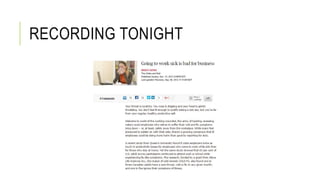
RECORDING TONIGHT
PRESENTATIONS
You have a handout for each group
Each group gets 10 minutes max for presentation and questions
Don’t worry if you don’t take all 10 minutes, if you can get across
why your business idea is so compelling in two minutes then you’re
way ahead of the game!
Make sure to leave a little bit of question time
Fill in feedback form for each group
ISSUES IN THE HOMEWORK
This is the first homework where answers aren’t just out there all in
one place
Need to learn how to find answers. Most of software development is
about finding answers, either from primary or secondary sources.
Only a small amount is thinking up algorithms on your own.
 Using JSFiddle.net
 HTML and JS on the page together
 Variables into the HTML
 Objects vs arrays
 Adding strings
 Revisiting loops and variables
 Finding answers from stackoverflow
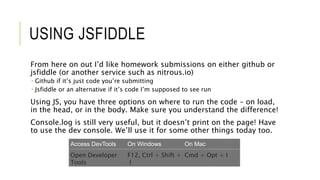
USING JSFIDDLE
From here on out I’d like homework submissions on either github or
jsfiddle (or another service such as nitrous.io)
 Github if it’s just code you’re submitting
 Jsfiddle or an alternative if it’s code I’m supposed to see run
Using JS, you have three options on where to run the code – on load,
in the head, or in the body. Make sure you understand the difference!
Console.log is still very useful, but it doesn’t print on the page! Have
to use the dev console. We’ll use it for some other things today too.
Access DevTools On Windows On Mac
Open Developer
Tools
F12, Ctrl + Shift +
I
Cmd + Opt + I
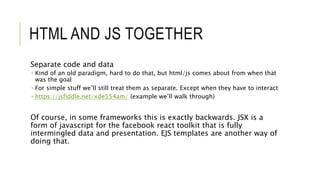
HTML AND JS TOGETHER
Separate code and data
 Kind of an old paradigm, hard to do that, but html/js comes about from when that
was the goal
 For simple stuff we’ll still treat them as separate. Except when they have to interact
 https://jsfiddle.net/xde554am/ (example we’ll walk through)
Of course, in some frameworks this is exactly backwards. JSX is a
form of javascript for the facebook react toolkit that is fully
intermingled data and presentation. EJS templates are another way of
doing that.
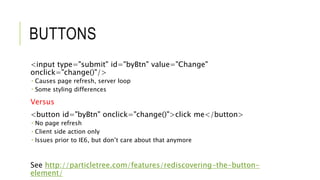
BUTTONS
<input type="submit" id="byBtn" value="Change"
onclick="change()"/>
 Causes page refresh, server loop
 Some styling differences
Versus
<button id="byBtn" onclick="change()">click me</button>
 No page refresh
 Client side action only
 Issues prior to IE6, but don’t care about that anymore
See http://particletree.com/features/rediscovering-the-button-
element/
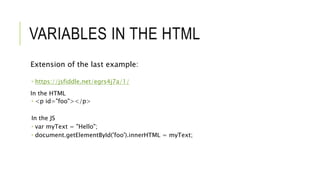
VARIABLES IN THE HTML
Extension of the last example:
 https://jsfiddle.net/egrs4j7a/1/
In the HTML
 <p id="foo"></p>
In the JS
 var myText = "Hello";
 document.getElementById('foo').innerHTML = myText;
OBJECTS VERSUS ARRAYS
Arrays are actually special cases of objects. All built-in variable types are,
really.
But you use them in different contexts
Arrays - var myArray = [];
 Multidimensional (potentially)
 Ordered
 Native methods like push, pop
Objects - var myObject = {};
 Unordered
 Best for key:value pairs
More info: https://msdn.microsoft.com/en-
us/library/89t1khd2%28v=vs.94%29.aspx?f=255&MSPPError=-2147217396
var a = [1, 2, 3];
var o = {a: 1, b: 2, c: 3};
a[0] = 1; a[1]=2; etc.
o[“a”] = 1
o.a = 1;
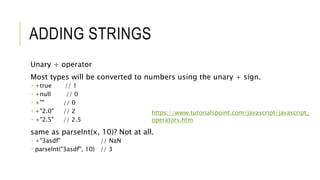
ADDING STRINGS
Unary + operator
Most types will be converted to numbers using the unary + sign.
 +true // 1
 +null // 0
 +"" // 0
 +"2.0" // 2
 +"2.5" // 2.5
same as parseInt(x, 10)? Not at all.
 +"3asdf" // NaN
 parseInt("3asdf", 10) // 3
https://www.tutorialspoint.com/javascript/javascript_
operators.htm
LOOPS AND VARIABLES
var toppingsOrder = ["cheese","pepperoni"];
var prices = {
cheese: "1.20",
avocado: "1.99",
pepperoni: "1.50"
}
var total = 0;
var i;
for (i=0; i<toppingsOrder.length; i++) {
total = (+total) + (+prices[toppingsOrder[i]]);
}
alert(total);
PARSING A COMMA SEPARATED
LIST
var myString = "test,test1,test2";
var arr = myString.split(',');
console.log(arr);
["test", "test1", "test2"]
More details: http://stackoverflow.com/questions/2858121/convert-
comma-separated-string-to-array
CSS INTRO – CASCADING STYLE
SHEETS
CSS is just styling on top of HTML
Everything should generally run the same without it, it will just look
ugly
In my example site a few weeks ago, I was using LESS. LESS and SASS
(among others) are CSS variants that compile down to CSS files but
use variables and some program control to make expressions easier
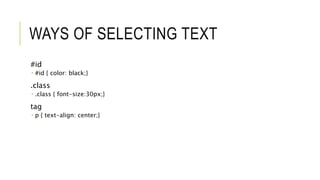
WAYS OF SELECTING TEXT
#id
 #id { color: black;}
.class
 .class { font-size:30px;}
tag
 p { text-align: center;}
CASCADING
HTML tags get superseded by classes and specific id’s
Classes get superseded by specific id’s
Specific id’s win
Unless something is marked important!
CSS EXERCISES
https://jsfiddle.net/sw465f3a/
Make “I’m a paragraph” green and 40px high
Make “another paragraph” blue
Make “more text” and the button red
EXERCISE ANSWERS
https://jsfiddle.net/sw465f3a/1/
Can you make all the paragraph tags blue without changing the class
or id specifiers?
https://jsfiddle.net/sw465f3a/2/
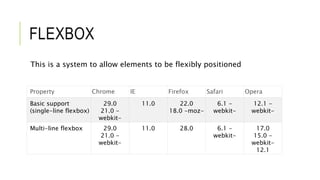
FLEXBOX
This is a system to allow elements to be flexibly positioned
Property Chrome IE Firefox Safari Opera
Basic support
(single-line flexbox)
29.0
21.0 -
webkit-
11.0 22.0
18.0 -moz-
6.1 -
webkit-
12.1 -
webkit-
Multi-line flexbox 29.0
21.0 -
webkit-
11.0 28.0 6.1 -
webkit-
17.0
15.0 -
webkit-
12.1
FLEXBOX FROGGY
Let’s take 10 or 15 minutes to do some examples
http://flexboxfroggy.com/
BOOTSTRAP
Developed by twitter, it has become a common library of CSS
definitions
Reference: http://www.w3schools.com/bootstrap/
Example: https://jsfiddle.net/oazgbqay/
Note external resources!
BOOTSTRAP EXERCISES
https://jsfiddle.net/j7g07w5e/
Create a table with three types of pizza and prices
Make one of the table rows red to indicate it is sold out, using
bootstrap styling
Reference:
http://www.w3schools.com/bootstrap/bootstrap_tables.asp
UI-KIT
And alternative UI language to bootstrap – this is what was used on
my 3data.ca example
Reference: https://getuikit.com/docs/documentation_get-
started.html
Example: https://jsfiddle.net/k0xp1jzy/
JQUERY
Side note on jquery in the last example!
Powerful library. Needs a more full explanation. Many sites these days
attempt to be “pure” in terms of not using jquery, in an attempt to
reduce file size and load times
Feel free to understand and use it if it helps, though!
HOMEWORK 6
Put a ui-kit front end on an expanded pizza ordering site. This front
end should use icons and resources to style the site. (bootstrap and
flexbox are alternative options if you prefer, particularly if that is
what you decide to base your project 2 on)
In addition to last week, the site should contain:
--A list of ingredients, as before, but with a picture and description
of each ingredient that only appears when it is hovered over (perhaps
in a box to the side or something)
--a confirmation dialog that presents the ingredients and the prices
in a nicely formatted receipt
This should be submitted running as a jsfiddle link
PROJECT 2
This is the front-end project
Goal is to make your site reflect the goals of the business – this might
be a sales site, a good landing page.
Ideally you should make it something that has a backend component
 Maybe it takes orders
 Or queries a database
 Or uses speech recognition or advanced interactions
 Think a bit ahead to the project 3 in any case
This project is actually due on the last day of class, coincident with
project 3, but I would like a mockup by Nov 9th. (this can be on paper
or in an image file)
PROJECT 2 TECHNOLOGIES
Ultimately it is up to you, but I would suggest using a framework such
as bootstrap or ui-kit rather than styling directly
You will also need to make hosting decisions. We will talk about this
next class.
Not all of your front-end UI needs to work! If this is a UI prototype
that shows look and feel then that is sufficient, but enough has to
work to get a feel for it
The back-end project decisions will greatly influence which pieces

Untangling7

  • 1.
    UNTANGLING THE WEBClass 7: Making pages look pretty
  • 2.
    AGENDA --Project 1 presentations --Somejavascript issues coming up in the homeworks  jsfiddle tips and tricks  more js stuff --CSS --flexbox --Bootstrap and ui-kit --Project 2 intro
  • 3.
  • 4.
    PRESENTATIONS You have ahandout for each group Each group gets 10 minutes max for presentation and questions Don’t worry if you don’t take all 10 minutes, if you can get across why your business idea is so compelling in two minutes then you’re way ahead of the game! Make sure to leave a little bit of question time Fill in feedback form for each group
  • 5.
    ISSUES IN THEHOMEWORK This is the first homework where answers aren’t just out there all in one place Need to learn how to find answers. Most of software development is about finding answers, either from primary or secondary sources. Only a small amount is thinking up algorithms on your own.  Using JSFiddle.net  HTML and JS on the page together  Variables into the HTML  Objects vs arrays  Adding strings  Revisiting loops and variables  Finding answers from stackoverflow
  • 6.
    USING JSFIDDLE From hereon out I’d like homework submissions on either github or jsfiddle (or another service such as nitrous.io)  Github if it’s just code you’re submitting  Jsfiddle or an alternative if it’s code I’m supposed to see run Using JS, you have three options on where to run the code – on load, in the head, or in the body. Make sure you understand the difference! Console.log is still very useful, but it doesn’t print on the page! Have to use the dev console. We’ll use it for some other things today too. Access DevTools On Windows On Mac Open Developer Tools F12, Ctrl + Shift + I Cmd + Opt + I
  • 7.
    HTML AND JSTOGETHER Separate code and data  Kind of an old paradigm, hard to do that, but html/js comes about from when that was the goal  For simple stuff we’ll still treat them as separate. Except when they have to interact  https://jsfiddle.net/xde554am/ (example we’ll walk through) Of course, in some frameworks this is exactly backwards. JSX is a form of javascript for the facebook react toolkit that is fully intermingled data and presentation. EJS templates are another way of doing that.
  • 8.
    BUTTONS <input type="submit" id="byBtn"value="Change" onclick="change()"/>  Causes page refresh, server loop  Some styling differences Versus <button id="byBtn" onclick="change()">click me</button>  No page refresh  Client side action only  Issues prior to IE6, but don’t care about that anymore See http://particletree.com/features/rediscovering-the-button- element/
  • 9.
    VARIABLES IN THEHTML Extension of the last example:  https://jsfiddle.net/egrs4j7a/1/ In the HTML  <p id="foo"></p> In the JS  var myText = "Hello";  document.getElementById('foo').innerHTML = myText;
  • 10.
    OBJECTS VERSUS ARRAYS Arraysare actually special cases of objects. All built-in variable types are, really. But you use them in different contexts Arrays - var myArray = [];  Multidimensional (potentially)  Ordered  Native methods like push, pop Objects - var myObject = {};  Unordered  Best for key:value pairs More info: https://msdn.microsoft.com/en- us/library/89t1khd2%28v=vs.94%29.aspx?f=255&MSPPError=-2147217396 var a = [1, 2, 3]; var o = {a: 1, b: 2, c: 3}; a[0] = 1; a[1]=2; etc. o[“a”] = 1 o.a = 1;
  • 11.
    ADDING STRINGS Unary +operator Most types will be converted to numbers using the unary + sign.  +true // 1  +null // 0  +"" // 0  +"2.0" // 2  +"2.5" // 2.5 same as parseInt(x, 10)? Not at all.  +"3asdf" // NaN  parseInt("3asdf", 10) // 3 https://www.tutorialspoint.com/javascript/javascript_ operators.htm
  • 12.
    LOOPS AND VARIABLES vartoppingsOrder = ["cheese","pepperoni"]; var prices = { cheese: "1.20", avocado: "1.99", pepperoni: "1.50" } var total = 0; var i; for (i=0; i<toppingsOrder.length; i++) { total = (+total) + (+prices[toppingsOrder[i]]); } alert(total);
  • 13.
    PARSING A COMMASEPARATED LIST var myString = "test,test1,test2"; var arr = myString.split(','); console.log(arr); ["test", "test1", "test2"] More details: http://stackoverflow.com/questions/2858121/convert- comma-separated-string-to-array
  • 14.
    CSS INTRO –CASCADING STYLE SHEETS CSS is just styling on top of HTML Everything should generally run the same without it, it will just look ugly In my example site a few weeks ago, I was using LESS. LESS and SASS (among others) are CSS variants that compile down to CSS files but use variables and some program control to make expressions easier
  • 15.
    WAYS OF SELECTINGTEXT #id  #id { color: black;} .class  .class { font-size:30px;} tag  p { text-align: center;}
  • 16.
    CASCADING HTML tags getsuperseded by classes and specific id’s Classes get superseded by specific id’s Specific id’s win Unless something is marked important!
  • 17.
    CSS EXERCISES https://jsfiddle.net/sw465f3a/ Make “I’ma paragraph” green and 40px high Make “another paragraph” blue Make “more text” and the button red
  • 18.
    EXERCISE ANSWERS https://jsfiddle.net/sw465f3a/1/ Can youmake all the paragraph tags blue without changing the class or id specifiers? https://jsfiddle.net/sw465f3a/2/
  • 19.
    FLEXBOX This is asystem to allow elements to be flexibly positioned Property Chrome IE Firefox Safari Opera Basic support (single-line flexbox) 29.0 21.0 - webkit- 11.0 22.0 18.0 -moz- 6.1 - webkit- 12.1 - webkit- Multi-line flexbox 29.0 21.0 - webkit- 11.0 28.0 6.1 - webkit- 17.0 15.0 - webkit- 12.1
  • 20.
    FLEXBOX FROGGY Let’s take10 or 15 minutes to do some examples http://flexboxfroggy.com/
  • 21.
    BOOTSTRAP Developed by twitter,it has become a common library of CSS definitions Reference: http://www.w3schools.com/bootstrap/ Example: https://jsfiddle.net/oazgbqay/ Note external resources!
  • 22.
    BOOTSTRAP EXERCISES https://jsfiddle.net/j7g07w5e/ Create atable with three types of pizza and prices Make one of the table rows red to indicate it is sold out, using bootstrap styling Reference: http://www.w3schools.com/bootstrap/bootstrap_tables.asp
  • 23.
    UI-KIT And alternative UIlanguage to bootstrap – this is what was used on my 3data.ca example Reference: https://getuikit.com/docs/documentation_get- started.html Example: https://jsfiddle.net/k0xp1jzy/
  • 24.
    JQUERY Side note onjquery in the last example! Powerful library. Needs a more full explanation. Many sites these days attempt to be “pure” in terms of not using jquery, in an attempt to reduce file size and load times Feel free to understand and use it if it helps, though!
  • 25.
    HOMEWORK 6 Put aui-kit front end on an expanded pizza ordering site. This front end should use icons and resources to style the site. (bootstrap and flexbox are alternative options if you prefer, particularly if that is what you decide to base your project 2 on) In addition to last week, the site should contain: --A list of ingredients, as before, but with a picture and description of each ingredient that only appears when it is hovered over (perhaps in a box to the side or something) --a confirmation dialog that presents the ingredients and the prices in a nicely formatted receipt This should be submitted running as a jsfiddle link
  • 26.
    PROJECT 2 This isthe front-end project Goal is to make your site reflect the goals of the business – this might be a sales site, a good landing page. Ideally you should make it something that has a backend component  Maybe it takes orders  Or queries a database  Or uses speech recognition or advanced interactions  Think a bit ahead to the project 3 in any case This project is actually due on the last day of class, coincident with project 3, but I would like a mockup by Nov 9th. (this can be on paper or in an image file)
  • 27.
    PROJECT 2 TECHNOLOGIES Ultimatelyit is up to you, but I would suggest using a framework such as bootstrap or ui-kit rather than styling directly You will also need to make hosting decisions. We will talk about this next class. Not all of your front-end UI needs to work! If this is a UI prototype that shows look and feel then that is sufficient, but enough has to work to get a feel for it The back-end project decisions will greatly influence which pieces