Getting to Know Perfecto
Introduction for Partners
David Broerman
Partner Enablement Manager
Email: davidb@perfectomobile.com
Agenda
•Intro to Perfecto
•Digital Challenges
•Understanding the Perfecto CQ Lab
•Architecture/Setup
•Perfecto University, Community and Partner
Portal
•Perfecto Solution Look and Feel
•Q&A
2
Intro to Perfecto
Perfecto Offers:
A Cloud Based Continuous Quality Lab
enabling testing and monitoring of all digital
platforms on real devices and real end user
conditions,
for enterprises adopting agile delivery processes.3
Intro to Perfecto
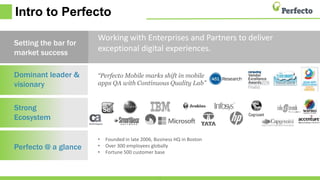
Dominant leader &
visionary
Strong
Ecosystem
Perfecto @ a glance
Working with Enterprises and Partners to deliver
exceptional digital experiences.
“Perfecto Mobile marks shift in mobile
apps QA with Continuous Quality Lab”
4
Setting the bar for
market success
• Founded in late 2006, Business HQ in Boston
• Over 300 employees globally
• Fortune 500 customer base
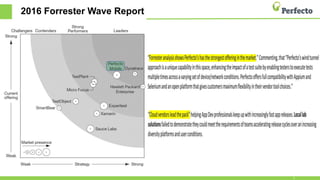
2016 Forrester Wave Report
5
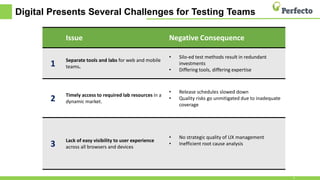
Digital Presents Several Challenges for Testing Teams
6
Issue Negative Consequence
1
Separate tools and labs for web and
mobile teams.
• Silo-ed test methods result in redundant
investments
• Differing tools, differing expertise
2 Timely access to required lab resources in a dynamic
market.
• Release schedules slowed down
• Quality risks go unmitigated due to inadequate
coverage
3 Lack of easy visibility to user experience
across all browsers and devices
• No strategic quality of UX management
• Inefficient root cause analysis
Issue Negative Consequence
1
Separate tools and labs for web and
mobile teams.
• Silo-ed test methods result in redundant
investments
• Differing tools, differing expertise
2 Timely access to required lab resources in a
dynamic market.
• Release schedules slowed down
• Quality risks go unmitigated due to inadequate
coverage
Issue Negative Consequence
1 Separate tools and labs for web and mobile
teams.
• Silo-ed test methods result in redundant
investments
• Differing tools, differing expertise
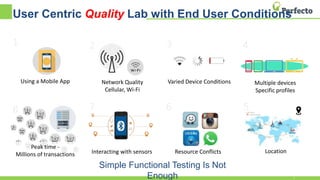
User Centric Quality Lab with End User Conditions
Using a Mobile App
1 2
Network Quality
Cellular, Wi-Fi
3
Varied Device Conditions
4
Multiple devices
Specific profiles
5
Location
6
Resource Conflicts
7
Interacting with sensors
Peak time -
Millions of transactions
8
Simple Functional Testing Is Not
Enough 7
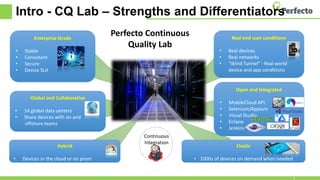
Intro - CQ Lab – Strengths and Differentiators
Enterprise Grade
• Stable
• Consistent
• Secure
• Device SLA
Real end user conditions
• Real devices
• Real networks
• “Wind Tunnel” - Real world
device and app conditions
Open and Integrated
• MobileCloud API
• Selenium/Appium
• Visual Studio
• Eclipse
• Jenkins
Global and Collaborative
• 14 global data centers
• Share devices with on and
offshore teams
Hybrid
• Devices in the cloud or on prem
Elastic
• 1000s of devices on demand when needed
Perfecto Continuous
Quality Lab
Continuous
Integration
8
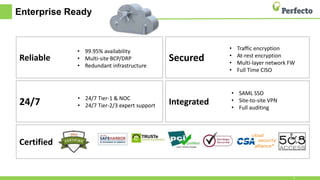
Enterprise Ready
Certified
Secured
24/7
Reliable
Integrated
• 99.95% availability
• Multi-site BCP/DRP
• Redundant infrastructure
• 24/7 Tier-1 & NOC
• 24/7 Tier-2/3 expert support
• Traffic encryption
• At-rest encryption
• Multi-layer network FW
• Full Time CISO
• SAML SSO
• Site-to-site VPN
• Full auditing
9
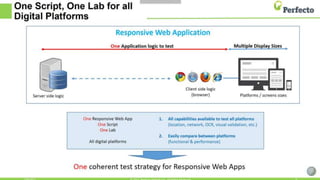
One Script One Lab – All Digital
Platforms
10
Understanding the Basic
Architecture/Setup, Look and Feel
11
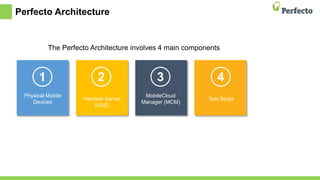
Perfecto Architecture
The Perfecto Architecture involves 4 main components
Physical Mobile
Devices
1
Handset Server
(HSS)
2
MobileCloud
Manager (MCM)
3
Test Script
4 5
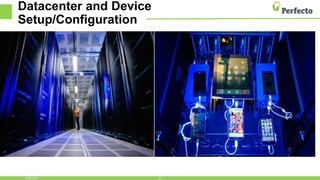
Datacenter and Device
Setup/Configuration
131/31/2017
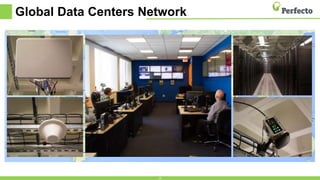
Global Data Centers Network
14
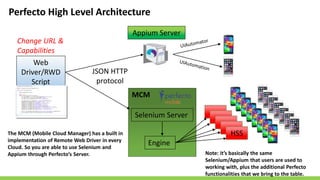
Web
Driver/RWD
Script
Appium Server
JSON HTTP
protocol
Selenium Server
Engine
MCM
HSS
Change URL &
Capabilities
Perfecto High Level Architecture
Note: it’s basically the same
Selenium/Appium that users are used to
working with, plus the additional Perfecto
functionalities that we bring to the table.
The MCM (Mobile Cloud Manager) has a built in
implementation of Remote Web Driver in every
Cloud. So you are able to use Selenium and
Appium through Perfecto’s Server.
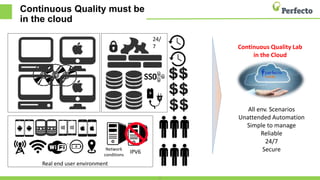
Continuous Quality must be
in the cloud
16
Network
conditions
IPV6
Real end user environment
All env. Scenarios
Unattended Automation
Simple to manage
Reliable
24/7
Secure
Continuous Quality Lab
in the Cloud
24/
7
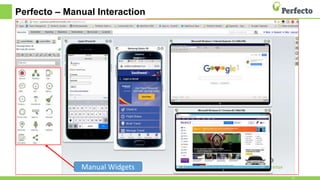
Perfecto – Manual Interaction
17
Manual Widgets
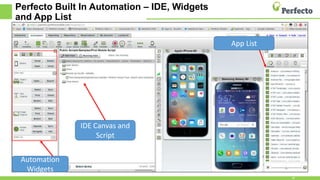
Perfecto Built In Automation – IDE, Widgets
and App List
18
Automation
Widgets
IDE Canvas and
Script
App List
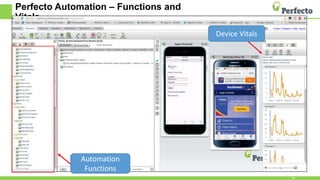
Perfecto Automation – Functions and
Vitals
19
Automation
Functions
Device Vitals
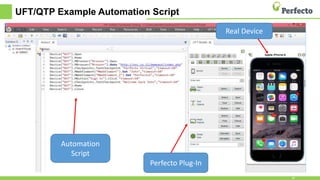
UFT/QTP Example Automation Script
20
Automation
Script
Real Device
Perfecto Plug-In
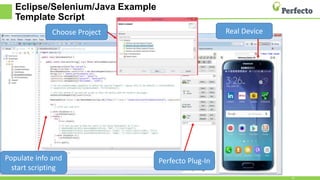
Eclipse/Selenium/Java Example
Template Script
21
Populate info and
start scripting
Real Device
Perfecto Plug-In
Choose Project
Perfecto University (Litmos)
• Allows you to select as many self-paced online courses (both
manual and automation) as you'd like.
• Open the URL: http://perfecto.litmos.com/online-courses
• Click on the title, and then check out using our free shopping cart where you can enter your
information and move forward.
• We recommend the following order when getting started:
• Perfecto Overview
• Manual Testing
• Mobile Automation
• Then select one of the other automation specific courses, such as UFT
or Selenium/Appium - whatever tool(s) you are interested in.
• Note: In order to have real devices that you can use for the training
courses mentioned above, we need to set you up with access to our
partners cloud. Example information:
• URL: https://partners.perfectomobile.com
• You will get a personalized username and password:
22
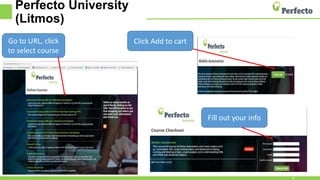
Perfecto University
(Litmos)
23
Go to URL, click
to select course
Click Add to cart
Fill out your info
Resources
• Perfecto Community Website
• Sign Up (Free) to be able to contribute, download code samples and
grab Perfecto knowledge
• https://community.perfectomobile.com
• Perfecto Partner Portal
• Sign Up (Free)- This site has special information and content only for
Partners https://community.perfectomobile.com/posts/980541
24
Q & A
25
Thank You
David Broerman
Partner Enablement Manager
Email: davidb@perfectomobile.com
26

TechTalk: Get to Know Perfecto

  • 1.
    Getting to KnowPerfecto Introduction for Partners David Broerman Partner Enablement Manager Email: davidb@perfectomobile.com
  • 2.
    Agenda •Intro to Perfecto •DigitalChallenges •Understanding the Perfecto CQ Lab •Architecture/Setup •Perfecto University, Community and Partner Portal •Perfecto Solution Look and Feel •Q&A 2
  • 3.
    Intro to Perfecto PerfectoOffers: A Cloud Based Continuous Quality Lab enabling testing and monitoring of all digital platforms on real devices and real end user conditions, for enterprises adopting agile delivery processes.3
  • 4.
    Intro to Perfecto Dominantleader & visionary Strong Ecosystem Perfecto @ a glance Working with Enterprises and Partners to deliver exceptional digital experiences. “Perfecto Mobile marks shift in mobile apps QA with Continuous Quality Lab” 4 Setting the bar for market success • Founded in late 2006, Business HQ in Boston • Over 300 employees globally • Fortune 500 customer base
  • 5.
  • 6.
    Digital Presents SeveralChallenges for Testing Teams 6 Issue Negative Consequence 1 Separate tools and labs for web and mobile teams. • Silo-ed test methods result in redundant investments • Differing tools, differing expertise 2 Timely access to required lab resources in a dynamic market. • Release schedules slowed down • Quality risks go unmitigated due to inadequate coverage 3 Lack of easy visibility to user experience across all browsers and devices • No strategic quality of UX management • Inefficient root cause analysis Issue Negative Consequence 1 Separate tools and labs for web and mobile teams. • Silo-ed test methods result in redundant investments • Differing tools, differing expertise 2 Timely access to required lab resources in a dynamic market. • Release schedules slowed down • Quality risks go unmitigated due to inadequate coverage Issue Negative Consequence 1 Separate tools and labs for web and mobile teams. • Silo-ed test methods result in redundant investments • Differing tools, differing expertise
  • 7.
    User Centric QualityLab with End User Conditions Using a Mobile App 1 2 Network Quality Cellular, Wi-Fi 3 Varied Device Conditions 4 Multiple devices Specific profiles 5 Location 6 Resource Conflicts 7 Interacting with sensors Peak time - Millions of transactions 8 Simple Functional Testing Is Not Enough 7
  • 8.
    Intro - CQLab – Strengths and Differentiators Enterprise Grade • Stable • Consistent • Secure • Device SLA Real end user conditions • Real devices • Real networks • “Wind Tunnel” - Real world device and app conditions Open and Integrated • MobileCloud API • Selenium/Appium • Visual Studio • Eclipse • Jenkins Global and Collaborative • 14 global data centers • Share devices with on and offshore teams Hybrid • Devices in the cloud or on prem Elastic • 1000s of devices on demand when needed Perfecto Continuous Quality Lab Continuous Integration 8
  • 9.
    Enterprise Ready Certified Secured 24/7 Reliable Integrated • 99.95%availability • Multi-site BCP/DRP • Redundant infrastructure • 24/7 Tier-1 & NOC • 24/7 Tier-2/3 expert support • Traffic encryption • At-rest encryption • Multi-layer network FW • Full Time CISO • SAML SSO • Site-to-site VPN • Full auditing 9
  • 10.
    One Script OneLab – All Digital Platforms 10
  • 11.
  • 12.
    Perfecto Architecture The PerfectoArchitecture involves 4 main components Physical Mobile Devices 1 Handset Server (HSS) 2 MobileCloud Manager (MCM) 3 Test Script 4 5
  • 13.
  • 14.
  • 15.
    Web Driver/RWD Script Appium Server JSON HTTP protocol SeleniumServer Engine MCM HSS Change URL & Capabilities Perfecto High Level Architecture Note: it’s basically the same Selenium/Appium that users are used to working with, plus the additional Perfecto functionalities that we bring to the table. The MCM (Mobile Cloud Manager) has a built in implementation of Remote Web Driver in every Cloud. So you are able to use Selenium and Appium through Perfecto’s Server.
  • 16.
    Continuous Quality mustbe in the cloud 16 Network conditions IPV6 Real end user environment All env. Scenarios Unattended Automation Simple to manage Reliable 24/7 Secure Continuous Quality Lab in the Cloud 24/ 7
  • 17.
    Perfecto – ManualInteraction 17 Manual Widgets
  • 18.
    Perfecto Built InAutomation – IDE, Widgets and App List 18 Automation Widgets IDE Canvas and Script App List
  • 19.
    Perfecto Automation –Functions and Vitals 19 Automation Functions Device Vitals
  • 20.
    UFT/QTP Example AutomationScript 20 Automation Script Real Device Perfecto Plug-In
  • 21.
    Eclipse/Selenium/Java Example Template Script 21 Populateinfo and start scripting Real Device Perfecto Plug-In Choose Project
  • 22.
    Perfecto University (Litmos) •Allows you to select as many self-paced online courses (both manual and automation) as you'd like. • Open the URL: http://perfecto.litmos.com/online-courses • Click on the title, and then check out using our free shopping cart where you can enter your information and move forward. • We recommend the following order when getting started: • Perfecto Overview • Manual Testing • Mobile Automation • Then select one of the other automation specific courses, such as UFT or Selenium/Appium - whatever tool(s) you are interested in. • Note: In order to have real devices that you can use for the training courses mentioned above, we need to set you up with access to our partners cloud. Example information: • URL: https://partners.perfectomobile.com • You will get a personalized username and password: 22
  • 23.
    Perfecto University (Litmos) 23 Go toURL, click to select course Click Add to cart Fill out your info
  • 24.
    Resources • Perfecto CommunityWebsite • Sign Up (Free) to be able to contribute, download code samples and grab Perfecto knowledge • https://community.perfectomobile.com • Perfecto Partner Portal • Sign Up (Free)- This site has special information and content only for Partners https://community.perfectomobile.com/posts/980541 24
  • 25.
  • 26.
    Thank You David Broerman PartnerEnablement Manager Email: davidb@perfectomobile.com 26

Editor's Notes

  • #2 Welcome the audience, the title of the webinar and introduce yourself
  • #3 Before we get started with the Agenda, just a quick housekeeping item…at the end we should have a few mins for Q&A. There is a panel in the webinar to submit questions during the webinar, so if you think of something, please ask. If we are unable to get to finish questions for any reason, then we will send out the info to all attendees. Here’s the agenda:
  • #6 Don’t just take out word for it that we are a leader in the digital space! In the most recent Forrester Report, Perfecto was ranked as having the strongest offering in the market, and that cloud vendors lead the pack over on premise vendors.
  • #7 Digital Presents Several Challenges for Testing Teams and Perfecto wants to be able to help you with those challenges:
  • #8 Let’s dig into Quality. Mobile quality differs dramatically from web. Specifically it is the user conditions. Therefore Quality and Dev teams must look beyond testing just a function toward testing all functions across all user conditions. The objective is to set defining and controlling user conditions as a key required capability. This can be expressed as a day in the life of how you use your favorite app. Think about traveling from point a to b and various network, device, device resources consumed and potentially conflicting apps that are also running on your device. App performance is influenced by a variety of factors, such as degraded network conditions, frequent network transitions back and forth between cellular and WiFi, on board sensor or resource conflicts along with a non-stop stream interruptions – SMSs, notifications, system pop-ups and phone calls. These factors impact app performance. Mobile app quality programs must account for these factors during testing to consistently deliver high-quality end user experience.
  • #9 Mention our differentiators
  • #10 Perfecto’s focus is meeting the security and reliability needs of enterprise mobile app teams Security objections, concerns? We are ready to answer the challenge. Perfecto is proud to have successfully met the most stringent customer and industry security requirements. In addition to the above, we are assessing ourselves against the ISO/IEC 27001 - Information security management standard
  • #12 How does it work?
  • #14 The first picture on the left is inside one of Perfecto’s Secure Datacenters, with racks of servers and devices locked in cabinets. Notice in the second picture, that we have real devices connected, via a USB cable, to the Perfecto Handset Server (or HSS). The HSS, which is responsible for managing all device connectivity, gets its commands from the MobileCloud manager (MCM) – which is a server. The MCM is the component responsible for executing all of the scripts as well as storing them within its repository and saving reports. Through this USB cable connected to the HSS, we get a live streaming from the device and are able to control the device (what we call system level control); including any device real user commands/gestures (such as tap, swipe, click etc.). So you will be able to see and control the device when you open up your browser and log into the Cloud. We don’t jailbreak/root or take the devices apart. We purchase them directly from the manufacturer, or we can take devices from you or a customer and also put them in the cloud.
  • #15 Perfecto operates 14 global data centers, including North America, South America, Canada, Israel, Europe, India (Gujarat), Australia, and China. Photos: Top Left & Right – WiFi paddles/repeaters enabling increased device density | Top Right – Another Picture inside one of our Datacenters Bottom Left, FCC approved cellular tower repeater | Bottom Right, GPS signal repeater Center: Global NOC located in Wakefield, MA
  • #16 Maybe you or your team are working with Selenium or Appium for testing. So for example, instead of having to set up an Appium Server locally, and then tether devices (1 iOS device per mac or a couple of Android devices to a windows machine), you can just connect to Perfecto’s server instance through the cloud and interact with the devices like you had them in your hand. So the benefit there is you or your team not having to deal with a local server instance, plus not having to manage physical devices or plugging them into machines locally. The MCM (Mobile Cloud Manager) has a built in implementation of Remote Web Driver in every Cloud. So you are able to use Selenium and Appium through Perfecto’s Server. A few other benefits with using Perfecto’s instance, is being able to interact with objects using visual, setting end user conditions (like GPS location, phone calls and sms messages, network virtualization (3G 4G), and capturing device vitals (CPU, Memory and Bytes in/Bytes out). The bottom line is that it’s the same Selenium/Appium that users are used to working with, plus the additional Perfecto functionalities that we bring to the table. This setup allows you and your teams to be more productive, test on real devices with those all important real end user conditions.
  • #17 What if you want to build out a lab yourself (or your company wants to build one - what might that look like? As practices accelerate and expand, reliability increasingly requires a cloud based lab. It’s not easy to create!! Continuous Quality must be in the cloud! Clicks 1 - 7: here are some things to think about when deploying a local lab. The process begins with acquiring servers, then deploying software and adding devices. As different devices are added unique hardware is also required. Soon, real time and dollars are being spent on building out a local lab. Clicks 8 – 15: As the need for lab scalability increases, there is the need for additional services such as repository back ups, addressing security requirements (firewall policy, SSO integration, IT infrastructure support). As these requirements continue to play out, organizations are compelled to allocate more FTEs, invest more budget and increasingly put these requests in the IT queue resulting in project slow downs. Clicks 16 – 17: Real end user conditions are needed for testing. Simple functional testing is not enough! Special infrastructure is a required to enable the controlling of these varied user conditions. For some organizations, the answer will be no to building out the right environment to manage user conditions. For those who say yes, it means more headcount, budget and frequently extended delivery turn around times. For those who do not support these requirements, quality risk rises. Click 18: A subscription based cloud based lab offers a clear alternatives to the complexity of managing local labs, and that’s where Perfecto can help!
  • #18 Interact with Multiple digital platforms – Manual Testing made easy
  • #22 To use this Template Project Script, Go to File > New > Project. Now select a Project such as Perfecto Selenium or Appium. In this case, we chose Selenium. This template includes a section where to include your code. The code can be developed manually, using code samples from Perfecto or other projects you already have built using Selenium, or it can be generated by using the record feature. Some parts can be recorded and others added or edited manually.
  • #24 Open the URL: http://perfecto.litmos.com/online-courses