Object Spy, Visual Analysis and
XML/Xpath
Intro and Demo for Partners
David Broerman
Partner Enablement Manager
Email:
davidb@perfectomobile.com
Agenda
• Intro to Perfecto
• XML and Xpath and Objects
• What are XML and Xpath?
• Working with XML and Xpath
• Object Analysis and the Perfecto Object Spy
• What is Visual Analysis
• Best Practices with Perfecto
• Demo
Perfecto Automation
• Discuss Object Spy , Visual and Xpath
Review a Perfecto Lab Selenium/Appium Project in Eclipse
• Discuss Object Spy , Visual and Xpath
• Q&A
Intro to Perfecto
Perfecto Offers:
A Cloud Based Continuous Quality Lab
enabling testing and monitoring of all digital
platforms on real devices and real end user
conditions,
for enterprises adopting agile delivery processes.
3/28/2017 3
Intro to Perfecto
Dominant leader &
visionary
Strong
Ecosystem
Perfecto @ a glance
Working with Enterprises and Partners to deliver
exceptional digital experiences.
4
Setting the bar for
market success
• Founded in late 2006, Business HQ in Boston
• Over 300 employees globally
• Fortune 500 customer base
3/28/2017
“Perfecto Mobile
marks shift in mobile
apps quality with
Continuous Quality
Lab”
Cloud Based Quality Platform For The Digital Era
3/28/2017 5© 2017, Perfecto Mobile Ltd. All Rights Reserved.
Open & Integrated
into Dev/Test/Ops
Any test tool
Any CI server
Any test framework
Any IDE
Any Location
Code/Debug
Functional
Test
Performance
Test
Production
Insight
One Lab for all Digital Platforms
Reporting & Analytics
Wind Tunnel Layer
Customer
Support
Browsers Desktops Mobile Devices IoT
Open and Integrated
6
Open &
Integrated
Xcode
Selenium
3/28/2017
What are XML and Xpath?
• XML
• EXtensible Markup Language
• XML enables you to create data that can read by any application on any
platform
• Native Object analysis relies on XML
• The Object Tree is an XML document
• Xpath (XML Path Language)
• XPath is the query language for XML documents
• Describes a way to locate and process items in XML documents
• In automation, Xpath allows us to identify the object/objects
Importance of Understanding XML and XPath
8
• Native Object analysis relies on XML
• Retrieves the XML document and analyzes it
• However, it this is not enough to identify the object using its location in the
object tree. This approach is fragile.
• It is necessary to use specific XPath expressions to uniquely identify the
object.
• This will enable your object to be found across multiple platforms and
devices.
Native Objects Analysis
9
• The Object Tree is an XML document
• The way to find elements inside XML is through XPath
• To properly work with Objects, a good grasp of XML/XPath is needed.
The Perfecto Approach for Mobile
Objects
Native Object Analysis
and
Visual Object Analysis
=
HYBRID APPROACH!
Best Practice: Use Native Object
Analysis for Navigating and
Visual/OCR for Validation.
Pros
Cons
The Object Spy enables working with objects
• The Object Spy accesses the XML of the application
• Identifies the element and writes an XPath Expression.
• May need to export the XML into Firebug/FirePath.
• Inserts the expression back into the Object Spy.
• Applies the required action:
• Click – click on the element
• Set – an edit field with a value
• Info – to retrieve an element to receive its properties
• Find – find an element
Website & Apps – Object Trees/Identifying Objects
• Web Objects
• DOM
• Same Tree (PM or Appium
Framework)
• Native App Objects
• PM or Appium framework
• Appium -Separate naming
for Android and iOS
• Perfecto – Script Once
• Hybrid Application
• PM automation framework
• Mix of Native and DOM
objects
DOM Perfecto
Mobile
Appium
Working with the Object Spy
Selected Automation Function and Parameter fields
Object
XPath
Object TreePreview Panel
Search
and
Export
Filter displayed Objects
Object
Properties
Automation
functions
associated with
the selected
object type
Adding Commands from the Object
Spy
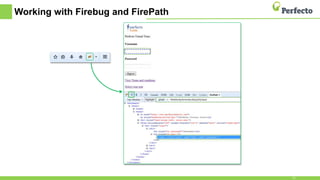
Working with Firebug and FirePath
15
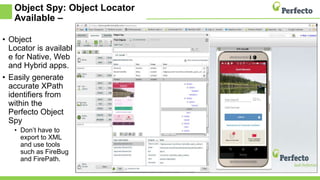
Object Spy: Object Locator
Available –
• Object
Locator is availabl
e for Native, Web
and Hybrid apps.
• Easily generate
accurate XPath
identifiers from
within the
Perfecto Object
Spy
• Don’t have to
export to XML
and use tools
such as FireBug
and FirePath.
Visual Analysis
• Visual analysis is an alternative way of interacting with a device.
• Its’ source is the screenshot taken from the device (what the user sees).
• Perfecto can analyze the screenshot looking for either text or
images, with text being the recommended option.
Best Practice: Use Native Object
Analysis for Navigating and Visual for Validation.
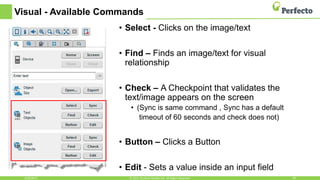
Visual - Available Commands
• Select - Clicks on the image/text
• Find – Finds an image/text for visual
relationship
• Check – A Checkpoint that validates the
text/image appears on the screen
• (Sync is same command , Sync has a default
timeout of 60 seconds and check does not)
• Button – Clicks a Button
• Edit - Sets a value inside an input field
3/28/2017 18© 2015, Perfecto Mobile Ltd. All Rights Reserved.
Example - Coding Visual Analysis –
Java
• Visual Analysis –
Perfecto
Proprietary
command
executed using
RemoteWebDriver
• Use the
executeScript
method
• The script
parameter
contains the
command name,
in the following
format:
mobile:command
:subcommand.3/28/2017 19© 2015, Perfecto Mobile Ltd. All Rights Reserved.
Map<String, Object> params3 = new HashMap<>();
// Check for the text that indicates that the sign in
was successful
params3.put("content", "Welcome back John");
// allow up-to 30 seconds for the page to display
params3.put("timeout", "30");
resultString = (String)
driver.executeScript("mobile:checkpoint:text",
params3);
if (!resultString.equalsIgnoreCase("true")) {
System.out.println("'Welcome back John' text not
found");
}
Did You Know?
• When talking with users of the Perfecto Solution
• Approximately 90% of testing defects are found using Visual
Validation!
• Mobile is different as we want to understand the UX
• Need to see what the user sees
• An object on the screen may be found, but it may be hidden
behind something else (need visual validation).
XPath Examples
Example of Power of Xpath with Objects
22
Let's say that we want to work on a username field.
Remember:
 The default path generated by the Object Spy refers to its location; its placement on the
page.
 The placement of that object can change, or be slightly different in another platform
(i.e. tablet vs. smartphone).
 So, it's important to refer to it by its logical function instead of an arbitrary placement on
the page.
XPath will allow this to be specified: //[@username]
 This expression explicitly refers to the input field called 'username'.
Advantages:
 It is easy to read.
 It is likely to work well with minimal maintenance.
 It is likely to be identical across devices and platforms.
XPath Expression Syntax
23
Expression Description
nodename Selects all nodes with the name "nodename"
// Selects nodes in the document from the current node that match
the selection no matter where they are
//vehicle Selects all vehicle elements no matter where they are in the
document
//@make Selects all attributes named make
//*[@make="Toyota"] Select all attributes named make with value of Toyota
//vehicle[@*] Selects all vehicle elements which have any attribute
//*[text()=’Corolla’] Select all objects with the text Corolla
//vehicle[2] Select the second vehicle element
Demo
• Open Perfecto Automation and also Open existing Perfecto Lab
Selenium/Appium Project in Eclipse
• Discuss Object Spy , Visual Analysis and Xpath
Resources
• Sample script and Demo Apps
• https://community.perfectomobile.com/series/25427/posts/1064930
• Working with Object Spy and XPath
• https://community.perfectomobile.com/posts/914140-web-objects
• XPath Tutorial
• http://www.w3schools.com/XPath/
• XML Tutorial
• http://www.w3schools.com/xml/
Q&A
Thank You
David Broerman
Partner Enablement Manager
Email: davidb@perfectomobile.com

TechTalk: Advanced Practices for Visual Test Automation

  • 1.
    Object Spy, VisualAnalysis and XML/Xpath Intro and Demo for Partners David Broerman Partner Enablement Manager Email: davidb@perfectomobile.com
  • 2.
    Agenda • Intro toPerfecto • XML and Xpath and Objects • What are XML and Xpath? • Working with XML and Xpath • Object Analysis and the Perfecto Object Spy • What is Visual Analysis • Best Practices with Perfecto • Demo Perfecto Automation • Discuss Object Spy , Visual and Xpath Review a Perfecto Lab Selenium/Appium Project in Eclipse • Discuss Object Spy , Visual and Xpath • Q&A
  • 3.
    Intro to Perfecto PerfectoOffers: A Cloud Based Continuous Quality Lab enabling testing and monitoring of all digital platforms on real devices and real end user conditions, for enterprises adopting agile delivery processes. 3/28/2017 3
  • 4.
    Intro to Perfecto Dominantleader & visionary Strong Ecosystem Perfecto @ a glance Working with Enterprises and Partners to deliver exceptional digital experiences. 4 Setting the bar for market success • Founded in late 2006, Business HQ in Boston • Over 300 employees globally • Fortune 500 customer base 3/28/2017 “Perfecto Mobile marks shift in mobile apps quality with Continuous Quality Lab”
  • 5.
    Cloud Based QualityPlatform For The Digital Era 3/28/2017 5© 2017, Perfecto Mobile Ltd. All Rights Reserved. Open & Integrated into Dev/Test/Ops Any test tool Any CI server Any test framework Any IDE Any Location Code/Debug Functional Test Performance Test Production Insight One Lab for all Digital Platforms Reporting & Analytics Wind Tunnel Layer Customer Support Browsers Desktops Mobile Devices IoT
  • 6.
    Open and Integrated 6 Open& Integrated Xcode Selenium 3/28/2017
  • 7.
    What are XMLand Xpath? • XML • EXtensible Markup Language • XML enables you to create data that can read by any application on any platform • Native Object analysis relies on XML • The Object Tree is an XML document • Xpath (XML Path Language) • XPath is the query language for XML documents • Describes a way to locate and process items in XML documents • In automation, Xpath allows us to identify the object/objects
  • 8.
    Importance of UnderstandingXML and XPath 8 • Native Object analysis relies on XML • Retrieves the XML document and analyzes it • However, it this is not enough to identify the object using its location in the object tree. This approach is fragile. • It is necessary to use specific XPath expressions to uniquely identify the object. • This will enable your object to be found across multiple platforms and devices.
  • 9.
    Native Objects Analysis 9 •The Object Tree is an XML document • The way to find elements inside XML is through XPath • To properly work with Objects, a good grasp of XML/XPath is needed.
  • 10.
    The Perfecto Approachfor Mobile Objects Native Object Analysis and Visual Object Analysis = HYBRID APPROACH! Best Practice: Use Native Object Analysis for Navigating and Visual/OCR for Validation. Pros Cons
  • 11.
    The Object Spyenables working with objects • The Object Spy accesses the XML of the application • Identifies the element and writes an XPath Expression. • May need to export the XML into Firebug/FirePath. • Inserts the expression back into the Object Spy. • Applies the required action: • Click – click on the element • Set – an edit field with a value • Info – to retrieve an element to receive its properties • Find – find an element
  • 12.
    Website & Apps– Object Trees/Identifying Objects • Web Objects • DOM • Same Tree (PM or Appium Framework) • Native App Objects • PM or Appium framework • Appium -Separate naming for Android and iOS • Perfecto – Script Once • Hybrid Application • PM automation framework • Mix of Native and DOM objects DOM Perfecto Mobile Appium
  • 13.
    Working with theObject Spy Selected Automation Function and Parameter fields Object XPath Object TreePreview Panel Search and Export Filter displayed Objects Object Properties Automation functions associated with the selected object type
  • 14.
    Adding Commands fromthe Object Spy
  • 15.
    Working with Firebugand FirePath 15
  • 16.
    Object Spy: ObjectLocator Available – • Object Locator is availabl e for Native, Web and Hybrid apps. • Easily generate accurate XPath identifiers from within the Perfecto Object Spy • Don’t have to export to XML and use tools such as FireBug and FirePath.
  • 17.
    Visual Analysis • Visualanalysis is an alternative way of interacting with a device. • Its’ source is the screenshot taken from the device (what the user sees). • Perfecto can analyze the screenshot looking for either text or images, with text being the recommended option. Best Practice: Use Native Object Analysis for Navigating and Visual for Validation.
  • 18.
    Visual - AvailableCommands • Select - Clicks on the image/text • Find – Finds an image/text for visual relationship • Check – A Checkpoint that validates the text/image appears on the screen • (Sync is same command , Sync has a default timeout of 60 seconds and check does not) • Button – Clicks a Button • Edit - Sets a value inside an input field 3/28/2017 18© 2015, Perfecto Mobile Ltd. All Rights Reserved.
  • 19.
    Example - CodingVisual Analysis – Java • Visual Analysis – Perfecto Proprietary command executed using RemoteWebDriver • Use the executeScript method • The script parameter contains the command name, in the following format: mobile:command :subcommand.3/28/2017 19© 2015, Perfecto Mobile Ltd. All Rights Reserved. Map<String, Object> params3 = new HashMap<>(); // Check for the text that indicates that the sign in was successful params3.put("content", "Welcome back John"); // allow up-to 30 seconds for the page to display params3.put("timeout", "30"); resultString = (String) driver.executeScript("mobile:checkpoint:text", params3); if (!resultString.equalsIgnoreCase("true")) { System.out.println("'Welcome back John' text not found"); }
  • 20.
    Did You Know? •When talking with users of the Perfecto Solution • Approximately 90% of testing defects are found using Visual Validation! • Mobile is different as we want to understand the UX • Need to see what the user sees • An object on the screen may be found, but it may be hidden behind something else (need visual validation).
  • 21.
  • 22.
    Example of Powerof Xpath with Objects 22 Let's say that we want to work on a username field. Remember:  The default path generated by the Object Spy refers to its location; its placement on the page.  The placement of that object can change, or be slightly different in another platform (i.e. tablet vs. smartphone).  So, it's important to refer to it by its logical function instead of an arbitrary placement on the page. XPath will allow this to be specified: //[@username]  This expression explicitly refers to the input field called 'username'. Advantages:  It is easy to read.  It is likely to work well with minimal maintenance.  It is likely to be identical across devices and platforms.
  • 23.
    XPath Expression Syntax 23 ExpressionDescription nodename Selects all nodes with the name "nodename" // Selects nodes in the document from the current node that match the selection no matter where they are //vehicle Selects all vehicle elements no matter where they are in the document //@make Selects all attributes named make //*[@make="Toyota"] Select all attributes named make with value of Toyota //vehicle[@*] Selects all vehicle elements which have any attribute //*[text()=’Corolla’] Select all objects with the text Corolla //vehicle[2] Select the second vehicle element
  • 24.
    Demo • Open PerfectoAutomation and also Open existing Perfecto Lab Selenium/Appium Project in Eclipse • Discuss Object Spy , Visual Analysis and Xpath
  • 25.
    Resources • Sample scriptand Demo Apps • https://community.perfectomobile.com/series/25427/posts/1064930 • Working with Object Spy and XPath • https://community.perfectomobile.com/posts/914140-web-objects • XPath Tutorial • http://www.w3schools.com/XPath/ • XML Tutorial • http://www.w3schools.com/xml/
  • 26.
  • 27.
    Thank You David Broerman PartnerEnablement Manager Email: davidb@perfectomobile.com

Editor's Notes

  • #2 Hello Everyone – welcome to Perfecto’s tech talk webinar Object Spy, Visual Analysis and XML/Xpath Intro and Demo for Partners. My name is ….
  • #3 Before we get started with the Agenda, just a quick housekeeping item…at the end we should have a few mins for questions and answers. There is a panel in the webinar named Q&A to submit questions during the webinar, so if you think of something, please ask. If we are unable to get to finish questions for any reason, then we will send out the info to all attendees. Here’s the agenda…
  • #6 The Perfecto CQ (Continuous Quality) Lab platform is a cloud architected quality platform. One lab for all digital platforms, from browsers, desktops to mobile to IoT We have capabilities to mimic the real user environment with our Wind Tunnel Including Location, orientation, network conditions like 3g 4g, and everything you need to reproduce your users environment While providing Quality visibility and trending with our reporting and analytics for fast feedback loops Completely accessible/embeddable in your SDLC process and tools Accessible from coding to customer support To integrated in Any test tool, CI server, test framework, IDE and location
  • #7 Perfecto is committed to helping enterprises leverage existing practices, assets and expertise Perfecto Mobile strives integrate with popular tools used by enterprises. Customers can leverage existing assets and expertise . Our support for various tools is constantly expanding. Some customers also take advantage of our published API to create custom extensions to different frameworks.
  • #8 So what is XML anyway? XML stands for EXtensible Markup Language It’s formal definition: In computing, Extensible Markup Language (XML) is a markup language that defines a set of rules for encoding documents in a format that is both human-readable and machine-readable. What does that really mean? XML enables you to create data that can read by any application on any platform Native Object analysis relies on XML The Object Tree is an XML document Now describe xpath
  • #10 How it works: -Receives Object tree (XML) from App or Website Main Features: -All objects are exposed by Perfecto -Objects can be clicked, set or queried
  • #12 When the Object Spy accesses the XML (shows the Object Tree), These are the steps to work with objects, we will now drill down and show you step-by-step
  • #13 Identifying objects on the different types of mobile applications can be done in many ways. We will focus on using the following frameworks, according to Perfecto Mobile best practices: the DOM objects for testing web applications Appium framework for testing Native applications, and Perfecto Mobile framework for testing hybrid applications This Framework selection is for what Trees you see (Perfecto or Appium) (Remember, since in these examples we are working on a native application, we will be setting our Automation Framework and Driver to Appium. To do this, go to: More > Settings > Automation Tab > Framework tab) Using the Object Spy and picking an Automation Framework enables us to find, view properties, and perform interactions on the application using objects (such as a clicking on something on the device screen, selecting an image or text element, and setting text in an edit field). (A little more about identifying objects: Application User Interfaces are drawn to the screen based on a definition (that’s provided by the application) of how and where to draw the different UI Elements. The definition is a hierarchy of available UI Elements that can be described as an Object Tree. The Object Tree for Web applications uses a standard set of UI Element types to describe how to draw the User Interface. This is the DOM tree and the UI Elements in that standard can be used to describe any website or web application.) The Perfecto Mobile and Appium Frameworks: In the world of mobile applications, it is not as simple. Apple has its own proprietary set of UI Elements and this is different from the proprietary set used by Android. Perfecto Mobile created a framework that allows us to translate the competing UI Elements of the different application UI sets into a “common” set of UI Elements and describe the UI structure of an application using these generic UI Elements (Script Once). This is the Perfecto Mobile framework Object Tree. Appium, is used to test native apps, references the UI Elements using the names provided by the proprietary description files. This is the Appium framework Object Tree. The Perfecto Mobile framework identifies the objects in the application with the same standard. This means that the object tree representation of the elements will be the same on both iOS and Android applications. The Appium framework uses two different object tree representations – UI Automator for Android and UI Automation for iOS. This means that when we develop our automation test, according to this mode of work, we will need to create two separate tests (one for Android and another for iOS). (For advanced users, the Perfecto Mobile framework supports identification of the objects either with the application classes or based on a translated generic set of classes. This enables using the same objects for both Android and iOS applications, also referred to as ScriptOnce. This will be covered in later modules.) The framework we choose to work with will determine the object tree representation, in XML format, that we see and work with when using the Perfecto Mobile Object Spy. (For beginner users, each object is refined by a set of attributes that define what is actually displayed. For example, the text attribute defines the text to display.)
  • #14 The following slide will describe how to use the Object Spy.
  • #15 Adding commands to the Automation script Click on the object in the preview panel Replace the default XPath with the one you have created Edit any necessary parameter field values Click Add to add the function to your script Optional: enable Execute on Add in the Object Spy to keep the Object Spy window open for additional functions (refresh the Object Spy preview panel to see the updated device screen) Recap We saw the object spy and did the full loop, starting in the mobile application, using the object spy to export the XML, writing the Xpath expression and then copying it back to the object spy. Once the correct expression was in the Spy, we selected the appropriate command, and with “execute on add” we are ready for the next step in the script. This flow is identical for mobile applications and websites and repeats whenever we want to work with objects.
  • #16 Reading the XML document Go to Firefox Browser – make sure you have Firebug installed Open Firebug (top right of the Firefox browser menu bar) Inspect the element you want to work with by clicking on the Firebug inspector and then on the object in the page The object in the page and the location of it in the tree will be highlighted. Also, a default XPath will be automatically provided. Read the XML, understand what makes the element unique and write an XPath that will be able to find it (more on writing XPath expressions later on)
  • #17 Example: Android Device B of A Application Sign In Button (Click) Object Locator – provides a more robust xpath instead of just location based
  • #18 Analyzing a screenshot is slower and less reliable than object analysis, it exists as an addition to objects which is the main way to work. Its use is limited, but when it is needed it provides an excellent solution. Visual analysis is a Perfecto extension to RWD & Appium, providing a comprehensive solution that enables automating all test cases. The main uses for visual analysis are: In cases where object analysis does not work When there’s a need to validate what the user sees on a certain page
  • #19 There are 5 commands available to use with visual analysis. Exactly the same buttons for both Image and Text. All commands can receive a timeout to which is useful e.g. when a new page is loading. Can work with either text or an image with text being the preferred option. Text is easier to use, works seamlessly across multiple devices and requires the least maintenance.
  • #20 Since visual analysis is a Perfecto command, we use the executeScript method to run it. The commands require the needle to be provided (in this case the text “welcome back John”) and any additional parameters (in this case we set a timeout of 30 seconds, the system will search for the needle continually for 30 seconds) The returned true/false result can then be handled by the code.
  • #22 The following slides contain expressions written for various objects in the PM demo applications. Go through the expressions, emphasizing WHAT the expression is saying in plain English, and WHY it is saying it. [Trainer Notes: download the sample test “MobileObjectsSample.java” here https://community.perfectomobile.com/groups/30292/posts/1046689-sample-script-mobile-objects-sample add it to your project workspace run the test on an iOS and an Android device The next slides describe specific XPath expressions, used in the sample, in more detail.]
  • #23 The elements inside an application or website have a logical meaning a “login” button or “my account” link are not just the third or fourth element, they also have a specific purpose inside the application. Identifying these elements according to what they are, and not just according to where they are will result in a script that is much more robust, readable and valid for multiple devices and platforms. For example, the login button will always stay the login button, another element may be added before it changing the where but the what will remain the same.
  • #24 XPath allows us to specify: "Give me an element named vehicle that has an attribute with a value Toyota". XPath enables powerful and complex queries quickly and easily. Below is a list of the most common XPath syntax you will need to understand.
  • #25 Notes: Let’s review a sample test. Use Eclipse Project Named ??? RemoteWebDriverTest.java – run as java test Credentials in code: To run the sample remember to add your credentials and Lab URL String host = “myLab.perfectomobile.com"; capabilities.setCapability("user", “myUser"); capabilities.setCapability("password", “MyPassword"); Selenium and Perfecto Tree Uses Perfecto demo application – tried to login with username, password and validates message
  • #27 Let’s take a few minutes for Q&A. Remember, there is a panel in the webinar named Q&A to submit questions (if you have already done that, great) if not, please take a minute or so now to type out your questions, We’ll go on mute for a minute, and then come back and answer the questions.