What have you learnt about
technologies from the process of
   constructing this product?
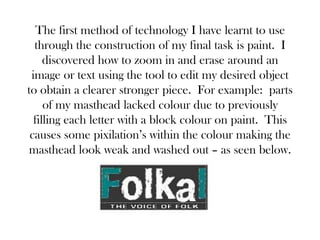
The first method of technology I have learnt to use
  through the construction of my final task is paint. I
     discovered how to zoom in and erase around an
 image or text using the tool to edit my desired object
to obtain a clearer stronger piece. For example: parts
     of my masthead lacked colour due to previously
  filling each letter with a block colour on paint. This
 causes some pixilation’s within the colour making the
masthead look weak and washed out – as seen below.
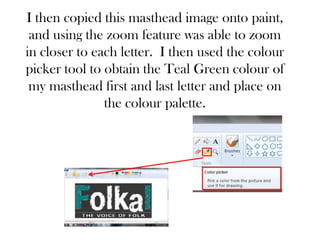
I then copied this masthead image onto paint,
 and using the zoom feature was able to zoom
in closer to each letter. I then used the colour
picker tool to obtain the Teal Green colour of
 my masthead first and last letter and place on
               the colour palette.
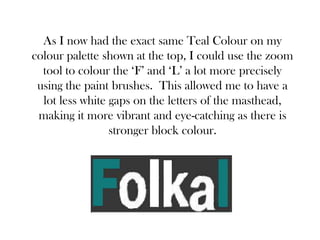
As I now had the exact same Teal Colour on my
colour palette shown at the top, I could use the zoom
  tool to colour the ‘F’ and ‘L’ a lot more precisely
 using the paint brushes. This allowed me to have a
  lot less white gaps on the letters of the masthead,
 making it more vibrant and eye-catching as there is
                 stronger block colour.
The next technology programme I learnt to use whilst constructing my product
was Photoshop. Before starting the media course I had never come into contact
with the programme and as soon as I opened it I thought it looked confusing.
There were loads of functions that I couldn’t understand and I couldn’t work
out how to get a cropping tool to use around the edge of the image. However,
after watching an ‘idiots guide to Photoshop’ on YouTube I gained knowledge
on cropping and found that Photoshop was in fact a better programme to use in
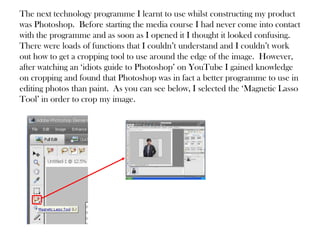
editing photos than paint. As you can see below, I selected the ‘Magnetic Lasso
Tool’ in order to crop my image.
The tool allowed me to drag the mouse around the edges
of the model highlighting his silhouette and allowing me to
copy that onto a plain white background. I feel using
photoshop strengthened my magazine as having the cleaner
crop around the image and being able to then copy in onto
a white background to change the gradient made the
magazine more eye catching and interesting. It prevented it
from looking dull the sharper crop around the model
made him stand out more to the audience. Furthermore,
the photoshop programme allowed me to use cropping to
layer two of the same images on top of each other so that
the magazine had some depth and didn’t look too flat.
The final technology development I have made whilst constructing this product
is how to use Slide Share. This programme allows its user to create a
PowerPoint and then upload it onto the internet so other people can view it. I
found the Slide Share programme extremely useful when blogging as I was able
to upload large amounts of photos that I had taken for a particular section of my
magazine, onto my blog for viewer’s usage. Slide Share itself was fairly easy to
use, all I had to do was sign up to their site, upload the power point to their
website and press ‘upload’. This then gave me a HTML which was where I
became confused. It took me a while to figure out how to copy the HTML
onto my blog and then publish the post without it just showing a link on my
page, but after watching some YouTube Tutorial videos I found the concept
quite simple. This shows that using the Slide Share programme has also
allowed me to develop ICT understanding as prior to it I hadn’t even heard of a
HTML never mind understand how to use them in publishing! The only
negative I feel there is to Slide Share is that it slightly slows down the loading of
my Blog which can become frustrating when trying to scroll down to the next
page of posts, however overall I am impressed with the idea and running of the
programme.

Technology

  • 1.
    What have youlearnt about technologies from the process of constructing this product?
  • 2.
    The first methodof technology I have learnt to use through the construction of my final task is paint. I discovered how to zoom in and erase around an image or text using the tool to edit my desired object to obtain a clearer stronger piece. For example: parts of my masthead lacked colour due to previously filling each letter with a block colour on paint. This causes some pixilation’s within the colour making the masthead look weak and washed out – as seen below.
  • 3.
    I then copiedthis masthead image onto paint, and using the zoom feature was able to zoom in closer to each letter. I then used the colour picker tool to obtain the Teal Green colour of my masthead first and last letter and place on the colour palette.
  • 4.
    As I nowhad the exact same Teal Colour on my colour palette shown at the top, I could use the zoom tool to colour the ‘F’ and ‘L’ a lot more precisely using the paint brushes. This allowed me to have a lot less white gaps on the letters of the masthead, making it more vibrant and eye-catching as there is stronger block colour.
  • 5.
    The next technologyprogramme I learnt to use whilst constructing my product was Photoshop. Before starting the media course I had never come into contact with the programme and as soon as I opened it I thought it looked confusing. There were loads of functions that I couldn’t understand and I couldn’t work out how to get a cropping tool to use around the edge of the image. However, after watching an ‘idiots guide to Photoshop’ on YouTube I gained knowledge on cropping and found that Photoshop was in fact a better programme to use in editing photos than paint. As you can see below, I selected the ‘Magnetic Lasso Tool’ in order to crop my image.
  • 6.
    The tool allowedme to drag the mouse around the edges of the model highlighting his silhouette and allowing me to copy that onto a plain white background. I feel using photoshop strengthened my magazine as having the cleaner crop around the image and being able to then copy in onto a white background to change the gradient made the magazine more eye catching and interesting. It prevented it from looking dull the sharper crop around the model made him stand out more to the audience. Furthermore, the photoshop programme allowed me to use cropping to layer two of the same images on top of each other so that the magazine had some depth and didn’t look too flat.
  • 7.
    The final technologydevelopment I have made whilst constructing this product is how to use Slide Share. This programme allows its user to create a PowerPoint and then upload it onto the internet so other people can view it. I found the Slide Share programme extremely useful when blogging as I was able to upload large amounts of photos that I had taken for a particular section of my magazine, onto my blog for viewer’s usage. Slide Share itself was fairly easy to use, all I had to do was sign up to their site, upload the power point to their website and press ‘upload’. This then gave me a HTML which was where I became confused. It took me a while to figure out how to copy the HTML onto my blog and then publish the post without it just showing a link on my page, but after watching some YouTube Tutorial videos I found the concept quite simple. This shows that using the Slide Share programme has also allowed me to develop ICT understanding as prior to it I hadn’t even heard of a HTML never mind understand how to use them in publishing! The only negative I feel there is to Slide Share is that it slightly slows down the loading of my Blog which can become frustrating when trying to scroll down to the next page of posts, however overall I am impressed with the idea and running of the programme.