CHAPTER 08
IoT TY BSc.IT notes by Ms.Blety Alengadan
CHAPTER 08
IoT TY BSc.IT notes by Ms.Blety Alengadan
 Memory Management
 Types of Memory
 Making the Most of Your RAM
 Performance and Battery Life
 Libraries
 Debugging
Memory Management
NEED FOR MEMORY MANAGEMENT
On laptops or servers you have gigabytes of memory and hundreds of gigabytes of
storage, on a microcontroller the resources are typically measured in kilobytes.
For example, your web browser will think nothing of slurping 330KB of HTML, CSS,
JavaScript, and images into memory, copying it around to parse it and rework it into a
better data structure for displaying just to show you the (relatively simple) home page of
Google.
That’s 150 times the total memory available on an Arduino Uno, just for the download—
before you start any processing of it.
IoT TY BSc.IT notes by Ms.Blety Alengadan
Memory Management
When you don’t have a lot of memory to play with, you need to be careful as to how you
use it. This is especially the case when you have no way to indicate that message to the
user.
The computer user presented with one too many “low memory” warning dialog boxes
will try rebooting, and so will the system administrator who spots the server thrashing its
disk as it pages memory out to the hard drive to increase the amount of virtual
memory.
On the other hand, an embedded platform with no screen or other indicators will usually
continue blindly until it runs out of memory completely—at which point it usually
“indicates” this situation to the user by mysteriously ceasing to function.
Even while you are developing software for a constrained device, trying to debug these
issues can be difficult if memory is not managed properly
IoT TY BSc.IT notes by Ms.Blety Alengadan
Types of Memory
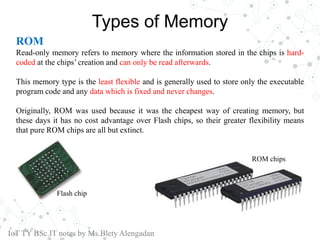
ROM
Read-only memory refers to memory where the information stored in the chips is hard-
coded at the chips’ creation and can only be read afterwards.
This memory type is the least flexible and is generally used to store only the executable
program code and any data which is fixed and never changes.
Originally, ROM was used because it was the cheapest way of creating memory, but
these days it has no cost advantage over Flash chips, so their greater flexibility means
that pure ROM chips are all but extinct.
IoT TY BSc.IT notes by Ms.Blety Alengadan
Flash chip
ROM chips
Types of MemoryFlash
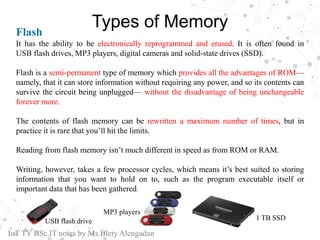
It has the ability to be electronically reprogrammed and erased. It is often found in
USB flash drives, MP3 players, digital cameras and solid-state drives (SSD).
Flash is a semi-permanent type of memory which provides all the advantages of ROM—
namely, that it can store information without requiring any power, and so its contents can
survive the circuit being unplugged— without the disadvantage of being unchangeable
forever more.
The contents of flash memory can be rewritten a maximum number of times, but in
practice it is rare that you’ll hit the limits.
Reading from flash memory isn’t much different in speed as from ROM or RAM.
Writing, however, takes a few processor cycles, which means it’s best suited to storing
information that you want to hold on to, such as the program executable itself or
important data that has been gathered.
IoT TY BSc.IT notes by Ms.Blety Alengadan
USB flash drive
MP3 players
1 TB SSD
Types of Memory
RAM
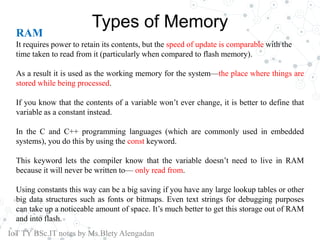
It requires power to retain its contents, but the speed of update is comparable with the
time taken to read from it (particularly when compared to flash memory).
As a result it is used as the working memory for the system—the place where things are
stored while being processed.
If you know that the contents of a variable won’t ever change, it is better to define that
variable as a constant instead.
In the C and C++ programming languages (which are commonly used in embedded
systems), you do this by using the const keyword.
This keyword lets the compiler know that the variable doesn’t need to live in RAM
because it will never be written to— only read from.
Using constants this way can be a big saving if you have any large lookup tables or other
big data structures such as fonts or bitmaps. Even text strings for debugging purposes
can take up a noticeable amount of space. It’s much better to get this storage out of RAM
and into flash.
IoT TY BSc.IT notes by Ms.Blety Alengadan
Types of Memory
RAM
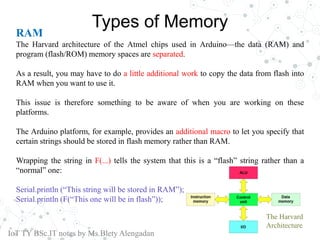
The Harvard architecture of the Atmel chips used in Arduino—the data (RAM) and
program (flash/ROM) memory spaces are separated.
As a result, you may have to do a little additional work to copy the data from flash into
RAM when you want to use it.
This issue is therefore something to be aware of when you are working on these
platforms.
The Arduino platform, for example, provides an additional macro to let you specify that
certain strings should be stored in flash memory rather than RAM.
Wrapping the string in F(...) tells the system that this is a “flash” string rather than a
“normal” one:
Serial.println (“This string will be stored in RAM”);
Serial.println (F(“This one will be in flash”));
IoT TY BSc.IT notes by Ms.Blety Alengadan
The Harvard
Architecture
MAKING THE MOST OF YOUR RAM
Now that you’ve moved everything that you can out of RAM and into flash, all that
remains is to work out ways to make better use of the free memory you have.
It’s easier to make the best trade-off between maximizing RAM usage and reliability if
your memory usage is deterministic—that is, if you know the maximum amount of
memory that will be used.
The way to achieve this result is to not allocate any memory dynamically, that is, while
the program is running.
Rather than download the entire page into memory at once, you download it in chunks—
filling the buffer each time and then working through that chunk of data before moving
on to the next one.
In some cases you might need to remember some part of one chunk before moving to the
next.
IoT TY BSc.IT notes by Ms.Blety Alengadan
MAKING THE MOST OF YOUR RAM
EXAMPLE : BUBBLINO
The code used for Bubblino, which runs on an Arduino board with only 2KB of RAM,
can easily process the standard response XML from Twitter’s search API, which is
typically 10–15KB per download.
Because Bubblino’s code condenses all that text into a single number—the count of new
tweets—it can discard a lot of the data as it goes.
All it needs to track is whether or not each tweet is newer and the timestamp for the
newest tweet it has seen (so it can pick up where it left off next time around).
.
IoT TY BSc.IT notes by Ms.Blety Alengadan
MAKING THE MOST OF YOUR RAM
Local variables exist only during the function in which they’re declared (assuming you
don’t use modifiers such as static to make them persistent) and so take up space only
when they’re needed.
If you can move more of your variables inside the functions where they’re actually used,
you can free up more space for use during other parts of the execution path.
Disadvantage:
The downside of this method, however, is that you have no way to go back through the
stream of data.
After you discard the chunk you were working on, it’s gone.
IoT TY BSc.IT notes by Ms.Blety Alengadan
PERFORMANCE AND BATTERY LIFE
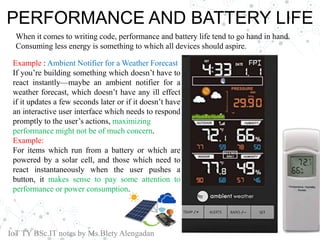
Example : Ambient Notifier for a Weather Forecast
If you’re building something which doesn’t have to
react instantly—maybe an ambient notifier for a
weather forecast, which doesn’t have any ill effect
if it updates a few seconds later or if it doesn’t have
an interactive user interface which needs to respond
promptly to the user’s actions, maximizing
performance might not be of much concern.
Example:
For items which run from a battery or which are
powered by a solar cell, and those which need to
react instantaneously when the user pushes a
button, it makes sense to pay some attention to
performance or power consumption.
IoT TY BSc.IT notes by Ms.Blety Alengadan
When it comes to writing code, performance and battery life tend to go hand in hand.
Consuming less energy is something to which all devices should aspire.
PERFORMANCE AND BATTERY LIFE
A lot of the biggest power-consumption gains come from the hardware design.
In particular, if your device can turn off modules of the system when they’re not in use or
put the entire processor into a low-power sleep mode when the code is finished or
waiting for something to happen, you have already made a quick win.
The quicker the main code finishes running, the sooner the hardware can go to sleep.
One of the easiest ways to make your code more efficient is to move to an event-driven
model rather than polling for changes.
The reason for this is to allow your device to sit in a low power state for longer and leap
into action when required, instead of having to regularly do busywork to check whether
things have changed and it has real work to do.
Setting up this model is trickier to do with the networking code if you are acting as a
client, rather than waiting as a server.
The techniques such as long polling that you saw in Chapter 7, “Prototyping Online Components”, or
protocols like Message Queue Telemetry Transport (MQTT) or basic socket connections enable you to work
around this situation.
IoT TY BSc.IT notes by Ms.Blety Alengadan
PERFORMANCE AND BATTERY LIFE
If your code needs to pause for a given amount of time to allow some effect to occur
before continuing, use calls which allow the processor to sleep rather than wait in a busy-
loop.
If you can reduce the amount of data that you’re processing, that helps too.
For instance, Bubblino talks directly to Twitter and downloads a full set of search results
as XML each time it checks for new messages.
All this data is processed and finally reduced down to a single number—how many new
tweets it finds.
In theory, an optimised intermediary service could perform the searches and just transmit
a single number to the Bubblino device.
The downside to that is you would need to write another service and maintain
infrastructure to support it.
In this case, it is better to have that traffic distributed across the globe wherever the
Bubblino devices themselves live.
IoT TY BSc.IT notes by Ms.Blety Alengadan
PERFORMANCE AND BATTERY LIFE
Following are a few habits that, if they become ingrained, help make your code
generally more efficient:
 When you are writing if/else constructs to choose between two possible paths
of execution, try to place the more likely code into the first branch—
the if rather than the else part—as follows:
if something is true
The more likely to happen code goes here
else
The less likely path of execution should go here
‱ Declaring data as constant where it is known never to change can help the
compiler to place it into flash memory or ROM, but it can also help the
compiler to know how to optimise the code.
‱ Avoid copying memory around. Moving big chunks of data from place to place
in memory can be a real performance killer.
IoT TY BSc.IT notes by Ms.Blety Alengadan
LIBRARIES
In the embedded world, tasks are often a little trickier. It’s getting better with the rise of
the system-on-chip offerings and their use of embedded Linux, where most of the server
packages can be incorporated in the same way as you would on “normal” Linux.
lwIP: lwIP, or LightWeight IP is a full TCP/IP stack which runs in low-resource
conditions. It requires only tens of kilobytes of RAM and around 40KB of ROM/flash.
The official Arduino WiFi shield uses a version of this library.
uIP: uIP, or micro IP is a TCP/IP stack targeted at the smallest possible systems. It can
even run on systems with only a couple of kilobytes of RAM. It does this by not using
any buffers to store incoming packets or outgoing packets which haven’t been
acknowledged.
uClibc: uClibc is a version of the standard GNU C library (glibc) targeted at embedded
Linux systems. It requires far fewer resources than glibc and should be an almost drop-in
replacement. Changing code to use it normally just involves recompiling the source
code.
IoT TY BSc.IT notes by Ms.Blety Alengadan
LIBRARIES
Atomthreads: Atomthreads is a lightweight real-time scheduler for embedded systems.
You can use it when your code gets complicated enough that you need to have more than
one thing happening at the same time
BusyBox: Although not really a library, BusyBox is a collection of a host of useful
UNIX utilities into a single, small executable and a common and useful package to
provide a simple shell environment and commands on your system.
IoT TY BSc.IT notes by Ms.Blety Alengadan
DEBUGGING
Modern desktop integrated development environments (often shortened to IDEs) have
excellent support for digging into what is going on while your code is running.
You can set breakpoints which stop execution when a predefined set of conditions is met,
at which point you can poke around in memory to see what it contains, evaluate
expressions to see whether your assumptions are correct, and then step through the code
line by line to watch what happens.
Systems such as embedded Linux usually have support for remote debugging with
utilities such as gdb, the GNU debugger .
This utility allows you to attach the debugger from your desktop system to the embedded
board, usually over a serial connection but sometimes also over an Ethernet or similar
network link.
Once it is attached, you then have access to a range of capabilities similar to desktop
debugging— the ability to set breakpoints, single-step through code, and inspect
variables and memory contents.
IoT TY BSc.IT notes by Ms.Blety Alengadan
DEBUGGING
The most obvious, and most common, poor-man’s debugging technique is to write
strings out to a logging system.
This approach is something that almost all software does, and it enables you to include
whatever information you deem useful.
That could be the value of certain variables at key points in the code.
Because most Internet of Things devices have a persistent connection to the network,
you could add a debugging service to the network interface.
This way, you can create a simple service which lets you connect using something as
basic as telnet and find out more about what is happening in real time
IoT TY BSc.IT notes by Ms.Blety Alengadan
DEBUGGING
You can connect a computer somewhere on the network path between the device and the
service it communicates with, running a packet sniffer enables you to see what is
happening at the network level.
Example: Wireshark
Usually, you monitor the network at one end of the connection or the other—with a
computer connected to the same LAN as the device or running the packet sniffer
software on the remote server
IoT TY BSc.IT notes by Ms.Blety Alengadan
List of ways to improve your embedded coding : SUMMARY
 Move as much data and so forth as possible into flash memory or ROM rather than
RAM because the latter tends to be in shorter supply.
 If items aren’t going to change, make them constant. This makes it easier to move
them into flash/ROM and lets the compiler optimise the code better.
 If you have only tiny amounts of memory, favour use of the stack over the heap.
 .For best power usage, spend as much time as possible asleep.
 Optimisations can live on the server side as well as in the device. A nonpolling or
reduced amount of data transferred improves both sides of the solution.
 Avoid premature optimisation. If you hit performance problems, profile to work out
where the issues lie.Copying memory is expensive, so try to do as little of it as you
can.
 Work with the compiler, rather than against it. Order your code to help the likely
execution path and use constants to help it optimise.
 Choose libraries carefully. One from a standard operating system might not be a good
choice for a more embedded environment.
 Tools such as gdb and JTAG are useful when debugging, but you can get a long way
with just outputting text to a serial terminal or flashing an LED.
 Careful observation of the environment surrounding the device can help you sniff out
problems, particularly when it’s connected to the Internet and so interacting with the
wider world.
IoT TY BSc.IT notes by Ms.Blety Alengadan

Techiques for Writing Embedded Code_Internet of Things

  • 1.
    CHAPTER 08 IoT TYBSc.IT notes by Ms.Blety Alengadan
  • 2.
    CHAPTER 08 IoT TYBSc.IT notes by Ms.Blety Alengadan  Memory Management  Types of Memory  Making the Most of Your RAM  Performance and Battery Life  Libraries  Debugging
  • 3.
    Memory Management NEED FORMEMORY MANAGEMENT On laptops or servers you have gigabytes of memory and hundreds of gigabytes of storage, on a microcontroller the resources are typically measured in kilobytes. For example, your web browser will think nothing of slurping 330KB of HTML, CSS, JavaScript, and images into memory, copying it around to parse it and rework it into a better data structure for displaying just to show you the (relatively simple) home page of Google. That’s 150 times the total memory available on an Arduino Uno, just for the download— before you start any processing of it. IoT TY BSc.IT notes by Ms.Blety Alengadan
  • 4.
    Memory Management When youdon’t have a lot of memory to play with, you need to be careful as to how you use it. This is especially the case when you have no way to indicate that message to the user. The computer user presented with one too many “low memory” warning dialog boxes will try rebooting, and so will the system administrator who spots the server thrashing its disk as it pages memory out to the hard drive to increase the amount of virtual memory. On the other hand, an embedded platform with no screen or other indicators will usually continue blindly until it runs out of memory completely—at which point it usually “indicates” this situation to the user by mysteriously ceasing to function. Even while you are developing software for a constrained device, trying to debug these issues can be difficult if memory is not managed properly IoT TY BSc.IT notes by Ms.Blety Alengadan
  • 5.
    Types of Memory ROM Read-onlymemory refers to memory where the information stored in the chips is hard- coded at the chips’ creation and can only be read afterwards. This memory type is the least flexible and is generally used to store only the executable program code and any data which is fixed and never changes. Originally, ROM was used because it was the cheapest way of creating memory, but these days it has no cost advantage over Flash chips, so their greater flexibility means that pure ROM chips are all but extinct. IoT TY BSc.IT notes by Ms.Blety Alengadan Flash chip ROM chips
  • 6.
    Types of MemoryFlash Ithas the ability to be electronically reprogrammed and erased. It is often found in USB flash drives, MP3 players, digital cameras and solid-state drives (SSD). Flash is a semi-permanent type of memory which provides all the advantages of ROM— namely, that it can store information without requiring any power, and so its contents can survive the circuit being unplugged— without the disadvantage of being unchangeable forever more. The contents of flash memory can be rewritten a maximum number of times, but in practice it is rare that you’ll hit the limits. Reading from flash memory isn’t much different in speed as from ROM or RAM. Writing, however, takes a few processor cycles, which means it’s best suited to storing information that you want to hold on to, such as the program executable itself or important data that has been gathered. IoT TY BSc.IT notes by Ms.Blety Alengadan USB flash drive MP3 players 1 TB SSD
  • 7.
    Types of Memory RAM Itrequires power to retain its contents, but the speed of update is comparable with the time taken to read from it (particularly when compared to flash memory). As a result it is used as the working memory for the system—the place where things are stored while being processed. If you know that the contents of a variable won’t ever change, it is better to define that variable as a constant instead. In the C and C++ programming languages (which are commonly used in embedded systems), you do this by using the const keyword. This keyword lets the compiler know that the variable doesn’t need to live in RAM because it will never be written to— only read from. Using constants this way can be a big saving if you have any large lookup tables or other big data structures such as fonts or bitmaps. Even text strings for debugging purposes can take up a noticeable amount of space. It’s much better to get this storage out of RAM and into flash. IoT TY BSc.IT notes by Ms.Blety Alengadan
  • 8.
    Types of Memory RAM TheHarvard architecture of the Atmel chips used in Arduino—the data (RAM) and program (flash/ROM) memory spaces are separated. As a result, you may have to do a little additional work to copy the data from flash into RAM when you want to use it. This issue is therefore something to be aware of when you are working on these platforms. The Arduino platform, for example, provides an additional macro to let you specify that certain strings should be stored in flash memory rather than RAM. Wrapping the string in F(...) tells the system that this is a “flash” string rather than a “normal” one: Serial.println (“This string will be stored in RAM”); Serial.println (F(“This one will be in flash”)); IoT TY BSc.IT notes by Ms.Blety Alengadan The Harvard Architecture
  • 9.
    MAKING THE MOSTOF YOUR RAM Now that you’ve moved everything that you can out of RAM and into flash, all that remains is to work out ways to make better use of the free memory you have. It’s easier to make the best trade-off between maximizing RAM usage and reliability if your memory usage is deterministic—that is, if you know the maximum amount of memory that will be used. The way to achieve this result is to not allocate any memory dynamically, that is, while the program is running. Rather than download the entire page into memory at once, you download it in chunks— filling the buffer each time and then working through that chunk of data before moving on to the next one. In some cases you might need to remember some part of one chunk before moving to the next. IoT TY BSc.IT notes by Ms.Blety Alengadan
  • 10.
    MAKING THE MOSTOF YOUR RAM EXAMPLE : BUBBLINO The code used for Bubblino, which runs on an Arduino board with only 2KB of RAM, can easily process the standard response XML from Twitter’s search API, which is typically 10–15KB per download. Because Bubblino’s code condenses all that text into a single number—the count of new tweets—it can discard a lot of the data as it goes. All it needs to track is whether or not each tweet is newer and the timestamp for the newest tweet it has seen (so it can pick up where it left off next time around). . IoT TY BSc.IT notes by Ms.Blety Alengadan
  • 11.
    MAKING THE MOSTOF YOUR RAM Local variables exist only during the function in which they’re declared (assuming you don’t use modifiers such as static to make them persistent) and so take up space only when they’re needed. If you can move more of your variables inside the functions where they’re actually used, you can free up more space for use during other parts of the execution path. Disadvantage: The downside of this method, however, is that you have no way to go back through the stream of data. After you discard the chunk you were working on, it’s gone. IoT TY BSc.IT notes by Ms.Blety Alengadan
  • 12.
    PERFORMANCE AND BATTERYLIFE Example : Ambient Notifier for a Weather Forecast If you’re building something which doesn’t have to react instantly—maybe an ambient notifier for a weather forecast, which doesn’t have any ill effect if it updates a few seconds later or if it doesn’t have an interactive user interface which needs to respond promptly to the user’s actions, maximizing performance might not be of much concern. Example: For items which run from a battery or which are powered by a solar cell, and those which need to react instantaneously when the user pushes a button, it makes sense to pay some attention to performance or power consumption. IoT TY BSc.IT notes by Ms.Blety Alengadan When it comes to writing code, performance and battery life tend to go hand in hand. Consuming less energy is something to which all devices should aspire.
  • 13.
    PERFORMANCE AND BATTERYLIFE A lot of the biggest power-consumption gains come from the hardware design. In particular, if your device can turn off modules of the system when they’re not in use or put the entire processor into a low-power sleep mode when the code is finished or waiting for something to happen, you have already made a quick win. The quicker the main code finishes running, the sooner the hardware can go to sleep. One of the easiest ways to make your code more efficient is to move to an event-driven model rather than polling for changes. The reason for this is to allow your device to sit in a low power state for longer and leap into action when required, instead of having to regularly do busywork to check whether things have changed and it has real work to do. Setting up this model is trickier to do with the networking code if you are acting as a client, rather than waiting as a server. The techniques such as long polling that you saw in Chapter 7, “Prototyping Online Components”, or protocols like Message Queue Telemetry Transport (MQTT) or basic socket connections enable you to work around this situation. IoT TY BSc.IT notes by Ms.Blety Alengadan
  • 14.
    PERFORMANCE AND BATTERYLIFE If your code needs to pause for a given amount of time to allow some effect to occur before continuing, use calls which allow the processor to sleep rather than wait in a busy- loop. If you can reduce the amount of data that you’re processing, that helps too. For instance, Bubblino talks directly to Twitter and downloads a full set of search results as XML each time it checks for new messages. All this data is processed and finally reduced down to a single number—how many new tweets it finds. In theory, an optimised intermediary service could perform the searches and just transmit a single number to the Bubblino device. The downside to that is you would need to write another service and maintain infrastructure to support it. In this case, it is better to have that traffic distributed across the globe wherever the Bubblino devices themselves live. IoT TY BSc.IT notes by Ms.Blety Alengadan
  • 15.
    PERFORMANCE AND BATTERYLIFE Following are a few habits that, if they become ingrained, help make your code generally more efficient:  When you are writing if/else constructs to choose between two possible paths of execution, try to place the more likely code into the first branch— the if rather than the else part—as follows: if something is true The more likely to happen code goes here else The less likely path of execution should go here ‱ Declaring data as constant where it is known never to change can help the compiler to place it into flash memory or ROM, but it can also help the compiler to know how to optimise the code. ‱ Avoid copying memory around. Moving big chunks of data from place to place in memory can be a real performance killer. IoT TY BSc.IT notes by Ms.Blety Alengadan
  • 16.
    LIBRARIES In the embeddedworld, tasks are often a little trickier. It’s getting better with the rise of the system-on-chip offerings and their use of embedded Linux, where most of the server packages can be incorporated in the same way as you would on “normal” Linux. lwIP: lwIP, or LightWeight IP is a full TCP/IP stack which runs in low-resource conditions. It requires only tens of kilobytes of RAM and around 40KB of ROM/flash. The official Arduino WiFi shield uses a version of this library. uIP: uIP, or micro IP is a TCP/IP stack targeted at the smallest possible systems. It can even run on systems with only a couple of kilobytes of RAM. It does this by not using any buffers to store incoming packets or outgoing packets which haven’t been acknowledged. uClibc: uClibc is a version of the standard GNU C library (glibc) targeted at embedded Linux systems. It requires far fewer resources than glibc and should be an almost drop-in replacement. Changing code to use it normally just involves recompiling the source code. IoT TY BSc.IT notes by Ms.Blety Alengadan
  • 17.
    LIBRARIES Atomthreads: Atomthreads isa lightweight real-time scheduler for embedded systems. You can use it when your code gets complicated enough that you need to have more than one thing happening at the same time BusyBox: Although not really a library, BusyBox is a collection of a host of useful UNIX utilities into a single, small executable and a common and useful package to provide a simple shell environment and commands on your system. IoT TY BSc.IT notes by Ms.Blety Alengadan
  • 18.
    DEBUGGING Modern desktop integrateddevelopment environments (often shortened to IDEs) have excellent support for digging into what is going on while your code is running. You can set breakpoints which stop execution when a predefined set of conditions is met, at which point you can poke around in memory to see what it contains, evaluate expressions to see whether your assumptions are correct, and then step through the code line by line to watch what happens. Systems such as embedded Linux usually have support for remote debugging with utilities such as gdb, the GNU debugger . This utility allows you to attach the debugger from your desktop system to the embedded board, usually over a serial connection but sometimes also over an Ethernet or similar network link. Once it is attached, you then have access to a range of capabilities similar to desktop debugging— the ability to set breakpoints, single-step through code, and inspect variables and memory contents. IoT TY BSc.IT notes by Ms.Blety Alengadan
  • 19.
    DEBUGGING The most obvious,and most common, poor-man’s debugging technique is to write strings out to a logging system. This approach is something that almost all software does, and it enables you to include whatever information you deem useful. That could be the value of certain variables at key points in the code. Because most Internet of Things devices have a persistent connection to the network, you could add a debugging service to the network interface. This way, you can create a simple service which lets you connect using something as basic as telnet and find out more about what is happening in real time IoT TY BSc.IT notes by Ms.Blety Alengadan
  • 20.
    DEBUGGING You can connecta computer somewhere on the network path between the device and the service it communicates with, running a packet sniffer enables you to see what is happening at the network level. Example: Wireshark Usually, you monitor the network at one end of the connection or the other—with a computer connected to the same LAN as the device or running the packet sniffer software on the remote server IoT TY BSc.IT notes by Ms.Blety Alengadan
  • 21.
    List of waysto improve your embedded coding : SUMMARY  Move as much data and so forth as possible into flash memory or ROM rather than RAM because the latter tends to be in shorter supply.  If items aren’t going to change, make them constant. This makes it easier to move them into flash/ROM and lets the compiler optimise the code better.  If you have only tiny amounts of memory, favour use of the stack over the heap.  .For best power usage, spend as much time as possible asleep.  Optimisations can live on the server side as well as in the device. A nonpolling or reduced amount of data transferred improves both sides of the solution.  Avoid premature optimisation. If you hit performance problems, profile to work out where the issues lie.Copying memory is expensive, so try to do as little of it as you can.  Work with the compiler, rather than against it. Order your code to help the likely execution path and use constants to help it optimise.  Choose libraries carefully. One from a standard operating system might not be a good choice for a more embedded environment.  Tools such as gdb and JTAG are useful when debugging, but you can get a long way with just outputting text to a serial terminal or flashing an LED.  Careful observation of the environment surrounding the device can help you sniff out problems, particularly when it’s connected to the Internet and so interacting with the wider world. IoT TY BSc.IT notes by Ms.Blety Alengadan