Checklist for identifying exemplary uses of 

technology and interactive media for early learning 

The Pennsylvania Digital Media Literacy Project


!

Michael Robb, Rita Catalano, Tanya Smith – Fred Rogers Center for Early Learning and
Children’s Media at Saint Vincent College
Sue Polojac, Michelle Figlar – Pittsburgh Association for the Education of Young Children
Barbara Minzenberg - Pennsylvania Office of Child Development and Early Learning
Roberta Schomburg – Carlow University, Fred Rogers Center

!

The influx of new technologies and digital media has raised questions about how early
childhood educators can best integrate new tools into their practice in ways that support
developmentally appropriate practice. In 2012, the National Association for the Education of
Young Children (NAEYC) and the Fred Rogers Center for Early Learning and Children’s
Media at Saint Vincent College (FRC) released a joint position statement to provide
guidance to early childhood programs, with recommendations on developmentally
appropriate practice in the selection, use, integration, and evaluation of technology and
interactive media. Other researchers, educators, and advocates also are providing positive
guidance in this rapidly changing environment. This checklist developed for the
Pennsylvania Digital Media Literacy Project synthesizes recommendations from the NAEYCFRC position statement and several of these other sources We borrow the definition of
technology tools from the NAEYC-FRC position statement to include a broad range of
digital and analog materials “designed to facilitate active and creative uses by young children
and to encourage social engagement with other children and adults.” These tools include,
for example, computers, tablets, multitouch screens, interactive whiteboards, mobile devices,
cameras, DVD and music players, audio recorders, electronic toys, games, e-book readers,
and older analog devices still being used such as tape recorders, VCRs, VHS tapes, record
and cassette players, light tables, projectors, and microscopes. 


NOTE: Educators should use this checklist to guide their thinking when integrating
technology and interactive media into their programs and classrooms. Many of the
statements below will be more applicable to specific instances of technology and
interactive media use in early childhood education than others. Therefore, it is not
essential to check “yes” in every box.
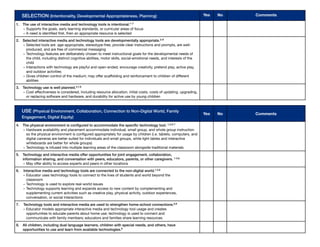
SELECTION (Intentionality, Developmental Appropriateness, Planning)

Yes

No

Comments

Yes

No

Comments

1. The use of interactive media and technology tools is intentional.1–7
• Supports the goals, early learning standards, or curricular areas of focus

• A need is identified first, then an appropriate resource is selected
2. Selected interactive media and technology tools are developmentally appropriate.2–8
• Selected tools are age-appropriate, stereotype-free, provide clear instructions and prompts, are wellproduced, and are free of commercial messaging

• Technology features are deliberately chosen to meet instructional goals for the developmental needs of
the child, including distinct cognitive abilities, motor skills, social-emotional needs, and interests of the
child

• Interactions with technology are playful and open-ended, encourage creativity, pretend play, active play,
and outdoor activities

• Gives children control of the medium; may offer scaffolding and reinforcement to children of different
abilities
3. Technology use is well planned.4,7,8
• Cost effectiveness is considered, including resource allocation, initial costs, costs of updating, upgrading,
or replacing software and hardware, and durability for active use by young children

USE (Physical Environment, Collaboration, Connection to Non-Digital World, Family
Engagement, Digital Equity)
4. The physical environment is configured to accommodate the specific technology tool. 1,2,5-7
• Hardware availability and placement accommodate individual, small group, and whole group instruction
so the physical environment is configured appropriately for usage by children (i.e. tablets, computers, and
digital cameras are better suited for individuals and small groups, while light tables and interactive
whiteboards are better for whole groups)

• Technology is infused into multiple learning areas of the classroom alongside traditional materials
5. Technology and interactive media offer opportunities for joint engagement, collaboration,
information sharing, and conversation with peers, educators, parents, or other caregivers. 1-3,6
• May offer ability to access experts and peers in other locations
6.

Interactive media and technology tools are connected to the non-digital world.1,3,8
• Educator uses technology tools to connect to the lives of students and world beyond the
classroom

• Technology is used to explore real-world issues

• Technology supports learning and expands access to new content by complementing and
supplementing current activities such as creative play, physical activity, outdoor experiences,
conversation, or social interactions

7.

Technology tools and interactive media are used to strengthen home-school connections.6,8
• Educator models appropriate interactive media and technology tool usage and creates
opportunities to educate parents about home use; technology is used to connect and
communicate with family members; educators and families share learning resources

8. All children, including dual language learners, children with special needs, and others, have
opportunities to use and learn from available technologies.8
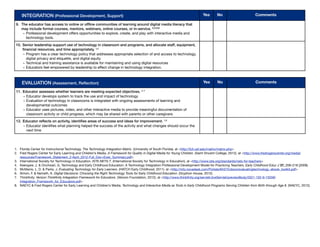
INTEGRATION (Professional Development, Support)

Yes

No

Comments

Yes

No

Comments

9. The educator has access to online or offline communities of learning around digital media literacy that
may include formal courses, mentors, webinars, online courses, or in-service. 2,3,5,6
• Professional development offers opportunities to explore, create, and play with interactive media and
technology tools.
10. Senior leadership support use of technology in classroom and programs, and allocate staff, equipment,
financial resources, and time appropriately. 3,6
• Program has a clear technology policy that addresses appropriate selection of and access to technology,
digital privacy and etiquette, and digital equity

• Technical and training assistance is available for maintaining and using digital resources

• Educators feel empowered by leadership to effect change in technology integration.

EVALUATION (Assessment, Reflection)
11. Educator assesses whether learners are meeting expected objectives. 3–7
• Educator develops system to track the use and impact of technology

• Evaluation of technology in classrooms is integrated with ongoing assessments of learning and
developmental outcomes

• Educator uses pictures, video, and other interactive media to provide meaningful documentation of
classroom activity or child progress, which may be shared with parents or other caregivers
12. Educator reflects on activity, identifies areas of success and ideas for improvement. 7,8
• Educator identifies what planning helped the success of the activity and what changes should occur the
next time

!
!

1.	 Florida Center for Instructional Technology. The Technology Integration Matrix. (University of South Florida). at <http://fcit.usf.edu/matrix/matrix.php>

2.	 Fred Rogers Center for Early Learning and Children’s Media. A Framework for Quality in Digital Media for Young Children. (Saint Vincent College, 2012). at <http://www.fredrogerscenter.org/media/
resources/Framework_Statement_2-April_2012-Full_Doc+Exec_Summary.pdf>

3.	 International Society for Technology in Education. ISTE.NETS.T. (International Society for Technology in Education). at <http://www.iste.org/standards/nets-for-teachers>

4.	 Keengwe, J. & Onchwari, G. Technology and Early Childhood Education: A Technology Integration Professional Development Model for Practicing Teachers. Early Childhood Educ J 37, 209–218 (2009).

5.	 McManis, L. D. & Parks, J. Evaluating Technology for Early Learners. (HATCH Early Childhood, 2011). at <http://info.novadesk.com/Portals/84375/docs/evaluatingtechnology_ebook_toolkit.pdf>

6.	 Simon, F. & Nemeth, K. Digital Decisions: Choosing the Right Technology Tools for Early Childhood Education. (Gryphon House, 2012).

7.	 Thinkfinity. Verizon Thinkfinity Integration Framework for Educators. (Verizon Foundation, 2012). at <http://www.thinkfinity.org/servlet/JiveServlet/previewBody/2021-102-9-15559/
Integration_Framework_for_Educators.pdf>

8.	 NAEYC & Fred Rogers Center for Early Learning and Children’s Media. Technology and Interactive Media as Tools in Early Childhood Programs Serving Children from Birth through Age 8. (NAEYC, 2012).

Fred Rogers Center at St. Vincent College | Tech Integration Checklist (FINAL)

  • 1.
    Checklist for identifyingexemplary uses of 
 technology and interactive media for early learning 
 The Pennsylvania Digital Media Literacy Project 
 ! Michael Robb, Rita Catalano, Tanya Smith – Fred Rogers Center for Early Learning and Children’s Media at Saint Vincent College Sue Polojac, Michelle Figlar – Pittsburgh Association for the Education of Young Children Barbara Minzenberg - Pennsylvania Office of Child Development and Early Learning Roberta Schomburg – Carlow University, Fred Rogers Center ! The influx of new technologies and digital media has raised questions about how early childhood educators can best integrate new tools into their practice in ways that support developmentally appropriate practice. In 2012, the National Association for the Education of Young Children (NAEYC) and the Fred Rogers Center for Early Learning and Children’s Media at Saint Vincent College (FRC) released a joint position statement to provide guidance to early childhood programs, with recommendations on developmentally appropriate practice in the selection, use, integration, and evaluation of technology and interactive media. Other researchers, educators, and advocates also are providing positive guidance in this rapidly changing environment. This checklist developed for the Pennsylvania Digital Media Literacy Project synthesizes recommendations from the NAEYCFRC position statement and several of these other sources We borrow the definition of technology tools from the NAEYC-FRC position statement to include a broad range of digital and analog materials “designed to facilitate active and creative uses by young children and to encourage social engagement with other children and adults.” These tools include, for example, computers, tablets, multitouch screens, interactive whiteboards, mobile devices, cameras, DVD and music players, audio recorders, electronic toys, games, e-book readers, and older analog devices still being used such as tape recorders, VCRs, VHS tapes, record and cassette players, light tables, projectors, and microscopes. 
 
 NOTE: Educators should use this checklist to guide their thinking when integrating technology and interactive media into their programs and classrooms. Many of the statements below will be more applicable to specific instances of technology and interactive media use in early childhood education than others. Therefore, it is not essential to check “yes” in every box.
  • 2.
    SELECTION (Intentionality, DevelopmentalAppropriateness, Planning) Yes No Comments Yes No Comments 1. The use of interactive media and technology tools is intentional.1–7 • Supports the goals, early learning standards, or curricular areas of focus • A need is identified first, then an appropriate resource is selected 2. Selected interactive media and technology tools are developmentally appropriate.2–8 • Selected tools are age-appropriate, stereotype-free, provide clear instructions and prompts, are wellproduced, and are free of commercial messaging • Technology features are deliberately chosen to meet instructional goals for the developmental needs of the child, including distinct cognitive abilities, motor skills, social-emotional needs, and interests of the child • Interactions with technology are playful and open-ended, encourage creativity, pretend play, active play, and outdoor activities • Gives children control of the medium; may offer scaffolding and reinforcement to children of different abilities 3. Technology use is well planned.4,7,8 • Cost effectiveness is considered, including resource allocation, initial costs, costs of updating, upgrading, or replacing software and hardware, and durability for active use by young children USE (Physical Environment, Collaboration, Connection to Non-Digital World, Family Engagement, Digital Equity) 4. The physical environment is configured to accommodate the specific technology tool. 1,2,5-7 • Hardware availability and placement accommodate individual, small group, and whole group instruction so the physical environment is configured appropriately for usage by children (i.e. tablets, computers, and digital cameras are better suited for individuals and small groups, while light tables and interactive whiteboards are better for whole groups) • Technology is infused into multiple learning areas of the classroom alongside traditional materials 5. Technology and interactive media offer opportunities for joint engagement, collaboration, information sharing, and conversation with peers, educators, parents, or other caregivers. 1-3,6 • May offer ability to access experts and peers in other locations 6. Interactive media and technology tools are connected to the non-digital world.1,3,8 • Educator uses technology tools to connect to the lives of students and world beyond the classroom • Technology is used to explore real-world issues • Technology supports learning and expands access to new content by complementing and supplementing current activities such as creative play, physical activity, outdoor experiences, conversation, or social interactions 7. Technology tools and interactive media are used to strengthen home-school connections.6,8 • Educator models appropriate interactive media and technology tool usage and creates opportunities to educate parents about home use; technology is used to connect and communicate with family members; educators and families share learning resources 8. All children, including dual language learners, children with special needs, and others, have opportunities to use and learn from available technologies.8
  • 3.
    INTEGRATION (Professional Development,Support) Yes No Comments Yes No Comments 9. The educator has access to online or offline communities of learning around digital media literacy that may include formal courses, mentors, webinars, online courses, or in-service. 2,3,5,6 • Professional development offers opportunities to explore, create, and play with interactive media and technology tools. 10. Senior leadership support use of technology in classroom and programs, and allocate staff, equipment, financial resources, and time appropriately. 3,6 • Program has a clear technology policy that addresses appropriate selection of and access to technology, digital privacy and etiquette, and digital equity • Technical and training assistance is available for maintaining and using digital resources • Educators feel empowered by leadership to effect change in technology integration. EVALUATION (Assessment, Reflection) 11. Educator assesses whether learners are meeting expected objectives. 3–7 • Educator develops system to track the use and impact of technology • Evaluation of technology in classrooms is integrated with ongoing assessments of learning and developmental outcomes • Educator uses pictures, video, and other interactive media to provide meaningful documentation of classroom activity or child progress, which may be shared with parents or other caregivers 12. Educator reflects on activity, identifies areas of success and ideas for improvement. 7,8 • Educator identifies what planning helped the success of the activity and what changes should occur the next time ! ! 1. Florida Center for Instructional Technology. The Technology Integration Matrix. (University of South Florida). at <http://fcit.usf.edu/matrix/matrix.php> 2. Fred Rogers Center for Early Learning and Children’s Media. A Framework for Quality in Digital Media for Young Children. (Saint Vincent College, 2012). at <http://www.fredrogerscenter.org/media/ resources/Framework_Statement_2-April_2012-Full_Doc+Exec_Summary.pdf> 3. International Society for Technology in Education. ISTE.NETS.T. (International Society for Technology in Education). at <http://www.iste.org/standards/nets-for-teachers> 4. Keengwe, J. & Onchwari, G. Technology and Early Childhood Education: A Technology Integration Professional Development Model for Practicing Teachers. Early Childhood Educ J 37, 209–218 (2009). 5. McManis, L. D. & Parks, J. Evaluating Technology for Early Learners. (HATCH Early Childhood, 2011). at <http://info.novadesk.com/Portals/84375/docs/evaluatingtechnology_ebook_toolkit.pdf> 6. Simon, F. & Nemeth, K. Digital Decisions: Choosing the Right Technology Tools for Early Childhood Education. (Gryphon House, 2012). 7. Thinkfinity. Verizon Thinkfinity Integration Framework for Educators. (Verizon Foundation, 2012). at <http://www.thinkfinity.org/servlet/JiveServlet/previewBody/2021-102-9-15559/ Integration_Framework_for_Educators.pdf> 8. NAEYC & Fred Rogers Center for Early Learning and Children’s Media. Technology and Interactive Media as Tools in Early Childhood Programs Serving Children from Birth through Age 8. (NAEYC, 2012).