IMAGES AS LINKS
By Mario Esparza
CIT 230
A picture is worth 1000 words.
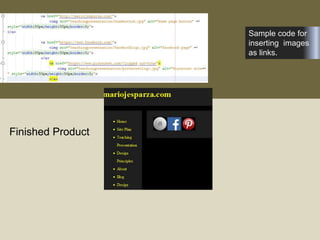
Sample code for
inserting images
as links.
Finished Product
<!DOCTYPE html>
<html>
<body>
<p>The image is a link. You can click on it.</p>
<a href="default.asp">
<img src="smiley.gif" alt="HTML tutorial"
style="width:42px;height:42px;border:0;">
</a>
<p>Add "border:0;" to prevent IE9 (and earlier) from
displaying a border around the image.</p>
</body>
</html>
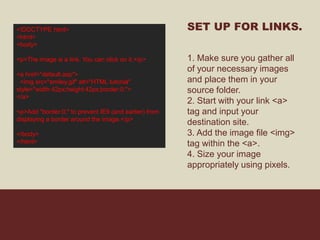
SET UP FOR LINKS.
1. Make sure you gather all
of your necessary images
and place them in your
source folder.
2. Start with your link <a>
tag and input your
destination site.
3. Add the image file <img>
tag within the <a>.
4. Size your image
appropriately using pixels.
SOURCES:
Facebook: https://www.facebookbrand.com/
Instagram: https://www.instagram-brand.com/
Home button: http://idyeah.com/blog/2013/03/home-not-required/
Pinterest: http://hudsonarealibrary.org/2013/03/follow-hudson-area-library-on-
pinterest/pinterest-logo/
Contacts: http://www.redmondpie.com/set-up-carddav-on-iphone-to-sync-google-gmail-
contacts-without-exchange/
Link Code: http://www.w3schools.com/html/tryit.asp?filename=tryhtml_images_link

Teachingpresentation

  • 1.
    IMAGES AS LINKS ByMario Esparza CIT 230
  • 2.
    A picture isworth 1000 words.
  • 3.
    Sample code for insertingimages as links. Finished Product
  • 4.
    <!DOCTYPE html> <html> <body> <p>The imageis a link. You can click on it.</p> <a href="default.asp"> <img src="smiley.gif" alt="HTML tutorial" style="width:42px;height:42px;border:0;"> </a> <p>Add "border:0;" to prevent IE9 (and earlier) from displaying a border around the image.</p> </body> </html> SET UP FOR LINKS. 1. Make sure you gather all of your necessary images and place them in your source folder. 2. Start with your link <a> tag and input your destination site. 3. Add the image file <img> tag within the <a>. 4. Size your image appropriately using pixels.
  • 5.
    SOURCES: Facebook: https://www.facebookbrand.com/ Instagram: https://www.instagram-brand.com/ Homebutton: http://idyeah.com/blog/2013/03/home-not-required/ Pinterest: http://hudsonarealibrary.org/2013/03/follow-hudson-area-library-on- pinterest/pinterest-logo/ Contacts: http://www.redmondpie.com/set-up-carddav-on-iphone-to-sync-google-gmail- contacts-without-exchange/ Link Code: http://www.w3schools.com/html/tryit.asp?filename=tryhtml_images_link