PC Hardware
TASK1:
Identification of the peripherals of a computer, components in a CPU and its functions. Draw
the block diagram of the CPU along with the configuration of each peripheral.
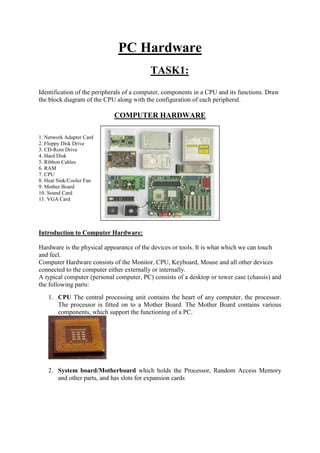
COMPUTER HARDWARE
1. Network Adapter Card
2. Floppy Disk Drive
3. CD-Rom Drive
4. Hard Disk
5. Ribbon Cables
6. RAM
7. CPU
8. Heat Sink/Cooler Fan
9. Mother Board
10. Sound Card
11. VGA Card
Introduction to Computer Hardware:
Hardware is the physical appearance of the devices or tools. It is what which we can touch
and feel.
Computer Hardware consists of the Monitor, CPU, Keyboard, Mouse and all other devices
connected to the computer either externally or internally.
A typical computer (personal computer, PC) consists of a desktop or tower case (chassis) and
the following parts:
1. CPU The central processing unit contains the heart of any computer, the processor.
The processor is fitted on to a Mother Board. The Mother Board contains various
components, which support the functioning of a PC.
2. System board/Motherboard which holds the Processor, Random Access Memory
and other parts, and has slots for expansion cards
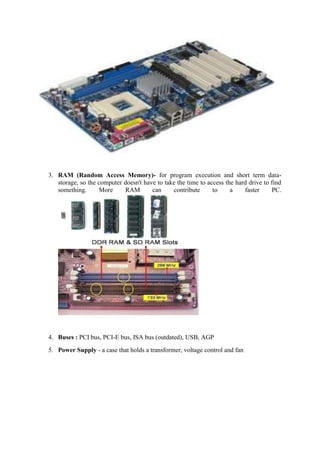
3. RAM (Random Access Memory)- for program execution and short term data-
storage, so the computer doesn't have to take the time to access the hard drive to find
something. More RAM can contribute to a faster PC.
4. Buses : PCI bus, PCI-E bus, ISA bus (outdated), USB, AGP
5. Power Supply - a case that holds a transformer, voltage control and fan
6. Storage controllers, of IDE, SCSI or other type, that control hard disk, floppy disk,
CD-ROM and other drives; the controllers sit directly on the motherboard (on-board)
or on expansion cards
7. Video display controller that produces the output for the computer display
8. Computer bus controllers (parallel, serial, USB, Fire wire) to connect the computer
to external peripheral devices such as printers or scanners
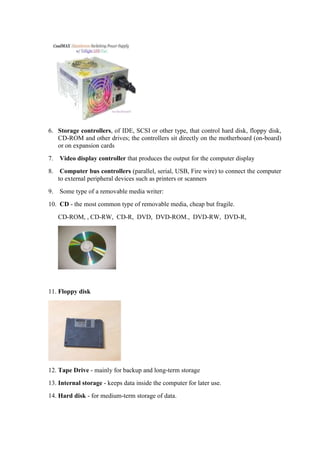
9. Some type of a removable media writer:
10. CD - the most common type of removable media, cheap but fragile.
CD-ROM, , CD-RW, CD-R, DVD, DVD-ROM., DVD-RW, DVD-R,
11. Floppy disk
12. Tape Drive - mainly for backup and long-term storage
13. Internal storage - keeps data inside the computer for later use.
14. Hard disk - for medium-term storage of data.
15. Disk array controller
16. Sound card - translates signals from the system board into analog voltage levels, and
has terminals to plug in speakers.
17. Networking - to connect the computer to the Internet and/or other computers
18. Modem - for dial-up connections
19. Network card - for DSL/Cable internet, and/or connecting to other computers.
20. Socket 478:
It uses 478 – PIN MICROPGA package it is used installing CPU It is square type design.
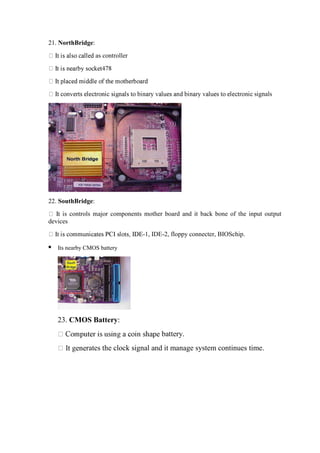
21. NorthBridge:
as controller
signals
22. SouthBridge:
s controls major components mother board and it back bone of the input output
devices
-1, IDE-2, floppy connecter, BIOSchip.
 Its nearby CMOS battery
23. CMOS Battery:
battery.
rates the clock signal and it manage system continues time.
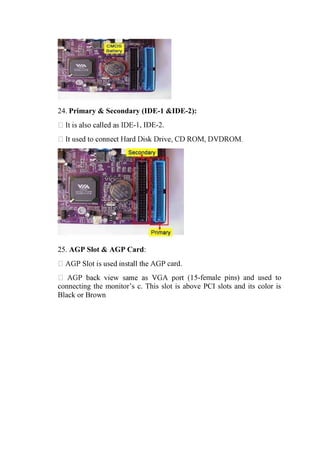
24. Primary & Secondary (IDE-1 &IDE-2):
-1, IDE-2.
25. AGP Slot & AGP Card:
card.
-female pins) and used to
connecting the monitor’s c. This slot is above PCI slots and its color is
Black or Brown
26. BIOS Chip:
work together
27. SMPS:
CD ROM, FDD
fan.
is the rectangular box shape and panel name is switching mode power
supply.
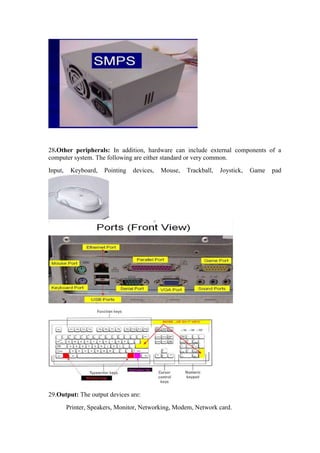
28.Other peripherals: In addition, hardware can include external components of a
computer system. The following are either standard or very common.
Input, Keyboard, Pointing devices, Mouse, Trackball, Joystick, Game pad
29.Output: The output devices are:
Printer, Speakers, Monitor, Networking, Modem, Network card.

task1.doc

  • 1.
    PC Hardware TASK1: Identification ofthe peripherals of a computer, components in a CPU and its functions. Draw the block diagram of the CPU along with the configuration of each peripheral. COMPUTER HARDWARE 1. Network Adapter Card 2. Floppy Disk Drive 3. CD-Rom Drive 4. Hard Disk 5. Ribbon Cables 6. RAM 7. CPU 8. Heat Sink/Cooler Fan 9. Mother Board 10. Sound Card 11. VGA Card Introduction to Computer Hardware: Hardware is the physical appearance of the devices or tools. It is what which we can touch and feel. Computer Hardware consists of the Monitor, CPU, Keyboard, Mouse and all other devices connected to the computer either externally or internally. A typical computer (personal computer, PC) consists of a desktop or tower case (chassis) and the following parts: 1. CPU The central processing unit contains the heart of any computer, the processor. The processor is fitted on to a Mother Board. The Mother Board contains various components, which support the functioning of a PC. 2. System board/Motherboard which holds the Processor, Random Access Memory and other parts, and has slots for expansion cards
  • 2.
    3. RAM (RandomAccess Memory)- for program execution and short term data- storage, so the computer doesn't have to take the time to access the hard drive to find something. More RAM can contribute to a faster PC. 4. Buses : PCI bus, PCI-E bus, ISA bus (outdated), USB, AGP 5. Power Supply - a case that holds a transformer, voltage control and fan
  • 3.
    6. Storage controllers,of IDE, SCSI or other type, that control hard disk, floppy disk, CD-ROM and other drives; the controllers sit directly on the motherboard (on-board) or on expansion cards 7. Video display controller that produces the output for the computer display 8. Computer bus controllers (parallel, serial, USB, Fire wire) to connect the computer to external peripheral devices such as printers or scanners 9. Some type of a removable media writer: 10. CD - the most common type of removable media, cheap but fragile. CD-ROM, , CD-RW, CD-R, DVD, DVD-ROM., DVD-RW, DVD-R, 11. Floppy disk 12. Tape Drive - mainly for backup and long-term storage 13. Internal storage - keeps data inside the computer for later use. 14. Hard disk - for medium-term storage of data.
  • 4.
    15. Disk arraycontroller 16. Sound card - translates signals from the system board into analog voltage levels, and has terminals to plug in speakers. 17. Networking - to connect the computer to the Internet and/or other computers 18. Modem - for dial-up connections 19. Network card - for DSL/Cable internet, and/or connecting to other computers. 20. Socket 478: It uses 478 – PIN MICROPGA package it is used installing CPU It is square type design.
  • 5.
    21. NorthBridge: as controller signals 22.SouthBridge: s controls major components mother board and it back bone of the input output devices -1, IDE-2, floppy connecter, BIOSchip.  Its nearby CMOS battery 23. CMOS Battery: battery. rates the clock signal and it manage system continues time.
  • 6.
    24. Primary &Secondary (IDE-1 &IDE-2): -1, IDE-2. 25. AGP Slot & AGP Card: card. -female pins) and used to connecting the monitor’s c. This slot is above PCI slots and its color is Black or Brown
  • 7.
    26. BIOS Chip: worktogether 27. SMPS: CD ROM, FDD fan. is the rectangular box shape and panel name is switching mode power supply.
  • 8.
    28.Other peripherals: Inaddition, hardware can include external components of a computer system. The following are either standard or very common. Input, Keyboard, Pointing devices, Mouse, Trackball, Joystick, Game pad 29.Output: The output devices are: Printer, Speakers, Monitor, Networking, Modem, Network card.