TAKE CONTROL OF YOUR SITE
WITH WORDPRESS
BeckyDavisDesign.com @beckyddesign
WHAT IS WORDPRESS?
WordPress is an open source blog tool and
publishing platform powered by PHP and MySQL. It's
often customized into a Content Management
System (CMS). It has many features including a plug-
in architecture and a template system.
From Wikipedia, the free encyclopedia
At this point over 25% of ALL websites are powered
by WordPress.
2
BeckyDavisDesign.com @beckyddesign
DIFFERENT FLAVORS OF WORDPRESS
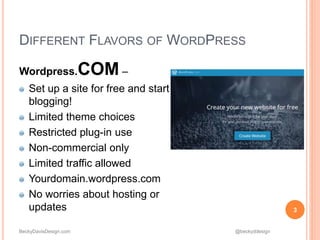
Wordpress.COM –
Set up a site for free and start
blogging!
Limited theme choices
Restricted plug-in use
Non-commercial only
Limited traffic allowed
Yourdomain.wordpress.com
No worries about hosting or
updates 3
BeckyDavisDesign.com @beckyddesign
DIFFERENT FLAVORS OF WORDPRESS
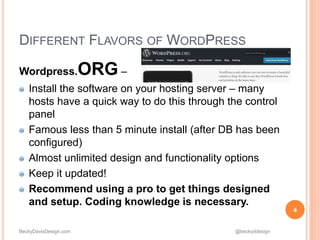
Wordpress.ORG –
Install the software on your hosting server – many
hosts have a quick way to do this through the control
panel
Famous less than 5 minute install (after DB has been
configured)
Almost unlimited design and functionality options
Keep it updated!
Recommend using a pro to get things designed
and setup. Coding knowledge is necessary.
4
BeckyDavisDesign.com @beckyddesign
DIFFERENT FLAVORS OF WORDPRESS
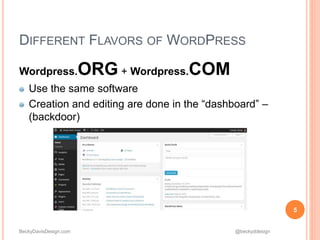
Wordpress.ORG + Wordpress.COM
Use the same software
Creation and editing are done in the “dashboard” –
(backdoor)
5
BeckyDavisDesign.com @beckyddesign
THINGS TO BE AWARE OF
If you already have a site that is NOT
WordPress
If you only need to make a few small
changes in a year, creating a new site in
WordPress may not be worth it
Most sites can be re-created with
WordPress, but it’s not a simple copy &
paste
You will be starting over…
Sites are like computers – over 5 years is
really old
6
BeckyDavisDesign.com @beckyddesign
THINGS TO BE AWARE OF
When using a pro….
Be clear on what you want in a site
Design and functionality
Be sure TRAINING is included
You should know how to add/edit
content
Be sure that you have your login info
for the site as well as your hosting
and domain
7
BeckyDavisDesign.com @beckyddesign
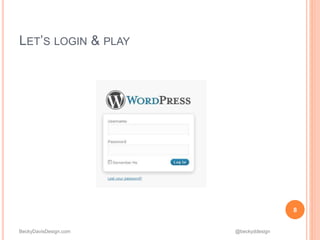
LET’S LOGIN & PLAY
8
BeckyDavisDesign.com @beckyddesign
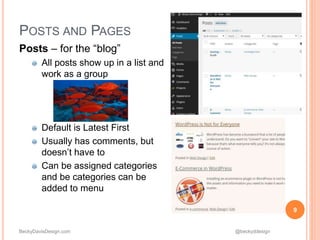
POSTS AND PAGES
Posts – for the “blog”
All posts show up in a list and
work as a group
Default is Latest First
Usually has comments, but
doesn’t have to
Can be assigned categories
and be categories can be
added to menu
9
BeckyDavisDesign.com @beckyddesign
POSTS AND PAGES
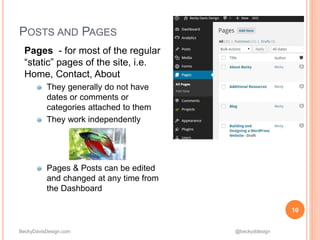
Pages - for most of the regular
“static” pages of the site, i.e.
Home, Contact, About
They generally do not have
dates or comments or
categories attached to them
They work independently
Pages & Posts can be edited
and changed at any time from
the Dashboard
10
BeckyDavisDesign.com @beckyddesign
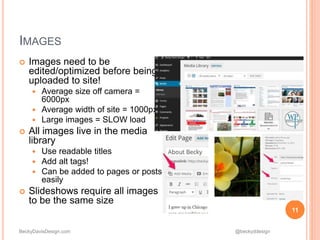
 Images need to be
edited/optimized before being
uploaded to site!
 Average size off camera =
6000px
 Average width of site = 1000px
 Large images = SLOW load
 All images live in the media
library
 Use readable titles
 Add alt tags!
 Can be added to pages or posts
easily
 Slideshows require all images
to be the same size
11
IMAGES
BeckyDavisDesign.com @beckyddesign
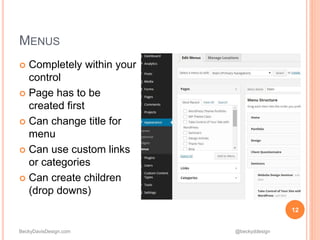
 Completely within your
control
 Page has to be
created first
 Can change title for
menu
 Can use custom links
or categories
 Can create children
(drop downs)
12
MENUS
BeckyDavisDesign.com @beckyddesign
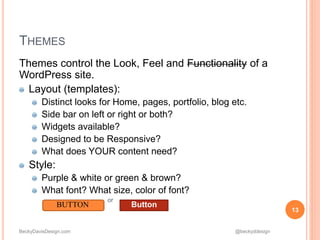
Themes control the Look, Feel and Functionality of a
WordPress site.
Layout (templates):
Distinct looks for Home, pages, portfolio, blog etc.
Side bar on left or right or both?
Widgets available?
Designed to be Responsive?
What does YOUR content need?
Style:
Purple & white or green & brown?
What font? What size, color of font?
or
13
THEMES
BUTTON Button
BeckyDavisDesign.com @beckyddesign
Ready-made themes
Wordpress.org/themes – free
Many vendors, usually $20-$80
Look at structure, templates, keep your content in mind
Don’t be sucked in by splashy design
Carefully investigate the documentation and support before
purchase
Words to look for: templates, widgets, responsive, support
No coding needed, but still a learning curve
Built for masses, many options
Custom built themes
Hire a pro or learn to code (HTML, CSS, PHP)
Built just for what you need
14
THEMES
BeckyDavisDesign.com @beckyddesign
15
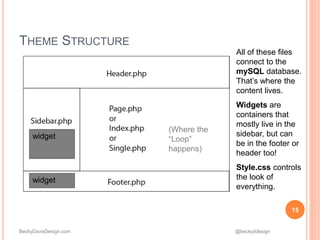
THEME STRUCTURE
All of these files
connect to the
mySQL database.
That’s where the
content lives.
Widgets are
containers that
mostly live in the
sidebar, but can
be in the footer or
header too!
Style.css controls
the look of
everything.
widget
widget
(Where the
“Loop”
happens)
BeckyDavisDesign.com @beckyddesign
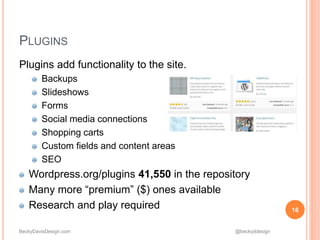
Plugins add functionality to the site.
Backups
Slideshows
Forms
Social media connections
Shopping carts
Custom fields and content areas
SEO
Wordpress.org/plugins 41,550 in the repository
Many more “premium” ($) ones available
Research and play required 16
PLUGINS
BeckyDavisDesign.com @beckyddesign
17
THAT’S A WORDPRESS SITE?
 Vogue.com
 Newyorker.com
 Lafeber.com
 chicagotribunemediagroup.com
 hydeparkday.org
 https://wordpress.org/showcase/ many more
examples!
BeckyDavisDesign.com @beckyddesign
becky@beckydavisdesign.com
beckydavisdesign.com
http://www.meetup.com/Chicago-WordPress-Meetup/
come and learn more!
Thanks!
18
CONTACT

Take Control of Your Site w/ WordPress

  • 1.
    TAKE CONTROL OFYOUR SITE WITH WORDPRESS
  • 2.
    BeckyDavisDesign.com @beckyddesign WHAT ISWORDPRESS? WordPress is an open source blog tool and publishing platform powered by PHP and MySQL. It's often customized into a Content Management System (CMS). It has many features including a plug- in architecture and a template system. From Wikipedia, the free encyclopedia At this point over 25% of ALL websites are powered by WordPress. 2
  • 3.
    BeckyDavisDesign.com @beckyddesign DIFFERENT FLAVORSOF WORDPRESS Wordpress.COM – Set up a site for free and start blogging! Limited theme choices Restricted plug-in use Non-commercial only Limited traffic allowed Yourdomain.wordpress.com No worries about hosting or updates 3
  • 4.
    BeckyDavisDesign.com @beckyddesign DIFFERENT FLAVORSOF WORDPRESS Wordpress.ORG – Install the software on your hosting server – many hosts have a quick way to do this through the control panel Famous less than 5 minute install (after DB has been configured) Almost unlimited design and functionality options Keep it updated! Recommend using a pro to get things designed and setup. Coding knowledge is necessary. 4
  • 5.
    BeckyDavisDesign.com @beckyddesign DIFFERENT FLAVORSOF WORDPRESS Wordpress.ORG + Wordpress.COM Use the same software Creation and editing are done in the “dashboard” – (backdoor) 5
  • 6.
    BeckyDavisDesign.com @beckyddesign THINGS TOBE AWARE OF If you already have a site that is NOT WordPress If you only need to make a few small changes in a year, creating a new site in WordPress may not be worth it Most sites can be re-created with WordPress, but it’s not a simple copy & paste You will be starting over… Sites are like computers – over 5 years is really old 6
  • 7.
    BeckyDavisDesign.com @beckyddesign THINGS TOBE AWARE OF When using a pro…. Be clear on what you want in a site Design and functionality Be sure TRAINING is included You should know how to add/edit content Be sure that you have your login info for the site as well as your hosting and domain 7
  • 8.
  • 9.
    BeckyDavisDesign.com @beckyddesign POSTS ANDPAGES Posts – for the “blog” All posts show up in a list and work as a group Default is Latest First Usually has comments, but doesn’t have to Can be assigned categories and be categories can be added to menu 9
  • 10.
    BeckyDavisDesign.com @beckyddesign POSTS ANDPAGES Pages - for most of the regular “static” pages of the site, i.e. Home, Contact, About They generally do not have dates or comments or categories attached to them They work independently Pages & Posts can be edited and changed at any time from the Dashboard 10
  • 11.
    BeckyDavisDesign.com @beckyddesign  Imagesneed to be edited/optimized before being uploaded to site!  Average size off camera = 6000px  Average width of site = 1000px  Large images = SLOW load  All images live in the media library  Use readable titles  Add alt tags!  Can be added to pages or posts easily  Slideshows require all images to be the same size 11 IMAGES
  • 12.
    BeckyDavisDesign.com @beckyddesign  Completelywithin your control  Page has to be created first  Can change title for menu  Can use custom links or categories  Can create children (drop downs) 12 MENUS
  • 13.
    BeckyDavisDesign.com @beckyddesign Themes controlthe Look, Feel and Functionality of a WordPress site. Layout (templates): Distinct looks for Home, pages, portfolio, blog etc. Side bar on left or right or both? Widgets available? Designed to be Responsive? What does YOUR content need? Style: Purple & white or green & brown? What font? What size, color of font? or 13 THEMES BUTTON Button
  • 14.
    BeckyDavisDesign.com @beckyddesign Ready-made themes Wordpress.org/themes– free Many vendors, usually $20-$80 Look at structure, templates, keep your content in mind Don’t be sucked in by splashy design Carefully investigate the documentation and support before purchase Words to look for: templates, widgets, responsive, support No coding needed, but still a learning curve Built for masses, many options Custom built themes Hire a pro or learn to code (HTML, CSS, PHP) Built just for what you need 14 THEMES
  • 15.
    BeckyDavisDesign.com @beckyddesign 15 THEME STRUCTURE Allof these files connect to the mySQL database. That’s where the content lives. Widgets are containers that mostly live in the sidebar, but can be in the footer or header too! Style.css controls the look of everything. widget widget (Where the “Loop” happens)
  • 16.
    BeckyDavisDesign.com @beckyddesign Plugins addfunctionality to the site. Backups Slideshows Forms Social media connections Shopping carts Custom fields and content areas SEO Wordpress.org/plugins 41,550 in the repository Many more “premium” ($) ones available Research and play required 16 PLUGINS
  • 17.
    BeckyDavisDesign.com @beckyddesign 17 THAT’S AWORDPRESS SITE?  Vogue.com  Newyorker.com  Lafeber.com  chicagotribunemediagroup.com  hydeparkday.org  https://wordpress.org/showcase/ many more examples!
  • 18.