Katrina	
  Kokoska	
  
DIY	
  Email	
  Marke.ng	
  
@kkokoska	
  //	
  kkokoska@schipul.com	
  
Who	
  Am	
  I?	
  
@kkokoska	
  
•  Why	
  email	
  marke7ng?	
  
•  Ge;ng	
  started	
  
•  Cra>ing	
  and	
  sending	
  messages	
  
•  Measurement	
  and	
  management	
  
What	
  We’ll	
  Cover	
  
@kkokoska	
  
•  It	
  has	
  proven	
  value	
  
•  Engaged	
  audience	
  
•  Easy	
  to	
  measure	
  
•  Messages	
  have	
  long	
  shelf	
  life	
  
•  ROI	
  
Why	
  Email	
  Marke.ng?	
  
@kkokoska	
  
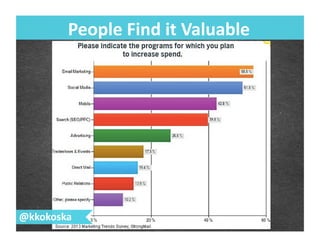
People	
  Find	
  it	
  Valuable	
  
@kkokoska	
  
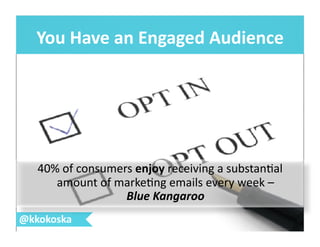
You	
  Have	
  an	
  Engaged	
  Audience	
  
@kkokoska	
  
40%	
  of	
  consumers	
  enjoy	
  receiving	
  a	
  substan7al	
  
amount	
  of	
  marke7ng	
  emails	
  every	
  week	
  –	
  
Blue	
  Kangaroo	
  
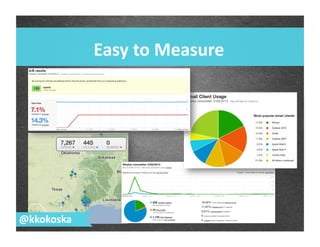
Easy	
  to	
  Measure	
  
@kkokoska	
  
Longer	
  Shelf	
  Life	
  
@kkokoska	
  
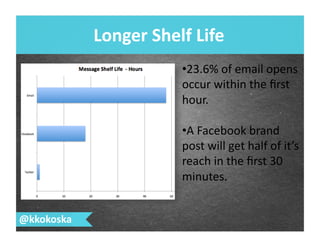
• 23.6%	
  of	
  email	
  opens	
  
occur	
  within	
  the	
  first	
  
hour.	
  
• A	
  Facebook	
  brand	
  
post	
  will	
  get	
  half	
  of	
  it’s	
  
reach	
  in	
  the	
  first	
  30	
  
minutes.	
  
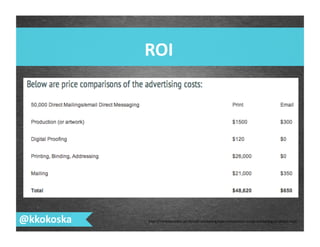
ROI	
  
@kkokoska	
   hSp://THEWEBSHOPPE.NET/email-­‐marke7ng/cost-­‐comparison-­‐email-­‐marke7ng-­‐vs-­‐direct-­‐mail/	
  
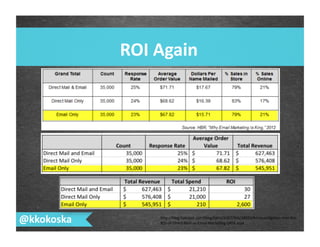
ROI	
  Again	
  
@kkokoska	
   hSp://blog.hubspot.com/blog/tabid/6307/bid/34032/An-­‐Inves7ga7on-­‐Into-­‐the-­‐
ROI-­‐of-­‐Direct-­‐Mail-­‐vs-­‐Email-­‐Marke7ng-­‐DATA.aspx	
  
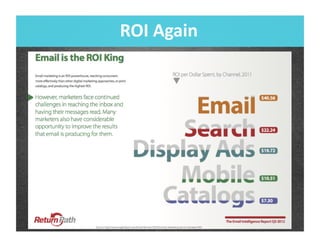
ROI	
  Again	
  
Takeaways:	
  
@kkokoska	
  
@kkokoska	
   hSp://www.flickr.com/photos/29647247@N00/60963915/	
  
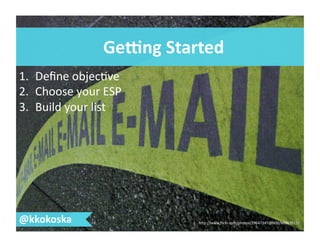
GePng	
  Started	
  
1.  Define	
  objec7ve	
  
2.  Choose	
  your	
  ESP	
  
3.  Build	
  your	
  list	
  
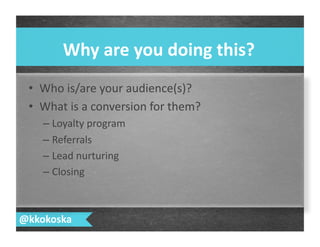
•  Who	
  is/are	
  your	
  audience(s)?	
  
•  What	
  is	
  a	
  conversion	
  for	
  them?	
  
– Loyalty	
  program	
  
– Referrals	
  	
  
– Lead	
  nurturing	
  
– Closing	
  
Why	
  are	
  you	
  doing	
  this?	
  
@kkokoska	
  
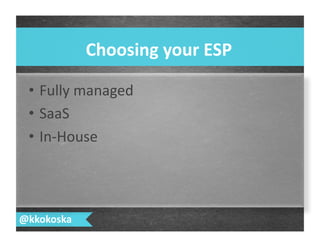
•  Fully	
  managed	
  
•  SaaS	
  
•  In-­‐House	
  
Choosing	
  your	
  ESP	
  
@kkokoska	
  
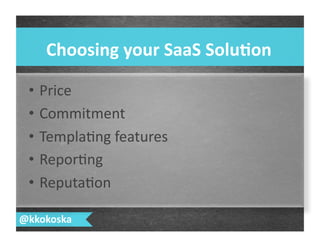
•  Price	
  
•  Commitment	
  
•  Templa7ng	
  features	
  
•  Repor7ng	
  
•  Reputa7on	
  
Choosing	
  your	
  SaaS	
  Solu.on	
  
@kkokoska	
  
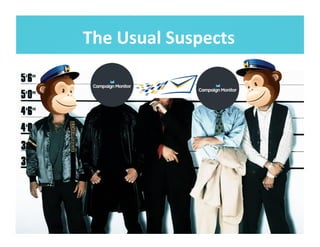
The	
  Usual	
  Suspects	
  
@kkokoska	
  
List	
  Building	
  -­‐	
  Do’s	
  and	
  Don’ts	
  
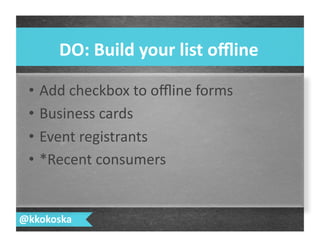
•  Add	
  checkbox	
  to	
  offline	
  forms	
  
•  Business	
  cards	
  
•  Event	
  registrants	
  
•  *Recent	
  consumers	
  
DO:	
  Build	
  your	
  list	
  offline	
  
@kkokoska	
  
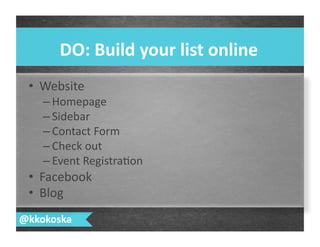
•  Website	
  
– Homepage	
  
– Sidebar	
  
– Contact	
  Form	
  
– Check	
  out	
  
– Event	
  Registra7on	
  
•  Facebook	
  
•  Blog	
  
DO:	
  Build	
  your	
  list	
  online	
  
@kkokoska	
  
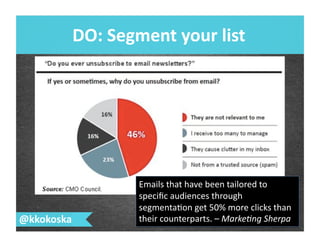
DO:	
  Segment	
  your	
  list	
  
@kkokoska	
  
Emails	
  that	
  have	
  been	
  tailored	
  to	
  
specific	
  audiences	
  through	
  
segmenta7on	
  get	
  50%	
  more	
  clicks	
  than	
  
their	
  counterparts.	
  –	
  Marke&ng	
  Sherpa	
  
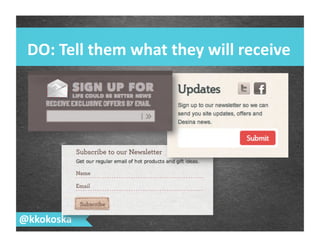
DO:	
  Tell	
  them	
  what	
  they	
  will	
  receive	
  
@kkokoska	
  
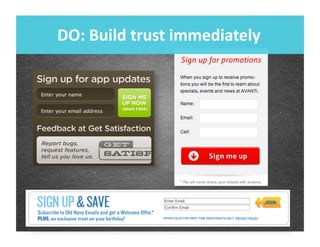
DO:	
  Build	
  trust	
  immediately	
  
DO:	
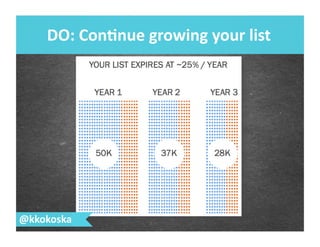
  Con.nue	
  growing	
  your	
  list	
  
@kkokoska	
  
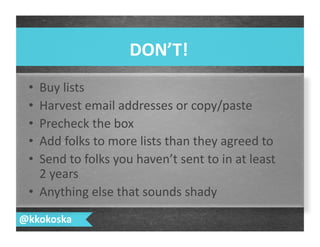
•  Buy	
  lists	
  
•  Harvest	
  email	
  addresses	
  or	
  copy/paste	
  
•  Precheck	
  the	
  box	
  
•  Add	
  folks	
  to	
  more	
  lists	
  than	
  they	
  agreed	
  to	
  
•  Send	
  to	
  folks	
  you	
  haven’t	
  sent	
  to	
  in	
  at	
  least	
  
2	
  years	
  
•  Anything	
  else	
  that	
  sounds	
  shady	
  
DON’T!	
  
@kkokoska	
  
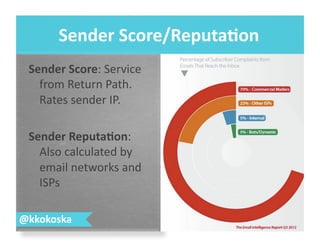
Sender	
  Score:	
  Service	
  
from	
  Return	
  Path.	
  
Rates	
  sender	
  IP.	
  
Sender	
  Reputa.on:	
  
Also	
  calculated	
  by	
  
email	
  networks	
  and	
  
ISPs	
  
Sender	
  Score/Reputa.on	
  
@kkokoska	
  
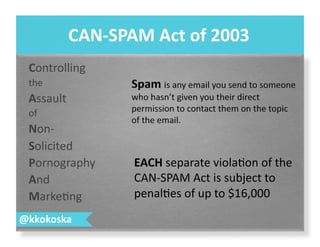
Controlling	
  
the	
  
Assault	
  
of	
  
Non-­‐	
  
Solicited	
  
Pornography	
  
And	
  
Marke7ng	
  
CAN-­‐SPAM	
  Act	
  of	
  2003	
  
@kkokoska	
  
EACH	
  separate	
  viola7on	
  of	
  the	
  
CAN-­‐SPAM	
  Act	
  is	
  subject	
  to	
  
penal7es	
  of	
  up	
  to	
  $16,000	
  
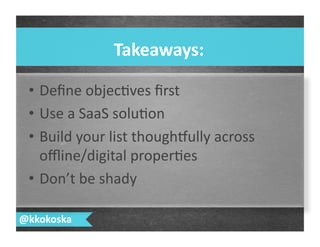
•  Define	
  objec7ves	
  first	
  
•  Use	
  a	
  SaaS	
  solu7on	
  
•  Build	
  your	
  list	
  thoughlully	
  across	
  
offline/digital	
  proper7es	
  
•  Don’t	
  be	
  shady	
  	
  
Takeaways:	
  
@kkokoska	
  
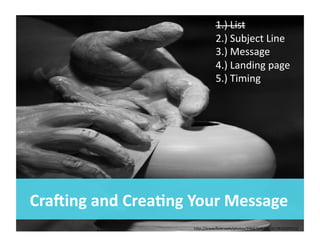
Cra[ing	
  and	
  Crea.ng	
  Your	
  Message	
  
1.)	
  List	
  
2.)	
  Subject	
  Line	
  
3.)	
  Message	
  
4.)	
  Landing	
  page	
  
5.)	
  Timing	
  
hSp://www.flickr.com/photos/24687645@N00/2826029311/	
  
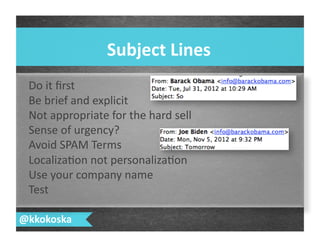
Do	
  it	
  first	
  
Be	
  brief	
  and	
  explicit	
  
Not	
  appropriate	
  for	
  the	
  hard	
  sell	
  
Sense	
  of	
  urgency?	
  
Avoid	
  SPAM	
  Terms	
  
Localiza7on	
  not	
  personaliza7on	
  
Use	
  your	
  company	
  name	
  
Test	
  
Subject	
  Lines	
  
@kkokoska	
  
@kkokoska	
   hSp://www.mailermailer.com/	
  
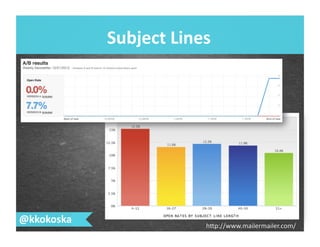
Subject	
  Lines	
  
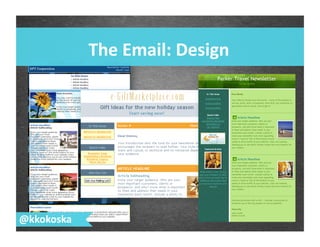
The	
  Email:	
  Design	
  
@kkokoska	
  
•  Your	
  CTA:	
  
–  Above	
  the	
  fold?	
  
–  All	
  roads	
  lead	
  to	
  CTA?	
  
–  Short	
  and	
  powerful?	
  
–  Redundant?	
  
•  How’s	
  your	
  subject	
  line	
  holding	
  up?	
  
•  Can	
  you	
  “Share	
  with	
  a	
  Friend?”	
  
•  Have	
  you	
  integrated	
  your	
  other	
  digital	
  proper7es?	
  
The	
  Email:	
  Message	
  
@kkokoska	
  
•  How	
  does	
  it	
  hold	
  up	
  across	
  email	
  
clients?	
  
•  How	
  does	
  it	
  look	
  across	
  mobile	
  
plalorms?	
  
•  Can	
  you	
  view	
  in	
  browser	
  and	
  as	
  plain	
  
text?	
  
The	
  Email:	
  Technical	
  
Considera.ons	
  
@kkokoska	
  
@kkokoska	
  
1.  Never	
  go	
  home	
  
2.  Focused	
  value	
  proposi7on	
  
3.  Clear	
  request	
  
4.  One	
  step	
  conversion	
  
The	
  Landing	
  Page	
  
@kkokoska	
  
@kkokoska	
  
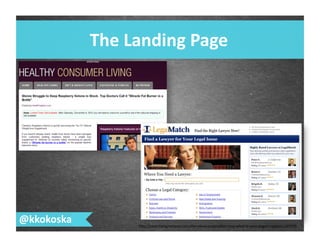
The	
  Landing	
  Page	
  
hSp://searchengineland.com/the-­‐value-­‐proposi7on-­‐test-­‐what-­‐is-­‐your-­‐pages-­‐cap7on-­‐141970	
  
@kkokoska	
  
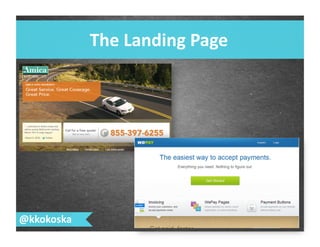
The	
  Landing	
  Page	
  
Timing	
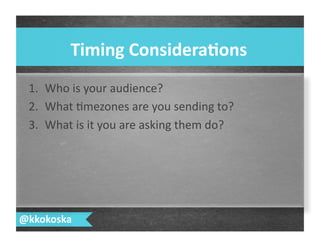
  Considera.ons	
  
@kkokoska	
  
1.  Who	
  is	
  your	
  audience?	
  
2.  What	
  7mezones	
  are	
  you	
  sending	
  to?	
  
3.  What	
  is	
  it	
  you	
  are	
  asking	
  them	
  do?	
  
@kkokoska	
  
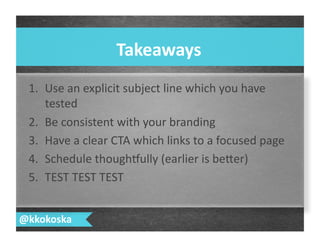
1.  Use	
  an	
  explicit	
  subject	
  line	
  which	
  you	
  have	
  
tested	
  
2.  Be	
  consistent	
  with	
  your	
  branding	
  
3.  Have	
  a	
  clear	
  CTA	
  which	
  links	
  to	
  a	
  focused	
  page	
  
4.  Schedule	
  thoughlully	
  (earlier	
  is	
  beSer)	
  
5.  TEST	
  TEST	
  TEST	
  
Takeaways	
  
@kkokoska	
  
Management	
  and	
  Measurement	
  
hSp://www.flickr.com/photos/87434398@N00/136165399/	
  
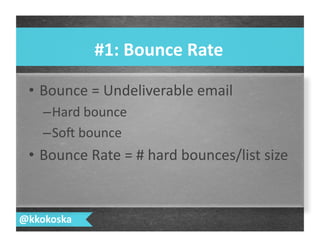
•  Bounce	
  =	
  Undeliverable	
  email	
  
– Hard	
  bounce	
  
– So>	
  bounce	
  
•  Bounce	
  Rate	
  =	
  #	
  hard	
  bounces/list	
  size	
  
#1:	
  Bounce	
  Rate	
  
@kkokoska	
  
@kkokoska	
  
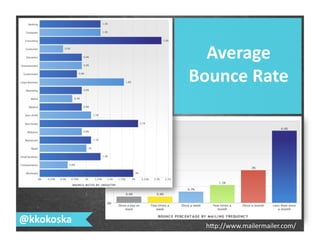
Average	
  
Bounce	
  Rate	
  
hSp://www.mailermailer.com/	
  
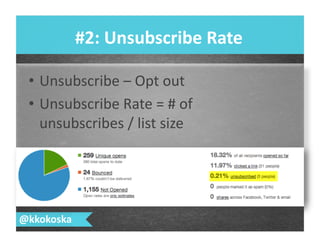
•  Unsubscribe	
  –	
  Opt	
  out	
  
•  Unsubscribe	
  Rate	
  =	
  #	
  of	
  
unsubscribes	
  /	
  list	
  size	
  
#2:	
  Unsubscribe	
  Rate	
  
@kkokoska	
  
@kkokoska	
  
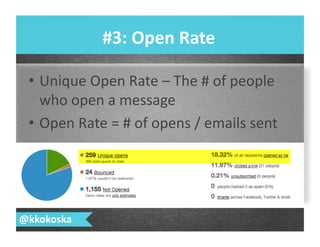
•  Unique	
  Open	
  Rate	
  –	
  The	
  #	
  of	
  people	
  
who	
  open	
  a	
  message	
  
•  Open	
  Rate	
  =	
  #	
  of	
  opens	
  /	
  emails	
  sent	
  
#3:	
  Open	
  Rate	
  
@kkokoska	
  
@kkokoska	
  
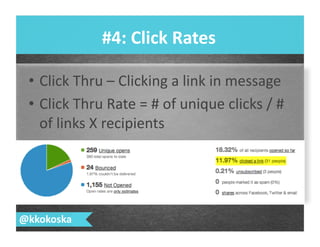
•  Click	
  Thru	
  –	
  Clicking	
  a	
  link	
  in	
  message	
  
•  Click	
  Thru	
  Rate	
  =	
  #	
  of	
  unique	
  clicks	
  /	
  #	
  
of	
  links	
  X	
  recipients	
  
#4:	
  Click	
  Rates	
  
@kkokoska	
  
@kkokoska	
  
Conversion	
  –	
  Someone	
  did	
  the	
  thing	
  
you	
  wanted	
  them	
  to	
  do.	
  
Conversion	
  Rate	
  =	
  #	
  of	
  conversions	
  /	
  #	
  
of	
  recipients	
  
#5:	
  Conversion	
  Rate	
  
@kkokoska	
  
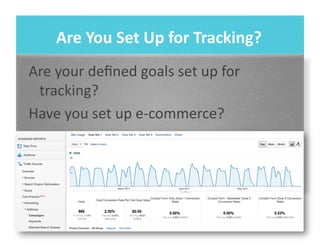
Are	
  You	
  Set	
  Up	
  for	
  Tracking?	
  
Are	
  your	
  defined	
  goals	
  set	
  up	
  for	
  
tracking?	
  
Have	
  you	
  set	
  up	
  e-­‐commerce?	
  
@kkokoska	
  
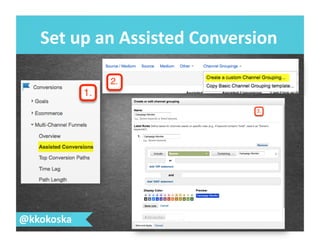
Set	
  up	
  an	
  Assisted	
  Conversion	
  
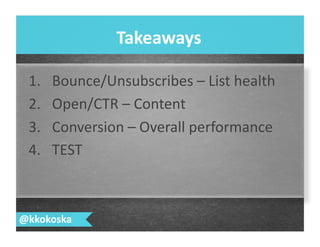
1.  Bounce/Unsubscribes	
  –	
  List	
  health	
  
2.  Open/CTR	
  –	
  Content	
  
3.  Conversion	
  –	
  Overall	
  performance	
  
4.  TEST	
  
Takeaways	
  
@kkokoska	
  
Ques.ons?	
  Contact	
  Me!	
  
Katrina 	
  Kokoska 	
  	
  
@kkokoska	
  
kkokoska@schipul.com	
  

TACCM 2013 DIY Email Marketing

  • 1.
    Katrina  Kokoska   DIY  Email  Marke.ng   @kkokoska  //  kkokoska@schipul.com  
  • 2.
    Who  Am  I?   @kkokoska  
  • 3.
    •  Why  email  marke7ng?   •  Ge;ng  started   •  Cra>ing  and  sending  messages   •  Measurement  and  management   What  We’ll  Cover   @kkokoska  
  • 4.
    •  It  has  proven  value   •  Engaged  audience   •  Easy  to  measure   •  Messages  have  long  shelf  life   •  ROI   Why  Email  Marke.ng?   @kkokoska  
  • 5.
    People  Find  it  Valuable   @kkokoska  
  • 6.
    You  Have  an  Engaged  Audience   @kkokoska   40%  of  consumers  enjoy  receiving  a  substan7al   amount  of  marke7ng  emails  every  week  –   Blue  Kangaroo  
  • 7.
    Easy  to  Measure   @kkokoska  
  • 8.
    Longer  Shelf  Life   @kkokoska   • 23.6%  of  email  opens   occur  within  the  first   hour.   • A  Facebook  brand   post  will  get  half  of  it’s   reach  in  the  first  30   minutes.  
  • 9.
    ROI   @kkokoska  hSp://THEWEBSHOPPE.NET/email-­‐marke7ng/cost-­‐comparison-­‐email-­‐marke7ng-­‐vs-­‐direct-­‐mail/  
  • 10.
    ROI  Again   @kkokoska   hSp://blog.hubspot.com/blog/tabid/6307/bid/34032/An-­‐Inves7ga7on-­‐Into-­‐the-­‐ ROI-­‐of-­‐Direct-­‐Mail-­‐vs-­‐Email-­‐Marke7ng-­‐DATA.aspx  
  • 11.
  • 12.
  • 13.
    @kkokoska   hSp://www.flickr.com/photos/29647247@N00/60963915/   GePng  Started   1.  Define  objec7ve   2.  Choose  your  ESP   3.  Build  your  list  
  • 14.
    •  Who  is/are  your  audience(s)?   •  What  is  a  conversion  for  them?   – Loyalty  program   – Referrals     – Lead  nurturing   – Closing   Why  are  you  doing  this?   @kkokoska  
  • 15.
    •  Fully  managed   •  SaaS   •  In-­‐House   Choosing  your  ESP   @kkokoska  
  • 16.
    •  Price   • Commitment   •  Templa7ng  features   •  Repor7ng   •  Reputa7on   Choosing  your  SaaS  Solu.on   @kkokoska  
  • 17.
    The  Usual  Suspects   @kkokoska  
  • 18.
    List  Building  -­‐  Do’s  and  Don’ts  
  • 19.
    •  Add  checkbox  to  offline  forms   •  Business  cards   •  Event  registrants   •  *Recent  consumers   DO:  Build  your  list  offline   @kkokoska  
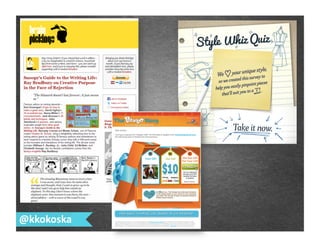
  • 20.
    •  Website   – Homepage   – Sidebar   – Contact  Form   – Check  out   – Event  Registra7on   •  Facebook   •  Blog   DO:  Build  your  list  online   @kkokoska  
  • 21.
    DO:  Segment  your  list   @kkokoska   Emails  that  have  been  tailored  to   specific  audiences  through   segmenta7on  get  50%  more  clicks  than   their  counterparts.  –  Marke&ng  Sherpa  
  • 22.
    DO:  Tell  them  what  they  will  receive   @kkokoska  
  • 23.
    DO:  Build  trust  immediately  
  • 24.
    DO:  Con.nue  growing  your  list   @kkokoska  
  • 25.
    •  Buy  lists   •  Harvest  email  addresses  or  copy/paste   •  Precheck  the  box   •  Add  folks  to  more  lists  than  they  agreed  to   •  Send  to  folks  you  haven’t  sent  to  in  at  least   2  years   •  Anything  else  that  sounds  shady   DON’T!   @kkokoska  
  • 26.
    Sender  Score:  Service   from  Return  Path.   Rates  sender  IP.   Sender  Reputa.on:   Also  calculated  by   email  networks  and   ISPs   Sender  Score/Reputa.on   @kkokoska  
  • 27.
    Controlling   the   Assault   of   Non-­‐   Solicited   Pornography   And   Marke7ng   CAN-­‐SPAM  Act  of  2003   @kkokoska   EACH  separate  viola7on  of  the   CAN-­‐SPAM  Act  is  subject  to   penal7es  of  up  to  $16,000  
  • 28.
    •  Define  objec7ves  first   •  Use  a  SaaS  solu7on   •  Build  your  list  thoughlully  across   offline/digital  proper7es   •  Don’t  be  shady     Takeaways:   @kkokoska  
  • 29.
    Cra[ing  and  Crea.ng  Your  Message   1.)  List   2.)  Subject  Line   3.)  Message   4.)  Landing  page   5.)  Timing   hSp://www.flickr.com/photos/24687645@N00/2826029311/  
  • 30.
    Do  it  first   Be  brief  and  explicit   Not  appropriate  for  the  hard  sell   Sense  of  urgency?   Avoid  SPAM  Terms   Localiza7on  not  personaliza7on   Use  your  company  name   Test   Subject  Lines   @kkokoska  
  • 31.
  • 32.
    The  Email:  Design   @kkokoska  
  • 33.
    •  Your  CTA:   –  Above  the  fold?   –  All  roads  lead  to  CTA?   –  Short  and  powerful?   –  Redundant?   •  How’s  your  subject  line  holding  up?   •  Can  you  “Share  with  a  Friend?”   •  Have  you  integrated  your  other  digital  proper7es?   The  Email:  Message   @kkokoska  
  • 34.
    •  How  does  it  hold  up  across  email   clients?   •  How  does  it  look  across  mobile   plalorms?   •  Can  you  view  in  browser  and  as  plain   text?   The  Email:  Technical   Considera.ons   @kkokoska  
  • 35.
  • 36.
    1.  Never  go  home   2.  Focused  value  proposi7on   3.  Clear  request   4.  One  step  conversion   The  Landing  Page   @kkokoska  
  • 37.
    @kkokoska   The  Landing  Page   hSp://searchengineland.com/the-­‐value-­‐proposi7on-­‐test-­‐what-­‐is-­‐your-­‐pages-­‐cap7on-­‐141970  
  • 38.
  • 39.
    Timing  Considera.ons   @kkokoska   1.  Who  is  your  audience?   2.  What  7mezones  are  you  sending  to?   3.  What  is  it  you  are  asking  them  do?  
  • 40.
  • 41.
    1.  Use  an  explicit  subject  line  which  you  have   tested   2.  Be  consistent  with  your  branding   3.  Have  a  clear  CTA  which  links  to  a  focused  page   4.  Schedule  thoughlully  (earlier  is  beSer)   5.  TEST  TEST  TEST   Takeaways   @kkokoska  
  • 42.
    Management  and  Measurement   hSp://www.flickr.com/photos/87434398@N00/136165399/  
  • 43.
    •  Bounce  =  Undeliverable  email   – Hard  bounce   – So>  bounce   •  Bounce  Rate  =  #  hard  bounces/list  size   #1:  Bounce  Rate   @kkokoska  
  • 44.
    @kkokoska   Average   Bounce  Rate   hSp://www.mailermailer.com/  
  • 45.
    •  Unsubscribe  –  Opt  out   •  Unsubscribe  Rate  =  #  of   unsubscribes  /  list  size   #2:  Unsubscribe  Rate   @kkokoska  
  • 46.
  • 47.
    •  Unique  Open  Rate  –  The  #  of  people   who  open  a  message   •  Open  Rate  =  #  of  opens  /  emails  sent   #3:  Open  Rate   @kkokoska  
  • 48.
  • 49.
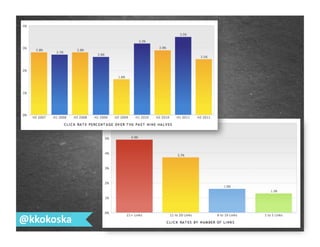
    •  Click  Thru  –  Clicking  a  link  in  message   •  Click  Thru  Rate  =  #  of  unique  clicks  /  #   of  links  X  recipients   #4:  Click  Rates   @kkokoska  
  • 50.
  • 51.
    Conversion  –  Someone  did  the  thing   you  wanted  them  to  do.   Conversion  Rate  =  #  of  conversions  /  #   of  recipients   #5:  Conversion  Rate   @kkokoska  
  • 52.
    Are  You  Set  Up  for  Tracking?   Are  your  defined  goals  set  up  for   tracking?   Have  you  set  up  e-­‐commerce?  
  • 53.
    @kkokoska   Set  up  an  Assisted  Conversion  
  • 54.
    1.  Bounce/Unsubscribes  –  List  health   2.  Open/CTR  –  Content   3.  Conversion  –  Overall  performance   4.  TEST   Takeaways   @kkokoska  
  • 55.
    Ques.ons?  Contact  Me!   Katrina  Kokoska     @kkokoska   kkokoska@schipul.com