BREAK THROUGH
THE PERSONALIZATION
FILTER
Katherine Watier Ong
@kwatier

02.13.13 | Room 31B | 9:00 AM-9:45 AM
Today’s Mental Journey:
• Discuss how Google, Bing, Facebook and Twitter are
increasingly becoming personalized to each user
• Tips for how to change your promotion plans to break
through the filter and reach your online target audience
• Tips for how to increase your chances of being
recommended for your target audience’s personalized
search experience
• Thoughts for how to measure if you have reached your
target online audience
• Where online personalization is headed
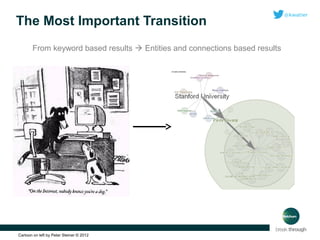
The Most Important Transition
From keyword based results  Entities and connections based results

Cartoon on left by Peter Steiner © 2012
A QUICK
HISTORY
OF ONLINE
PERSONALIZATION
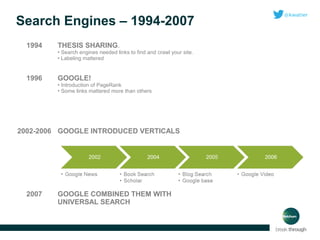
Search Engines – 1994-2007
1994

THESIS SHARING.
• Search engines needed links to find and crawl your site.
• Labeling mattered

1996

GOOGLE!
• Introduction of PageRank
• Some links mattered more than others

2002-2006 GOOGLE INTRODUCED VERTICALS

2007

GOOGLE COMBINED THEM WITH
UNIVERSAL SEARCH
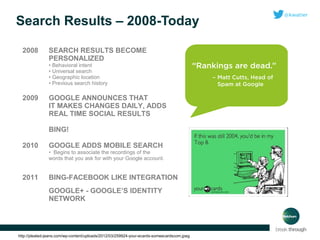
Search Results – 2008-Today
2008

SEARCH RESULTS BECOME
PERSONALIZED
• Behavioral intent
• Universal search
• Geographic location
• Previous search history

2009

GOOGLE ANNOUNCES THAT
IT MAKES CHANGES DAILY, ADDS
REAL TIME SOCIAL RESULTS
BING!

2010

GOOGLE ADDS MOBILE SEARCH

2011

BING-FACEBOOK LIKE INTEGRATION

• Begins to associate the recordings of the
words that you ask for with your Google account.

GOOGLE+ - GOOGLE’S IDENTITY
NETWORK

http://pleated-jeans.com/wp-content/uploads/2012/03/259924-your-ecards-someecardscom.jpeg
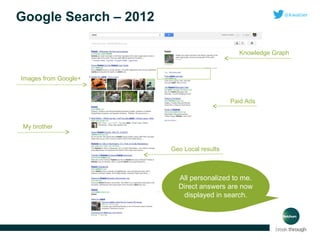
Google Search – 2012
Knowledge Graph

Images from Google+

Paid Ads

My brother
Geo Local results

All personalized to me.
Direct answers are now
displayed in search.
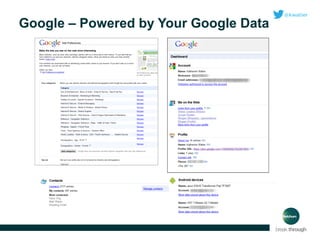
Google – Powered by Your Google Data
Google’s Personalization Signals

Did you know?

40

There are
personalization factors?
Full list here: http://bit.ly/VxOnkM
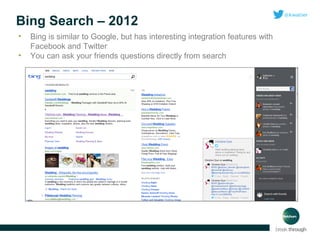
Bing Search – 2012
•
•

Bing is similar to Google, but has interesting integration features with
Facebook and Twitter
You can ask your friends questions directly from search
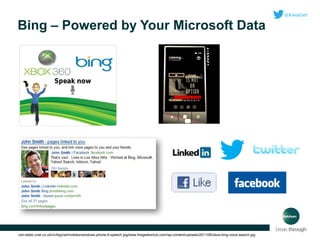
Bing – Powered by Your Microsoft Data

cdn-static.cnet.co.uk/i/c/blg/cat/mobiles/windows-phone-8-speech.jpg/www.thegeeksclub.com/wp-content/uploads/2011/06/xbox-bing-voice-search.jpg
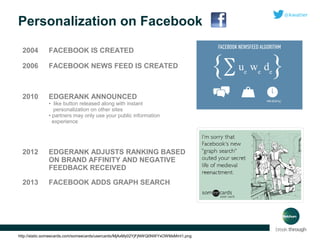
Personalization on Facebook
2004

FACEBOOK IS CREATED

2006

FACEBOOK NEWS FEED IS CREATED

2010

EDGERANK ANNOUNCED
• like button released along with instant
personalization on other sites
• partners may only use your public information
experience

2012

EDGERANK ADJUSTS RANKING BASED
ON BRAND AFFINITY AND NEGATIVE
FEEDBACK RECEIVED

2013

FACEBOOK ADDS GRAPH SEARCH

http://static.someecards.com/someecards/usercards/MjAxMy02YjFjNWQ0NWYxOWMxMmI1.png
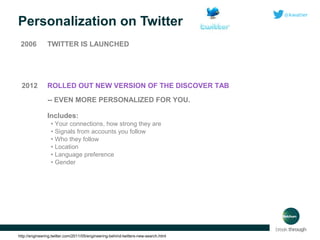
Personalization on Twitter
2006

TWITTER IS LAUNCHED

2012

ROLLED OUT NEW VERSION OF THE DISCOVER TAB
-- EVEN MORE PERSONALIZED FOR YOU.
Includes:
• Your connections, how strong they are
• Signals from accounts you follow
• Who they follow
• Location
• Language preference
• Gender

http://engineering.twitter.com/2011/05/engineering-behind-twitters-new-search.html
LET’S TAKE A LOOK AT:
PERSONALIZED SEARCH RANKINGS
YOU CAN USE GOOGLE FOR MEDIA
MONITORING?
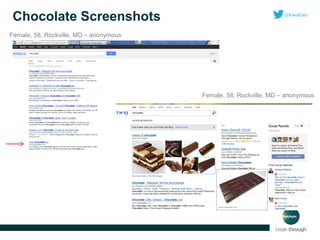
Chocolate Screenshots
Female, 58, Rockville, MD – anonymous

Female, 58, Rockville, MD – anonymous
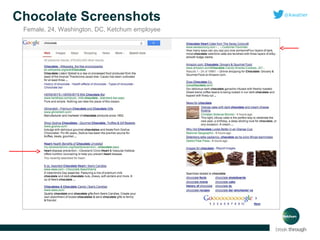
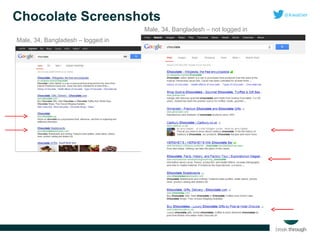
Chocolate Screenshots
Female, 24, Washington, DC, Ketchum employee
Chocolate Screenshots
Male, 34, Bangladesh – not logged in
Male, 34, Bangladesh – logged in
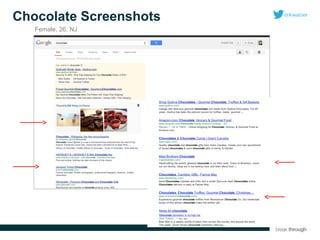
Chocolate Screenshots
Female, 26, NJ
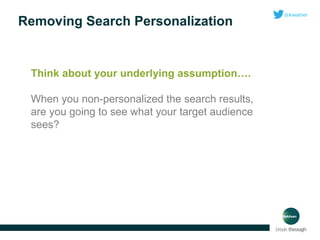
Removing Search Personalization

Think about your underlying assumption….
When you non-personalized the search results,
are you going to see what your target audience
sees?
CREATING A PLAN
TO CUT THROUGH
THE ONLINE FILTER
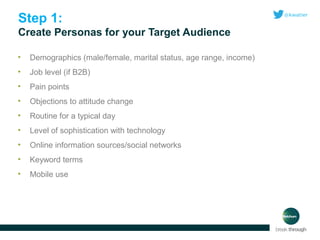
Step 1:
Create Personas for your Target Audience
•

Demographics (male/female, marital status, age range, income)

•

Job level (if B2B)

•

Pain points

•

Objections to attitude change

•

Routine for a typical day

•

Level of sophistication with technology

•

Online information sources/social networks

•

Keyword terms

•

Mobile use
Ketchum Example

PERSONAS FOR HEALTHIT.GOV
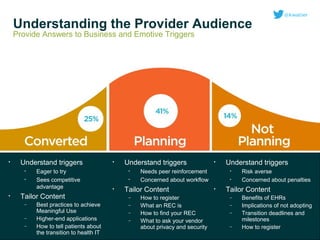
Understanding the Provider Audience
Provide Answers to Business and Emotive Triggers

•

Understand triggers
•
•

•

Eager to try
Sees competitive
advantage

Tailor Content
–
–
–

Best practices to achieve
Meaningful Use
Higher-end applications
How to tell patients about
the transition to health IT

•

Understand triggers
•
•

•

Needs peer reinforcement
Concerned about workflow

Tailor Content
–
–
–
–

•

How to register
What an REC is
How to find your REC
What to ask your vendor
about privacy and security

Understand triggers
•
•

•

Risk averse
Concerned about penalties

Tailor Content
–
–
–
–

Benefits of EHRs
Implications of not adopting
Transition deadlines and
milestones
How to register
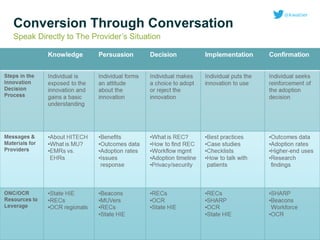
Conversion Through Conversation
Speak Directly to The Provider’s Situation
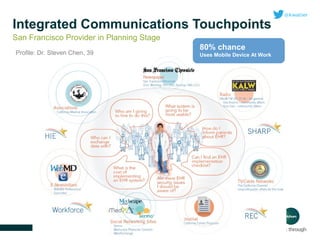
Integrated Communications Touchpoints
San Francisco Provider in Planning Stage
Profile: Dr. Steven Chen, 39

80% chance
Uses Mobile Device At Work
Step 2:
Create content for your target audience
•

Create content that is focused on their:
• Needs
• Desires
• Emotional Motivators
• Burning Questions
• Formatted in a way that drives sharing
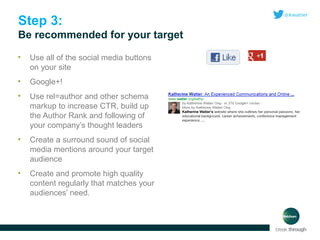
Step 3:
Be recommended for your target
•

Use all of the social media buttons
on your site

•

Google+!

•

Use rel=author and other schema
markup to increase CTR, build up
the Author Rank and following of
your company’s thought leaders

•

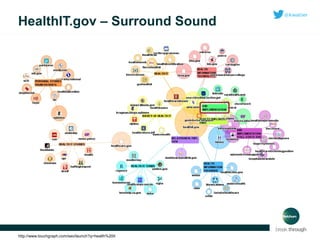
Create a surround sound of social
media mentions around your target
audience

•

Create and promote high quality
content regularly that matches your
audiences’ need.
HealthIT.gov – Surround Sound

http://www.touchgraph.com/seo/launch?q=health%20it
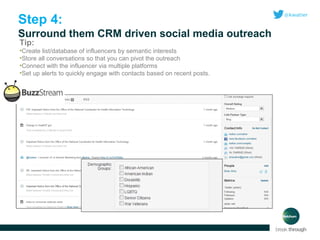
Step 4:
Surround them CRM driven social media outreach
Tip:

•Create list/database of influencers by semantic interests
•Store all conversations so that you can pivot the outreach
•Connect with the influencer via multiple platforms
•Set up alerts to quickly engage with contacts based on recent posts.
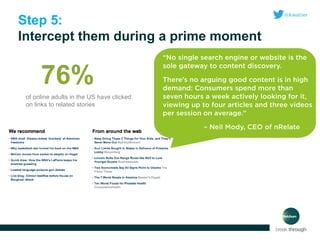
Step 5:
Intercept them during a prime moment

76%
of online adults in the US have clicked
on links to related stories
Step 6:
Measure to see if it’s working
• Google searches/mo.
compared to your analytics
traffic by keyword?
• Social media monitoring to
view an increase in volume
around your brand name
and products?
• Overall increased social
media & target referral traffic
per month?
• Searching focus group
studies
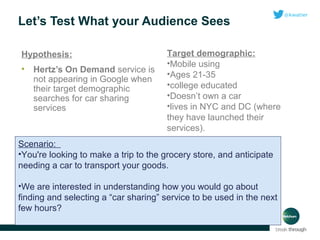
Let’s Test What your Audience Sees
Hypothesis:
•

Hertz’s On Demand service is
not appearing in Google when
their target demographic
searches for car sharing
services

Target demographic:
•Mobile using
•Ages 21-35
•college educated
•Doesn’t own a car
•lives in NYC and DC (where
they have launched their
services).

Scenario:
•You're looking to make a trip to the grocery store, and anticipate
needing a car to transport your goods.
•We are interested in understanding how you would go about
finding and selecting a “car sharing” service to be used in the next
few hours?
User’s Instructions
1. Please enter “car sharing” into the Google search bar.
2. Do you feel that the search results are relevant to your ultimate goal
of selecting a “car sharing” service? Why or why not?
3. What is your thought process when deciding which search result to
select?
4. Click on your desired result.
5. By what criteria do you evaluate whether a car sharing service
provider is worth hiring?
6. Are you satisfied with your current selection? Why or why not?
7. How else would you search online for a car sharing provider?
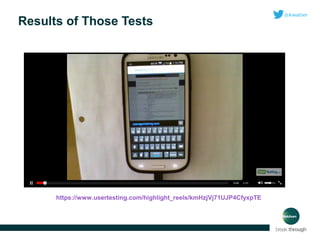
Results of Those Tests

https://www.usertesting.com/highlight_reels/kmHzjVj71UJP4CfyxpTE
WHERE ARE WE HEADED?
THE FUTURE OF PERSONALIZATION
The Future of Google Search:
“With your permission, you give us more information about
you, about your friends, and we can improve the quality of
our searches….we don’t need you to type at all.

We know who you are
We know where you’ve been
We can more or less know what you’re
thinking.”
- Eric Schmidt, Google
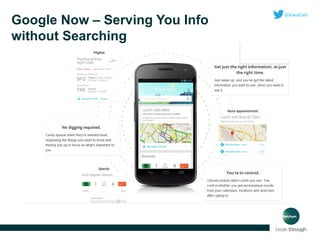
Google Now – Serving You Info
without Searching
Google asks: What are you
thinking now?
“ It w ill kno w at a sem ant ically d eep le vel
w hat you’re int erest ed in, not just t he
t op ic... [ b ut ] t he sp ecifi c q uest ions and
concerns you have.
I envision som e y ears from now t hat
t he m ajorit y of sear ch q ueries w ill b e
answ ered w it ho ut y ou act ually sp eaking . ”
– Ray Kurzw eil

Google asks: “What did you want to know recently?”

http://backslidden.net/wp-content/uploads/2011/06/Dyson86237596.jpg
Parting Thoughts….
Know your Customer
•

Use their language

•

Have them test your message

•

Create search personas and measure against assumptions

•

Provide online content that is quality and shareable

•

Build social communities around your brand – especially utilizing
Google+

•

Store and leverage influencer data

•

Coordinate all messaging including paid to create a “surround sound”

•

Leverage social and web data to refine personas and outreach
Contact
Katherine Watier Ong
Ketchum
202-729-8355
@kwatier
www.linkedin.com/in/katherinewatier
gplus.to/katherinewatier
Katherine.watier@ketchum.com
www.ketchum.com

Why understanding your customer is key to getting through the personalization filter final

  • 1.
    BREAK THROUGH THE PERSONALIZATION FILTER KatherineWatier Ong @kwatier 02.13.13 | Room 31B | 9:00 AM-9:45 AM
  • 2.
    Today’s Mental Journey: •Discuss how Google, Bing, Facebook and Twitter are increasingly becoming personalized to each user • Tips for how to change your promotion plans to break through the filter and reach your online target audience • Tips for how to increase your chances of being recommended for your target audience’s personalized search experience • Thoughts for how to measure if you have reached your target online audience • Where online personalization is headed
  • 3.
    The Most ImportantTransition From keyword based results  Entities and connections based results Cartoon on left by Peter Steiner © 2012
  • 4.
  • 5.
    Search Engines –1994-2007 1994 THESIS SHARING. • Search engines needed links to find and crawl your site. • Labeling mattered 1996 GOOGLE! • Introduction of PageRank • Some links mattered more than others 2002-2006 GOOGLE INTRODUCED VERTICALS 2007 GOOGLE COMBINED THEM WITH UNIVERSAL SEARCH
  • 6.
    Search Results –2008-Today 2008 SEARCH RESULTS BECOME PERSONALIZED • Behavioral intent • Universal search • Geographic location • Previous search history 2009 GOOGLE ANNOUNCES THAT IT MAKES CHANGES DAILY, ADDS REAL TIME SOCIAL RESULTS BING! 2010 GOOGLE ADDS MOBILE SEARCH 2011 BING-FACEBOOK LIKE INTEGRATION • Begins to associate the recordings of the words that you ask for with your Google account. GOOGLE+ - GOOGLE’S IDENTITY NETWORK http://pleated-jeans.com/wp-content/uploads/2012/03/259924-your-ecards-someecardscom.jpeg
  • 7.
    Google Search –2012 Knowledge Graph Images from Google+ Paid Ads My brother Geo Local results All personalized to me. Direct answers are now displayed in search.
  • 8.
    Google – Poweredby Your Google Data
  • 9.
    Google’s Personalization Signals Didyou know? 40 There are personalization factors? Full list here: http://bit.ly/VxOnkM
  • 10.
    Bing Search –2012 • • Bing is similar to Google, but has interesting integration features with Facebook and Twitter You can ask your friends questions directly from search
  • 11.
    Bing – Poweredby Your Microsoft Data cdn-static.cnet.co.uk/i/c/blg/cat/mobiles/windows-phone-8-speech.jpg/www.thegeeksclub.com/wp-content/uploads/2011/06/xbox-bing-voice-search.jpg
  • 12.
    Personalization on Facebook 2004 FACEBOOKIS CREATED 2006 FACEBOOK NEWS FEED IS CREATED 2010 EDGERANK ANNOUNCED • like button released along with instant personalization on other sites • partners may only use your public information experience 2012 EDGERANK ADJUSTS RANKING BASED ON BRAND AFFINITY AND NEGATIVE FEEDBACK RECEIVED 2013 FACEBOOK ADDS GRAPH SEARCH http://static.someecards.com/someecards/usercards/MjAxMy02YjFjNWQ0NWYxOWMxMmI1.png
  • 13.
    Personalization on Twitter 2006 TWITTERIS LAUNCHED 2012 ROLLED OUT NEW VERSION OF THE DISCOVER TAB -- EVEN MORE PERSONALIZED FOR YOU. Includes: • Your connections, how strong they are • Signals from accounts you follow • Who they follow • Location • Language preference • Gender http://engineering.twitter.com/2011/05/engineering-behind-twitters-new-search.html
  • 14.
    LET’S TAKE ALOOK AT: PERSONALIZED SEARCH RANKINGS YOU CAN USE GOOGLE FOR MEDIA MONITORING?
  • 15.
    Chocolate Screenshots Female, 58,Rockville, MD – anonymous Female, 58, Rockville, MD – anonymous
  • 16.
    Chocolate Screenshots Female, 24,Washington, DC, Ketchum employee
  • 17.
    Chocolate Screenshots Male, 34,Bangladesh – not logged in Male, 34, Bangladesh – logged in
  • 18.
  • 19.
    Removing Search Personalization Thinkabout your underlying assumption…. When you non-personalized the search results, are you going to see what your target audience sees?
  • 20.
    CREATING A PLAN TOCUT THROUGH THE ONLINE FILTER
  • 21.
    Step 1: Create Personasfor your Target Audience • Demographics (male/female, marital status, age range, income) • Job level (if B2B) • Pain points • Objections to attitude change • Routine for a typical day • Level of sophistication with technology • Online information sources/social networks • Keyword terms • Mobile use
  • 22.
  • 23.
    Understanding the ProviderAudience Provide Answers to Business and Emotive Triggers • Understand triggers • • • Eager to try Sees competitive advantage Tailor Content – – – Best practices to achieve Meaningful Use Higher-end applications How to tell patients about the transition to health IT • Understand triggers • • • Needs peer reinforcement Concerned about workflow Tailor Content – – – – • How to register What an REC is How to find your REC What to ask your vendor about privacy and security Understand triggers • • • Risk averse Concerned about penalties Tailor Content – – – – Benefits of EHRs Implications of not adopting Transition deadlines and milestones How to register
  • 24.
    Conversion Through Conversation SpeakDirectly to The Provider’s Situation
  • 25.
    Integrated Communications Touchpoints SanFrancisco Provider in Planning Stage Profile: Dr. Steven Chen, 39 80% chance Uses Mobile Device At Work
  • 26.
    Step 2: Create contentfor your target audience • Create content that is focused on their: • Needs • Desires • Emotional Motivators • Burning Questions • Formatted in a way that drives sharing
  • 27.
    Step 3: Be recommendedfor your target • Use all of the social media buttons on your site • Google+! • Use rel=author and other schema markup to increase CTR, build up the Author Rank and following of your company’s thought leaders • Create a surround sound of social media mentions around your target audience • Create and promote high quality content regularly that matches your audiences’ need.
  • 28.
    HealthIT.gov – SurroundSound http://www.touchgraph.com/seo/launch?q=health%20it
  • 29.
    Step 4: Surround themCRM driven social media outreach Tip: •Create list/database of influencers by semantic interests •Store all conversations so that you can pivot the outreach •Connect with the influencer via multiple platforms •Set up alerts to quickly engage with contacts based on recent posts.
  • 30.
    Step 5: Intercept themduring a prime moment 76% of online adults in the US have clicked on links to related stories
  • 31.
    Step 6: Measure tosee if it’s working • Google searches/mo. compared to your analytics traffic by keyword? • Social media monitoring to view an increase in volume around your brand name and products? • Overall increased social media & target referral traffic per month? • Searching focus group studies
  • 32.
    Let’s Test Whatyour Audience Sees Hypothesis: • Hertz’s On Demand service is not appearing in Google when their target demographic searches for car sharing services Target demographic: •Mobile using •Ages 21-35 •college educated •Doesn’t own a car •lives in NYC and DC (where they have launched their services). Scenario: •You're looking to make a trip to the grocery store, and anticipate needing a car to transport your goods. •We are interested in understanding how you would go about finding and selecting a “car sharing” service to be used in the next few hours?
  • 33.
    User’s Instructions 1. Pleaseenter “car sharing” into the Google search bar. 2. Do you feel that the search results are relevant to your ultimate goal of selecting a “car sharing” service? Why or why not? 3. What is your thought process when deciding which search result to select? 4. Click on your desired result. 5. By what criteria do you evaluate whether a car sharing service provider is worth hiring? 6. Are you satisfied with your current selection? Why or why not? 7. How else would you search online for a car sharing provider?
  • 34.
    Results of ThoseTests https://www.usertesting.com/highlight_reels/kmHzjVj71UJP4CfyxpTE
  • 35.
    WHERE ARE WEHEADED? THE FUTURE OF PERSONALIZATION
  • 36.
    The Future ofGoogle Search: “With your permission, you give us more information about you, about your friends, and we can improve the quality of our searches….we don’t need you to type at all. We know who you are We know where you’ve been We can more or less know what you’re thinking.” - Eric Schmidt, Google
  • 37.
    Google Now –Serving You Info without Searching
  • 38.
    Google asks: Whatare you thinking now? “ It w ill kno w at a sem ant ically d eep le vel w hat you’re int erest ed in, not just t he t op ic... [ b ut ] t he sp ecifi c q uest ions and concerns you have. I envision som e y ears from now t hat t he m ajorit y of sear ch q ueries w ill b e answ ered w it ho ut y ou act ually sp eaking . ” – Ray Kurzw eil Google asks: “What did you want to know recently?” http://backslidden.net/wp-content/uploads/2011/06/Dyson86237596.jpg
  • 39.
    Parting Thoughts…. Know yourCustomer • Use their language • Have them test your message • Create search personas and measure against assumptions • Provide online content that is quality and shareable • Build social communities around your brand – especially utilizing Google+ • Store and leverage influencer data • Coordinate all messaging including paid to create a “surround sound” • Leverage social and web data to refine personas and outreach
  • 40.

Editor's Notes

  • #7 http://pleated-jeans.com/wp-content/uploads/2012/03/259924-your-ecards-someecardscom.jpeg
  • #9 And voice search data….
  • #11 “for instance” example here - low sodium diet Pulls from Twitter, Foursquare, Quora, LinkedIn, Google Plus and Blogger 
  • #12 Talk about voice search cdn-static.cnet.co.uk/i/c/blg/cat/mobiles/windows-phone-8-speech.jpg www.thegeeksclub.com/wp-content/uploads/2011/06/xbox-bing-voice-search.jpg
  • #13 Public information includes your name, profile picture, gender, networks, and other information you've made public.
  • #14 http://engineering.twitter.com/2011/05 /engineering-behind-twitters-new-search.html  Cassovary, their graph processing library Related to searching Twitter: They determine whether you are searching for an “entity in a tweet”, and if so they surface the video or photo tagged with that keyword that has been shared the most.
  • #20 To remove personalization: 1) add "&pws=0 to the end of the Google search url to turn it off. 2) Use the incognito version of Chrome. 3) You can change localization by clicking "change location" on the left sidebar to enter a different city or zip code in the U.S. If your underlying assumption is that by getting unpersonalized results you are going to see results that are more like what your target audience is going to see, well, I'm not sure that assumption is true.
  • #24 We will leverage our understanding of provider questions and concerns at each stage of the adoption curve to develop tailored messages and materials. The percentages above do not add to 100%, as the “not sure” percentage is not included.
  • #25 We will tailor materials and leverage resources according to where providers are in the adoption decision process.
  • #26 This slide demonstrates what a local provider – in this case Dr. Chen in San Francisco – will see and hear in his community regarding EHRs and HIT.
  • #28 the primary way that Google+ can affect your rankings is based on the people that have the author (or publisher) of a particular web page in their circles.
  • #29 http://www.touchgraph.com/seo/launch?q=health%20it
  • #31 according to a report by nRelate. Those adults were asked if they had clicked on a related link story in the past 3 months
  • #38 Now rolling out in Google Chrome
  • #39 For three days, at eight randomly chosen times a day, Google called 150 peopled involved in an experiment and asked: “What did you want to know recently?” Google is trying to understand how it can deliver information to users that they’d never have thought to search for online. http://www.technologyreview.com/news/507451/how-google-plans-to-find-the-ungoogleable/ http://backslidden.net/wp-content/uploads/2011/06/Dyson86237596.jpg
  • #40 http://www.bing.com/community/site_blogs/b/webmaster/archive/2013/01/11/how-to-think-like-your-customer.aspx