Synfig Studio

Presentation
on
Synfig Studio
Prepared By:Nakrani Asha D.
Modi Janki P.
FYMsc(IT&CA)

1

Asha & Janki
Synfig Studio

Topic to be covered in presentation










2

What is Synfig?
Introduction of Synfig
Extension of Synfig File
How to Start Synfig?
IDE of Synfig Studio?
What isToolbox?
What is Canvas?
What is Panels?
Example of synfig
Questions?
Asha & Janki
Synfig Studio

What is Synfig Studio?







3

2-D animation software.
Used for create film type animation within smaller
source(device).
Run on linux,windows & macosx.
First version is 0.61.05.
Latest version 0.63.05.

Asha & Janki
Synfig Studio

Introduction of Synfig






4

Time Dependent Multimedia Authering Tool.
Open Source
Freely available on Internet
Download from http://www.Synfig.org
Developed in 2005 under GNU GPL(General
Public Licence).

Asha & Janki
Synfig Studio

Extension of Synfig File




Store Animation file in XML form
.sif
–



.sifz
–

5

For uncompressed file
For compressed file

Asha & Janki
Synfig Studio

How to Start Synfig Studio?




6

Application
|
Graphics
|
Synfig
It open synfig studio in Linux

Asha & Janki
Synfig Studio

Synfig IDE
 Three
–
–
–

Part of Synfig Studio IDE.

Toolbox
Canvas
Panels
 Vertically

Panels
 Horizontally Panels

7

Asha & Janki
Synfig Studio

IDE of Synfig

8

Asha & Janki
Synfig Studio

Toolbox


9

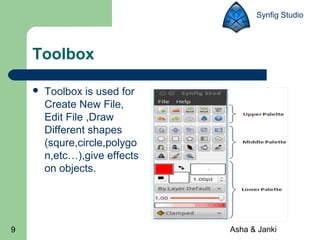
Toolbox is used for
Create New File,
Edit File ,Draw
Different shapes
(squre,circle,polygo
n,etc…),give effects
on objects.

Asha & Janki
Synfig Studio

Canvas
 It

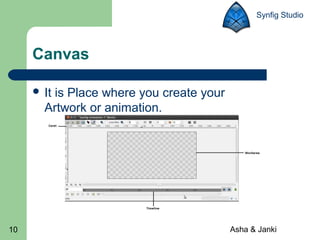
is Place where you create your
Artwork or animation.

10

Asha & Janki
Synfig Studio

Panels
 There
–
–

11

are two types of Panels.

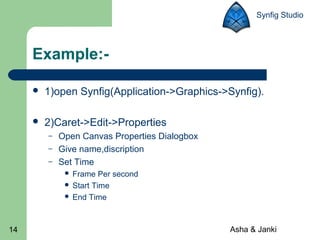
Vertically Panels
Horizontally Panels

Asha & Janki
Synfig Studio

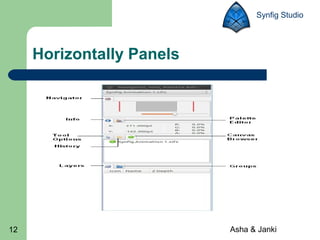
Horizontally Panels

12

Asha & Janki
Synfig Studio

Vertically Panels

13

Asha & Janki
Synfig Studio

Example:

1)open Synfig(Application->Graphics->Synfig).



2)Caret->Edit->Properties
–
–
–

Open Canvas Properties Dialogbox
Give name,discription
Set Time
Frame Per second
 Start Time
 End Time


14

Asha & Janki
Synfig Studio

Properties Dialogbox

15

Asha & Janki
Synfig Studio

Example(Continue..)
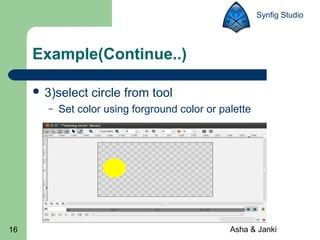
 3)select
–

16

circle from tool

Set color using forground color or palette

Asha & Janki
Synfig Studio

Example(Continue..)
 4)
–
–

17

Before start animation learn about
Timebar
Animate Editing Mode

Asha & Janki
Synfig Studio

Example(Continue..)
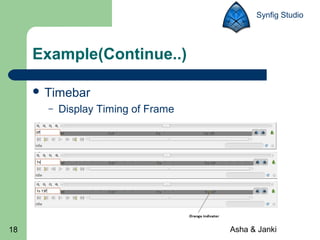
 Timebar
–

18

Display Timing of Frame

Asha & Janki
Synfig Studio

Example(Continue..)
 Animate

19

Editing Mode

Asha & Janki
Synfig Studio

Example(Continue..)
 5)

Start creation of Animation by starting
Animate Edition Mode
–
–

20

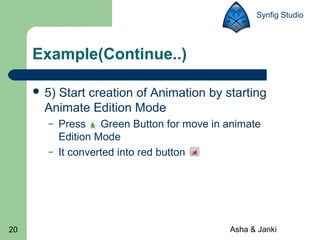
Press Green Button for move in animate
Edition Mode
It converted into red button

Asha & Janki
Synfig Studio

Example(Continue..)
 6)set

‘Timeline Entry Field’ 0f(starting
position) for first Animate editing mode
 7)change place of object set Timeline at end
is 2s.
–

21

For change place of object select object and
press ‘shoft’ key.

Asha & Janki
Synfig Studio

Example(Continue..)

22

Asha & Janki
Synfig Studio

Example(Continue..)
 8)

If you click anywhere in timeline it
automatically change position of object. That
is known as ‘Tweening’.
 9) For priview your animation press ‘play’
button.

23

Asha & Janki
Synfig Studio

Example(Continue..)

 10)

At Last complete animation you need to
be rendering (Rendering Means use different
computer Algorithm to display effect on your
object).
 11) Before rendering Exit from ‘Animate
Auditing Mode’ by pressing
button.
24

Asha & Janki
Synfig Studio

Example(Continue..)
 12)

Caret->File->Save command for Save
.sifz file.

 13)

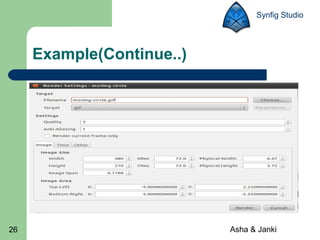
Caret->File->Render command for
Change file .sifz to .gif then store this file in
form of .gif at same location.

25

Asha & Janki
Synfig Studio

Example(Continue..)

26

Asha & Janki
Synfig Studio

Example(Continue..)
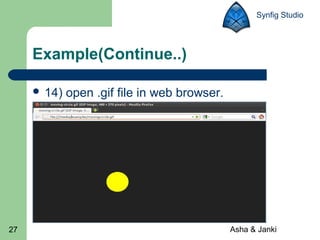
 14)

27

open .gif file in web browser.

Asha & Janki
Synfig Studio

Refrences
 www.Synfig.org
 www.wikipedia.com
 www.fsmsh.com/3285

28

Asha & Janki
Synfig Studio

Question?
 Extension
–
–
–
–

29

of Synfig Studio File?

A) .Fiz
B) .Sifz
C) .Zif
D) .Fis

Asha & Janki
Synfig Studio

Answer is:
 Extension
–
–
–
–

30

of Synfig Studio File?

A) .Fiz
B) .Sifz
C) .Zif
D) .Fis

Asha & Janki
Synfig Studio

Question?
 Dafault
–
–
–
–

31

End Time for animation is:

A) 2s
B) 5s
C) 6s
D) 3s

Asha & Janki
Synfig Studio

Answer is:
 Dafault
–
–
–
–

32

End Time for animation is:

A) 2s
B) 5s
C) 6s
D) 3s

Asha & Janki
33

Asha & Janki

Synfig