Network Cabling
Content
 What is Network cable
 Coaxial Cable
 Single-core coaxial cable
 Multi-core coaxial cable
 Specifications of coaxial cables
 Twisted-pair cables
 Shielded Twisted Pair (STP) Cable
 Unshielded Twisted Pair
 Fiber Optic Cable
Network Cable
 Network cable acts like a medium through which information travels from
one network device to the other.
 The type of cable selected for a network depends on the network’s size,
topology, and procedure.
 Four Types of Network Cabling
Coaxial Cable
Shielded Twisted Pair (STP) Cable
Fiber Optic Cable
Unshielded Twisted Pair
Coaxial Cable
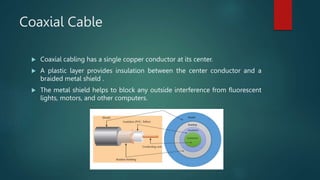
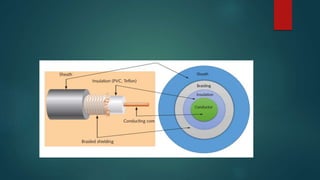
 Coaxial cabling has a single copper conductor at its center.
 A plastic layer provides insulation between the center conductor and a
braided metal shield .
 The metal shield helps to block any outside interference from fluorescent
lights, motors, and other computers.
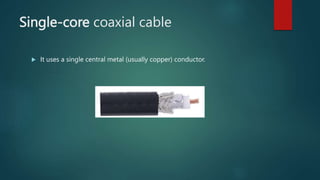
Single-core coaxial cable
 It uses a single central metal (usually copper) conductor.
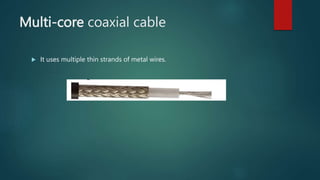
Multi-core coaxial cable
 It uses multiple thin strands of metal wires.
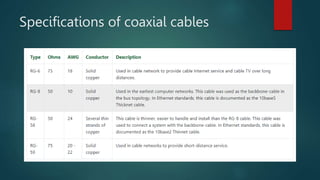
Specifications of coaxial cables
Twisted-pair cables
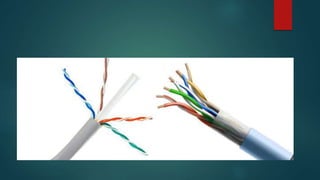
 This cable is also known as Ethernet cable.
 Almost all modern LAN computer networks use this cable.
 This cable consists of color-coded pairs of insulated copper wires.
 Every two wires are twisted around each other to form pair.
 Usually, there are four pairs. Each pair has one solid color and one stripped
color wire.
 Solid colors are blue, brown, green and orange. In stripped color, the solid
color is mixed with the white color.
Shielded Twisted Pair (STP) Cable
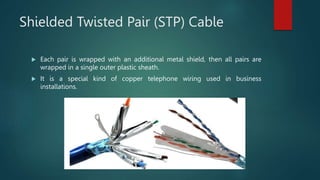
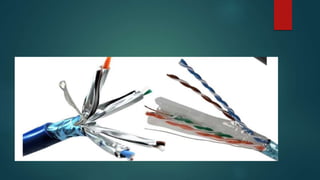
 Each pair is wrapped with an additional metal shield, then all pairs are
wrapped in a single outer plastic sheath.
 It is a special kind of copper telephone wiring used in business
installations.
Unshielded Twisted Pair
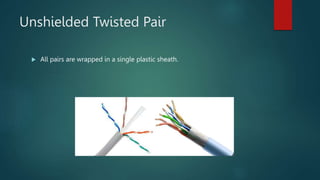
 All pairs are wrapped in a single plastic sheath.
Types of UTP cables
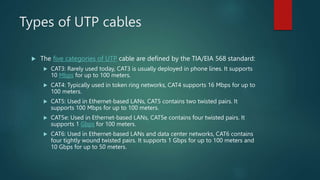
 The five categories of UTP cable are defined by the TIA/EIA 568 standard:
 CAT3: Rarely used today, CAT3 is usually deployed in phone lines. It supports
10 Mbps for up to 100 meters.
 CAT4: Typically used in token ring networks, CAT4 supports 16 Mbps for up to
100 meters.
 CAT5: Used in Ethernet-based LANs, CAT5 contains two twisted pairs. It
supports 100 Mbps for up to 100 meters.
 CAT5e: Used in Ethernet-based LANs, CAT5e contains four twisted pairs. It
supports 1 Gbps for 100 meters.
 CAT6: Used in Ethernet-based LANs and data center networks, CAT6 contains
four tightly wound twisted pairs. It supports 1 Gbps for up to 100 meters and
10 Gbps for up to 50 meters.
T568A And T568B Wiring Standard
Basis
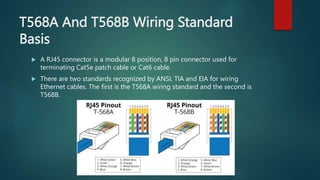
 A RJ45 connector is a modular 8 position, 8 pin connector used for
terminating Cat5e patch cable or Cat6 cable.
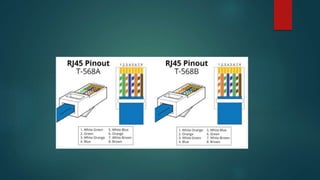
 There are two standards recognized by ANSI, TIA and EIA for wiring
Ethernet cables. The first is the T568A wiring standard and the second is
T568B.
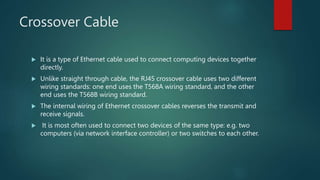
Crossover Cable
 It is a type of Ethernet cable used to connect computing devices together
directly.
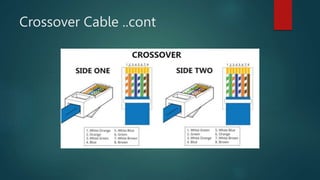
 Unlike straight through cable, the RJ45 crossover cable uses two different
wiring standards: one end uses the T568A wiring standard, and the other
end uses the T568B wiring standard.
 The internal wiring of Ethernet crossover cables reverses the transmit and
receive signals.
 It is most often used to connect two devices of the same type: e.g. two
computers (via network interface controller) or two switches to each other.
Crossover Cable ..cont
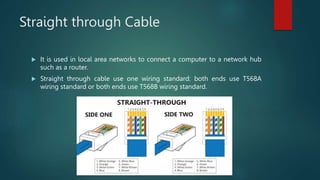
Straight through Cable
 It is used in local area networks to connect a computer to a network hub
such as a router.
 Straight through cable use one wiring standard: both ends use T568A
wiring standard or both ends use T568B wiring standard.
Straight Through vs Crossover Cable,
which to choose?
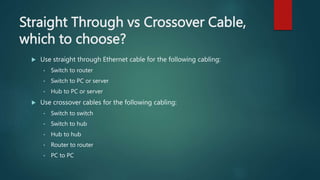
 Use straight through Ethernet cable for the following cabling:
• Switch to router
• Switch to PC or server
• Hub to PC or server
 Use crossover cables for the following cabling:
• Switch to switch
• Switch to hub
• Hub to hub
• Router to router
• PC to PC
Fiber Optic Cable
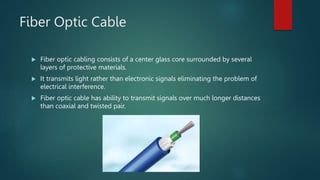
 Fiber optic cabling consists of a center glass core surrounded by several
layers of protective materials.
 It transmits light rather than electronic signals eliminating the problem of
electrical interference.
 Fiber optic cable has ability to transmit signals over much longer distances
than coaxial and twisted pair.
Network Cabling.pptx

Network Cabling.pptx

  • 1.
  • 2.
    Content  What isNetwork cable  Coaxial Cable  Single-core coaxial cable  Multi-core coaxial cable  Specifications of coaxial cables  Twisted-pair cables  Shielded Twisted Pair (STP) Cable  Unshielded Twisted Pair  Fiber Optic Cable
  • 3.
    Network Cable  Networkcable acts like a medium through which information travels from one network device to the other.  The type of cable selected for a network depends on the network’s size, topology, and procedure.  Four Types of Network Cabling Coaxial Cable Shielded Twisted Pair (STP) Cable Fiber Optic Cable Unshielded Twisted Pair
  • 4.
    Coaxial Cable  Coaxialcabling has a single copper conductor at its center.  A plastic layer provides insulation between the center conductor and a braided metal shield .  The metal shield helps to block any outside interference from fluorescent lights, motors, and other computers.
  • 6.
    Single-core coaxial cable It uses a single central metal (usually copper) conductor.
  • 7.
    Multi-core coaxial cable It uses multiple thin strands of metal wires.
  • 8.
  • 9.
    Twisted-pair cables  Thiscable is also known as Ethernet cable.  Almost all modern LAN computer networks use this cable.  This cable consists of color-coded pairs of insulated copper wires.  Every two wires are twisted around each other to form pair.  Usually, there are four pairs. Each pair has one solid color and one stripped color wire.  Solid colors are blue, brown, green and orange. In stripped color, the solid color is mixed with the white color.
  • 10.
    Shielded Twisted Pair(STP) Cable  Each pair is wrapped with an additional metal shield, then all pairs are wrapped in a single outer plastic sheath.  It is a special kind of copper telephone wiring used in business installations.
  • 12.
    Unshielded Twisted Pair All pairs are wrapped in a single plastic sheath.
  • 14.
    Types of UTPcables  The five categories of UTP cable are defined by the TIA/EIA 568 standard:  CAT3: Rarely used today, CAT3 is usually deployed in phone lines. It supports 10 Mbps for up to 100 meters.  CAT4: Typically used in token ring networks, CAT4 supports 16 Mbps for up to 100 meters.  CAT5: Used in Ethernet-based LANs, CAT5 contains two twisted pairs. It supports 100 Mbps for up to 100 meters.  CAT5e: Used in Ethernet-based LANs, CAT5e contains four twisted pairs. It supports 1 Gbps for 100 meters.  CAT6: Used in Ethernet-based LANs and data center networks, CAT6 contains four tightly wound twisted pairs. It supports 1 Gbps for up to 100 meters and 10 Gbps for up to 50 meters.
  • 15.
    T568A And T568BWiring Standard Basis  A RJ45 connector is a modular 8 position, 8 pin connector used for terminating Cat5e patch cable or Cat6 cable.  There are two standards recognized by ANSI, TIA and EIA for wiring Ethernet cables. The first is the T568A wiring standard and the second is T568B.
  • 17.
    Crossover Cable  Itis a type of Ethernet cable used to connect computing devices together directly.  Unlike straight through cable, the RJ45 crossover cable uses two different wiring standards: one end uses the T568A wiring standard, and the other end uses the T568B wiring standard.  The internal wiring of Ethernet crossover cables reverses the transmit and receive signals.  It is most often used to connect two devices of the same type: e.g. two computers (via network interface controller) or two switches to each other.
  • 18.
  • 19.
    Straight through Cable It is used in local area networks to connect a computer to a network hub such as a router.  Straight through cable use one wiring standard: both ends use T568A wiring standard or both ends use T568B wiring standard.
  • 20.
    Straight Through vsCrossover Cable, which to choose?  Use straight through Ethernet cable for the following cabling: • Switch to router • Switch to PC or server • Hub to PC or server  Use crossover cables for the following cabling: • Switch to switch • Switch to hub • Hub to hub • Router to router • PC to PC
  • 21.
    Fiber Optic Cable Fiber optic cabling consists of a center glass core surrounded by several layers of protective materials.  It transmits light rather than electronic signals eliminating the problem of electrical interference.  Fiber optic cable has ability to transmit signals over much longer distances than coaxial and twisted pair.