Study Skills Development08.09.11Rakesh PatelMarta Ulanicka
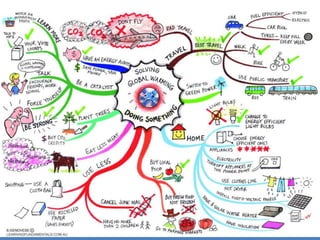
What is a Mind Map?A pictorial representation of information and an alternative to linear notes. A mind map will contain a central concept (or the ‘topic’) in the centre with branches to related concepts, which in turn branch off to provide further detail.
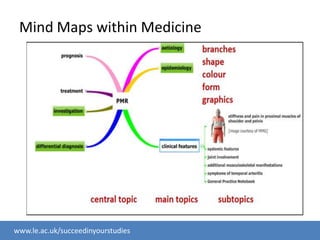
Mind Maps within Medicine
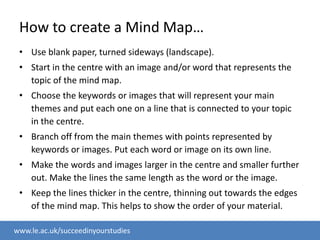
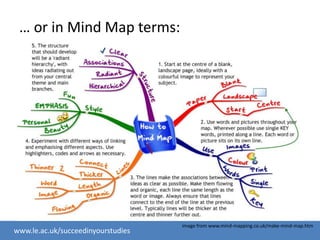
How to create a Mind Map…Use blank paper, turned sideways (landscape).Start in the centre with an image and/or word that represents the topic of the mind map.Choose the keywords or images that will represent your main themes and put each one on a line that is connected to your topic in the centre.Branch off from the main themes with points represented by keywords or images. Put each word or image on its own line.Make the words and images larger in the centre and smaller further out. Make the lines the same length as the word or the image.Keep the lines thicker in the centre, thinning out towards the edges of the mind map. This helps to show the order of your material.
… or in Mind Map terms:image from www.mind-mapping.co.uk/make-mind-map.htm
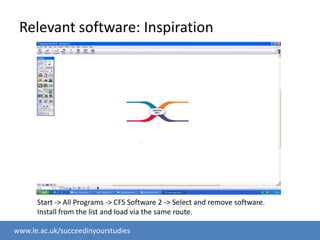
Relevant software: InspirationStart -> All Programs -> CFS Software 2 -> Select and remove software. Install from the list and load via the same route.
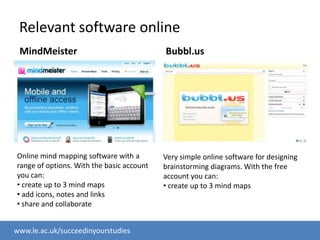
Relevant software onlineMindMeisterBubbl.usOnline mind mapping software with a range of options. With the basic account you can: create up to 3 mind maps
 add icons, notes and links
 share and collaborateVery simple online software for designing brainstorming diagrams. With the free account you can: create up to 3 mind mapsIf you use online softwareRemember to save and back up your work.
Ideas for the bloglinks to resources;anything you’ve learned which you think others would find useful;which topics you find easy and which topics you find difficult (you could set up group study sessions based on this information);ask questions;what works for you when studying (e.g. have you adopted the portfolio system? is it working for you?);set up study sessions – students only, or with Learning DevelopmentAnything else you want to share!
Who is admitted to the blog – your choice

Study Skills Development Medics 3

  • 1.
  • 2.
    What is aMind Map?A pictorial representation of information and an alternative to linear notes. A mind map will contain a central concept (or the ‘topic’) in the centre with branches to related concepts, which in turn branch off to provide further detail.
  • 4.
  • 6.
    How to createa Mind Map…Use blank paper, turned sideways (landscape).Start in the centre with an image and/or word that represents the topic of the mind map.Choose the keywords or images that will represent your main themes and put each one on a line that is connected to your topic in the centre.Branch off from the main themes with points represented by keywords or images. Put each word or image on its own line.Make the words and images larger in the centre and smaller further out. Make the lines the same length as the word or the image.Keep the lines thicker in the centre, thinning out towards the edges of the mind map. This helps to show the order of your material.
  • 7.
    … or inMind Map terms:image from www.mind-mapping.co.uk/make-mind-map.htm
  • 8.
    Relevant software: InspirationStart-> All Programs -> CFS Software 2 -> Select and remove software. Install from the list and load via the same route.
  • 9.
    Relevant software onlineMindMeisterBubbl.usOnlinemind mapping software with a range of options. With the basic account you can: create up to 3 mind maps
  • 10.
    add icons,notes and links
  • 11.
    share andcollaborateVery simple online software for designing brainstorming diagrams. With the free account you can: create up to 3 mind mapsIf you use online softwareRemember to save and back up your work.
  • 12.
    Ideas for thebloglinks to resources;anything you’ve learned which you think others would find useful;which topics you find easy and which topics you find difficult (you could set up group study sessions based on this information);ask questions;what works for you when studying (e.g. have you adopted the portfolio system? is it working for you?);set up study sessions – students only, or with Learning DevelopmentAnything else you want to share!
  • 13.
    Who is admittedto the blog – your choice

Editor's Notes

  • #6 http://www.youtube.com/watch?v=wLWV0XN7K1g
  • #12 Show example blog post first, and how tags work (they indicate the content of the post - you can tag one post with multiple tags)
  • #14 We’ve introduced methods and tools – the rest is up to you – we have thrown things at you within the first three weeks but we are still here afterwards. E.g. time management, explain blog, organising blog/portfolio – big group/small group/individually