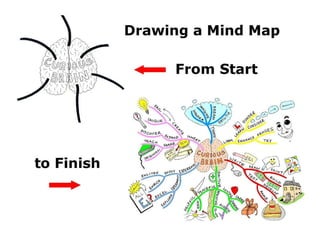
As the subject matter for this Mind Map I decide to investigate what a
“Curious Brain” is and how it could impact continual learning and development

        Starting with a central image that best represents the subject
    being explored; in this case I have used an illustration of a brain and
     have started to add main branches (initially I work in pencil so that
    adjustments can be made if necessary before adding ink and colour)

  To avoid the Mind Map becoming crowded and particularly if you are using
 it as a memory aid, it is preferable to have no more than 11 main branches
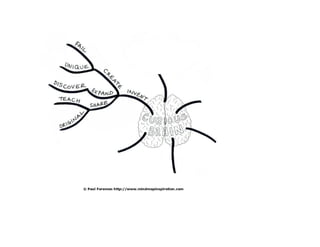
I start to consider what a Curious Brain is.

      The easiest way to investigate this is simply to start adding
     keywords and branching out without too much contemplation
            or the mind starts to think in a linear fashion.

   The beauty and diversity of using Mind Maps is that it encourages
   radial thinking which uncovers wider and more interesting ideas.

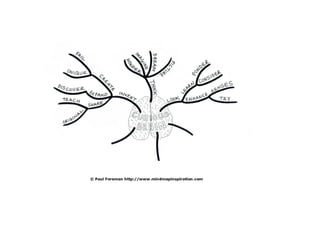
     From the starting point of “invent” I travel quickly to other words
(it is best to use single words as a phrase can stop the train of thought)
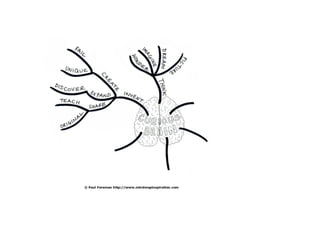
I add the word “think” as another main branch and
then progress again by adding more main keywords
“Look” comes to mind, so I then add that keyword and branch out further
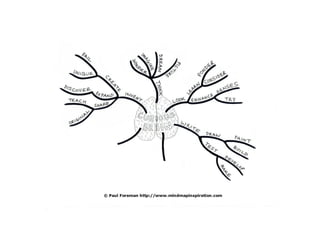
Same again for the word “write”
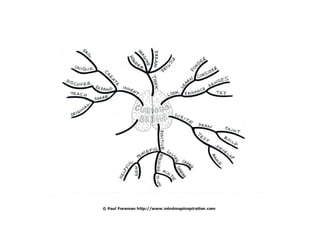
And “positive”
Followed by “experience”

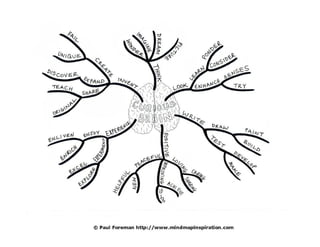
      I could have added more main branches and even more words
to each branch, as the system of Mind Mapping creates infinite possibilities,
     yet I decide I have enough branches for this particular Mind Map.

 I have covered “Curious Brain” in my own unique way – if anyone else had
Mind Mapped this subject they may well have formed an entirely different set
     of keywords and that is another fantastic element of Mind Mapping.
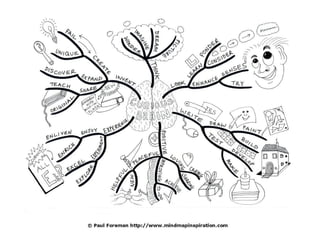
To make the Mind Map more memorable and exciting to look at I add
sketches and illustrations, concentrating on simplicity. I always have in mind
   when adding pictures – what is the best or easiest way to represent the
 words and concepts. It is not necessary to illustrate every word and in fact,
  it is just as likely that the images get created when adding the keywords.

        I have split the tasks here for demonstration purposes only.

        Because Mind Maps use a combination of words and images
        they are far more brain-friendly than a list of text; brilliant
              for memorising information and fun to create.

                 Here is the Mind Map with sketches added.
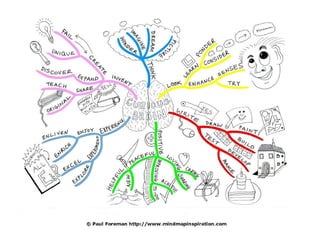
It is preferable to colour each branch differently.

In this case, I used a very thick pen to create the branches and
  that helped when it came to filling the colour by computer.

        Normally the main branches from the central
  image would be thicker working out to thinner branches as
 you add new words so that it is easy to see the main points.
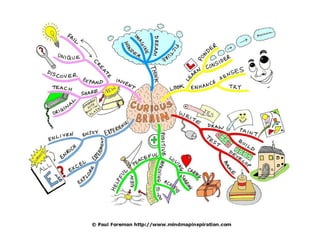
I then add colour to the rest of the images to highlight the Mind Map.

      Two brilliant tips here are to use light colours and spread the colours
fairly evenly throughout the Mind Map so that there is a good balance overall.
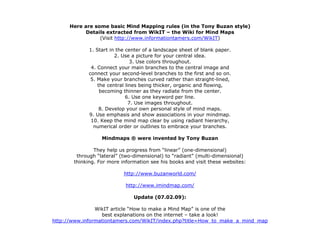
Here are some basic Mind Mapping rules (in the Tony Buzan style)
            Details extracted from WikIT – the Wiki for Mind Maps
                 (Visit http://www.informationtamers.com/WikIT)

             1. Start in the center of a landscape sheet of blank paper.
                        2. Use a picture for your central idea.
                               3. Use colors throughout.
              4. Connect your main branches to the central image and
             connect your second-level branches to the first and so on.
              5. Make your branches curved rather than straight-lined,
                 the central lines being thicker, organic and flowing,
                  becoming thinner as they radiate from the center.
                             6. Use one keyword per line.
                               7. Use images throughout.
                  8. Develop your own personal style of mind maps.
             9. Use emphasis and show associations in your mindmap.
              10. Keep the mind map clear by using radiant hierarchy,
               numerical order or outlines to embrace your branches.

                  Mindmaps ® were invented by Tony Buzan

               They help us progress from “linear” (one-dimensional)
        through “lateral” (two-dimensional) to “radiant” (multi-dimensional)
       thinking. For more information see his books and visit these websites:

                           http://www.buzanworld.com/

                            http://www.imindmap.com/

                               Update (07.02.09):

                WikIT article “How to make a Mind Map” is one of the
                  best explanations on the internet – take a look!
http://www.informationtamers.com/WikIT/index.php?title=How_to_make_a_mind_map
Handy links to help get you started with mindmapping

                          A comprehensive introduction to mindmapping:

                       How to Mind Map – A Beginner’s Guide at the IQ Matrix Blog
                http://blog.iqmatrix.com/mind-map/how-to-mind-map-a-beginners-guide

                                      Books about mind maps:

                                     List of Mind Mapping Books
                         http://www.mindmapinspiration.com/mind-map-books/

                  Bigger list of Books about mind maps at WikIT (the mindmapping Wiki)
           http://www.informationtamers.com/WikIT/index.php?title=Books_about_mind_maps

                         Tips for how to summarise text with mind maps:

                                  How to convert text to Mind Map
          http://www.mindmapinspiration.com/how-to-convert-text-to-mind-map-paul-foreman/

                              Collections of Mind Maps to inspire you:

                       Mind Map Examples to view in the online Mind Map Libraries
                         http://www.mind-mapping.org/mind-map-libraries.html

                              If you fancy trying mind map software:

                      List of free mind mapping (and related types) software at WikIT
http://www.informationtamers.com/WikIT/index.php?title=Free_mind_mapping_(and_related_types)_software


                         Blog Post of Drawing a Mind Map from Start to Finish:
              http://www.mindmapinspiration.com/drawing-a-mind-map-from-start-to-finish/
Slideshare created by Paul Foreman


    To see more Mind Maps visit:

    Mind Map Inspiration Blog

http://www.mindmapinspiration.com/


  Mind Map Inspiration Website

http://www.mindmapinspiration.co.uk/

Drawing A Mind Map From Start To Finish

  • 2.
    As the subjectmatter for this Mind Map I decide to investigate what a “Curious Brain” is and how it could impact continual learning and development Starting with a central image that best represents the subject being explored; in this case I have used an illustration of a brain and have started to add main branches (initially I work in pencil so that adjustments can be made if necessary before adding ink and colour) To avoid the Mind Map becoming crowded and particularly if you are using it as a memory aid, it is preferable to have no more than 11 main branches
  • 4.
    I start toconsider what a Curious Brain is. The easiest way to investigate this is simply to start adding keywords and branching out without too much contemplation or the mind starts to think in a linear fashion. The beauty and diversity of using Mind Maps is that it encourages radial thinking which uncovers wider and more interesting ideas. From the starting point of “invent” I travel quickly to other words (it is best to use single words as a phrase can stop the train of thought)
  • 6.
    I add theword “think” as another main branch and then progress again by adding more main keywords
  • 8.
    “Look” comes tomind, so I then add that keyword and branch out further
  • 10.
    Same again forthe word “write”
  • 12.
  • 14.
    Followed by “experience” I could have added more main branches and even more words to each branch, as the system of Mind Mapping creates infinite possibilities, yet I decide I have enough branches for this particular Mind Map. I have covered “Curious Brain” in my own unique way – if anyone else had Mind Mapped this subject they may well have formed an entirely different set of keywords and that is another fantastic element of Mind Mapping.
  • 16.
    To make theMind Map more memorable and exciting to look at I add sketches and illustrations, concentrating on simplicity. I always have in mind when adding pictures – what is the best or easiest way to represent the words and concepts. It is not necessary to illustrate every word and in fact, it is just as likely that the images get created when adding the keywords. I have split the tasks here for demonstration purposes only. Because Mind Maps use a combination of words and images they are far more brain-friendly than a list of text; brilliant for memorising information and fun to create. Here is the Mind Map with sketches added.
  • 18.
    It is preferableto colour each branch differently. In this case, I used a very thick pen to create the branches and that helped when it came to filling the colour by computer. Normally the main branches from the central image would be thicker working out to thinner branches as you add new words so that it is easy to see the main points.
  • 20.
    I then addcolour to the rest of the images to highlight the Mind Map. Two brilliant tips here are to use light colours and spread the colours fairly evenly throughout the Mind Map so that there is a good balance overall.
  • 22.
    Here are somebasic Mind Mapping rules (in the Tony Buzan style) Details extracted from WikIT – the Wiki for Mind Maps (Visit http://www.informationtamers.com/WikIT) 1. Start in the center of a landscape sheet of blank paper. 2. Use a picture for your central idea. 3. Use colors throughout. 4. Connect your main branches to the central image and connect your second-level branches to the first and so on. 5. Make your branches curved rather than straight-lined, the central lines being thicker, organic and flowing, becoming thinner as they radiate from the center. 6. Use one keyword per line. 7. Use images throughout. 8. Develop your own personal style of mind maps. 9. Use emphasis and show associations in your mindmap. 10. Keep the mind map clear by using radiant hierarchy, numerical order or outlines to embrace your branches. Mindmaps ® were invented by Tony Buzan They help us progress from “linear” (one-dimensional) through “lateral” (two-dimensional) to “radiant” (multi-dimensional) thinking. For more information see his books and visit these websites: http://www.buzanworld.com/ http://www.imindmap.com/ Update (07.02.09): WikIT article “How to make a Mind Map” is one of the best explanations on the internet – take a look! http://www.informationtamers.com/WikIT/index.php?title=How_to_make_a_mind_map
  • 23.
    Handy links tohelp get you started with mindmapping A comprehensive introduction to mindmapping: How to Mind Map – A Beginner’s Guide at the IQ Matrix Blog http://blog.iqmatrix.com/mind-map/how-to-mind-map-a-beginners-guide Books about mind maps: List of Mind Mapping Books http://www.mindmapinspiration.com/mind-map-books/ Bigger list of Books about mind maps at WikIT (the mindmapping Wiki) http://www.informationtamers.com/WikIT/index.php?title=Books_about_mind_maps Tips for how to summarise text with mind maps: How to convert text to Mind Map http://www.mindmapinspiration.com/how-to-convert-text-to-mind-map-paul-foreman/ Collections of Mind Maps to inspire you: Mind Map Examples to view in the online Mind Map Libraries http://www.mind-mapping.org/mind-map-libraries.html If you fancy trying mind map software: List of free mind mapping (and related types) software at WikIT http://www.informationtamers.com/WikIT/index.php?title=Free_mind_mapping_(and_related_types)_software Blog Post of Drawing a Mind Map from Start to Finish: http://www.mindmapinspiration.com/drawing-a-mind-map-from-start-to-finish/
  • 24.
    Slideshare created byPaul Foreman To see more Mind Maps visit: Mind Map Inspiration Blog http://www.mindmapinspiration.com/ Mind Map Inspiration Website http://www.mindmapinspiration.co.uk/