1
18CSE489T/STREAMING ANALYTICS Dr. A. Manju/AP/SRMIST, RAMAPURAM
UNIT II
Getting Started with Kafka - Why Kafka? Publish Subscribe messaging model - Kafka
Architecture - Messages and Batches, Schemas Topics and Partitions, - Producers and
consumers - Brokers and Clusters - Multiple Clusters, Data Ecosystem - Sending messages
with producers - Steps & Example - Sending messages with producers- Receiving messages
with consumers - Steps & Example - Receiving messages with consumers- Developing Kafka
Streams Application - Phases in a Kafka Streams Application Development - Constructing a
topology - Streams and State – Applying stateful operations- Example application development
with Kafka Streams - Demo – Kafka Streams
Getting Started with Kafka
Now that we know all about Kafka and its history, we can set it up and build our own data pipeline.
In the next chapter, we will explore installing and configuring Kafka. We will also cover selecting the right
hardware to run Kafka on, and some things to keep in mind when moving to production operations.
Why Kafka?
There are many choices for publish/subscribe messaging systems, so what makes Apache Kafka a
good choice?
Multiple Producers
Kafka is able to seamlessly handle multiple producers, whether those clients are using
many topics or the same topic. This makes the system ideal for aggregating data from many
frontend systems and making it consistent. For example, a site that serves content to users via
a number of microservices can have a single topic for page views that all services can write to
using a common format. Consumer applications can then receive a single stream of page views
for all applications on the site without having to coordinate consuming from multiple topics,
one for each application.
Multiple Consumers
In addition to multiple producers, Kafka is designed for multiple consumers to read any
single stream of messages without interfering with each other. This is in contrast to many
queuing systems where once a message is consumed by one client, it is not available to any
other. Multiple Kafka consumers can choose to operate as part of a group and share a stream,
assuring that the entire group processes a given message only once.
Disk-Based Retention
Not only can Kafka handle multiple consumers, but durable message retention means
that consumers do not always need to work in real time. Messages are committed to disk, and
will be stored with configurable retention rules. These options can be selected on a per-topic
basis, allowing for different streams of messages to have different amounts of retention
depending on the consumer needs. Durable retention means that if a consumer falls behind,
either due to slow processing or a burst in traffic, there is no danger of losing data. It also means
that maintenance can be performed on consumers, taking applications offline for a short period
of time, with no concern about messages backing up on the producer or getting lost. Consumers
2
18CSE489T/STREAMING ANALYTICS Dr. A. Manju/AP/SRMIST, RAMAPURAM
can be stopped, and the messages will be retained in Kafka. This allows them to restart and
pick up processing messages where they left off with no data loss.
Scalable
Kafka’s flexible scalability makes it easy to handle any amount of data. Users can start
with a single broker as a proof of concept, expand to a small development cluster of three
brokers, and move into production with a larger cluster of tens or even hundreds of brokers that
grows over time as the data scales up. Expansions can be per‐formed while the cluster is online,
with no impact on the availability of the system as a whole. This also means that a cluster of
multiple brokers can handle the failure of an individual broker, and continue servicing clients.
Clusters that need to tolerate more simultaneous failures can be configured with higher
replication factors.
High Performance
All of these features come together to make Apache Kafka a publish/subscribe
messaging system with excellent performance under high load. Producers, consumers, and
brokers can all be scaled out to handle very large message streams with ease. This can be done
while still providing subsecond message latency from producing a message to availability to
consumers.
Publish Subscribe messaging model
Publish/subscribe
messaging is a pattern that is characterized by the sender (publisher) of a piece of data
(message) not specifically directing it to a receiver. Instead, the publisher classifies the message
somehow, and that receiver (subscriber) subscribes to receive certain classes of messages.
Pub/sub systems often have a broker, a central point where messages are published, to facilitate
this.
How It Starts
Many use cases for publish/subscribe start out the same way: with a simple message
queue or interprocess communication channel. For example, you create an application that
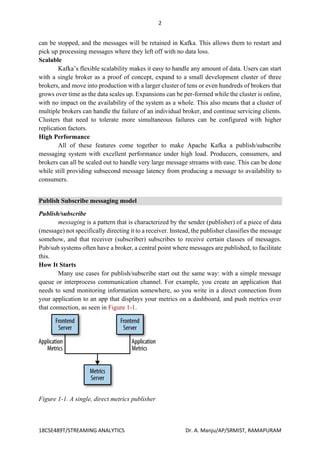
needs to send monitoring information somewhere, so you write in a direct connection from
your application to an app that displays your metrics on a dashboard, and push metrics over
that connection, as seen in Figure 1-1.
Figure 1-1. A single, direct metrics publisher
3
18CSE489T/STREAMING ANALYTICS Dr. A. Manju/AP/SRMIST, RAMAPURAM
This is a simple solution to a simple problem that works when you are getting started
with monitoring. Before long, you decide you would like to analyze your metrics over a longer
term, and that doesn’t work well in the dashboard. You start a new service that can receive
metrics, store them, and analyze them. In order to support this, you modify your application to
write metrics to both systems. By now you have three more applications that are generating
metrics, and they all make the same connections to these two services. Your coworker thinks
it would be a good idea to do active polling of the services for alerting as well, so you add a
server on each of the applications to provide metrics on request. After a while, you have more
applications that are using those servers to get individual metrics and use them for various
purposes.
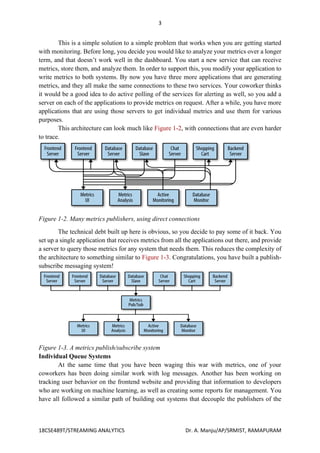
This architecture can look much like Figure 1-2, with connections that are even harder
to trace.
Figure 1-2. Many metrics publishers, using direct connections
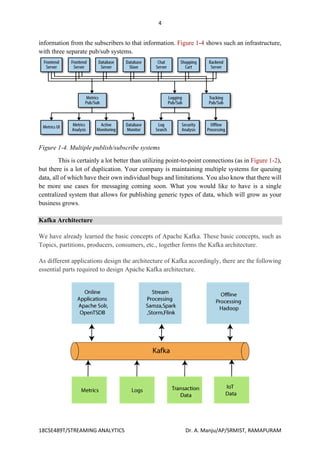
The technical debt built up here is obvious, so you decide to pay some of it back. You
set up a single application that receives metrics from all the applications out there, and provide
a server to query those metrics for any system that needs them. This reduces the complexity of
the architecture to something similar to Figure 1-3. Congratulations, you have built a publish-
subscribe messaging system!
Figure 1-3. A metrics publish/subscribe system
Individual Queue Systems
At the same time that you have been waging this war with metrics, one of your
coworkers has been doing similar work with log messages. Another has been working on
tracking user behavior on the frontend website and providing that information to developers
who are working on machine learning, as well as creating some reports for management. You
have all followed a similar path of building out systems that decouple the publishers of the
4
18CSE489T/STREAMING ANALYTICS Dr. A. Manju/AP/SRMIST, RAMAPURAM
information from the subscribers to that information. Figure 1-4 shows such an infrastructure,
with three separate pub/sub systems.
Figure 1-4. Multiple publish/subscribe systems
This is certainly a lot better than utilizing point-to-point connections (as in Figure 1-2),
but there is a lot of duplication. Your company is maintaining multiple systems for queuing
data, all of which have their own individual bugs and limitations. You also know that there will
be more use cases for messaging coming soon. What you would like to have is a single
centralized system that allows for publishing generic types of data, which will grow as your
business grows.
Kafka Architecture
We have already learned the basic concepts of Apache Kafka. These basic concepts, such as
Topics, partitions, producers, consumers, etc., together forms the Kafka architecture.
As different applications design the architecture of Kafka accordingly, there are the following
essential parts required to design Apache Kafka architecture.
5
18CSE489T/STREAMING ANALYTICS Dr. A. Manju/AP/SRMIST, RAMAPURAM
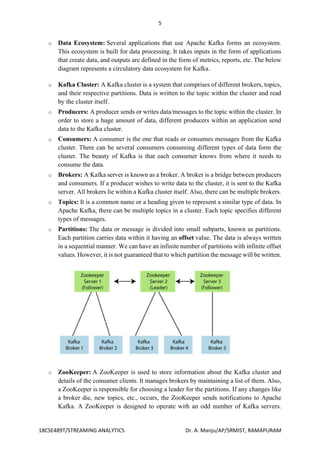
o Data Ecosystem: Several applications that use Apache Kafka forms an ecosystem.
This ecosystem is built for data processing. It takes inputs in the form of applications
that create data, and outputs are defined in the form of metrics, reports, etc. The below
diagram represents a circulatory data ecosystem for Kafka.
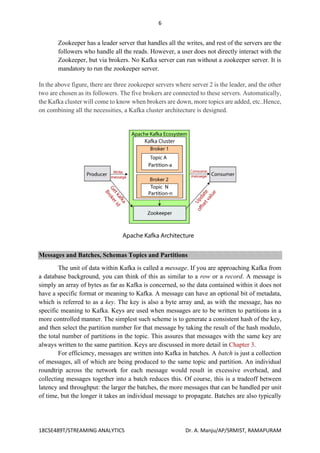
o Kafka Cluster: A Kafka cluster is a system that comprises of different brokers, topics,
and their respective partitions. Data is written to the topic within the cluster and read
by the cluster itself.
o Producers: A producer sends or writes data/messages to the topic within the cluster. In
order to store a huge amount of data, different producers within an application send
data to the Kafka cluster.
o Consumers: A consumer is the one that reads or consumes messages from the Kafka
cluster. There can be several consumers consuming different types of data form the
cluster. The beauty of Kafka is that each consumer knows from where it needs to
consume the data.
o Brokers: A Kafka server is known as a broker. A broker is a bridge between producers
and consumers. If a producer wishes to write data to the cluster, it is sent to the Kafka
server. All brokers lie within a Kafka cluster itself. Also, there can be multiple brokers.
o Topics: It is a common name or a heading given to represent a similar type of data. In
Apache Kafka, there can be multiple topics in a cluster. Each topic specifies different
types of messages.
o Partitions: The data or message is divided into small subparts, known as partitions.
Each partition carries data within it having an offset value. The data is always written
in a sequential manner. We can have an infinite number of partitions with infinite offset
values. However, it is not guaranteed that to which partition the message will be written.
o ZooKeeper: A ZooKeeper is used to store information about the Kafka cluster and
details of the consumer clients. It manages brokers by maintaining a list of them. Also,
a ZooKeeper is responsible for choosing a leader for the partitions. If any changes like
a broker die, new topics, etc., occurs, the ZooKeeper sends notifications to Apache
Kafka. A ZooKeeper is designed to operate with an odd number of Kafka servers.
6
18CSE489T/STREAMING ANALYTICS Dr. A. Manju/AP/SRMIST, RAMAPURAM
Zookeeper has a leader server that handles all the writes, and rest of the servers are the
followers who handle all the reads. However, a user does not directly interact with the
Zookeeper, but via brokers. No Kafka server can run without a zookeeper server. It is
mandatory to run the zookeeper server.
In the above figure, there are three zookeeper servers where server 2 is the leader, and the other
two are chosen as its followers. The five brokers are connected to these servers. Automatically,
the Kafka cluster will come to know when brokers are down, more topics are added, etc..Hence,
on combining all the necessities, a Kafka cluster architecture is designed.
Messages and Batches, Schemas Topics and Partitions
The unit of data within Kafka is called a message. If you are approaching Kafka from
a database background, you can think of this as similar to a row or a record. A message is
simply an array of bytes as far as Kafka is concerned, so the data contained within it does not
have a specific format or meaning to Kafka. A message can have an optional bit of metadata,
which is referred to as a key. The key is also a byte array and, as with the message, has no
specific meaning to Kafka. Keys are used when messages are to be written to partitions in a
more controlled manner. The simplest such scheme is to generate a consistent hash of the key,
and then select the partition number for that message by taking the result of the hash modulo,
the total number of partitions in the topic. This assures that messages with the same key are
always written to the same partition. Keys are discussed in more detail in Chapter 3.
For efficiency, messages are written into Kafka in batches. A batch is just a collection
of messages, all of which are being produced to the same topic and partition. An individual
roundtrip across the network for each message would result in excessive overhead, and
collecting messages together into a batch reduces this. Of course, this is a tradeoff between
latency and throughput: the larger the batches, the more messages that can be handled per unit
of time, but the longer it takes an individual message to propagate. Batches are also typically
7
18CSE489T/STREAMING ANALYTICS Dr. A. Manju/AP/SRMIST, RAMAPURAM
compressed, providing more efficient data transfer and storage at the cost of some processing
power.
Schemas
While messages are opaque byte arrays to Kafka itself, it is recommended that
additional structure, or schema, be imposed on the message content so that it can be easily
understood. There are many options available for message schema, depending on your
application’s individual needs. Simplistic systems, such as Javascript Object Notation (JSON)
and Extensible Markup Language (XML), are easy to use and human-readable. However, they
lack features such as robust type handling and compatibility between schema versions. Many
Kafka developers favor the use of Apache Avro, which is a serialization framework originally
developed for Hadoop. Avro provides a compact serialization format; schemas that are separate
from the message payloads and that do not require code to be generated when they change; and
strong data typing and schema evolution, with both backward and forward compatibility.
A consistent data format is important in Kafka, as it allows writing and reading
messages to be decoupled. When these tasks are tightly coupled, applications that subscribe to
messages must be updated to handle the new data format, in parallel with the old format. Only
then can the applications that publish the messages be updated to utilize the new format. By
using well-defined schemas and storing them in a common repository, the messages in Kafka
can be understood without coordination. Schemas and serialization are covered in more detail
in Chapter 3.
Topics and Partitions
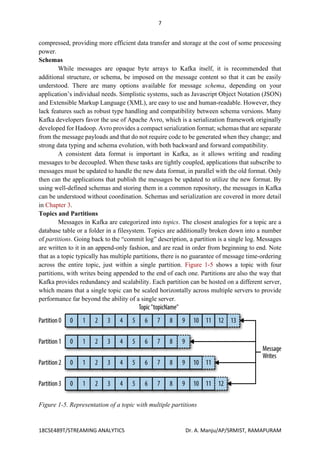
Messages in Kafka are categorized into topics. The closest analogies for a topic are a
database table or a folder in a filesystem. Topics are additionally broken down into a number
of partitions. Going back to the “commit log” description, a partition is a single log. Messages
are written to it in an append-only fashion, and are read in order from beginning to end. Note
that as a topic typically has multiple partitions, there is no guarantee of message time-ordering
across the entire topic, just within a single partition. Figure 1-5 shows a topic with four
partitions, with writes being appended to the end of each one. Partitions are also the way that
Kafka provides redundancy and scalability. Each partition can be hosted on a different server,
which means that a single topic can be scaled horizontally across multiple servers to provide
performance far beyond the ability of a single server.
Figure 1-5. Representation of a topic with multiple partitions
8
18CSE489T/STREAMING ANALYTICS Dr. A. Manju/AP/SRMIST, RAMAPURAM
The term stream is often used when discussing data within systems like Kafka. Most
often, a stream is considered to be a single topic of data, regardless of the number of partitions.
This represents a single stream of data moving from the producers to the consumers. This way
of referring to messages is most common when discussing stream processing, which is when
frameworks—some of which are Kafka Streams, Apache Samza, and Storm—operate on the
messages in real time. This method of operation can be compared to the way offline
frameworks, namely Hadoop, are designed to work on bulk data at a later time. An overview
of stream processing is provided in Chapter 11.
Producers and consumers
Kafka clients are users of the system, and there are two basic types: producers and
consumers. There are also advanced client APIs—Kafka Connect API for data integration and
Kafka Streams for stream processing. The advanced clients use producers and consumers as
building blocks and provide higher-level functionality on top.
Producers create new messages. In other publish/subscribe systems, these may be
called publishers or writers. In general, a message will be produced to a specific topic. By
default, the producer does not care what partition a specific message is written to and will
balance messages over all partitions of a topic evenly. In some cases, the producer will direct
messages to specific partitions. This is typically done using the message key and a partitioner
that will generate a hash of the key and map it to a specific partition. This assures that all
messages produced with a given key will get written to the same partition. The producer could
also use a custom partitioner that follows other business rules for mapping messages to
partitions. Producers are covered in more detail in Chapter 3.
Consumers read messages. In other publish/subscribe systems, these clients may be
called subscribers or readers. The consumer subscribes to one or more topics and reads the
messages in the order in which they were produced. The consumer keeps track of which
messages it has already consumed by keeping track of the offset of increases—that Kafka adds
to each message as it is produced. Each message in a given partition has a unique offset. By
storing the offset of the last consumed message for each partition, either in Zookeeper or in
Kafka itself, a consumer can stop and restart without losing its place.
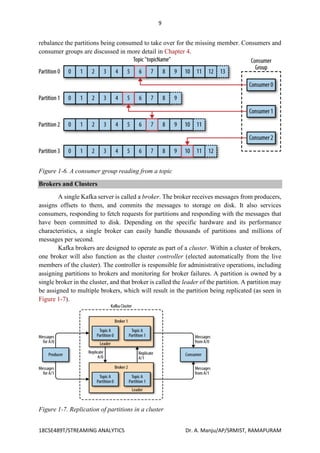
Consumers work as part of a consumer group, which is one or more consumers that
work together to consume a topic. The group assures that each partition is only consumed by
one member. In Figure 1-6, there are three consumers in a single group consuming a topic.
Two of the consumers are working from one partition each, while the third consumer is working
from two partitions. The mapping of a consumer to a partition is often called ownership of the
partition by the consumer.
In this way, consumers can horizontally scale to consume topics with a large number
of messages. Additionally, if a single consumer fails, the remaining members of the group will
9
18CSE489T/STREAMING ANALYTICS Dr. A. Manju/AP/SRMIST, RAMAPURAM
rebalance the partitions being consumed to take over for the missing member. Consumers and
consumer groups are discussed in more detail in Chapter 4.
Figure 1-6. A consumer group reading from a topic
Brokers and Clusters
A single Kafka server is called a broker. The broker receives messages from producers,
assigns offsets to them, and commits the messages to storage on disk. It also services
consumers, responding to fetch requests for partitions and responding with the messages that
have been committed to disk. Depending on the specific hardware and its performance
characteristics, a single broker can easily handle thousands of partitions and millions of
messages per second.
Kafka brokers are designed to operate as part of a cluster. Within a cluster of brokers,
one broker will also function as the cluster controller (elected automatically from the live
members of the cluster). The controller is responsible for administrative operations, including
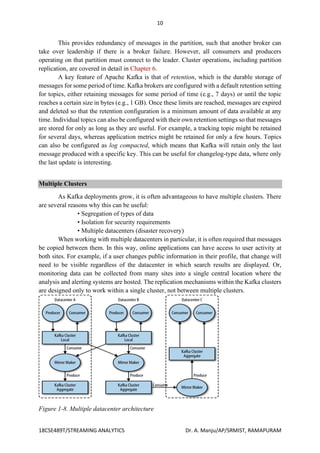
assigning partitions to brokers and monitoring for broker failures. A partition is owned by a
single broker in the cluster, and that broker is called the leader of the partition. A partition may
be assigned to multiple brokers, which will result in the partition being replicated (as seen in
Figure 1-7).
Figure 1-7. Replication of partitions in a cluster
10
18CSE489T/STREAMING ANALYTICS Dr. A. Manju/AP/SRMIST, RAMAPURAM
This provides redundancy of messages in the partition, such that another broker can
take over leadership if there is a broker failure. However, all consumers and producers
operating on that partition must connect to the leader. Cluster operations, including partition
replication, are covered in detail in Chapter 6.
A key feature of Apache Kafka is that of retention, which is the durable storage of
messages for some period of time. Kafka brokers are configured with a default retention setting
for topics, either retaining messages for some period of time (e.g., 7 days) or until the topic
reaches a certain size in bytes (e.g., 1 GB). Once these limits are reached, messages are expired
and deleted so that the retention configuration is a minimum amount of data available at any
time. Individual topics can also be configured with their own retention settings so that messages
are stored for only as long as they are useful. For example, a tracking topic might be retained
for several days, whereas application metrics might be retained for only a few hours. Topics
can also be configured as log compacted, which means that Kafka will retain only the last
message produced with a specific key. This can be useful for changelog-type data, where only
the last update is interesting.
Multiple Clusters
As Kafka deployments grow, it is often advantageous to have multiple clusters. There
are several reasons why this can be useful:
• Segregation of types of data
• Isolation for security requirements
• Multiple datacenters (disaster recovery)
When working with multiple datacenters in particular, it is often required that messages
be copied between them. In this way, online applications can have access to user activity at
both sites. For example, if a user changes public information in their profile, that change will
need to be visible regardless of the datacenter in which search results are displayed. Or,
monitoring data can be collected from many sites into a single central location where the
analysis and alerting systems are hosted. The replication mechanisms within the Kafka clusters
are designed only to work within a single cluster, not between multiple clusters.
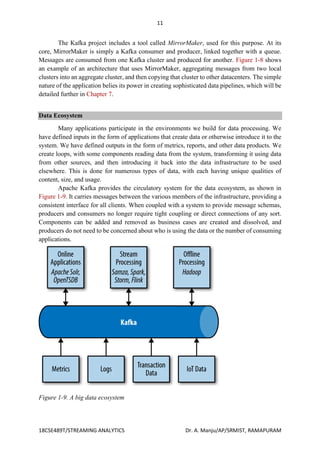
Figure 1-8. Multiple datacenter architecture
11
18CSE489T/STREAMING ANALYTICS Dr. A. Manju/AP/SRMIST, RAMAPURAM
The Kafka project includes a tool called MirrorMaker, used for this purpose. At its
core, MirrorMaker is simply a Kafka consumer and producer, linked together with a queue.
Messages are consumed from one Kafka cluster and produced for another. Figure 1-8 shows
an example of an architecture that uses MirrorMaker, aggregating messages from two local
clusters into an aggregate cluster, and then copying that cluster to other datacenters. The simple
nature of the application belies its power in creating sophisticated data pipelines, which will be
detailed further in Chapter 7.
Data Ecosystem
Many applications participate in the environments we build for data processing. We
have defined inputs in the form of applications that create data or otherwise introduce it to the
system. We have defined outputs in the form of metrics, reports, and other data products. We
create loops, with some components reading data from the system, transforming it using data
from other sources, and then introducing it back into the data infrastructure to be used
elsewhere. This is done for numerous types of data, with each having unique qualities of
content, size, and usage.
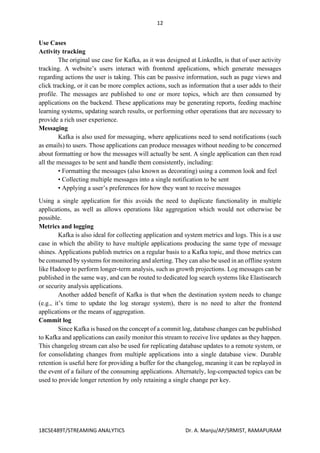
Apache Kafka provides the circulatory system for the data ecosystem, as shown in
Figure 1-9. It carries messages between the various members of the infrastructure, providing a
consistent interface for all clients. When coupled with a system to provide message schemas,
producers and consumers no longer require tight coupling or direct connections of any sort.
Components can be added and removed as business cases are created and dissolved, and
producers do not need to be concerned about who is using the data or the number of consuming
applications.
Figure 1-9. A big data ecosystem
12
18CSE489T/STREAMING ANALYTICS Dr. A. Manju/AP/SRMIST, RAMAPURAM
Use Cases
Activity tracking
The original use case for Kafka, as it was designed at LinkedIn, is that of user activity
tracking. A website’s users interact with frontend applications, which generate messages
regarding actions the user is taking. This can be passive information, such as page views and
click tracking, or it can be more complex actions, such as information that a user adds to their
profile. The messages are published to one or more topics, which are then consumed by
applications on the backend. These applications may be generating reports, feeding machine
learning systems, updating search results, or performing other operations that are necessary to
provide a rich user experience.
Messaging
Kafka is also used for messaging, where applications need to send notifications (such
as emails) to users. Those applications can produce messages without needing to be concerned
about formatting or how the messages will actually be sent. A single application can then read
all the messages to be sent and handle them consistently, including:
• Formatting the messages (also known as decorating) using a common look and feel
• Collecting multiple messages into a single notification to be sent
• Applying a user’s preferences for how they want to receive messages
Using a single application for this avoids the need to duplicate functionality in multiple
applications, as well as allows operations like aggregation which would not otherwise be
possible.
Metrics and logging
Kafka is also ideal for collecting application and system metrics and logs. This is a use
case in which the ability to have multiple applications producing the same type of message
shines. Applications publish metrics on a regular basis to a Kafka topic, and those metrics can
be consumed by systems for monitoring and alerting. They can also be used in an offline system
like Hadoop to perform longer-term analysis, such as growth projections. Log messages can be
published in the same way, and can be routed to dedicated log search systems like Elastisearch
or security analysis applications.
Another added benefit of Kafka is that when the destination system needs to change
(e.g., it’s time to update the log storage system), there is no need to alter the frontend
applications or the means of aggregation.
Commit log
Since Kafka is based on the concept of a commit log, database changes can be published
to Kafka and applications can easily monitor this stream to receive live updates as they happen.
This changelog stream can also be used for replicating database updates to a remote system, or
for consolidating changes from multiple applications into a single database view. Durable
retention is useful here for providing a buffer for the changelog, meaning it can be replayed in
the event of a failure of the consuming applications. Alternately, log-compacted topics can be
used to provide longer retention by only retaining a single change per key.
13
18CSE489T/STREAMING ANALYTICS Dr. A. Manju/AP/SRMIST, RAMAPURAM
Stream processing
Another area that provides numerous types of applications is stream processing. While
almost all usage of Kafka can be thought of as stream processing, the term is typically used to
refer to applications that provide similar functionality to map/reduce processing in Hadoop.
Hadoop usually relies on aggregation of data over a long time frame, either hours or days.
Stream processing operates on data in real time, as quickly as messages are produced. Stream
frameworks allow users to write small applications to operate on Kafka messages, performing
tasks such as counting metrics, partitioning messages for efficient processing by other
applications, or transforming messages using data from multiple sources. Stream processing is
covered in Chapter 11.
Sending messages with producers - Steps & Example
The simplest way to send a message is as follows:
ProducerRecord<String, String> record =
new ProducerRecord<>("CustomerCountry", "Precision Products",
"France");
try {
producer.send(record);
} catch (Exception e) {
e.printStackTrace();
}
The producer accepts ProducerRecord objects, so we start by creating one.
ProducerRecord has multiple constructors, which we will discuss later. Here we use one that
requires the name of the topic we are sending data to, which is always a string, and the key and
value we are sending to Kafka, which in this case are also strings. The types of the key and
value must match our serializer and producer objects.
We use the producer object send() method to send the ProducerRecord. The send()
method returns a Java Future object with RecordMetadata, but since we simply ignore the
returned value, we have no way of knowing whether the message was sent successfully or not.
This method of sending messages can be used when dropping a message silently is acceptable.
This is not typically the case in production applications. While we ignore errors that may occur
while sending messages to Kafka brokers or in the brokers themselves, we may still get an
exception if the producer encountered errors before sending the message to Kafka. Those can
be a SerializationException when it fails to serialize the message, a BufferExhaustedException
or TimeoutException if the buffer is full, or an InterruptException if the sending thread was
interrupted.
Sending a Message Synchronously
The simplest way to send a message synchronously is as follows:
ProducerRecord<String, String> record =
new ProducerRecord<>("CustomerCountry", "Precision Products", "France");
try {
producer.send(record).get();
14
18CSE489T/STREAMING ANALYTICS Dr. A. Manju/AP/SRMIST, RAMAPURAM
} catch (Exception e) {
e.printStackTrace();
}
Here, we are using Future.get() to wait for a reply from Kafka. This method will throw
an exception if the record is not sent successfully to Kafka. If there were no errors, we will get
a RecordMetadata object that we can use to retrieve the offset the message was written to.
If there were any errors before sending data to Kafka, while sending, if the Kafka
brokers returned a nonretriable exceptions or if we exhausted the available retries, we will
encounter an exception. In this case, we just print any exception we ran into.
KafkaProducer has two types of errors. Retriable errors are those that can be resolved
by sending the message again. For example, a connection error can be resolved because the
connection may get reestablished. A “no leader” error can be resolved when a new leader is
elected for the partition. KafkaProducer can be configured to retry those errors automatically,
so the application code will get retriable exceptions only when the number of retries was
exhausted and the error was not resolved. Some errors will not be resolved by retrying. For
example, “message size too large.” In those cases, KafkaProducer will not attempt a retry and
will return the exception immediately.
Sending a Message Asynchronously
Suppose the network roundtrip time between our application and the Kafka cluster is
10ms. If we wait for a reply after sending each message, sending 100 messages will take around
1 second. On the other hand, if we just send all our messages and not wait for any replies, then
sending 100 messages will barely take any time at all. In most cases, we really don’t need a
reply—Kafka sends back the topic, partition, and offset of the record after it was written, which
is usually not required by the sending app. On the other hand, we do need to know when we
failed to send a message completely so we can throw an exception, log an error, or perhaps
write the message to an “errors” file for later analysis.
In order to send messages asynchronously and still handle error scenarios, the producer
supports adding a callback when sending a record. Here is an example of how we use a
callback:
private class DemoProducerCallback implements Callback {
@Override
public void onCompletion(RecordMetadata recordMetadata, Exception e) {
if (e != null) {
e.printStackTrace();
}
}
}
ProducerRecord<String, String> record =
new ProducerRecord<>("CustomerCountry", "Biomedical Materials", "USA");
producer.send(record, new DemoProducerCallback());
To use callbacks, you need a class that implements the org.apache.kafka.
clients.producer.Callback interface, which has a single function—onCompletion().
15
18CSE489T/STREAMING ANALYTICS Dr. A. Manju/AP/SRMIST, RAMAPURAM
If Kafka returned an error, onCompletion() will have a nonnull exception. Here we
“handle” it by printing, but production code will probably have more robust error handling
functions.
The records are the same as before. And we pass a Callback object along when sending the
record.
Receiving messages with consumers - Steps & Example
Creating a Kafka Consumer
The first step to start consuming records is to create a KafkaConsumer instance.
Creating a KafkaConsumer is very similar to creating a KafkaProducer—you create a Java
Properties instance with the properties you want to pass to the consumer. We will discuss all
the properties in depth later in the chapter. To start we just need to use the three mandatory
properties: bootstrap.servers, key.deserializer, and value.deserializer.
The first property, bootstrap.servers, is the connection string to a Kafka cluster. It is
used the exact same way as in KafkaProducer. The other two properties, key.deserializer and
value.deserializer, are similar to the serializers defined for the producer, but rather than
specifying classes that turn Java objects to byte arrays, you need to specify classes that can take
a byte array and turn it into a Java object. There is a fourth property, which is not strictly
mandatory, but for now we will pretend
it is. The property is group.id and it specifies the consumer group the KafkaConsumer instance
belongs to. While it is possible to create consumers that do not belong to any consumer group,
this is uncommon, so for most of the chapter we will assume the consumer is part of a group.
The following code snippet shows how to create a KafkaConsumer:
Properties props = new Properties();
props.put("bootstrap.servers", "broker1:9092,broker2:9092");
props.put("group.id", "CountryCounter");
props.put("key.deserializer",
"org.apache.kafka.common.serialization.StringDeserializer");
props.put("value.deserializer",
"org.apache.kafka.common.serialization.StringDeserializer");
KafkaConsumer<String, String> consumer = new KafkaConsumer<String,
String>(props);
We assume that the records we consume will have String objects as both the key and
the value of the record. The only new property here is group.id, which is the name of the
consumer group this consumer belong to.
Subscribing to Topics
Once we create a consumer, the next step is to subscribe to one or more topics. The
subcribe() method takes a list of topics as a parameter, so it’s pretty simple to use:
consumer.subscribe(Collections.singletonList("customerCountries"));
Here we simply create a list with a single element: the topic name customerCountries.
It is also possible to call subscribe with a regular expression. The expression can match multiple
topic names, and if someone creates a new topic with a name that matches, a rebalance will
16
18CSE489T/STREAMING ANALYTICS Dr. A. Manju/AP/SRMIST, RAMAPURAM
happen almost immediately and the consumers will start consuming from the new topic. This
is useful for applications that need to consume from multiple topics and can handle the different
types of data the topics will contain.
Subscribing to multiple topics using a regular expression is most commonly used in
applications that replicate data between Kafka and another system.
To subscribe to all test topics, we can call:
consumer.subscribe("test.*");
The Poll Loop
At the heart of the consumer API is a simple loop for polling the server for more data.
Once the consumer subscribes to topics, the poll loop handles all details of coordination,
partition rebalances, heartbeats, and data fetching, leaving the developer with a clean API that
simply returns available data from the assigned partitions. The main body of a consumer will
look as follows:
try {
while (true) {
ConsumerRecords<String, String> records = consumer.poll(100);
for (ConsumerRecord<String, String> record : records)
{
log.debug("topic = %s, partition = %s, offset = %d,
customer = %s, country = %sn",
record.topic(), record.partition(), record.offset(),
record.key(), record.value());
int updatedCount = 1;
if (custCountryMap.countainsValue(record.value())) {
updatedCount = custCountryMap.get(record.value()) + 1;
}
custCountryMap.put(record.value(), updatedCount)
JSONObject json = new JSONObject(custCountryMap);
System.out.println(json.toString(4))
}
}
} finally {
consumer.close();
}
This is indeed an infinite loop. Consumers are usually long-running applications that
continuously poll Kafka for more data. We will show later in the chapter how to cleanly exit
the loop and close the consumer.
This is the most important line in the chapter. The same way that sharks must keep moving or
they die, consumers must keep polling Kafka or they will be considered dead and the partitions
they are consuming will be handed to another consumer in the group to continue consuming.
The parameter we pass, poll(), is a timeout interval and controls how long poll() will block if
data is not available in the consumer buffer. If this is set to 0, poll() will return immediately;
otherwise, it will wait for the specified number of milliseconds for data to arrive from the
broker. poll() returns a list of records. Each record contains the topic and partition the record
17
18CSE489T/STREAMING ANALYTICS Dr. A. Manju/AP/SRMIST, RAMAPURAM
came from, the offset of the record within the partition, and of course the key and the value of
the record. Typically we want to iterate over the list and process the records individually. The
poll() method takes a timeout parameter. This specifies how long it will take poll to return,
with or without data. The value is typically driven by application needs for quick responses—
how fast do you want to return control to the thread that does the polling?
Processing usually ends in writing a result in a data store or updating a stored record.
Here, the goal is to keep a running count of customers from each county, so we update a
hashtable and print the result as JSON. A more realistic example would store the updates result
in a data store.
Always close() the consumer before exiting. This will close the network connections
and sockets. It will also trigger a rebalance immediately rather than wait for the group
coordinator to discover that the consumer stopped sending heartbeats and is likely dead, which
will take longer and therefore result in a longer period of time in which consumers can’t
consume messages from a subset of the partitions. The poll loop does a lot more than just get
data. The first time you call poll() with a new consumer, it is responsible for finding the
GroupCoordinator, joining the consumer group, and receiving a partition assignment. If a
rebalance is triggered, it will be handled inside the poll loop as well. And of course the
heartbeats that keep consumers alive are sent from within the poll loop. For this reason, we try
to make sure that whatever processing we do between iterations is fast and efficient.
Developing Kafka Streams Application
The Kafka Streams DSL is the high-level API that enables you to build Kafka Streams
applications quickly. The high-level API is very well thought out, and there are methods to
handle most stream-processing needs out of the box, so you can create a sophisticated stream-
processing program without much effort. At the heart of the high-level API is the KStream
object, which represents the streaming key/value pair records. Most of the methods in the Kafka
Streams DSL return a reference to a KStream object, allowing for a fluent interface style of
programming. Additionally, a good percentage of the KStream methods accept types consisting
of single-method interfaces allowing for the use of Java 8 lambda expressions. Taking these
factors into account, you can imagine the simplicity and ease with which you can build a Kafka
Streams program.
Back in 2005, Martin Fowler and Eric Evans developed the concept of the fluent
interface—an interface where the return value of a method call is the same instance that
originally called the method (https://martinfowler.com/bliki/FluentInterface.html). This
approach is useful when constructing objects with several parameters, such as
Person.builder().firstName("Beth").withLastName("Smith").with- Occupation("CEO"). In
Kafka Streams, there is one small but important difference: the returned KStream object is a
new instance, not the same instance that made the original method call.
There’s also a lower-level API, the Processor API, which isn’t as succinct as the Kafka
Streams DSL but allows for more control. We’ll cover the Processor API in chapter 6. With
that introduction out of the way, let’s dive into the requisite Hello World program for Kafka
Streams.
18
18CSE489T/STREAMING ANALYTICS Dr. A. Manju/AP/SRMIST, RAMAPURAM
Phases in a Kafka Streams Application Development
Hello World for Kafka Streams
Your first program will be a toy application that takes incoming messages and converts
them to uppercase characters, effectively yelling at anyone who reads the message. You’ll call
this the Yelling App. Before diving into the code, let’s take a look at the processing topology
you’ll assemble for this application.
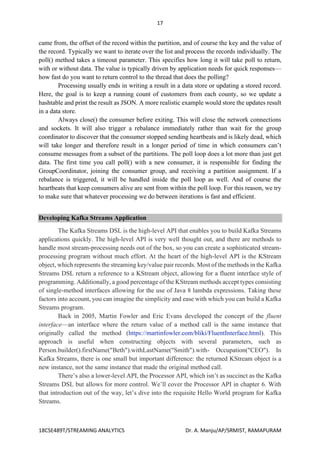
As you can see, you’re building a simple processing graph—so simple that it resembles
a linked list of nodes more than the typical tree-like structure of a graph. But there’s enough
here to give you strong clues about what to expect in the code. There will be a source node, a
processor node transforming incoming text to uppercase, and a sink processor writing results
out to a topic.
This is a trivial example, but the code shown here is representative of what you’ll see
in other Kafka Streams programs. In most of the examples, you’ll see a similar structure:
1 Define the configuration items.
2 Create Serde instances, either custom or predefined.
3 Build the processor topology.
4 Create and start the KStream.
When we get into the more advanced examples, the principal difference will be in the
complexity of the processor topology. With that in mind, it’s time to build your first
application.
Creating the topology for the Yelling App
The first step to creating any Kafka Streams application is to create a source node. The source
node is responsible for consuming the records, from a topic, that will flow through the
application.
19
18CSE489T/STREAMING ANALYTICS Dr. A. Manju/AP/SRMIST, RAMAPURAM
The following line of code creates the source, or parent, node of the graph.
KStream<String, String> simpleFirstStream = builder.stream("src-topic",
Consumed.with(stringSerde, stringSerde));
The simpleFirstStreamKStream instance is set to consume messages written to the src-topic
topic. In addition to specifying the topic name, you also provide Serde objects (via a Consumed
instance) for deserializing the records from Kafka. You’ll use the Consumed class for any
optional parameters whenever you create a source node in Kafka Streams.
You now have a source node for your application, but you need to attach a processing node to
make use of the data. The code used to attach the
processor (a child node of the source node) is shown in the following listing. With this line,
you create another KStream instance that’s a child node of the parent node.
KStream<String, String> upperCasedStream =
simpleFirstStream.mapValues(String::toUpperCase);
By calling the KStream.mapValues function, you’re creating a new processing node whose
inputs are the results of going through the mapValues call.
20
18CSE489T/STREAMING ANALYTICS Dr. A. Manju/AP/SRMIST, RAMAPURAM
It’s important to remember that you shouldn’t modify the original value in the Value- Mapper
provided to mapValues. The upperCasedStream instance receives transformed copies of the
initial value from the simpleFirstStream.mapValues call. In this case, it’s uppercase text.
The mapValues() method takes an instance of the ValueMapper<V, V1> interface. The
ValueMapper interface defines only one method, ValueMapper.apply, making it an ideal
candidate for using a Java 8 lambda expression. This is what you’ve done here with
String::toUpperCase, which is a method reference, an even shorter form of a Java 8 lambda
expression.
NOTE Many Java 8 tutorials are available for lambda expressions and method references.
Good starting points can be found in Oracle’s Java documentation:
“Lambda Expressions” (http://mng.bz/J0Xm) and “Method References”
(http://mng.bz/BaDW).
You could have used the form s s.toUpperCase(), but because toUpperCase is an instance
method on the String class, you can use a method reference.
Using lambda expressions instead of concrete implementations is a pattern you’ll see over and
over with the Streams Processor API in this book. Because most of the methods expect types
that are single method interfaces, you can easily use Java 8 lambdas.
So far, your Kafka Streams application is consuming records and transforming them to
uppercase. The final step is to add a sink processor that writes the results out to a topic.
The following code line adds the last processor in the graph.
upperCasedStream.to("out-topic", Produced.with(stringSerde, stringSerde));
The KStream.to method creates a sink-processing node in the topology. Sink processors write
records back out to Kafka. This sink node takes records from the upper- CasedStream processor
and writes them to a topic named out-topic. Again, you provide Serde instances, this time for
serializing records written to a Kafka topic. But in this case, you use a Produced instance, which
provides optional parameters for creating a sink node in Kafka Streams.
The preceding example uses three lines to build the topology:
KStream<String,String> simpleFirstStream = builder.stream("src-topic",
Consumed.with(stringSerde, stringSerde));
21
18CSE489T/STREAMING ANALYTICS Dr. A. Manju/AP/SRMIST, RAMAPURAM
KStream<String, String> upperCasedStream =
simpleFirstStream.mapValues(String::toUpperCase);
upperCasedStream.to("out-topic", Produced.with(stringSerde, stringSerde));
Each step is on an individual line to demonstrate the different stages of the building process.
But all methods in the KStream API that don’t create terminal nodes (methods with a return
type of void) return a new KStream instance, which allows you to use the fluent interface style
of programming mentioned earlier. To demonstrate this idea, here’s another way you could
construct the Yelling App topology:
builder.stream("src-topic", Consumed.with(stringSerde, stringSerde))
.mapValues(String::toUpperCase).to("out-topic", Produced.with(stringSerde, stringSerde));
This shortens the program from three lines to one without losing any clarity or purpose.
From this point forward, all the examples will be written using the fluent interface style unless
doing so causes the clarity of the program to suffer.
You’ve built your first Kafka Streams topology, but we glossed over the important steps of
configuration and Serde creation. We’ll look at those now.
Kafka Streams configuration
Although Kafka Streams is highly configurable, with several properties you can adjust for your
specific needs, the first example uses only two configuration settings,
APPLICATION_ID_CONFIG and BOOTSTRAP_SERVERS_CONFIG:
props.put(StreamsConfig.APPLICATION_ID_CONFIG, "yelling_app_id");
props.put(StreamsConfig.BOOTSTRAP_SERVERS_CONFIG, "localhost:9092");
Both settings are required because no default values are provided. Attempting to start a Kafka
Streams program without these two properties defined will result in a Config- Exception being
thrown.
The StreamsConfig.APPLICATION_ID_CONFIG property identifies your Kafka Streams
application, and it must be a unique value for the entire cluster. It also serves as a default value
for the client ID prefix and group ID parameters if you don’t set either value. The client ID
prefix is the user-defined value that uniquely identifies clients connecting to Kafka. The group
ID is used to manage the membership of a group of consumers reading from the same topic,
ensuring that all consumers in the group can effectively read subscribed topics.
The StreamsConfig.BOOTSTRAP_SERVERS_CONFIG property can be a single hostname:
port pair or multiple hostname:port comma-separated pairs. The value of this setting points the
Kafka Streams application to the locaction of the Kafka cluster. We’ll cover several more
configuration items as we explore more examples in the book.
Serde creation
In Kafka Streams, the Serdes class provides convenience methods for creating Serde instances,
as shown here:
Serde<String> stringSerde = Serdes.String();
This line is where you create the Serde instance required for serialization/deserialization using
the Serdes class. Here, you create a variable to reference the Serde for repeated use in the
topology. The Serdes class provides default implementations for the following types:
String
Byte array
22
18CSE489T/STREAMING ANALYTICS Dr. A. Manju/AP/SRMIST, RAMAPURAM
Long
Integer
Double
Implementations of the Serde interface are extremely useful because they contain the serializer
and deserializer, which keeps you from having to specify four parameters (key serializer, value
serializer, key deserializer, and value deserializer) every time you need to provide a Serde in a
KStream method. In an upcoming example, you’ll create a Serde implementation to handle
serialization/deserialization of more-complex types.
Let’s take a look at the whole program you just put together. You can find the source in
src/main/java/bbejeck/chapter_3/KafkaStreamsYellingApp.java (source code can be found on
the book’s website here: https://manning.com/books/kafkastreams- in-action).
You’ve now constructed your first Kafka Streams application. Let’s quickly review the steps
involved, as it’s a general pattern you’ll see in most of your Kafka Streams applications:
1 Create a StreamsConfig instance.
2 Create a Serde object.
3 Construct a processing topology.
4 Start the Kafka Streams program.
Apart from the general construction of a Kafka Streams application, a key takeaway here is to
use lambda expressions whenever possible, to make your programs more concise. We’ll now
move on to a more complex example that will allow us to explore more of the Streams
Processor API. The example will be new, but the scenario is one you’re already familiar with:
ZMart data-processing goals.
Constructing a topology
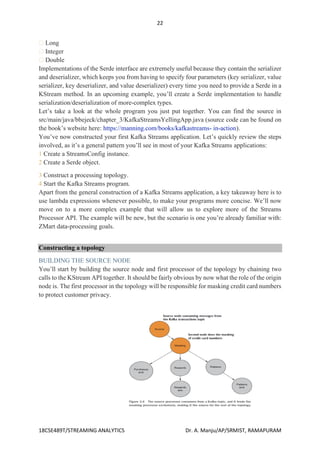
BUILDING THE SOURCE NODE
You’ll start by building the source node and first processor of the topology by chaining two
calls to the KStream API together. It should be fairly obvious by now what the role of the origin
node is. The first processor in the topology will be responsible for masking credit card numbers
to protect customer privacy.
the source node and first processor
23
18CSE489T/STREAMING ANALYTICS Dr. A. Manju/AP/SRMIST, RAMAPURAM
KStream<String,Purchase> purchaseKStream = streamsBuilder.stream("transactions",
Consumed.with(stringSerde, purchaseSerde)) .mapValues(p ->
Purchase.builder(p).maskCreditCard().build());
You create the source node with a call to the StreamsBuilder.stream method using a default
String serde, a custom serde for Purchase objects, and the name of the topic that’s the source
of the messages for the stream. In this case, you only specify one topic, but you could have
provided a comma-separated list of names or a regular expression to match topic names instead.
In this listing 3.5, you provide Serdes with a Consumed instance, but you could have left that
out and only provided the topic name and relied on the default Serdes provided via
configuration parameters.
The next immediate call is to the KStream.mapValues method, taking a ValueMapper< V, V1>
instance as a parameter. Value mappers take a single parameter of one type (a Purchase object,
in this case) and map that object to a to a new value, possibly of another type. In this example,
KStream.mapValues returns an object of the same type (Purchase), but with a masked credit
card number.
Note that when using the KStream.mapValues method, the original key is unchanged and isn’t
factored into mapping a new value. If you wanted to generate a new key/value pair or include
the key in producing a new value, you’d use the KStream.map method that takes a
KeyValueMapper<K, V, KeyValue<K1, V1>> instance.
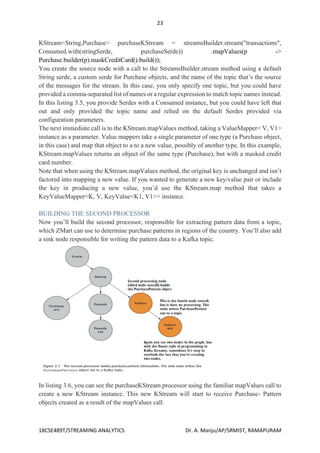
BUILDING THE SECOND PROCESSOR
Now you’ll build the second processor, responsible for extracting pattern data from a topic,
which ZMart can use to determine purchase patterns in regions of the country. You’ll also add
a sink node responsible for writing the pattern data to a Kafka topic.
In listing 3.6, you can see the purchaseKStream processor using the familiar mapValues call to
create a new KStream instance. This new KStream will start to receive Purchase- Pattern
objects created as a result of the mapValues call.
24
18CSE489T/STREAMING ANALYTICS Dr. A. Manju/AP/SRMIST, RAMAPURAM
KStream<String, PurchasePattern> patternKStream = purchaseKStream.mapValues(purchase
->PurchasePattern.builder(purchase).build()); patternKStream.to("patterns",
Produced.with(stringSerde,purchasePatternSerde));
Here, you declare a variable to hold the reference of the new KStream instance, because you’ll
use it to print the results of the stream to the console with a print call. This is very useful during
development and for debugging. The purchase-patterns processor forwards the records it
receives to a child node of its own, defined by the method call KStream.to, writing to the
patterns topic. Note the use of a Produced object to provide the previously built Serde. The
KStream.to method is a mirror image of the KStream.source method. Instead of setting a source
for the topology to read from, the KStream.to method defines a sink node that’s used to write
the data from a KStream instance to a Kafka topic. The KStream.to method also provides
overloaded versions in which you can leave out the Produced parameter and use the default
Serdes defined in the configuration. One of the optional parameters you can set with the
Produced class is Stream- Partitioner, which we’ll discuss next.
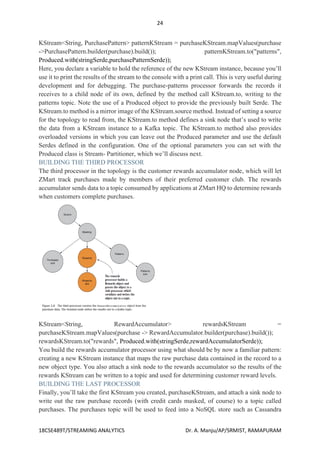
BUILDING THE THIRD PROCESSOR
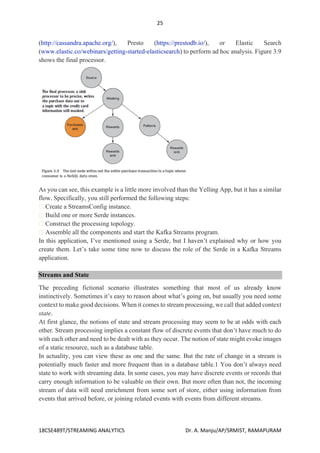
The third processor in the topology is the customer rewards accumulator node, which will let
ZMart track purchases made by members of their preferred customer club. The rewards
accumulator sends data to a topic consumed by applications at ZMart HQ to determine rewards
when customers complete purchases.
KStream<String, RewardAccumulator> rewardsKStream =
purchaseKStream.mapValues(purchase -> RewardAccumulator.builder(purchase).build());
rewardsKStream.to("rewards", Produced.with(stringSerde,rewardAccumulatorSerde));
You build the rewards accumulator processor using what should be by now a familiar pattern:
creating a new KStream instance that maps the raw purchase data contained in the record to a
new object type. You also attach a sink node to the rewards accumulator so the results of the
rewards KStream can be written to a topic and used for determining customer reward levels.
BUILDING THE LAST PROCESSOR
Finally, you’ll take the first KStream you created, purchaseKStream, and attach a sink node to
write out the raw purchase records (with credit cards masked, of course) to a topic called
purchases. The purchases topic will be used to feed into a NoSQL store such as Cassandra
25
18CSE489T/STREAMING ANALYTICS Dr. A. Manju/AP/SRMIST, RAMAPURAM
(http://cassandra.apache.org/), Presto (https://prestodb.io/), or Elastic Search
(www.elastic.co/webinars/getting-started-elasticsearch) to perform ad hoc analysis. Figure 3.9
shows the final processor.
As you can see, this example is a little more involved than the Yelling App, but it has a similar
flow. Specifically, you still performed the following steps:
Create a StreamsConfig instance.
Build one or more Serde instances.
Construct the processing topology.
Assemble all the components and start the Kafka Streams program.
In this application, I’ve mentioned using a Serde, but I haven’t explained why or how you
create them. Let’s take some time now to discuss the role of the Serde in a Kafka Streams
application.
Streams and State
The preceding fictional scenario illustrates something that most of us already know
instinctively. Sometimes it’s easy to reason about what’s going on, but usually you need some
context to make good decisions. When it comes to stream processing, we call that added context
state.
At first glance, the notions of state and stream processing may seem to be at odds with each
other. Stream processing implies a constant flow of discrete events that don’t have much to do
with each other and need to be dealt with as they occur. The notion of state might evoke images
of a static resource, such as a database table.
In actuality, you can view these as one and the same. But the rate of change in a stream is
potentially much faster and more frequent than in a database table.1 You don’t always need
state to work with streaming data. In some cases, you may have discrete events or records that
carry enough information to be valuable on their own. But more often than not, the incoming
stream of data will need enrichment from some sort of store, either using information from
events that arrived before, or joining related events with events from different streams.
26
18CSE489T/STREAMING ANALYTICS Dr. A. Manju/AP/SRMIST, RAMAPURAM
Applying stateful operations
In this section, we’ll look at how you can add a stateful operation to an existing stateless one
to improve the information collected by our application. In this topology, you produced a
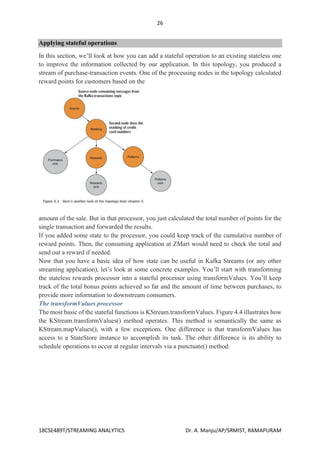
stream of purchase-transaction events. One of the processing nodes in the topology calculated
reward points for customers based on the
amount of the sale. But in that processor, you just calculated the total number of points for the
single transaction and forwarded the results.
If you added some state to the processor, you could keep track of the cumulative number of
reward points. Then, the consuming application at ZMart would need to check the total and
send out a reward if needed.
Now that you have a basic idea of how state can be useful in Kafka Streams (or any other
streaming application), let’s look at some concrete examples. You’ll start with transforming
the stateless rewards processor into a stateful processor using transformValues. You’ll keep
track of the total bonus points achieved so far and the amount of time between purchases, to
provide more information to downstream consumers.
The transformValues processor
The most basic of the stateful functions is KStream.transformValues. Figure 4.4 illustrates how
the KStream.transformValues() method operates. This method is semantically the same as
KStream.mapValues(), with a few exceptions. One difference is that transformValues has
access to a StateStore instance to accomplish its task. The other difference is its ability to
schedule operations to occur at regular intervals via a punctuate() method.
27
18CSE489T/STREAMING ANALYTICS Dr. A. Manju/AP/SRMIST, RAMAPURAM
Stateful customer rewards
The rewards processor from the chapter 3 topology (see figure 4.3) for ZMart extracts
information for customers belonging to ZMart’s rewards program. Initially, the rewards
processor used the KStream.mapValues() method to map the incoming Purchase object into a
RewardAccumulator object. The RewardAccumulator object originally consisted of just two
fields, the customer ID and the purchase total for the transaction. Now, the requirements have
changed some, and points are being associated with the ZMart rewards program:
Whereas before, an application read from the rewards topic and calculated customer
achievements, now management wants the point system to be maintained and calculated by the
streaming application. Additionally, you need to capture the amount of time between the
customer’s current and last purchase.
Initializing the value transformer
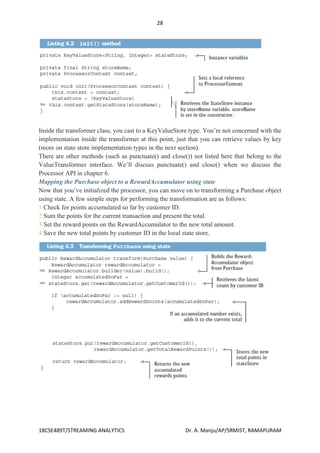
The first step is to set up or create any instance variables in the transformer init() method. In
the init() method, you retrieve the state store created when building the processing topology
(we’ll cover how you add the state store in section 4.3.3).
28
18CSE489T/STREAMING ANALYTICS Dr. A. Manju/AP/SRMIST, RAMAPURAM
Inside the transformer class, you cast to a KeyValueStore type. You’re not concerned with the
implementation inside the transformer at this point, just that you can retrieve values by key
(more on state store implementation types in the next section).
There are other methods (such as punctuate() and close()) not listed here that belong to the
ValueTransformer interface. We’ll discuss punctuate() and close() when we discuss the
Processor API in chapter 6.
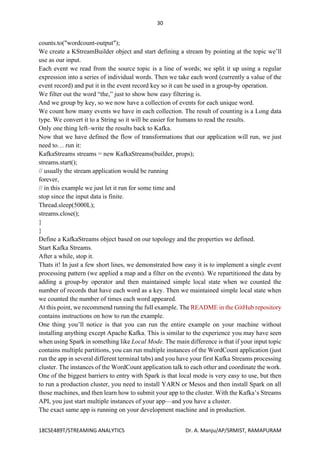
Mapping the Purchase object to a RewardAccumulator using state
Now that you’ve initialized the processor, you can move on to transforming a Purchase object
using state. A few simple steps for performing the transformation are as follows:
1 Check for points accumulated so far by customer ID.
2 Sum the points for the current transaction and present the total.
3 Set the reward points on the RewardAccumulator to the new total amount.
4 Save the new total points by customer ID in the local state store.
29
18CSE489T/STREAMING ANALYTICS Dr. A. Manju/AP/SRMIST, RAMAPURAM
Example application development with Kafka Streams
Word Count
Let’s walk through an abbreviated word count example for Kafka Streams. You can find the
full example on GitHub.
The first thing you do when creating a stream-processing app is configure Kafka Streams.
Kafka Streams has a large number of possible configurations, which we won’t discuss here,
but you can find them in the documentation. In addition, you can also configure the producer
and consumer embedded in Kafka Streams by adding any producer or consumer config to the
Properties object:
public class WordCountExample {
public static void main(String[] args) throws Exception{
Properties props = new Properties();
props.put(StreamsConfig.APPLICATION_ID_CONFIG,
"wordcount");
props.put(StreamsConfig.BOOTSTRAP_SERVERS_CONFIG,
"localhost:9092");
props.put(StreamsConfig.KEY_SERDE_CLASS_CONFIG,
Serdes.String().getClass().getName());
props.put(StreamsConfig.VALUE_SERDE_CLASS_CONFIG,
Serdes.String().getClass().getName());
Every Kafka Streams application must have an application ID. This is used to coordinate the
instances of the application and also when naming the internal local stores and the topics related
to them. This name must be unique for each Kafka Streams application working with the same
Kafka cluster.
The Kafka Streams application always reads data from Kafka topics and writes its output to
Kafka topics. As we’ll discuss later, Kafka Streams applications also use Kafka for
coordination. So we had better tell our app where to find Kafka.
When reading and writing data, our app will need to serialize and deserialize, so we provide
default Serde classes. If needed, we can override these defaults later when building the streams
topology.
Now that we have the configuration, let’s build our streams topology:
KStreamBuilder builder = new KStreamBuilder();
KStream<String, String> source =
builder.stream("wordcount-input");
final Pattern pattern = Pattern.compile("W+");
KStream counts = source.flatMapValues(value->
Arrays.asList(pattern.split(value.toLowerCase())))
.map((key, value) -> new KeyValue<Object,
Object>(value, value))
.filter((key, value) -> (!value.equals("the")))
.groupByKey()
.count("CountStore").mapValues(value->
Long.toString(value)).toStream();
30
18CSE489T/STREAMING ANALYTICS Dr. A. Manju/AP/SRMIST, RAMAPURAM
counts.to("wordcount-output");
We create a KStreamBuilder object and start defining a stream by pointing at the topic we’ll
use as our input.
Each event we read from the source topic is a line of words; we split it up using a regular
expression into a series of individual words. Then we take each word (currently a value of the
event record) and put it in the event record key so it can be used in a group-by operation.
We filter out the word “the,” just to show how easy filtering is.
And we group by key, so we now have a collection of events for each unique word.
We count how many events we have in each collection. The result of counting is a Long data
type. We convert it to a String so it will be easier for humans to read the results.
Only one thing left–write the results back to Kafka.
Now that we have defined the flow of transformations that our application will run, we just
need to… run it:
KafkaStreams streams = new KafkaStreams(builder, props);
streams.start();
// usually the stream application would be running
forever,
// in this example we just let it run for some time and
stop since the input data is finite.
Thread.sleep(5000L);
streams.close();
}
}
Define a KafkaStreams object based on our topology and the properties we defined.
Start Kafka Streams.
After a while, stop it.
Thats it! In just a few short lines, we demonstrated how easy it is to implement a single event
processing pattern (we applied a map and a filter on the events). We repartitioned the data by
adding a group-by operator and then maintained simple local state when we counted the
number of records that have each word as a key. Then we maintained simple local state when
we counted the number of times each word appeared.
At this point, we recommend running the full example. The README in the GitHub repository
contains instructions on how to run the example.
One thing you’ll notice is that you can run the entire example on your machine without
installing anything except Apache Kafka. This is similar to the experience you may have seen
when using Spark in something like Local Mode. The main difference is that if your input topic
contains multiple partitions, you can run multiple instances of the WordCount application (just
run the app in several different terminal tabs) and you have your first Kafka Streams processing
cluster. The instances of the WordCount application talk to each other and coordinate the work.
One of the biggest barriers to entry with Spark is that local mode is very easy to use, but then
to run a production cluster, you need to install YARN or Mesos and then install Spark on all
those machines, and then learn how to submit your app to the cluster. With the Kafka’s Streams
API, you just start multiple instances of your app—and you have a cluster.
The exact same app is running on your development machine and in production.
31
18CSE489T/STREAMING ANALYTICS Dr. A. Manju/AP/SRMIST, RAMAPURAM
Demo – Kafka Streams
Stock Market Statistics
The next example is more involved—we will read a stream of stock market trading events that
include the stock ticker, ask price, and ask size. In stock market trades, ask price is what a seller
is asking for whereas bid price is what the buyer is suggesting to pay. Ask size is the number
of shares the seller is willing to sell at that price. For simplicity of the example, we’ll ignore
bids completely. We also won’t include a timestamp in our data; instead, we’ll rely on event
time populated by our Kafka producer.
We will then create output streams that contains a few windowed statistics:
• Best (i.e., minimum) ask price for every five-second window
• Number of trades for every five-second window
• Average ask price for every five-second window
All statistics will be updated every second.
For simplicity, we’ll assume our exchange only has 10 stock tickers trading in it. The setup and
configuration are very similar to those we used in the “Word Count” on page 265:
Properties props = new Properties();
props.put(StreamsConfig.APPLICATION_ID_CONFIG, "stockstat");
props.put(StreamsConfig.BOOTSTRAP_SERVERS_CONFIG,
Constants.BROKER);
props.put(StreamsConfig.KEY_SERDE_CLASS_CONFIG,
Serdes.String().getClass().getName());
props.put(StreamsConfig.VALUE_SERDE_CLASS_CONFIG,
TradeSerde.class.getName());
The main difference is the Serde classes used. In the “Word Count” on page 265, we used
strings for both key and value and therefore used the Serdes.String() class as a serializer and
deserializer for both. In this example, the key is still a string, but the value is a Trade object
that contains the ticker symbol, ask price, and ask size. In order to serialize and deserialize this
object (and a few other objects we used in this small app), we used the Gson library from
Google to generate a JSon serializer and deserializer from our Java object. Then created a small
wrapper that created a Serde object from those. Here is how we created the Serde:
static public final class TradeSerde extends WrapperSerde<Trade> {
public TradeSerde() {
super(new JsonSerializer<Trade>(),
new JsonDeserializer<Trade>(Trade.class));
}
}
Nothing fancy, but you need to remember to provide a Serde object for every object you want
to store in Kafka—input, output, and in some cases, also intermediate results. To make this
easier, we recommend generating these Serdes through projects like GSon, Avro, Protobufs, or
similar.
Now that we have everything configured, it’s time to build our topology:
KStream<TickerWindow, TradeStats> stats = source.groupByKey()
.aggregate(TradeStats::new,
32
18CSE489T/STREAMING ANALYTICS Dr. A. Manju/AP/SRMIST, RAMAPURAM
(k, v, tradestats) -> tradestats.add(v),
TimeWindows.of(5000).advanceBy(1000),
new TradeStatsSerde(),
"trade-stats-store")
.toStream((key, value) -> new TickerWindow(key.key(),
key.window().start()))
.mapValues((trade) -> trade.computeAvgPrice());
stats.to(new TickerWindowSerde(), new TradeStatsSerde(),
"stockstats-output");
We start by reading events from the input topic and performing a groupByKey() operation.
Despite its name, this operation does not do any grouping. Rather, it ensures that the stream of
events is partitioned based on the record key. Since wewrote the data into a topic with a key
and didn’t modify the key before calling groupByKey(), the data is still partitioned by its key—
so this method does nothing in this case.
After we ensure correct partitioning, we start the windowed aggregation. The “aggregate”
method will split the stream into overlapping windows (a five-second window every second),
and then apply an aggregate method on all the events in the window. The first parameter this
method takes is a new object that will contain the results of the aggregation—Tradestats in our
case. This is an object we created to contain all the statistics we are interested in for each time
window— minimum price, average price, and number of trades.
We then supply a method for actually aggregating the records—in this case, an add method of
the Tradestats object is used to update the minimum price, number of trades, and total prices
in the window with the new record.
We define the window—in this case, a window of five seconds (5,000 ms), advancing every
second.
Then we provide a Serde object for serializing and deserializing the results of the aggregation
(the Tradestats object).
As mentioned in “Stream-Processing Design Patterns” on page 256, windowing aggregation
requires maintaining a state and a local store in which the state will be maintained. The last
parameter of the aggregate method is the name of the state store. This can be any unique name.
The results of the aggregation is a table with the ticker and the time window as the primary key
and the aggregation result as the value. We are turning the table back into a stream of events
and replacing the key that contains the entire time window definition with our own key that
contains just the ticker and the start time of the window. This toStream method converts the
table into a stream and also converts the key into my TickerWindow object.
The last step is to update the average price—right now the aggregation results include the sum
of prices and number of trades. We go over these records and use the existing statistics to
calculate average price so we can include it in the output stream.
And finally, we write the results back to the stockstats-output stream.

Streaming Analytics unit 2 notes for engineers

  • 1.
    1 18CSE489T/STREAMING ANALYTICS Dr.A. Manju/AP/SRMIST, RAMAPURAM UNIT II Getting Started with Kafka - Why Kafka? Publish Subscribe messaging model - Kafka Architecture - Messages and Batches, Schemas Topics and Partitions, - Producers and consumers - Brokers and Clusters - Multiple Clusters, Data Ecosystem - Sending messages with producers - Steps & Example - Sending messages with producers- Receiving messages with consumers - Steps & Example - Receiving messages with consumers- Developing Kafka Streams Application - Phases in a Kafka Streams Application Development - Constructing a topology - Streams and State – Applying stateful operations- Example application development with Kafka Streams - Demo – Kafka Streams Getting Started with Kafka Now that we know all about Kafka and its history, we can set it up and build our own data pipeline. In the next chapter, we will explore installing and configuring Kafka. We will also cover selecting the right hardware to run Kafka on, and some things to keep in mind when moving to production operations. Why Kafka? There are many choices for publish/subscribe messaging systems, so what makes Apache Kafka a good choice? Multiple Producers Kafka is able to seamlessly handle multiple producers, whether those clients are using many topics or the same topic. This makes the system ideal for aggregating data from many frontend systems and making it consistent. For example, a site that serves content to users via a number of microservices can have a single topic for page views that all services can write to using a common format. Consumer applications can then receive a single stream of page views for all applications on the site without having to coordinate consuming from multiple topics, one for each application. Multiple Consumers In addition to multiple producers, Kafka is designed for multiple consumers to read any single stream of messages without interfering with each other. This is in contrast to many queuing systems where once a message is consumed by one client, it is not available to any other. Multiple Kafka consumers can choose to operate as part of a group and share a stream, assuring that the entire group processes a given message only once. Disk-Based Retention Not only can Kafka handle multiple consumers, but durable message retention means that consumers do not always need to work in real time. Messages are committed to disk, and will be stored with configurable retention rules. These options can be selected on a per-topic basis, allowing for different streams of messages to have different amounts of retention depending on the consumer needs. Durable retention means that if a consumer falls behind, either due to slow processing or a burst in traffic, there is no danger of losing data. It also means that maintenance can be performed on consumers, taking applications offline for a short period of time, with no concern about messages backing up on the producer or getting lost. Consumers
  • 2.
    2 18CSE489T/STREAMING ANALYTICS Dr.A. Manju/AP/SRMIST, RAMAPURAM can be stopped, and the messages will be retained in Kafka. This allows them to restart and pick up processing messages where they left off with no data loss. Scalable Kafka’s flexible scalability makes it easy to handle any amount of data. Users can start with a single broker as a proof of concept, expand to a small development cluster of three brokers, and move into production with a larger cluster of tens or even hundreds of brokers that grows over time as the data scales up. Expansions can be per‐formed while the cluster is online, with no impact on the availability of the system as a whole. This also means that a cluster of multiple brokers can handle the failure of an individual broker, and continue servicing clients. Clusters that need to tolerate more simultaneous failures can be configured with higher replication factors. High Performance All of these features come together to make Apache Kafka a publish/subscribe messaging system with excellent performance under high load. Producers, consumers, and brokers can all be scaled out to handle very large message streams with ease. This can be done while still providing subsecond message latency from producing a message to availability to consumers. Publish Subscribe messaging model Publish/subscribe messaging is a pattern that is characterized by the sender (publisher) of a piece of data (message) not specifically directing it to a receiver. Instead, the publisher classifies the message somehow, and that receiver (subscriber) subscribes to receive certain classes of messages. Pub/sub systems often have a broker, a central point where messages are published, to facilitate this. How It Starts Many use cases for publish/subscribe start out the same way: with a simple message queue or interprocess communication channel. For example, you create an application that needs to send monitoring information somewhere, so you write in a direct connection from your application to an app that displays your metrics on a dashboard, and push metrics over that connection, as seen in Figure 1-1. Figure 1-1. A single, direct metrics publisher
  • 3.
    3 18CSE489T/STREAMING ANALYTICS Dr.A. Manju/AP/SRMIST, RAMAPURAM This is a simple solution to a simple problem that works when you are getting started with monitoring. Before long, you decide you would like to analyze your metrics over a longer term, and that doesn’t work well in the dashboard. You start a new service that can receive metrics, store them, and analyze them. In order to support this, you modify your application to write metrics to both systems. By now you have three more applications that are generating metrics, and they all make the same connections to these two services. Your coworker thinks it would be a good idea to do active polling of the services for alerting as well, so you add a server on each of the applications to provide metrics on request. After a while, you have more applications that are using those servers to get individual metrics and use them for various purposes. This architecture can look much like Figure 1-2, with connections that are even harder to trace. Figure 1-2. Many metrics publishers, using direct connections The technical debt built up here is obvious, so you decide to pay some of it back. You set up a single application that receives metrics from all the applications out there, and provide a server to query those metrics for any system that needs them. This reduces the complexity of the architecture to something similar to Figure 1-3. Congratulations, you have built a publish- subscribe messaging system! Figure 1-3. A metrics publish/subscribe system Individual Queue Systems At the same time that you have been waging this war with metrics, one of your coworkers has been doing similar work with log messages. Another has been working on tracking user behavior on the frontend website and providing that information to developers who are working on machine learning, as well as creating some reports for management. You have all followed a similar path of building out systems that decouple the publishers of the
  • 4.
    4 18CSE489T/STREAMING ANALYTICS Dr.A. Manju/AP/SRMIST, RAMAPURAM information from the subscribers to that information. Figure 1-4 shows such an infrastructure, with three separate pub/sub systems. Figure 1-4. Multiple publish/subscribe systems This is certainly a lot better than utilizing point-to-point connections (as in Figure 1-2), but there is a lot of duplication. Your company is maintaining multiple systems for queuing data, all of which have their own individual bugs and limitations. You also know that there will be more use cases for messaging coming soon. What you would like to have is a single centralized system that allows for publishing generic types of data, which will grow as your business grows. Kafka Architecture We have already learned the basic concepts of Apache Kafka. These basic concepts, such as Topics, partitions, producers, consumers, etc., together forms the Kafka architecture. As different applications design the architecture of Kafka accordingly, there are the following essential parts required to design Apache Kafka architecture.
  • 5.
    5 18CSE489T/STREAMING ANALYTICS Dr.A. Manju/AP/SRMIST, RAMAPURAM o Data Ecosystem: Several applications that use Apache Kafka forms an ecosystem. This ecosystem is built for data processing. It takes inputs in the form of applications that create data, and outputs are defined in the form of metrics, reports, etc. The below diagram represents a circulatory data ecosystem for Kafka. o Kafka Cluster: A Kafka cluster is a system that comprises of different brokers, topics, and their respective partitions. Data is written to the topic within the cluster and read by the cluster itself. o Producers: A producer sends or writes data/messages to the topic within the cluster. In order to store a huge amount of data, different producers within an application send data to the Kafka cluster. o Consumers: A consumer is the one that reads or consumes messages from the Kafka cluster. There can be several consumers consuming different types of data form the cluster. The beauty of Kafka is that each consumer knows from where it needs to consume the data. o Brokers: A Kafka server is known as a broker. A broker is a bridge between producers and consumers. If a producer wishes to write data to the cluster, it is sent to the Kafka server. All brokers lie within a Kafka cluster itself. Also, there can be multiple brokers. o Topics: It is a common name or a heading given to represent a similar type of data. In Apache Kafka, there can be multiple topics in a cluster. Each topic specifies different types of messages. o Partitions: The data or message is divided into small subparts, known as partitions. Each partition carries data within it having an offset value. The data is always written in a sequential manner. We can have an infinite number of partitions with infinite offset values. However, it is not guaranteed that to which partition the message will be written. o ZooKeeper: A ZooKeeper is used to store information about the Kafka cluster and details of the consumer clients. It manages brokers by maintaining a list of them. Also, a ZooKeeper is responsible for choosing a leader for the partitions. If any changes like a broker die, new topics, etc., occurs, the ZooKeeper sends notifications to Apache Kafka. A ZooKeeper is designed to operate with an odd number of Kafka servers.
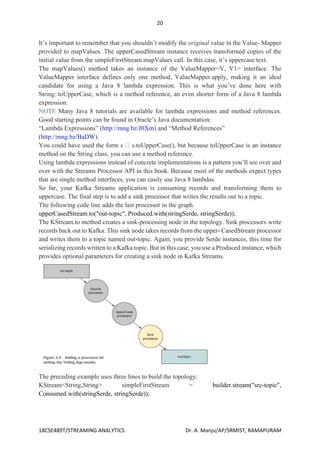
  • 6.
    6 18CSE489T/STREAMING ANALYTICS Dr.A. Manju/AP/SRMIST, RAMAPURAM Zookeeper has a leader server that handles all the writes, and rest of the servers are the followers who handle all the reads. However, a user does not directly interact with the Zookeeper, but via brokers. No Kafka server can run without a zookeeper server. It is mandatory to run the zookeeper server. In the above figure, there are three zookeeper servers where server 2 is the leader, and the other two are chosen as its followers. The five brokers are connected to these servers. Automatically, the Kafka cluster will come to know when brokers are down, more topics are added, etc..Hence, on combining all the necessities, a Kafka cluster architecture is designed. Messages and Batches, Schemas Topics and Partitions The unit of data within Kafka is called a message. If you are approaching Kafka from a database background, you can think of this as similar to a row or a record. A message is simply an array of bytes as far as Kafka is concerned, so the data contained within it does not have a specific format or meaning to Kafka. A message can have an optional bit of metadata, which is referred to as a key. The key is also a byte array and, as with the message, has no specific meaning to Kafka. Keys are used when messages are to be written to partitions in a more controlled manner. The simplest such scheme is to generate a consistent hash of the key, and then select the partition number for that message by taking the result of the hash modulo, the total number of partitions in the topic. This assures that messages with the same key are always written to the same partition. Keys are discussed in more detail in Chapter 3. For efficiency, messages are written into Kafka in batches. A batch is just a collection of messages, all of which are being produced to the same topic and partition. An individual roundtrip across the network for each message would result in excessive overhead, and collecting messages together into a batch reduces this. Of course, this is a tradeoff between latency and throughput: the larger the batches, the more messages that can be handled per unit of time, but the longer it takes an individual message to propagate. Batches are also typically
  • 7.
    7 18CSE489T/STREAMING ANALYTICS Dr.A. Manju/AP/SRMIST, RAMAPURAM compressed, providing more efficient data transfer and storage at the cost of some processing power. Schemas While messages are opaque byte arrays to Kafka itself, it is recommended that additional structure, or schema, be imposed on the message content so that it can be easily understood. There are many options available for message schema, depending on your application’s individual needs. Simplistic systems, such as Javascript Object Notation (JSON) and Extensible Markup Language (XML), are easy to use and human-readable. However, they lack features such as robust type handling and compatibility between schema versions. Many Kafka developers favor the use of Apache Avro, which is a serialization framework originally developed for Hadoop. Avro provides a compact serialization format; schemas that are separate from the message payloads and that do not require code to be generated when they change; and strong data typing and schema evolution, with both backward and forward compatibility. A consistent data format is important in Kafka, as it allows writing and reading messages to be decoupled. When these tasks are tightly coupled, applications that subscribe to messages must be updated to handle the new data format, in parallel with the old format. Only then can the applications that publish the messages be updated to utilize the new format. By using well-defined schemas and storing them in a common repository, the messages in Kafka can be understood without coordination. Schemas and serialization are covered in more detail in Chapter 3. Topics and Partitions Messages in Kafka are categorized into topics. The closest analogies for a topic are a database table or a folder in a filesystem. Topics are additionally broken down into a number of partitions. Going back to the “commit log” description, a partition is a single log. Messages are written to it in an append-only fashion, and are read in order from beginning to end. Note that as a topic typically has multiple partitions, there is no guarantee of message time-ordering across the entire topic, just within a single partition. Figure 1-5 shows a topic with four partitions, with writes being appended to the end of each one. Partitions are also the way that Kafka provides redundancy and scalability. Each partition can be hosted on a different server, which means that a single topic can be scaled horizontally across multiple servers to provide performance far beyond the ability of a single server. Figure 1-5. Representation of a topic with multiple partitions
  • 8.
    8 18CSE489T/STREAMING ANALYTICS Dr.A. Manju/AP/SRMIST, RAMAPURAM The term stream is often used when discussing data within systems like Kafka. Most often, a stream is considered to be a single topic of data, regardless of the number of partitions. This represents a single stream of data moving from the producers to the consumers. This way of referring to messages is most common when discussing stream processing, which is when frameworks—some of which are Kafka Streams, Apache Samza, and Storm—operate on the messages in real time. This method of operation can be compared to the way offline frameworks, namely Hadoop, are designed to work on bulk data at a later time. An overview of stream processing is provided in Chapter 11. Producers and consumers Kafka clients are users of the system, and there are two basic types: producers and consumers. There are also advanced client APIs—Kafka Connect API for data integration and Kafka Streams for stream processing. The advanced clients use producers and consumers as building blocks and provide higher-level functionality on top. Producers create new messages. In other publish/subscribe systems, these may be called publishers or writers. In general, a message will be produced to a specific topic. By default, the producer does not care what partition a specific message is written to and will balance messages over all partitions of a topic evenly. In some cases, the producer will direct messages to specific partitions. This is typically done using the message key and a partitioner that will generate a hash of the key and map it to a specific partition. This assures that all messages produced with a given key will get written to the same partition. The producer could also use a custom partitioner that follows other business rules for mapping messages to partitions. Producers are covered in more detail in Chapter 3. Consumers read messages. In other publish/subscribe systems, these clients may be called subscribers or readers. The consumer subscribes to one or more topics and reads the messages in the order in which they were produced. The consumer keeps track of which messages it has already consumed by keeping track of the offset of increases—that Kafka adds to each message as it is produced. Each message in a given partition has a unique offset. By storing the offset of the last consumed message for each partition, either in Zookeeper or in Kafka itself, a consumer can stop and restart without losing its place. Consumers work as part of a consumer group, which is one or more consumers that work together to consume a topic. The group assures that each partition is only consumed by one member. In Figure 1-6, there are three consumers in a single group consuming a topic. Two of the consumers are working from one partition each, while the third consumer is working from two partitions. The mapping of a consumer to a partition is often called ownership of the partition by the consumer. In this way, consumers can horizontally scale to consume topics with a large number of messages. Additionally, if a single consumer fails, the remaining members of the group will
  • 9.
    9 18CSE489T/STREAMING ANALYTICS Dr.A. Manju/AP/SRMIST, RAMAPURAM rebalance the partitions being consumed to take over for the missing member. Consumers and consumer groups are discussed in more detail in Chapter 4. Figure 1-6. A consumer group reading from a topic Brokers and Clusters A single Kafka server is called a broker. The broker receives messages from producers, assigns offsets to them, and commits the messages to storage on disk. It also services consumers, responding to fetch requests for partitions and responding with the messages that have been committed to disk. Depending on the specific hardware and its performance characteristics, a single broker can easily handle thousands of partitions and millions of messages per second. Kafka brokers are designed to operate as part of a cluster. Within a cluster of brokers, one broker will also function as the cluster controller (elected automatically from the live members of the cluster). The controller is responsible for administrative operations, including assigning partitions to brokers and monitoring for broker failures. A partition is owned by a single broker in the cluster, and that broker is called the leader of the partition. A partition may be assigned to multiple brokers, which will result in the partition being replicated (as seen in Figure 1-7). Figure 1-7. Replication of partitions in a cluster
  • 10.
    10 18CSE489T/STREAMING ANALYTICS Dr.A. Manju/AP/SRMIST, RAMAPURAM This provides redundancy of messages in the partition, such that another broker can take over leadership if there is a broker failure. However, all consumers and producers operating on that partition must connect to the leader. Cluster operations, including partition replication, are covered in detail in Chapter 6. A key feature of Apache Kafka is that of retention, which is the durable storage of messages for some period of time. Kafka brokers are configured with a default retention setting for topics, either retaining messages for some period of time (e.g., 7 days) or until the topic reaches a certain size in bytes (e.g., 1 GB). Once these limits are reached, messages are expired and deleted so that the retention configuration is a minimum amount of data available at any time. Individual topics can also be configured with their own retention settings so that messages are stored for only as long as they are useful. For example, a tracking topic might be retained for several days, whereas application metrics might be retained for only a few hours. Topics can also be configured as log compacted, which means that Kafka will retain only the last message produced with a specific key. This can be useful for changelog-type data, where only the last update is interesting. Multiple Clusters As Kafka deployments grow, it is often advantageous to have multiple clusters. There are several reasons why this can be useful: • Segregation of types of data • Isolation for security requirements • Multiple datacenters (disaster recovery) When working with multiple datacenters in particular, it is often required that messages be copied between them. In this way, online applications can have access to user activity at both sites. For example, if a user changes public information in their profile, that change will need to be visible regardless of the datacenter in which search results are displayed. Or, monitoring data can be collected from many sites into a single central location where the analysis and alerting systems are hosted. The replication mechanisms within the Kafka clusters are designed only to work within a single cluster, not between multiple clusters. Figure 1-8. Multiple datacenter architecture
  • 11.
    11 18CSE489T/STREAMING ANALYTICS Dr.A. Manju/AP/SRMIST, RAMAPURAM The Kafka project includes a tool called MirrorMaker, used for this purpose. At its core, MirrorMaker is simply a Kafka consumer and producer, linked together with a queue. Messages are consumed from one Kafka cluster and produced for another. Figure 1-8 shows an example of an architecture that uses MirrorMaker, aggregating messages from two local clusters into an aggregate cluster, and then copying that cluster to other datacenters. The simple nature of the application belies its power in creating sophisticated data pipelines, which will be detailed further in Chapter 7. Data Ecosystem Many applications participate in the environments we build for data processing. We have defined inputs in the form of applications that create data or otherwise introduce it to the system. We have defined outputs in the form of metrics, reports, and other data products. We create loops, with some components reading data from the system, transforming it using data from other sources, and then introducing it back into the data infrastructure to be used elsewhere. This is done for numerous types of data, with each having unique qualities of content, size, and usage. Apache Kafka provides the circulatory system for the data ecosystem, as shown in Figure 1-9. It carries messages between the various members of the infrastructure, providing a consistent interface for all clients. When coupled with a system to provide message schemas, producers and consumers no longer require tight coupling or direct connections of any sort. Components can be added and removed as business cases are created and dissolved, and producers do not need to be concerned about who is using the data or the number of consuming applications. Figure 1-9. A big data ecosystem
  • 12.
    12 18CSE489T/STREAMING ANALYTICS Dr.A. Manju/AP/SRMIST, RAMAPURAM Use Cases Activity tracking The original use case for Kafka, as it was designed at LinkedIn, is that of user activity tracking. A website’s users interact with frontend applications, which generate messages regarding actions the user is taking. This can be passive information, such as page views and click tracking, or it can be more complex actions, such as information that a user adds to their profile. The messages are published to one or more topics, which are then consumed by applications on the backend. These applications may be generating reports, feeding machine learning systems, updating search results, or performing other operations that are necessary to provide a rich user experience. Messaging Kafka is also used for messaging, where applications need to send notifications (such as emails) to users. Those applications can produce messages without needing to be concerned about formatting or how the messages will actually be sent. A single application can then read all the messages to be sent and handle them consistently, including: • Formatting the messages (also known as decorating) using a common look and feel • Collecting multiple messages into a single notification to be sent • Applying a user’s preferences for how they want to receive messages Using a single application for this avoids the need to duplicate functionality in multiple applications, as well as allows operations like aggregation which would not otherwise be possible. Metrics and logging Kafka is also ideal for collecting application and system metrics and logs. This is a use case in which the ability to have multiple applications producing the same type of message shines. Applications publish metrics on a regular basis to a Kafka topic, and those metrics can be consumed by systems for monitoring and alerting. They can also be used in an offline system like Hadoop to perform longer-term analysis, such as growth projections. Log messages can be published in the same way, and can be routed to dedicated log search systems like Elastisearch or security analysis applications. Another added benefit of Kafka is that when the destination system needs to change (e.g., it’s time to update the log storage system), there is no need to alter the frontend applications or the means of aggregation. Commit log Since Kafka is based on the concept of a commit log, database changes can be published to Kafka and applications can easily monitor this stream to receive live updates as they happen. This changelog stream can also be used for replicating database updates to a remote system, or for consolidating changes from multiple applications into a single database view. Durable retention is useful here for providing a buffer for the changelog, meaning it can be replayed in the event of a failure of the consuming applications. Alternately, log-compacted topics can be used to provide longer retention by only retaining a single change per key.
  • 13.
    13 18CSE489T/STREAMING ANALYTICS Dr.A. Manju/AP/SRMIST, RAMAPURAM Stream processing Another area that provides numerous types of applications is stream processing. While almost all usage of Kafka can be thought of as stream processing, the term is typically used to refer to applications that provide similar functionality to map/reduce processing in Hadoop. Hadoop usually relies on aggregation of data over a long time frame, either hours or days. Stream processing operates on data in real time, as quickly as messages are produced. Stream frameworks allow users to write small applications to operate on Kafka messages, performing tasks such as counting metrics, partitioning messages for efficient processing by other applications, or transforming messages using data from multiple sources. Stream processing is covered in Chapter 11. Sending messages with producers - Steps & Example The simplest way to send a message is as follows: ProducerRecord<String, String> record = new ProducerRecord<>("CustomerCountry", "Precision Products", "France"); try { producer.send(record); } catch (Exception e) { e.printStackTrace(); } The producer accepts ProducerRecord objects, so we start by creating one. ProducerRecord has multiple constructors, which we will discuss later. Here we use one that requires the name of the topic we are sending data to, which is always a string, and the key and value we are sending to Kafka, which in this case are also strings. The types of the key and value must match our serializer and producer objects. We use the producer object send() method to send the ProducerRecord. The send() method returns a Java Future object with RecordMetadata, but since we simply ignore the returned value, we have no way of knowing whether the message was sent successfully or not. This method of sending messages can be used when dropping a message silently is acceptable. This is not typically the case in production applications. While we ignore errors that may occur while sending messages to Kafka brokers or in the brokers themselves, we may still get an exception if the producer encountered errors before sending the message to Kafka. Those can be a SerializationException when it fails to serialize the message, a BufferExhaustedException or TimeoutException if the buffer is full, or an InterruptException if the sending thread was interrupted. Sending a Message Synchronously The simplest way to send a message synchronously is as follows: ProducerRecord<String, String> record = new ProducerRecord<>("CustomerCountry", "Precision Products", "France"); try { producer.send(record).get();
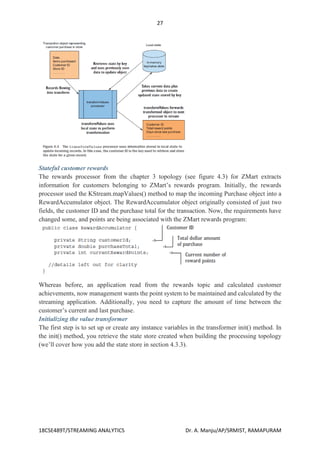
  • 14.
    14 18CSE489T/STREAMING ANALYTICS Dr.A. Manju/AP/SRMIST, RAMAPURAM } catch (Exception e) { e.printStackTrace(); } Here, we are using Future.get() to wait for a reply from Kafka. This method will throw an exception if the record is not sent successfully to Kafka. If there were no errors, we will get a RecordMetadata object that we can use to retrieve the offset the message was written to. If there were any errors before sending data to Kafka, while sending, if the Kafka brokers returned a nonretriable exceptions or if we exhausted the available retries, we will encounter an exception. In this case, we just print any exception we ran into. KafkaProducer has two types of errors. Retriable errors are those that can be resolved by sending the message again. For example, a connection error can be resolved because the connection may get reestablished. A “no leader” error can be resolved when a new leader is elected for the partition. KafkaProducer can be configured to retry those errors automatically, so the application code will get retriable exceptions only when the number of retries was exhausted and the error was not resolved. Some errors will not be resolved by retrying. For example, “message size too large.” In those cases, KafkaProducer will not attempt a retry and will return the exception immediately. Sending a Message Asynchronously Suppose the network roundtrip time between our application and the Kafka cluster is 10ms. If we wait for a reply after sending each message, sending 100 messages will take around 1 second. On the other hand, if we just send all our messages and not wait for any replies, then sending 100 messages will barely take any time at all. In most cases, we really don’t need a reply—Kafka sends back the topic, partition, and offset of the record after it was written, which is usually not required by the sending app. On the other hand, we do need to know when we failed to send a message completely so we can throw an exception, log an error, or perhaps write the message to an “errors” file for later analysis. In order to send messages asynchronously and still handle error scenarios, the producer supports adding a callback when sending a record. Here is an example of how we use a callback: private class DemoProducerCallback implements Callback { @Override public void onCompletion(RecordMetadata recordMetadata, Exception e) { if (e != null) { e.printStackTrace(); } } } ProducerRecord<String, String> record = new ProducerRecord<>("CustomerCountry", "Biomedical Materials", "USA"); producer.send(record, new DemoProducerCallback()); To use callbacks, you need a class that implements the org.apache.kafka. clients.producer.Callback interface, which has a single function—onCompletion().
  • 15.
    15 18CSE489T/STREAMING ANALYTICS Dr.A. Manju/AP/SRMIST, RAMAPURAM If Kafka returned an error, onCompletion() will have a nonnull exception. Here we “handle” it by printing, but production code will probably have more robust error handling functions. The records are the same as before. And we pass a Callback object along when sending the record. Receiving messages with consumers - Steps & Example Creating a Kafka Consumer The first step to start consuming records is to create a KafkaConsumer instance. Creating a KafkaConsumer is very similar to creating a KafkaProducer—you create a Java Properties instance with the properties you want to pass to the consumer. We will discuss all the properties in depth later in the chapter. To start we just need to use the three mandatory properties: bootstrap.servers, key.deserializer, and value.deserializer. The first property, bootstrap.servers, is the connection string to a Kafka cluster. It is used the exact same way as in KafkaProducer. The other two properties, key.deserializer and value.deserializer, are similar to the serializers defined for the producer, but rather than specifying classes that turn Java objects to byte arrays, you need to specify classes that can take a byte array and turn it into a Java object. There is a fourth property, which is not strictly mandatory, but for now we will pretend it is. The property is group.id and it specifies the consumer group the KafkaConsumer instance belongs to. While it is possible to create consumers that do not belong to any consumer group, this is uncommon, so for most of the chapter we will assume the consumer is part of a group. The following code snippet shows how to create a KafkaConsumer: Properties props = new Properties(); props.put("bootstrap.servers", "broker1:9092,broker2:9092"); props.put("group.id", "CountryCounter"); props.put("key.deserializer", "org.apache.kafka.common.serialization.StringDeserializer"); props.put("value.deserializer", "org.apache.kafka.common.serialization.StringDeserializer"); KafkaConsumer<String, String> consumer = new KafkaConsumer<String, String>(props); We assume that the records we consume will have String objects as both the key and the value of the record. The only new property here is group.id, which is the name of the consumer group this consumer belong to. Subscribing to Topics Once we create a consumer, the next step is to subscribe to one or more topics. The subcribe() method takes a list of topics as a parameter, so it’s pretty simple to use: consumer.subscribe(Collections.singletonList("customerCountries")); Here we simply create a list with a single element: the topic name customerCountries. It is also possible to call subscribe with a regular expression. The expression can match multiple topic names, and if someone creates a new topic with a name that matches, a rebalance will
  • 16.
    16 18CSE489T/STREAMING ANALYTICS Dr.A. Manju/AP/SRMIST, RAMAPURAM happen almost immediately and the consumers will start consuming from the new topic. This is useful for applications that need to consume from multiple topics and can handle the different types of data the topics will contain. Subscribing to multiple topics using a regular expression is most commonly used in applications that replicate data between Kafka and another system. To subscribe to all test topics, we can call: consumer.subscribe("test.*"); The Poll Loop At the heart of the consumer API is a simple loop for polling the server for more data. Once the consumer subscribes to topics, the poll loop handles all details of coordination, partition rebalances, heartbeats, and data fetching, leaving the developer with a clean API that simply returns available data from the assigned partitions. The main body of a consumer will look as follows: try { while (true) { ConsumerRecords<String, String> records = consumer.poll(100); for (ConsumerRecord<String, String> record : records) { log.debug("topic = %s, partition = %s, offset = %d, customer = %s, country = %sn", record.topic(), record.partition(), record.offset(), record.key(), record.value()); int updatedCount = 1; if (custCountryMap.countainsValue(record.value())) { updatedCount = custCountryMap.get(record.value()) + 1; } custCountryMap.put(record.value(), updatedCount) JSONObject json = new JSONObject(custCountryMap); System.out.println(json.toString(4)) } } } finally { consumer.close(); } This is indeed an infinite loop. Consumers are usually long-running applications that continuously poll Kafka for more data. We will show later in the chapter how to cleanly exit the loop and close the consumer. This is the most important line in the chapter. The same way that sharks must keep moving or they die, consumers must keep polling Kafka or they will be considered dead and the partitions they are consuming will be handed to another consumer in the group to continue consuming. The parameter we pass, poll(), is a timeout interval and controls how long poll() will block if data is not available in the consumer buffer. If this is set to 0, poll() will return immediately; otherwise, it will wait for the specified number of milliseconds for data to arrive from the broker. poll() returns a list of records. Each record contains the topic and partition the record
  • 17.
    17 18CSE489T/STREAMING ANALYTICS Dr.A. Manju/AP/SRMIST, RAMAPURAM came from, the offset of the record within the partition, and of course the key and the value of the record. Typically we want to iterate over the list and process the records individually. The poll() method takes a timeout parameter. This specifies how long it will take poll to return, with or without data. The value is typically driven by application needs for quick responses— how fast do you want to return control to the thread that does the polling? Processing usually ends in writing a result in a data store or updating a stored record. Here, the goal is to keep a running count of customers from each county, so we update a hashtable and print the result as JSON. A more realistic example would store the updates result in a data store. Always close() the consumer before exiting. This will close the network connections and sockets. It will also trigger a rebalance immediately rather than wait for the group coordinator to discover that the consumer stopped sending heartbeats and is likely dead, which will take longer and therefore result in a longer period of time in which consumers can’t consume messages from a subset of the partitions. The poll loop does a lot more than just get data. The first time you call poll() with a new consumer, it is responsible for finding the GroupCoordinator, joining the consumer group, and receiving a partition assignment. If a rebalance is triggered, it will be handled inside the poll loop as well. And of course the heartbeats that keep consumers alive are sent from within the poll loop. For this reason, we try to make sure that whatever processing we do between iterations is fast and efficient. Developing Kafka Streams Application The Kafka Streams DSL is the high-level API that enables you to build Kafka Streams applications quickly. The high-level API is very well thought out, and there are methods to handle most stream-processing needs out of the box, so you can create a sophisticated stream- processing program without much effort. At the heart of the high-level API is the KStream object, which represents the streaming key/value pair records. Most of the methods in the Kafka Streams DSL return a reference to a KStream object, allowing for a fluent interface style of programming. Additionally, a good percentage of the KStream methods accept types consisting of single-method interfaces allowing for the use of Java 8 lambda expressions. Taking these factors into account, you can imagine the simplicity and ease with which you can build a Kafka Streams program. Back in 2005, Martin Fowler and Eric Evans developed the concept of the fluent interface—an interface where the return value of a method call is the same instance that originally called the method (https://martinfowler.com/bliki/FluentInterface.html). This approach is useful when constructing objects with several parameters, such as Person.builder().firstName("Beth").withLastName("Smith").with- Occupation("CEO"). In Kafka Streams, there is one small but important difference: the returned KStream object is a new instance, not the same instance that made the original method call. There’s also a lower-level API, the Processor API, which isn’t as succinct as the Kafka Streams DSL but allows for more control. We’ll cover the Processor API in chapter 6. With that introduction out of the way, let’s dive into the requisite Hello World program for Kafka Streams.
  • 18.
    18 18CSE489T/STREAMING ANALYTICS Dr.A. Manju/AP/SRMIST, RAMAPURAM Phases in a Kafka Streams Application Development Hello World for Kafka Streams Your first program will be a toy application that takes incoming messages and converts them to uppercase characters, effectively yelling at anyone who reads the message. You’ll call this the Yelling App. Before diving into the code, let’s take a look at the processing topology you’ll assemble for this application. As you can see, you’re building a simple processing graph—so simple that it resembles a linked list of nodes more than the typical tree-like structure of a graph. But there’s enough here to give you strong clues about what to expect in the code. There will be a source node, a processor node transforming incoming text to uppercase, and a sink processor writing results out to a topic. This is a trivial example, but the code shown here is representative of what you’ll see in other Kafka Streams programs. In most of the examples, you’ll see a similar structure: 1 Define the configuration items. 2 Create Serde instances, either custom or predefined. 3 Build the processor topology. 4 Create and start the KStream. When we get into the more advanced examples, the principal difference will be in the complexity of the processor topology. With that in mind, it’s time to build your first application. Creating the topology for the Yelling App The first step to creating any Kafka Streams application is to create a source node. The source node is responsible for consuming the records, from a topic, that will flow through the application.
  • 19.
    19 18CSE489T/STREAMING ANALYTICS Dr.A. Manju/AP/SRMIST, RAMAPURAM The following line of code creates the source, or parent, node of the graph. KStream<String, String> simpleFirstStream = builder.stream("src-topic", Consumed.with(stringSerde, stringSerde)); The simpleFirstStreamKStream instance is set to consume messages written to the src-topic topic. In addition to specifying the topic name, you also provide Serde objects (via a Consumed instance) for deserializing the records from Kafka. You’ll use the Consumed class for any optional parameters whenever you create a source node in Kafka Streams. You now have a source node for your application, but you need to attach a processing node to make use of the data. The code used to attach the processor (a child node of the source node) is shown in the following listing. With this line, you create another KStream instance that’s a child node of the parent node. KStream<String, String> upperCasedStream = simpleFirstStream.mapValues(String::toUpperCase); By calling the KStream.mapValues function, you’re creating a new processing node whose inputs are the results of going through the mapValues call.
  • 20.
    20 18CSE489T/STREAMING ANALYTICS Dr.A. Manju/AP/SRMIST, RAMAPURAM It’s important to remember that you shouldn’t modify the original value in the Value- Mapper provided to mapValues. The upperCasedStream instance receives transformed copies of the initial value from the simpleFirstStream.mapValues call. In this case, it’s uppercase text. The mapValues() method takes an instance of the ValueMapper<V, V1> interface. The ValueMapper interface defines only one method, ValueMapper.apply, making it an ideal candidate for using a Java 8 lambda expression. This is what you’ve done here with String::toUpperCase, which is a method reference, an even shorter form of a Java 8 lambda expression. NOTE Many Java 8 tutorials are available for lambda expressions and method references. Good starting points can be found in Oracle’s Java documentation: “Lambda Expressions” (http://mng.bz/J0Xm) and “Method References” (http://mng.bz/BaDW). You could have used the form s s.toUpperCase(), but because toUpperCase is an instance method on the String class, you can use a method reference. Using lambda expressions instead of concrete implementations is a pattern you’ll see over and over with the Streams Processor API in this book. Because most of the methods expect types that are single method interfaces, you can easily use Java 8 lambdas. So far, your Kafka Streams application is consuming records and transforming them to uppercase. The final step is to add a sink processor that writes the results out to a topic. The following code line adds the last processor in the graph. upperCasedStream.to("out-topic", Produced.with(stringSerde, stringSerde)); The KStream.to method creates a sink-processing node in the topology. Sink processors write records back out to Kafka. This sink node takes records from the upper- CasedStream processor and writes them to a topic named out-topic. Again, you provide Serde instances, this time for serializing records written to a Kafka topic. But in this case, you use a Produced instance, which provides optional parameters for creating a sink node in Kafka Streams. The preceding example uses three lines to build the topology: KStream<String,String> simpleFirstStream = builder.stream("src-topic", Consumed.with(stringSerde, stringSerde));
  • 21.
    21 18CSE489T/STREAMING ANALYTICS Dr.A. Manju/AP/SRMIST, RAMAPURAM KStream<String, String> upperCasedStream = simpleFirstStream.mapValues(String::toUpperCase); upperCasedStream.to("out-topic", Produced.with(stringSerde, stringSerde)); Each step is on an individual line to demonstrate the different stages of the building process. But all methods in the KStream API that don’t create terminal nodes (methods with a return type of void) return a new KStream instance, which allows you to use the fluent interface style of programming mentioned earlier. To demonstrate this idea, here’s another way you could construct the Yelling App topology: builder.stream("src-topic", Consumed.with(stringSerde, stringSerde)) .mapValues(String::toUpperCase).to("out-topic", Produced.with(stringSerde, stringSerde)); This shortens the program from three lines to one without losing any clarity or purpose. From this point forward, all the examples will be written using the fluent interface style unless doing so causes the clarity of the program to suffer. You’ve built your first Kafka Streams topology, but we glossed over the important steps of configuration and Serde creation. We’ll look at those now. Kafka Streams configuration Although Kafka Streams is highly configurable, with several properties you can adjust for your specific needs, the first example uses only two configuration settings, APPLICATION_ID_CONFIG and BOOTSTRAP_SERVERS_CONFIG: props.put(StreamsConfig.APPLICATION_ID_CONFIG, "yelling_app_id"); props.put(StreamsConfig.BOOTSTRAP_SERVERS_CONFIG, "localhost:9092"); Both settings are required because no default values are provided. Attempting to start a Kafka Streams program without these two properties defined will result in a Config- Exception being thrown. The StreamsConfig.APPLICATION_ID_CONFIG property identifies your Kafka Streams application, and it must be a unique value for the entire cluster. It also serves as a default value for the client ID prefix and group ID parameters if you don’t set either value. The client ID prefix is the user-defined value that uniquely identifies clients connecting to Kafka. The group ID is used to manage the membership of a group of consumers reading from the same topic, ensuring that all consumers in the group can effectively read subscribed topics. The StreamsConfig.BOOTSTRAP_SERVERS_CONFIG property can be a single hostname: port pair or multiple hostname:port comma-separated pairs. The value of this setting points the Kafka Streams application to the locaction of the Kafka cluster. We’ll cover several more configuration items as we explore more examples in the book. Serde creation In Kafka Streams, the Serdes class provides convenience methods for creating Serde instances, as shown here: Serde<String> stringSerde = Serdes.String(); This line is where you create the Serde instance required for serialization/deserialization using the Serdes class. Here, you create a variable to reference the Serde for repeated use in the topology. The Serdes class provides default implementations for the following types: String Byte array
  • 22.
    22 18CSE489T/STREAMING ANALYTICS Dr.A. Manju/AP/SRMIST, RAMAPURAM Long Integer Double Implementations of the Serde interface are extremely useful because they contain the serializer and deserializer, which keeps you from having to specify four parameters (key serializer, value serializer, key deserializer, and value deserializer) every time you need to provide a Serde in a KStream method. In an upcoming example, you’ll create a Serde implementation to handle serialization/deserialization of more-complex types. Let’s take a look at the whole program you just put together. You can find the source in src/main/java/bbejeck/chapter_3/KafkaStreamsYellingApp.java (source code can be found on the book’s website here: https://manning.com/books/kafkastreams- in-action). You’ve now constructed your first Kafka Streams application. Let’s quickly review the steps involved, as it’s a general pattern you’ll see in most of your Kafka Streams applications: 1 Create a StreamsConfig instance. 2 Create a Serde object. 3 Construct a processing topology. 4 Start the Kafka Streams program. Apart from the general construction of a Kafka Streams application, a key takeaway here is to use lambda expressions whenever possible, to make your programs more concise. We’ll now move on to a more complex example that will allow us to explore more of the Streams Processor API. The example will be new, but the scenario is one you’re already familiar with: ZMart data-processing goals. Constructing a topology BUILDING THE SOURCE NODE You’ll start by building the source node and first processor of the topology by chaining two calls to the KStream API together. It should be fairly obvious by now what the role of the origin node is. The first processor in the topology will be responsible for masking credit card numbers to protect customer privacy. the source node and first processor
  • 23.
    23 18CSE489T/STREAMING ANALYTICS Dr.A. Manju/AP/SRMIST, RAMAPURAM KStream<String,Purchase> purchaseKStream = streamsBuilder.stream("transactions", Consumed.with(stringSerde, purchaseSerde)) .mapValues(p -> Purchase.builder(p).maskCreditCard().build()); You create the source node with a call to the StreamsBuilder.stream method using a default String serde, a custom serde for Purchase objects, and the name of the topic that’s the source of the messages for the stream. In this case, you only specify one topic, but you could have provided a comma-separated list of names or a regular expression to match topic names instead. In this listing 3.5, you provide Serdes with a Consumed instance, but you could have left that out and only provided the topic name and relied on the default Serdes provided via configuration parameters. The next immediate call is to the KStream.mapValues method, taking a ValueMapper< V, V1> instance as a parameter. Value mappers take a single parameter of one type (a Purchase object, in this case) and map that object to a to a new value, possibly of another type. In this example, KStream.mapValues returns an object of the same type (Purchase), but with a masked credit card number. Note that when using the KStream.mapValues method, the original key is unchanged and isn’t factored into mapping a new value. If you wanted to generate a new key/value pair or include the key in producing a new value, you’d use the KStream.map method that takes a KeyValueMapper<K, V, KeyValue<K1, V1>> instance. BUILDING THE SECOND PROCESSOR Now you’ll build the second processor, responsible for extracting pattern data from a topic, which ZMart can use to determine purchase patterns in regions of the country. You’ll also add a sink node responsible for writing the pattern data to a Kafka topic. In listing 3.6, you can see the purchaseKStream processor using the familiar mapValues call to create a new KStream instance. This new KStream will start to receive Purchase- Pattern objects created as a result of the mapValues call.
  • 24.
    24 18CSE489T/STREAMING ANALYTICS Dr.A. Manju/AP/SRMIST, RAMAPURAM KStream<String, PurchasePattern> patternKStream = purchaseKStream.mapValues(purchase ->PurchasePattern.builder(purchase).build()); patternKStream.to("patterns", Produced.with(stringSerde,purchasePatternSerde)); Here, you declare a variable to hold the reference of the new KStream instance, because you’ll use it to print the results of the stream to the console with a print call. This is very useful during development and for debugging. The purchase-patterns processor forwards the records it receives to a child node of its own, defined by the method call KStream.to, writing to the patterns topic. Note the use of a Produced object to provide the previously built Serde. The KStream.to method is a mirror image of the KStream.source method. Instead of setting a source for the topology to read from, the KStream.to method defines a sink node that’s used to write the data from a KStream instance to a Kafka topic. The KStream.to method also provides overloaded versions in which you can leave out the Produced parameter and use the default Serdes defined in the configuration. One of the optional parameters you can set with the Produced class is Stream- Partitioner, which we’ll discuss next. BUILDING THE THIRD PROCESSOR The third processor in the topology is the customer rewards accumulator node, which will let ZMart track purchases made by members of their preferred customer club. The rewards accumulator sends data to a topic consumed by applications at ZMart HQ to determine rewards when customers complete purchases. KStream<String, RewardAccumulator> rewardsKStream = purchaseKStream.mapValues(purchase -> RewardAccumulator.builder(purchase).build()); rewardsKStream.to("rewards", Produced.with(stringSerde,rewardAccumulatorSerde)); You build the rewards accumulator processor using what should be by now a familiar pattern: creating a new KStream instance that maps the raw purchase data contained in the record to a new object type. You also attach a sink node to the rewards accumulator so the results of the rewards KStream can be written to a topic and used for determining customer reward levels. BUILDING THE LAST PROCESSOR Finally, you’ll take the first KStream you created, purchaseKStream, and attach a sink node to write out the raw purchase records (with credit cards masked, of course) to a topic called purchases. The purchases topic will be used to feed into a NoSQL store such as Cassandra
  • 25.
    25 18CSE489T/STREAMING ANALYTICS Dr.A. Manju/AP/SRMIST, RAMAPURAM (http://cassandra.apache.org/), Presto (https://prestodb.io/), or Elastic Search (www.elastic.co/webinars/getting-started-elasticsearch) to perform ad hoc analysis. Figure 3.9 shows the final processor. As you can see, this example is a little more involved than the Yelling App, but it has a similar flow. Specifically, you still performed the following steps: Create a StreamsConfig instance. Build one or more Serde instances. Construct the processing topology. Assemble all the components and start the Kafka Streams program. In this application, I’ve mentioned using a Serde, but I haven’t explained why or how you create them. Let’s take some time now to discuss the role of the Serde in a Kafka Streams application. Streams and State The preceding fictional scenario illustrates something that most of us already know instinctively. Sometimes it’s easy to reason about what’s going on, but usually you need some context to make good decisions. When it comes to stream processing, we call that added context state. At first glance, the notions of state and stream processing may seem to be at odds with each other. Stream processing implies a constant flow of discrete events that don’t have much to do with each other and need to be dealt with as they occur. The notion of state might evoke images of a static resource, such as a database table. In actuality, you can view these as one and the same. But the rate of change in a stream is potentially much faster and more frequent than in a database table.1 You don’t always need state to work with streaming data. In some cases, you may have discrete events or records that carry enough information to be valuable on their own. But more often than not, the incoming stream of data will need enrichment from some sort of store, either using information from events that arrived before, or joining related events with events from different streams.
  • 26.
    26 18CSE489T/STREAMING ANALYTICS Dr.A. Manju/AP/SRMIST, RAMAPURAM Applying stateful operations In this section, we’ll look at how you can add a stateful operation to an existing stateless one to improve the information collected by our application. In this topology, you produced a stream of purchase-transaction events. One of the processing nodes in the topology calculated reward points for customers based on the amount of the sale. But in that processor, you just calculated the total number of points for the single transaction and forwarded the results. If you added some state to the processor, you could keep track of the cumulative number of reward points. Then, the consuming application at ZMart would need to check the total and send out a reward if needed. Now that you have a basic idea of how state can be useful in Kafka Streams (or any other streaming application), let’s look at some concrete examples. You’ll start with transforming the stateless rewards processor into a stateful processor using transformValues. You’ll keep track of the total bonus points achieved so far and the amount of time between purchases, to provide more information to downstream consumers. The transformValues processor The most basic of the stateful functions is KStream.transformValues. Figure 4.4 illustrates how the KStream.transformValues() method operates. This method is semantically the same as KStream.mapValues(), with a few exceptions. One difference is that transformValues has access to a StateStore instance to accomplish its task. The other difference is its ability to schedule operations to occur at regular intervals via a punctuate() method.
  • 27.
    27 18CSE489T/STREAMING ANALYTICS Dr.A. Manju/AP/SRMIST, RAMAPURAM Stateful customer rewards The rewards processor from the chapter 3 topology (see figure 4.3) for ZMart extracts information for customers belonging to ZMart’s rewards program. Initially, the rewards processor used the KStream.mapValues() method to map the incoming Purchase object into a RewardAccumulator object. The RewardAccumulator object originally consisted of just two fields, the customer ID and the purchase total for the transaction. Now, the requirements have changed some, and points are being associated with the ZMart rewards program: Whereas before, an application read from the rewards topic and calculated customer achievements, now management wants the point system to be maintained and calculated by the streaming application. Additionally, you need to capture the amount of time between the customer’s current and last purchase. Initializing the value transformer The first step is to set up or create any instance variables in the transformer init() method. In the init() method, you retrieve the state store created when building the processing topology (we’ll cover how you add the state store in section 4.3.3).
  • 28.
    28 18CSE489T/STREAMING ANALYTICS Dr.A. Manju/AP/SRMIST, RAMAPURAM Inside the transformer class, you cast to a KeyValueStore type. You’re not concerned with the implementation inside the transformer at this point, just that you can retrieve values by key (more on state store implementation types in the next section). There are other methods (such as punctuate() and close()) not listed here that belong to the ValueTransformer interface. We’ll discuss punctuate() and close() when we discuss the Processor API in chapter 6. Mapping the Purchase object to a RewardAccumulator using state Now that you’ve initialized the processor, you can move on to transforming a Purchase object using state. A few simple steps for performing the transformation are as follows: 1 Check for points accumulated so far by customer ID. 2 Sum the points for the current transaction and present the total. 3 Set the reward points on the RewardAccumulator to the new total amount. 4 Save the new total points by customer ID in the local state store.
  • 29.
    29 18CSE489T/STREAMING ANALYTICS Dr.A. Manju/AP/SRMIST, RAMAPURAM Example application development with Kafka Streams Word Count Let’s walk through an abbreviated word count example for Kafka Streams. You can find the full example on GitHub. The first thing you do when creating a stream-processing app is configure Kafka Streams. Kafka Streams has a large number of possible configurations, which we won’t discuss here, but you can find them in the documentation. In addition, you can also configure the producer and consumer embedded in Kafka Streams by adding any producer or consumer config to the Properties object: public class WordCountExample { public static void main(String[] args) throws Exception{ Properties props = new Properties(); props.put(StreamsConfig.APPLICATION_ID_CONFIG, "wordcount"); props.put(StreamsConfig.BOOTSTRAP_SERVERS_CONFIG, "localhost:9092"); props.put(StreamsConfig.KEY_SERDE_CLASS_CONFIG, Serdes.String().getClass().getName()); props.put(StreamsConfig.VALUE_SERDE_CLASS_CONFIG, Serdes.String().getClass().getName()); Every Kafka Streams application must have an application ID. This is used to coordinate the instances of the application and also when naming the internal local stores and the topics related to them. This name must be unique for each Kafka Streams application working with the same Kafka cluster. The Kafka Streams application always reads data from Kafka topics and writes its output to Kafka topics. As we’ll discuss later, Kafka Streams applications also use Kafka for coordination. So we had better tell our app where to find Kafka. When reading and writing data, our app will need to serialize and deserialize, so we provide default Serde classes. If needed, we can override these defaults later when building the streams topology. Now that we have the configuration, let’s build our streams topology: KStreamBuilder builder = new KStreamBuilder(); KStream<String, String> source = builder.stream("wordcount-input"); final Pattern pattern = Pattern.compile("W+"); KStream counts = source.flatMapValues(value-> Arrays.asList(pattern.split(value.toLowerCase()))) .map((key, value) -> new KeyValue<Object, Object>(value, value)) .filter((key, value) -> (!value.equals("the"))) .groupByKey() .count("CountStore").mapValues(value-> Long.toString(value)).toStream();
  • 30.
    30 18CSE489T/STREAMING ANALYTICS Dr.A. Manju/AP/SRMIST, RAMAPURAM counts.to("wordcount-output"); We create a KStreamBuilder object and start defining a stream by pointing at the topic we’ll use as our input. Each event we read from the source topic is a line of words; we split it up using a regular expression into a series of individual words. Then we take each word (currently a value of the event record) and put it in the event record key so it can be used in a group-by operation. We filter out the word “the,” just to show how easy filtering is. And we group by key, so we now have a collection of events for each unique word. We count how many events we have in each collection. The result of counting is a Long data type. We convert it to a String so it will be easier for humans to read the results. Only one thing left–write the results back to Kafka. Now that we have defined the flow of transformations that our application will run, we just need to… run it: KafkaStreams streams = new KafkaStreams(builder, props); streams.start(); // usually the stream application would be running forever, // in this example we just let it run for some time and stop since the input data is finite. Thread.sleep(5000L); streams.close(); } } Define a KafkaStreams object based on our topology and the properties we defined. Start Kafka Streams. After a while, stop it. Thats it! In just a few short lines, we demonstrated how easy it is to implement a single event processing pattern (we applied a map and a filter on the events). We repartitioned the data by adding a group-by operator and then maintained simple local state when we counted the number of records that have each word as a key. Then we maintained simple local state when we counted the number of times each word appeared. At this point, we recommend running the full example. The README in the GitHub repository contains instructions on how to run the example. One thing you’ll notice is that you can run the entire example on your machine without installing anything except Apache Kafka. This is similar to the experience you may have seen when using Spark in something like Local Mode. The main difference is that if your input topic contains multiple partitions, you can run multiple instances of the WordCount application (just run the app in several different terminal tabs) and you have your first Kafka Streams processing cluster. The instances of the WordCount application talk to each other and coordinate the work. One of the biggest barriers to entry with Spark is that local mode is very easy to use, but then to run a production cluster, you need to install YARN or Mesos and then install Spark on all those machines, and then learn how to submit your app to the cluster. With the Kafka’s Streams API, you just start multiple instances of your app—and you have a cluster. The exact same app is running on your development machine and in production.
  • 31.
    31 18CSE489T/STREAMING ANALYTICS Dr.A. Manju/AP/SRMIST, RAMAPURAM Demo – Kafka Streams Stock Market Statistics The next example is more involved—we will read a stream of stock market trading events that include the stock ticker, ask price, and ask size. In stock market trades, ask price is what a seller is asking for whereas bid price is what the buyer is suggesting to pay. Ask size is the number of shares the seller is willing to sell at that price. For simplicity of the example, we’ll ignore bids completely. We also won’t include a timestamp in our data; instead, we’ll rely on event time populated by our Kafka producer. We will then create output streams that contains a few windowed statistics: • Best (i.e., minimum) ask price for every five-second window • Number of trades for every five-second window • Average ask price for every five-second window All statistics will be updated every second. For simplicity, we’ll assume our exchange only has 10 stock tickers trading in it. The setup and configuration are very similar to those we used in the “Word Count” on page 265: Properties props = new Properties(); props.put(StreamsConfig.APPLICATION_ID_CONFIG, "stockstat"); props.put(StreamsConfig.BOOTSTRAP_SERVERS_CONFIG, Constants.BROKER); props.put(StreamsConfig.KEY_SERDE_CLASS_CONFIG, Serdes.String().getClass().getName()); props.put(StreamsConfig.VALUE_SERDE_CLASS_CONFIG, TradeSerde.class.getName()); The main difference is the Serde classes used. In the “Word Count” on page 265, we used strings for both key and value and therefore used the Serdes.String() class as a serializer and deserializer for both. In this example, the key is still a string, but the value is a Trade object that contains the ticker symbol, ask price, and ask size. In order to serialize and deserialize this object (and a few other objects we used in this small app), we used the Gson library from Google to generate a JSon serializer and deserializer from our Java object. Then created a small wrapper that created a Serde object from those. Here is how we created the Serde: static public final class TradeSerde extends WrapperSerde<Trade> { public TradeSerde() { super(new JsonSerializer<Trade>(), new JsonDeserializer<Trade>(Trade.class)); } } Nothing fancy, but you need to remember to provide a Serde object for every object you want to store in Kafka—input, output, and in some cases, also intermediate results. To make this easier, we recommend generating these Serdes through projects like GSon, Avro, Protobufs, or similar. Now that we have everything configured, it’s time to build our topology: KStream<TickerWindow, TradeStats> stats = source.groupByKey() .aggregate(TradeStats::new,
  • 32.
    32 18CSE489T/STREAMING ANALYTICS Dr.A. Manju/AP/SRMIST, RAMAPURAM (k, v, tradestats) -> tradestats.add(v), TimeWindows.of(5000).advanceBy(1000), new TradeStatsSerde(), "trade-stats-store") .toStream((key, value) -> new TickerWindow(key.key(), key.window().start())) .mapValues((trade) -> trade.computeAvgPrice()); stats.to(new TickerWindowSerde(), new TradeStatsSerde(), "stockstats-output"); We start by reading events from the input topic and performing a groupByKey() operation. Despite its name, this operation does not do any grouping. Rather, it ensures that the stream of events is partitioned based on the record key. Since wewrote the data into a topic with a key and didn’t modify the key before calling groupByKey(), the data is still partitioned by its key— so this method does nothing in this case. After we ensure correct partitioning, we start the windowed aggregation. The “aggregate” method will split the stream into overlapping windows (a five-second window every second), and then apply an aggregate method on all the events in the window. The first parameter this method takes is a new object that will contain the results of the aggregation—Tradestats in our case. This is an object we created to contain all the statistics we are interested in for each time window— minimum price, average price, and number of trades. We then supply a method for actually aggregating the records—in this case, an add method of the Tradestats object is used to update the minimum price, number of trades, and total prices in the window with the new record. We define the window—in this case, a window of five seconds (5,000 ms), advancing every second. Then we provide a Serde object for serializing and deserializing the results of the aggregation (the Tradestats object). As mentioned in “Stream-Processing Design Patterns” on page 256, windowing aggregation requires maintaining a state and a local store in which the state will be maintained. The last parameter of the aggregate method is the name of the state store. This can be any unique name. The results of the aggregation is a table with the ticker and the time window as the primary key and the aggregation result as the value. We are turning the table back into a stream of events and replacing the key that contains the entire time window definition with our own key that contains just the ticker and the start time of the window. This toStream method converts the table into a stream and also converts the key into my TickerWindow object. The last step is to update the average price—right now the aggregation results include the sum of prices and number of trades. We go over these records and use the existing statistics to calculate average price so we can include it in the output stream. And finally, we write the results back to the stockstats-output stream.