Chapter 1
INTRODUCTION TO IDA
Outline
 Disassembly Theory
 The Why and how of Disassembly
 Reversing and Disassembly Tools
Disassembly Theory
 First-generation languages
 These are the lowest form of language, generally consisting of ones and
zeros or some shorthand form such as hexadecimal, and readable only by
binary ninjas.
 Things are confusing at this level because it is often difficult to distinguish
data from instructions since everything looks pretty much the same.
 First-generation languages may also be referred to as machine languages,
and in some cases byte code, while machine language programs are often
referred to as binaries.
Disassembly Theory
 Second-generation languages
 Also called assembly languages, second-generation languages are a mere
table lookup away from machine language and generally map specific bit
patterns, or operation codes (opcodes), to short but memorable character
sequences called mnemonics.
 Occasionally these mnemonics actually help programmers remember the
instructions with which they are associated.
 An assembler is a tool used by programmers to translate their assembly
language programs into machine language suitable for execution.
Disassembly Theory
 Third-generation languages
 These languages take another step toward the expressive capability of natural
languages by introducing keywords and constructs those programmers use as
the building blocks for their programs.
 Third-generation languages are generally platform independent, though
programs written using them may be platform dependent as a result of using
features unique to a specific operating system.
 Often-cited examples include FORTRAN, COBOL, C, and Java.
Programmers generally use compilers to translate their programs into
assembly language or all the way to machine language (or some rough
equivalent such as byte code).
The Why and How of
Disassembly
 The Why of Disassembly
 The purpose of disassembly tools is often to facilitate understanding of
programs when source code is unavailable.
 Common situations in which disassembly is used include these:
o Analysis of malware
o Analysis of closed-source software for vulnerabilities
o Analysis of closed-source software for interoperability
o Analysis of compiler-generated code to validate compiler performance/
correctness
o Display of program instructions while debugging
The Why and How of
Disassembly
 Malware Analysis
 Unless you are dealing with a script-based worm, malware authors seldom do
you the favor of providing the source code to their creations.
 Lacking source code, you are faced with a very limited set of options for
discovering exactly how the malware behaves.
 The two main techniques for malware analysis are dynamic analysis and static
analysis.
o Dynamic analysis involves allowing the malware to execute in a carefully
controlled environment (sandbox) while recording every observable aspect
of its behavior using any number of system instrumentation utilities.
o In contrast, static analysis attempts to understand the behavior of a program
simply by reading through the program code, which, in the case of malware,
generally consists of a disassembly listing.
The Why and How of
Disassembly
 Vulnerability Analysis
 For the sake of simplification, let’s break the entire security-auditing process
into three steps:
o vulnerability discovery,
o vulnerability analysis, and
o exploit development.
 The same steps apply whether you have source code or not; however, the level
of effort increases substantially when all you have is a binary.
 The first step in the process is to discover a potentially exploitable condition in
a program.
 This is often accomplished using dynamic techniques such as fuzzing, 1 but it
can also be performed (usually with much more effort) via static analysis.
The Why and How of
Disassembly
 Once a problem has been discovered, further analysis is often required to
determine whether the problem is exploitable at all and, if so, under what
conditions.
 Disassembly listings provide the level of detail required to understand exactly
how the compiler has chosen to allocate program variables.
 For example, it might be useful to know that a 70-byte character array declared
by a programmer was rounded up to 80 bytes when allocated by the compiler.
 Disassembly listings also provide the only means to determine exactly how a
compiler has chosen to order all of the variables declared globally or within
functions.
 Understanding the spatial relationships among variables is often essential when
attempting to develop exploits.
 Ultimately, by using a disassembler and a debugger together, an exploit may be
developed.
The Why and How of
Disassembly
 Software Interoperability
 When software is released in binary form only, it is very difficult for competitors to
create software that can interoperate with it or to provide plug-in replacements for that
software.
 A common example is driver code released for hardware that is supported on only one
platform.
 When a vendor is slow to support or, worse yet, refuses to support the use of its
hardware with alternative platforms, substantial reverse engineering effort may be
required in order to develop software drivers to support the hardware.
 In these cases, static code analysis is almost the only remedy and often must go beyond
the software driver to understand embedded firmware.
The Why and How of
Disassembly
 Compiler Validation
 Since the purpose of a compiler (or assembler) is to generate machine language, good
disassembly tools are often required to verify that the compiler is doing its job in
accordance with any design specifications.
 Analysts may also be interested in locating additional opportunities for optimizing
compiler output and, from a security standpoint, ascertaining whether the compiler itself
has been compromised to the extent that it may be inserting back doors into generated
code.
The Why and How of
Disassembly
 Debugging Displays
 Perhaps the single most common use of disassemblers is to generate listings within
debuggers.
 Unfortunately, disassemblers embedded within debuggers tend to be fairly
unsophisticated.
 They are generally incapable of batch disassembly and sometimes balk at disassembling
when they cannot determine the boundaries of a function.
 This is one of the reasons why it is best to use a debugger in conjunction with a high-
quality disassembler to provide better situational awareness and context during
debugging.

The Why and How of
Disassembly
 The How of Disassembly
 Now that you’re well versed in the purposes of disassembly, it’s time to move on to how
the process actually works.
 Consider a typical daunting task faced by a disassembler: Take these 100KB, distinguish
code from data, convert the code to assembly language for display to a user, and please
don’t miss anything along the way.
 We could tack any number of special requests on the end of this, such as asking the
disassembler to locate functions, recognize jump tables, and identify local variables,
making the disassembler’s job that much more difficult.
 In order to accommodate all of our demands, any disassembler will need to pick and
choose from a variety of algorithms as it navigates through the files that we feed it.
 The quality of the generated disassembly listing will be directly related to the quality of
the algorithms utilized and how well they have been implemented.
The Why and How of
Disassembly
 A Basic Disassembly Algorithm
 For starters, let’s develop a simple algorithm for accepting machine language as input
and producing assembly language as output.
 In doing so, we will gain an understanding of the challenges, assumptions, and
compromises that underlie an automated disassembly process.
 Step 1 The first step in the disassembly process is to identify a region of code to disassemble.
This is not necessarily as straightforward as it may seem. Instructions are generally mixed with
data, and it is important to distinguish between the two. In the most common case, disassembly
of an executable file, the file will conform to a common format for executable files such as the
Portable Executable (PE) format used on Windows or the Executable and Linking Format (ELF)
common on many Unix-based systems. These formats typically contain mechanisms (often in
the form of hierarchical file headers) for locating the sections of the file that contain code and
entry points2 into that code.
The Why and How of
Disassembly
o Step 2 Given an initial address of an instruction, the next step is to read the value
contained at that address (or file offset) and perform a table lookup to match the
binary opcode value to its assembly language mnemonic. Depending on the
complexity of the instruction set being disassembled, this may be a trivial process,
or it may involve several additional operations such as understanding any prefixes
that may modify the instruction’s behavior and determining any operands required
by the instruction. For instruction sets with variable-length instructions, such as the
Intel x86, additional instruction bytes may need to be retrieved in order to
completely disassemble a single instruction.
The Why and How of
Disassembly
 Step 3 Once an instruction has been fetched and any required operands decoded, its
assembly language equivalent is formatted and output as part of the disassembly
listing. It may be possible to choose from more than one assembly language output
syntax. For example, the two predominant formats for x86 assembly language are
the Intel format and the AT&T format.
 Step 4 Following the output of an instruction, we need to advance to the next
instruction and repeat the previous process until we have disassembled every
instruction in the file.
The Why and How of
Disassembly
 Various algorithms exist for determining where to begin a disassembly, how to
choose the next instruction to be disassembled, how to distinguish code from
data, and how to determine when the last instruction has been disassembled.
 The two predominant disassembly algorithms are
 linear sweep and
 recursive descent.
The Why and How of
Disassembly
Linear Sweep Algorithm
 The linear sweep disassembly algorithm takes a very straightforward approach to locating
instructions to disassemble: Where one instruction ends, another begins.
 As a result, the most difficult decision faced is where to begin.
 The usual solution is to assume that everything contained in sections of a program
marked as code (typically specified by the program file’s headers) represents machine
language instructions.
 Disassembly begins with the first byte in a code section and moves, in a linear fashion,
through the section, disassembling one instruction after another until the end of the
section is reached.
 No effort is made to understand the program’s control flow through recognition of
nonlinear instructions such as branches.
The Why and How of
Disassembly
 During the disassembly process, a pointer can be maintained to mark the
beginning of the instruction currently being disassembled.
 As part of the disassembly process, the length of each instruction is computed
and used to determine the location of the next instruction to be disassembled.
 Instruction sets with fixed-length instructions (MIPS, for example) are
somewhat easier to disassemble, as locating subsequent instructions is
straightforward.
The Why and How of
Disassembly
 The main advantage of the linear sweep algorithm is that it provides complete
coverage of a program’s code sections.
 One of the primary disadvantages of the linear sweep method is that it fails to
account for the fact that data may be comingled with code.
The Why and How of
Disassembly
 Recursive Descent Disassembly
 Recursive descent takes a different approach to locating instructions.
 Recursive descent focuses on the concept of control flow, which determines
whether an instruction should be disassembled or not based on whether it is
referenced by another instruction.
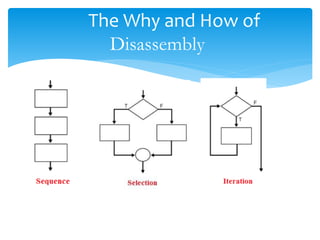
 To understand recursive descent, it is helpful to classify instructions according to
how they affect the CPU Instruction pointer.
 Sequential Flow Instructions
 Conditional Branching Instructions
 Unconditional Branching Instructions
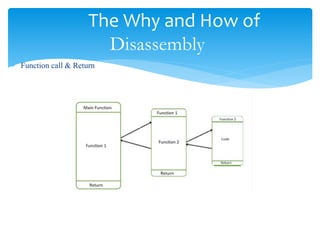
 Function Call Instructions
 Return Instructions
The Why and How of
Disassembly
The Why and How of
Disassembly
 Function call & Return
Reversing and Disassembly
tools
 Classification Tools
 file
 The file command is a standard utility, included with most *NIX-style
operating systems and with the Cygwin1 or MinGW2 tools for Windows.
 File attempts to identify a file’s type by examining specific fields within the
file.
 PE Tools
 PE Tools4 is a collection of tools useful for analyzing both running processes
and executable files on Windows systems.
Reversing and Disassembly
tools
 Classification Tools
 PEiD
 PEiD6 is another Windows tool whose primary purposes are to identify the
compiler used to build a particular Windows PE binary and to identify any
tools used to obfuscate a Windows PE binary.
Reversing and Disassembly
tools
 Summary Tools
 nm
 When nm is used to examine an intermediate object file (a .o file rather than
an executable), the default output yields the names of any functions and
global variables declared in the file
 Idd
 The ldd (list dynamic dependencies) utility is a tool used to list the dynamic
libraries required by any executable.
 Objdump
 The purpose of objdump is to “display information from object files.
 otool
 otool is most easily described as an objdump-like utility for OS X, and it is
useful for parsing information about OS X Mach-O binaries.
Reversing and Disassembly
tools
 Deep Inspection Tools
 strings
 The strings utility is designed specifically to extract string content from files,
often without regard for the format of those files.
 When using strings on executable files, it is important to remember that, by
default, only the loadable, initialized sections of the file will be scanned. Use the
-a command-line argument to force strings to scan the entire input file.
 strings gives no indication of where, within a file, a string is located. Use the -t
command-line argument to have strings print file offset information for each
string found.
 Many files utilize alternate character sets. Utilize the -e command-line argument
to cause strings to search for wide characters such as 16-bit Unicode.

UNIT 3.1 INTRODUCTON TO IDA.ppt

  • 1.
  • 2.
    Outline  Disassembly Theory The Why and how of Disassembly  Reversing and Disassembly Tools
  • 3.
    Disassembly Theory  First-generationlanguages  These are the lowest form of language, generally consisting of ones and zeros or some shorthand form such as hexadecimal, and readable only by binary ninjas.  Things are confusing at this level because it is often difficult to distinguish data from instructions since everything looks pretty much the same.  First-generation languages may also be referred to as machine languages, and in some cases byte code, while machine language programs are often referred to as binaries.
  • 4.
    Disassembly Theory  Second-generationlanguages  Also called assembly languages, second-generation languages are a mere table lookup away from machine language and generally map specific bit patterns, or operation codes (opcodes), to short but memorable character sequences called mnemonics.  Occasionally these mnemonics actually help programmers remember the instructions with which they are associated.  An assembler is a tool used by programmers to translate their assembly language programs into machine language suitable for execution.
  • 5.
    Disassembly Theory  Third-generationlanguages  These languages take another step toward the expressive capability of natural languages by introducing keywords and constructs those programmers use as the building blocks for their programs.  Third-generation languages are generally platform independent, though programs written using them may be platform dependent as a result of using features unique to a specific operating system.  Often-cited examples include FORTRAN, COBOL, C, and Java. Programmers generally use compilers to translate their programs into assembly language or all the way to machine language (or some rough equivalent such as byte code).
  • 6.
    The Why andHow of Disassembly  The Why of Disassembly  The purpose of disassembly tools is often to facilitate understanding of programs when source code is unavailable.  Common situations in which disassembly is used include these: o Analysis of malware o Analysis of closed-source software for vulnerabilities o Analysis of closed-source software for interoperability o Analysis of compiler-generated code to validate compiler performance/ correctness o Display of program instructions while debugging
  • 7.
    The Why andHow of Disassembly  Malware Analysis  Unless you are dealing with a script-based worm, malware authors seldom do you the favor of providing the source code to their creations.  Lacking source code, you are faced with a very limited set of options for discovering exactly how the malware behaves.  The two main techniques for malware analysis are dynamic analysis and static analysis. o Dynamic analysis involves allowing the malware to execute in a carefully controlled environment (sandbox) while recording every observable aspect of its behavior using any number of system instrumentation utilities. o In contrast, static analysis attempts to understand the behavior of a program simply by reading through the program code, which, in the case of malware, generally consists of a disassembly listing.
  • 8.
    The Why andHow of Disassembly  Vulnerability Analysis  For the sake of simplification, let’s break the entire security-auditing process into three steps: o vulnerability discovery, o vulnerability analysis, and o exploit development.  The same steps apply whether you have source code or not; however, the level of effort increases substantially when all you have is a binary.  The first step in the process is to discover a potentially exploitable condition in a program.  This is often accomplished using dynamic techniques such as fuzzing, 1 but it can also be performed (usually with much more effort) via static analysis.
  • 9.
    The Why andHow of Disassembly  Once a problem has been discovered, further analysis is often required to determine whether the problem is exploitable at all and, if so, under what conditions.  Disassembly listings provide the level of detail required to understand exactly how the compiler has chosen to allocate program variables.  For example, it might be useful to know that a 70-byte character array declared by a programmer was rounded up to 80 bytes when allocated by the compiler.  Disassembly listings also provide the only means to determine exactly how a compiler has chosen to order all of the variables declared globally or within functions.  Understanding the spatial relationships among variables is often essential when attempting to develop exploits.  Ultimately, by using a disassembler and a debugger together, an exploit may be developed.
  • 10.
    The Why andHow of Disassembly  Software Interoperability  When software is released in binary form only, it is very difficult for competitors to create software that can interoperate with it or to provide plug-in replacements for that software.  A common example is driver code released for hardware that is supported on only one platform.  When a vendor is slow to support or, worse yet, refuses to support the use of its hardware with alternative platforms, substantial reverse engineering effort may be required in order to develop software drivers to support the hardware.  In these cases, static code analysis is almost the only remedy and often must go beyond the software driver to understand embedded firmware.
  • 11.
    The Why andHow of Disassembly  Compiler Validation  Since the purpose of a compiler (or assembler) is to generate machine language, good disassembly tools are often required to verify that the compiler is doing its job in accordance with any design specifications.  Analysts may also be interested in locating additional opportunities for optimizing compiler output and, from a security standpoint, ascertaining whether the compiler itself has been compromised to the extent that it may be inserting back doors into generated code.
  • 12.
    The Why andHow of Disassembly  Debugging Displays  Perhaps the single most common use of disassemblers is to generate listings within debuggers.  Unfortunately, disassemblers embedded within debuggers tend to be fairly unsophisticated.  They are generally incapable of batch disassembly and sometimes balk at disassembling when they cannot determine the boundaries of a function.  This is one of the reasons why it is best to use a debugger in conjunction with a high- quality disassembler to provide better situational awareness and context during debugging. 
  • 13.
    The Why andHow of Disassembly  The How of Disassembly  Now that you’re well versed in the purposes of disassembly, it’s time to move on to how the process actually works.  Consider a typical daunting task faced by a disassembler: Take these 100KB, distinguish code from data, convert the code to assembly language for display to a user, and please don’t miss anything along the way.  We could tack any number of special requests on the end of this, such as asking the disassembler to locate functions, recognize jump tables, and identify local variables, making the disassembler’s job that much more difficult.  In order to accommodate all of our demands, any disassembler will need to pick and choose from a variety of algorithms as it navigates through the files that we feed it.  The quality of the generated disassembly listing will be directly related to the quality of the algorithms utilized and how well they have been implemented.
  • 14.
    The Why andHow of Disassembly  A Basic Disassembly Algorithm  For starters, let’s develop a simple algorithm for accepting machine language as input and producing assembly language as output.  In doing so, we will gain an understanding of the challenges, assumptions, and compromises that underlie an automated disassembly process.  Step 1 The first step in the disassembly process is to identify a region of code to disassemble. This is not necessarily as straightforward as it may seem. Instructions are generally mixed with data, and it is important to distinguish between the two. In the most common case, disassembly of an executable file, the file will conform to a common format for executable files such as the Portable Executable (PE) format used on Windows or the Executable and Linking Format (ELF) common on many Unix-based systems. These formats typically contain mechanisms (often in the form of hierarchical file headers) for locating the sections of the file that contain code and entry points2 into that code.
  • 15.
    The Why andHow of Disassembly o Step 2 Given an initial address of an instruction, the next step is to read the value contained at that address (or file offset) and perform a table lookup to match the binary opcode value to its assembly language mnemonic. Depending on the complexity of the instruction set being disassembled, this may be a trivial process, or it may involve several additional operations such as understanding any prefixes that may modify the instruction’s behavior and determining any operands required by the instruction. For instruction sets with variable-length instructions, such as the Intel x86, additional instruction bytes may need to be retrieved in order to completely disassemble a single instruction.
  • 16.
    The Why andHow of Disassembly  Step 3 Once an instruction has been fetched and any required operands decoded, its assembly language equivalent is formatted and output as part of the disassembly listing. It may be possible to choose from more than one assembly language output syntax. For example, the two predominant formats for x86 assembly language are the Intel format and the AT&T format.  Step 4 Following the output of an instruction, we need to advance to the next instruction and repeat the previous process until we have disassembled every instruction in the file.
  • 17.
    The Why andHow of Disassembly  Various algorithms exist for determining where to begin a disassembly, how to choose the next instruction to be disassembled, how to distinguish code from data, and how to determine when the last instruction has been disassembled.  The two predominant disassembly algorithms are  linear sweep and  recursive descent.
  • 18.
    The Why andHow of Disassembly Linear Sweep Algorithm  The linear sweep disassembly algorithm takes a very straightforward approach to locating instructions to disassemble: Where one instruction ends, another begins.  As a result, the most difficult decision faced is where to begin.  The usual solution is to assume that everything contained in sections of a program marked as code (typically specified by the program file’s headers) represents machine language instructions.  Disassembly begins with the first byte in a code section and moves, in a linear fashion, through the section, disassembling one instruction after another until the end of the section is reached.  No effort is made to understand the program’s control flow through recognition of nonlinear instructions such as branches.
  • 19.
    The Why andHow of Disassembly  During the disassembly process, a pointer can be maintained to mark the beginning of the instruction currently being disassembled.  As part of the disassembly process, the length of each instruction is computed and used to determine the location of the next instruction to be disassembled.  Instruction sets with fixed-length instructions (MIPS, for example) are somewhat easier to disassemble, as locating subsequent instructions is straightforward.
  • 20.
    The Why andHow of Disassembly  The main advantage of the linear sweep algorithm is that it provides complete coverage of a program’s code sections.  One of the primary disadvantages of the linear sweep method is that it fails to account for the fact that data may be comingled with code.
  • 21.
    The Why andHow of Disassembly  Recursive Descent Disassembly  Recursive descent takes a different approach to locating instructions.  Recursive descent focuses on the concept of control flow, which determines whether an instruction should be disassembled or not based on whether it is referenced by another instruction.  To understand recursive descent, it is helpful to classify instructions according to how they affect the CPU Instruction pointer.  Sequential Flow Instructions  Conditional Branching Instructions  Unconditional Branching Instructions  Function Call Instructions  Return Instructions
  • 22.
    The Why andHow of Disassembly
  • 23.
    The Why andHow of Disassembly  Function call & Return
  • 24.
    Reversing and Disassembly tools Classification Tools  file  The file command is a standard utility, included with most *NIX-style operating systems and with the Cygwin1 or MinGW2 tools for Windows.  File attempts to identify a file’s type by examining specific fields within the file.  PE Tools  PE Tools4 is a collection of tools useful for analyzing both running processes and executable files on Windows systems.
  • 25.
    Reversing and Disassembly tools Classification Tools  PEiD  PEiD6 is another Windows tool whose primary purposes are to identify the compiler used to build a particular Windows PE binary and to identify any tools used to obfuscate a Windows PE binary.
  • 26.
    Reversing and Disassembly tools Summary Tools  nm  When nm is used to examine an intermediate object file (a .o file rather than an executable), the default output yields the names of any functions and global variables declared in the file  Idd  The ldd (list dynamic dependencies) utility is a tool used to list the dynamic libraries required by any executable.  Objdump  The purpose of objdump is to “display information from object files.  otool  otool is most easily described as an objdump-like utility for OS X, and it is useful for parsing information about OS X Mach-O binaries.
  • 27.
    Reversing and Disassembly tools Deep Inspection Tools  strings  The strings utility is designed specifically to extract string content from files, often without regard for the format of those files.  When using strings on executable files, it is important to remember that, by default, only the loadable, initialized sections of the file will be scanned. Use the -a command-line argument to force strings to scan the entire input file.  strings gives no indication of where, within a file, a string is located. Use the -t command-line argument to have strings print file offset information for each string found.  Many files utilize alternate character sets. Utilize the -e command-line argument to cause strings to search for wide characters such as 16-bit Unicode.