the heart & science of philanthropy
24 March 2016 | Erica Klinger, Director of Marketing
Storytelling & Marketing
The Heart
You have a great story,
now how do you share it?
The content marketing
team is your friend
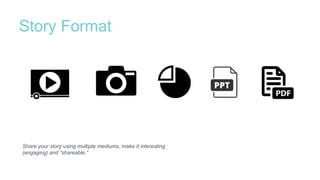
Story Format
Share your story using multiple mediums, make it interesting
(engaging) and “shareable.”
Scan-ability
Highlight just a few main points and make them stand out!
“Sticky” Headlines
Be persuasive - what, why, how, or when?
On the average, five times as many people read the headline as
read the body copy. When you have written your headline, you have
spent eighty cents out of your dollar.
—David Ogilvy “Father of advertising”
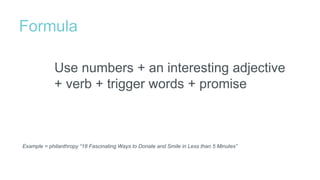
Formula
Example = philanthropy “18 Fascinating Ways to Donate and Smile in Less than 5 Minutes”
Use numbers + an interesting adjective
+ verb + trigger words + promise
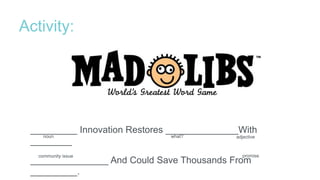
Activity:
_________ Innovation Restores ______________With
________
_______________ And Could Save Thousands From
_________.
promise
what? adjective
community issue
noun
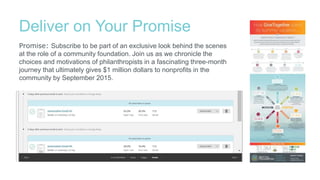
Deliver on Your Promise
Promise: Subscribe to be part of an exclusive look behind the scenes
at the role of a community foundation. Join us as we chronicle the
choices and motivations of philanthropists in a fascinating three-month
journey that ultimately gives $1 million dollars to nonprofits in the
community by September 2015.
Together, we work to create
equality of opportunity in our
community, with strategies
for philanthropic investment
that creates lasting change.
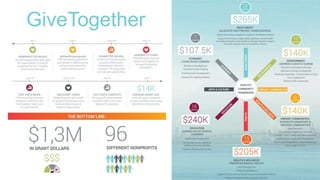
GiveTogether
Brand Ambassadors
Build a list of people that will share you content in their social networks.
• Employees
• Volunteers
• Board
• Family
• Friends
• Media and bloggers
• Celebrities
The Science
Story analysis,
work smarter not harder
Identify the
“share-ability” factor
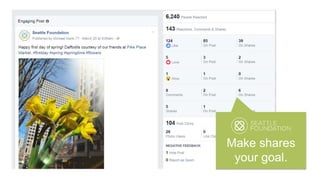
Make shares
your goal.
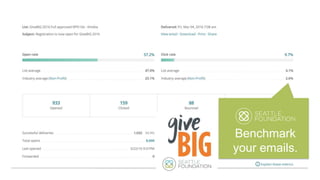
Benchmark
your emails.
Track blog
engagement
Activity:
Calculate Year over Year (YOY) Growth
Traffic May 2015= 1220 visits per month
Traffic May 2014 = 720 visits per month
Traffic now minus traffic last year. 1220-720 = 500
Take 500 x (100) / 720 (the original amount)
Multiplying by 100 (calculate to %)
69% YOY growth rate
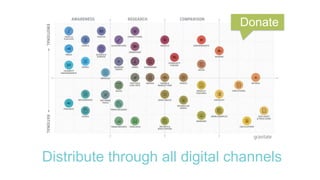
Distribute through all digital channels
Donate
Drive to an action –
remove friction
All about the timing–
when to make an ASK?
Set your goals and have
a clear Call to Action (CTA)
Failure is good
$%(L@#!
Make telling a story, fun.
Fun
Questions?

Storytelling for Nonprofits - KCNE Conference

Editor's Notes

  • #2 Add heart an
  • #7 Video, photos, visualizations (compare text boring, to creative interesting – summer givetogether infographic) Put it in multiple mediums, build your content, creative Simplify complex information into something scanneable Compare boring headline vs. interesting actionable headline Mad Libs – fill in the blanks activity as a group (5) headline that is also SEO friendly
  • #8 Video, photos, visualizations (compare text boring, to creative interesting – summer givetogether infographic) Put it in multiple mediums, build your content, creative Simplify complex information into something scanneable Compare boring headline vs. interesting actionable headline Mad Libs – fill in the blanks activity as a group (5) headline that is also SEO friendly
  • #9 Video, photos, visualizations (compare text boring, to creative interesting – summer givetogether infographic) Put it in multiple mediums, build your content, creative Simplify complex information into something scanneable Compare boring headline vs. interesting actionable headline Mad Libs – fill in the blanks activity as a group (5) headline that is also SEO friendly
  • #10 Video, photos, visualizations (compare text boring, to creative interesting – summer givetogether infographic) Put it in multiple mediums, build your content, creative Simplify complex information into something scanneable Compare boring headline vs. interesting actionable headline Mad Libs – fill in the blanks activity as a group (5) headline that is also SEO friendly
  • #11 Video, photos, visualizations (compare text boring, to creative interesting – summer givetogether infographic) Put it in multiple mediums, build your content, creative Simplify complex information into something scanneable Compare boring headline vs. interesting actionable headline Mad Libs – fill in the blanks activity as a group (5) headline that is also SEO friendly
  • #14 Video, photos, visualizations (compare text boring, to creative interesting – summer givetogether infographic) Put it in multiple mediums, build your content, creative Simplify complex information into something scanneable Compare boring headline vs. interesting actionable headline Mad Libs – fill in the blanks activity as a group (5) headline that is also SEO friendly
  • #22 Blog post or web page KEY TO CAPTURE AN EMAIL, related content Email blast and eNewsletter Ambassadors email with easy sharing links Social Networks SMS Text Paid Media Social Search ads Banner ads
  • #23 Human behavior = this is too hard – I give up! Keep the message and path simple Different channels have different goals – EMAIL & Mail for $ Email long form Email short form Example: YouTube screenshot – where do they go? End screen with CTA (GiveBIG)
  • #24 Human behavior = this is too hard – I give up! Keep the message and path simple Different channels have different goals – EMAIL & Mail for $ Email long form Email short form Example: YouTube screenshot – where do they go? End screen with CTA (GiveBIG)
  • #25 Human behavior = this is too hard – I give up! Keep the message and path simple Different channels have different goals – EMAIL & Mail for $ Email long form Email short form Example: YouTube screenshot – where do they go? End screen with CTA (GiveBIG)
  • #26 Human behavior = this is too hard – I give up! Keep the message and path simple Different channels have different goals – EMAIL & Mail for $ Email long form Email short form Example: YouTube screenshot – where do they go? End screen with CTA (GiveBIG)
  • #27 Human behavior = this is too hard – I give up! Keep the message and path simple Different channels have different goals – EMAIL & Mail for $ Email long form Email short form Example: YouTube screenshot – where do they go? End screen with CTA (GiveBIG)
  • #28 Duamish