Step-by-Step development
of an Application for the
Java Card 3.0™ platform
Anki Nelaturu Eric Vétillard
Sun Microsystems Trusted Labs
2
About the speakers
> Eric Vétillard
● CTO of Trusted Labs
● Technical Chair, Java Card Forum
> Anki Nelaturu
● Staff engineer, Java Card Technology Group,
Sun Microsystems
3
Session objectives
> Learn the basic principles of Java Card 3.0
● Based on a small realistic application
● Step-by-step building of a first version
● Including typical smart card issues
● Security, performance, deployment
> Discover the development tools
● Building a project
● Using the Reference Implementation
4
The Session at a Glance
> An introduction to Java Card 3.0
> Writing a first application
> Building and running the application
> Making your application realistic
> Further options
> Deploying your application
5
Smart Card Characteristics
> Smart cards are small
● Best in class have 32k RAM, 1M Flash
> Smart cards are cheap
● A single chip, embedded in plastic
> Smart cards are secure
● They are often used to manage sensitive assets
> Smart cards are manageable
● Powerful remote app management tools
6
Why a Specific Platform?
> Limited resources
● RAM is very scarce; object use is limited
● Flash memory is hard to access
● Computing power is limited
> Specific requirements
● High level of security
● Several applications share the same VM
● Persistence is achieved through objects
7
Java Card 3.0 in One Slide
> VM and core API based on CLDC
● Minus floating-point numbers and a few details
● Plus persistent objects
● Plus a firewall between applications
● Plus detailed permissions
> A servlet application model
● Plus a legacy smart card application model
8
The First Application
> A basic password manager
● Stores triplets made of
● An identifier (URL or simple string)
● A user name
● A password
> Available through a Web interface
● Main application is a servlet
9
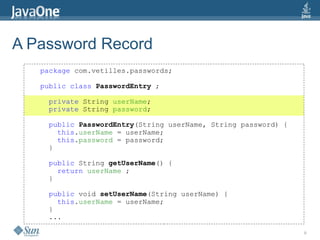
A Password Record
package com.vetilles.passwords;
public class PasswordEntry ;
private String userName;
private String password;
public PasswordEntry(String userName, String password) {
this.userName = userName;
this.password = password;
}
public String getUserName() {
return userName ;
}
public void setUserName(String userName) {
this.userName = userName;
}
...
10
A Password Manager
package com.vetilles.passwords;
import java.util.Hashtable;
import java.util.Enumeration;
import javacardx.framework.TransactionType;
import javacardx.framework.TransactionTypeValue;
public class PasswordManager ;
private Hashtable<String,PasswordEntry> entries;
public PasswordManager() {
entries = new Hashtable();
}
...
11
A Password Manager
...
@TransactionType(TransactionTypeValue.REQUIRED)
public boolean addPasswordEntry
(String id, String userName, String password) {
if (entries.containsKey(id)) return false ;
entries.put(id, new PasswordEntry(userName, password);
return true ;
}
public PasswordEntry retrievePasswordEntry(String id)
{
return entries.get(id) ;
}
...
12
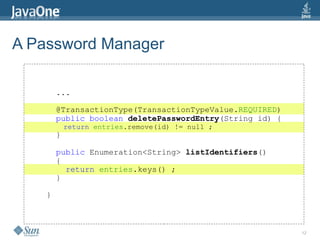
A Password Manager
...
@TransactionType(TransactionTypeValue.REQUIRED)
public boolean deletePasswordEntry(String id) {
return entries.remove(id) != null ;
}
public Enumeration<String> listIdentifiers()
{
return entries.keys() ;
}
}
13
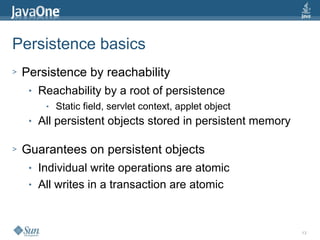
Persistence basics
> Persistence by reachability
● Reachability by a root of persistence
● Static field, servlet context, applet object
● All persistent objects stored in persistent memory
> Guarantees on persistent objects
● Individual write operations are atomic
● All writes in a transaction are atomic
14
Transaction basics
> Inspired from Java EE persistence
● With some specific details
● A smart card is not a database
> Three basic principles
● The scope of the transaction is a method
● Commit occurs on normal return
● Abort occurs on exception exit
15
Transaction types
> SUPPORTS
● By default, transaction optional
> REQUIRED
● When a transaction is needed
> REQUIRES_NEW
● For a separate transaction
> MANDATORY, NEVER, NOT_SUPPORTED:
● For special cases
16
A Password Servlet
package com.vetilles.passwords;
import java.io.IOException;
import java.io.PrintWriter;
import java.util.Enumeration;
import javax.servlet.http.HttpServlet;
import javax.servlet.http.HttpServletRequest;
import javax.servlet.http.HttpServletResponse;
/** A Simple Hello Servlet */
public class PassServlet extends HttpServlet {
private static PasswordManager manager =
new PasswordManager();
...
17
A Password Servlet
@Override
public void doGet( HttpServletRequest request,
HttpServletResponse response)
throws IOException
{
// First interprets the command
String command = request.getServletPath();
// Matches the possible incoming commands
if (command.equals("/addentry"))
addEntry(request, response);
else if (command.equals("/retrieveentry"))
retrieveEntry(request, response);
else if (command.equals("/deleteentry"))
deleteEntry(request, response);
else if (command.equals("/listidentifiers"))
listIdentifiers(request, response);
}
18
A Password Servlet
private void addEntry(
HttpServletRequest request,
HttpServletResponse response)
throws IOException
{
boolean status = manager.addPasswordEntry(
request.getParameter("id"),
request.getParameter("name"),
request.getParameter("pass")) ;
PrintWriter out = startResponse(response);
if (status)
out.println(HTML_ADD_ENTRY_SUCCESS);
else
out.println(HTML_ADD_ENTRY_FAILED);
finishResponse(response);
}
19
A Password Servlet
private static final String HTML_ADD_ENTRY_SUCCESS =
"<p align="center">"
+ "Password entry added successfully"
+ "</p><br>";
private static final String HTML_ADD_ENTRY_FAILED =
"<p align="center">"
+ "Password entry addition failed."
+ "</p>"
+ "<p align="center">"
+ "Identifier already in use."
+ "</p><br>";
20
A Password Servlet
private PrintWriter startResponse(
HttpServletRequest request,
HttpServletResponse response)
throws IOException, ServletException {
// Set content type first
response.setContentType("text/html");
// Uses RequestDispatcher to write the header
RequestDispatcher dispatcher =
request.getRequestDispatcher("/WEB-INF/header.i");
dispatcher.include(request, response);
// Get PrintWriter object to create response
return response.getWriter();
}
21
A Password Servlet
private void finishResponse(
HttpServletRequest request)
HttpServletResponse response)
throws IOException
{
// Uses RequestDispatcher to write the footer
RequestDispatcher dispatcher =
request.getRequestDispatcher("/WEB-INF/footer.i");
dispatcher.include(request, response);
}
22
HTML file: header.i
<html>
<head><title>Password Manager</title></head>
<body>
<table><tr>
<h1 align="center">Password Manager</h1><br>
<td><a href="/pass/add.html">Add entry</a></td>
<td><a href="/pass/retrieve.html">
Retrieve entry
</a></td>
<td><a href="/pass/delete.html">
Delete entry
</a></td>
<td><a href="/pass/listidentifiers">
List identifiers
</a></td>
</tr></table>
<br><br>
23
HTML file: footer.i
</body>
</html>
24
Access Control
> No access control
● The user must be authenticated
> Container-managed authentication is possible
● BASIC authentication for simplicity
● FORM-based for more flexibility
> Role-based security is available
● Access rights orthogonal to authentication
25
So ?
> For Java Card 2.x developers
● Java Card 3.0 is a major breakthrough
● The servlet model is entirely new
> For other Java developers
● Java Card 3.0 is more traditional
● Well integrated into standard tool chain
● NetBeans, debugger, etc.
26
Demo
27
What is Wrong with this Application?
> Security
● Content is not well protected
● No protection against Web attacks
> Performance
● Too much content going back and forth
● Card-specific optimizations
28
Why Protect the Content?
> No separation in n tiers
● Data is stored by the presentation application
> Smart cards are subject to attacks
● They are a Web server in the attacker's hands
● Attacks on the hardware are possible
● Observation and fault induction attacks
> Content is sensitive
29
Secure Storage of Passwords
> Issue 1: Upon deletion, passwords must be wiped
● How do you wipe a String?
● Persistent storage must be in a byte array
> Issue 2: Passwords should be stored encrypted
● Once again, byte arrays are required
> The PasswordEntry class needs some work
● Storage of passwords in encrypted byte arrays
30
Secure Storage of Passwords
package com.vetilles.passwords;
import javacard.security.DESKey ;
import javacard.security.KeyBuilder ;
import javacardx.crypto.Cipher ;
import javacardx.crypto.RandomData ;
public class PasswordEntry {
private String userName;
private byte[] password;
private static DESKey theKey ;
private static Cipher cipher ;
public PasswordEntry(String userName, String password) {
if (theKey == null)
initCrypto() ;
this.userName = userName;
setPassword(password);
}
31
Secure Storage of Passwords
private static void initCrypto()
{
// Allocates the objects
theKey = (DESKey)KeyBuilder.buildKey(
"DES",KeyBuilder.LENGTH_DES3_2KEY, false);
cipher = Cipher.getInstance("DES_CBC_ISO9797_M2", true);
// Generates a random key value
RandomData rnd = RandomData.getInstance("SECURE_RANDOM");
byte[] value = new byte[16] ;
rnd.generateData(value, (short)0, (short)16);
theKey.setKey(value);
// Clears the key value before to return
rnd.generateData(value, (short)0, (short)16);
}
32
Secure Storage of Passwords
public void setPassword(String pass)
{
byte[] bytes = pass.bytes();
password = new byte[bytes.length+9];
cipher.init(theKey,Cipher.MODE_ENCRYPT);
password[0] = (byte)cipher.doFinal(
bytes, (short)0, (short)bytes.length, password, (short)1 );
}
public String getPassword()
{
byte[] bytes = new byte[password.length];
cipher.init(theKey,Cipher.MODE_DECRYPT);
short len = cipher.doFinal(
password, (short)1, password[0], bytes, (short)0 );
return new String(bytes,(short)0,len);
}
33
Secure Communication
> Several issues are present
● All data is transmitted in clear
● Master password is transmitted in clear
> One simple solution: SSL
● Supported at the container level
● Not a single line of code
● Only constraint: manage the certificates
34
Web Security
> Web applications have many security issues
> See OWASP for a starting point
● In particular the “Top 10 Vulnerabilities”
> Some countermeasures are required
● Input filtering
● Output canonicalization
● Proper session management
35
Validating Input
private void addEntry(
HttpServletRequest request,
HttpServletResponse response)
throws IOException
{
boolean status ;
try {
status = manager.addPasswordEntry(
validateId(request.getParameter("id")),
validateId(request.getParameter("name")),
request.getParameter("pass")) ;
} catch(Exception e) {
sendError(response,e.getMessage());
return;
}
...
}
36
Validating Input
private static final String otherChars = "-_@." ;
private String validateId(String id) throws IOException
{
char[] chars = id.toCharArray() ;
for(char c:chars)
{
if (Character.isDigit(c)) continue;
if (Character.isLowerCase(c)) continue;
if (Character.isUpperCase(c)) continue;
if (otherChars.indexOf(c)!=-1) continue;
throw new IOException("Invalid identifier string");
}
// If we get here, all characters are acceptable
return id ;
}
37
Canonicalizing Output
> The idea is to make the output innocuous
● Make sure that characters are not interpreted
● The following only works on ASCII characters
private String encodeUnverifiedString(String str)
{
StringBuffer s = new StringBuffer();
char[] chars = str.toCharArray() ;
for(char c:chars)
{
s.append("<span>#&" + Integer.toString(c) + ";</span>");
}
return s.toString();
}
38
Communication Performance
> Card communication remains slow
● Content production also has limits
> Similar to other elements of the “Web of Things”
● Servers are less powerful than clients
● The work must be delegated to clients
> Ajax can be used
● Limits the amount of communication
● Limits HTML overhead on the server side
39
Ajax on a Smart Card?
> Ajax is an interesting technique
● It is entirely managed on the card
● It uses the client's resources
> Aren't there security issues ?
● No, not really
● The browser must be trusted anyway
40
Performance Optimization
Persistent memory
private static void initCrypto()
{
// Allocates the objects
theKey = (DESKey)KeyBuilder.buildKey(
"DES",KeyBuilder.LENGTH_DES3_2KEY, false);
cipher = Cipher.getInstance("DES_CBC_ISO9797_M2", true);
// Generates a random key value
RandomData rnd = RandomData.getInstance("SECURE_RANDOM");
byte[] value = new byte[16] ;
rnd.generateData(value, (short)0, (short)16);
theKey.setKey(value);
// Clears the key value before to return
rnd.generateData(value, (short)0, (short)16);
}
41
Performance Optimization
Persistent memory
private static void initCrypto()
{
// Allocates the objects
DESKey newKey = (DESKey)KeyBuilder.buildKey(
"DES",KeyBuilder.LENGTH_DES3_2KEY, false);
cipher = Cipher.getInstance("DES_CBC_ISO9797_M2", true);
// Generates a random key value
RandomData rnd = RandomData.getInstance("SECURE_RANDOM");
byte[] value = new byte[16] ;
rnd.generateData(value, (short)0, (short)16);
newKey.setKey(value);
// Clears the key value before to return
rnd.generateData(value, (short)0, (short)16);
// Promotes the key to persistent memory
theKey = newKey ;
}
42
What more could we do ?
> Manage the data in a separate application
● Use sharing to communicate
> Add an APDU interface
● Work with legacy smart card applications
> Manage our own authenticators
● Rather than use the platform's default ones
> Backup our passwords
● Open a connection to a backup server
43
What about Deployment?
> Many instances
● Not a single server
● Instead, millions of cards/objects
> A mutualized server
● Several providers represented on the server
● Usually, one single issuer (the owner)
● Some resource allocation to manage
44
GlobalPlatform
> Card management technology since 1999
● Standards to deploy/manage applications
● Standards to manage relationships
● Between card issuers and application providers
● Including trusted third parties when needed
> Currently being adapted to a Web model
● Update of application management
● Addition of new resources to be managed
45
GlobalPlatform Architecture
FromGlobalPlatform
Card Spec v2.2,2006
46
Issuer-Centric Deployment
> Current model for smart cards
● The issuer owns the card
> Many deployment options
● The issuer manages all applications
● Simple and practical
● A third party needs to sign all applications
● Practical to enforce issuer policies
● Management can be delegated
● All operations may still be explicitly authorized
47
Alternative Deployment Scenarios
> White card schemes
● Very similar to an issuer-centric scheme
● But the “issuer” is an association/public entity
> Cardholder-owned cards
● Not the tendency for traditional cards
● Likely trend with smart objects
> ...
48
GlobalPlatform Networked Framework
> Adapts the existing model to the Web
● HTTP and SSL as transport
● ASN.1 as encoding
> Supports specific Web application features
● Management of URIs
● Who can use the http://localhost:8019/google ?
● Management of realms and authenticators
● Who can use the “Visa” authentication realm?
49
Recap
> Java Card 3.0 brings Web servers everywhere
● On cards and on other devices
● Using a very classical model
> Of course, there is a catch
● Resources are severely limited
● Deployment needs to be carefully planned
● Applications and devices may be linked
50
Getting More Information
> Spec and Development Kit
● java.sun.com/products/javacard
● Look at the samples ...
> Blogs
● javacard.vetilles.com
> Other sessions at JavaOne
Anki Nelaturu
anki.nelaturu@sun.com
Eric Vétillard
eric.vetillard@trusted-labs.com

Step-by-step Development of an Application for the Java Card Connected Platform

  • 1.
    Step-by-Step development of anApplication for the Java Card 3.0™ platform Anki Nelaturu Eric Vétillard Sun Microsystems Trusted Labs
  • 2.
    2 About the speakers >Eric Vétillard ● CTO of Trusted Labs ● Technical Chair, Java Card Forum > Anki Nelaturu ● Staff engineer, Java Card Technology Group, Sun Microsystems
  • 3.
    3 Session objectives > Learnthe basic principles of Java Card 3.0 ● Based on a small realistic application ● Step-by-step building of a first version ● Including typical smart card issues ● Security, performance, deployment > Discover the development tools ● Building a project ● Using the Reference Implementation
  • 4.
    4 The Session ata Glance > An introduction to Java Card 3.0 > Writing a first application > Building and running the application > Making your application realistic > Further options > Deploying your application
  • 5.
    5 Smart Card Characteristics >Smart cards are small ● Best in class have 32k RAM, 1M Flash > Smart cards are cheap ● A single chip, embedded in plastic > Smart cards are secure ● They are often used to manage sensitive assets > Smart cards are manageable ● Powerful remote app management tools
  • 6.
    6 Why a SpecificPlatform? > Limited resources ● RAM is very scarce; object use is limited ● Flash memory is hard to access ● Computing power is limited > Specific requirements ● High level of security ● Several applications share the same VM ● Persistence is achieved through objects
  • 7.
    7 Java Card 3.0in One Slide > VM and core API based on CLDC ● Minus floating-point numbers and a few details ● Plus persistent objects ● Plus a firewall between applications ● Plus detailed permissions > A servlet application model ● Plus a legacy smart card application model
  • 8.
    8 The First Application >A basic password manager ● Stores triplets made of ● An identifier (URL or simple string) ● A user name ● A password > Available through a Web interface ● Main application is a servlet
  • 9.
    9 A Password Record packagecom.vetilles.passwords; public class PasswordEntry ; private String userName; private String password; public PasswordEntry(String userName, String password) { this.userName = userName; this.password = password; } public String getUserName() { return userName ; } public void setUserName(String userName) { this.userName = userName; } ...
  • 10.
    10 A Password Manager packagecom.vetilles.passwords; import java.util.Hashtable; import java.util.Enumeration; import javacardx.framework.TransactionType; import javacardx.framework.TransactionTypeValue; public class PasswordManager ; private Hashtable<String,PasswordEntry> entries; public PasswordManager() { entries = new Hashtable(); } ...
  • 11.
    11 A Password Manager ... @TransactionType(TransactionTypeValue.REQUIRED) publicboolean addPasswordEntry (String id, String userName, String password) { if (entries.containsKey(id)) return false ; entries.put(id, new PasswordEntry(userName, password); return true ; } public PasswordEntry retrievePasswordEntry(String id) { return entries.get(id) ; } ...
  • 12.
    12 A Password Manager ... @TransactionType(TransactionTypeValue.REQUIRED) publicboolean deletePasswordEntry(String id) { return entries.remove(id) != null ; } public Enumeration<String> listIdentifiers() { return entries.keys() ; } }
  • 13.
    13 Persistence basics > Persistenceby reachability ● Reachability by a root of persistence ● Static field, servlet context, applet object ● All persistent objects stored in persistent memory > Guarantees on persistent objects ● Individual write operations are atomic ● All writes in a transaction are atomic
  • 14.
    14 Transaction basics > Inspiredfrom Java EE persistence ● With some specific details ● A smart card is not a database > Three basic principles ● The scope of the transaction is a method ● Commit occurs on normal return ● Abort occurs on exception exit
  • 15.
    15 Transaction types > SUPPORTS ●By default, transaction optional > REQUIRED ● When a transaction is needed > REQUIRES_NEW ● For a separate transaction > MANDATORY, NEVER, NOT_SUPPORTED: ● For special cases
  • 16.
    16 A Password Servlet packagecom.vetilles.passwords; import java.io.IOException; import java.io.PrintWriter; import java.util.Enumeration; import javax.servlet.http.HttpServlet; import javax.servlet.http.HttpServletRequest; import javax.servlet.http.HttpServletResponse; /** A Simple Hello Servlet */ public class PassServlet extends HttpServlet { private static PasswordManager manager = new PasswordManager(); ...
  • 17.
    17 A Password Servlet @Override publicvoid doGet( HttpServletRequest request, HttpServletResponse response) throws IOException { // First interprets the command String command = request.getServletPath(); // Matches the possible incoming commands if (command.equals("/addentry")) addEntry(request, response); else if (command.equals("/retrieveentry")) retrieveEntry(request, response); else if (command.equals("/deleteentry")) deleteEntry(request, response); else if (command.equals("/listidentifiers")) listIdentifiers(request, response); }
  • 18.
    18 A Password Servlet privatevoid addEntry( HttpServletRequest request, HttpServletResponse response) throws IOException { boolean status = manager.addPasswordEntry( request.getParameter("id"), request.getParameter("name"), request.getParameter("pass")) ; PrintWriter out = startResponse(response); if (status) out.println(HTML_ADD_ENTRY_SUCCESS); else out.println(HTML_ADD_ENTRY_FAILED); finishResponse(response); }
  • 19.
    19 A Password Servlet privatestatic final String HTML_ADD_ENTRY_SUCCESS = "<p align="center">" + "Password entry added successfully" + "</p><br>"; private static final String HTML_ADD_ENTRY_FAILED = "<p align="center">" + "Password entry addition failed." + "</p>" + "<p align="center">" + "Identifier already in use." + "</p><br>";
  • 20.
    20 A Password Servlet privatePrintWriter startResponse( HttpServletRequest request, HttpServletResponse response) throws IOException, ServletException { // Set content type first response.setContentType("text/html"); // Uses RequestDispatcher to write the header RequestDispatcher dispatcher = request.getRequestDispatcher("/WEB-INF/header.i"); dispatcher.include(request, response); // Get PrintWriter object to create response return response.getWriter(); }
  • 21.
    21 A Password Servlet privatevoid finishResponse( HttpServletRequest request) HttpServletResponse response) throws IOException { // Uses RequestDispatcher to write the footer RequestDispatcher dispatcher = request.getRequestDispatcher("/WEB-INF/footer.i"); dispatcher.include(request, response); }
  • 22.
    22 HTML file: header.i <html> <head><title>PasswordManager</title></head> <body> <table><tr> <h1 align="center">Password Manager</h1><br> <td><a href="/pass/add.html">Add entry</a></td> <td><a href="/pass/retrieve.html"> Retrieve entry </a></td> <td><a href="/pass/delete.html"> Delete entry </a></td> <td><a href="/pass/listidentifiers"> List identifiers </a></td> </tr></table> <br><br>
  • 23.
  • 24.
    24 Access Control > Noaccess control ● The user must be authenticated > Container-managed authentication is possible ● BASIC authentication for simplicity ● FORM-based for more flexibility > Role-based security is available ● Access rights orthogonal to authentication
  • 25.
    25 So ? > ForJava Card 2.x developers ● Java Card 3.0 is a major breakthrough ● The servlet model is entirely new > For other Java developers ● Java Card 3.0 is more traditional ● Well integrated into standard tool chain ● NetBeans, debugger, etc.
  • 26.
  • 27.
    27 What is Wrongwith this Application? > Security ● Content is not well protected ● No protection against Web attacks > Performance ● Too much content going back and forth ● Card-specific optimizations
  • 28.
    28 Why Protect theContent? > No separation in n tiers ● Data is stored by the presentation application > Smart cards are subject to attacks ● They are a Web server in the attacker's hands ● Attacks on the hardware are possible ● Observation and fault induction attacks > Content is sensitive
  • 29.
    29 Secure Storage ofPasswords > Issue 1: Upon deletion, passwords must be wiped ● How do you wipe a String? ● Persistent storage must be in a byte array > Issue 2: Passwords should be stored encrypted ● Once again, byte arrays are required > The PasswordEntry class needs some work ● Storage of passwords in encrypted byte arrays
  • 30.
    30 Secure Storage ofPasswords package com.vetilles.passwords; import javacard.security.DESKey ; import javacard.security.KeyBuilder ; import javacardx.crypto.Cipher ; import javacardx.crypto.RandomData ; public class PasswordEntry { private String userName; private byte[] password; private static DESKey theKey ; private static Cipher cipher ; public PasswordEntry(String userName, String password) { if (theKey == null) initCrypto() ; this.userName = userName; setPassword(password); }
  • 31.
    31 Secure Storage ofPasswords private static void initCrypto() { // Allocates the objects theKey = (DESKey)KeyBuilder.buildKey( "DES",KeyBuilder.LENGTH_DES3_2KEY, false); cipher = Cipher.getInstance("DES_CBC_ISO9797_M2", true); // Generates a random key value RandomData rnd = RandomData.getInstance("SECURE_RANDOM"); byte[] value = new byte[16] ; rnd.generateData(value, (short)0, (short)16); theKey.setKey(value); // Clears the key value before to return rnd.generateData(value, (short)0, (short)16); }
  • 32.
    32 Secure Storage ofPasswords public void setPassword(String pass) { byte[] bytes = pass.bytes(); password = new byte[bytes.length+9]; cipher.init(theKey,Cipher.MODE_ENCRYPT); password[0] = (byte)cipher.doFinal( bytes, (short)0, (short)bytes.length, password, (short)1 ); } public String getPassword() { byte[] bytes = new byte[password.length]; cipher.init(theKey,Cipher.MODE_DECRYPT); short len = cipher.doFinal( password, (short)1, password[0], bytes, (short)0 ); return new String(bytes,(short)0,len); }
  • 33.
    33 Secure Communication > Severalissues are present ● All data is transmitted in clear ● Master password is transmitted in clear > One simple solution: SSL ● Supported at the container level ● Not a single line of code ● Only constraint: manage the certificates
  • 34.
    34 Web Security > Webapplications have many security issues > See OWASP for a starting point ● In particular the “Top 10 Vulnerabilities” > Some countermeasures are required ● Input filtering ● Output canonicalization ● Proper session management
  • 35.
    35 Validating Input private voidaddEntry( HttpServletRequest request, HttpServletResponse response) throws IOException { boolean status ; try { status = manager.addPasswordEntry( validateId(request.getParameter("id")), validateId(request.getParameter("name")), request.getParameter("pass")) ; } catch(Exception e) { sendError(response,e.getMessage()); return; } ... }
  • 36.
    36 Validating Input private staticfinal String otherChars = "-_@." ; private String validateId(String id) throws IOException { char[] chars = id.toCharArray() ; for(char c:chars) { if (Character.isDigit(c)) continue; if (Character.isLowerCase(c)) continue; if (Character.isUpperCase(c)) continue; if (otherChars.indexOf(c)!=-1) continue; throw new IOException("Invalid identifier string"); } // If we get here, all characters are acceptable return id ; }
  • 37.
    37 Canonicalizing Output > Theidea is to make the output innocuous ● Make sure that characters are not interpreted ● The following only works on ASCII characters private String encodeUnverifiedString(String str) { StringBuffer s = new StringBuffer(); char[] chars = str.toCharArray() ; for(char c:chars) { s.append("<span>#&" + Integer.toString(c) + ";</span>"); } return s.toString(); }
  • 38.
    38 Communication Performance > Cardcommunication remains slow ● Content production also has limits > Similar to other elements of the “Web of Things” ● Servers are less powerful than clients ● The work must be delegated to clients > Ajax can be used ● Limits the amount of communication ● Limits HTML overhead on the server side
  • 39.
    39 Ajax on aSmart Card? > Ajax is an interesting technique ● It is entirely managed on the card ● It uses the client's resources > Aren't there security issues ? ● No, not really ● The browser must be trusted anyway
  • 40.
    40 Performance Optimization Persistent memory privatestatic void initCrypto() { // Allocates the objects theKey = (DESKey)KeyBuilder.buildKey( "DES",KeyBuilder.LENGTH_DES3_2KEY, false); cipher = Cipher.getInstance("DES_CBC_ISO9797_M2", true); // Generates a random key value RandomData rnd = RandomData.getInstance("SECURE_RANDOM"); byte[] value = new byte[16] ; rnd.generateData(value, (short)0, (short)16); theKey.setKey(value); // Clears the key value before to return rnd.generateData(value, (short)0, (short)16); }
  • 41.
    41 Performance Optimization Persistent memory privatestatic void initCrypto() { // Allocates the objects DESKey newKey = (DESKey)KeyBuilder.buildKey( "DES",KeyBuilder.LENGTH_DES3_2KEY, false); cipher = Cipher.getInstance("DES_CBC_ISO9797_M2", true); // Generates a random key value RandomData rnd = RandomData.getInstance("SECURE_RANDOM"); byte[] value = new byte[16] ; rnd.generateData(value, (short)0, (short)16); newKey.setKey(value); // Clears the key value before to return rnd.generateData(value, (short)0, (short)16); // Promotes the key to persistent memory theKey = newKey ; }
  • 42.
    42 What more couldwe do ? > Manage the data in a separate application ● Use sharing to communicate > Add an APDU interface ● Work with legacy smart card applications > Manage our own authenticators ● Rather than use the platform's default ones > Backup our passwords ● Open a connection to a backup server
  • 43.
    43 What about Deployment? >Many instances ● Not a single server ● Instead, millions of cards/objects > A mutualized server ● Several providers represented on the server ● Usually, one single issuer (the owner) ● Some resource allocation to manage
  • 44.
    44 GlobalPlatform > Card managementtechnology since 1999 ● Standards to deploy/manage applications ● Standards to manage relationships ● Between card issuers and application providers ● Including trusted third parties when needed > Currently being adapted to a Web model ● Update of application management ● Addition of new resources to be managed
  • 45.
  • 46.
    46 Issuer-Centric Deployment > Currentmodel for smart cards ● The issuer owns the card > Many deployment options ● The issuer manages all applications ● Simple and practical ● A third party needs to sign all applications ● Practical to enforce issuer policies ● Management can be delegated ● All operations may still be explicitly authorized
  • 47.
    47 Alternative Deployment Scenarios >White card schemes ● Very similar to an issuer-centric scheme ● But the “issuer” is an association/public entity > Cardholder-owned cards ● Not the tendency for traditional cards ● Likely trend with smart objects > ...
  • 48.
    48 GlobalPlatform Networked Framework >Adapts the existing model to the Web ● HTTP and SSL as transport ● ASN.1 as encoding > Supports specific Web application features ● Management of URIs ● Who can use the http://localhost:8019/google ? ● Management of realms and authenticators ● Who can use the “Visa” authentication realm?
  • 49.
    49 Recap > Java Card3.0 brings Web servers everywhere ● On cards and on other devices ● Using a very classical model > Of course, there is a catch ● Resources are severely limited ● Deployment needs to be carefully planned ● Applications and devices may be linked
  • 50.
    50 Getting More Information >Spec and Development Kit ● java.sun.com/products/javacard ● Look at the samples ... > Blogs ● javacard.vetilles.com > Other sessions at JavaOne
  • 51.