User Centered Design & Usability Testing
July 1, 2013
Alex Kirtland
VP Product & UX, Krossover
alex@krossover.com
@UsableMarkets
@krossovr
July 1, 2013 | Page © Alex Kirtland 2013
Agenda
I. UX Process (10 minutes)
II. How to Plan a Usability Test (20 minutes)
III. Lets do some Usability Testing (1 hour)
IV. Q&A (30 minutes)
2
July 1, 2013 | Page © Alex Kirtland 2013
UX Process
3
July 1, 2013 | Page © Alex Kirtland 2013
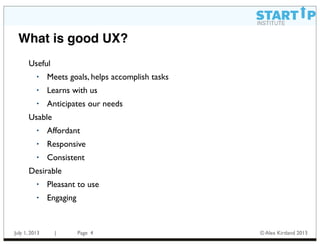
What is good UX?
4
Useful
• Meets goals, helps accomplish tasks
• Learns with us
• Anticipates our needs
Usable
• Affordant
• Responsive
• Consistent
Desirable
• Pleasant to use
• Engaging
July 1, 2013 | Page © Alex Kirtland 2013
What is design strategy?
• Design strategy is a discipline which helps firms
determine what to make and do, why do it and how to
innovate contextually, both immediately and over the
long term.This process involves the interplay between
design and business strategy, forming a systematic
approach integrating holistic-thinking, research
methods used to inform business strategy and
strategic planning which provides a context for design.
5
July 1, 2013 | Page © Alex Kirtland 2013
What is user centered design?
• In broad terms, user-centered design (UCD) is a
design philosophy and a process in which the needs,
wants, and limitations of the end user of an interface
or document are given extensive attention at each
stage of the design process. User-centered design can
be characterized as a multi-stage problem solving process
that not only requires designers to analyze and foresee
how users are likely to use an interface, but also to test
the validity of their assumptions with regards to user
behavior in real world tests with actual users.
6
July 1, 2013 | Page © Alex Kirtland 2013
Iteration is key
7
  Mood boards
  Interaction models
  Wireframes
  Prototypes
  Feature Value Matrix
•  Personas and Mental Models
•  Research reports
•  User Testing reports
•  Customer segmentation
•  Feature identification
•  Ethnographic research
•  User interviews
•  Usability testing
•  Focus groups
•  Card sorting
July 1, 2013 | Page © Alex Kirtland 2013
How to Plan a Usability Test
8
July 1, 2013 | Page © Alex Kirtland 2013
Why do usability testing?
- Some specific reasons to do usability testing:
- Avoid bad ideas; generate good ones
- Improve functionality and design
- Insights into users (help you become user centric)
- Balance opinions among various team members and
stakeholders
- Systematic evaluation to complement existing
feedback mechanisms (Answers the question:Why?)
- At the end of the day, to be more successful!
9
July 1, 2013 | Page © Alex Kirtland 2013
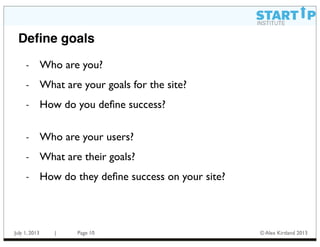
Define goals
- Who are you?
- What are your goals for the site?
- How do you define success?
- Who are your users?
- What are their goals?
- How do they define success on your site?
10
July 1, 2013 | Page © Alex Kirtland 2013
Define Objectives
- All testing needs to have a clear set of objectives
- Objectives help you decide what to ask
- Objectives should be agreed on by all stakeholders
- Objectives help show the business value of testing
- Objectives help people know what to expect for the
outcomes of testing
- There are two types of objectives:
- specific: measure how easy is it for users to find something
- general: understand if content is fun and engaging for them
11
July 1, 2013 | Page © Alex Kirtland 2013
Process
- Questions to ponder ....
- What’s your development process?
- How (and when) will usability test results be
incorporated into development?
- The basic points ...
- Usability testing should support development
- Don’t wait until the last minute (“1 user early is
better than 50 at the last minute”)
- Testing should be iterative (as should be design)
12
July 1, 2013 | Page © Alex Kirtland 2013
Planning a Test
- Who’s Involved
- Objectives
- Screening and recruiting
- Discussion guide ... scenarios and tasks
- Prototypes (paper, html, interactive, fully functioning)
- Software, environment
- Trial run(s)
- Performing the usability test
- Analysis
13
July 1, 2013 | Page © Alex Kirtland 2013
Tips and Tactics
- “This is a test of the site, not of you” (repeat as necessary)
- “Be honest, you won’t hurt my feelings”
- “This is not going to end up onYouTube”
- “Was that easy?” “What did you think of that?”
- “I’m curious to know why you said that”
- “Tell me what you’re thinking”
- “What would you do now?”
- “What do you think just happened?”
- “Is this what you expected?”
14
July 1, 2013 | Page © Alex Kirtland 2013
Tips and Tactics, cont.
- Answer with questions:
‣ User:“Was that right?”
You:“Do you think that’s right?”
‣ User:“Is that how that’s supposed to work?”
You:“What do you think?”
‣ User:“That’s not what I expected.”
You:“What did you expect?”
‣ User (after something breaks): “Is this broken?”
You:“What would you have expected to see here?”
‣ User:“This was great. Easy to use. Wonderful!”
You:“Is there anything you would do to make the system
better?”
15
July 1, 2013 | Page © Alex Kirtland 2013
Tips and Tactics, cont.
- Yes, it’s okay to end an interview early
- Explore (reinforce) negative comments
- Explore positive comments, too
- You don’t need to ask every question or prompt (but you
should try to get the user to complete all the tasks)
- Be flexible
- Be egoless
- Be nice
- Above all, listen
16
July 1, 2013 | Page © Alex Kirtland 2013
Lets do some Usability Testing
17
July 1, 2013 | Page © Alex Kirtland 2013
Lets do a test
- Pick a site to test on
- Write down goals, objectives, and tasks
- Pair off
- Test each other on our site
- Lets discuss results
- And brainstorm
18
July 1, 2013 | Page © Alex Kirtland 2013
Q&A
19
July 1, 2013 | Page © Alex Kirtland 2013
Resources
- Don’t Make MeThink or Rocket Surgery Made Easy, both
by Steve Krug
- Any of the books from Rosenfeld Media
- Numerous books, blogs, UX magazines, design sites,
conferences, tweeters, etc.
20

start-up-institute-class.key

  • 1.
    User Centered Design& Usability Testing July 1, 2013 Alex Kirtland VP Product & UX, Krossover alex@krossover.com @UsableMarkets @krossovr
  • 2.
    July 1, 2013| Page © Alex Kirtland 2013 Agenda I. UX Process (10 minutes) II. How to Plan a Usability Test (20 minutes) III. Lets do some Usability Testing (1 hour) IV. Q&A (30 minutes) 2
  • 3.
    July 1, 2013| Page © Alex Kirtland 2013 UX Process 3
  • 4.
    July 1, 2013| Page © Alex Kirtland 2013 What is good UX? 4 Useful • Meets goals, helps accomplish tasks • Learns with us • Anticipates our needs Usable • Affordant • Responsive • Consistent Desirable • Pleasant to use • Engaging
  • 5.
    July 1, 2013| Page © Alex Kirtland 2013 What is design strategy? • Design strategy is a discipline which helps firms determine what to make and do, why do it and how to innovate contextually, both immediately and over the long term.This process involves the interplay between design and business strategy, forming a systematic approach integrating holistic-thinking, research methods used to inform business strategy and strategic planning which provides a context for design. 5
  • 6.
    July 1, 2013| Page © Alex Kirtland 2013 What is user centered design? • In broad terms, user-centered design (UCD) is a design philosophy and a process in which the needs, wants, and limitations of the end user of an interface or document are given extensive attention at each stage of the design process. User-centered design can be characterized as a multi-stage problem solving process that not only requires designers to analyze and foresee how users are likely to use an interface, but also to test the validity of their assumptions with regards to user behavior in real world tests with actual users. 6
  • 7.
    July 1, 2013| Page © Alex Kirtland 2013 Iteration is key 7   Mood boards   Interaction models   Wireframes   Prototypes   Feature Value Matrix •  Personas and Mental Models •  Research reports •  User Testing reports •  Customer segmentation •  Feature identification •  Ethnographic research •  User interviews •  Usability testing •  Focus groups •  Card sorting
  • 8.
    July 1, 2013| Page © Alex Kirtland 2013 How to Plan a Usability Test 8
  • 9.
    July 1, 2013| Page © Alex Kirtland 2013 Why do usability testing? - Some specific reasons to do usability testing: - Avoid bad ideas; generate good ones - Improve functionality and design - Insights into users (help you become user centric) - Balance opinions among various team members and stakeholders - Systematic evaluation to complement existing feedback mechanisms (Answers the question:Why?) - At the end of the day, to be more successful! 9
  • 10.
    July 1, 2013| Page © Alex Kirtland 2013 Define goals - Who are you? - What are your goals for the site? - How do you define success? - Who are your users? - What are their goals? - How do they define success on your site? 10
  • 11.
    July 1, 2013| Page © Alex Kirtland 2013 Define Objectives - All testing needs to have a clear set of objectives - Objectives help you decide what to ask - Objectives should be agreed on by all stakeholders - Objectives help show the business value of testing - Objectives help people know what to expect for the outcomes of testing - There are two types of objectives: - specific: measure how easy is it for users to find something - general: understand if content is fun and engaging for them 11
  • 12.
    July 1, 2013| Page © Alex Kirtland 2013 Process - Questions to ponder .... - What’s your development process? - How (and when) will usability test results be incorporated into development? - The basic points ... - Usability testing should support development - Don’t wait until the last minute (“1 user early is better than 50 at the last minute”) - Testing should be iterative (as should be design) 12
  • 13.
    July 1, 2013| Page © Alex Kirtland 2013 Planning a Test - Who’s Involved - Objectives - Screening and recruiting - Discussion guide ... scenarios and tasks - Prototypes (paper, html, interactive, fully functioning) - Software, environment - Trial run(s) - Performing the usability test - Analysis 13
  • 14.
    July 1, 2013| Page © Alex Kirtland 2013 Tips and Tactics - “This is a test of the site, not of you” (repeat as necessary) - “Be honest, you won’t hurt my feelings” - “This is not going to end up onYouTube” - “Was that easy?” “What did you think of that?” - “I’m curious to know why you said that” - “Tell me what you’re thinking” - “What would you do now?” - “What do you think just happened?” - “Is this what you expected?” 14
  • 15.
    July 1, 2013| Page © Alex Kirtland 2013 Tips and Tactics, cont. - Answer with questions: ‣ User:“Was that right?” You:“Do you think that’s right?” ‣ User:“Is that how that’s supposed to work?” You:“What do you think?” ‣ User:“That’s not what I expected.” You:“What did you expect?” ‣ User (after something breaks): “Is this broken?” You:“What would you have expected to see here?” ‣ User:“This was great. Easy to use. Wonderful!” You:“Is there anything you would do to make the system better?” 15
  • 16.
    July 1, 2013| Page © Alex Kirtland 2013 Tips and Tactics, cont. - Yes, it’s okay to end an interview early - Explore (reinforce) negative comments - Explore positive comments, too - You don’t need to ask every question or prompt (but you should try to get the user to complete all the tasks) - Be flexible - Be egoless - Be nice - Above all, listen 16
  • 17.
    July 1, 2013| Page © Alex Kirtland 2013 Lets do some Usability Testing 17
  • 18.
    July 1, 2013| Page © Alex Kirtland 2013 Lets do a test - Pick a site to test on - Write down goals, objectives, and tasks - Pair off - Test each other on our site - Lets discuss results - And brainstorm 18
  • 19.
    July 1, 2013| Page © Alex Kirtland 2013 Q&A 19
  • 20.
    July 1, 2013| Page © Alex Kirtland 2013 Resources - Don’t Make MeThink or Rocket Surgery Made Easy, both by Steve Krug - Any of the books from Rosenfeld Media - Numerous books, blogs, UX magazines, design sites, conferences, tweeters, etc. 20