
Stack It & Pack It Partitioning And Compression For Warehouses / VLDB Jeff Moss
Who Dunnit ?
Agenda My background Squeeze your data with data segment compression Partition for success Questions
My Background Independent Consultant 13 years Oracle experience Blog:  http://oramossoracle.blogspot.com/ Focused on warehousing / VLDB since 1998 First project UK Music Sales Data Mart Produces BBC Radio 1 Top 40 chart and many more 2 billion row sales fact table 1 Tb total database size Currently working with Eon UK (Powergen) 4Tb Production Warehouse, 8Tb total storage Oracle Product Stack
What Is Data Segment Compression ? Compresses data by eliminating intra block repeated column values Reduces the space required for a segment …but only if there are appropriate repeats! Self contained Lossless algorithm
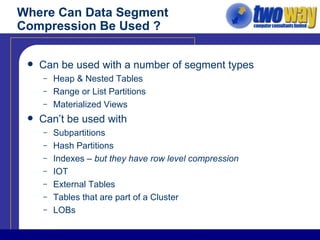
Where Can Data Segment Compression Be Used ? Can be used with a number of segment types Heap & Nested Tables Range or List Partitions Materialized Views Can’t be used with Subpartitions Hash Partitions Indexes –  but they have row level compression IOT External Tables Tables that are part of a Cluster LOBs
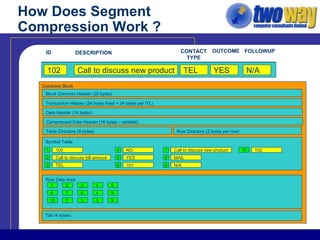
How Does Segment Compression Work ? Database Block Symbol Table Row Data Area Block Common Header (20 bytes) Transaction Header (24 bytes fixed + 24 bytes per ITL) Data Header (14 bytes) Compressed Data Header (16 bytes -  variable ) Tail (4 bytes) 100 Call to discuss bill amount TEL NO YES 3 TEL 4 NO 5 YES 2 Call to discuss bill amount 1 100 1 2 3 4 5 101 Call to discuss new product MAIL NO N/A 8 MAIL 9 N/A 7 Call to discuss new product 6 101 6 7 8 4 9 102 Call to discuss new product TEL YES N/A 10 7 3 5 9 10 102 ID DESCRIPTION CONTACT TYPE OUTCOME FOLLOWUP Table Directory (8 bytes) Row Directory (2 bytes  per row )
What Affects Compression ? Undisclosed Algorithm I asked but support wouldn’t play ball! Many Factors Block size Anything which affects  block overhead Interested Transaction Lists ( INITRANS ) Number of columns Number of rows PCTFREE Number of repeats ( in the block ) Length of column value(s)
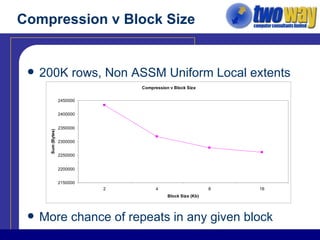
Compression v Block Size 200K rows, Non ASSM Uniform Local extents More chance of repeats in any given block
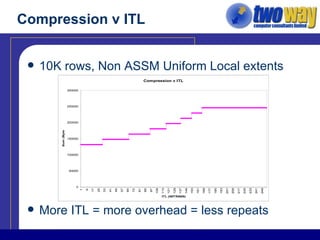
Compression v ITL 10K rows, Non ASSM Uniform Local extents More ITL = more overhead = less repeats
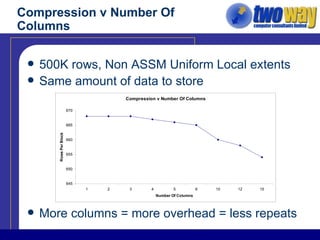
Compression v Number Of Columns 500K rows, Non ASSM Uniform Local extents Same amount of data to store More columns = more overhead = less repeats
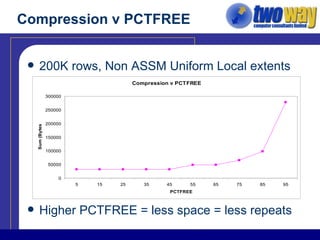
Compression v PCTFREE 200K rows, Non ASSM Uniform Local extents  Higher PCTFREE = less space = less repeats
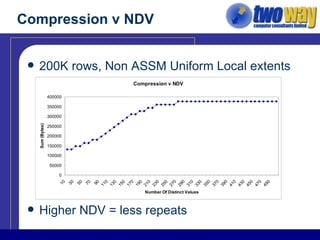
Compression v NDV 200K rows, Non ASSM Uniform Local extents Higher NDV = less repeats
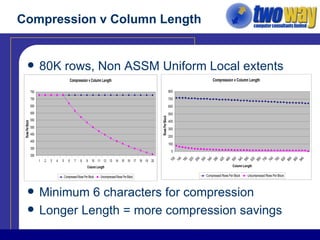
Compression v Column Length 80K rows, Non ASSM Uniform Local extents Minimum 6 characters for compression Longer Length = more compression savings
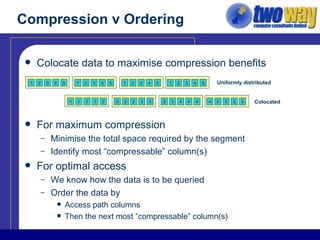
Compression v Ordering Colocate data to maximise compression benefits For maximum compression Minimise the total space required by the segment Identify most “compressable” column(s) For optimal access We know how the data is to be queried Order the data by  Access path columns  Then the next most “compressable” column(s) Uniformly distributed Colocated 1 2 3 4 5 1 2 3 4 5 1 2 3 4 5 1 2 3 4 5 1 1 1 1 2 2 2 2 3 3 3 3 4 4 4 4 5 5 5 5
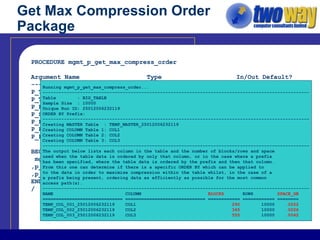
Get Max Compression Order Package PROCEDURE mgmt_p_get_max_compress_order Argument Name  Type  In/Out Default? ------------------------------ ----------------------- ------ -------- P_TABLE_OWNER  VARCHAR2  IN  DEFAULT P_TABLE_NAME  VARCHAR2  IN P_PARTITION_NAME  VARCHAR2  IN  DEFAULT P_SAMPLE_SIZE  NUMBER  IN  DEFAULT P_PREFIX_COLUMN1  VARCHAR2  IN  DEFAULT P_PREFIX_COLUMN2  VARCHAR2  IN  DEFAULT P_PREFIX_COLUMN3  VARCHAR2  IN  DEFAULT BEGIN mgmt_p_get_max_compress_order(p_table_owner => ‘AE_MGMT’ ,p_table_name =>’BIG_TABLE’ ,p_sample_size =>10000); END: / Running mgmt_p_get_max_compress_order... ---------------------------------------------------------------------------------------------------- Table  : BIG_TABLE Sample Size  : 10000 Unique Run ID: 25012006232119 ORDER BY Prefix: ---------------------------------------------------------------------------------------------------- Creating MASTER Table  : TEMP_MASTER_25012006232119 Creating COLUMN Table 1: COL1 Creating COLUMN Table 2: COL2 Creating COLUMN Table 3: COL3 ---------------------------------------------------------------------------------------------------- The output below lists each column in the table and the number of blocks/rows and space used when the table data is ordered by only that column, or in the case where a prefix has been specified, where the table data is ordered by the prefix and then that column. From this one can determine if there is a specific ORDER BY which can be applied to to the data in order to maximise compression within the table whilst, in the case of a a prefix being present, ordering data as efficiently as possible for the most common access path(s). ---------------------------------------------------------------------------------------------------- NAME  COLUMN  BLOCKS  ROWS   SPACE_GB ============================== ============================== ============ ============ ======== TEMP_COL_001_25012006232119  COL1  290  10000   .0022 TEMP_COL_002_25012006232119  COL2  345  10000   .0026 TEMP_COL_003_25012006232119  COL3  555  10000   .0042
Pros & Cons Pros Saves space Reduces LIO / PIO Speeds up backup/recovery Improves query response time Transparent To readers  …and writers Decreases time to perform some DML  Deletes  should be  quicker Bulk inserts  may  be quicker
Pros & Cons Cons Increases CPU load Can only be used on Direct Path operations CTAS Serial Inserts using INSERT /*+ APPEND */ Parallel Inserts (PDML) ALTER TABLE…MOVE… Direct Path SQL*Loader Increases time to perform some DML Bulk inserts  may  be slower Updates are slower
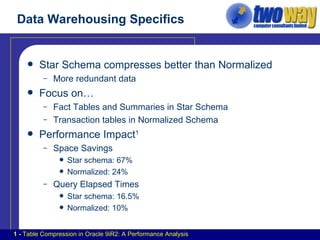
Data Warehousing Specifics Star Schema compresses better than Normalized More redundant data Focus on… Fact Tables and Summaries in Star Schema Transaction tables in Normalized Schema Performance Impact 1 Space Savings Star schema: 67% Normalized: 24% Query Elapsed Times Star schema: 16.5% Normalized: 10% 1 -  Table Compression in Oracle 9iR2: A Performance Analysis
Things To Watch Out For DROP COLUMN is awkward ORA-39726: Unsupported add/drop column operation on compressed tables Uncompress the table and try again - still gives ORA-39726! After UPDATEs data is uncompressed Performance impact Row migration Use appropriate physical design settings PCTFREE 0  - pack each block Large blocksize -  reduce overhead / increase repeats per block Minimise INITRANS -  reduce overhead Order data for best compression / access path
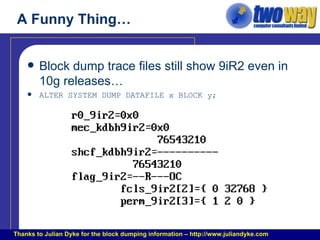
A Funny Thing… Block dump trace files still show 9iR2 even in 10g releases… ALTER SYSTEM DUMP DATAFILE x BLOCK y; Thanks to Julian Dyke for the block dumping information – http://www.juliandyke.com
What Is Partitioning ? “ Partitioning  addresses key issues in supporting very large tables and indexes by letting you decompose them into  smaller  and more  manageable  pieces called  partitions .”   Oracle Database Concepts Manual, 10gR2 Introduced in Oracle 8.0 Numerous improvements since Subpartitioning adds another level of decomposition Partitions and Subpartitions are logical containers
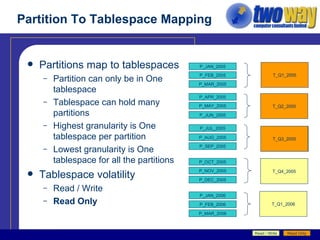
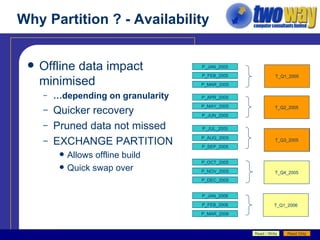
Partition To Tablespace Mapping Partitions map to tablespaces Partition can only be in One tablespace Tablespace can hold many partitions Highest granularity is One tablespace per partition Lowest granularity is One tablespace for all the partitions Tablespace volatility Read / Write Read Only P_JAN_2005 P_FEB_2005 P_MAR_2005 P_APR_2005 P_MAY_2005 P_JUN_2005 P_JUL_2005 P_AUG_2005 P_SEP_2005 P_OCT_2005 P_NOV_2005 P_DEC_2005 T_Q1_2005 T_Q2_2005 T_Q3_2005 T_Q4_2005 T_Q1_2006 P_JAN_2006 P_FEB_2006 P_MAR_2006 T_Q3_2005 Read / Write Read Only
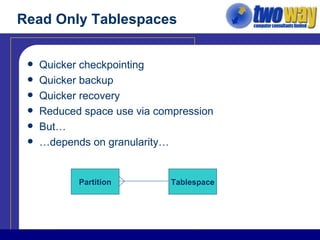
Read Only Tablespaces Quicker checkpointing Quicker backup Quicker recovery Reduced space use via compression But… … depends on granularity… Partition Tablespace
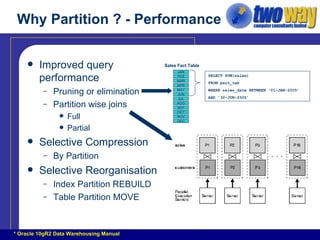
Why Partition ? - Performance Improved query performance Pruning or elimination Partition wise joins Full Partial Selective Compression By Partition Selective Reorganisation Index Partition REBUILD Table Partition MOVE SELECT SUM(sales)  FROM part_tab WHERE sales_date BETWEEN ‘01-JAN-2005’  AND ’30-JUN-2005’ Sales Fact Table * Oracle 10gR2 Data Warehousing Manual JAN FEB MAR APR MAY JUN JUL AUG SEP OCT NOV DEC
Why Partition ? - Manageability Archiving Use a rolling window approach ALTER TABLE … ADD/SPLIT/DROP PARTITION… Easier ETL Processing Build a new dataset in a staging table Add indexes and constraints Collect statistics Then swap the staging table for a partition on the target ALTER TABLE…EXCHANGE PARTITION… Easier Maintenance Table partition move, e.g. to compress data Local Index partition rebuild
Why Partition ? - Scalability Partition is generally consistent and predictable Assuming an appropriate partitioning key is used …and data has an even distribution across the key Read only approach Scalable backups - read only tablespaces are ignored …so partitions in those tablespaces are ignored Pruning allows consistent query performance
Why Partition ? - Availability Offline data impact minimised … depending on granularity Quicker recovery Pruned data not missed EXCHANGE PARTITION Allows offline build Quick swap over P_JAN_2005 P_FEB_2005 P_MAR_2005 P_APR_2005 P_MAY_2005 P_JUN_2005 P_JUL_2005 P_AUG_2005 P_SEP_2005 P_OCT_2005 P_NOV_2005 P_DEC_2005 T_Q1_2005 T_Q2_2005 T_Q3_2005 T_Q4_2005 T_Q1_2006 P_JAN_2006 P_FEB_2006 P_MAR_2006 T_Q3_2005 Read / Write Read Only
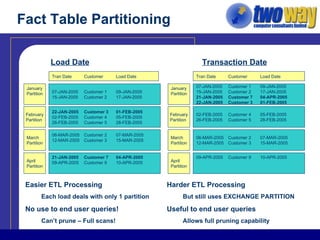
Fact Table Partitioning Transaction Date Load Date Easier ETL Processing Each load deals with only 1 partition No use to end user queries! Can’t prune – Full scans! Harder ETL Processing But still uses EXCHANGE PARTITION Useful to end user queries Allows full pruning capability 07-JAN-2005 Customer 1 09-JAN-2005 15-JAN-2005 Customer 2 17-JAN-2005 January Partition February Partition 22-JAN-2005 Customer 3 01-FEB-2005 02-FEB-2005 Customer 4 05-FEB-2005 26-FEB-2005 Customer 5 28-FEB-2005 March Partition 06-MAR-2005 Customer 2 07-MAR-2005 12-MAR-2005 Customer 3 15-MAR-2005 Tran Date Customer Load Date April Partition 21-JAN-2005 Customer 7 04-APR-2005 09-APR-2005 Customer 9 10-APR-2005 07-JAN-2005 Customer 1 09-JAN-2005 15-JAN-2005 Customer 2 17-JAN-2005 21-JAN-2005 Customer 7 04-APR-2005 22-JAN-2005 Customer 3 01-FEB-2005 January Partition February Partition 02-FEB-2005 Customer 4 05-FEB-2005 26-FEB-2005 Customer 5 28-FEB-2005 March Partition 06-MAR-2005 Customer 2 07-MAR-2005 12-MAR-2005 Customer 3 15-MAR-2005 Tran Date Customer Load Date April Partition 09-APR-2005 Customer 9 10-APR-2005
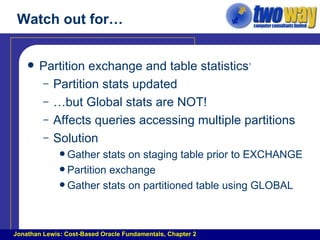
Watch out for… Partition exchange and table statistics 1 Partition stats updated … but Global stats are NOT! Affects queries accessing multiple partitions Solution Gather stats on staging table prior to EXCHANGE Partition exchange Gather stats on partitioned table using GLOBAL Jonathan Lewis: Cost-Based Oracle Fundamentals, Chapter 2
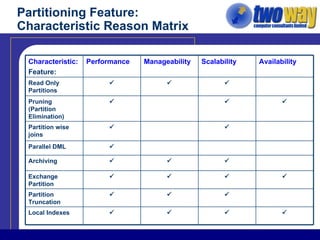
Partitioning Feature: Characteristic Reason Matrix    Partition Truncation     Exchange Partition    Archiving    Pruning (Partition Elimination)   Partition wise joins  Parallel DML     Local Indexes    Read Only Partitions Availability Scalability Manageability Performance Characteristic: Feature:
Questions ?
References: Papers Table Compression in Oracle 9iR2: A Performance Analysis Table Compression in Oracle 9iR2: An Oracle White Paper “ Scaling To Infinity, Partitioning In Oracle Data Warehouses”, Tim Gorman Decision Speed: Table Compression In Action
References: Online Presentation / Code http://www.oramoss.demon.co.uk/presentations/stackitandpackit.ppt http://www.oramoss.demon.co.uk/Code/mgmt_p_get_max_compression_order.prc http://www.oramoss.demon.co.uk/Code/test_dml_performance_delete.sql http://www.oramoss.demon.co.uk/Code/test_dml_performance_insert.sql http://www.oramoss.demon.co.uk/Code/test_dml_performance_update.sql http://www.oramoss.demon.co.uk/Code/test_block_size_compression.sql http://www.oramoss.demon.co.uk/Code/test_column_length_compression.sql http://www.oramoss.demon.co.uk/Code/test_itl_compression.sql http://www.oramoss.demon.co.uk/Code/test_ndv_compression.sql http://www.oramoss.demon.co.uk/Code/test_num_cols_compression.sql http://www.oramoss.demon.co.uk/Code/test_pctfree_compression.sql

Stack It And Unpack It

  • 1.
    Stack It &Pack It Partitioning And Compression For Warehouses / VLDB Jeff Moss
  • 2.
  • 3.
    Agenda My backgroundSqueeze your data with data segment compression Partition for success Questions
  • 4.
    My Background IndependentConsultant 13 years Oracle experience Blog: http://oramossoracle.blogspot.com/ Focused on warehousing / VLDB since 1998 First project UK Music Sales Data Mart Produces BBC Radio 1 Top 40 chart and many more 2 billion row sales fact table 1 Tb total database size Currently working with Eon UK (Powergen) 4Tb Production Warehouse, 8Tb total storage Oracle Product Stack
  • 5.
    What Is DataSegment Compression ? Compresses data by eliminating intra block repeated column values Reduces the space required for a segment …but only if there are appropriate repeats! Self contained Lossless algorithm
  • 6.
    Where Can DataSegment Compression Be Used ? Can be used with a number of segment types Heap & Nested Tables Range or List Partitions Materialized Views Can’t be used with Subpartitions Hash Partitions Indexes – but they have row level compression IOT External Tables Tables that are part of a Cluster LOBs
  • 7.
    How Does SegmentCompression Work ? Database Block Symbol Table Row Data Area Block Common Header (20 bytes) Transaction Header (24 bytes fixed + 24 bytes per ITL) Data Header (14 bytes) Compressed Data Header (16 bytes - variable ) Tail (4 bytes) 100 Call to discuss bill amount TEL NO YES 3 TEL 4 NO 5 YES 2 Call to discuss bill amount 1 100 1 2 3 4 5 101 Call to discuss new product MAIL NO N/A 8 MAIL 9 N/A 7 Call to discuss new product 6 101 6 7 8 4 9 102 Call to discuss new product TEL YES N/A 10 7 3 5 9 10 102 ID DESCRIPTION CONTACT TYPE OUTCOME FOLLOWUP Table Directory (8 bytes) Row Directory (2 bytes per row )
  • 8.
    What Affects Compression? Undisclosed Algorithm I asked but support wouldn’t play ball! Many Factors Block size Anything which affects block overhead Interested Transaction Lists ( INITRANS ) Number of columns Number of rows PCTFREE Number of repeats ( in the block ) Length of column value(s)
  • 9.
    Compression v BlockSize 200K rows, Non ASSM Uniform Local extents More chance of repeats in any given block
  • 10.
    Compression v ITL10K rows, Non ASSM Uniform Local extents More ITL = more overhead = less repeats
  • 11.
    Compression v NumberOf Columns 500K rows, Non ASSM Uniform Local extents Same amount of data to store More columns = more overhead = less repeats
  • 12.
    Compression v PCTFREE200K rows, Non ASSM Uniform Local extents Higher PCTFREE = less space = less repeats
  • 13.
    Compression v NDV200K rows, Non ASSM Uniform Local extents Higher NDV = less repeats
  • 14.
    Compression v ColumnLength 80K rows, Non ASSM Uniform Local extents Minimum 6 characters for compression Longer Length = more compression savings
  • 15.
    Compression v OrderingColocate data to maximise compression benefits For maximum compression Minimise the total space required by the segment Identify most “compressable” column(s) For optimal access We know how the data is to be queried Order the data by Access path columns Then the next most “compressable” column(s) Uniformly distributed Colocated 1 2 3 4 5 1 2 3 4 5 1 2 3 4 5 1 2 3 4 5 1 1 1 1 2 2 2 2 3 3 3 3 4 4 4 4 5 5 5 5
  • 16.
    Get Max CompressionOrder Package PROCEDURE mgmt_p_get_max_compress_order Argument Name Type In/Out Default? ------------------------------ ----------------------- ------ -------- P_TABLE_OWNER VARCHAR2 IN DEFAULT P_TABLE_NAME VARCHAR2 IN P_PARTITION_NAME VARCHAR2 IN DEFAULT P_SAMPLE_SIZE NUMBER IN DEFAULT P_PREFIX_COLUMN1 VARCHAR2 IN DEFAULT P_PREFIX_COLUMN2 VARCHAR2 IN DEFAULT P_PREFIX_COLUMN3 VARCHAR2 IN DEFAULT BEGIN mgmt_p_get_max_compress_order(p_table_owner => ‘AE_MGMT’ ,p_table_name =>’BIG_TABLE’ ,p_sample_size =>10000); END: / Running mgmt_p_get_max_compress_order... ---------------------------------------------------------------------------------------------------- Table : BIG_TABLE Sample Size : 10000 Unique Run ID: 25012006232119 ORDER BY Prefix: ---------------------------------------------------------------------------------------------------- Creating MASTER Table : TEMP_MASTER_25012006232119 Creating COLUMN Table 1: COL1 Creating COLUMN Table 2: COL2 Creating COLUMN Table 3: COL3 ---------------------------------------------------------------------------------------------------- The output below lists each column in the table and the number of blocks/rows and space used when the table data is ordered by only that column, or in the case where a prefix has been specified, where the table data is ordered by the prefix and then that column. From this one can determine if there is a specific ORDER BY which can be applied to to the data in order to maximise compression within the table whilst, in the case of a a prefix being present, ordering data as efficiently as possible for the most common access path(s). ---------------------------------------------------------------------------------------------------- NAME COLUMN BLOCKS ROWS SPACE_GB ============================== ============================== ============ ============ ======== TEMP_COL_001_25012006232119 COL1 290 10000 .0022 TEMP_COL_002_25012006232119 COL2 345 10000 .0026 TEMP_COL_003_25012006232119 COL3 555 10000 .0042
  • 17.
    Pros & ConsPros Saves space Reduces LIO / PIO Speeds up backup/recovery Improves query response time Transparent To readers …and writers Decreases time to perform some DML Deletes should be quicker Bulk inserts may be quicker
  • 18.
    Pros & ConsCons Increases CPU load Can only be used on Direct Path operations CTAS Serial Inserts using INSERT /*+ APPEND */ Parallel Inserts (PDML) ALTER TABLE…MOVE… Direct Path SQL*Loader Increases time to perform some DML Bulk inserts may be slower Updates are slower
  • 19.
    Data Warehousing SpecificsStar Schema compresses better than Normalized More redundant data Focus on… Fact Tables and Summaries in Star Schema Transaction tables in Normalized Schema Performance Impact 1 Space Savings Star schema: 67% Normalized: 24% Query Elapsed Times Star schema: 16.5% Normalized: 10% 1 - Table Compression in Oracle 9iR2: A Performance Analysis
  • 20.
    Things To WatchOut For DROP COLUMN is awkward ORA-39726: Unsupported add/drop column operation on compressed tables Uncompress the table and try again - still gives ORA-39726! After UPDATEs data is uncompressed Performance impact Row migration Use appropriate physical design settings PCTFREE 0 - pack each block Large blocksize - reduce overhead / increase repeats per block Minimise INITRANS - reduce overhead Order data for best compression / access path
  • 21.
    A Funny Thing…Block dump trace files still show 9iR2 even in 10g releases… ALTER SYSTEM DUMP DATAFILE x BLOCK y; Thanks to Julian Dyke for the block dumping information – http://www.juliandyke.com
  • 22.
    What Is Partitioning? “ Partitioning addresses key issues in supporting very large tables and indexes by letting you decompose them into smaller and more manageable pieces called partitions .” Oracle Database Concepts Manual, 10gR2 Introduced in Oracle 8.0 Numerous improvements since Subpartitioning adds another level of decomposition Partitions and Subpartitions are logical containers
  • 23.
    Partition To TablespaceMapping Partitions map to tablespaces Partition can only be in One tablespace Tablespace can hold many partitions Highest granularity is One tablespace per partition Lowest granularity is One tablespace for all the partitions Tablespace volatility Read / Write Read Only P_JAN_2005 P_FEB_2005 P_MAR_2005 P_APR_2005 P_MAY_2005 P_JUN_2005 P_JUL_2005 P_AUG_2005 P_SEP_2005 P_OCT_2005 P_NOV_2005 P_DEC_2005 T_Q1_2005 T_Q2_2005 T_Q3_2005 T_Q4_2005 T_Q1_2006 P_JAN_2006 P_FEB_2006 P_MAR_2006 T_Q3_2005 Read / Write Read Only
  • 24.
    Read Only TablespacesQuicker checkpointing Quicker backup Quicker recovery Reduced space use via compression But… … depends on granularity… Partition Tablespace
  • 25.
    Why Partition ?- Performance Improved query performance Pruning or elimination Partition wise joins Full Partial Selective Compression By Partition Selective Reorganisation Index Partition REBUILD Table Partition MOVE SELECT SUM(sales) FROM part_tab WHERE sales_date BETWEEN ‘01-JAN-2005’ AND ’30-JUN-2005’ Sales Fact Table * Oracle 10gR2 Data Warehousing Manual JAN FEB MAR APR MAY JUN JUL AUG SEP OCT NOV DEC
  • 26.
    Why Partition ?- Manageability Archiving Use a rolling window approach ALTER TABLE … ADD/SPLIT/DROP PARTITION… Easier ETL Processing Build a new dataset in a staging table Add indexes and constraints Collect statistics Then swap the staging table for a partition on the target ALTER TABLE…EXCHANGE PARTITION… Easier Maintenance Table partition move, e.g. to compress data Local Index partition rebuild
  • 27.
    Why Partition ?- Scalability Partition is generally consistent and predictable Assuming an appropriate partitioning key is used …and data has an even distribution across the key Read only approach Scalable backups - read only tablespaces are ignored …so partitions in those tablespaces are ignored Pruning allows consistent query performance
  • 28.
    Why Partition ?- Availability Offline data impact minimised … depending on granularity Quicker recovery Pruned data not missed EXCHANGE PARTITION Allows offline build Quick swap over P_JAN_2005 P_FEB_2005 P_MAR_2005 P_APR_2005 P_MAY_2005 P_JUN_2005 P_JUL_2005 P_AUG_2005 P_SEP_2005 P_OCT_2005 P_NOV_2005 P_DEC_2005 T_Q1_2005 T_Q2_2005 T_Q3_2005 T_Q4_2005 T_Q1_2006 P_JAN_2006 P_FEB_2006 P_MAR_2006 T_Q3_2005 Read / Write Read Only
  • 29.
    Fact Table PartitioningTransaction Date Load Date Easier ETL Processing Each load deals with only 1 partition No use to end user queries! Can’t prune – Full scans! Harder ETL Processing But still uses EXCHANGE PARTITION Useful to end user queries Allows full pruning capability 07-JAN-2005 Customer 1 09-JAN-2005 15-JAN-2005 Customer 2 17-JAN-2005 January Partition February Partition 22-JAN-2005 Customer 3 01-FEB-2005 02-FEB-2005 Customer 4 05-FEB-2005 26-FEB-2005 Customer 5 28-FEB-2005 March Partition 06-MAR-2005 Customer 2 07-MAR-2005 12-MAR-2005 Customer 3 15-MAR-2005 Tran Date Customer Load Date April Partition 21-JAN-2005 Customer 7 04-APR-2005 09-APR-2005 Customer 9 10-APR-2005 07-JAN-2005 Customer 1 09-JAN-2005 15-JAN-2005 Customer 2 17-JAN-2005 21-JAN-2005 Customer 7 04-APR-2005 22-JAN-2005 Customer 3 01-FEB-2005 January Partition February Partition 02-FEB-2005 Customer 4 05-FEB-2005 26-FEB-2005 Customer 5 28-FEB-2005 March Partition 06-MAR-2005 Customer 2 07-MAR-2005 12-MAR-2005 Customer 3 15-MAR-2005 Tran Date Customer Load Date April Partition 09-APR-2005 Customer 9 10-APR-2005
  • 30.
    Watch out for…Partition exchange and table statistics 1 Partition stats updated … but Global stats are NOT! Affects queries accessing multiple partitions Solution Gather stats on staging table prior to EXCHANGE Partition exchange Gather stats on partitioned table using GLOBAL Jonathan Lewis: Cost-Based Oracle Fundamentals, Chapter 2
  • 31.
    Partitioning Feature: CharacteristicReason Matrix    Partition Truncation     Exchange Partition    Archiving    Pruning (Partition Elimination)   Partition wise joins  Parallel DML     Local Indexes    Read Only Partitions Availability Scalability Manageability Performance Characteristic: Feature:
  • 32.
  • 33.
    References: Papers TableCompression in Oracle 9iR2: A Performance Analysis Table Compression in Oracle 9iR2: An Oracle White Paper “ Scaling To Infinity, Partitioning In Oracle Data Warehouses”, Tim Gorman Decision Speed: Table Compression In Action
  • 34.
    References: Online Presentation/ Code http://www.oramoss.demon.co.uk/presentations/stackitandpackit.ppt http://www.oramoss.demon.co.uk/Code/mgmt_p_get_max_compression_order.prc http://www.oramoss.demon.co.uk/Code/test_dml_performance_delete.sql http://www.oramoss.demon.co.uk/Code/test_dml_performance_insert.sql http://www.oramoss.demon.co.uk/Code/test_dml_performance_update.sql http://www.oramoss.demon.co.uk/Code/test_block_size_compression.sql http://www.oramoss.demon.co.uk/Code/test_column_length_compression.sql http://www.oramoss.demon.co.uk/Code/test_itl_compression.sql http://www.oramoss.demon.co.uk/Code/test_ndv_compression.sql http://www.oramoss.demon.co.uk/Code/test_num_cols_compression.sql http://www.oramoss.demon.co.uk/Code/test_pctfree_compression.sql

Editor's Notes

  • #2 Good morning everyone and welcome to the second session of the morning. My name is Jeff Moss and I’m going to talk to you about a couple of features which can come in handy in datawarehouse/VLDB environments.