SQL 2008 Performance Improvements
Agenda Partitioning Enhancements Sparse Columns Filtered indexes Plan Freezing MERGE (T-SQL)
Some notes… SQL Status within the industry compared to other DB providers Caught up on many features, such as Parallel Data Warehouse (R2) – this used dedicated architecture and design. On windows platform performance is virtually unmatched. Has connectors/APIs from other non windows languages, namely java platform.
Table Partitioning Background File Types What is Table Partitioning How to create, some concepts File groups  Partition function Partition Schema
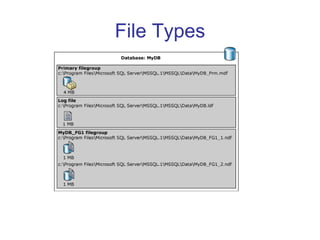
File Types
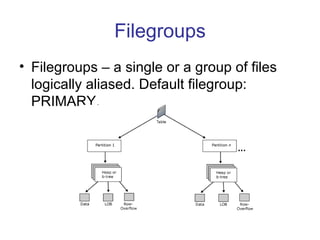
Filegroups Filegroups – a single or a group of files logically aliased. Default filegroup: PRIMARY.
Partitioning Filegroups – a single or a group of files logically aliased. Default filegroup: PRIMARY. Partition function – A user defined function which allows to define to which file group a row in a table will be inserted. Example:  Create three partitions:  > 1 , 1-100, 1000> CREATE PARTITION FUNCTION myRangePF1 (int)  AS RANGE LEFT FOR VALUES (1, 100, 1000);
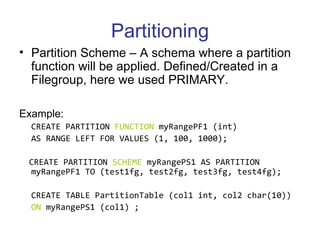
Partitioning Partition Scheme – A schema where a partition function will be applied. Defined/Created in a Filegroup, here we used PRIMARY. Example:  CREATE PARTITION  FUNCTION  myRangePF1 (int)  AS RANGE LEFT FOR VALUES (1, 100, 1000);  CREATE PARTITION  SCHEME  myRangePS1 AS PARTITION myRangePF1 TO (test1fg, test2fg, test3fg, test4fg);   CREATE TABLE PartitionTable (col1 int, col2 char(10))  ON  myRangePS1 (col1) ;
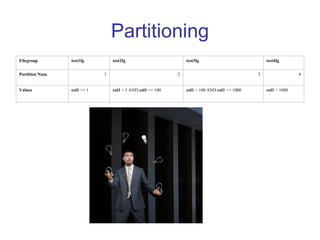
Partitioning Filegroup test1fg test2fg test3fg test4fg Partition Num. 1 2 3 4 Values col1  <= 1 col1  > 1 AND  col1  <= 100 col1  > 100 AND  col1  <= 1000 col1  > 1000
Partitioning Predicate usage in query: CREATE PARTITION FUNCTION RangePF1 ( int )  AS RANGE FOR VALUES (10, 100, 1000) ;  SELECT  $PARTITION.RangePF1  (10) ; GO   SELECT $PARTITION.TransactionRangePF1(TransactionDate) AS Partition,  COUNT(*) AS [COUNT]  FROM Production.TransactionHistory GROUP BY  PARTITION.TransactionRangePF1(TransactionDate)  ORDER BY Partition ;
Multiple Threads per Partition
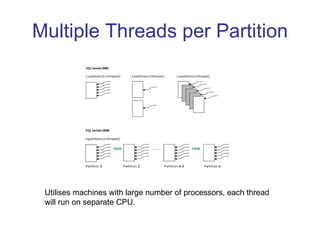
Multiple Threads per Partition Utilises machines with large number of processors, each thread will run on separate CPU.
Partition Level Lock Escalation New CREATE | ALTER Table Option in syntax ALTER TABLE  MyPartitionedTable   SET   ( LOCK_ESCALATION  =  TABLE ); Default is ‘Table’ Option can be disabled Increase the risk of deadlocks but in return can increase performance Example:  A very large table where the partition function is date based on a certain field. If we are certain we will not touch the old partitions (for older dates) then we could safely insert new records as this will occur in a different partition.
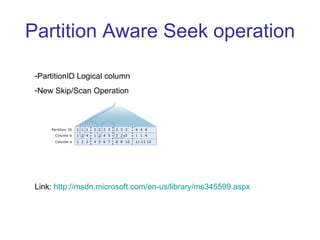
Partition Aware Seek operation PartitionID Logical column New Skip/Scan Operation Link:  http://msdn.microsoft.com/en-us/library/ms345599.aspx
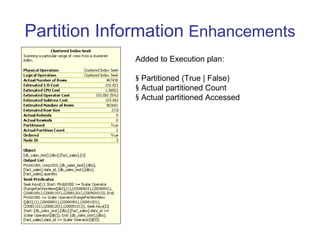
Partition Information  Enhancements Added to Execution plan: Partitioned (True | False) Actual partitioned Count Actual partitioned Accessed
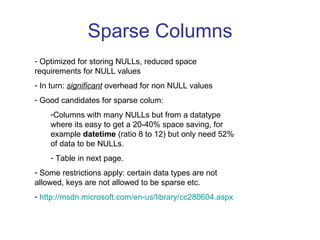
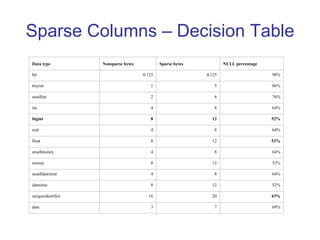
Sparse Columns Optimized for storing NULLs, reduced space requirements for NULL values In turn:  significant  overhead for non NULL values Good candidates for sparse colum: Columns with many NULLs but from a datatype where its easy to get a 20-40% space saving, for example  datetime  (ratio 8 to 12) but only need 52% of data to be NULLs. Table in next page. Some restrictions apply: certain data types are not allowed, keys are not allowed to be sparse etc. http://msdn.microsoft.com/en-us/library/cc280604.aspx
Sparse Columns – Decision Table Data type Nonsparse bytes Sparse bytes NULL percentage bit 0.125 4.125 98% tinyint 1 5 86% smallint 2 6 76% int 4 8 64% bigint 8 12 52% real 4 8 64% float 8 12 52% smallmoney 4 8 64% money 8 12 52% smalldatetime 4 8 64% datetime 8 12 52% uniqueidentifier 16 20 43% date 3 7 69%
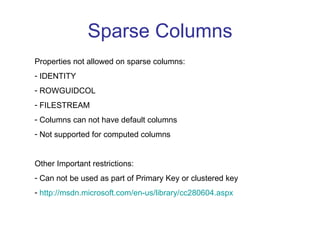
Sparse Columns Properties not allowed on sparse columns: IDENTITY ROWGUIDCOL FILESTREAM Columns can not have default columns Not supported for computed columns Other Important restrictions: Can not be used as part of Primary Key or clustered key http://msdn.microsoft.com/en-us/library/cc280604.aspx
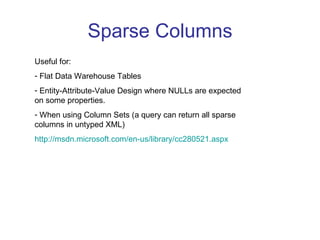
Sparse Columns Useful for: Flat Data Warehouse Tables Entity-Attribute-Value Design where NULLs are expected on some properties. When using Column Sets (a query can return all sparse columns in untyped XML) http://msdn.microsoft.com/en-us/library/cc280521.aspx
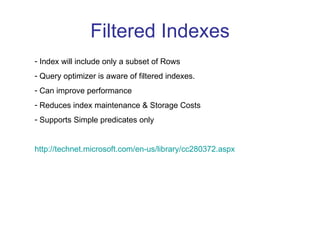
Filtered Indexes Index will include only a subset of Rows Query optimizer is aware of filtered indexes. Can improve performance Reduces index maintenance & Storage Costs Supports Simple predicates only http://technet.microsoft.com/en-us/library/cc280372.aspx
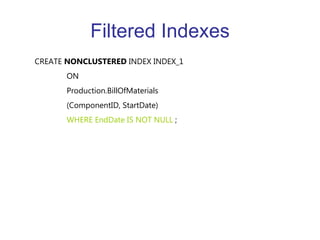
Filtered Indexes CREATE  NONCLUSTERED  INDEX INDEX_1   ON  Production.BillOfMaterials (ComponentID, StartDate)      WHERE EndDate IS NOT NULL  ;
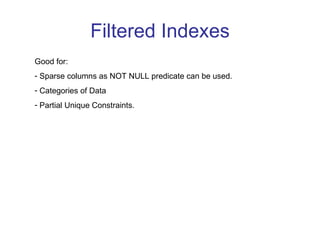
Filtered Indexes Good for: Sparse columns as NOT NULL predicate can be used. Categories of Data Partial Unique Constraints.
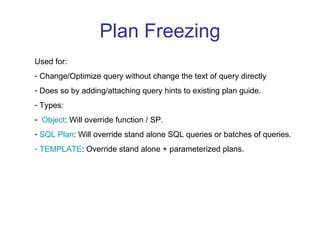
Plan Freezing Used for: Change/Optimize query without change the text of query directly Does so by adding/attaching query hints to existing plan guide. Types: Object : Will override function / SP. SQL Plan : Will override stand alone SQL queries or batches of queries. TEMPLATE : Override stand alone + parameterized plans.
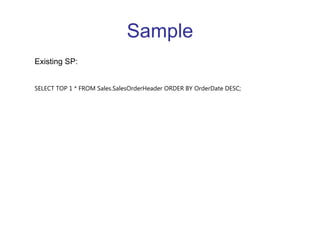
Sample Existing SP: SELECT TOP 1 * FROM Sales.SalesOrderHeader ORDER BY OrderDate DESC;
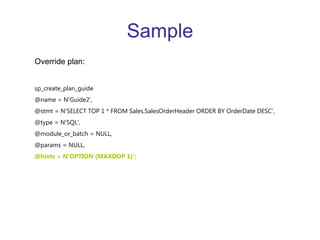
Sample Override plan: sp_create_plan_guide  @name = N'Guide2',  @stmt = N'SELECT TOP 1 * FROM Sales.SalesOrderHeader ORDER BY OrderDate DESC',  @type = N'SQL',  @module_or_batch = NULL,  @params = NULL,  @hints = N'OPTION (MAXDOP 1)';
MERGE Statement Outperforms equivalent multiple statement query which achieve the same query goal. Simplifies multiple operations in 1 query syntax – easy to read and understand. MERGE  INTO  [AdventureWorks].[Person].[Contact_Base]  AS Target   USING ( SELECT  ContactID,Title,FirstName,MiddleName,LastName,EmailAddress  FROM  [AdventureWorks].[Person].[Contact_Temp])  AS Source  (ContactID,Title,FirstName,MiddleName,LastName,EmailAddress)  ON  Target.ContactID = Source.ContactID  WHEN  MATCHED  THEN UPDATE   SET  EmailAddress = Source.EmailAddress  WHEN   NOT  MATCHED  BY  TARGET  THEN   INSERT (ContactID,Title,FirstName,MiddleName,LastName,EmailAddress)  VALUES  (ContactID,Title,FirstName,MiddleName,LastName,EmailAddress);
Demo:  http://www.youtube.com/watch?gl=GB&v=_D4Eu-GDboU   Links: http://www.sqllion.com/2009/07/transaction-isolation-levels-in-sql-server/   http://sqlblog.com/blogs/erin_welker/archive/2008/02/10/partitioning-enhancements-in-sql-server-2008.aspx   http://www.sqlskills.com/blogs/paul/post/SQL-Server-2008-Partition-level-lock-escalation-details-and-examples.aspx

SQL Server 2008 Performance Enhancements

  • 1.
  • 2.
    Agenda Partitioning EnhancementsSparse Columns Filtered indexes Plan Freezing MERGE (T-SQL)
  • 3.
    Some notes… SQLStatus within the industry compared to other DB providers Caught up on many features, such as Parallel Data Warehouse (R2) – this used dedicated architecture and design. On windows platform performance is virtually unmatched. Has connectors/APIs from other non windows languages, namely java platform.
  • 4.
    Table Partitioning BackgroundFile Types What is Table Partitioning How to create, some concepts File groups Partition function Partition Schema
  • 5.
  • 6.
    Filegroups Filegroups –a single or a group of files logically aliased. Default filegroup: PRIMARY.
  • 7.
    Partitioning Filegroups –a single or a group of files logically aliased. Default filegroup: PRIMARY. Partition function – A user defined function which allows to define to which file group a row in a table will be inserted. Example: Create three partitions: > 1 , 1-100, 1000> CREATE PARTITION FUNCTION myRangePF1 (int) AS RANGE LEFT FOR VALUES (1, 100, 1000);
  • 8.
    Partitioning Partition Scheme– A schema where a partition function will be applied. Defined/Created in a Filegroup, here we used PRIMARY. Example: CREATE PARTITION FUNCTION myRangePF1 (int) AS RANGE LEFT FOR VALUES (1, 100, 1000); CREATE PARTITION SCHEME myRangePS1 AS PARTITION myRangePF1 TO (test1fg, test2fg, test3fg, test4fg); CREATE TABLE PartitionTable (col1 int, col2 char(10)) ON myRangePS1 (col1) ;
  • 9.
    Partitioning Filegroup test1fgtest2fg test3fg test4fg Partition Num. 1 2 3 4 Values col1  <= 1 col1  > 1 AND  col1  <= 100 col1  > 100 AND  col1  <= 1000 col1  > 1000
  • 10.
    Partitioning Predicate usagein query: CREATE PARTITION FUNCTION RangePF1 ( int ) AS RANGE FOR VALUES (10, 100, 1000) ; SELECT $PARTITION.RangePF1 (10) ; GO SELECT $PARTITION.TransactionRangePF1(TransactionDate) AS Partition, COUNT(*) AS [COUNT] FROM Production.TransactionHistory GROUP BY PARTITION.TransactionRangePF1(TransactionDate) ORDER BY Partition ;
  • 11.
  • 12.
    Multiple Threads perPartition Utilises machines with large number of processors, each thread will run on separate CPU.
  • 13.
    Partition Level LockEscalation New CREATE | ALTER Table Option in syntax ALTER TABLE MyPartitionedTable SET ( LOCK_ESCALATION = TABLE ); Default is ‘Table’ Option can be disabled Increase the risk of deadlocks but in return can increase performance Example: A very large table where the partition function is date based on a certain field. If we are certain we will not touch the old partitions (for older dates) then we could safely insert new records as this will occur in a different partition.
  • 14.
    Partition Aware Seekoperation PartitionID Logical column New Skip/Scan Operation Link: http://msdn.microsoft.com/en-us/library/ms345599.aspx
  • 15.
    Partition Information Enhancements Added to Execution plan: Partitioned (True | False) Actual partitioned Count Actual partitioned Accessed
  • 16.
    Sparse Columns Optimizedfor storing NULLs, reduced space requirements for NULL values In turn: significant overhead for non NULL values Good candidates for sparse colum: Columns with many NULLs but from a datatype where its easy to get a 20-40% space saving, for example datetime (ratio 8 to 12) but only need 52% of data to be NULLs. Table in next page. Some restrictions apply: certain data types are not allowed, keys are not allowed to be sparse etc. http://msdn.microsoft.com/en-us/library/cc280604.aspx
  • 17.
    Sparse Columns –Decision Table Data type Nonsparse bytes Sparse bytes NULL percentage bit 0.125 4.125 98% tinyint 1 5 86% smallint 2 6 76% int 4 8 64% bigint 8 12 52% real 4 8 64% float 8 12 52% smallmoney 4 8 64% money 8 12 52% smalldatetime 4 8 64% datetime 8 12 52% uniqueidentifier 16 20 43% date 3 7 69%
  • 18.
    Sparse Columns Propertiesnot allowed on sparse columns: IDENTITY ROWGUIDCOL FILESTREAM Columns can not have default columns Not supported for computed columns Other Important restrictions: Can not be used as part of Primary Key or clustered key http://msdn.microsoft.com/en-us/library/cc280604.aspx
  • 19.
    Sparse Columns Usefulfor: Flat Data Warehouse Tables Entity-Attribute-Value Design where NULLs are expected on some properties. When using Column Sets (a query can return all sparse columns in untyped XML) http://msdn.microsoft.com/en-us/library/cc280521.aspx
  • 20.
    Filtered Indexes Indexwill include only a subset of Rows Query optimizer is aware of filtered indexes. Can improve performance Reduces index maintenance & Storage Costs Supports Simple predicates only http://technet.microsoft.com/en-us/library/cc280372.aspx
  • 21.
    Filtered Indexes CREATE NONCLUSTERED INDEX INDEX_1   ON Production.BillOfMaterials (ComponentID, StartDate)      WHERE EndDate IS NOT NULL ;
  • 22.
    Filtered Indexes Goodfor: Sparse columns as NOT NULL predicate can be used. Categories of Data Partial Unique Constraints.
  • 23.
    Plan Freezing Usedfor: Change/Optimize query without change the text of query directly Does so by adding/attaching query hints to existing plan guide. Types: Object : Will override function / SP. SQL Plan : Will override stand alone SQL queries or batches of queries. TEMPLATE : Override stand alone + parameterized plans.
  • 24.
    Sample Existing SP:SELECT TOP 1 * FROM Sales.SalesOrderHeader ORDER BY OrderDate DESC;
  • 25.
    Sample Override plan:sp_create_plan_guide @name = N'Guide2', @stmt = N'SELECT TOP 1 * FROM Sales.SalesOrderHeader ORDER BY OrderDate DESC', @type = N'SQL', @module_or_batch = NULL, @params = NULL, @hints = N'OPTION (MAXDOP 1)';
  • 26.
    MERGE Statement Outperformsequivalent multiple statement query which achieve the same query goal. Simplifies multiple operations in 1 query syntax – easy to read and understand. MERGE INTO [AdventureWorks].[Person].[Contact_Base] AS Target USING ( SELECT ContactID,Title,FirstName,MiddleName,LastName,EmailAddress FROM [AdventureWorks].[Person].[Contact_Temp]) AS Source (ContactID,Title,FirstName,MiddleName,LastName,EmailAddress) ON Target.ContactID = Source.ContactID WHEN MATCHED THEN UPDATE SET EmailAddress = Source.EmailAddress WHEN NOT MATCHED BY TARGET THEN INSERT (ContactID,Title,FirstName,MiddleName,LastName,EmailAddress) VALUES (ContactID,Title,FirstName,MiddleName,LastName,EmailAddress);
  • 27.
    Demo: http://www.youtube.com/watch?gl=GB&v=_D4Eu-GDboU Links: http://www.sqllion.com/2009/07/transaction-isolation-levels-in-sql-server/ http://sqlblog.com/blogs/erin_welker/archive/2008/02/10/partitioning-enhancements-in-sql-server-2008.aspx http://www.sqlskills.com/blogs/paul/post/SQL-Server-2008-Partition-level-lock-escalation-details-and-examples.aspx