<Insert Picture Here> 
Best Practices – Extreme Performance with Data Warehousing on Oracle Database 
Rekha Balwada, Principal Product Manager 
Levi Norman, Product Marketing Director
2 
Agenda 
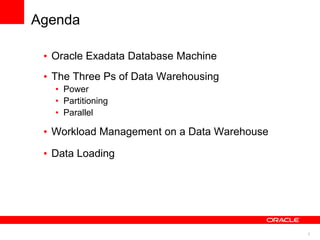
• Oracle Exadata Database Machine 
• The Three Ps of Data Warehousing 
• Power 
• Partitioning 
• Parallel 
• Workload Management on a Data Warehouse 
• Data Loading
3 
Oracle Exadata Database Machine 
Best Machine For… 
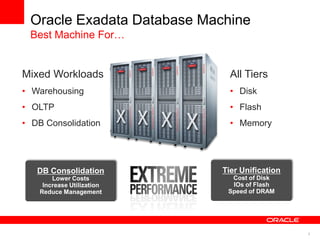
Mixed Workloads 
• Warehousing 
• OLTP 
• DB Consolidation 
All Tiers 
• Disk 
• Flash 
• Memory 
DB Consolidation 
Lower Costs 
Increase Utilization 
Reduce Management 
Tier Unification 
Cost of Disk 
IOs of Flash 
Speed of DRAM
4 
Oracle Exadata 
Standardized and Simple to Deploy 
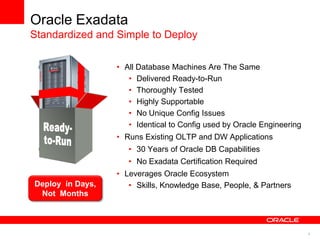
• All Database Machines Are The Same 
• Delivered Ready-to-Run 
• Thoroughly Tested 
• Highly Supportable 
• No Unique Config Issues 
• Identical to Config used by Oracle Engineering 
• Runs Existing OLTP and DW Applications 
• 30 Years of Oracle DB Capabilities 
• No Exadata Certification Required 
• Leverages Oracle Ecosystem 
• Skills, Knowledge Deploy in Days, Base, People, & Partners 
Not Months
5 
Oracle Exadata Innovation 
Exadata Storage Server Software 
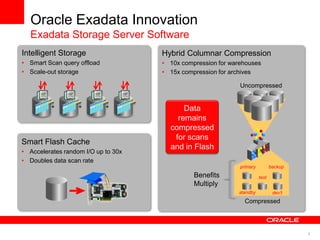
Intelligent Storage 
• Smart Scan query offload 
• Scale-out storage 
+ + + 
Hybrid Columnar Compression 
• 10x compression for warehouses 
• 15x compression for archives 
Compressed 
primary 
standby 
test 
dev’t 
backup 
Uncompressed 
Smart Flash Cache 
• Accelerates random I/O up to 30x 
• Doubles data scan rate 
Data 
remains 
compressed 
for scans 
and in Flash 
Benefits 
Multiply
6 
Exadata in the Marketplace 
Rapid Adoption In All Geographies and Industries
7 
Best Practices for Data Warehousing 
3 Ps - Power, Partitioning, Parallelism 
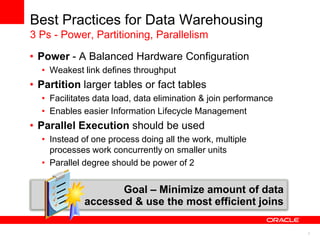
• Power - A Balanced Hardware Configuration 
• Weakest link defines throughput 
• Partition larger tables or fact tables 
• Facilitates data load, data elimination & join performance 
• Enables easier Information Lifecycle Management 
• Parallel Execution should be used 
• Instead of one process doing all the work, multiple 
processes work concurrently on smaller units 
• Parallel degree should be power of 2 
Goal – Minimize amount of data 
accessed & use the most efficient joins
8 
Disk 
Array 1 
Disk 
Array 2 
Disk 
Array 3 
Disk 
Array 4 
Disk 
Array 5 
Disk 
Array 6 
Disk 
Array 7 
Disk 
Array 8 
FC-Switch1 FC-Switch2 
HBA1 
HBA2 
HBA1 
HBA2 
HBA1 
HBA2 
HBA1 
HBA2 
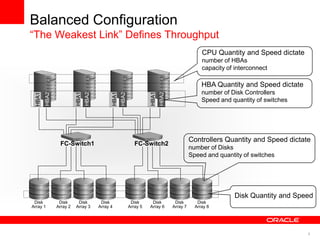
Balanced Configuration 
“The Weakest Link” Defines Throughput 
CPU Quantity and Speed dictate 
number of HBAs 
capacity of interconnect 
HBA Quantity and Speed dictate 
number of Disk Controllers 
Speed and quantity of switches 
Controllers Quantity and Speed dictate 
number of Disks 
Speed and quantity of switches 
Disk Quantity and Speed
9 
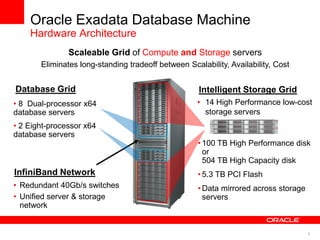
• 14 High Performance low-cost 
storage servers 
Oracle Exadata Database Machine 
Hardware Architecture 
Database Grid Intelligent Storage Grid 
InfiniBand Network 
• Redundant 40Gb/s switches 
• Unified server & storage 
network 
• 8 Dual-processor x64 
database servers 
• 2 Eight-processor x64 
database servers 
Scaleable Grid of Compute and Storage servers 
Eliminates long-standing tradeoff between Scalability, Availability, Cost 
• 100 TB High Performance disk 
or 
504 TB High Capacity disk 
• 5.3 TB PCI Flash 
•Data mirrored across storage 
servers
10 
Partitioning 
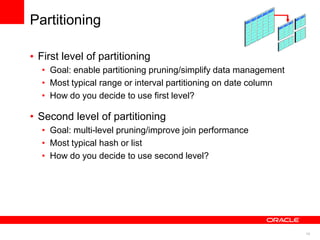
• First level of partitioning 
• Goal: enable partitioning pruning/simplify data management 
• Most typical range or interval partitioning on date column 
• How do you decide to use first level? 
• Second level of partitioning 
• Goal: multi-level pruning/improve join performance 
• Most typical hash or list 
• How do you decide to use second level?
11 
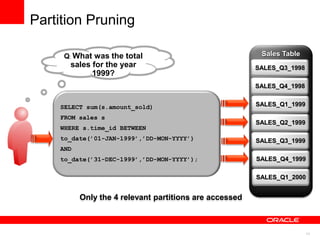
Sales Table 
SALES_Q3_1998 
SELECT sum(s.amount_sold) 
FROM sales s 
WHERE s.time_id BETWEEN 
to_date(’01-JAN-1999’,’DD-MON-YYYY’) 
AND 
to_date(’31-DEC-1999’,’DD-MON-YYYY’); 
Q: What was the total 
sales for the year 
1999? 
Partition Pruning 
SALES_Q4_1998 
SALES_Q1_1999 
SALES_Q2_1999 
SALES_Q3_1999 
SALES_Q4_1999 
SALES_Q1_2000 
Only the 4 relevant partitions are accessed
12 
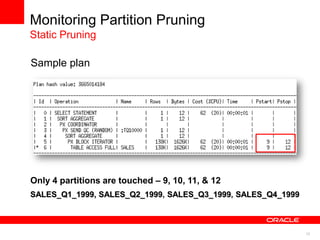
Monitoring Partition Pruning 
Static Pruning 
Sample plan 
Only 4 partitions are touched – 9, 10, 11, & 12 
SALES_Q1_1999, SALES_Q2_1999, SALES_Q3_1999, SALES_Q4_1999
13 
Monitoring Partition Pruning 
Static Pruning 
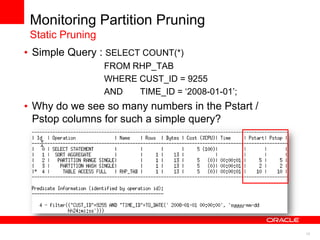
• Simple Query : SELECT COUNT(*) 
FROM RHP_TAB 
WHERE CUST_ID = 9255 
AND TIME_ID = „2008-01-01‟; 
• Why do we see so many numbers in the Pstart / 
Pstop columns for such a simple query?
14 
Numbering of Partitions 
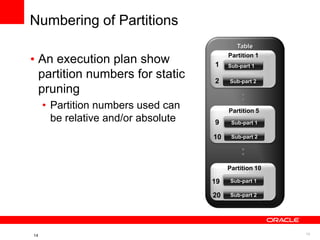
• An execution plan show 
partition numbers for static 
pruning 
• Partition numbers used can 
be relative and/or absolute 
14 
Table 
Partition 1 
Partition 5 
Partition 10 
Sub-part 1 
Sub-part 2 
Sub-part 1 
Sub-part 2 
Sub-part 1 
Sub-part 2 
: 
: 
1 
2 
9 
10 
19 
20
15 
Monitoring Partition Pruning 
Static Pruning 
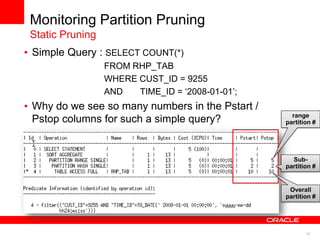
• Simple Query : SELECT COUNT(*) 
FROM RHP_TAB 
WHERE CUST_ID = 9255 
AND TIME_ID = „2008-01-01‟; 
• Why do we see so many numbers in the Pstart / 
Pstop columns for such a simple query? 
Overall 
partition # 
range 
partition # 
Sub-partition 
#
16 
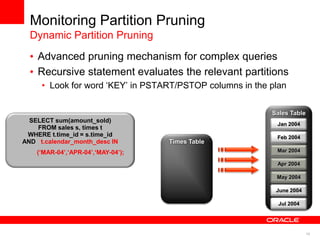
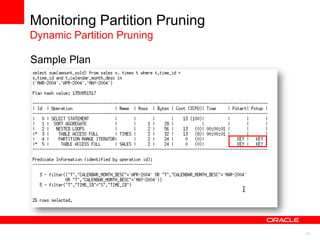
• Advanced pruning mechanism for complex queries 
• Recursive statement evaluates the relevant partitions 
• Look for word „KEY‟ in PSTART/PSTOP columns in the plan 
SELECT sum(amount_sold) 
FROM sales s, times t 
WHERE t.time_id = s.time_id 
AND t.calendar_month_desc IN 
(‘MAR-04’,‘APR-04’,‘MAY-04’); 
Sales Table 
May 2004 
June 2004 
Jul 2004 
Jan 2004 
Feb 2004 
Mar 2004 
Apr 2004 
Times Table 
Monitoring Partition Pruning 
Dynamic Partition Pruning
17 
Sample explain plan output 
Monitoring Partition Pruning 
Dynamic Partition Pruning 
Sample Plan
18 
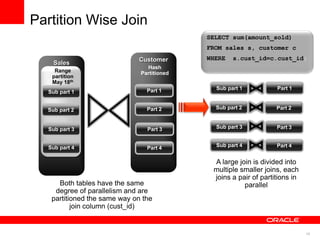
SELECT sum(amount_sold) 
FROM sales s, customer c 
WHERE s.cust_id=c.cust_id; 
Both tables have the same 
degree of parallelism and are 
partitioned the same way on the 
join column (cust_id) 
Sales 
Range 
partition 
May 18th 
2008 
Customer 
Hash 
Partitioned 
Sub part 1 
A large join is divided into 
multiple smaller joins, each 
joins a pair of partitions in 
parallel 
Part 1 
Sub part 2 
Sub part 3 
Sub part 4 
Part 2 
Part 3 
Part 4 
Sub part 2 
Sub part 3 
Sub part 4 
Sub part 1 Part 1 
Part 2 
Part 3 
Part 4 
Partition Wise Join
19 
Monitoring of Partition-Wise Join 
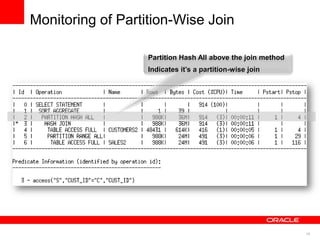
Partition Hash All above the join method 
Indicates it’s a partition-wise join
20 
Hybrid Columnar Compression 
Featured in Exadata V2 
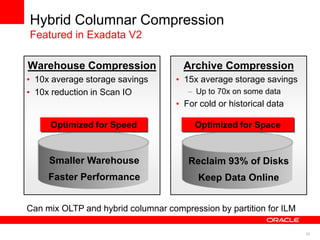
Warehouse Compression 
• 10x average storage savings 
• 10x reduction in Scan IO 
Archive Compression 
• 15x average storage savings 
– Up to 70x on some data 
• For cold or historical data 
Optimized for Speed Optimized for Space 
Smaller Warehouse 
Faster Performance 
Reclaim 93% of Disks 
Keep Data Online 
Can mix OLTP and hybrid columnar compression by partition for ILM
21 
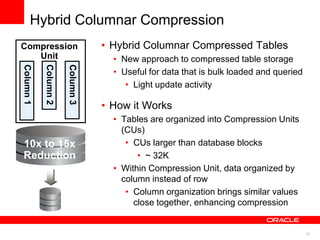
Hybrid Columnar Compression 
• Hybrid Columnar Compressed Tables 
• New approach to compressed table storage 
• Useful for data that is bulk loaded and queried 
• Light update activity 
• How it Works 
• Tables are organized into Compression Units 
(CUs) 
• CUs larger than database blocks 
• ~ 32K 
• Within Compression Unit, data organized by 
column instead of row 
• Column organization brings similar values 
close together, enhancing compression 
Compression 
Unit 
10x to 15x 
Reduction
22 
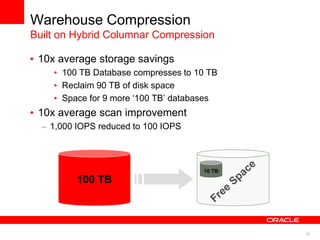
Warehouse Compression 
Built on Hybrid Columnar Compression 
• 10x average storage savings 
• 100 TB Database compresses to 10 TB 
• Reclaim 90 TB of disk space 
• Space for 9 more „100 TB‟ databases 
• 10x average scan improvement 
– 1,000 IOPS reduced to 100 IOPS 
100 TB 
10 TB
23 
Archive Compression 
Built on Hybrid Columnar Compression 
• Compression algorithm optimized for max storage 
savings 
• Benefits any application with data retention 
requirements 
• Best approach for ILM and data archival 
• Minimum storage footprint 
• No need to move data to tape or less expensive disks 
• Data is always online and always accessible 
• Run queries against historical data (without recovering from tape) 
• Update historical data 
• Supports schema evolution (add/drop columns)
24 
Archive Compression 
ILM and Data Archiving Strategies 
• OLTP Applications 
• Table Partitioning 
• Heavily accessed data 
• Partitions using OLTP Table Compression 
• Cold or historical data 
• Partitions using Online Archival Compression 
• Data Warehouses 
• Table Partitioning 
• Heavily accessed data 
• Partitions using Warehouse Compression 
• Cold or historical data 
• Partitions using Online Archival Compression
25 
25 
Hybrid Columnar Compression 
Customer Success Stories 
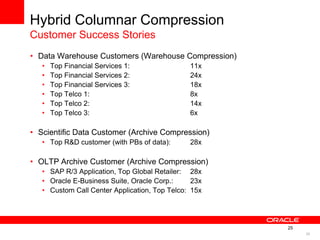
• Data Warehouse Customers (Warehouse Compression) 
• Top Financial Services 1: 11x 
• Top Financial Services 2: 24x 
• Top Financial Services 3: 18x 
• Top Telco 1: 8x 
• Top Telco 2: 14x 
• Top Telco 3: 6x 
• Scientific Data Customer (Archive Compression) 
• Top R&D customer (with PBs of data): 28x 
• OLTP Archive Customer (Archive Compression) 
• SAP R/3 Application, Top Global Retailer: 28x 
• Oracle E-Business Suite, Oracle Corp.: 23x 
• Custom Call Center Application, Top Telco: 15x
26 
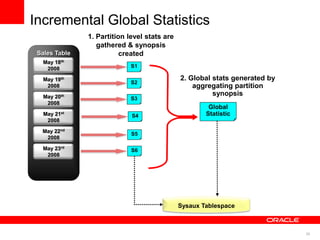
Incremental Global Statistics 
Sales Table 
May 22nd 
2008 
May 23rd 
2008 
May 18th 
2008 
May 19th 
2008 
May 20th 
2008 
May 21st 
2008 
Sysaux Tablespace 
1. Partition level stats are 
gathered & synopsis 
created 
2. Global stats generated by 
aggregating partition 
synopsis
27 
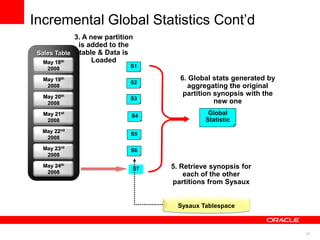
Incremental Global Statistics Cont‟d 
Sales Table 
May 22nd 
2008 
May 23rd 
2008 
May 24th 
2008 
May 18th 
2008 
May 19th 
2008 
May 20th 
2008 
May 21st 
2008 
Sysaux Tablespace 
3. A new partition 
is added to the 
table & Data is 
Loaded 
4. Gather partition 
statistics for new 
partition 
5. Retrieve synopsis for 
each of the other 
partitions from Sysaux 
6. Global stats generated by 
aggregating the original 
partition synopsis with the 
new one
28 
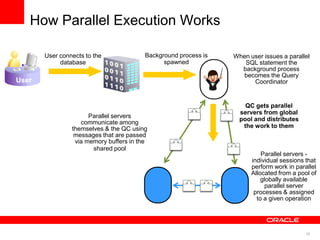
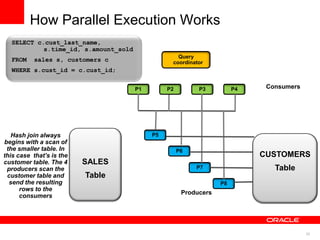
How Parallel Execution Works 
User connects to the 
database 
User 
Background process is 
spawned 
When user issues a parallel 
SQL statement the 
background process 
becomes the Query 
Coordinator 
QC gets parallel 
servers from global 
pool and distributes 
the work to them 
Parallel servers - 
individual sessions that 
perform work in parallel 
Allocated from a pool of 
globally available 
parallel server 
processes & assigned 
to a given operation 
Parallel servers 
communicate among 
themselves & the QC using 
messages that are passed 
via memory buffers in the 
shared pool
29 
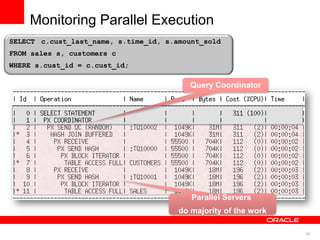
Parallel Servers 
do majority of the work 
Monitoring Parallel Execution 
SELECT c.cust_last_name, s.time_id, s.amount_sold 
FROM sales s, customers c 
WHERE s.cust_id = c.cust_id; 
Query Coordinator
30 
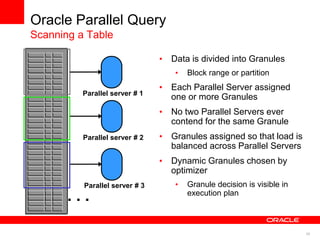
Oracle Parallel Query 
Scanning a Table 
• Data is divided into Granules 
• Block range or partition 
• Each Parallel Server assigned 
one or more Granules 
• No two Parallel Servers ever 
contend for the same Granule 
• Granules assigned so that load is 
balanced across Parallel Servers 
• Dynamic Granules chosen by 
optimizer 
• Granule decision is visible in 
. . . execution plan 
Parallel server # 1 
Parallel server # 2 
Parallel server # 3
31 
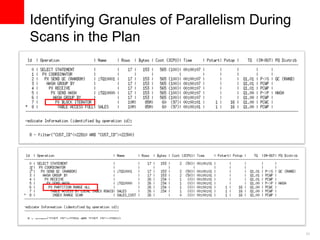
Identifying Granules of Parallelism During 
Scans in the Plan
32 
Producers 
Consumers 
Query 
coordinator 
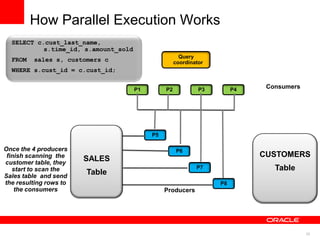
P1 P2 P3 P4 
Hash join always 
begins with a scan of 
the smaller table. In 
this case that’s is the 
customer table. The 4 
producers scan the 
customer table and 
send the resulting 
rows to the 
consumers 
P8 
P7 
P6 
P5 
SALES 
Table 
CUSTOMERS 
Table 
SELECT c.cust_last_name, 
s.time_id, s.amount_sold 
FROM sales s, customers c 
WHERE s.cust_id = c.cust_id; 
How Parallel Execution Works
33 
Producers 
Consumers 
Query 
coordinator 
P1 P2 P3 P4 
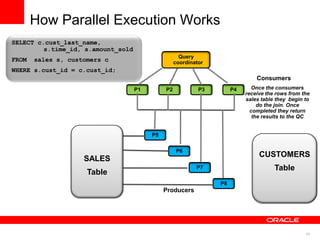
Once the 4 producers 
finish scanning the 
customer table, they 
start to scan the 
Sales table and send 
the resulting rows to 
the consumers 
P8 
P7 
P6 
P5 
SALES 
Table 
CUSTOMERS 
Table 
SELECT c.cust_last_name, 
s.time_id, s.amount_sold 
FROM sales s, customers c 
WHERE s.cust_id = c.cust_id; 
How Parallel Execution Works
34 
Producers 
Consumers 
P1 P2 P3 P4 
P8 
P7 
P6 
P5 
Once the consumers 
receive the rows from the 
sales table they begin to 
do the join. Once 
completed they return 
the results to the QC 
Query 
coordinator 
SALES 
Table 
CUSTOMERS 
Table 
SELECT c.cust_last_name, 
s.time_id, s.amount_sold 
FROM sales s, customers c 
WHERE s.cust_id = c.cust_id; 
How Parallel Execution Works
35 
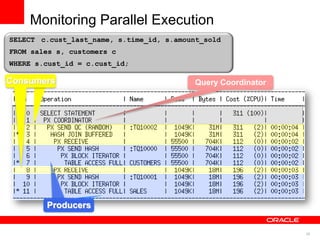
SELECT c.cust_last_name, s.time_id, s.amount_sold 
FROM sales s, customers c 
WHERE s.cust_id = c.cust_id; 
Query Coordinator 
Producers 
CCoonnssuummeerrss 
Monitoring Parallel Execution
36 
SQL Monitoring Screens 
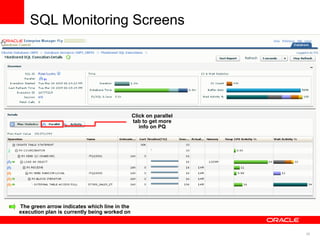
The green arrow indicates which line in the 
execution plan is currently being worked on 
Click on parallel 
tab to get more 
info on PQ
37 
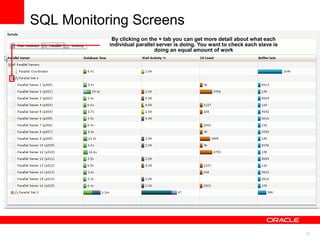
SQL Monitoring Screens 
By clicking on the + tab you can get more detail about what each 
individual parallel server is doing. You want to check each slave is 
doing an equal amount of work
38 
Best Practices for Using Parallel Execution 
Current Issues 
• Difficult to determine ideal DOP for each table without manual tuning 
• One DOP does not fit all queries touching an object 
• Not enough PX server processes can result in statement running serial 
• Too many PX server processes can thrash the system 
• Only uses IO resources 
Solution 
• Oracle automatically decides if a statement 
1. Executes in parallel or not and what DOP it will use 
2. Can execute immediately or will be queued 
3. Will take advantage of aggregated cluster memory or not
39 
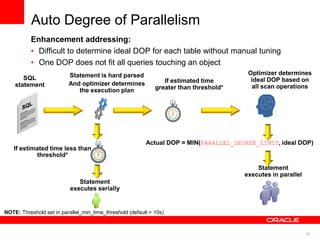
Auto Degree of Parallelism 
Enhancement addressing: 
• Difficult to determine ideal DOP for each table without manual tuning 
• One DOP does not fit all queries touching an object 
SQL 
statement 
Statement is hard parsed 
And optimizer determines 
the execution plan 
Statement 
executes in parallel 
Actual DOP = MIN(PARALLEL_DEGREE_LIMIT, ideal DOP) 
Statement 
executes serially 
If estimated time less than 
threshold* 
Optimizer determines 
ideal DOP based on 
all scan operations 
If estimated time 
greater than threshold* 
NOTE: Threshold set in parallel_min_time_threshold (default = 10s)
40 
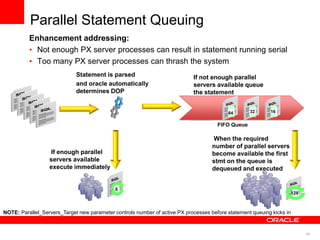
SQL 
statements 
Statement is parsed 
and oracle automatically 
determines DOP 
If enough parallel 
servers available 
execute immediately 
If not enough parallel 
servers available queue 
the statement 
64 32 16 128 
8 
FIFO Queue 
When the required 
number of parallel servers 
become available the first 
stmt on the queue is 
dequeued and executed 
128 
64 32 16 
Parallel Statement Queuing 
Enhancement addressing: 
• Not enough PX server processes can result in statement running serial 
• Too many PX server processes can thrash the system 
NOTE: Parallel_Servers_Target new parameter controls number of active PX processes before statement queuing kicks in
41 
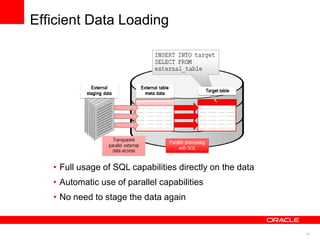
Efficient Data Loading 
• Full usage of SQL capabilities directly on the data 
• Automatic use of parallel capabilities 
• No need to stage the data again
42 
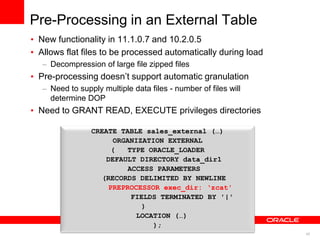
Pre-Processing in an External Table 
• New functionality in 11.1.0.7 and 10.2.0.5 
• Allows flat files to be processed automatically during load 
– Decompression of large file zipped files 
• Pre-processing doesn‟t support automatic granulation 
– Need to supply multiple data files - number of files will 
determine DOP 
• Need to GRANT READ, EXECUTE privileges directories 
CREATE TABLE sales_external (…) 
ORGANIZATION EXTERNAL 
( TYPE ORACLE_LOADER 
DEFAULT DIRECTORY data_dir1 
ACCESS PARAMETERS 
(RECORDS DELIMITED BY NEWLINE 
PREPROCESSOR exec_dir: ‘zcat' 
FIELDS TERMINATED BY '|' 
) 
LOCATION (…) 
);
43 
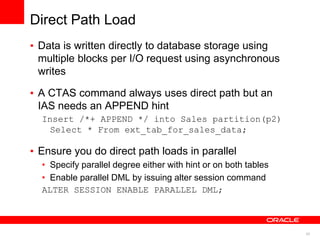
Direct Path Load 
• Data is written directly to database storage using 
multiple blocks per I/O request using asynchronous 
writes 
• A CTAS command always uses direct path but an 
IAS needs an APPEND hint 
Insert /*+ APPEND */ into Sales partition(p2) 
Select * From ext_tab_for_sales_data; 
• Ensure you do direct path loads in parallel 
• Specify parallel degree either with hint or on both tables 
• Enable parallel DML by issuing alter session command 
ALTER SESSION ENABLE PARALLEL DML;
44 
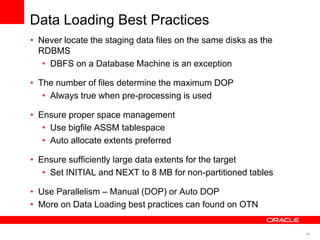
Data Loading Best Practices 
• Never locate the staging data files on the same disks as the 
RDBMS 
• DBFS on a Database Machine is an exception 
• The number of files determine the maximum DOP 
• Always true when pre-processing is used 
• Ensure proper space management 
• Use bigfile ASSM tablespace 
• Auto allocate extents preferred 
• Ensure sufficiently large data extents for the target 
• Set INITIAL and NEXT to 8 MB for non-partitioned tables 
• Use Parallelism – Manual (DOP) or Auto DOP 
• More on Data Loading best practices can found on OTN
45 
Sales Table 
May 22nd 
2008 
May 23rd 
2008 
May 24th 
2008 
May 18th 
2008 
May 19th 
2008 
May 20th 
2008 
May 21st 
2008 
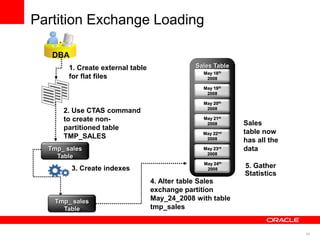
DBA 
1. Create external table 
for flat files 
2. Use CTAS command 
to create non-partitioned 
table 
TMP_SALES 
Tmp_ sales 
Table 
4. Alter table Sales 
exchange partition 
May_24_2008 with table 
tmp_sales 
Sales 
table now 
has all the 
data 
3. Create indexes 
Tmp_ sales 
Table 
Partition Exchange Loading 
5. Gather 
Statistics
46 
Summary 
Implement the three Ps of Data Warehousing 
• Power – Balanced hardware configuration 
• Make sure the system can deliver your SLA 
• Partitioning – Performance, Manageability, ILM 
• Make sure partition pruning and partition-wise 
joins occur 
• Parallel – Maximize the number of processes 
working 
• Make sure the system is not flooded using DOP 
limits & queuing
47 
Oracle Exadata Database Machine 
Additional Resources 
Exadata Online at www.oracle.com/exadata 
Exadata Best Practice Webcast Series On Demand 
Best Practices for Implementing a Data Warehouse on 
Oracle Exadata 
and 
Best Practices for Workload Management of a Data 
Warehouse on Oracle Exadata 
http://www.oracle.com/us/dm/sev100056475-wwmk11051130mpp016-1545274.html

Best Practices – Extreme Performance with Data Warehousing on Oracle Database

  • 1.
    <Insert Picture Here> Best Practices – Extreme Performance with Data Warehousing on Oracle Database Rekha Balwada, Principal Product Manager Levi Norman, Product Marketing Director
  • 2.
    2 Agenda •Oracle Exadata Database Machine • The Three Ps of Data Warehousing • Power • Partitioning • Parallel • Workload Management on a Data Warehouse • Data Loading
  • 3.
    3 Oracle ExadataDatabase Machine Best Machine For… Mixed Workloads • Warehousing • OLTP • DB Consolidation All Tiers • Disk • Flash • Memory DB Consolidation Lower Costs Increase Utilization Reduce Management Tier Unification Cost of Disk IOs of Flash Speed of DRAM
  • 4.
    4 Oracle Exadata Standardized and Simple to Deploy • All Database Machines Are The Same • Delivered Ready-to-Run • Thoroughly Tested • Highly Supportable • No Unique Config Issues • Identical to Config used by Oracle Engineering • Runs Existing OLTP and DW Applications • 30 Years of Oracle DB Capabilities • No Exadata Certification Required • Leverages Oracle Ecosystem • Skills, Knowledge Deploy in Days, Base, People, & Partners Not Months
  • 5.
    5 Oracle ExadataInnovation Exadata Storage Server Software Intelligent Storage • Smart Scan query offload • Scale-out storage + + + Hybrid Columnar Compression • 10x compression for warehouses • 15x compression for archives Compressed primary standby test dev’t backup Uncompressed Smart Flash Cache • Accelerates random I/O up to 30x • Doubles data scan rate Data remains compressed for scans and in Flash Benefits Multiply
  • 6.
    6 Exadata inthe Marketplace Rapid Adoption In All Geographies and Industries
  • 7.
    7 Best Practicesfor Data Warehousing 3 Ps - Power, Partitioning, Parallelism • Power - A Balanced Hardware Configuration • Weakest link defines throughput • Partition larger tables or fact tables • Facilitates data load, data elimination & join performance • Enables easier Information Lifecycle Management • Parallel Execution should be used • Instead of one process doing all the work, multiple processes work concurrently on smaller units • Parallel degree should be power of 2 Goal – Minimize amount of data accessed & use the most efficient joins
  • 8.
    8 Disk Array1 Disk Array 2 Disk Array 3 Disk Array 4 Disk Array 5 Disk Array 6 Disk Array 7 Disk Array 8 FC-Switch1 FC-Switch2 HBA1 HBA2 HBA1 HBA2 HBA1 HBA2 HBA1 HBA2 Balanced Configuration “The Weakest Link” Defines Throughput CPU Quantity and Speed dictate number of HBAs capacity of interconnect HBA Quantity and Speed dictate number of Disk Controllers Speed and quantity of switches Controllers Quantity and Speed dictate number of Disks Speed and quantity of switches Disk Quantity and Speed
  • 9.
    9 • 14High Performance low-cost storage servers Oracle Exadata Database Machine Hardware Architecture Database Grid Intelligent Storage Grid InfiniBand Network • Redundant 40Gb/s switches • Unified server & storage network • 8 Dual-processor x64 database servers • 2 Eight-processor x64 database servers Scaleable Grid of Compute and Storage servers Eliminates long-standing tradeoff between Scalability, Availability, Cost • 100 TB High Performance disk or 504 TB High Capacity disk • 5.3 TB PCI Flash •Data mirrored across storage servers
  • 10.
    10 Partitioning •First level of partitioning • Goal: enable partitioning pruning/simplify data management • Most typical range or interval partitioning on date column • How do you decide to use first level? • Second level of partitioning • Goal: multi-level pruning/improve join performance • Most typical hash or list • How do you decide to use second level?
  • 11.
    11 Sales Table SALES_Q3_1998 SELECT sum(s.amount_sold) FROM sales s WHERE s.time_id BETWEEN to_date(’01-JAN-1999’,’DD-MON-YYYY’) AND to_date(’31-DEC-1999’,’DD-MON-YYYY’); Q: What was the total sales for the year 1999? Partition Pruning SALES_Q4_1998 SALES_Q1_1999 SALES_Q2_1999 SALES_Q3_1999 SALES_Q4_1999 SALES_Q1_2000 Only the 4 relevant partitions are accessed
  • 12.
    12 Monitoring PartitionPruning Static Pruning Sample plan Only 4 partitions are touched – 9, 10, 11, & 12 SALES_Q1_1999, SALES_Q2_1999, SALES_Q3_1999, SALES_Q4_1999
  • 13.
    13 Monitoring PartitionPruning Static Pruning • Simple Query : SELECT COUNT(*) FROM RHP_TAB WHERE CUST_ID = 9255 AND TIME_ID = „2008-01-01‟; • Why do we see so many numbers in the Pstart / Pstop columns for such a simple query?
  • 14.
    14 Numbering ofPartitions • An execution plan show partition numbers for static pruning • Partition numbers used can be relative and/or absolute 14 Table Partition 1 Partition 5 Partition 10 Sub-part 1 Sub-part 2 Sub-part 1 Sub-part 2 Sub-part 1 Sub-part 2 : : 1 2 9 10 19 20
  • 15.
    15 Monitoring PartitionPruning Static Pruning • Simple Query : SELECT COUNT(*) FROM RHP_TAB WHERE CUST_ID = 9255 AND TIME_ID = „2008-01-01‟; • Why do we see so many numbers in the Pstart / Pstop columns for such a simple query? Overall partition # range partition # Sub-partition #
  • 16.
    16 • Advancedpruning mechanism for complex queries • Recursive statement evaluates the relevant partitions • Look for word „KEY‟ in PSTART/PSTOP columns in the plan SELECT sum(amount_sold) FROM sales s, times t WHERE t.time_id = s.time_id AND t.calendar_month_desc IN (‘MAR-04’,‘APR-04’,‘MAY-04’); Sales Table May 2004 June 2004 Jul 2004 Jan 2004 Feb 2004 Mar 2004 Apr 2004 Times Table Monitoring Partition Pruning Dynamic Partition Pruning
  • 17.
    17 Sample explainplan output Monitoring Partition Pruning Dynamic Partition Pruning Sample Plan
  • 18.
    18 SELECT sum(amount_sold) FROM sales s, customer c WHERE s.cust_id=c.cust_id; Both tables have the same degree of parallelism and are partitioned the same way on the join column (cust_id) Sales Range partition May 18th 2008 Customer Hash Partitioned Sub part 1 A large join is divided into multiple smaller joins, each joins a pair of partitions in parallel Part 1 Sub part 2 Sub part 3 Sub part 4 Part 2 Part 3 Part 4 Sub part 2 Sub part 3 Sub part 4 Sub part 1 Part 1 Part 2 Part 3 Part 4 Partition Wise Join
  • 19.
    19 Monitoring ofPartition-Wise Join Partition Hash All above the join method Indicates it’s a partition-wise join
  • 20.
    20 Hybrid ColumnarCompression Featured in Exadata V2 Warehouse Compression • 10x average storage savings • 10x reduction in Scan IO Archive Compression • 15x average storage savings – Up to 70x on some data • For cold or historical data Optimized for Speed Optimized for Space Smaller Warehouse Faster Performance Reclaim 93% of Disks Keep Data Online Can mix OLTP and hybrid columnar compression by partition for ILM
  • 21.
    21 Hybrid ColumnarCompression • Hybrid Columnar Compressed Tables • New approach to compressed table storage • Useful for data that is bulk loaded and queried • Light update activity • How it Works • Tables are organized into Compression Units (CUs) • CUs larger than database blocks • ~ 32K • Within Compression Unit, data organized by column instead of row • Column organization brings similar values close together, enhancing compression Compression Unit 10x to 15x Reduction
  • 22.
    22 Warehouse Compression Built on Hybrid Columnar Compression • 10x average storage savings • 100 TB Database compresses to 10 TB • Reclaim 90 TB of disk space • Space for 9 more „100 TB‟ databases • 10x average scan improvement – 1,000 IOPS reduced to 100 IOPS 100 TB 10 TB
  • 23.
    23 Archive Compression Built on Hybrid Columnar Compression • Compression algorithm optimized for max storage savings • Benefits any application with data retention requirements • Best approach for ILM and data archival • Minimum storage footprint • No need to move data to tape or less expensive disks • Data is always online and always accessible • Run queries against historical data (without recovering from tape) • Update historical data • Supports schema evolution (add/drop columns)
  • 24.
    24 Archive Compression ILM and Data Archiving Strategies • OLTP Applications • Table Partitioning • Heavily accessed data • Partitions using OLTP Table Compression • Cold or historical data • Partitions using Online Archival Compression • Data Warehouses • Table Partitioning • Heavily accessed data • Partitions using Warehouse Compression • Cold or historical data • Partitions using Online Archival Compression
  • 25.
    25 25 HybridColumnar Compression Customer Success Stories • Data Warehouse Customers (Warehouse Compression) • Top Financial Services 1: 11x • Top Financial Services 2: 24x • Top Financial Services 3: 18x • Top Telco 1: 8x • Top Telco 2: 14x • Top Telco 3: 6x • Scientific Data Customer (Archive Compression) • Top R&D customer (with PBs of data): 28x • OLTP Archive Customer (Archive Compression) • SAP R/3 Application, Top Global Retailer: 28x • Oracle E-Business Suite, Oracle Corp.: 23x • Custom Call Center Application, Top Telco: 15x
  • 26.
    26 Incremental GlobalStatistics Sales Table May 22nd 2008 May 23rd 2008 May 18th 2008 May 19th 2008 May 20th 2008 May 21st 2008 Sysaux Tablespace 1. Partition level stats are gathered & synopsis created 2. Global stats generated by aggregating partition synopsis
  • 27.
    27 Incremental GlobalStatistics Cont‟d Sales Table May 22nd 2008 May 23rd 2008 May 24th 2008 May 18th 2008 May 19th 2008 May 20th 2008 May 21st 2008 Sysaux Tablespace 3. A new partition is added to the table & Data is Loaded 4. Gather partition statistics for new partition 5. Retrieve synopsis for each of the other partitions from Sysaux 6. Global stats generated by aggregating the original partition synopsis with the new one
  • 28.
    28 How ParallelExecution Works User connects to the database User Background process is spawned When user issues a parallel SQL statement the background process becomes the Query Coordinator QC gets parallel servers from global pool and distributes the work to them Parallel servers - individual sessions that perform work in parallel Allocated from a pool of globally available parallel server processes & assigned to a given operation Parallel servers communicate among themselves & the QC using messages that are passed via memory buffers in the shared pool
  • 29.
    29 Parallel Servers do majority of the work Monitoring Parallel Execution SELECT c.cust_last_name, s.time_id, s.amount_sold FROM sales s, customers c WHERE s.cust_id = c.cust_id; Query Coordinator
  • 30.
    30 Oracle ParallelQuery Scanning a Table • Data is divided into Granules • Block range or partition • Each Parallel Server assigned one or more Granules • No two Parallel Servers ever contend for the same Granule • Granules assigned so that load is balanced across Parallel Servers • Dynamic Granules chosen by optimizer • Granule decision is visible in . . . execution plan Parallel server # 1 Parallel server # 2 Parallel server # 3
  • 31.
    31 Identifying Granulesof Parallelism During Scans in the Plan
  • 32.
    32 Producers Consumers Query coordinator P1 P2 P3 P4 Hash join always begins with a scan of the smaller table. In this case that’s is the customer table. The 4 producers scan the customer table and send the resulting rows to the consumers P8 P7 P6 P5 SALES Table CUSTOMERS Table SELECT c.cust_last_name, s.time_id, s.amount_sold FROM sales s, customers c WHERE s.cust_id = c.cust_id; How Parallel Execution Works
  • 33.
    33 Producers Consumers Query coordinator P1 P2 P3 P4 Once the 4 producers finish scanning the customer table, they start to scan the Sales table and send the resulting rows to the consumers P8 P7 P6 P5 SALES Table CUSTOMERS Table SELECT c.cust_last_name, s.time_id, s.amount_sold FROM sales s, customers c WHERE s.cust_id = c.cust_id; How Parallel Execution Works
  • 34.
    34 Producers Consumers P1 P2 P3 P4 P8 P7 P6 P5 Once the consumers receive the rows from the sales table they begin to do the join. Once completed they return the results to the QC Query coordinator SALES Table CUSTOMERS Table SELECT c.cust_last_name, s.time_id, s.amount_sold FROM sales s, customers c WHERE s.cust_id = c.cust_id; How Parallel Execution Works
  • 35.
    35 SELECT c.cust_last_name,s.time_id, s.amount_sold FROM sales s, customers c WHERE s.cust_id = c.cust_id; Query Coordinator Producers CCoonnssuummeerrss Monitoring Parallel Execution
  • 36.
    36 SQL MonitoringScreens The green arrow indicates which line in the execution plan is currently being worked on Click on parallel tab to get more info on PQ
  • 37.
    37 SQL MonitoringScreens By clicking on the + tab you can get more detail about what each individual parallel server is doing. You want to check each slave is doing an equal amount of work
  • 38.
    38 Best Practicesfor Using Parallel Execution Current Issues • Difficult to determine ideal DOP for each table without manual tuning • One DOP does not fit all queries touching an object • Not enough PX server processes can result in statement running serial • Too many PX server processes can thrash the system • Only uses IO resources Solution • Oracle automatically decides if a statement 1. Executes in parallel or not and what DOP it will use 2. Can execute immediately or will be queued 3. Will take advantage of aggregated cluster memory or not
  • 39.
    39 Auto Degreeof Parallelism Enhancement addressing: • Difficult to determine ideal DOP for each table without manual tuning • One DOP does not fit all queries touching an object SQL statement Statement is hard parsed And optimizer determines the execution plan Statement executes in parallel Actual DOP = MIN(PARALLEL_DEGREE_LIMIT, ideal DOP) Statement executes serially If estimated time less than threshold* Optimizer determines ideal DOP based on all scan operations If estimated time greater than threshold* NOTE: Threshold set in parallel_min_time_threshold (default = 10s)
  • 40.
    40 SQL statements Statement is parsed and oracle automatically determines DOP If enough parallel servers available execute immediately If not enough parallel servers available queue the statement 64 32 16 128 8 FIFO Queue When the required number of parallel servers become available the first stmt on the queue is dequeued and executed 128 64 32 16 Parallel Statement Queuing Enhancement addressing: • Not enough PX server processes can result in statement running serial • Too many PX server processes can thrash the system NOTE: Parallel_Servers_Target new parameter controls number of active PX processes before statement queuing kicks in
  • 41.
    41 Efficient DataLoading • Full usage of SQL capabilities directly on the data • Automatic use of parallel capabilities • No need to stage the data again
  • 42.
    42 Pre-Processing inan External Table • New functionality in 11.1.0.7 and 10.2.0.5 • Allows flat files to be processed automatically during load – Decompression of large file zipped files • Pre-processing doesn‟t support automatic granulation – Need to supply multiple data files - number of files will determine DOP • Need to GRANT READ, EXECUTE privileges directories CREATE TABLE sales_external (…) ORGANIZATION EXTERNAL ( TYPE ORACLE_LOADER DEFAULT DIRECTORY data_dir1 ACCESS PARAMETERS (RECORDS DELIMITED BY NEWLINE PREPROCESSOR exec_dir: ‘zcat' FIELDS TERMINATED BY '|' ) LOCATION (…) );
  • 43.
    43 Direct PathLoad • Data is written directly to database storage using multiple blocks per I/O request using asynchronous writes • A CTAS command always uses direct path but an IAS needs an APPEND hint Insert /*+ APPEND */ into Sales partition(p2) Select * From ext_tab_for_sales_data; • Ensure you do direct path loads in parallel • Specify parallel degree either with hint or on both tables • Enable parallel DML by issuing alter session command ALTER SESSION ENABLE PARALLEL DML;
  • 44.
    44 Data LoadingBest Practices • Never locate the staging data files on the same disks as the RDBMS • DBFS on a Database Machine is an exception • The number of files determine the maximum DOP • Always true when pre-processing is used • Ensure proper space management • Use bigfile ASSM tablespace • Auto allocate extents preferred • Ensure sufficiently large data extents for the target • Set INITIAL and NEXT to 8 MB for non-partitioned tables • Use Parallelism – Manual (DOP) or Auto DOP • More on Data Loading best practices can found on OTN
  • 45.
    45 Sales Table May 22nd 2008 May 23rd 2008 May 24th 2008 May 18th 2008 May 19th 2008 May 20th 2008 May 21st 2008 DBA 1. Create external table for flat files 2. Use CTAS command to create non-partitioned table TMP_SALES Tmp_ sales Table 4. Alter table Sales exchange partition May_24_2008 with table tmp_sales Sales table now has all the data 3. Create indexes Tmp_ sales Table Partition Exchange Loading 5. Gather Statistics
  • 46.
    46 Summary Implementthe three Ps of Data Warehousing • Power – Balanced hardware configuration • Make sure the system can deliver your SLA • Partitioning – Performance, Manageability, ILM • Make sure partition pruning and partition-wise joins occur • Parallel – Maximize the number of processes working • Make sure the system is not flooded using DOP limits & queuing
  • 47.
    47 Oracle ExadataDatabase Machine Additional Resources Exadata Online at www.oracle.com/exadata Exadata Best Practice Webcast Series On Demand Best Practices for Implementing a Data Warehouse on Oracle Exadata and Best Practices for Workload Management of a Data Warehouse on Oracle Exadata http://www.oracle.com/us/dm/sev100056475-wwmk11051130mpp016-1545274.html