Oracle Tips & Tricks  Feb 10, 2011 Shane Zhang
AGENDA CASE Statement  Joins Timestamp Data Type  Rename Tables, Columns Merge Statement  Subqueries/With Groupset/Rollup/Cube  Skip Scanning of Indexes  Index Compression  Index Organized Tables (IOT’s)  Temp Tables
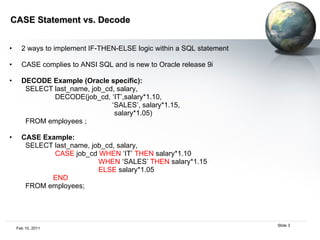
CASE Statement vs. Decode  2 ways to implement IF-THEN-ELSE logic within a SQL statement CASE complies to ANSI SQL and is new to Oracle release 9i DECODE Example (Oracle specific):  SELECT last_name, job_cd, salary,  DECODE(job_cd, ‘IT’,salary*1.10, ‘ SALES’, salary*1.15, salary*1.05)  FROM employees ; CASE Example:  SELECT last_name, job_cd, salary,  CASE  job_cd  WHEN  ‘IT’  THEN  salary*1.10 WHEN  ‘SALES’  THEN  salary*1.15 ELSE  salary*1.05  END   FROM employees;
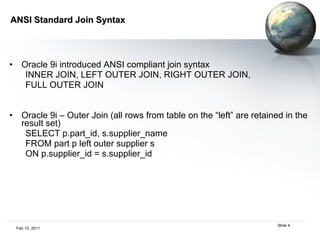
ANSI Standard Join Syntax Oracle 9i introduced ANSI compliant join syntax INNER JOIN, LEFT OUTER JOIN, RIGHT OUTER JOIN,  FULL OUTER JOIN  Oracle 9i – Outer Join (all rows from table on the “left” are retained in the result set) SELECT p.part_id, s.supplier_name  FROM part p left outer supplier s  ON p.supplier_id = s.supplier_id
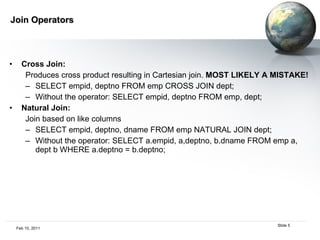
Join Operators Cross Join:   Produces cross product resulting in Cartesian join.  MOST LIKELY A MISTAKE! SELECT empid, deptno FROM emp CROSS JOIN dept; Without the operator: SELECT empid, deptno FROM emp, dept; Natural Join:   Join based on like columns SELECT empid, deptno, dname FROM emp NATURAL JOIN dept; Without the operator: SELECT a.empid, a,deptno, b.dname FROM emp a, dept b WHERE a.deptno = b.deptno;
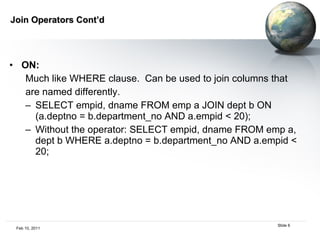
Join Operators Cont’d ON:   Much like WHERE clause.  Can be used to join columns that  are named differently. SELECT empid, dname FROM emp a JOIN dept b ON (a.deptno = b.department_no AND a.empid < 20); Without the operator: SELECT empid, dname FROM emp a, dept b WHERE a.deptno = b.department_no AND a.empid < 20;
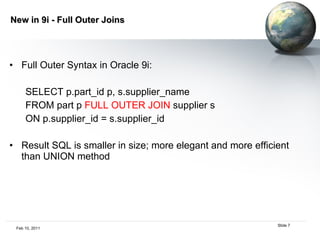
New in 9i - Full Outer Joins Full Outer Syntax in Oracle 9i:  SELECT p.part_id p, s.supplier_name FROM part p  FULL OUTER JOIN  supplier s  ON p.supplier_id = s.supplier_id Result SQL is smaller in size; more elegant and more efficient than UNION method
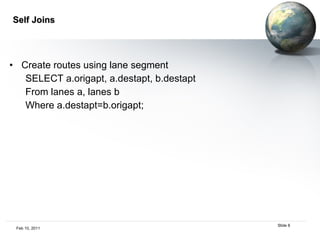
Self Joins Create routes using lane segment SELECT a.origapt, a.destapt, b.destapt From lanes a, lanes b Where a.destapt=b.origapt;
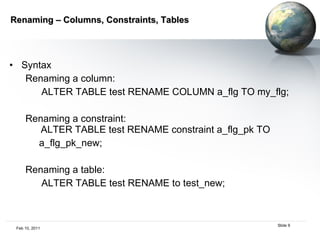
Renaming – Columns, Constraints, Tables Syntax Renaming a column:  ALTER TABLE test RENAME COLUMN a_flg TO my_flg; Renaming a constraint:   ALTER TABLE test RENAME constraint a_flg_pk TO a_flg_pk_new; Renaming a table:  ALTER TABLE test RENAME to test_new;
Top N Analysis SELECT [column_list], ROWNUM  FROM (SELECT [column_list]  FROM table  ORDER BY Top-N_column)  WHERE ROWNUM <= N;  Rank by group SELECT Empno, Ename, Job, Mgr, Hiredate, Sal FROM (SELECT Empno, Ename, Job, Mgr, Hiredate, Sal, RANK() OVER (ORDER BY SAL Desc NULLS LAST) AS Emp_Rank FROM Emp ORDER BY SAL Desc NULLS LAST) WHERE Emp_Rank < 6;
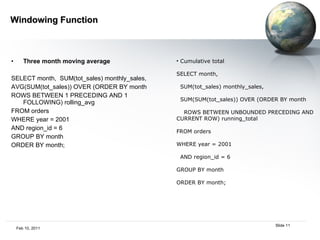
Windowing Function Three month moving average SELECT month,  SUM(tot_sales) monthly_sales, AVG(SUM(tot_sales)) OVER (ORDER BY month  ROWS BETWEEN 1 PRECEDING AND 1 FOLLOWING) rolling_avg FROM orders WHERE year = 2001  AND region_id = 6 GROUP BY month ORDER BY month; Cumulative total SELECT month,  SUM(tot_sales) monthly_sales, SUM(SUM(tot_sales)) OVER (ORDER BY month ROWS BETWEEN UNBOUNDED PRECEDING AND CURRENT ROW) running_total FROM orders WHERE year = 2001  AND region_id = 6 GROUP BY month ORDER BY month;
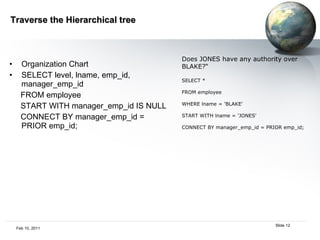
Traverse the Hierarchical tree Organization Chart SELECT level, lname, emp_id, manager_emp_id FROM employee START WITH manager_emp_id IS NULL CONNECT BY manager_emp_id = PRIOR emp_id; Does JONES have any authority over BLAKE?“ SELECT *  FROM employee WHERE lname = 'BLAKE' START WITH lname = 'JONES' CONNECT BY manager_emp_id = PRIOR emp_id;
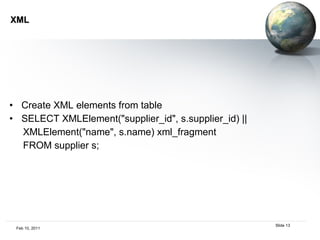
XML Create XML elements from table SELECT XMLElement(&quot;supplier_id&quot;, s.supplier_id) || XMLElement(&quot;name&quot;, s.name) xml_fragment FROM supplier s;
Using subquery Inline View – subquery in the from clause  Inline views are always executed prior to the containing query and, thus, may not reference columns from other tables or inline views from the same query. SELECT [column_list], ROWNUM FROM (SELECT [column_list]  FROM table ORDER BY Top-N_column) WHERE ROWNUM <= N;  Nested query – subquery in the where clause SELECT lname FROM employee  WHERE salary > (SELECT AVG(salary)  FROM employee); select ename ,sal ,deptno from emp a where a.sal < (select avg(sal) from emp b    where a.deptno = b.deptno)  order by deptno;
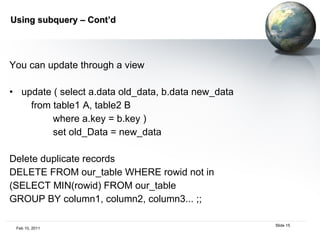
Using subquery – Cont’d You can update through a view update ( select a.data old_data, b.data new_data from table1 A, table2 B where a.key = b.key ) set old_Data = new_data Delete duplicate records DELETE FROM our_table WHERE rowid not in (SELECT MIN(rowid) FROM our_table GROUP BY column1, column2, column3... ;;
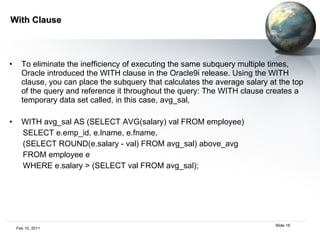
With Clause To eliminate the inefficiency of executing the same subquery multiple times, Oracle introduced the WITH clause in the Oracle9i release. Using the WITH clause, you can place the subquery that calculates the average salary at the top of the query and reference it throughout the query: The WITH clause creates a temporary data set called, in this case, avg_sal, WITH avg_sal AS (SELECT AVG(salary) val FROM employee) SELECT e.emp_id, e.lname, e.fname,  (SELECT ROUND(e.salary - val) FROM avg_sal) above_avg FROM employee e WHERE e.salary > (SELECT val FROM avg_sal);
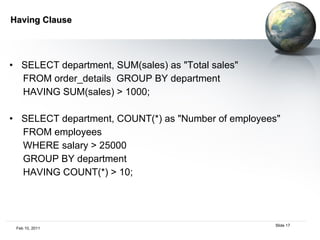
Having Clause SELECT department, SUM(sales) as &quot;Total sales&quot; FROM order_details  GROUP BY department HAVING SUM(sales) > 1000; SELECT department, COUNT(*) as &quot;Number of employees&quot; FROM employees WHERE salary > 25000 GROUP BY department HAVING COUNT(*) > 10;
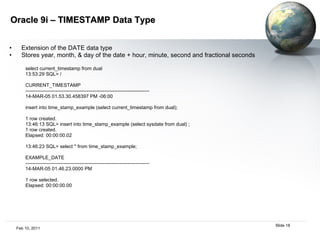
Oracle 9i – TIMESTAMP Data Type Extension of the DATE data type Stores year, month, & day of the date + hour, minute, second and fractional seconds select current_timestamp from dual 13:53:29 SQL> / CURRENT_TIMESTAMP --------------------------------------------------------------------------- 14-MAR-05 01.53.30.458397 PM -06:00 insert into time_stamp_example (select current_timestamp from dual); 1 row created. 13:46:13 SQL> insert into time_stamp_example (select sysdate from dual) ; 1 row created. Elapsed: 00:00:00.02 13:46:23 SQL> select * from time_stamp_example; EXAMPLE_DATE --------------------------------------------------------------------------- 14-MAR-05 01.46.23.0000 PM 1 row selected. Elapsed: 00:00:00.00
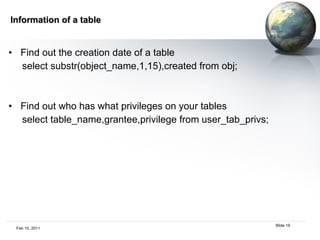
Information of a table Find out the creation date of a table select substr(object_name,1,15),created from obj; Find out who has what privileges on your tables select table_name,grantee,privilege from user_tab_privs;
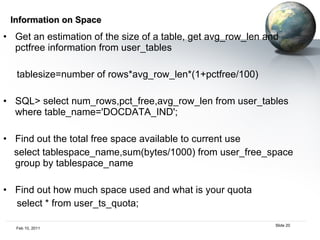
Information on Space Get an estimation of the size of a table, get avg_row_len and pctfree information from user_tables tablesize=number of rows*avg_row_len*(1+pctfree/100) SQL> select num_rows,pct_free,avg_row_len from user_tables where table_name='DOCDATA_IND'; Find out the total free space available to current use select tablespace_name,sum(bytes/1000) from user_free_space group by tablespace_name Find out how much space used and what is your quota select * from user_ts_quota;
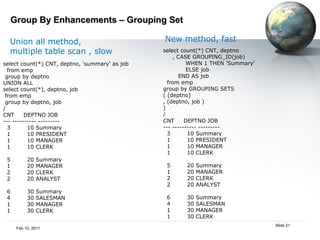
Group By Enhancements – Grouping Set select count(*) CNT, deptno, 'summary' as job from emp group by deptno UNION ALL select count(*), deptno, job from emp group by deptno, job / CNT  DEPTNO JOB --- ---------- --------- 3  10 Summary 1  10 PRESIDENT 1  10 MANAGER 1  10 CLERK 5  20 Summary 1  20 MANAGER 2  20 CLERK 2  20 ANALYST 6  30 Summary 4  30 SALESMAN 1  30 MANAGER 1  30 CLERK select count(*) CNT, deptno , CASE GROUPING_ID(job) WHEN 1 THEN 'Summary' ELSE job END AS job from emp group by GROUPING SETS ( (deptno) , (deptno, job ) ) / CNT  DEPTNO JOB --- ---------- --------- 3  10 Summary 1  10 PRESIDENT 1  10 MANAGER 1  10 CLERK 5  20 Summary 1  20 MANAGER 2  20 CLERK 2  20 ANALYST 6  30 Summary 4  30 SALESMAN 1  30 MANAGER 1  30 CLERK Union all method,  multiple table scan , slow New method, fast
Group By Enhancements – ROLLUP / CUBE ROLLUP - Used for subtotaling along a hierarchical dimension such as time or geography.  CUBE = ROLLUP + other combinations Can simplify and speed up population and maintenance of summary tables.
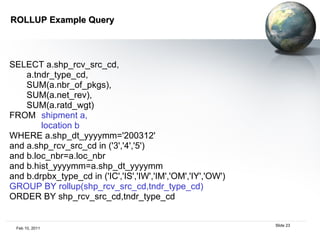
ROLLUP Example Query SELECT a.shp_rcv_src_cd, a.tndr_type_cd, SUM(a.nbr_of_pkgs), SUM(a.net_rev), SUM(a.ratd_wgt) FROM  shipment a, location b WHERE a.shp_dt_yyyymm='200312' and a.shp_rcv_src_cd in ('3','4','5') and b.loc_nbr=a.loc_nbr and b.hist_yyyymm=a.shp_dt_yyyymm and b.drpbx_type_cd in ('IC','IS','IW','IM','OM','IY','OW') GROUP BY rollup(shp_rcv_src_cd,tndr_type_cd) ORDER BY shp_rcv_src_cd,tndr_type_cd
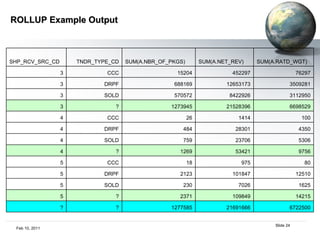
ROLLUP Example Output SHP_RCV_SRC_CD TNDR_TYPE_CD SUM(A.NBR_OF_PKGS) SUM(A.NET_REV) SUM(A.RATD_WGT) 3 CCC 15204 452297 76297 3 DRPF 688169 12653173 3509281 3 SOLD 570572 8422926 3112950 3 ? 1273945 21528396 6698529 4 CCC 26 1414 100 4 DRPF 484 28301 4350 4 SOLD 759 23706 5306 4 ? 1269 53421 9756 5 CCC 18 975 80 5 DRPF 2123 101847 12510 5 SOLD 230 7026 1625 5 ? 2371 109849 14215 ? ? 1277585 21691666 6722500
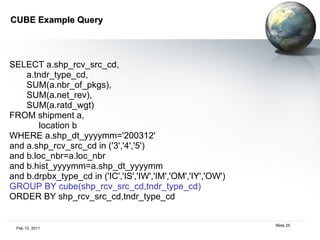
CUBE Example Query  SELECT a.shp_rcv_src_cd, a.tndr_type_cd, SUM(a.nbr_of_pkgs), SUM(a.net_rev), SUM(a.ratd_wgt) FROM shipment a, location b WHERE a.shp_dt_yyyymm='200312' and a.shp_rcv_src_cd in ('3','4','5') and b.loc_nbr=a.loc_nbr and b.hist_yyyymm=a.shp_dt_yyyymm and b.drpbx_type_cd in ('IC','IS','IW','IM','OM','IY','OW') GROUP BY cube(shp_rcv_src_cd,tndr_type_cd) ORDER BY shp_rcv_src_cd,tndr_type_cd
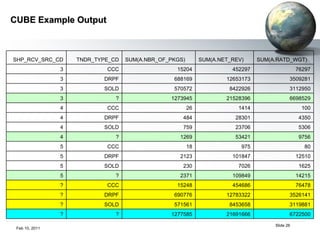
CUBE Example Output SHP_RCV_SRC_CD TNDR_TYPE_CD SUM(A.NBR_OF_PKGS) SUM(A.NET_REV) SUM(A.RATD_WGT) 3 CCC 15204 452297 76297 3 DRPF 688169 12653173 3509281 3 SOLD 570572 8422926 3112950 3 ? 1273945 21528396 6698529 4 CCC 26 1414 100 4 DRPF 484 28301 4350 4 SOLD 759 23706 5306 4 ? 1269 53421 9756 5 CCC 18 975 80 5 DRPF 2123 101847 12510 5 SOLD 230 7026 1625 5 ? 2371 109849 14215 ? CCC 15248 454686 76478 ? DRPF 690776 12783322 3526141 ? SOLD 571561 8453658 3119881 ? ? 1277585 21691666 6722500
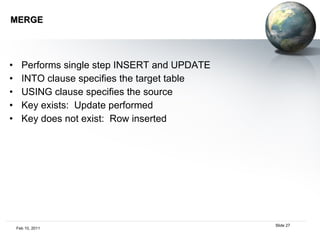
MERGE Performs single step INSERT and UPDATE INTO clause specifies the target table USING clause specifies the source Key exists:  Update performed Key does not exist:  Row inserted
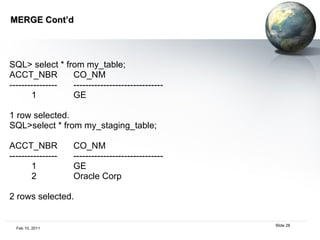
MERGE Cont’d SQL> select * from my_table; ACCT_NBR CO_NM ---------------- ------------------------------ 1 GE 1 row selected. SQL>select * from my_staging_table; ACCT_NBR CO_NM ---------------- ------------------------------ 1 GE 2 Oracle Corp 2 rows selected.
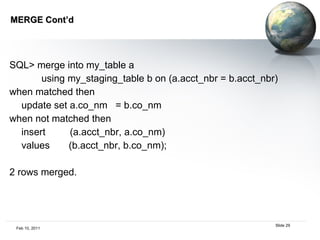
MERGE Cont’d  SQL> merge into my_table a using my_staging_table b on (a.acct_nbr = b.acct_nbr) when matched then update set a.co_nm  = b.co_nm when not matched then insert  (a.acct_nbr, a.co_nm) values  (b.acct_nbr, b.co_nm); 2 rows merged.
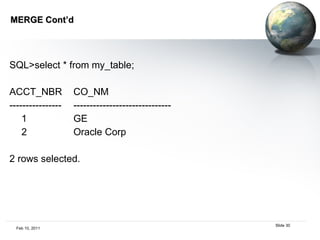
MERGE Cont’d SQL>select * from my_table; ACCT_NBR CO_NM ---------------- ------------------------------ 1 GE 2 Oracle Corp 2 rows selected.
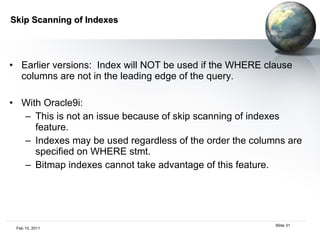
Skip Scanning of Indexes Earlier versions:  Index will NOT be used if the WHERE clause columns are not in the leading edge of the query. With Oracle9i:  This is not an issue because of skip scanning of indexes feature. Indexes may be used regardless of the order the columns are specified on WHERE stmt.  Bitmap indexes cannot take advantage of this feature.
Index Compression  Compression option on indexes was introduced in Oracle 8i; but enhanced features are easier to use in Oracle 9i  A properly compressed index would use a smaller number of “leaf” blocks to store the index…resulting in lower i/o when the index is used = better performance on index scans.  At creation time, compress the 1 st  2 columns of a composite index: CREATE INDEX my_idx ON my_tbl(col1, col2, col3) compress 2; Index already exists, compress first 2 columns:  ALTER index my_idx rebuild compress 2;
All my Indexes should be compressed, right?  No - should not ALWAYS compress indexes. How do I know if I should compress and what columns to compress?  Use VALIDATE INDEX:  VALIDATE INDEX my_idx; Look at OPT_CMPR_COUNT and OPT_COMPR_PCTSAVE columns: SELECT opt_cmpr_countm, opt_cmpr_pctsave FROM index_stats;
Temporary Tables Not really a 9i feature.  Enhanced/bug fixed Holds session based or transaction based data. Inserts by user A not visible to user B Data automatically purged at the end of the session/transaction but the table structure will be retained. CREATE TABLE: key word GLOBAL TEMPORARY TABLE
Temporary Table Cont’d Example:  SQL>CREATE GLOBAL TEMPORARY TABLE t_transaction  (c VARCHAR2(4000)) ON COMMIT DELETE ROWS;  Table created.  SQL> CREATE GLOBAL TEMPORARY TABLE t_session  (c VARCHAR2(4000)) ON COMMIT PRESERVE ROWS;  Table created.
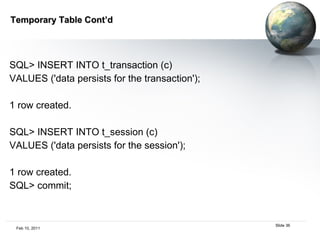
Temporary Table Cont’d SQL> INSERT INTO t_transaction (c)  VALUES ('data persists for the transaction');  1 row created.  SQL> INSERT INTO t_session (c)  VALUES ('data persists for the session');  1 row created.  SQL> commit;
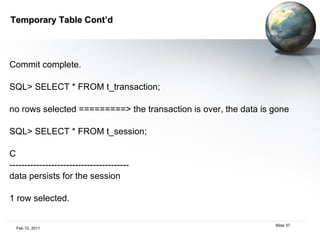
Temporary Table Cont’d Commit complete. SQL> SELECT * FROM t_transaction;  no rows selected =========> the transaction is over, the data is gone SQL> SELECT * FROM t_session;  C  ----------------------------------------  data persists for the session  1 row selected.

Oracle tips and tricks

  • 1.
    Oracle Tips &Tricks Feb 10, 2011 Shane Zhang
  • 2.
    AGENDA CASE Statement Joins Timestamp Data Type Rename Tables, Columns Merge Statement Subqueries/With Groupset/Rollup/Cube Skip Scanning of Indexes Index Compression Index Organized Tables (IOT’s) Temp Tables
  • 3.
    CASE Statement vs.Decode 2 ways to implement IF-THEN-ELSE logic within a SQL statement CASE complies to ANSI SQL and is new to Oracle release 9i DECODE Example (Oracle specific): SELECT last_name, job_cd, salary, DECODE(job_cd, ‘IT’,salary*1.10, ‘ SALES’, salary*1.15, salary*1.05) FROM employees ; CASE Example: SELECT last_name, job_cd, salary, CASE job_cd WHEN ‘IT’ THEN salary*1.10 WHEN ‘SALES’ THEN salary*1.15 ELSE salary*1.05 END FROM employees;
  • 4.
    ANSI Standard JoinSyntax Oracle 9i introduced ANSI compliant join syntax INNER JOIN, LEFT OUTER JOIN, RIGHT OUTER JOIN, FULL OUTER JOIN Oracle 9i – Outer Join (all rows from table on the “left” are retained in the result set) SELECT p.part_id, s.supplier_name FROM part p left outer supplier s ON p.supplier_id = s.supplier_id
  • 5.
    Join Operators CrossJoin: Produces cross product resulting in Cartesian join. MOST LIKELY A MISTAKE! SELECT empid, deptno FROM emp CROSS JOIN dept; Without the operator: SELECT empid, deptno FROM emp, dept; Natural Join: Join based on like columns SELECT empid, deptno, dname FROM emp NATURAL JOIN dept; Without the operator: SELECT a.empid, a,deptno, b.dname FROM emp a, dept b WHERE a.deptno = b.deptno;
  • 6.
    Join Operators Cont’dON: Much like WHERE clause. Can be used to join columns that are named differently. SELECT empid, dname FROM emp a JOIN dept b ON (a.deptno = b.department_no AND a.empid < 20); Without the operator: SELECT empid, dname FROM emp a, dept b WHERE a.deptno = b.department_no AND a.empid < 20;
  • 7.
    New in 9i- Full Outer Joins Full Outer Syntax in Oracle 9i: SELECT p.part_id p, s.supplier_name FROM part p FULL OUTER JOIN supplier s ON p.supplier_id = s.supplier_id Result SQL is smaller in size; more elegant and more efficient than UNION method
  • 8.
    Self Joins Createroutes using lane segment SELECT a.origapt, a.destapt, b.destapt From lanes a, lanes b Where a.destapt=b.origapt;
  • 9.
    Renaming – Columns,Constraints, Tables Syntax Renaming a column: ALTER TABLE test RENAME COLUMN a_flg TO my_flg; Renaming a constraint: ALTER TABLE test RENAME constraint a_flg_pk TO a_flg_pk_new; Renaming a table: ALTER TABLE test RENAME to test_new;
  • 10.
    Top N AnalysisSELECT [column_list], ROWNUM FROM (SELECT [column_list] FROM table ORDER BY Top-N_column) WHERE ROWNUM <= N; Rank by group SELECT Empno, Ename, Job, Mgr, Hiredate, Sal FROM (SELECT Empno, Ename, Job, Mgr, Hiredate, Sal, RANK() OVER (ORDER BY SAL Desc NULLS LAST) AS Emp_Rank FROM Emp ORDER BY SAL Desc NULLS LAST) WHERE Emp_Rank < 6;
  • 11.
    Windowing Function Threemonth moving average SELECT month, SUM(tot_sales) monthly_sales, AVG(SUM(tot_sales)) OVER (ORDER BY month ROWS BETWEEN 1 PRECEDING AND 1 FOLLOWING) rolling_avg FROM orders WHERE year = 2001 AND region_id = 6 GROUP BY month ORDER BY month; Cumulative total SELECT month, SUM(tot_sales) monthly_sales, SUM(SUM(tot_sales)) OVER (ORDER BY month ROWS BETWEEN UNBOUNDED PRECEDING AND CURRENT ROW) running_total FROM orders WHERE year = 2001 AND region_id = 6 GROUP BY month ORDER BY month;
  • 12.
    Traverse the Hierarchicaltree Organization Chart SELECT level, lname, emp_id, manager_emp_id FROM employee START WITH manager_emp_id IS NULL CONNECT BY manager_emp_id = PRIOR emp_id; Does JONES have any authority over BLAKE?“ SELECT * FROM employee WHERE lname = 'BLAKE' START WITH lname = 'JONES' CONNECT BY manager_emp_id = PRIOR emp_id;
  • 13.
    XML Create XMLelements from table SELECT XMLElement(&quot;supplier_id&quot;, s.supplier_id) || XMLElement(&quot;name&quot;, s.name) xml_fragment FROM supplier s;
  • 14.
    Using subquery InlineView – subquery in the from clause Inline views are always executed prior to the containing query and, thus, may not reference columns from other tables or inline views from the same query. SELECT [column_list], ROWNUM FROM (SELECT [column_list] FROM table ORDER BY Top-N_column) WHERE ROWNUM <= N; Nested query – subquery in the where clause SELECT lname FROM employee WHERE salary > (SELECT AVG(salary) FROM employee); select ename ,sal ,deptno from emp a where a.sal < (select avg(sal) from emp b where a.deptno = b.deptno) order by deptno;
  • 15.
    Using subquery –Cont’d You can update through a view update ( select a.data old_data, b.data new_data from table1 A, table2 B where a.key = b.key ) set old_Data = new_data Delete duplicate records DELETE FROM our_table WHERE rowid not in (SELECT MIN(rowid) FROM our_table GROUP BY column1, column2, column3... ;;
  • 16.
    With Clause Toeliminate the inefficiency of executing the same subquery multiple times, Oracle introduced the WITH clause in the Oracle9i release. Using the WITH clause, you can place the subquery that calculates the average salary at the top of the query and reference it throughout the query: The WITH clause creates a temporary data set called, in this case, avg_sal, WITH avg_sal AS (SELECT AVG(salary) val FROM employee) SELECT e.emp_id, e.lname, e.fname, (SELECT ROUND(e.salary - val) FROM avg_sal) above_avg FROM employee e WHERE e.salary > (SELECT val FROM avg_sal);
  • 17.
    Having Clause SELECTdepartment, SUM(sales) as &quot;Total sales&quot; FROM order_details GROUP BY department HAVING SUM(sales) > 1000; SELECT department, COUNT(*) as &quot;Number of employees&quot; FROM employees WHERE salary > 25000 GROUP BY department HAVING COUNT(*) > 10;
  • 18.
    Oracle 9i –TIMESTAMP Data Type Extension of the DATE data type Stores year, month, & day of the date + hour, minute, second and fractional seconds select current_timestamp from dual 13:53:29 SQL> / CURRENT_TIMESTAMP --------------------------------------------------------------------------- 14-MAR-05 01.53.30.458397 PM -06:00 insert into time_stamp_example (select current_timestamp from dual); 1 row created. 13:46:13 SQL> insert into time_stamp_example (select sysdate from dual) ; 1 row created. Elapsed: 00:00:00.02 13:46:23 SQL> select * from time_stamp_example; EXAMPLE_DATE --------------------------------------------------------------------------- 14-MAR-05 01.46.23.0000 PM 1 row selected. Elapsed: 00:00:00.00
  • 19.
    Information of atable Find out the creation date of a table select substr(object_name,1,15),created from obj; Find out who has what privileges on your tables select table_name,grantee,privilege from user_tab_privs;
  • 20.
    Information on SpaceGet an estimation of the size of a table, get avg_row_len and pctfree information from user_tables tablesize=number of rows*avg_row_len*(1+pctfree/100) SQL> select num_rows,pct_free,avg_row_len from user_tables where table_name='DOCDATA_IND'; Find out the total free space available to current use select tablespace_name,sum(bytes/1000) from user_free_space group by tablespace_name Find out how much space used and what is your quota select * from user_ts_quota;
  • 21.
    Group By Enhancements– Grouping Set select count(*) CNT, deptno, 'summary' as job from emp group by deptno UNION ALL select count(*), deptno, job from emp group by deptno, job / CNT DEPTNO JOB --- ---------- --------- 3 10 Summary 1 10 PRESIDENT 1 10 MANAGER 1 10 CLERK 5 20 Summary 1 20 MANAGER 2 20 CLERK 2 20 ANALYST 6 30 Summary 4 30 SALESMAN 1 30 MANAGER 1 30 CLERK select count(*) CNT, deptno , CASE GROUPING_ID(job) WHEN 1 THEN 'Summary' ELSE job END AS job from emp group by GROUPING SETS ( (deptno) , (deptno, job ) ) / CNT DEPTNO JOB --- ---------- --------- 3 10 Summary 1 10 PRESIDENT 1 10 MANAGER 1 10 CLERK 5 20 Summary 1 20 MANAGER 2 20 CLERK 2 20 ANALYST 6 30 Summary 4 30 SALESMAN 1 30 MANAGER 1 30 CLERK Union all method, multiple table scan , slow New method, fast
  • 22.
    Group By Enhancements– ROLLUP / CUBE ROLLUP - Used for subtotaling along a hierarchical dimension such as time or geography. CUBE = ROLLUP + other combinations Can simplify and speed up population and maintenance of summary tables.
  • 23.
    ROLLUP Example QuerySELECT a.shp_rcv_src_cd, a.tndr_type_cd, SUM(a.nbr_of_pkgs), SUM(a.net_rev), SUM(a.ratd_wgt) FROM shipment a, location b WHERE a.shp_dt_yyyymm='200312' and a.shp_rcv_src_cd in ('3','4','5') and b.loc_nbr=a.loc_nbr and b.hist_yyyymm=a.shp_dt_yyyymm and b.drpbx_type_cd in ('IC','IS','IW','IM','OM','IY','OW') GROUP BY rollup(shp_rcv_src_cd,tndr_type_cd) ORDER BY shp_rcv_src_cd,tndr_type_cd
  • 24.
    ROLLUP Example OutputSHP_RCV_SRC_CD TNDR_TYPE_CD SUM(A.NBR_OF_PKGS) SUM(A.NET_REV) SUM(A.RATD_WGT) 3 CCC 15204 452297 76297 3 DRPF 688169 12653173 3509281 3 SOLD 570572 8422926 3112950 3 ? 1273945 21528396 6698529 4 CCC 26 1414 100 4 DRPF 484 28301 4350 4 SOLD 759 23706 5306 4 ? 1269 53421 9756 5 CCC 18 975 80 5 DRPF 2123 101847 12510 5 SOLD 230 7026 1625 5 ? 2371 109849 14215 ? ? 1277585 21691666 6722500
  • 25.
    CUBE Example Query SELECT a.shp_rcv_src_cd, a.tndr_type_cd, SUM(a.nbr_of_pkgs), SUM(a.net_rev), SUM(a.ratd_wgt) FROM shipment a, location b WHERE a.shp_dt_yyyymm='200312' and a.shp_rcv_src_cd in ('3','4','5') and b.loc_nbr=a.loc_nbr and b.hist_yyyymm=a.shp_dt_yyyymm and b.drpbx_type_cd in ('IC','IS','IW','IM','OM','IY','OW') GROUP BY cube(shp_rcv_src_cd,tndr_type_cd) ORDER BY shp_rcv_src_cd,tndr_type_cd
  • 26.
    CUBE Example OutputSHP_RCV_SRC_CD TNDR_TYPE_CD SUM(A.NBR_OF_PKGS) SUM(A.NET_REV) SUM(A.RATD_WGT) 3 CCC 15204 452297 76297 3 DRPF 688169 12653173 3509281 3 SOLD 570572 8422926 3112950 3 ? 1273945 21528396 6698529 4 CCC 26 1414 100 4 DRPF 484 28301 4350 4 SOLD 759 23706 5306 4 ? 1269 53421 9756 5 CCC 18 975 80 5 DRPF 2123 101847 12510 5 SOLD 230 7026 1625 5 ? 2371 109849 14215 ? CCC 15248 454686 76478 ? DRPF 690776 12783322 3526141 ? SOLD 571561 8453658 3119881 ? ? 1277585 21691666 6722500
  • 27.
    MERGE Performs singlestep INSERT and UPDATE INTO clause specifies the target table USING clause specifies the source Key exists: Update performed Key does not exist: Row inserted
  • 28.
    MERGE Cont’d SQL>select * from my_table; ACCT_NBR CO_NM ---------------- ------------------------------ 1 GE 1 row selected. SQL>select * from my_staging_table; ACCT_NBR CO_NM ---------------- ------------------------------ 1 GE 2 Oracle Corp 2 rows selected.
  • 29.
    MERGE Cont’d SQL> merge into my_table a using my_staging_table b on (a.acct_nbr = b.acct_nbr) when matched then update set a.co_nm = b.co_nm when not matched then insert (a.acct_nbr, a.co_nm) values (b.acct_nbr, b.co_nm); 2 rows merged.
  • 30.
    MERGE Cont’d SQL>select* from my_table; ACCT_NBR CO_NM ---------------- ------------------------------ 1 GE 2 Oracle Corp 2 rows selected.
  • 31.
    Skip Scanning ofIndexes Earlier versions: Index will NOT be used if the WHERE clause columns are not in the leading edge of the query. With Oracle9i: This is not an issue because of skip scanning of indexes feature. Indexes may be used regardless of the order the columns are specified on WHERE stmt. Bitmap indexes cannot take advantage of this feature.
  • 32.
    Index Compression Compression option on indexes was introduced in Oracle 8i; but enhanced features are easier to use in Oracle 9i A properly compressed index would use a smaller number of “leaf” blocks to store the index…resulting in lower i/o when the index is used = better performance on index scans. At creation time, compress the 1 st 2 columns of a composite index: CREATE INDEX my_idx ON my_tbl(col1, col2, col3) compress 2; Index already exists, compress first 2 columns: ALTER index my_idx rebuild compress 2;
  • 33.
    All my Indexesshould be compressed, right? No - should not ALWAYS compress indexes. How do I know if I should compress and what columns to compress? Use VALIDATE INDEX: VALIDATE INDEX my_idx; Look at OPT_CMPR_COUNT and OPT_COMPR_PCTSAVE columns: SELECT opt_cmpr_countm, opt_cmpr_pctsave FROM index_stats;
  • 34.
    Temporary Tables Notreally a 9i feature. Enhanced/bug fixed Holds session based or transaction based data. Inserts by user A not visible to user B Data automatically purged at the end of the session/transaction but the table structure will be retained. CREATE TABLE: key word GLOBAL TEMPORARY TABLE
  • 35.
    Temporary Table Cont’dExample: SQL>CREATE GLOBAL TEMPORARY TABLE t_transaction (c VARCHAR2(4000)) ON COMMIT DELETE ROWS; Table created. SQL> CREATE GLOBAL TEMPORARY TABLE t_session (c VARCHAR2(4000)) ON COMMIT PRESERVE ROWS; Table created.
  • 36.
    Temporary Table Cont’dSQL> INSERT INTO t_transaction (c) VALUES ('data persists for the transaction'); 1 row created. SQL> INSERT INTO t_session (c) VALUES ('data persists for the session'); 1 row created. SQL> commit;
  • 37.
    Temporary Table Cont’dCommit complete. SQL> SELECT * FROM t_transaction; no rows selected =========> the transaction is over, the data is gone SQL> SELECT * FROM t_session; C ---------------------------------------- data persists for the session 1 row selected.