SQL/Monitoring Facility
An execution-time monitor
for DB2/VM
and DB2/VSE
© 2008 – 2014 Software Product Research
SQL/MF components
The System Monitor provides monitoring at the database level. At a defined interval,
the system monitor takes a “snapshot" of database resource usage and stores the
results in DB2 tables.
The Statement Monitor monitors the databases at the SQL statement level, by
recording the execution characteristics of every SQL statement submitted to the DB2
server.
The Governor controls DB2 resource consumption by users and packages.
The AutoPrep facility optimizes the use of dynamic SQL statements.
In a relational database, access to the data is determined by the database manager.
Inefficient access paths may result if SQL statements are poorly coded. Therefore,
monitoring at the SQL statement level is essential.
SQL/Monitoring Facility
Product Highlights
Statement monitoring
monitors all running SQL statements with unprecedented detail
saves the runtime statistics for every SQL statement executed
logs poorly performing statements in an exception table
provides application recording and benchmarking services
issues real time alerts when performance problems are detected
the Governor function monitors DB2 clients for resource usage and terminates users
that violate defined resource limits
the AutoPrep facility automatically replaces frequently used dynamic SQL statements
with prepped access
System Monitoring
performs database-wide measurements for the DB2 subsystems:
interpreter (RDS)
I/O manager (DBSS)
data spaces
lock manager
checkpoint agent
SQL/Monitoring Facility
Running Statement List
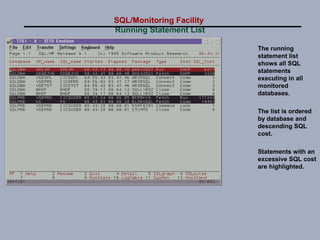
The running
statement list
shows all SQL
statements
executing in all
monitored
databases.
The list is ordered
by database and
descending SQL
cost.
Statements with an
excessive SQL cost
are highlighted.
SQL/Monitoring Facility
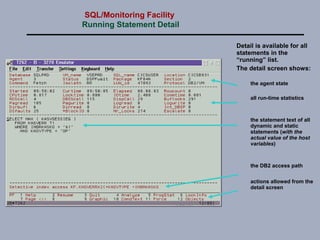
Running Statement Detail
Detail is available for all
statements in the
“running” list.
The detail screen shows:
the agent state
all run-time statistics
the statement text of all
dynamic and static
statements (with the
actual value of the host
variables)
the DB2 access path
actions allowed from the
detail screen
SQL/Monitoring Facility
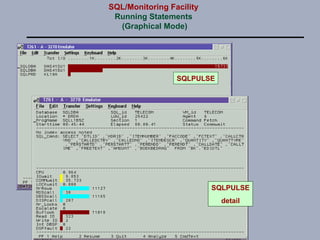
Running Statements
(Graphical Mode)
SQLPULSE
detail
SQLPULSE
SQL/Monitoring Facility
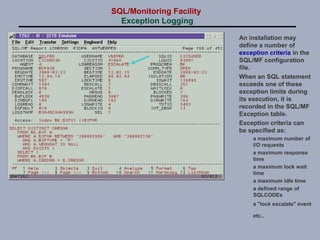
Exception Logging
An installation may
define a number of
exception criteria in the
SQL/MF configuration
file.
When an SQL statement
exceeds one of these
exception limits during
its execution, it is
recorded in the SQL/MF
Exception table.
Exception criteria can
be specified as:
a maximum number of
I/O requests
a maximum response
time
a maximum lock wait
time
a maximum idle time
a defined range of
SQLCODEs
a "lock escalate" event
etc..
SQL/Monitoring Facility
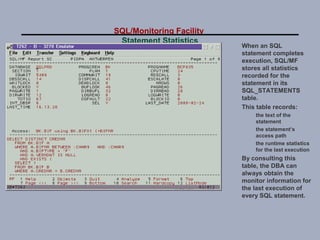
Statement Statistics
When an SQL
statement completes
execution, SQL/MF
stores all statistics
recorded for the
statement in its
SQL_STATEMENTS
table.
This table records:
the text of the
statement
the statement’s
access path
the runtime statistics
for the last execution
By consulting this
table, the DBA can
always obtain the
monitor information for
the last execution of
every SQL statement.
SQL/Monitoring Facility
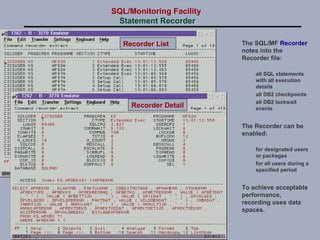
Statement Recorder
The SQL/MF Recorder
notes into the
Recorder file:
all SQL statements
with all execution
details
all DB2 checkpoints
all DB2 lockwait
events
The Recorder can be
enabled:
for designated users
or packages
for all users during a
specified period
To achieve acceptable
performance,
recording uses data
spaces.
Recorder List
Recorder Detail
SQL/Monitoring Facility
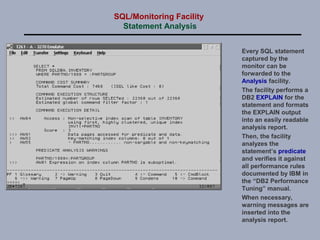
Statement Analysis
Every SQL statement
captured by the
monitor can be
forwarded to the
Analysis facility.
The facility performs a
DB2 EXPLAIN for the
statement and formats
the EXPLAIN output
into an easily readable
analysis report.
Then, the facility
analyzes the
statement’s predicate
and verifies it against
all performance rules
documented by IBM in
the “DB2 Performance
Tuning” manual.
When necessary,
warning messages are
inserted into the
analysis report.
SQL/Monitoring Facility
Notification Facility
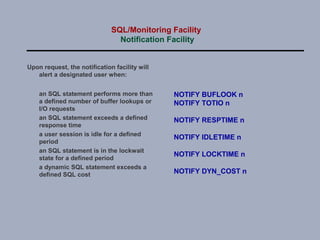
Upon request, the notification facility will
alert a designated user when:
an SQL statement performs more than
a defined number of buffer lookups or
I/O requests
an SQL statement exceeds a defined
response time
a user session is idle for a defined
period
an SQL statement is in the lockwait
state for a defined period
a dynamic SQL statement exceeds a
defined SQL cost
NOTIFY BUFLOOK n
NOTIFY TOTIO n
NOTIFY RESPTIME n
NOTIFY IDLETIME n
NOTIFY LOCKTIME n
NOTIFY DYN_COST n
SQL/Monitoring Facility
Governor Facility
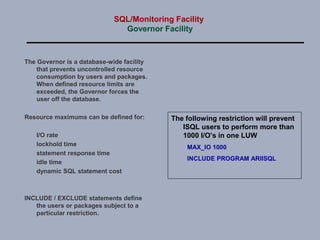
The Governor is a database-wide facility
that prevents uncontrolled resource
consumption by users and packages.
When defined resource limits are
exceeded, the Governor forces the
user off the database.
Resource maximums can be defined for:
I/O rate
lockhold time
statement response time
idle time
dynamic SQL statement cost
INCLUDE / EXCLUDE statements define
the users or packages subject to a
particular restriction.
The following restriction will prevent
ISQL users to perform more than
1000 I/O’s in one LUW
MAX_IO 1000
INCLUDE PROGRAM ARIISQL
SQL/Monitoring Facility
AutoPrep Facility
The purpose of the AutoPrep facility is to reduce the cost of dynamic SQL
statements.
Dynamic SQL implies that DB2 determines the access strategy before every
execution of the dynamic SQL. However, access path determination is a
costly process in terms of CPU usage and catalog contention.
Today, with increased PC database access, e-business and ERP applications,
dynamic SQL tends to become a performance bottleneck.
AutoPrep offers a solution by:
detecting frequently executed dynamic SQL commands
initiating a DB2 prep for these commands (in the AutoPrep server)
replacing the dynamic sequence with a static one that invokes the
generated package
The solution completely avoids path determination and its associated cost.
Benchmarks have shown that AutoPrep reduces CPU usage during dynamic
SQL with a factor 3 to 5.
SQL/Monitoring Facility
System Monitor
The SQL/MF System Monitor records
the global performance of DB2
databases.
The component runs in a dedicated
virtual machine and inspects all
monitored databases at an installation
defined sampling interval. The
sampled results are saved in the
System Monitor tables.
Monitoring is performed for several
aspects (classes) of database
performance:
System Class
Dataspaces Class
Buffer Pool Class
Package Class
DBspace Class
Storage Pool Class
Log Class
Agent Class
Lockwait Class
Connections Class
Checkpoint Class
SQL/Monitoring Facility
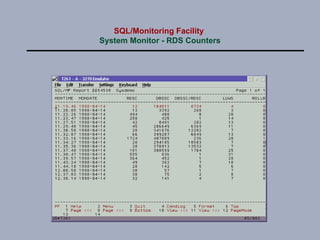
System Monitor - RDS Counters
SQL/Monitoring Facility
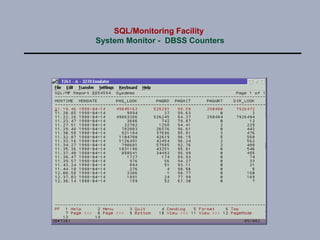
System Monitor - DBSS Counters
SQL/Monitoring Facility
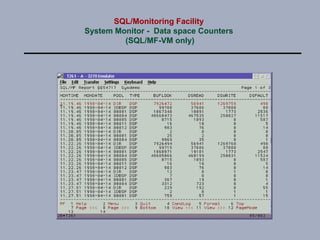
System Monitor - Data space Counters
(SQL/MF-VM only)
SQL/Monitoring Facility
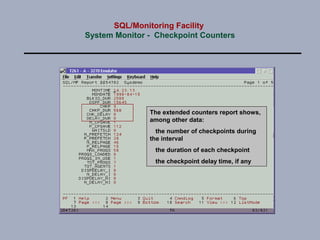
System Monitor - Checkpoint Counters
The extended counters report shows,
among other data:
the number of checkpoints during
the interval
the duration of each checkpoint
the checkpoint delay time, if any

Monitor DB2 performance on z/VM and z/VSE

  • 1.
    SQL/Monitoring Facility An execution-timemonitor for DB2/VM and DB2/VSE © 2008 – 2014 Software Product Research
  • 2.
    SQL/MF components The SystemMonitor provides monitoring at the database level. At a defined interval, the system monitor takes a “snapshot" of database resource usage and stores the results in DB2 tables. The Statement Monitor monitors the databases at the SQL statement level, by recording the execution characteristics of every SQL statement submitted to the DB2 server. The Governor controls DB2 resource consumption by users and packages. The AutoPrep facility optimizes the use of dynamic SQL statements. In a relational database, access to the data is determined by the database manager. Inefficient access paths may result if SQL statements are poorly coded. Therefore, monitoring at the SQL statement level is essential.
  • 3.
    SQL/Monitoring Facility Product Highlights Statementmonitoring monitors all running SQL statements with unprecedented detail saves the runtime statistics for every SQL statement executed logs poorly performing statements in an exception table provides application recording and benchmarking services issues real time alerts when performance problems are detected the Governor function monitors DB2 clients for resource usage and terminates users that violate defined resource limits the AutoPrep facility automatically replaces frequently used dynamic SQL statements with prepped access System Monitoring performs database-wide measurements for the DB2 subsystems: interpreter (RDS) I/O manager (DBSS) data spaces lock manager checkpoint agent
  • 4.
    SQL/Monitoring Facility Running StatementList The running statement list shows all SQL statements executing in all monitored databases. The list is ordered by database and descending SQL cost. Statements with an excessive SQL cost are highlighted.
  • 5.
    SQL/Monitoring Facility Running StatementDetail Detail is available for all statements in the “running” list. The detail screen shows: the agent state all run-time statistics the statement text of all dynamic and static statements (with the actual value of the host variables) the DB2 access path actions allowed from the detail screen
  • 6.
  • 7.
    SQL/Monitoring Facility Exception Logging Aninstallation may define a number of exception criteria in the SQL/MF configuration file. When an SQL statement exceeds one of these exception limits during its execution, it is recorded in the SQL/MF Exception table. Exception criteria can be specified as: a maximum number of I/O requests a maximum response time a maximum lock wait time a maximum idle time a defined range of SQLCODEs a "lock escalate" event etc..
  • 8.
    SQL/Monitoring Facility Statement Statistics Whenan SQL statement completes execution, SQL/MF stores all statistics recorded for the statement in its SQL_STATEMENTS table. This table records: the text of the statement the statement’s access path the runtime statistics for the last execution By consulting this table, the DBA can always obtain the monitor information for the last execution of every SQL statement.
  • 9.
    SQL/Monitoring Facility Statement Recorder TheSQL/MF Recorder notes into the Recorder file: all SQL statements with all execution details all DB2 checkpoints all DB2 lockwait events The Recorder can be enabled: for designated users or packages for all users during a specified period To achieve acceptable performance, recording uses data spaces. Recorder List Recorder Detail
  • 10.
    SQL/Monitoring Facility Statement Analysis EverySQL statement captured by the monitor can be forwarded to the Analysis facility. The facility performs a DB2 EXPLAIN for the statement and formats the EXPLAIN output into an easily readable analysis report. Then, the facility analyzes the statement’s predicate and verifies it against all performance rules documented by IBM in the “DB2 Performance Tuning” manual. When necessary, warning messages are inserted into the analysis report.
  • 11.
    SQL/Monitoring Facility Notification Facility Uponrequest, the notification facility will alert a designated user when: an SQL statement performs more than a defined number of buffer lookups or I/O requests an SQL statement exceeds a defined response time a user session is idle for a defined period an SQL statement is in the lockwait state for a defined period a dynamic SQL statement exceeds a defined SQL cost NOTIFY BUFLOOK n NOTIFY TOTIO n NOTIFY RESPTIME n NOTIFY IDLETIME n NOTIFY LOCKTIME n NOTIFY DYN_COST n
  • 12.
    SQL/Monitoring Facility Governor Facility TheGovernor is a database-wide facility that prevents uncontrolled resource consumption by users and packages. When defined resource limits are exceeded, the Governor forces the user off the database. Resource maximums can be defined for: I/O rate lockhold time statement response time idle time dynamic SQL statement cost INCLUDE / EXCLUDE statements define the users or packages subject to a particular restriction. The following restriction will prevent ISQL users to perform more than 1000 I/O’s in one LUW MAX_IO 1000 INCLUDE PROGRAM ARIISQL
  • 13.
    SQL/Monitoring Facility AutoPrep Facility Thepurpose of the AutoPrep facility is to reduce the cost of dynamic SQL statements. Dynamic SQL implies that DB2 determines the access strategy before every execution of the dynamic SQL. However, access path determination is a costly process in terms of CPU usage and catalog contention. Today, with increased PC database access, e-business and ERP applications, dynamic SQL tends to become a performance bottleneck. AutoPrep offers a solution by: detecting frequently executed dynamic SQL commands initiating a DB2 prep for these commands (in the AutoPrep server) replacing the dynamic sequence with a static one that invokes the generated package The solution completely avoids path determination and its associated cost. Benchmarks have shown that AutoPrep reduces CPU usage during dynamic SQL with a factor 3 to 5.
  • 14.
    SQL/Monitoring Facility System Monitor TheSQL/MF System Monitor records the global performance of DB2 databases. The component runs in a dedicated virtual machine and inspects all monitored databases at an installation defined sampling interval. The sampled results are saved in the System Monitor tables. Monitoring is performed for several aspects (classes) of database performance: System Class Dataspaces Class Buffer Pool Class Package Class DBspace Class Storage Pool Class Log Class Agent Class Lockwait Class Connections Class Checkpoint Class
  • 15.
  • 16.
  • 17.
    SQL/Monitoring Facility System Monitor- Data space Counters (SQL/MF-VM only)
  • 18.
    SQL/Monitoring Facility System Monitor- Checkpoint Counters The extended counters report shows, among other data: the number of checkpoints during the interval the duration of each checkpoint the checkpoint delay time, if any