Oracle Applications Overview
Module Overview Oracle E-Business Suite Home Page HTML Interface Forms Interface Concurrent Processing Database Components File System Components Applications Technology Stack  Rapid Install Component Products Product Dependencies Vision Demo Database
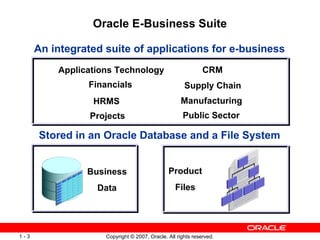
Oracle E-Business Suite An integrated suite of applications for e-business Stored in an Oracle Database and a File System Applications Technology Financials Manufacturing CRM HRMS Supply Chain Business Data Product Files Public Sector Projects
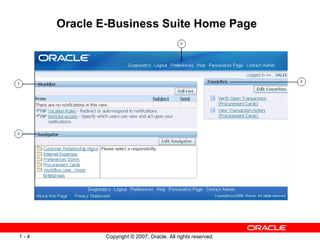
Oracle E-Business Suite Home Page
HTML Interface Provides fast, accurate information Reduces paperwork Minimizes administrative costs Increases organizational responsiveness Provides simple, approachable interface Requires very little user training
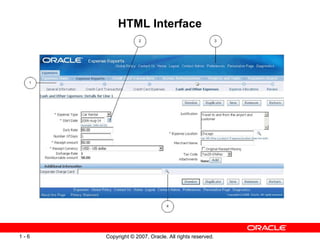
HTML Interface
Forms Interface Offers a flexible, powerful system for professional administrative users Provides a very responsive interface that is optimized for high-volume use Optimizes production reporting
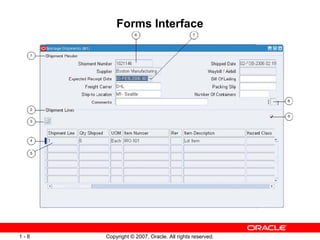
Forms Interface
Concurrent Processing Concurrent programs: Typically report on, and update, large volumes of data Are usually data-intensive, long-running tasks Run on the Concurrent Processing server Can run simultaneously with online operations Multiple concurrent programs can run at the same time
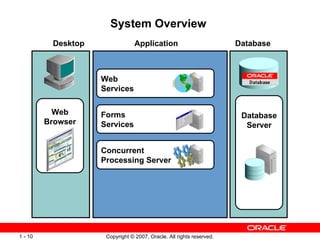
System Overview  Database Server  Web Services Forms  Services  Concurrent  Processing Server  Web Browser Desktop   Database   Application
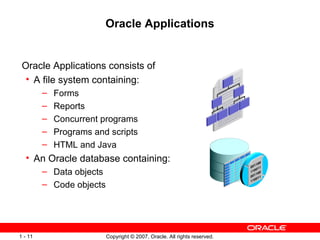
Oracle Applications Oracle Applications consists of  A file system containing: Forms Reports  Concurrent programs Programs and scripts HTML and Java An Oracle database containing: Data objects Code objects
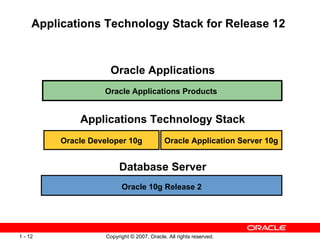
Applications Technology Stack for Release 12  Oracle 10g Release 2 Oracle Applications Products  Oracle Applications Oracle Developer 10g Oracle Application Server 10g Applications Technology Stack Database Server
Rapid Install The Rapid Install utility: Automates many of the steps required for installing Oracle Applications Release 12 Simplifies both basic and advanced installations Creates, installs, and configures most of the components needed for an Oracle Applications system Minimizes installation time Allows you to select languages and corresponding character sets Avoids the possibility of certification issues arising
Rapid Install Technology Stack Components Rapid Install installs and configures the following technology stack components, including: Oracle RDBMS  Oracle Application Server (including Oracle HTTP Server) Oracle Developer, which includes: Oracle Forms  Oracle Applications file system Oracle Applications database
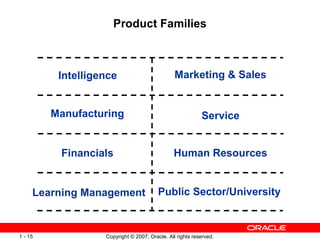
Product Families Intelligence Financials Manufacturing Learning Management Human Resources Marketing & Sales Service Public Sector/University
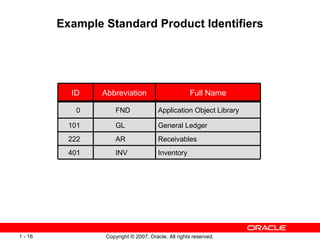
Example Standard Product Identifiers Receivables AR 222 401 101 0 ID Application Object Library FND Inventory INV General Ledger Full Name GL Abbreviation
Product Registration To simplify maintenance, the database objects and file system components for  all  Oracle Applications products are installed When you install Oracle Applications, you use the Rapid Install screens to register the products you intend to implement The license status of dependent products is automatically marked as Shared or Installed, according to product dependencies After you install Oracle Applications, you use License Manager to register any additional products you wish to implement
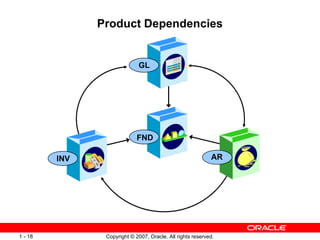
Product Dependencies INV GL AR FND
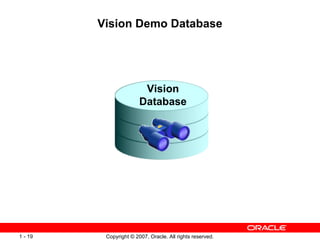
Vision Demo Database Vision Database
Module Summary This module introduced the following topics: Oracle E-Business Suite Home Page HTML Interface Forms Interface Concurrent Processing Database Components File System Components Applications Technology Stack  Rapid Install Component Products Product Dependencies Vision Demo Database

R12 d49656 gc10-apps dba 00

  • 1.
  • 2.
    Module Overview OracleE-Business Suite Home Page HTML Interface Forms Interface Concurrent Processing Database Components File System Components Applications Technology Stack Rapid Install Component Products Product Dependencies Vision Demo Database
  • 3.
    Oracle E-Business SuiteAn integrated suite of applications for e-business Stored in an Oracle Database and a File System Applications Technology Financials Manufacturing CRM HRMS Supply Chain Business Data Product Files Public Sector Projects
  • 4.
  • 5.
    HTML Interface Providesfast, accurate information Reduces paperwork Minimizes administrative costs Increases organizational responsiveness Provides simple, approachable interface Requires very little user training
  • 6.
  • 7.
    Forms Interface Offersa flexible, powerful system for professional administrative users Provides a very responsive interface that is optimized for high-volume use Optimizes production reporting
  • 8.
  • 9.
    Concurrent Processing Concurrentprograms: Typically report on, and update, large volumes of data Are usually data-intensive, long-running tasks Run on the Concurrent Processing server Can run simultaneously with online operations Multiple concurrent programs can run at the same time
  • 10.
    System Overview Database Server Web Services Forms Services Concurrent Processing Server Web Browser Desktop Database Application
  • 11.
    Oracle Applications OracleApplications consists of A file system containing: Forms Reports Concurrent programs Programs and scripts HTML and Java An Oracle database containing: Data objects Code objects
  • 12.
    Applications Technology Stackfor Release 12 Oracle 10g Release 2 Oracle Applications Products Oracle Applications Oracle Developer 10g Oracle Application Server 10g Applications Technology Stack Database Server
  • 13.
    Rapid Install TheRapid Install utility: Automates many of the steps required for installing Oracle Applications Release 12 Simplifies both basic and advanced installations Creates, installs, and configures most of the components needed for an Oracle Applications system Minimizes installation time Allows you to select languages and corresponding character sets Avoids the possibility of certification issues arising
  • 14.
    Rapid Install TechnologyStack Components Rapid Install installs and configures the following technology stack components, including: Oracle RDBMS Oracle Application Server (including Oracle HTTP Server) Oracle Developer, which includes: Oracle Forms Oracle Applications file system Oracle Applications database
  • 15.
    Product Families IntelligenceFinancials Manufacturing Learning Management Human Resources Marketing & Sales Service Public Sector/University
  • 16.
    Example Standard ProductIdentifiers Receivables AR 222 401 101 0 ID Application Object Library FND Inventory INV General Ledger Full Name GL Abbreviation
  • 17.
    Product Registration Tosimplify maintenance, the database objects and file system components for all Oracle Applications products are installed When you install Oracle Applications, you use the Rapid Install screens to register the products you intend to implement The license status of dependent products is automatically marked as Shared or Installed, according to product dependencies After you install Oracle Applications, you use License Manager to register any additional products you wish to implement
  • 18.
  • 19.
    Vision Demo DatabaseVision Database
  • 20.
    Module Summary Thismodule introduced the following topics: Oracle E-Business Suite Home Page HTML Interface Forms Interface Concurrent Processing Database Components File System Components Applications Technology Stack Rapid Install Component Products Product Dependencies Vision Demo Database

Editor's Notes

  • #2 Schedule: Timing Topic 20 minutes Lecture 0 minutes Practice 20 minutes Total
  • #3 <Course name> <Lesson number> - Overview This module introduces the different programs and components that make up Oracle Applications Release 12. It describes the components that are stored and processed in the Oracle Applications database as well as the components stored in the Oracle Applications file system. It also explains the various component applications and how dependencies exist between them. A brief introduction of the Vision Demo database is also provided. Many of the components and processes introduced in this module are described in further detail in subsequent modules. Instructor Note : Additional information about Oracle Applications installation and architecture is available at the Oracle internal site http://max.us.oracle.com/ATG/ADX/RapidInstall , and in the books Oracle Applications Installation Guide: Using Rapid Install and Oracle Applications Concepts .
  • #4 <Course name> <Lesson number> - Oracle E-Business Suite Oracle E-Business Suite is a suite of integrated software applications that provides a complete solution to the business needs of enterprises of all types and sizes. Each E-Business Suite product provides services for a particular business area, such as Inventory or Accounts Receivable. Oracle E-Business Suite includes component applications such as: Applications Technology Customer Relationship Management (CRM) Financials Supply Chain Human Resource Management Systems (HRMS) Manufacturing Projects Public Sector
  • #5 <Course name> <Lesson number> - Oracle E-Business Suite Home Page After logging into Oracle E-Business Suite, the first page the user sees is the Oracle E-Business Suite Home Page. This page is the starting point to access both the HTML interface and the Forms interface, and it provides seamless navigation to all areas of the system. The Oracle E-Business Suite Home Page provides a consistent look and feel across all Oracle Applications products. As shown in the screen shot, you can: 1. View or respond to your most important notifications from the Worklist . 2. Access E-Business Suite functions from the Navigator . 3. Set Preferences . 4. Navigate to frequently-used functions or Web pages from Favorites .
  • #6 <Course name> <Lesson number> - HTML Interface The HTML interface is used for many products, including iExpense (Self-Service Expenses), Self-Service Human Resources, Internet Procurement, Internet Receivables, Self-Service Time, Web Suppliers, i Store, i Payment, i Support, i Marketing, and e Travel. These products extend the functionality of the Oracle E-Business Suite by adding a browser–based, “walk up and use” functionality. All HTML (Framework-based) pages have an integrated personalization feature that enables both users and administrator to personalize the look and feel of the page. The HTML-interface applications can be either inquiry or transactional. The difference is that inquiry modules only read the Oracle Applications database, whereas transactional modules can update the database.
  • #7 <Course name> <Lesson number> - HTML Interface The HTML Interface architecture includes or utilizes the following components: A Web browser The Oracle HTTP server, powered by Apache HTML and XML files JavaServer Pages, JavaBeans, and Servlets Oracle database Features highlighted in the screen shot are: 1. Process Train 2. Date Picker 3. Global Links 4. List of Values Icon
  • #8 <Course name> <Lesson number> - Forms Interface Some products in the Oracle E-Business Suite utilize the Forms interface. This flexible and powerful user interface facilitates performing complex transactions and inputting high volumes of data. Oracle Applications Release 12 uses Forms 10g (part of Developer 10g).
  • #9 <Course name> <Lesson number> - Forms Interface One of the key application tier software components used by many Oracle E-Business Suite products is Forms services, which mediate between the Forms client (a Java applet running on the desktop), and the Oracle database server on the database tier. Features highlighted in the screen shot are: 1. Single-Row Block 2. Multi-Row Block 3. Folder Indicator 4. Current Record Indicator 5. Record 6. Field 7. List of Values Indicator 8. Descriptive Flexfield 9. Master-Detail Coordination Box
  • #10 <Course name> <Lesson number> - Concurrent Processing A concurrent program is an executable program that runs in the background. It can run simultaneously both with online (interactive) programs and with other concurrent programs, fully utilizing your hardware capacity. Typically, concurrent programs are used to support long-running, data-intensive tasks, such as posting a journal or generating a report. Concurrent programs run on the Concurrent Processing server. Reports are translated and available in all languages supported by Oracle Applications.
  • #11 <Course name> <Lesson number> - System Overview Oracle Applications utilizes a three-tier architecture. These tiers are the desktop tier, the application tier, and the database tier. The desktop tier consists of the Web browser The application (or middle) tier includes Web services, Forms services, and the Concurrent Processing server The database tier contains the Oracle database server
  • #12 <Course name> <Lesson number> - Oracle Applications Oracle Applications consists of A file system containing: Forms that allow interactive entry and updating of data Reports that allow formatted display of data Concurrent programs that provide high-volume, non-interactive update of data Programs and SQL scripts for maintaining the system HTML, XML, and Java that perform certain user interface and business functions An Oracle database containing: Data objects, such as tables and indexes used to store customer data Code objects, such as views, grants, synonyms, and PL/SQL stored procedures and triggers for performing database processing
  • #13 <Course name> <Lesson number> - Oracle Applications and the Applications Technology Stack Oracle Applications Release 12 works in conjunction with the Oracle database server and associated Oracle Tools products. Oracle Applications gathers and processes customer data, and stores it in the Oracle database . The Applications technology stack products, such as Oracle Developer, provide multi-tier, distributed processing capability.
  • #14 <Course name> <Lesson number> - Rapid Install Rapid Install is the only supported method of installing Oracle Applications for Release 12. All Oracle components packaged with Rapid Install are pre-certified for use with Release 12.
  • #15 Rapid Install Technology Stack Components Before upgrading any technology stack component, refer to the Certify site to verify that the combination of platform and components that you plan to use are fully certified by Oracle Applications: https://metalink.oracle.com/metalink/plsql/certify.welcome
  • #16 <Course name> <Lesson number> - Product Families The component products that make up Oracle Applications are grouped into product families by functionality. Some examples are shown on the slide. Each component application may contain a number of products. For example, Payables, Receivables, and General Ledger are three of the many members of the Financials product family.
  • #17 <Course name> <Lesson number> - Standard Product Identifiers Each product has multiple identifiers: ID is Applications ID. It is used when identifying setup data for the product. Product abbreviation is a two- or three-letter abbreviation for the product. It appears in the file system path and names of files as well as the standard prefix for all database objects. Full name is the name of the Oracle Applications product. It is displayed in pick lists. These identifiers are used throughout Oracle Applications and are commonly used when referring to Oracle Applications products. Some example identifiers are shown on the slide.
  • #18 <Course name> <Lesson number> -
  • #19 <Course name> <Lesson number> - Product Dependencies The products that make up Oracle Applications are tightly integrated. Some products depend on components from other products, called dependent or shared products, for full functionality. The slide shows a simplified example of product dependencies: General Ledger (GL) depends on the Application Object Library (FND) and Oracle Receivables (AR). Inventory (INV) depends on FND and GL. Receivables (AR) depends on FND, INV, and GL.
  • #20 <Course name> <Lesson number> - Vision Demo Database The Vision Demonstration database provides a sample set of transaction data for a fictitious company that uses most Oracle Applications Release 12 products. The Vision Demo is installed using Rapid Install. The Vision Demo simulates a real production configuration. As such, it can be updated and maintained using Oracle Applications utilities. You can use the Vision Demo as a testing and training environment. You can also use it to learn about new products to help decide whether you want to expand the number of Oracle Applications products you currently have licensed and implemented.
  • #21 <Course name> <Lesson number> -