GOLD SPONSORS
SILVER SPONSORS
BRONZE SPONSOR
STRATEGIC PARTNER
Brief introduction into
SQL Server Execution Plans
Marek Maśko
About the Author
Marek Maśko
• Principal Database Analyst at Sabre
• Working with SQL Server since 2010
• SQL DBA, Dev & Architect
• MCP since 2012
• Contact Information:
Blog: blog.sqlterritory.com
Email: marek@sqlterritory.com
LinkedIn: https://pl.linkedin.com/in/marekmasko
Twitter: @MarekMasko
What is an Execution Plan?
Execution plans can tell you how SQL Server may execute a query, or how it
did execute a query.
An execution plan, simply put, is the result of the query optimizer's attempt
to calculate the most efficient way to implement the request represented
by the T-SQL query you submitted.
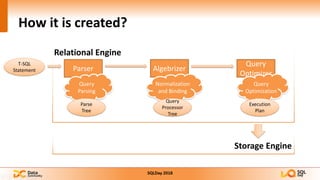
How it is created?
Relational Engine
T-SQL
Statement Parser Algebrizer
Query
Optimizer
Storage Engine
Query
Parsing
Parse
Tree
Normalization
and Binding
Query
Processor
Tree
Query
Optimization
Execution
Plan
Estimated and Actual Execution Plans
Estimated execution plan
• Output from the Optimizer
• Query doesn’t have to be executed
• Tells you what SQL Server would most likely do
• Stored in the plan cache
Actual execution plan
• Output from the actual query execution
• Tells you exactly what SQL Server did
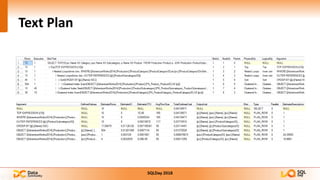
Text Plan
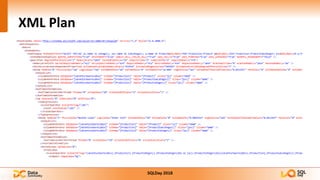
XML Plan
Graphical Plan
DEMO
Let’s take a look...
HOW TO READ AN EXECUTION PLAN?
Operators
• Represented on Execution Plan as icons
• Represents various actions and decisions
• Each operator has a logical and a physical component
Data Flow Arrows
• Represents data passed between operators
• The direction of the arrow emphasizes further the direction of data flow.
• Thickness of the arrow reflects the amount of data passed
ToolTips
• Each Operator and Arrow has a ToolTip pop-up
• ToolTips present distinct set of data for each operator
• Physical Operator
• Logical Operator
• I/O Cost
• CPU Cost
• Rowcount
• Ordered
Properties
• Provides similar information to those from ToolTip
• Additional info regarding parallel query execution
• Some optimization data from Query Optimizer
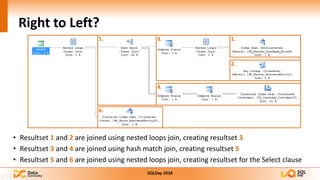
Right to Left?
• Resultset 1 and 2 are joined using nested loops join, creating resultset 3
• Resultset 3 and 4 are joined using hash match join, creating resultset 5
• Resultset 5 and 6 are joined using nested loops join, creating resultset for the Select clause
1.
2.
3.
4.
5.
6.
DEMO
Let’s see more details...
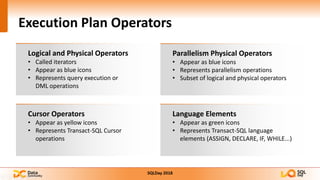
Execution Plan Operators
Logical and Physical Operators
• Called iterators
• Appear as blue icons
• Represents query execution or
DML operations
Parallelism Physical Operators
• Appear as blue icons
• Represents parallelism operations
• Subset of logical and physical operators
Cursor Operators
• Appear as yellow icons
• Represents Transact-SQL Cursor
operations
Language Elements
• Appear as green icons
• Represents Transact-SQL language
elements (ASSIGN, DECLARE, IF, WHILE...)
LOGICAL AND PHYSICAL OPERATORS
Data Access
Scan and Seek Operators
• Table Scan
• Clustered Index Scan
• Clustered Index Seek
• Index Scan
• Index Seek
Lookup Operators
• Key Lookup
• RID Lookup
Join Operators
• Nested Loops Join
• Merge Join
• Hash Join
Scan and Seek Operators
Table Scan
• All rows in a heap table are searched
Clustered Index Scan
• All rows in a clustered index are searched
• Results may be ordered
Clustered Index Seek
• Looks up each row via clustered index key
• Similar to looking up name in a telephone book
• Results may be ordered
Scan and Seek Operators
Index Scan
• All rows in a non-clustered index are searched
Index Seek
• Looks up each row via index key
• Similar to looking up name in a telephone book
• Results may be ordered
Lookups
• Retrieves row from the base table after a non-clustered index seek
• Expensive for large row counts
• Can be avoided with a covering index
Key Lookup
• Lookup on a Clustered Index
• Uses the clustered index key to locate each row
RID Lookup
• Lookup on a Heap
• Uses the rowID to locate each row
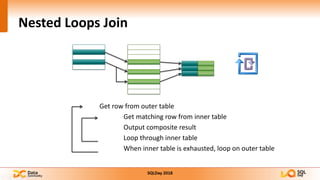
Nested Loops Join
Get row from outer table
Get matching row from inner table
Output composite result
Loop through inner table
When inner table is exhausted, loop on outer table
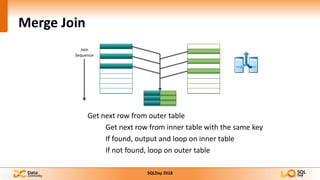
Merge Join
Join
Sequence
Get next row from outer table
Get next row from inner table with the same key
If found, output and loop on inner table
If not found, loop on outer table
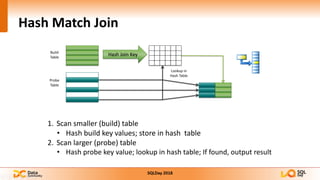
Hash Match Join
Build
Table
Probe
Table
Hash Join Key
Lookup in
Hash Table
1. Scan smaller (build) table
• Hash build key values; store in hash table
2. Scan larger (probe) table
• Hash probe key value; lookup in hash table; If found, output result
DEMO
Let’s take a look once again...
THANK YOU!
GOLD SPONSORS
SILVER SPONSORS
BRONZE SPONSOR
STRATEGIC PARTNER

SqlDay 2018 - Brief introduction into SQL Server Execution Plans

  • 1.
    GOLD SPONSORS SILVER SPONSORS BRONZESPONSOR STRATEGIC PARTNER
  • 2.
    Brief introduction into SQLServer Execution Plans Marek Maśko
  • 3.
    About the Author MarekMaśko • Principal Database Analyst at Sabre • Working with SQL Server since 2010 • SQL DBA, Dev & Architect • MCP since 2012 • Contact Information: Blog: blog.sqlterritory.com Email: marek@sqlterritory.com LinkedIn: https://pl.linkedin.com/in/marekmasko Twitter: @MarekMasko
  • 4.
    What is anExecution Plan? Execution plans can tell you how SQL Server may execute a query, or how it did execute a query. An execution plan, simply put, is the result of the query optimizer's attempt to calculate the most efficient way to implement the request represented by the T-SQL query you submitted.
  • 5.
    How it iscreated? Relational Engine T-SQL Statement Parser Algebrizer Query Optimizer Storage Engine Query Parsing Parse Tree Normalization and Binding Query Processor Tree Query Optimization Execution Plan
  • 6.
    Estimated and ActualExecution Plans Estimated execution plan • Output from the Optimizer • Query doesn’t have to be executed • Tells you what SQL Server would most likely do • Stored in the plan cache Actual execution plan • Output from the actual query execution • Tells you exactly what SQL Server did
  • 7.
  • 8.
  • 9.
  • 10.
  • 11.
    HOW TO READAN EXECUTION PLAN?
  • 12.
    Operators • Represented onExecution Plan as icons • Represents various actions and decisions • Each operator has a logical and a physical component
  • 13.
    Data Flow Arrows •Represents data passed between operators • The direction of the arrow emphasizes further the direction of data flow. • Thickness of the arrow reflects the amount of data passed
  • 14.
    ToolTips • Each Operatorand Arrow has a ToolTip pop-up • ToolTips present distinct set of data for each operator • Physical Operator • Logical Operator • I/O Cost • CPU Cost • Rowcount • Ordered
  • 15.
    Properties • Provides similarinformation to those from ToolTip • Additional info regarding parallel query execution • Some optimization data from Query Optimizer
  • 16.
    Right to Left? •Resultset 1 and 2 are joined using nested loops join, creating resultset 3 • Resultset 3 and 4 are joined using hash match join, creating resultset 5 • Resultset 5 and 6 are joined using nested loops join, creating resultset for the Select clause 1. 2. 3. 4. 5. 6.
  • 17.
  • 18.
    Execution Plan Operators Logicaland Physical Operators • Called iterators • Appear as blue icons • Represents query execution or DML operations Parallelism Physical Operators • Appear as blue icons • Represents parallelism operations • Subset of logical and physical operators Cursor Operators • Appear as yellow icons • Represents Transact-SQL Cursor operations Language Elements • Appear as green icons • Represents Transact-SQL language elements (ASSIGN, DECLARE, IF, WHILE...)
  • 19.
  • 20.
    Data Access Scan andSeek Operators • Table Scan • Clustered Index Scan • Clustered Index Seek • Index Scan • Index Seek Lookup Operators • Key Lookup • RID Lookup Join Operators • Nested Loops Join • Merge Join • Hash Join
  • 21.
    Scan and SeekOperators Table Scan • All rows in a heap table are searched Clustered Index Scan • All rows in a clustered index are searched • Results may be ordered Clustered Index Seek • Looks up each row via clustered index key • Similar to looking up name in a telephone book • Results may be ordered
  • 22.
    Scan and SeekOperators Index Scan • All rows in a non-clustered index are searched Index Seek • Looks up each row via index key • Similar to looking up name in a telephone book • Results may be ordered
  • 23.
    Lookups • Retrieves rowfrom the base table after a non-clustered index seek • Expensive for large row counts • Can be avoided with a covering index Key Lookup • Lookup on a Clustered Index • Uses the clustered index key to locate each row RID Lookup • Lookup on a Heap • Uses the rowID to locate each row
  • 24.
    Nested Loops Join Getrow from outer table Get matching row from inner table Output composite result Loop through inner table When inner table is exhausted, loop on outer table
  • 25.
    Merge Join Join Sequence Get nextrow from outer table Get next row from inner table with the same key If found, output and loop on inner table If not found, loop on outer table
  • 26.
    Hash Match Join Build Table Probe Table HashJoin Key Lookup in Hash Table 1. Scan smaller (build) table • Hash build key values; store in hash table 2. Scan larger (probe) table • Hash probe key value; lookup in hash table; If found, output result
  • 27.
    DEMO Let’s take alook once again...
  • 28.
  • 29.
    GOLD SPONSORS SILVER SPONSORS BRONZESPONSOR STRATEGIC PARTNER