JOINS AND KEYS
IN SQL
BY
HARI PRASAD A
JOINS IN SQL
Joins are nothing but merging (or) Joining one (or) more table
and fetch the output from Multiple tables
Types of Joins
1.Cross/Cartesian Join
2.Inner/Equi/Simple Join
3.Outer Join
Left Outer Join
Right Outer Join
Full Outer Join
4.Self Join
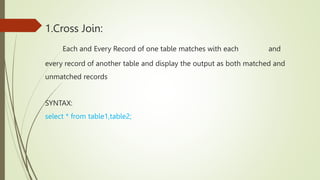
1.Cross Join:
Each and Every Record of one table matches with each and
every record of another table and display the output as both matched and
unmatched records
SYNTAX:
select * from table1,table2;
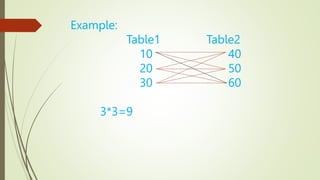
Example:
Table1 Table2
10 40
20 50
30 60
3*3=9
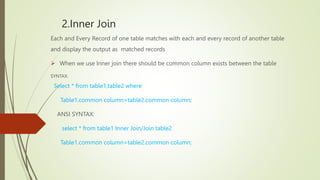
2.Inner Join
Each and Every Record of one table matches with each and every record of another table
and display the output as matched records
 When we use Inner join there should be common column exists between the table
SYNTAX:
Select * from table1,table2 where
Table1.common column=table2.common column;
ANSI SYNTAX:
select * from table1 Inner Join/Join table2
Table1.common column=table2.common column;
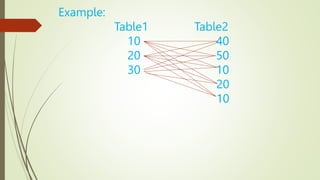
Example:
Table1 Table2
10 40
20 50
30 10
20
10
Matched Records
10 10
10 10
20 20
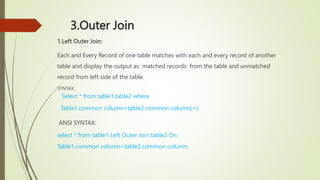
3.Outer Join
1.Left Outer Join:
Each and Every Record of one table matches with each and every record of another
table and display the output as matched records from the table and unmatched
record from left side of the table.
SYNTAX:
Select * from table1,table2 where
Table1.common column=table2.common column(+);
ANSI SYNTAX:
select * from table1 Left Outer Join table2 On
Table1.common column=table2.common column;
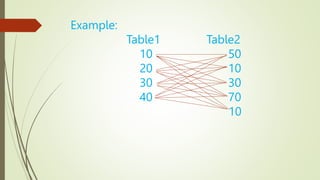
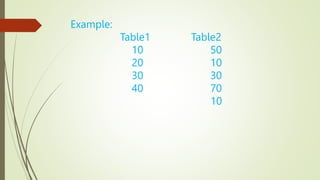
Example:
Table1 Table2
10 50
20 10
30 30
40 70
10
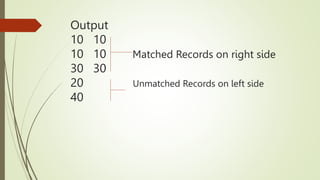
Output
10 10
10 10 Matched Records on right side
30 30
20 Unmatched Records on left side
40
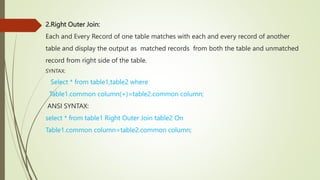
2.Right Outer Join:
Each and Every Record of one table matches with each and every record of another
table and display the output as matched records from both the table and unmatched
record from right side of the table.
SYNTAX:
Select * from table1,table2 where
Table1.common column(+)=table2.common column;
ANSI SYNTAX:
select * from table1 Right Outer Join table2 On
Table1.common column=table2.common column;
Example:
Table1 Table2
10 50
20 10
30 30
40 70
10
Output:
10 10
10 10
30 30
50
70
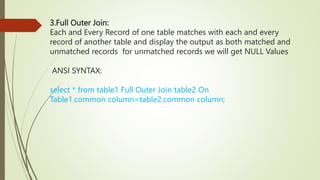
3.Full Outer Join:
Each and Every Record of one table matches with each and every
record of another table and display the output as both matched and
unmatched records for unmatched records we will get NULL Values
ANSI SYNTAX:
select * from table1 Full Outer Join table2 On
Table1.common column=table2.common column;
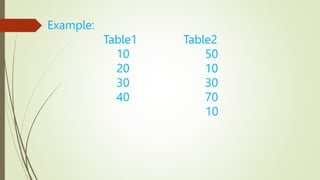
Example:
Table1 Table2
10 50
20 10
30 30
40 70
10
Output:
10 10
10 10
30 30
20 -
40 -
- 50 `
- 70
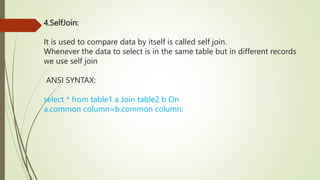
4.SelfJoin:
It is used to compare data by itself is called self join.
Whenever the data to select is in the same table but in different records
we use self join
ANSI SYNTAX:
select * from table1 a Join table2 b On
a.common column=b.common column;
Keys in RDBMS
Primary Key
Foreign key
Candidate Key
Alternate Key
Unique Key
Composite Key
Super Key
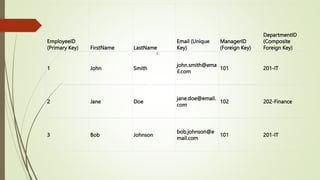
EmployeeID
(Primary Key) FirstName LastName
Email (Unique
Key)
ManagerID
(Foreign Key)
DepartmentID
(Composite
Foreign Key)
1 John Smith
john.smith@ema
il.com
101 201-IT
2 Jane Doe
jane.doe@email.
com
102 202-Finance
3 Bob Johnson
bob.johnson@e
mail.com
101 201-IT
1.
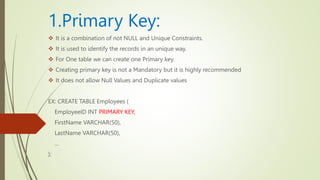
1.Primary Key:
 It is a combination of not NULL and Unique Constraints.
 It is used to identify the records in an unique way.
 For One table we can create one Primary key.
 Creating primary key is not a Mandatory but it is highly recommended
 It does not allow Null Values and Duplicate values
EX: CREATE TABLE Employees (
EmployeeID INT PRIMARY KEY,
FirstName VARCHAR(50),
LastName VARCHAR(50),
...
);
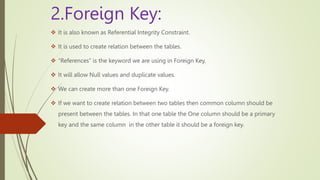
2.Foreign Key:
 It is also known as Referential Integrity Constraint.
 It is used to create relation between the tables.
 “References” is the keyword we are using in Foreign Key.
 It will allow Null values and duplicate values.
 We can create more than one Foreign Key.
 If we want to create relation between two tables then common column should be
present between the tables. In that one table the One column should be a primary
key and the same column in the other table it should be a foreign key.
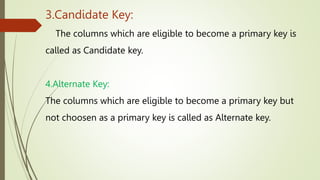
3.Candidate Key:
The columns which are eligible to become a primary key is
called as Candidate key.
4.Alternate Key:
The columns which are eligible to become a primary key but
not choosen as a primary key is called as Alternate key.
5.Unique Key:
Whenever we declared any column as Unique the column should not have
duplicate values (or) repeated values.
It will not allow Duplicate Values.
6.Composite Key:
A composite key in a relational database is also known as a "composite primary
key" when it is used as the primary key of a table. It can also be referred to as a
"compound key" or "concatenated key." The term "composite" is used because it
is composed of two or more columns, and it is considered a single key, ensuring
the uniqueness of the combination of values across those columns.
7.Super Key:
Super Key is an attribute (or set of attributes) that is used to uniquely identifies all
attributes in a relation. All super keys can’t be candidate keys but the reverse is
true. In relation, a number of super keys is more than a number of candidate keys.
SQL PPT on joins

SQL PPT on joins

  • 1.
    JOINS AND KEYS INSQL BY HARI PRASAD A
  • 2.
    JOINS IN SQL Joinsare nothing but merging (or) Joining one (or) more table and fetch the output from Multiple tables
  • 3.
    Types of Joins 1.Cross/CartesianJoin 2.Inner/Equi/Simple Join 3.Outer Join Left Outer Join Right Outer Join Full Outer Join 4.Self Join
  • 4.
    1.Cross Join: Each andEvery Record of one table matches with each and every record of another table and display the output as both matched and unmatched records SYNTAX: select * from table1,table2;
  • 5.
  • 6.
    2.Inner Join Each andEvery Record of one table matches with each and every record of another table and display the output as matched records  When we use Inner join there should be common column exists between the table SYNTAX: Select * from table1,table2 where Table1.common column=table2.common column; ANSI SYNTAX: select * from table1 Inner Join/Join table2 Table1.common column=table2.common column;
  • 7.
  • 8.
  • 9.
    3.Outer Join 1.Left OuterJoin: Each and Every Record of one table matches with each and every record of another table and display the output as matched records from the table and unmatched record from left side of the table. SYNTAX: Select * from table1,table2 where Table1.common column=table2.common column(+); ANSI SYNTAX: select * from table1 Left Outer Join table2 On Table1.common column=table2.common column;
  • 10.
  • 11.
    Output 10 10 10 10Matched Records on right side 30 30 20 Unmatched Records on left side 40
  • 12.
    2.Right Outer Join: Eachand Every Record of one table matches with each and every record of another table and display the output as matched records from both the table and unmatched record from right side of the table. SYNTAX: Select * from table1,table2 where Table1.common column(+)=table2.common column; ANSI SYNTAX: select * from table1 Right Outer Join table2 On Table1.common column=table2.common column;
  • 13.
  • 14.
  • 15.
    3.Full Outer Join: Eachand Every Record of one table matches with each and every record of another table and display the output as both matched and unmatched records for unmatched records we will get NULL Values ANSI SYNTAX: select * from table1 Full Outer Join table2 On Table1.common column=table2.common column;
  • 16.
  • 17.
    Output: 10 10 10 10 3030 20 - 40 - - 50 ` - 70
  • 18.
    4.SelfJoin: It is usedto compare data by itself is called self join. Whenever the data to select is in the same table but in different records we use self join ANSI SYNTAX: select * from table1 a Join table2 b On a.common column=b.common column;
  • 19.
    Keys in RDBMS PrimaryKey Foreign key Candidate Key Alternate Key Unique Key Composite Key Super Key
  • 20.
    EmployeeID (Primary Key) FirstNameLastName Email (Unique Key) ManagerID (Foreign Key) DepartmentID (Composite Foreign Key) 1 John Smith john.smith@ema il.com 101 201-IT 2 Jane Doe jane.doe@email. com 102 202-Finance 3 Bob Johnson bob.johnson@e mail.com 101 201-IT 1.
  • 21.
    1.Primary Key:  Itis a combination of not NULL and Unique Constraints.  It is used to identify the records in an unique way.  For One table we can create one Primary key.  Creating primary key is not a Mandatory but it is highly recommended  It does not allow Null Values and Duplicate values EX: CREATE TABLE Employees ( EmployeeID INT PRIMARY KEY, FirstName VARCHAR(50), LastName VARCHAR(50), ... );
  • 22.
    2.Foreign Key:  Itis also known as Referential Integrity Constraint.  It is used to create relation between the tables.  “References” is the keyword we are using in Foreign Key.  It will allow Null values and duplicate values.  We can create more than one Foreign Key.  If we want to create relation between two tables then common column should be present between the tables. In that one table the One column should be a primary key and the same column in the other table it should be a foreign key.
  • 23.
    3.Candidate Key: The columnswhich are eligible to become a primary key is called as Candidate key. 4.Alternate Key: The columns which are eligible to become a primary key but not choosen as a primary key is called as Alternate key.
  • 24.
    5.Unique Key: Whenever wedeclared any column as Unique the column should not have duplicate values (or) repeated values. It will not allow Duplicate Values. 6.Composite Key: A composite key in a relational database is also known as a "composite primary key" when it is used as the primary key of a table. It can also be referred to as a "compound key" or "concatenated key." The term "composite" is used because it is composed of two or more columns, and it is considered a single key, ensuring the uniqueness of the combination of values across those columns.
  • 25.
    7.Super Key: Super Keyis an attribute (or set of attributes) that is used to uniquely identifies all attributes in a relation. All super keys can’t be candidate keys but the reverse is true. In relation, a number of super keys is more than a number of candidate keys.