Types of Joins
•Inner Join
• Natural Join
• Left (Outer) Join
• Right (Outer) Join
• )Full) Outer Join
• Left (Outer) Join Excluding Inner Join
• Right (Outer) Join Excluding Inner Join
• (Full) Outer Join Excluding Inner Join
• Cross Join
3.
Different Types ofSQL JOINs
Here are the different types of the JOINs in SQL:
(INNER) JOIN: Returns records that have matching values in both tables
LEFT (OUTER) JOIN: Returns all records from the left table, and the matched records from the right table
RIGHT (OUTER) JOIN: Returns all records from the right table, and the matched records from the left table
FULL (OUTER) JOIN: Returns all records when there is a match in either left or right table
4.
Sample Tables
PK Value
1FOX
2 COP
3 TAXI
6 WASHINGTON
7 DELL
5 ARIZONA
4 LINCOLN
10 LUCENT
TableA
PK Value
1 TROT
2 CAR
3 CAB
6 MONUMENT
7 PC
8 MICROSOFT
9 APPLE
11 SCOTCH
TableB
5.
Inner Join
• Innerjoin produces only the
set of records that match in
both Table A and Table B
• Most commonly used,
best understood join
INNER JOIN Syntax
SELECT column_name(s)
FROM table1
INNER JOIN table2
ON table1.column_name = table2.column_name;
• Note:
• Inner Joins do not have to use
equality to join the fields
• Can use <, >, <>
6.
Inner Join
SELECT *
FROMTableA INNER JOIN TableB
ON TableA.PK = TableB.PK;
This is the same as doing
SELECT *
FROM TableA, TableB
WHERE TableA.PK = TableB.PK;
TableA
Value PK
TableB
PK Value
FOX 1 1 TROT
COP 2 2 CAR
TAXI 3 3 CAB
WASHINGTON 6 6 MONUMENT
DELL 7 7 PC
8.
Inner Join (continued)
SELECT*
FROM TableA
INNER JOIN TableB
ON TableA.PK > TableB.PK;
TableA
PK Value
TableB
PK Value
2 COP 1 TROT
3 TAXI 1 TROT
3 TAXI 2 CAR
4 LINCOLN 1 TROT
4 LINCOLN 2 CAR
4 LINCOLN 3 CAB
5 ARIZONA 1 TROT
5 ARIZONA 2 CAR
5 ARIZONA 3 CAB
… More… Rows…
9.
Left Outer Join
•Left outer join produces a
complete set of records
from Table A, with the
matching records (where
available) in Table B. If there
is no match, the right side
will contain null.
10.
Left Outer Join
•SELECT *
• FROM TableA LEFT OUTER JOIN TableB
• ON TableA.PK = TableB.PK
TableA
Value PK
TableB PK
Value
FOX 1 1 TROT
COP 2 2 CAR
TAXI 3 3 CAB
LINCOLN 4 NULL NULL
ARIZONA 5 NULL NULL
WASHINGTON 6 6 MONUMENT
DELL 7 7 PC
LUCENT 10 NULL NULL
11.
SQL Joins…Example
SELECT S.name,E.classid
FROM Students S LEFT OUTER JOIN Enrolled E
ON S.sid=E.sid
S.name S.sid
Jones 11111
Smith 22222
Brown 33333
E.sid E.classid
11111 History105
11111 DataScience194
22222 French150
44444 English10
S.name E.classid
Jones History105
Jones DataScience194
Smith French150
Brown NULL
E
S
13.
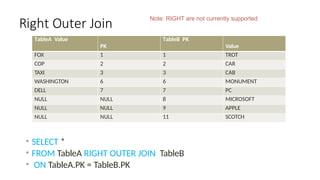
Right Outer Join
•Right outer join produces a
complete set of records
from Table B, with the
matching records (where
available) in Table A. If there
is no match, the left side
will contain null.
14.
Right Outer Join
•SELECT *
• FROM TableA RIGHT OUTER JOIN TableB
• ON TableA.PK = TableB.PK
TableA Value
PK
TableB PK
Value
FOX 1 1 TROT
COP 2 2 CAR
TAXI 3 3 CAB
WASHINGTON 6 6 MONUMENT
DELL 7 7 PC
NULL NULL 8 MICROSOFT
NULL NULL 9 APPLE
NULL NULL 11 SCOTCH
Note: RIGHT are not currently supported
15.
SQL Joins…..example
SELECT S.name,E.classid
FROM Students S RIGHT OUTER JOIN Enrolled E
ON S.sid=E.sid
S.name S.sid
Jones 11111
Smith 22222
Brown 33333
E.sid E.classid
11111 History105
11111 DataScience194
22222 French150
44444 English10
S.name E.classid
Jones History105
Jones DataScience194
Smith French150
NULL English10
E
S
17.
Full Outer Join
•Full outer join produces the
set of all records in Table A
and Table B, with matching
records from both sides
where available. If there is
no match, the missing side
will contain null.
18.
Full Outer Join
•SELECT * FROM TableA FULL OUTER JOIN TableB ON TableA.PK
= TableB.PK
TableA
Value PK
TableB
PK Value
FOX 1 1 TROT
COP 2 2 CAR
TAXI 3 3 CAB
LINCOLN 4 NULL NULL
ARIZONA 5 NULL NULL
WASHINGTON 6 6 MONUMENT
DELL 7 7 PC
LUCENT 10 NULL NULL
NULL NULL 8 MICROSOFT
NULL NULL 9 APPLE
NULL NULL 11 SCOTCH
19.
SQL Joins….. Example
SELECTS.name, E.classid
FROM Students S FULL OUTER JOIN Enrolled E
ON S.sid=E.sid
S.name S.sid
Jones 11111
Smith 22222
Brown 33333
E.sid E.classid
11111 History105
11111 DataScience194
22222 French150
44444 English10
S.name E.classid
Jones History105
Jones DataScience194
Smith French150
NULL English10
Brown NULL
E
S
21.
Cross Join
• Across join is a Cartesian Product join – it is every record in
Table A combined with every record in Table B.
• It gives the same results as not using a WHERE clause when
querying two tables in MySQL
• SELECT * from TableA CROSS JOIN TableB
• SELECT * from TableA, TableB
SQL Joins
SELECT *
FROMStudents S CROSS JOIN Enrolled E
S.name S.sid
Jones 11111
Smith 22222
E.sid E.classid
11111 History105
11111 DataScience194
22222 French150
S.name S.sid E.sid E.classid
Jones 11111 11111 History105
Jones 11111 11111 DataScience194
Jones 11111 22222 French150
Smith 22222 11111 History105
Smith 22222 11111 DataScience194
Smith 22222 22222 French150
E
S
24.
Theta Joins
SELECT *
FROMStudents S, Enrolled E
WHERE S.sid <= E.sid
S.name S.sid
Jones 11111
Smith 22222
E.sid E.classid
11111 History105
11111 DataScience194
22222 French150
S.name S.sid E.sid E.classid
Jones 11111 11111 History105
Jones 11111 11111 DataScience194
Jones 11111 22222 French150
Smith 22222 22222 French150
E
S
25.
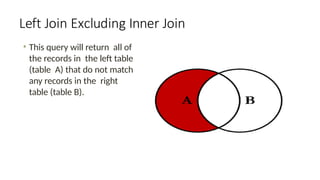
Left Join ExcludingInner Join
• This query will return all of
the records in the left table
(table A) that do not match
any records in the right
table (table B).
26.
Left Join ExcludingInner Join
• SELECT * FROM TableA LEFT JOIN TableB
• ON TableA.PK = TableB.PK
WHERE TableB.PK IS NULL;
• Perform left outer join, then exclude the records we don't want
from the right side via a where clause.
TableA
Value PK
TableB PK
Value
LINCOLN 4 NULL NULL
ARIZONA 5 NULL NULL
LUCENT 10 NULL NULL
27.
Right Join ExcludingInner Join
• This query will return all of
the records in the right table
(table B) that do not match
any records in the left table
(table A).
28.
Right Join ExcludingInner Join
• SELECT * FROM TableA RIGHT JOIN TableB
• ON TableA.PK = TableB.PK
WHERE TableA.PK IS NULL
• Perform right outer join, then exclude the records we don't
want from the left side via a where clause.
TableA
Value PK
TableB PK
Value
NULL NULL 8 MICROSOFT
NULL NULL 9 APPLE
NULL NULL 11 SCOTCH
29.
Full Outer ExcludingInner Join
• This query will return all of
the records in Table A and
Table B that do not have a
matching record in the
other table.
• In general, Not used
30.
Full Outer ExcludingInner Join
• SELECT * FROM TableA FULL OUTER JOIN TableB
• ON TableA.PK = TableB.PK
WHERE TableA.PK IS NULL OR TableB.PK IS NULL
TableA
Value PK
TableB PK
Value
NULL NULL 8 MICROSOFT
NULL NULL 9 APPLE
NULL NULL 11 SCOTCH
LINCOLN 4 NULL NULL
ARIZONA 5 NULL NULL
LUCENT 10 NULL NULL
31.
student_id student_name course_idcourse_name faculty_id faculty_name salary
101 Rahul C01 DBMS F01 Dr. Verma 70000
102 Priya C01 DBMS F01 Dr. Verma 70000
103 Ankit C02 Java F02 Ms. Neha 65000
104 Sita C02 Java F02 Ms. Neha 65000
105 Aman C03 Python F03 Mr. Kumar 60000
106 Deepak C03 Python F03 Mr. Kumar 60000
107 Meena C01 DBMS F01 Dr. Verma 70000
108 Karan C02 Java F02 Ms. Neha 65000
109 Simran C04 C++ F04 Dr. Arjun 72000
110 Riya C04 C++ F04 Dr. Arjun 72000
Students and Faculty
32.
1. Insert Anomaly
•Ifwe want to add a new course and its faculty but no student has
enrolled yet, we can't insert it.
•Example: Can’t insert course C05, "AI", with faculty F05 until a student takes it.
Anomalies Students and Faculty table Can Cause:
2. Update Anomaly
•If we update Dr. Verma’s salary in one row but forget to update it in all rows → data mismatch.
3. Delete Anomaly
•If the last student in course C03 (Python) is deleted, all data about that course and faculty is lost.
To avoid anomalies:
•Break into 3 tables:
•students(student_id, student_name)
•courses(course_id, course_name, faculty_id)
•faculty(faculty_id, faculty_name, salary)
•And use foreign keys
33.
Understanding Indexing inMySQL
An index in MySQL is a data structure that improves the speed of data
retrieval operations on a database table.
Think of it like a book index – instead of reading every page, you go
directly to the topic.
Why Use Indexing?
Faster SELECT queries
Efficient data search
Reduced data scanning
But:
Slows down INSERT, UPDATE, DELETE
Takes extra disk space
34.
Basic Syntax ofIndex
Create index on existing table:
CREATE INDEX index_name ON table_name (column_name);
Drop index:
DROP INDEX index_name ON table_name;
Example Without Index
CREATE TABLE students ( id INT, name VARCHAR(100), age INT );
Query without index:
SELECT * FROM students WHERE name = 'Amit';
This does full table scan
Example With Index
Add index:
CREATE INDEX idx_name ON students(name);
Now the query:
SELECT * FROM students WHERE name = 'Amit';
Uses index lookup → Faster!
35.
Composite Index Example
CREATEINDEX idx_name_age ON students(name, age);
Optimized for queries like:
SELECT * FROM students WHERE name='Amit' AND age=20;
When Not to Use Index
On small tables
On columns with many duplicates
If table updates are frequent
36.
Indexing Demonstration Activity:"Speed Up the Search"
Goal:Show that searching *with an index* is much faster than *without an index*
CREATE TABLE people
( id INT AUTO_INCREMENT PRIMARY KEY,
name VARCHAR(100),
email VARCHAR(100),
phone VARCHAR(20)
);
DELIMITER //CREATE PROCEDURE populate_people()BEGIN DECLARE i INT DEFAULT 1; WHILE i <=
1000000 DO INSERT INTO people (name, email, phone) VALUES ( CONCAT('Person_', i),
CONCAT('person', i, '@example.com'), CONCAT('12345', LPAD(i, 5, '0')) ); SET i = i + 1; END
WHILE;END;//DELIMITER ;-- Run the procedureCALL populate_people();
Step 3: Run Search Without Index#### Find a record:sql-- Start timerSELECT NOW();-- Execute slow
querySELECT * FROM people WHERE email = 'person999999@example.com';-- End timerSELECT
NOW();