ENTERPRISE DB SERVER AN INTRODUCTION 
Why do we need to know structure, features of an enterprise database? 
As Batman said: Either you die yourself a hero or live long enough to see yourself becoming a villain. 
(The Dark Knight) 
Microsoft, Oracle & even Apple: Lived long enough to see themselves becoming villains. Web does 
not like them, open source community dislikes them. :) 
(Antitrust, proprietary code, patent war, aggressive sales tactics, Market Monopoly, DRM) 
But Microsoft Windows Server Software still resides on 16% web server machines, 54% of all 
fortune 1000 company servers. Not to mention many corporate SME use entire microsoft stack in 
their intranet making it top intranet based software. 
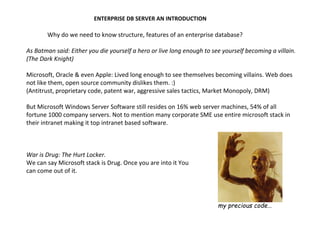
War is Drug: The Hurt Locker. 
We can say Microsoft stack is Drug. Once you are into it You 
can come out of it. 
my precious code…
Why? 
Microsoft SQL Server may not be the best enterpriseDB out there but it has the best Software 
Suit in terms of packaging of various components, features and analytics verticals. 
Basic components of the sql server database is as follows 
Sql Server Database engine (DB Objects, Jobs, Query Tools, Tuning tools, Full-Text, Log and DTC) 
Sql Server Analysis Services (OLAP, Cubes, PostGre In Memory, BI, Business Analytics) 
Sql Server Reporting engine (Charting, Matrix, Templates, Sub Reports) 
Sql Server Integration services (DTS Packages) 
[1] SQL Server Database Engine: This part of SQL Server actually creates and drives relational 
databases. (profiler, Agent, DB Mail, Browser, Pipes, mdf and ldf, Recovery, Mirror, RAIDs) 
[2] SQL Server Analysis Services (SSAS): SSAS is the data-analysis component of SQL Server. It 
can create OLAP (OnLine Analytical Processing) cubes sophisticated programming objects for 
organizing data inside a relational database and do data mining (pulling relevant data out of a 
database in response to an ad-hoc question). 
[3] SQL Server Reporting Services (SSRS): SSRS is a component of SQL Server that provides 
reporting regardless of a database’s operating system. 
[4] SQL Server Integration Services (SSIS): SSIS is a component of SQL Server that does the 
Extract, Transform, and Load (ETL) process that cleans up and formats raw data from source 
systems for inclusion in the database as ready-to-use information.
SQL 
SERVER 
MY SQL 
Feature Comparison
DB INDEXING 
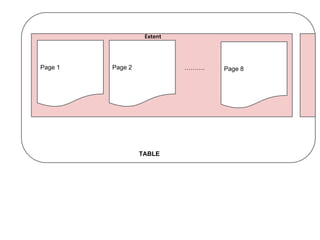
•Extent 
–8 contiguous 64KByte size data Pages 
–Once extent full, next record will take up a whole additional extent. 
–Pre-allocating space saves time. 
•Page 
–64K bytes 
–# of records/page varies with bytes/record 
–Types of Pages: Data and Index pages 
–Page Split 
–When page becomes full, it splits 
–New page allocated: ½ data from old page moved to new (FILL FACTOR*) 
•Rows 
–Storage is different as per different versions 
–Text data or Blob data is stored differently, only finite data is stored in Pages
Extent 
Page 1 Page 2 ………. 
Page 8 
TABLE
● Two types of Index: 
Clustered and Nonclustered Index (Ordered and Hashed Index) 
|Amit| 24| Vidhya Nagar| Bharat| 27| 
Jay Nagar| Kumar| 22| vikas 
Nagar |Lukcy| 24| Shastri Nagar| 
|Mohan| 44| Vidhyadhar Nagar| 
PAGE 1 
|Sanjay| 24| Vidhya Nagar| Sumit| 
27| Jay Nagar| Tarun| 22| 
vikas Nagar |Yusuf| 24| Shastri Nagar| 
|Zakir| 44| Vidhyadhar Nagar| 
PAGE 2 
Index 
Amit - Page 1 
Bharat - Page 1 
... 
Sumit - Page 2
Nonclustered Index 
|Amit| 24| Vidhya Nagar| Bharat| 27| 
Jay Nagar| Kumar| 22| vikas 
Nagar |Lukcy| 24| Shastri Nagar| 
|Mohan| 44| Vidhyadhar Nagar| 
PAGE 1 
|Sanjay| 25| Vidhya Nagar| Sumit| 
27| Jay Nagar| Tarun| 22| 
vikas Nagar |Yusuf| 26| Shastri Nagar| 
|Zakir| 44| Vidhyadhar Nagar| 
PAGE 2 
Index 
24 - Page 1 
27 - Page 1 
27 - Page 2 
... 
Index DESC 
27 - Page 1 
27 - Page 2 
24 - Page 1 
...
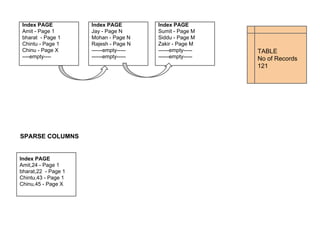
FRAGMENTATION / FILL FACTOR / SPARSE COLUMNS 
Index PAGE 
Amit - Page 1 
bharat - Page 1 
Chintu - Page 1 
--40-- 
Index PAGE 
Jay - Page N 
Mohan - Page N 
Rajesh - Page N 
--40-- 
Index PAGE 
Sumit - Page M 
Siddu - Page M 
Zakir - Page M 
---40--- 
TABLE 
No of Records 
120 
Index PAGE 
Amit - Page 1 
bharat - Page 1 
Chintu - Page 1 
--40-- 
Index PAGE 
Jay - Page N 
Mohan - Page N 
Rajesh - Page N 
--40-- 
Index PAGE 
Sumit - Page M 
Siddu - Page M 
Zakir - Page M 
---40--- 
Index PAGE 
Chinu - Page X
TABLE 
No of Records 
121 
Index PAGE 
Amit - Page 1 
bharat - Page 1 
Chintu - Page 1 
Chinu - Page X 
----empty---- 
Index PAGE 
Jay - Page N 
Mohan - Page N 
Rajesh - Page N 
------empty----- 
------empty----- 
Index PAGE 
Sumit - Page M 
Siddu - Page M 
Zakir - Page M 
------empty----- 
------empty----- 
SPARSE COLUMNS 
Index PAGE 
Amit,24 - Page 1 
bharat,22 - Page 1 
Chintu,43 - Page 1 
Chinu,45 - Page X
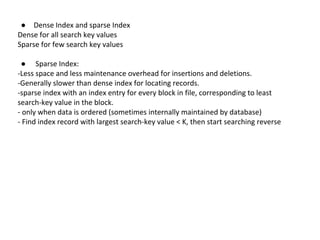
● Dense Index and sparse Index 
Dense for all search key values 
Sparse for few search key values 
● Sparse Index: 
-Less space and less maintenance overhead for insertions and deletions. 
-Generally slower than dense index for locating records. 
-sparse index with an index entry for every block in file, corresponding to least 
search-key value in the block. 
- only when data is ordered (sometimes internally maintained by database) 
- Find index record with largest search-key value < K, then start searching reverse
Multi Level Index:
Points: 
● Updating indices imposes overhead on database modification --when a 
row is modified, every index on the row must be updated. e.g. Log Table 
● High Insert values: Bulk insert, BCP routines 
● Sequential scan using clustered index is efficient, but a sequential scan 
using a non clustered index is expensive. 
● Only one clustered index, hundreds of non clustered index (ascending, 
descending) 
● Where > clause = clustered index 
● Where = clause Non clustered index 
● Index Maintenance is also important due to fragmentation 
● Full Text
Choosing between clustered and non-clustered index: 
Five Factors involved when choosing the indexing technique 
• Access type - is the type of access being used. 
• Access time - time required to locate the data. 
• Insertion time - time required to insert the new data. 
• Deletion time - time required to delete the data. 
• Space overhead - the additional space occupied by the added data 
structure.
Hopefully ☺ 
● Database Components & features 
● Sql Constructs 
● Database design & Normalization 
● Analytics & Reporting Concepts 
● Database Maintenance & tuning 
● Database Architectures

Enterprise dbs and Database indexing

  • 1.
    ENTERPRISE DB SERVERAN INTRODUCTION Why do we need to know structure, features of an enterprise database? As Batman said: Either you die yourself a hero or live long enough to see yourself becoming a villain. (The Dark Knight) Microsoft, Oracle & even Apple: Lived long enough to see themselves becoming villains. Web does not like them, open source community dislikes them. :) (Antitrust, proprietary code, patent war, aggressive sales tactics, Market Monopoly, DRM) But Microsoft Windows Server Software still resides on 16% web server machines, 54% of all fortune 1000 company servers. Not to mention many corporate SME use entire microsoft stack in their intranet making it top intranet based software. War is Drug: The Hurt Locker. We can say Microsoft stack is Drug. Once you are into it You can come out of it. my precious code…
  • 2.
    Why? Microsoft SQLServer may not be the best enterpriseDB out there but it has the best Software Suit in terms of packaging of various components, features and analytics verticals. Basic components of the sql server database is as follows Sql Server Database engine (DB Objects, Jobs, Query Tools, Tuning tools, Full-Text, Log and DTC) Sql Server Analysis Services (OLAP, Cubes, PostGre In Memory, BI, Business Analytics) Sql Server Reporting engine (Charting, Matrix, Templates, Sub Reports) Sql Server Integration services (DTS Packages) [1] SQL Server Database Engine: This part of SQL Server actually creates and drives relational databases. (profiler, Agent, DB Mail, Browser, Pipes, mdf and ldf, Recovery, Mirror, RAIDs) [2] SQL Server Analysis Services (SSAS): SSAS is the data-analysis component of SQL Server. It can create OLAP (OnLine Analytical Processing) cubes sophisticated programming objects for organizing data inside a relational database and do data mining (pulling relevant data out of a database in response to an ad-hoc question). [3] SQL Server Reporting Services (SSRS): SSRS is a component of SQL Server that provides reporting regardless of a database’s operating system. [4] SQL Server Integration Services (SSIS): SSIS is a component of SQL Server that does the Extract, Transform, and Load (ETL) process that cleans up and formats raw data from source systems for inclusion in the database as ready-to-use information.
  • 3.
    SQL SERVER MYSQL Feature Comparison
  • 4.
    DB INDEXING •Extent –8 contiguous 64KByte size data Pages –Once extent full, next record will take up a whole additional extent. –Pre-allocating space saves time. •Page –64K bytes –# of records/page varies with bytes/record –Types of Pages: Data and Index pages –Page Split –When page becomes full, it splits –New page allocated: ½ data from old page moved to new (FILL FACTOR*) •Rows –Storage is different as per different versions –Text data or Blob data is stored differently, only finite data is stored in Pages
  • 5.
    Extent Page 1Page 2 ………. Page 8 TABLE
  • 6.
    ● Two typesof Index: Clustered and Nonclustered Index (Ordered and Hashed Index) |Amit| 24| Vidhya Nagar| Bharat| 27| Jay Nagar| Kumar| 22| vikas Nagar |Lukcy| 24| Shastri Nagar| |Mohan| 44| Vidhyadhar Nagar| PAGE 1 |Sanjay| 24| Vidhya Nagar| Sumit| 27| Jay Nagar| Tarun| 22| vikas Nagar |Yusuf| 24| Shastri Nagar| |Zakir| 44| Vidhyadhar Nagar| PAGE 2 Index Amit - Page 1 Bharat - Page 1 ... Sumit - Page 2
  • 7.
    Nonclustered Index |Amit|24| Vidhya Nagar| Bharat| 27| Jay Nagar| Kumar| 22| vikas Nagar |Lukcy| 24| Shastri Nagar| |Mohan| 44| Vidhyadhar Nagar| PAGE 1 |Sanjay| 25| Vidhya Nagar| Sumit| 27| Jay Nagar| Tarun| 22| vikas Nagar |Yusuf| 26| Shastri Nagar| |Zakir| 44| Vidhyadhar Nagar| PAGE 2 Index 24 - Page 1 27 - Page 1 27 - Page 2 ... Index DESC 27 - Page 1 27 - Page 2 24 - Page 1 ...
  • 8.
    FRAGMENTATION / FILLFACTOR / SPARSE COLUMNS Index PAGE Amit - Page 1 bharat - Page 1 Chintu - Page 1 --40-- Index PAGE Jay - Page N Mohan - Page N Rajesh - Page N --40-- Index PAGE Sumit - Page M Siddu - Page M Zakir - Page M ---40--- TABLE No of Records 120 Index PAGE Amit - Page 1 bharat - Page 1 Chintu - Page 1 --40-- Index PAGE Jay - Page N Mohan - Page N Rajesh - Page N --40-- Index PAGE Sumit - Page M Siddu - Page M Zakir - Page M ---40--- Index PAGE Chinu - Page X
  • 9.
    TABLE No ofRecords 121 Index PAGE Amit - Page 1 bharat - Page 1 Chintu - Page 1 Chinu - Page X ----empty---- Index PAGE Jay - Page N Mohan - Page N Rajesh - Page N ------empty----- ------empty----- Index PAGE Sumit - Page M Siddu - Page M Zakir - Page M ------empty----- ------empty----- SPARSE COLUMNS Index PAGE Amit,24 - Page 1 bharat,22 - Page 1 Chintu,43 - Page 1 Chinu,45 - Page X
  • 10.
    ● Dense Indexand sparse Index Dense for all search key values Sparse for few search key values ● Sparse Index: -Less space and less maintenance overhead for insertions and deletions. -Generally slower than dense index for locating records. -sparse index with an index entry for every block in file, corresponding to least search-key value in the block. - only when data is ordered (sometimes internally maintained by database) - Find index record with largest search-key value < K, then start searching reverse
  • 11.
  • 12.
    Points: ● Updatingindices imposes overhead on database modification --when a row is modified, every index on the row must be updated. e.g. Log Table ● High Insert values: Bulk insert, BCP routines ● Sequential scan using clustered index is efficient, but a sequential scan using a non clustered index is expensive. ● Only one clustered index, hundreds of non clustered index (ascending, descending) ● Where > clause = clustered index ● Where = clause Non clustered index ● Index Maintenance is also important due to fragmentation ● Full Text
  • 13.
    Choosing between clusteredand non-clustered index: Five Factors involved when choosing the indexing technique • Access type - is the type of access being used. • Access time - time required to locate the data. • Insertion time - time required to insert the new data. • Deletion time - time required to delete the data. • Space overhead - the additional space occupied by the added data structure.
  • 14.
    Hopefully ☺ ●Database Components & features ● Sql Constructs ● Database design & Normalization ● Analytics & Reporting Concepts ● Database Maintenance & tuning ● Database Architectures