An Overview of the
New Features in ABAP
© SAP AG 2006, SAP TechEd ’06 / CD200 / 2
Agenda
Horst Keller
Knowledge Architect, SAP AG
ABAP Debugger
ABAP Unit
Memory Inspector
Regular Expressions
Shared Objects
Checkpoints
ABAP Editor
Enhancement Framework
Simple Transformations
Preview of Next Release
ABAP Debugger
ABAP Unit
Memory Inspector
Regular Expressions
Shared Objects
Checkpoints
ABAP Editor
Enhancement Framework
Simple Transformations
Preview of Next Release
© SAP AG 2006, SAP TechEd ’06 / CD200 / 5
Learning Objectives
As a result of this lecture, you will have an
overview
of many of the new ABAP features available with SAP
NetWeaver 04 and SAP NetWeaver 2004s
of the new ABAP features coming with the follow-up release
ABAP Debugger
ABAP Unit
Memory Inspector
Regular Expressions
Shared Objects
Checkpoints
ABAP Editor
Enhancement Framework
Simple Transformations
Preview of Next Release
© SAP AG 2006, SAP TechEd ’06 / CD200 / 7
Regular Expressions (Regexes, REs) are more powerful than
traditional SAP patterns (SEARCH txt FOR pat, IF txt CP pat)
Well understood
– Developed by mathematician Kleene in the 1950s
Powerful
– Highly focused special purpose language
– Many common text processing tasks turn into
simple one-liners
Standardized and widely used
– Made popular by Unix tools: grep, sed, awk, emacs
– Built into some languages like Perl and Java;
add-on libraries available for many others
– Early Unix de-facto standard formalized in PCRE and POSIX
ABAP supports POSIX regular expressions as of Release 7.00
Improved Text Processing With REs
Stephen C. Kleene
Image © U. of Wisconsin
© SAP AG 2006, SAP TechEd ’06 / CD200 / 8
Regular Expression Terminology
Regular expressions are built from
Literals
Special operators (metacharacters)
Prepending  turns operators into literals
REs match or represent sets of text strings
RE matches text if complete text is represented by RE
REs are commonly used for searching text
Text to be searched may contain one or more matches
Usually interested in left-most, longest match contained in text
a b c 1 2 3 ä à ß , / = …
. * + ?  ^ $ ( ) [ ] { }
Match
Search
© SAP AG 2006, SAP TechEd ’06 / CD200 / 9
Regular Expressions Quick Check
What is the main difference betweens file system wildcards
like *.jpg and regular expressions?
How are SAP patterns
written as regular expressions?
pat pat+ *pat p#*t
pat pat. .*pat p*t
files: * = sequence of characters
REs: * = general repetition, requires specification
of what should be repeated;
sequence of characters becomes .*
© SAP AG 2006, SAP TechEd ’06 / CD200 / 10
Regex Reference Chart (1)
Name Operator Matches
Literals a
*
literal character
turn special operator * into literal character *
Sets [abc]
[^abc]
[a-z]
any literal character listed
any literal character NOT listed
any literal character within range listed (can be combined
with above)
Classes
(to be used
within sets)
[:alpha:]
[:digit:] [:xdigit:]
[:alnum:] [:word:]
[:upper:] [:lower:]
[:space:] [:blank:]
[:punct:] [:graph:]
[:print:] [:cntrl:]
[:unicode:]
any letter, including non-latin alphabets
any digit 0-9/hex digit 0-9A-F
[:alpha:] plus [:digit:]/same plus '_' character
any uppercase/lowercase character
any whitespace character/blank or horizontal tab
any punctuation/graphical character
any printable/control code character
any Unicode character above ASCII 255
Wildcard . any character
Repetitions r*
r+
r{m}
r{m,n}
r?
zero or more repetitions of r
one of more repetitions of r
exactly m repetitions of r
at least m and at most n repetitions of r
optional r, i.e., zero or one repetition of r
Alternatives r|s either r or s
© SAP AG 2006, SAP TechEd ’06 / CD200 / 11
Regex Reference Chart (2)
Name Operator Matches
Abbreviations n t a
w W
d D
s S
u U
l L
newline/tab/bell character
equivalent to [[:word:]] and [^[:word:]]
equivalent to [[:digit:]] and [^[:digit:]]
equivalent to [[:space:]] and [^[:space:]]
equivalent to [[:upper:]] and [^[:upper:]]
equivalent to [[:lower:]] and [^[:lower:]]
Quote Q … E interpret quoted sequence as literal characters
Anchors A z
^ $
< >
b
B
begin and end of buffer (i.e., text to search)
begin and end of line (buffer separated into lines by n chars)
begin and end of word
either begin or end of word
inside of a word, i.e., between two w's
Back references ( )
1 2 3 …
(?: )
group subexpression and save submatch into register
matches contents of n-th register
group subexpression, but do not store in register
Look-ahead r(?=s)
r(?!s)
matches r iff r is followed by s
matches r iff r is NOT followed by s
Cuts (?>r) do not backtrack for left-most longest match once r has
matched
© SAP AG 2006, SAP TechEd ’06 / CD200 / 12
Searching for Matches with FIND
New addition REGEX to the FIND statement:
Detailed match information is available with RESULTS addition.
FIND returns left-most longest match within text.
FIND
[{FIRST OCCURRENCE}|{ALL OCCURRENCES} OF] REGEX regx
IN text
[{RESPECTING|IGNORING} CASE]
[MATCH COUNT mcnt]
[RESULTS result_tab].
© SAP AG 2006, SAP TechEd ’06 / CD200 / 13
Replacing Matches with REPLACE
New addition REGEX to the REPLACE statement:
Search works exactly as in FIND.
REPLACE
[{FIRST OCCURRENCE}|{ALL OCCURRENCES} OF] REGEX regx
IN text WITH repl
[{RESPECTING|IGNORING} CASE]
[REPLACEMENT COUNT mcnt]
[RESULTS result_tab].
© SAP AG 2006, SAP TechEd ’06 / CD200 / 14
Grouping and Submatches
Parentheses structure complex expressions
Define scope of operators
Store submatches for later reference
– Submatches easily available with FIND additions
– Groups numbered left-to-right, can be nested
– No upper limit on number of groups
– Can refer to submatches within pattern and replacement
Non-registering parentheses (?:…) do not store submatch
– Increased performance over ( )
tick*tock* (tick)*(tock)* (ticktock)*
(?:tick)*(?:tock)*
very
useful
© SAP AG 2006, SAP TechEd ’06 / CD200 / 15
Example: Match-Based Replacements
The replacement string can refer to submatches of match being
replaced
$0 contains complete match
$1,$2, ... contain submatches
Result:
DATA: html TYPE string,
repl TYPE string,
regx TYPE string.
html = `<title>This is the <i>Title</i></title>`.
repl = `i`.
CONCATENATE repl '(?![^<>]*>)' INTO regx.
REPLACE ALL OCCURRENCES OF REGEX regx
IN html WITH <b>$0</b>`.
<title>Th<b>i</b>s <b>i</b>s the <i>T<b>i</b>tle</i></title>
© SAP AG 2006, SAP TechEd ’06 / CD200 / 16
Classes for Regular Expressions
ABAP Objects provides two classes for using REs
Regex CL_ABAP_REGEX
– Stores compiled automaton for RE pattern
– Should be reused to avoid costly recompilation
– Offers simplified syntax and disabling of
submatches
– Can be used in FIND and REPLACE statements
instead of textual pattern
Matcher CL_ABAP_MATCHER
– Main class for interaction with REs
– Stores copy of text to process (efficient for
strings, costly for fixed-length fields)
– Links text to regex object and tracks matching
and replacing within text
CL_ABAP_MATCHER
$0___
___
___
CL_ABAP_REGEX
a*b
© SAP AG 2006, SAP TechEd ’06 / CD200 / 17
Matcher Class Reference Chart (1)
CL_ABAP_MATCHER Instance Methods
find_next( ) find next unprocessed match
replace_found( new ) replace match found by new *)
get_match( ) return match information (MATCH_RESULT) *)
get_offset( [n] ) return offset of current (sub)match *)
replace_all( new ) replace all remaining matches
get_submatch( n ) return n-th submatch *)
get_length( [n] ) return length of current (sub)match *)
find_all( ) return all remaining matches
replace_next ( new ) find and replace next unprocessed match
*) throws exception if no current match stored
© SAP AG 2006, SAP TechEd ’06 / CD200 / 18
Matcher Class Reference Chart (2)
CL_ABAP_MATCHER Class Methods
create( pattern text ) create and return matcher object
matches( pattern text ) returns abap_true if pattern matches text
contains( pattern text ) returns abap_true if text contains pattern
match
get_object( ) returns matcher object containing match
information about last matches( ) or
contains( ) invocation
© SAP AG 2006, SAP TechEd ’06 / CD200 / 19
Creating Regex Objects
There are two ways of setting up objects for RE processing
Using CREATE
Using factory method
CREATE OBJECT regex EXPORTING pattern = '^a*'
ignore_case = abap_true.
CREATE OBJECT matcher EXPORTING regex = regex
text = text.
DATA: regex TYPE REF TO cl_abap_regex,
matcher TYPE REF TO cl_abap_matcher.
matcher = cl_abap_matcher=>create( pattern = '^a*'
text = text ).
© SAP AG 2006, SAP TechEd ’06 / CD200 / 20
Example: Pattern Matching
Checking the format of an Email address:
PARAMETERS email TYPE c LENGTH 30 LOWER CASE
default 'shai.agassi@sap.com'.
DATA matcher TYPE REF TO cl_abap_matcher.
matcher = cl_abap_matcher=>create(
pattern = `w+(.w+)*@(w+.)+(w{2,4})`
ignore_case = 'X'
text = email ).
IF matcher->match( )IS INITIAL.
MESSAGE 'Wrong Format' TYPE 'I'.
ELSE.
MESSAGE 'Format OK' TYPE 'I'.
ENDIF.
ABAP Debugger
ABAP Unit
Memory Inspector
Regular Expressions
Shared Objects
Checkpoints
ABAP Editor
Enhancement Framework
Simple Transformations
Preview of Next Release
© SAP AG 2006, SAP TechEd ’06 / CD200 / 22
Data Access without Buffering
DB
User X
Session
© SAP AG 2006, SAP TechEd ’06 / CD200 / 23
Data Access with Buffering by Copy
Common data
retrieved from DB
User X
Session
Common
Data
DB
© SAP AG 2006, SAP TechEd ’06 / CD200 / 24
Data Access without Buffering
Common data
retrieved from DB and
aggregated
User X
Session
DB
© SAP AG 2006, SAP TechEd ’06 / CD200 / 25
Data Access without Buffering
User Y
Session
Common
Data
User X
Session
Common
Data
DB
Common data
retrieved from DB and
aggregated for
each user session
User Z
Session
Common
Data
Common
Data
Common
Data
© SAP AG 2006, SAP TechEd ’06 / CD200 / 26
Data Access with Buffering by Copy
DB
User X
Session
© SAP AG 2006, SAP TechEd ’06 / CD200 / 27
Data Access with Buffering by Copy
Common data
retrieved from DB
User X
Session
Common
Data
DB
© SAP AG 2006, SAP TechEd ’06 / CD200 / 28
Data Access with Buffering by Copy
Common data
retrieved from DB,
aggregated
User X
Session
DB
© SAP AG 2006, SAP TechEd ’06 / CD200 / 29
Data Access with Buffering by Copy
Common data
retrieved from DB,
aggregated,
copied (EXPORT) to SHM
User X
Session
Common
Data
DB
Shared Memory (SHM)
Common
Data
© SAP AG 2006, SAP TechEd ’06 / CD200 / 30
Data Access with Buffering by Copy
User X
Session
Common
Data
DB
Common data
retrieved from DB,
aggregated,
copied (EXPORT) to SHM,
and copied (IMPORT) to
each user session
Shared Memory (SHM)
Common
Data
User Y
Session
Common
Data
User Z
Session
Common
Data
© SAP AG 2006, SAP TechEd ’06 / CD200 / 31
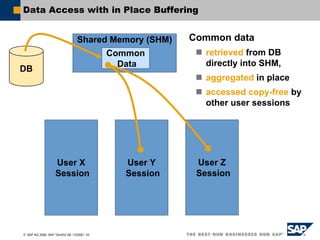
Data Access with in Place Buffering
Common data
retrieved from DB
directly into SHM
User X
Session
DB
Shared Memory (SHM)
Common
Data
© SAP AG 2006, SAP TechEd ’06 / CD200 / 32
Data Access with in Place Buffering
Common data
retrieved from DB
directly into SHM,
aggregated in place
DB
Shared Memory (SHM)
Common
Data
User X
Session
© SAP AG 2006, SAP TechEd ’06 / CD200 / 33
Data Access with in Place Buffering
User X
Session
DB
Common data
retrieved from DB
directly into SHM,
aggregated in place
accessed copy-free by
other user sessions
Shared Memory (SHM)
Common
Data
User Y
Session
User Z
Session
© SAP AG 2006, SAP TechEd ’06 / CD200 / 34
Areas and Area Instances
Shared Objects memory
Part of the shared memory
Shared Objects areas
Organizational units
Defined at design time
Shared Objects area instances
Content stored at runtime
Identified by unique name
Shared Memory
Area Area
I
n
s
t
a
n
c
e
I
n
s
t
a
n
c
e
I
n
s
t
a
n
c
e
Shared Objects Memory
© SAP AG 2006, SAP TechEd ’06 / CD200 / 35
Working with Area Instances
InstanceAttach for write
RootFill the contents
© SAP AG 2006, SAP TechEd ’06 / CD200 / 36
Working with Area Instances
Attach for write Instance
RootFill the contents
Commit changes
© SAP AG 2006, SAP TechEd ’06 / CD200 / 37
Working with Area Instances
Attach for write Instance
RootFill the contents
Commit changes
Attach Reader1
© SAP AG 2006, SAP TechEd ’06 / CD200 / 38
Working with Area Instances
Attach for write Instance
RootFill the contents
Commit changes
Attach Reader1
Attach Reader2
© SAP AG 2006, SAP TechEd ’06 / CD200 / 39
Working with Area Instances
Attach for write Instance
RootFill the contents
Commit changes
Attach Reader1
Attach Reader2
Detach Reader1
© SAP AG 2006, SAP TechEd ’06 / CD200 / 40
Working with Area Instances
Attach for write Instance
RootFill the contents
Commit changes
Attach Reader1
Attach Reader2
Detach Reader1
Detach Reader2
© SAP AG 2006, SAP TechEd ’06 / CD200 / 41
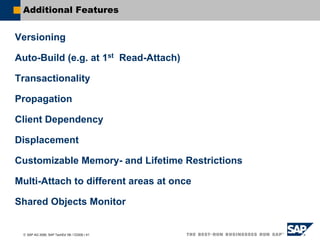
Additional Features
Versioning
Auto-Build (e.g. at 1st Read-Attach)
Transactionality
Propagation
Client Dependency
Displacement
Customizable Memory- and Lifetime Restrictions
Multi-Attach to different areas at once
Shared Objects Monitor
ABAP Debugger
ABAP Unit
Memory Inspector
Regular Expressions
Shared Objects
Checkpoints
ABAP Editor
Enhancement Framework
Simple Transformations
Preview of Next Release
© SAP AG 2006, SAP TechEd ’06 / CD200 / 43
ABAP / XML Mapping: Simple Transformations
ABAP
Data
… .. ….
…. … ..
.. …. …. ..
… …. .. ..
XML
Doc
XSLT
… .. ….
…. … ..
.. …. …. ..
HTML / Text
XSLT
XSLT
Simple
Transformations
DB
Network
XSLT
XSLT
new in
NetWeaver
04
© SAP AG 2006, SAP TechEd ’06 / CD200 / 44
ABAP / XML Mapping Languages
XSLT (since 6.10)
works on canonical XML representation of ABAP data (asXML)
builds DOM for source side
arbitrarily complex transformations
Simple Transformations (since NetWeaver 04)
only for ABAP ↔ XML
only linear transformations (no DOM)
speedup over XSLT: 10 – 30; “unlimited” size of data
reversible (one program for both directions)
Both
symmetric: no generation of ABAP code / XML schemas
integrated in workbench (maintenance / transport)
integrated in ABAP: CALL TRANSFORMATION
© SAP AG 2006, SAP TechEd ’06 / CD200 / 45
Simple Transformations: Expressive Power
Anything that can be done with ...
accessing each node in the data tree
any number of times
accessing each node in the XML tree
at most once,
in document order (with "lookahead 1" on XML source)
... which includes (any combination of) ...
renamings (e.g.: structure-component / element names)
projections (omission of sub-trees)
permutations (changes in sub-tree order)
constants (e.g.: constant values, insertion of tree levels)
defaults (for initial / special values)
conditionals (e.g.: existence of sub-trees, value of nodes)
value maps
covers most data mappings in practice
© SAP AG 2006, SAP TechEd ’06 / CD200 / 46
Simple Transformations: Program Structure
Programs are XML templates
literal XML with
interspersed instructions
declarative, straightforward
semantics
Data tree access by
node references
instructions access data by
simple “reference expressions”
all named children of a data node
are accessible by name
tables are accessible as a whole
(all lines or none)
<Customers>
<tt:loop ref="CUSTTAB">
<LastName>
<tt:value ref=
"NAME.LAST"/>
</LastName>
</tt:loop>
</Customers>
© SAP AG 2006, SAP TechEd ’06 / CD200 / 47
Simple Transformations: Example
<?sap.transform simple?>
<tt:transform
xmlns:tt="http://www.sap.com/transformation-templates">
<tt:root name="table"/>
<tt:template>
<TABLE>
<tt:loop ref=".table">
<ITEM>
<tt:value />
</ITEM>
</tt:loop>
</TABLE>
</tt:template>
</tt:transform>
DATA: itab TYPE TABLE OF i,
xmlstr TYPE xstring.
DO 3 TIMES. APPEND sy-index TO itab. ENDDO.
CALL TRANSFORMATION z_simple_table
SOURCE table = itab
RESULT XML xmlstr.
CALL FUNCTION 'DISPLAY_XML_STRING'
EXPORTING xml_string = xmlstr.
ABAP Debugger
ABAP Unit
Memory Inspector
Regular Expressions
Shared Objects
Checkpoints
ABAP Editor
Enhancement Framework
Simple Transformations
Preview of Next Release
© SAP AG 2006, SAP TechEd ’06 / CD200 / 49
Checkpoints in ABAPsystemstate
program flow
consistent state
normaltermination
© SAP AG 2006, SAP TechEd ’06 / CD200 / 50
Checkpoints in ABAPsystemstate
program flow
consistent state
normaltermination
unexpected
behavior
© SAP AG 2006, SAP TechEd ’06 / CD200 / 51
Checkpoints in ABAP
systemstate
program flow
consistent state
normaltermination
: assertion
runtime
error
systemstate
program flow
consistent state
normaltermination
unexpected
behavior
find cause of error in shorter time
© SAP AG 2006, SAP TechEd ’06 / CD200 / 52
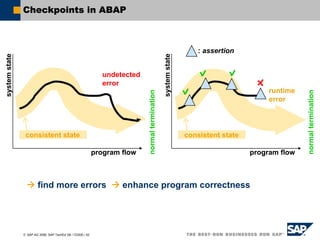
Checkpoints in ABAP
systemstate
program flow
consistent state
normaltermination
: assertion
runtime
error
systemstate
program flow
consistent state
normaltermination
undetected
error
find more errors enhance program correctness
© SAP AG 2006, SAP TechEd ’06 / CD200 / 53
Checkpoints in ABAP
ASSERT - Statement:
BREAK-POINT - Statement:
LOG-POINT - Statement:
ASSERT ID group
SUBKEY subkey
FIELDS dobj1 dobj2 ...
CONDITION log_exp.
BREAK-POINT ID group.
LOG-POINT ID group.
© SAP AG 2006, SAP TechEd ’06 / CD200 / 54
Checkpoints in ABAP
Activation method
dynamic, while system is running
Activation granularity
Logical „checkpoint groups“
Compose „variants“ from
Checkpoint groups, variants,
All checkpoints in programs, function groups, classes
Extract checkpoint groups from programs, function groups,
classes, packages, development components
User, server
Assertion mechanism
Abort, debug or protocol
© SAP AG 2006, SAP TechEd ’06 / CD200 / 55
Checkpoints in ABAP
ABAP checkpoints support developers in writing
correct code
Activated in SAP development systems ( abort, protocol )
Code instrumented with checkpoints is easier to
support and maintain
Can be activated on the fly in productive systems ( activation
for dedicated user, server )
No activation, no performance loss !!!
ABAP Debugger
ABAP Unit
Memory Inspector
Regular Expressions
Shared Objects
Checkpoints
ABAP Editor
Enhancement Framework
Simple Transformations
Preview of Next Release
© SAP AG 2006, SAP TechEd ’06 / CD200 / 57
New ABAP Editor
Modern Editor control
with syntax coloring
and many additional
features
Automatic syntax check!
© SAP AG 2006, SAP TechEd ’06 / CD200 / 58
Editor Features - Outlining
See Start / End / Middle
of language block
Collapse/Expand Block
Collapse same type
blocks
Collapse Comments
User defined
“Outlining Regions”
See current scope
See collapsed text
© SAP AG 2006, SAP TechEd ’06 / CD200 / 59
Editor Features - Templates
User and language
dependent
Expandable by Ctrl +
Enter
Built in runtime tags (Date
Time, Clipboard Content,
Document Name)
Interactive tags
Suggested by Code Hints
Extract template from
selected text
Surround by template
© SAP AG 2006, SAP TechEd ’06 / CD200 / 60
Editor Features - Code Hints
Code Hints
Suggest valid
keywords
and recently used
identifiers
Runs automatically as
you type
For templates
shortcuts
For misspelling from
auto correction
dictionary
Customizing of
suggestions
© SAP AG 2006, SAP TechEd ’06 / CD200 / 61
Editor Features - Clipboard
Clipboard Ring
Extended Paste Menu
Normal and block format
Multiple Clipboard
Formats:
Paste in MS Outlook
with syntax
highlighting
Paste in MS Word with
syntax highlighting
Copy/Cut Append to
clipboard
Insert Special
Unicode or ASCII format
support
© SAP AG 2006, SAP TechEd ’06 / CD200 / 62
Editor Features - Current Scope
Highlight of current scope
tags in source
Highlight current scope
on outline margin
See current code
hierarchy in status panel
See current brackets
highlighted in source
See mismatching
brackets highlighted in
error color
© SAP AG 2006, SAP TechEd ’06 / CD200 / 63
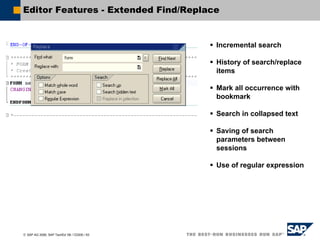
Editor Features - Extended Find/Replace
Incremental search
History of search/replace
items
Mark all occurrence with
bookmark
Search in collapsed text
Saving of search
parameters between
sessions
Use of regular expression
© SAP AG 2006, SAP TechEd ’06 / CD200 / 64
Editor Features - Edit Functions
Block Selection
Mistyping Correction
Auto Brackets
Keyword Case correction
Auto Indent
Caps Lock correction
Smart Tab
Surround Selection
Format After Paste
Line operations
Sort Lines
Change Case
Indent/Unindent
AutoSave
…
© SAP AG 2006, SAP TechEd ’06 / CD200 / 65
Editor Features - Quick Info in ABAP Debugger
Quick Info for
variables on
hovering
Quick Info for
variables by Ctrl-
Shift-Space
Customizing of
quick info
ABAP Debugger
ABAP Unit
Memory Inspector
Regular Expressions
Shared Objects
Checkpoints
ABAP Editor
Enhancement Framework
Simple Transformations
Preview of Next Release
© SAP AG 2006, SAP TechEd ’06 / CD200 / 67
Classic Debugger – Current Status
Classic Debugger
Technology
Debugger and debuggee run in the same (internal) session
Debugger dynpros placed “in-between”
Consequences
Not all ABAP code can be debugged (no conversion / field exits)
Not free of side effects (F1, F4 help, list output)
Implementation of new features not always straight-forward
No chance to use modern UI techniques (no ABAP allowed in the debugger !)
A new ABAP debugger technology
© SAP AG 2006, SAP TechEd ’06 / CD200 / 68
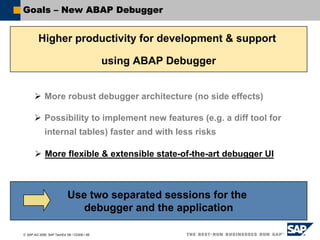
Goals – New ABAP Debugger
Higher productivity for development & support
using ABAP Debugger
More robust debugger architecture (no side effects)
Possibility to implement new features (e.g. a diff tool for
internal tables) faster and with less risks
More flexible & extensible state-of-the-art debugger UI
Use two separated sessions for the
debugger and the application
© SAP AG 2006, SAP TechEd ’06 / CD200 / 69
New ABAP Debugger, Two Process Architecture
The New Debugger is attached to an “external session”
Session 1 - Debuggee
ABAP VM
Session 2 - Debugger
UI
/h
Debugger Engine
© SAP AG 2006, SAP TechEd ’06 / CD200 / 70
New ABAP Debugger – GUI
Process InformationsProcess Informations
DesktopsDesktops
Control AreaControl Area
11
22
Source Code Informations,
System Fields
Source Code Informations,
System Fields
33
44
ToolsTools
55
© SAP AG 2006, SAP TechEd ’06 / CD200 / 71
New ABAP Debugger – Customizing the GUI
1. Close Tool1. Close Tool
2. New Tool2. New Tool
3. Replace Tool3. Replace Tool
4. Full Screen4. Full Screen
5. Maximize Horizontally5. Maximize Horizontally
6. Exchange6. Exchange
7. Services of the Tool7. Services of the Tool
Enlarge SizeEnlarge Size
Reduce SizeReduce Size
© SAP AG 2006, SAP TechEd ’06 / CD200 / 72
New ABAP Debugger – Tools, Breakpoints, Watchpoints
ABAP Debugger
ABAP Unit
Memory Inspector
Regular Expressions
Shared Objects
Checkpoints
ABAP Editor
Enhancement Framework
Simple Transformations
Preview of Next Release
© SAP AG 2006, SAP TechEd ’06 / CD200 / 74
ABAP Unit – What Should I Know ?
What is ABAP Unit?
ABAP Unit is the ABAP framework for module/unit tests.
What is an Unit?
An unit can be considered as a non-trivial, accessible code portion
(method, function or form) where a given input or action causes a verifiable
effect. Ideally it is the smallest code part which can be tested in isolation.
How does an ABAP Unit test looks like?
The ABAP Unit tests are realized as methods of a local class
(with the addition “FOR TESTING”).
This local class is part of the class, function group or program you want to
test.
© SAP AG 2006, SAP TechEd ’06 / CD200 / 75
ABAP UNIT – What Should I Know ?
Why is the test class part of the productive code?
ABAP Unit tests and the linked production code are in sync
In a productive system the ABAP Unit tests are not part of the
productive program load.
(-> No performance or security drawbacks)
Which services are provided by ABAP UNIT?
ABAP Unit provides a service class CL_AUNIT_ASSERT, which contains
static methods (e.g. ASSERT_EQUALS) to compare e.g. strings or internal
tables in order to verify test results.
© SAP AG 2006, SAP TechEd ’06 / CD200 / 76
ABAP UNIT – Example for Test Class
CLASS test_sflight_selection
DEFINITION DEFERRED.
CLASS demo DEFINITION
FRIENDS test_sflight_selection.
PUBLIC SECTION.
METHODS get_carrier_flights
IMPORTING carrier TYPE string.
PRIVATE SECTION.
DATA sflight_tab TYPE TABLE OF sflight.
ENDCLASS.
CLASS demo IMPLEMENTATION.
METHOD get_carrier_flights.
SELECT * FROM sflight
INTO TABLE sflight_tab
WHERE carrid = 'LH'.
ENDMETHOD.
ENDCLASS.
CLASS test_sflight_selection IMPLEMENTATION.
METHOD setup.
CREATE OBJECT demo_ref.
APPEND 'LH' TO test_carrids.
APPEND 'UA' TO test_carrids.
APPEND 'AA' TO test_carrids.
ENDMETHOD.
METHOD test_get_carrier_flights.
DATA: act_carrid TYPE string,
msg TYPE string,
sflight_wa TYPE sflight.
LOOP AT test_carrids INTO test_carrid.
CONCATENATE 'Selection of' test_carrid
'gives different airlines'
INTO msg SEPARATED BY space.
demo_ref->get_carrier_flights( test_carrid ).
LOOP AT demo_ref->sflight_tab INTO sflight_wa.
act_carrid = sflight_wa-carrid.
cl_aunit_assert=>assert_equals(
act = act_carrid
exp = test_carrid
msg = msg
quit = cl_aunit_assert=>no ).
IF act_carrid <> test_carrid.
EXIT.
ENDIF.
ENDLOOP.
ENDLOOP.
ENDMETHOD.
ENDCLASS.
CLASS test_sflight_selection
DEFINITION "#AU Risk_Level Harmless
FOR TESTING. "#AU Duration Short
PRIVATE SECTION.
METHODS: test_get_carrier_flights
FOR TESTING,
setup.
DATA: demo_ref TYPE REF TO demo,
test_carrid TYPE string,
test_carrids TYPE TABLE OF string.
ENDCLASS.
PROGRAM z_abap_unit.
© SAP AG 2006, SAP TechEd ’06 / CD200 / 77
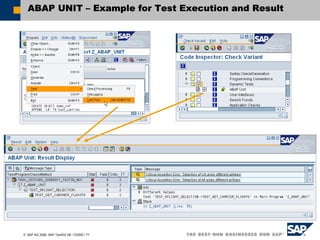
ABAP UNIT – Example for Test Execution and Result
ABAP Debugger
ABAP Unit
Memory Inspector
Regular Expressions
Shared Objects
Checkpoints
ABAP Editor
Enhancement Framework
Simple Transformations
Preview of Next Release
© SAP AG 2006, SAP TechEd ’06 / CD200 / 79
Memory Inspector: Motivation
What is the Memory Inspector ?
Tool to analyze dynamic memory consumption
Why do we need the Memory Inspector ?
Increasing usage of dynamic memory objects, like
Internal Tables Strings
Class Instances (Objects) Anonymous Data Objects
Increasing number of long-running transactions
T1 T2 T3 T4 T1
© SAP AG 2006, SAP TechEd ’06 / CD200 / 80
Memory Inspector: Features Summary
In ABAP Debugger
TopN-Consumer-Lists
– Aggregation of types (class/data)
– Find References
Memory consumption overview
In Stand-Alone TA
Analyzing memory snapshots
Comparing memory snapshots
– Growth of memory objects in different views
Available in Release 6.20 ( SP 29, Sept.2003 )
© SAP AG 2006, SAP TechEd ’06 / CD200 / 81
Memory Inspector: GUI
ABAP Debugger
ABAP Unit
Memory Inspector
Regular Expressions
Shared Objects
Checkpoints
ABAP Editor
Enhancement Framework
Simple Transformations
Preview of Next Release
© SAP AG 2006, SAP TechEd ’06 / CD200 / 83
Adapting SAP Software
One of the advantages of SAP software is the
possibility to adapt the software to own
requirements and the possibility of keeping
the adaptations during upgrade.
Ways of adaptation:
Customizing
Enhancement new concept!
Modification
© SAP AG 2006, SAP TechEd ’06 / CD200 / 84
Evolution of SAP Enhancement Technology
Kernel based
Business
Add Ins
User
Exits
Form
routines
Application
Workbench
Kernel
Customer
Exits
Function
modules
Business
Transaction
Events
Industries
Business
Add Ins
Filters
Classes
© SAP AG 2006, SAP TechEd ’06 / CD200 / 85
Components of new Enhancement Framework
Enhancement options (in original system):
Part of a development object that can be enhanced
Can be explicitly defined or implicitly available
Are organized and documented in Enhancement Spots
Examples are
– BAdIs
– Parameter Interfaces of Functiongroups or Methods
– Components of Classes/Interfaces
– ABAP statements ENHANCEMENT-POINT, ENHANCEMENT-SECTION
– …
Enhancements (in follow-up system):
Switchable by Switch Framework
Support automatic Upgrade
Are organized and documented in Enhancement Implementations
Offer multilayer support
© SAP AG 2006, SAP TechEd ’06 / CD200 / 86
Multilayer Support of Enhancements
Core Development
Original Object
Enhancement 1 Enhancement 2
Enhancement 11 Enhancement 12
Application Development
Add On Development
Customer Development
Enhancement 121 Enhancement 201
Enhancement 01
Enhancement 001
© SAP AG 2006, SAP TechEd ’06 / CD200 / 87
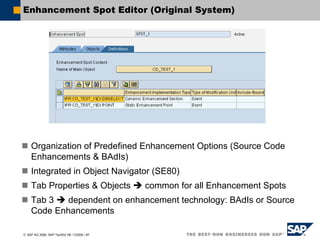
Enhancement Spot Editor (Original System)
Organization of Predefined Enhancement Options (Source Code
Enhancements & BAdIs)
Integrated in Object Navigator (SE80)
Tab Properties & Objects common for all Enhancement Spots
Tab 3 dependent on enhancement technology: BAdIs or Source
Code Enhancements
© SAP AG 2006, SAP TechEd ’06 / CD200 / 88
Enhancement Implementation Editor (Follow-up System)
Organization of Enhancements
Integrated in Object Navigator (SE80)
Tab Properties & Objects common for all enhancement types
Tab 3 dependent on enhancement technology: e.g. BAdI-
Implementation or Source Code Enhancements
© SAP AG 2006, SAP TechEd ’06 / CD200 / 89
Enhancement Browser (Original and Follow-up System)
Tool to Search for
Enhancement Spots
Existing Enhancement Implementations
Enhancement Implementations to be adjusted after upgrade
© SAP AG 2006, SAP TechEd ’06 / CD200 / 90
Implicit and Explicit Enhancement Options
Features of explicit enhancement options
Defined by developer
More stable
Few changes in definition to expect
Only at valid source code locations
Target-oriented
Organized by Enhancement Spots
Features of implicit enhancement options
Defined implicitly
Enhancement of „arbitrary“ objects
No enhancement spots for management necessary
© SAP AG 2006, SAP TechEd ’06 / CD200 / 91
Example 1 - Source Code Enhancements
Modification-free enhancement of source code
either by
Explicit Enhancement Options
– Explicit enhancement options can be defined in source code.
– They are organized by Enhancement Spots.
Implicit Enhancement Options
– Implicit Enhancement options are available at common enhancement
places.
– Examples:
- Begin/End of Include
- Begin/End of Method/Function Module/Form Routine
- End of a structure
- End of Private/Protected/Public Section of a local class
- ...
© SAP AG 2006, SAP TechEd ’06 / CD200 / 92
Explicit Enhancement Options in Source Code
© SAP AG 2006, SAP TechEd ’06 / CD200 / 93
Enhancement by Source Code Plug-In Technology
PROGRAM p1.
WRITE ‘Hello World’.
ENHANCEMENT-POINT ep1 SPOTS
s1.
..
..
..
ENHANCEMENT-SECTION ep2
SPOTS s1.
WRITE ’Original’.
END-ENHANCEMENT-SECTION.
ENHANCEMENT 1.
WRITE ’Hello
Paris’.
ENDENHANCEMENT.
ENHANCEMENT 2.
WRITE ’Hello
London’.
ENDENHANCEMENT.
ENHANCEMENT 3.
WRITE ’Enhanced’.
ENDENHANCEMENT.
Source Code Plug-Ins
© SAP AG 2006, SAP TechEd ’06 / CD200 / 94
Example 2 - Class/Interface Enhancements
Implicit Enhancement Options allow adding of:
optional parameters to existing methods
methods
events and event handlers
references to interfaces
Exits to existing methods
– Pre-Exit – Called at the beginning of a method
– Post-Exit – Called at the End of a method
© SAP AG 2006, SAP TechEd ’06 / CD200 / 95
Example 3 – New BAdIs
A new BAdI is an Explicit Enhancement Option
that:
is a predefined anchor point for Object Plug-Ins
has a well-defined interface in contrast to Source
Code Plug-Ins and is therefore more stable to changes
in the original coding
is integrated into ABAP language and has much better
performance than classic BAdIs
© SAP AG 2006, SAP TechEd ’06 / CD200 / 96
Usage of New BAdIs
Classic BAdI New BAdI
DATA: bd TYPE REF TO if_intf.
DATA: flt TYPE flt.
CALL METHOD cl_exithandler=>
get_instance
EXPORTING
exit_name = `BADI_NAME`
CHANGING
instance = bd.
flt-lang = `D`.
CALL METHOD bd->method
EXPORTING
x = 10
flt_val = flt.
DATA bd TYPE REF TO badi_name.
GET BADI bd FILTERS lang = `D`.
CALL BADI bd->method
EXPORTING x = 10.
© SAP AG 2006, SAP TechEd ’06 / CD200 / 97
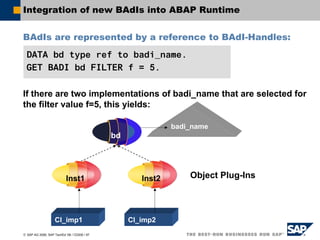
Integration of new BAdIs into ABAP Runtime
BAdIs are represented by a reference to BAdI-Handles:
If there are two implementations of badi_name that are selected for
the filter value f=5, this yields:
DATA bd type ref to badi_name.
GET BADI bd FILTER f = 5.
Inst1 Inst2
Cl_imp1 Cl_imp2
bd
badi_name
Object Plug-Ins
ABAP Debugger
ABAP Unit
Memory Inspector
Regular Expressions
Shared Objects
Checkpoints
ABAP Editor
Enhancement Framework
Simple Transformations
Preview of Next Release
© SAP AG 2006, SAP TechEd ’06 / CD200 / 99
Disclaimer
This preview is a preliminary version and not subject to your
license agreement or any other agreement with SAP. This document
contains only intended strategies, developments, and functionalities
of the SAP® product and is not intended to be binding upon SAP to
any particular course of business, product strategy, and/or
development. Please note that this document is subject to change
and may be changed by SAP at any time without notice. SAP
assumes no responsibility for errors or omissions in this document.
© SAP AG 2006, SAP TechEd ’06 / CD200 / 100
ABAP Language Preview – Enhanced Expression Enabling
As of next Release:
You can use computational expressions, functional methods and
built-in functions in expression positions:
– Logical expressions: a + b < oref->meth( )
– Method call parameters: oref1->meth1( oref2->meth2( ... ) )
You can use numerical expressions in numerical positions:
– Examples: DO abs( n ) + 1 TIMES.
READ TABLE itab INDEX lines( itab ) – 1 ...
You can use functional methods in functional positions:
– Examples: FIND|REPLACE REGEX oref->get_regex( ... ) IN ...
READ TABLE itab FROM oref->get_wa( ... ) ...
© SAP AG 2006, SAP TechEd ’06 / CD200 / 101
ABAP Language Preview – Decimal Floating Point Numbers
As of next Release:
New data types for decimal floating point numbers (based on IEEE-
754r):
– decfloat16: 8 bytes, 16 digits, exponent -383 to +384
– decfloat34: 16 bytes, 34 digits, exponent -6143 to +6144
Exact representation of decimal numbers within range (no rounding
necessary as for binary floating point numbers of type f).
Range larger than f!
Calculation accuracy like p!
Supported by new generic type decfloat, new Dictionary types,
new rounding functions round and rescale, new methods in
CL_ABAP_MATH, and new format options in WRITE [TO].
© SAP AG 2006, SAP TechEd ’06 / CD200 / 102
ABAP Language Preview – Internal Tables
As of next Release:
Dynamic WHERE condition:
– LOOP At itab ... WHERE (cond_syntax) ...
Secondary keys for internal tables:
– Secondary key definition:
TYPES itab TYPE ... TABLE OF ...
WITH {UNIQUE HASHED}|{{UNIQUE|NON_UNIQUE} SORTED}
KEY keynamei COMPONENTS comp1 comp2 ...
– Key specification for key access:
... WITH [TABLE] KEY keynamei COMPONENTS ...
– Key specification for index access:
... USING KEY keynamei ...
Boosting internal table performance
Real key access to standard tables
Index access to hashed tables
© SAP AG 2006, SAP TechEd ’06 / CD200 / 103
ABAP Language Preview – Class Based Exceptions
As of next Release:
Resumable exceptions:
– Raising a resumable exception
RAISE RESUMABLE EXCEPTION TYPE cx_class.
– Resuming (continue processing behind RAISE):
TRY.
...
CATCH cx_class BEFORE UNWIND.
...
RESUME.
ENDTRY.
Retry:
– Retrying (continue processing behind TRY):
TRY.
...
CATCH cx_class.
...
RETRY.
ENDTRY.
© SAP AG 2006, SAP TechEd ’06 / CD200 / 104
ABAP Development Preview – Packages
As of next Release:
Role of Packages:
– Packages encapsulate repository objects
– Reusable components must be published in package interfaces
Operational Package Concept:
– A "server package" has to expose everything that is meant for public
usage in an interface.
– A "client package" has to be allowed to use that interface.
– A "client package" has to declare the usage of that interface.
– Package checking is integrated into the ABAP compiler and ABAP
runtime and package violations are treated as ‘first order errors’.
Enhancement of ABAP Objects:
– CLASS cls DEFINITION OPEN WITHIN PACKAGE
– PACKAGE SECTION
© SAP AG 2006, SAP TechEd ’06 / CD200 / 105
ABAP Development Preview – ABAP Editor
As of next Release:
Code Completion:
– Suggests valid
keywords and
valid identifiers
– Invoked explicitly
by pressing special
key combination
– Autofilters result
by typed prefix
Entities completed include …
– Variables, including structures and components
– Types (including ABAP Dictionary), classes
– Methods, attributes, constants, events
– Functions
– Subroutines
– Formal parameters and exceptions of methods, functions, and subroutines
– Database tables
– Keywords
Completion suggestions may be inserted …
– Verbatim as shown
– As pattern with parameters prefilled
(CALL METHOD, CALL FUNCTION, PERFORM, …)
© SAP AG 2006, SAP TechEd ’06 / CD200 / 106
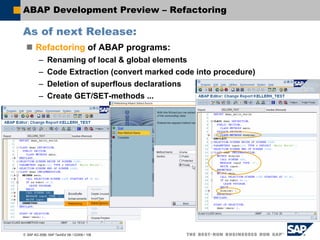
ABAP Development Preview – Refactoring
As of next Release:
Refactoring of ABAP programs:
– Renaming of local & global elements
– Code Extraction (convert marked code into procedure)
– Deletion of superflous declarations
– Create GET/SET-methods ...
© SAP AG 2006, SAP TechEd ’06 / CD200 / 107
ABAP Development Preview – Class Builder
As of next Release:
Source code based editing of global classes:
© SAP AG 2006, SAP TechEd ’06 / CD200 / 108
ABAP Testing Preview – ABAP Debugger
As of next Release:
New Dynpro analysis tool
New Web Dynpro analysis tool
Simple Transformation Debugging
Automated Debugging: Debugger Scripting
Layer Debugging
– Define your active software
- Packages
- Free-style expressions
– Dynamically assign your „system code“
– Layer-step through code
Miscellaneous:
– Upload of Internal Tables
– Table View: view and configure sub-components of embedded structures
– Changing long fields
– Call Stack of the internal session of the caller
© SAP AG 2006, SAP TechEd ’06 / CD200 / 109
ABAP Testing Preview – Coverage Analyzer
As of next Release:
Code Coverage
measured on statement
level
Condition Coverage for
logical expressions
Coverage of empty
branches
Statement results
visualized using new
ABAP Edit Control
Integrated to ABAP
Unit
© SAP AG 2006, SAP TechEd ’06 / CD200 / 110
ABAP Testing Preview – Runtime Analysis
As of next Release:
Controls based UI
(like ABAP Debugger)
Multiple Tools on
Customizable
Desktops
More flexible and
powerful Analysis
Tools
Trace Data stored on
Database (Server and
Platform independant)
Cross
System/Release Trace
Comparison
© SAP AG 2006, SAP TechEd ’06 / CD200 / 111
ABAP Connectivity Preview – bgRFC & LDQ
As of next Release:
tRFC
qRFC
Processed by
Scheduler
directly
No-Send
Scenario
bgRFC
Sequencing:
Type “T” or Type “Q”
Serialization:
RFC Protocol
LDQ
Sequencing:
Type “Q”
Serialization:
XML or binary
© SAP AG 2006, SAP TechEd ’06 / CD200 / 112
ABAP Connectivity Preview – Alternatives to tRFC & qRFC
As of next Release:
Optimized alternatives for tRFC, qRFC, and qRFC No-Send:
bgRFC (Background RFC)
– CALL FUNCTION IN BACKGROUND UNIT oref (TYPE REF TO IF_BGRFC_UNIT)
– Remote Function Calls are recorded, and execution takes place at a later point in
time, which is controlled automatically by a scheduler process.
– The execution scales with O(n*log(n)), i.e. linear-logarithmic, which is determined
by the I/O system only.
– The inbound procedure is executed at the caller system and serves for load-
balancing purposes.
– The outbound procedure is executed at the receiver system and serves for de-
coupled, remote system environments with load-balancing at the receiver.
LDQ (Local Data Queue)
– Persistency layer to provide first-in first-out (queue) access to data.
– Receiver actively pulls data from such a queue, similar to a mailbox.
– Access is locally within one SAP system.
– The data model of LDQ is absolutely de-coupled from any RFC database tables.
© SAP AG 2006, SAP TechEd ’06 / CD200 / 113
ABAP Connectivity Preview – Quality of Services
As of next Release:
RFC Communication
– Binary asXML serialization replaces the different RFC serialization concepts, e.g.
“xRFC”.
- Available for ABAP Application Server, Java Application Server, and
SAP NetWeaver RFC SDK
– SAP NetWeaver RFC SDK replaces the classic RFC SDKs for ASCII and Unicode.
- Homogeneous handling of all RFC parameter types.
- Compatible with all backend system variants R/3, mySAP, …
- Classic RFC SDKs are still maintained.
RFC-based SAP J2EE Connectivity
– SAP Java Resource Adapter compliant with JCA 1.5 replaces the direct usage of
the SAP JCo API.
- Supports stateful connections and callback connections.
- Provides shareable client connections for increased robustness and scalability .
- SAP JCo API within SAP J2EE is still maintained.
– IDoc class library for SAP J2EE simplifying the handling of SAP IDocs.
ABAP Debugger
ABAP Unit
Memory Inspector
Regular Expressions
Shared Objects
Checkpoints
ABAP Editor
Enhancement Framework
Simple Transformations
Preview of Next Release
© SAP AG 2006, SAP TechEd ’06 / CD200 / 115
THANK YOU FOR YOUR
ATTENTION !
QUESTIONS – SUGGESTIONS – DISCUSSION
© SAP AG 2006, SAP TechEd ’06 / CD200 / 116
Please complete your session evaluation.
Be courteous — deposit your trash,
and do not take the handouts for the following session.
Feedback
Thank You !
© SAP AG 2006, SAP TechEd ’06 / CD200 / 117
Further Information
Public Web
www.sap.com
SAP Developer Network:
http://www.sdn.sap.com/sdn/developerareas/abap.sdn
SAP Help Portal: http://www.help.sap.com
ABAP Keyword-Documentation
Transaction ABAPHELP, always the first source of information
Related Workshops/Lectures at SAP TechEd ’06
All lectures and workshops about ABAP
© SAP AG 2006, SAP TechEd ’06 / CD200 / 118
Copyright 2006 SAP AG. All Rights Reserved
No part of this publication may be reproduced or transmitted in any form or for any purpose without the express permission of SAP AG. The information
contained herein may be changed without prior notice.
Some software products marketed by SAP AG and its distributors contain proprietary software components of other software vendors.
Microsoft, Windows, Outlook, and PowerPoint are registered trademarks of Microsoft Corporation.
IBM, DB2, DB2 Universal Database, OS/2, Parallel Sysplex, MVS/ESA, AIX, S/390, AS/400, OS/390, OS/400, iSeries, pSeries, xSeries, zSeries, z/OS, AFP,
Intelligent Miner, WebSphere, Netfinity, Tivoli, and Informix are trademarks or registered trademarks of IBM Corporation in the United States and/or other
countries.
Oracle is a registered trademark of Oracle Corporation.
UNIX, X/Open, OSF/1, and Motif are registered trademarks of the Open Group.
Citrix, ICA, Program Neighborhood, MetaFrame, WinFrame, VideoFrame, and MultiWin are trademarks or registered trademarks of Citrix Systems, Inc.
HTML, XML, XHTML and W3C are trademarks or registered trademarks of W3C®, World Wide Web Consortium, Massachusetts Institute of Technology.
Java is a registered trademark of Sun Microsystems, Inc.
JavaScript is a registered trademark of Sun Microsystems, Inc., used under license for technology invented and implemented by Netscape.
MaxDB is a trademark of MySQL AB, Sweden.
SAP, R/3, mySAP, mySAP.com, xApps, xApp, SAP NetWeaver and other SAP products and services mentioned herein as well as their respective logos are
trademarks or registered trademarks of SAP AG in Germany and in several other countries all over the world. All other product and service names mentioned
are the trademarks of their respective companies. Data contained in this document serves informational purposes only. National product specifications
may vary.
The information in this document is proprietary to SAP. No part of this document may be reproduced, copied, or transmitted in any form or for any purpose
without the express prior written permission of SAP AG.
This document is a preliminary version and not subject to your license agreement or any other agreement with SAP. This document contains only intended
strategies, developments, and functionalities of the SAP®
product and is not intended to be binding upon SAP to any particular course of business, product
strategy, and/or development. Please note that this document is subject to change and may be changed by SAP at any time without notice.
SAP assumes no responsibility for errors or omissions in this document. SAP does not warrant the accuracy or completeness of the information, text, graphics,
links, or other items contained within this material. This document is provided without a warranty of any kind, either express or implied, including but not limited
to the implied warranties of merchantability, fitness for a particular purpose, or non-infringement.
SAP shall have no liability for damages of any kind including without limitation direct, special, indirect, or consequential damages that may result from the use
of these materials. This limitation shall not apply in cases of intent or gross negligence.
The statutory liability for personal injury and defective products is not affected. SAP has no control over the information that you may access through the use
of hot links contained in these materials and does not endorse your use of third-party Web pages nor provide any warranty whatsoever relating to third-party
Web pages.

New features in abap

  • 1.
    An Overview ofthe New Features in ABAP
  • 2.
    © SAP AG2006, SAP TechEd ’06 / CD200 / 2 Agenda Horst Keller Knowledge Architect, SAP AG
  • 3.
    ABAP Debugger ABAP Unit MemoryInspector Regular Expressions Shared Objects Checkpoints ABAP Editor Enhancement Framework Simple Transformations Preview of Next Release
  • 4.
    ABAP Debugger ABAP Unit MemoryInspector Regular Expressions Shared Objects Checkpoints ABAP Editor Enhancement Framework Simple Transformations Preview of Next Release
  • 5.
    © SAP AG2006, SAP TechEd ’06 / CD200 / 5 Learning Objectives As a result of this lecture, you will have an overview of many of the new ABAP features available with SAP NetWeaver 04 and SAP NetWeaver 2004s of the new ABAP features coming with the follow-up release
  • 6.
    ABAP Debugger ABAP Unit MemoryInspector Regular Expressions Shared Objects Checkpoints ABAP Editor Enhancement Framework Simple Transformations Preview of Next Release
  • 7.
    © SAP AG2006, SAP TechEd ’06 / CD200 / 7 Regular Expressions (Regexes, REs) are more powerful than traditional SAP patterns (SEARCH txt FOR pat, IF txt CP pat) Well understood – Developed by mathematician Kleene in the 1950s Powerful – Highly focused special purpose language – Many common text processing tasks turn into simple one-liners Standardized and widely used – Made popular by Unix tools: grep, sed, awk, emacs – Built into some languages like Perl and Java; add-on libraries available for many others – Early Unix de-facto standard formalized in PCRE and POSIX ABAP supports POSIX regular expressions as of Release 7.00 Improved Text Processing With REs Stephen C. Kleene Image © U. of Wisconsin
  • 8.
    © SAP AG2006, SAP TechEd ’06 / CD200 / 8 Regular Expression Terminology Regular expressions are built from Literals Special operators (metacharacters) Prepending turns operators into literals REs match or represent sets of text strings RE matches text if complete text is represented by RE REs are commonly used for searching text Text to be searched may contain one or more matches Usually interested in left-most, longest match contained in text a b c 1 2 3 ä à ß , / = … . * + ? ^ $ ( ) [ ] { } Match Search
  • 9.
    © SAP AG2006, SAP TechEd ’06 / CD200 / 9 Regular Expressions Quick Check What is the main difference betweens file system wildcards like *.jpg and regular expressions? How are SAP patterns written as regular expressions? pat pat+ *pat p#*t pat pat. .*pat p*t files: * = sequence of characters REs: * = general repetition, requires specification of what should be repeated; sequence of characters becomes .*
  • 10.
    © SAP AG2006, SAP TechEd ’06 / CD200 / 10 Regex Reference Chart (1) Name Operator Matches Literals a * literal character turn special operator * into literal character * Sets [abc] [^abc] [a-z] any literal character listed any literal character NOT listed any literal character within range listed (can be combined with above) Classes (to be used within sets) [:alpha:] [:digit:] [:xdigit:] [:alnum:] [:word:] [:upper:] [:lower:] [:space:] [:blank:] [:punct:] [:graph:] [:print:] [:cntrl:] [:unicode:] any letter, including non-latin alphabets any digit 0-9/hex digit 0-9A-F [:alpha:] plus [:digit:]/same plus '_' character any uppercase/lowercase character any whitespace character/blank or horizontal tab any punctuation/graphical character any printable/control code character any Unicode character above ASCII 255 Wildcard . any character Repetitions r* r+ r{m} r{m,n} r? zero or more repetitions of r one of more repetitions of r exactly m repetitions of r at least m and at most n repetitions of r optional r, i.e., zero or one repetition of r Alternatives r|s either r or s
  • 11.
    © SAP AG2006, SAP TechEd ’06 / CD200 / 11 Regex Reference Chart (2) Name Operator Matches Abbreviations n t a w W d D s S u U l L newline/tab/bell character equivalent to [[:word:]] and [^[:word:]] equivalent to [[:digit:]] and [^[:digit:]] equivalent to [[:space:]] and [^[:space:]] equivalent to [[:upper:]] and [^[:upper:]] equivalent to [[:lower:]] and [^[:lower:]] Quote Q … E interpret quoted sequence as literal characters Anchors A z ^ $ < > b B begin and end of buffer (i.e., text to search) begin and end of line (buffer separated into lines by n chars) begin and end of word either begin or end of word inside of a word, i.e., between two w's Back references ( ) 1 2 3 … (?: ) group subexpression and save submatch into register matches contents of n-th register group subexpression, but do not store in register Look-ahead r(?=s) r(?!s) matches r iff r is followed by s matches r iff r is NOT followed by s Cuts (?>r) do not backtrack for left-most longest match once r has matched
  • 12.
    © SAP AG2006, SAP TechEd ’06 / CD200 / 12 Searching for Matches with FIND New addition REGEX to the FIND statement: Detailed match information is available with RESULTS addition. FIND returns left-most longest match within text. FIND [{FIRST OCCURRENCE}|{ALL OCCURRENCES} OF] REGEX regx IN text [{RESPECTING|IGNORING} CASE] [MATCH COUNT mcnt] [RESULTS result_tab].
  • 13.
    © SAP AG2006, SAP TechEd ’06 / CD200 / 13 Replacing Matches with REPLACE New addition REGEX to the REPLACE statement: Search works exactly as in FIND. REPLACE [{FIRST OCCURRENCE}|{ALL OCCURRENCES} OF] REGEX regx IN text WITH repl [{RESPECTING|IGNORING} CASE] [REPLACEMENT COUNT mcnt] [RESULTS result_tab].
  • 14.
    © SAP AG2006, SAP TechEd ’06 / CD200 / 14 Grouping and Submatches Parentheses structure complex expressions Define scope of operators Store submatches for later reference – Submatches easily available with FIND additions – Groups numbered left-to-right, can be nested – No upper limit on number of groups – Can refer to submatches within pattern and replacement Non-registering parentheses (?:…) do not store submatch – Increased performance over ( ) tick*tock* (tick)*(tock)* (ticktock)* (?:tick)*(?:tock)* very useful
  • 15.
    © SAP AG2006, SAP TechEd ’06 / CD200 / 15 Example: Match-Based Replacements The replacement string can refer to submatches of match being replaced $0 contains complete match $1,$2, ... contain submatches Result: DATA: html TYPE string, repl TYPE string, regx TYPE string. html = `<title>This is the <i>Title</i></title>`. repl = `i`. CONCATENATE repl '(?![^<>]*>)' INTO regx. REPLACE ALL OCCURRENCES OF REGEX regx IN html WITH <b>$0</b>`. <title>Th<b>i</b>s <b>i</b>s the <i>T<b>i</b>tle</i></title>
  • 16.
    © SAP AG2006, SAP TechEd ’06 / CD200 / 16 Classes for Regular Expressions ABAP Objects provides two classes for using REs Regex CL_ABAP_REGEX – Stores compiled automaton for RE pattern – Should be reused to avoid costly recompilation – Offers simplified syntax and disabling of submatches – Can be used in FIND and REPLACE statements instead of textual pattern Matcher CL_ABAP_MATCHER – Main class for interaction with REs – Stores copy of text to process (efficient for strings, costly for fixed-length fields) – Links text to regex object and tracks matching and replacing within text CL_ABAP_MATCHER $0___ ___ ___ CL_ABAP_REGEX a*b
  • 17.
    © SAP AG2006, SAP TechEd ’06 / CD200 / 17 Matcher Class Reference Chart (1) CL_ABAP_MATCHER Instance Methods find_next( ) find next unprocessed match replace_found( new ) replace match found by new *) get_match( ) return match information (MATCH_RESULT) *) get_offset( [n] ) return offset of current (sub)match *) replace_all( new ) replace all remaining matches get_submatch( n ) return n-th submatch *) get_length( [n] ) return length of current (sub)match *) find_all( ) return all remaining matches replace_next ( new ) find and replace next unprocessed match *) throws exception if no current match stored
  • 18.
    © SAP AG2006, SAP TechEd ’06 / CD200 / 18 Matcher Class Reference Chart (2) CL_ABAP_MATCHER Class Methods create( pattern text ) create and return matcher object matches( pattern text ) returns abap_true if pattern matches text contains( pattern text ) returns abap_true if text contains pattern match get_object( ) returns matcher object containing match information about last matches( ) or contains( ) invocation
  • 19.
    © SAP AG2006, SAP TechEd ’06 / CD200 / 19 Creating Regex Objects There are two ways of setting up objects for RE processing Using CREATE Using factory method CREATE OBJECT regex EXPORTING pattern = '^a*' ignore_case = abap_true. CREATE OBJECT matcher EXPORTING regex = regex text = text. DATA: regex TYPE REF TO cl_abap_regex, matcher TYPE REF TO cl_abap_matcher. matcher = cl_abap_matcher=>create( pattern = '^a*' text = text ).
  • 20.
    © SAP AG2006, SAP TechEd ’06 / CD200 / 20 Example: Pattern Matching Checking the format of an Email address: PARAMETERS email TYPE c LENGTH 30 LOWER CASE default 'shai.agassi@sap.com'. DATA matcher TYPE REF TO cl_abap_matcher. matcher = cl_abap_matcher=>create( pattern = `w+(.w+)*@(w+.)+(w{2,4})` ignore_case = 'X' text = email ). IF matcher->match( )IS INITIAL. MESSAGE 'Wrong Format' TYPE 'I'. ELSE. MESSAGE 'Format OK' TYPE 'I'. ENDIF.
  • 21.
    ABAP Debugger ABAP Unit MemoryInspector Regular Expressions Shared Objects Checkpoints ABAP Editor Enhancement Framework Simple Transformations Preview of Next Release
  • 22.
    © SAP AG2006, SAP TechEd ’06 / CD200 / 22 Data Access without Buffering DB User X Session
  • 23.
    © SAP AG2006, SAP TechEd ’06 / CD200 / 23 Data Access with Buffering by Copy Common data retrieved from DB User X Session Common Data DB
  • 24.
    © SAP AG2006, SAP TechEd ’06 / CD200 / 24 Data Access without Buffering Common data retrieved from DB and aggregated User X Session DB
  • 25.
    © SAP AG2006, SAP TechEd ’06 / CD200 / 25 Data Access without Buffering User Y Session Common Data User X Session Common Data DB Common data retrieved from DB and aggregated for each user session User Z Session Common Data Common Data Common Data
  • 26.
    © SAP AG2006, SAP TechEd ’06 / CD200 / 26 Data Access with Buffering by Copy DB User X Session
  • 27.
    © SAP AG2006, SAP TechEd ’06 / CD200 / 27 Data Access with Buffering by Copy Common data retrieved from DB User X Session Common Data DB
  • 28.
    © SAP AG2006, SAP TechEd ’06 / CD200 / 28 Data Access with Buffering by Copy Common data retrieved from DB, aggregated User X Session DB
  • 29.
    © SAP AG2006, SAP TechEd ’06 / CD200 / 29 Data Access with Buffering by Copy Common data retrieved from DB, aggregated, copied (EXPORT) to SHM User X Session Common Data DB Shared Memory (SHM) Common Data
  • 30.
    © SAP AG2006, SAP TechEd ’06 / CD200 / 30 Data Access with Buffering by Copy User X Session Common Data DB Common data retrieved from DB, aggregated, copied (EXPORT) to SHM, and copied (IMPORT) to each user session Shared Memory (SHM) Common Data User Y Session Common Data User Z Session Common Data
  • 31.
    © SAP AG2006, SAP TechEd ’06 / CD200 / 31 Data Access with in Place Buffering Common data retrieved from DB directly into SHM User X Session DB Shared Memory (SHM) Common Data
  • 32.
    © SAP AG2006, SAP TechEd ’06 / CD200 / 32 Data Access with in Place Buffering Common data retrieved from DB directly into SHM, aggregated in place DB Shared Memory (SHM) Common Data User X Session
  • 33.
    © SAP AG2006, SAP TechEd ’06 / CD200 / 33 Data Access with in Place Buffering User X Session DB Common data retrieved from DB directly into SHM, aggregated in place accessed copy-free by other user sessions Shared Memory (SHM) Common Data User Y Session User Z Session
  • 34.
    © SAP AG2006, SAP TechEd ’06 / CD200 / 34 Areas and Area Instances Shared Objects memory Part of the shared memory Shared Objects areas Organizational units Defined at design time Shared Objects area instances Content stored at runtime Identified by unique name Shared Memory Area Area I n s t a n c e I n s t a n c e I n s t a n c e Shared Objects Memory
  • 35.
    © SAP AG2006, SAP TechEd ’06 / CD200 / 35 Working with Area Instances InstanceAttach for write RootFill the contents
  • 36.
    © SAP AG2006, SAP TechEd ’06 / CD200 / 36 Working with Area Instances Attach for write Instance RootFill the contents Commit changes
  • 37.
    © SAP AG2006, SAP TechEd ’06 / CD200 / 37 Working with Area Instances Attach for write Instance RootFill the contents Commit changes Attach Reader1
  • 38.
    © SAP AG2006, SAP TechEd ’06 / CD200 / 38 Working with Area Instances Attach for write Instance RootFill the contents Commit changes Attach Reader1 Attach Reader2
  • 39.
    © SAP AG2006, SAP TechEd ’06 / CD200 / 39 Working with Area Instances Attach for write Instance RootFill the contents Commit changes Attach Reader1 Attach Reader2 Detach Reader1
  • 40.
    © SAP AG2006, SAP TechEd ’06 / CD200 / 40 Working with Area Instances Attach for write Instance RootFill the contents Commit changes Attach Reader1 Attach Reader2 Detach Reader1 Detach Reader2
  • 41.
    © SAP AG2006, SAP TechEd ’06 / CD200 / 41 Additional Features Versioning Auto-Build (e.g. at 1st Read-Attach) Transactionality Propagation Client Dependency Displacement Customizable Memory- and Lifetime Restrictions Multi-Attach to different areas at once Shared Objects Monitor
  • 42.
    ABAP Debugger ABAP Unit MemoryInspector Regular Expressions Shared Objects Checkpoints ABAP Editor Enhancement Framework Simple Transformations Preview of Next Release
  • 43.
    © SAP AG2006, SAP TechEd ’06 / CD200 / 43 ABAP / XML Mapping: Simple Transformations ABAP Data … .. …. …. … .. .. …. …. .. … …. .. .. XML Doc XSLT … .. …. …. … .. .. …. …. .. HTML / Text XSLT XSLT Simple Transformations DB Network XSLT XSLT new in NetWeaver 04
  • 44.
    © SAP AG2006, SAP TechEd ’06 / CD200 / 44 ABAP / XML Mapping Languages XSLT (since 6.10) works on canonical XML representation of ABAP data (asXML) builds DOM for source side arbitrarily complex transformations Simple Transformations (since NetWeaver 04) only for ABAP ↔ XML only linear transformations (no DOM) speedup over XSLT: 10 – 30; “unlimited” size of data reversible (one program for both directions) Both symmetric: no generation of ABAP code / XML schemas integrated in workbench (maintenance / transport) integrated in ABAP: CALL TRANSFORMATION
  • 45.
    © SAP AG2006, SAP TechEd ’06 / CD200 / 45 Simple Transformations: Expressive Power Anything that can be done with ... accessing each node in the data tree any number of times accessing each node in the XML tree at most once, in document order (with "lookahead 1" on XML source) ... which includes (any combination of) ... renamings (e.g.: structure-component / element names) projections (omission of sub-trees) permutations (changes in sub-tree order) constants (e.g.: constant values, insertion of tree levels) defaults (for initial / special values) conditionals (e.g.: existence of sub-trees, value of nodes) value maps covers most data mappings in practice
  • 46.
    © SAP AG2006, SAP TechEd ’06 / CD200 / 46 Simple Transformations: Program Structure Programs are XML templates literal XML with interspersed instructions declarative, straightforward semantics Data tree access by node references instructions access data by simple “reference expressions” all named children of a data node are accessible by name tables are accessible as a whole (all lines or none) <Customers> <tt:loop ref="CUSTTAB"> <LastName> <tt:value ref= "NAME.LAST"/> </LastName> </tt:loop> </Customers>
  • 47.
    © SAP AG2006, SAP TechEd ’06 / CD200 / 47 Simple Transformations: Example <?sap.transform simple?> <tt:transform xmlns:tt="http://www.sap.com/transformation-templates"> <tt:root name="table"/> <tt:template> <TABLE> <tt:loop ref=".table"> <ITEM> <tt:value /> </ITEM> </tt:loop> </TABLE> </tt:template> </tt:transform> DATA: itab TYPE TABLE OF i, xmlstr TYPE xstring. DO 3 TIMES. APPEND sy-index TO itab. ENDDO. CALL TRANSFORMATION z_simple_table SOURCE table = itab RESULT XML xmlstr. CALL FUNCTION 'DISPLAY_XML_STRING' EXPORTING xml_string = xmlstr.
  • 48.
    ABAP Debugger ABAP Unit MemoryInspector Regular Expressions Shared Objects Checkpoints ABAP Editor Enhancement Framework Simple Transformations Preview of Next Release
  • 49.
    © SAP AG2006, SAP TechEd ’06 / CD200 / 49 Checkpoints in ABAPsystemstate program flow consistent state normaltermination
  • 50.
    © SAP AG2006, SAP TechEd ’06 / CD200 / 50 Checkpoints in ABAPsystemstate program flow consistent state normaltermination unexpected behavior
  • 51.
    © SAP AG2006, SAP TechEd ’06 / CD200 / 51 Checkpoints in ABAP systemstate program flow consistent state normaltermination : assertion runtime error systemstate program flow consistent state normaltermination unexpected behavior find cause of error in shorter time
  • 52.
    © SAP AG2006, SAP TechEd ’06 / CD200 / 52 Checkpoints in ABAP systemstate program flow consistent state normaltermination : assertion runtime error systemstate program flow consistent state normaltermination undetected error find more errors enhance program correctness
  • 53.
    © SAP AG2006, SAP TechEd ’06 / CD200 / 53 Checkpoints in ABAP ASSERT - Statement: BREAK-POINT - Statement: LOG-POINT - Statement: ASSERT ID group SUBKEY subkey FIELDS dobj1 dobj2 ... CONDITION log_exp. BREAK-POINT ID group. LOG-POINT ID group.
  • 54.
    © SAP AG2006, SAP TechEd ’06 / CD200 / 54 Checkpoints in ABAP Activation method dynamic, while system is running Activation granularity Logical „checkpoint groups“ Compose „variants“ from Checkpoint groups, variants, All checkpoints in programs, function groups, classes Extract checkpoint groups from programs, function groups, classes, packages, development components User, server Assertion mechanism Abort, debug or protocol
  • 55.
    © SAP AG2006, SAP TechEd ’06 / CD200 / 55 Checkpoints in ABAP ABAP checkpoints support developers in writing correct code Activated in SAP development systems ( abort, protocol ) Code instrumented with checkpoints is easier to support and maintain Can be activated on the fly in productive systems ( activation for dedicated user, server ) No activation, no performance loss !!!
  • 56.
    ABAP Debugger ABAP Unit MemoryInspector Regular Expressions Shared Objects Checkpoints ABAP Editor Enhancement Framework Simple Transformations Preview of Next Release
  • 57.
    © SAP AG2006, SAP TechEd ’06 / CD200 / 57 New ABAP Editor Modern Editor control with syntax coloring and many additional features Automatic syntax check!
  • 58.
    © SAP AG2006, SAP TechEd ’06 / CD200 / 58 Editor Features - Outlining See Start / End / Middle of language block Collapse/Expand Block Collapse same type blocks Collapse Comments User defined “Outlining Regions” See current scope See collapsed text
  • 59.
    © SAP AG2006, SAP TechEd ’06 / CD200 / 59 Editor Features - Templates User and language dependent Expandable by Ctrl + Enter Built in runtime tags (Date Time, Clipboard Content, Document Name) Interactive tags Suggested by Code Hints Extract template from selected text Surround by template
  • 60.
    © SAP AG2006, SAP TechEd ’06 / CD200 / 60 Editor Features - Code Hints Code Hints Suggest valid keywords and recently used identifiers Runs automatically as you type For templates shortcuts For misspelling from auto correction dictionary Customizing of suggestions
  • 61.
    © SAP AG2006, SAP TechEd ’06 / CD200 / 61 Editor Features - Clipboard Clipboard Ring Extended Paste Menu Normal and block format Multiple Clipboard Formats: Paste in MS Outlook with syntax highlighting Paste in MS Word with syntax highlighting Copy/Cut Append to clipboard Insert Special Unicode or ASCII format support
  • 62.
    © SAP AG2006, SAP TechEd ’06 / CD200 / 62 Editor Features - Current Scope Highlight of current scope tags in source Highlight current scope on outline margin See current code hierarchy in status panel See current brackets highlighted in source See mismatching brackets highlighted in error color
  • 63.
    © SAP AG2006, SAP TechEd ’06 / CD200 / 63 Editor Features - Extended Find/Replace Incremental search History of search/replace items Mark all occurrence with bookmark Search in collapsed text Saving of search parameters between sessions Use of regular expression
  • 64.
    © SAP AG2006, SAP TechEd ’06 / CD200 / 64 Editor Features - Edit Functions Block Selection Mistyping Correction Auto Brackets Keyword Case correction Auto Indent Caps Lock correction Smart Tab Surround Selection Format After Paste Line operations Sort Lines Change Case Indent/Unindent AutoSave …
  • 65.
    © SAP AG2006, SAP TechEd ’06 / CD200 / 65 Editor Features - Quick Info in ABAP Debugger Quick Info for variables on hovering Quick Info for variables by Ctrl- Shift-Space Customizing of quick info
  • 66.
    ABAP Debugger ABAP Unit MemoryInspector Regular Expressions Shared Objects Checkpoints ABAP Editor Enhancement Framework Simple Transformations Preview of Next Release
  • 67.
    © SAP AG2006, SAP TechEd ’06 / CD200 / 67 Classic Debugger – Current Status Classic Debugger Technology Debugger and debuggee run in the same (internal) session Debugger dynpros placed “in-between” Consequences Not all ABAP code can be debugged (no conversion / field exits) Not free of side effects (F1, F4 help, list output) Implementation of new features not always straight-forward No chance to use modern UI techniques (no ABAP allowed in the debugger !) A new ABAP debugger technology
  • 68.
    © SAP AG2006, SAP TechEd ’06 / CD200 / 68 Goals – New ABAP Debugger Higher productivity for development & support using ABAP Debugger More robust debugger architecture (no side effects) Possibility to implement new features (e.g. a diff tool for internal tables) faster and with less risks More flexible & extensible state-of-the-art debugger UI Use two separated sessions for the debugger and the application
  • 69.
    © SAP AG2006, SAP TechEd ’06 / CD200 / 69 New ABAP Debugger, Two Process Architecture The New Debugger is attached to an “external session” Session 1 - Debuggee ABAP VM Session 2 - Debugger UI /h Debugger Engine
  • 70.
    © SAP AG2006, SAP TechEd ’06 / CD200 / 70 New ABAP Debugger – GUI Process InformationsProcess Informations DesktopsDesktops Control AreaControl Area 11 22 Source Code Informations, System Fields Source Code Informations, System Fields 33 44 ToolsTools 55
  • 71.
    © SAP AG2006, SAP TechEd ’06 / CD200 / 71 New ABAP Debugger – Customizing the GUI 1. Close Tool1. Close Tool 2. New Tool2. New Tool 3. Replace Tool3. Replace Tool 4. Full Screen4. Full Screen 5. Maximize Horizontally5. Maximize Horizontally 6. Exchange6. Exchange 7. Services of the Tool7. Services of the Tool Enlarge SizeEnlarge Size Reduce SizeReduce Size
  • 72.
    © SAP AG2006, SAP TechEd ’06 / CD200 / 72 New ABAP Debugger – Tools, Breakpoints, Watchpoints
  • 73.
    ABAP Debugger ABAP Unit MemoryInspector Regular Expressions Shared Objects Checkpoints ABAP Editor Enhancement Framework Simple Transformations Preview of Next Release
  • 74.
    © SAP AG2006, SAP TechEd ’06 / CD200 / 74 ABAP Unit – What Should I Know ? What is ABAP Unit? ABAP Unit is the ABAP framework for module/unit tests. What is an Unit? An unit can be considered as a non-trivial, accessible code portion (method, function or form) where a given input or action causes a verifiable effect. Ideally it is the smallest code part which can be tested in isolation. How does an ABAP Unit test looks like? The ABAP Unit tests are realized as methods of a local class (with the addition “FOR TESTING”). This local class is part of the class, function group or program you want to test.
  • 75.
    © SAP AG2006, SAP TechEd ’06 / CD200 / 75 ABAP UNIT – What Should I Know ? Why is the test class part of the productive code? ABAP Unit tests and the linked production code are in sync In a productive system the ABAP Unit tests are not part of the productive program load. (-> No performance or security drawbacks) Which services are provided by ABAP UNIT? ABAP Unit provides a service class CL_AUNIT_ASSERT, which contains static methods (e.g. ASSERT_EQUALS) to compare e.g. strings or internal tables in order to verify test results.
  • 76.
    © SAP AG2006, SAP TechEd ’06 / CD200 / 76 ABAP UNIT – Example for Test Class CLASS test_sflight_selection DEFINITION DEFERRED. CLASS demo DEFINITION FRIENDS test_sflight_selection. PUBLIC SECTION. METHODS get_carrier_flights IMPORTING carrier TYPE string. PRIVATE SECTION. DATA sflight_tab TYPE TABLE OF sflight. ENDCLASS. CLASS demo IMPLEMENTATION. METHOD get_carrier_flights. SELECT * FROM sflight INTO TABLE sflight_tab WHERE carrid = 'LH'. ENDMETHOD. ENDCLASS. CLASS test_sflight_selection IMPLEMENTATION. METHOD setup. CREATE OBJECT demo_ref. APPEND 'LH' TO test_carrids. APPEND 'UA' TO test_carrids. APPEND 'AA' TO test_carrids. ENDMETHOD. METHOD test_get_carrier_flights. DATA: act_carrid TYPE string, msg TYPE string, sflight_wa TYPE sflight. LOOP AT test_carrids INTO test_carrid. CONCATENATE 'Selection of' test_carrid 'gives different airlines' INTO msg SEPARATED BY space. demo_ref->get_carrier_flights( test_carrid ). LOOP AT demo_ref->sflight_tab INTO sflight_wa. act_carrid = sflight_wa-carrid. cl_aunit_assert=>assert_equals( act = act_carrid exp = test_carrid msg = msg quit = cl_aunit_assert=>no ). IF act_carrid <> test_carrid. EXIT. ENDIF. ENDLOOP. ENDLOOP. ENDMETHOD. ENDCLASS. CLASS test_sflight_selection DEFINITION "#AU Risk_Level Harmless FOR TESTING. "#AU Duration Short PRIVATE SECTION. METHODS: test_get_carrier_flights FOR TESTING, setup. DATA: demo_ref TYPE REF TO demo, test_carrid TYPE string, test_carrids TYPE TABLE OF string. ENDCLASS. PROGRAM z_abap_unit.
  • 77.
    © SAP AG2006, SAP TechEd ’06 / CD200 / 77 ABAP UNIT – Example for Test Execution and Result
  • 78.
    ABAP Debugger ABAP Unit MemoryInspector Regular Expressions Shared Objects Checkpoints ABAP Editor Enhancement Framework Simple Transformations Preview of Next Release
  • 79.
    © SAP AG2006, SAP TechEd ’06 / CD200 / 79 Memory Inspector: Motivation What is the Memory Inspector ? Tool to analyze dynamic memory consumption Why do we need the Memory Inspector ? Increasing usage of dynamic memory objects, like Internal Tables Strings Class Instances (Objects) Anonymous Data Objects Increasing number of long-running transactions T1 T2 T3 T4 T1
  • 80.
    © SAP AG2006, SAP TechEd ’06 / CD200 / 80 Memory Inspector: Features Summary In ABAP Debugger TopN-Consumer-Lists – Aggregation of types (class/data) – Find References Memory consumption overview In Stand-Alone TA Analyzing memory snapshots Comparing memory snapshots – Growth of memory objects in different views Available in Release 6.20 ( SP 29, Sept.2003 )
  • 81.
    © SAP AG2006, SAP TechEd ’06 / CD200 / 81 Memory Inspector: GUI
  • 82.
    ABAP Debugger ABAP Unit MemoryInspector Regular Expressions Shared Objects Checkpoints ABAP Editor Enhancement Framework Simple Transformations Preview of Next Release
  • 83.
    © SAP AG2006, SAP TechEd ’06 / CD200 / 83 Adapting SAP Software One of the advantages of SAP software is the possibility to adapt the software to own requirements and the possibility of keeping the adaptations during upgrade. Ways of adaptation: Customizing Enhancement new concept! Modification
  • 84.
    © SAP AG2006, SAP TechEd ’06 / CD200 / 84 Evolution of SAP Enhancement Technology Kernel based Business Add Ins User Exits Form routines Application Workbench Kernel Customer Exits Function modules Business Transaction Events Industries Business Add Ins Filters Classes
  • 85.
    © SAP AG2006, SAP TechEd ’06 / CD200 / 85 Components of new Enhancement Framework Enhancement options (in original system): Part of a development object that can be enhanced Can be explicitly defined or implicitly available Are organized and documented in Enhancement Spots Examples are – BAdIs – Parameter Interfaces of Functiongroups or Methods – Components of Classes/Interfaces – ABAP statements ENHANCEMENT-POINT, ENHANCEMENT-SECTION – … Enhancements (in follow-up system): Switchable by Switch Framework Support automatic Upgrade Are organized and documented in Enhancement Implementations Offer multilayer support
  • 86.
    © SAP AG2006, SAP TechEd ’06 / CD200 / 86 Multilayer Support of Enhancements Core Development Original Object Enhancement 1 Enhancement 2 Enhancement 11 Enhancement 12 Application Development Add On Development Customer Development Enhancement 121 Enhancement 201 Enhancement 01 Enhancement 001
  • 87.
    © SAP AG2006, SAP TechEd ’06 / CD200 / 87 Enhancement Spot Editor (Original System) Organization of Predefined Enhancement Options (Source Code Enhancements & BAdIs) Integrated in Object Navigator (SE80) Tab Properties & Objects common for all Enhancement Spots Tab 3 dependent on enhancement technology: BAdIs or Source Code Enhancements
  • 88.
    © SAP AG2006, SAP TechEd ’06 / CD200 / 88 Enhancement Implementation Editor (Follow-up System) Organization of Enhancements Integrated in Object Navigator (SE80) Tab Properties & Objects common for all enhancement types Tab 3 dependent on enhancement technology: e.g. BAdI- Implementation or Source Code Enhancements
  • 89.
    © SAP AG2006, SAP TechEd ’06 / CD200 / 89 Enhancement Browser (Original and Follow-up System) Tool to Search for Enhancement Spots Existing Enhancement Implementations Enhancement Implementations to be adjusted after upgrade
  • 90.
    © SAP AG2006, SAP TechEd ’06 / CD200 / 90 Implicit and Explicit Enhancement Options Features of explicit enhancement options Defined by developer More stable Few changes in definition to expect Only at valid source code locations Target-oriented Organized by Enhancement Spots Features of implicit enhancement options Defined implicitly Enhancement of „arbitrary“ objects No enhancement spots for management necessary
  • 91.
    © SAP AG2006, SAP TechEd ’06 / CD200 / 91 Example 1 - Source Code Enhancements Modification-free enhancement of source code either by Explicit Enhancement Options – Explicit enhancement options can be defined in source code. – They are organized by Enhancement Spots. Implicit Enhancement Options – Implicit Enhancement options are available at common enhancement places. – Examples: - Begin/End of Include - Begin/End of Method/Function Module/Form Routine - End of a structure - End of Private/Protected/Public Section of a local class - ...
  • 92.
    © SAP AG2006, SAP TechEd ’06 / CD200 / 92 Explicit Enhancement Options in Source Code
  • 93.
    © SAP AG2006, SAP TechEd ’06 / CD200 / 93 Enhancement by Source Code Plug-In Technology PROGRAM p1. WRITE ‘Hello World’. ENHANCEMENT-POINT ep1 SPOTS s1. .. .. .. ENHANCEMENT-SECTION ep2 SPOTS s1. WRITE ’Original’. END-ENHANCEMENT-SECTION. ENHANCEMENT 1. WRITE ’Hello Paris’. ENDENHANCEMENT. ENHANCEMENT 2. WRITE ’Hello London’. ENDENHANCEMENT. ENHANCEMENT 3. WRITE ’Enhanced’. ENDENHANCEMENT. Source Code Plug-Ins
  • 94.
    © SAP AG2006, SAP TechEd ’06 / CD200 / 94 Example 2 - Class/Interface Enhancements Implicit Enhancement Options allow adding of: optional parameters to existing methods methods events and event handlers references to interfaces Exits to existing methods – Pre-Exit – Called at the beginning of a method – Post-Exit – Called at the End of a method
  • 95.
    © SAP AG2006, SAP TechEd ’06 / CD200 / 95 Example 3 – New BAdIs A new BAdI is an Explicit Enhancement Option that: is a predefined anchor point for Object Plug-Ins has a well-defined interface in contrast to Source Code Plug-Ins and is therefore more stable to changes in the original coding is integrated into ABAP language and has much better performance than classic BAdIs
  • 96.
    © SAP AG2006, SAP TechEd ’06 / CD200 / 96 Usage of New BAdIs Classic BAdI New BAdI DATA: bd TYPE REF TO if_intf. DATA: flt TYPE flt. CALL METHOD cl_exithandler=> get_instance EXPORTING exit_name = `BADI_NAME` CHANGING instance = bd. flt-lang = `D`. CALL METHOD bd->method EXPORTING x = 10 flt_val = flt. DATA bd TYPE REF TO badi_name. GET BADI bd FILTERS lang = `D`. CALL BADI bd->method EXPORTING x = 10.
  • 97.
    © SAP AG2006, SAP TechEd ’06 / CD200 / 97 Integration of new BAdIs into ABAP Runtime BAdIs are represented by a reference to BAdI-Handles: If there are two implementations of badi_name that are selected for the filter value f=5, this yields: DATA bd type ref to badi_name. GET BADI bd FILTER f = 5. Inst1 Inst2 Cl_imp1 Cl_imp2 bd badi_name Object Plug-Ins
  • 98.
    ABAP Debugger ABAP Unit MemoryInspector Regular Expressions Shared Objects Checkpoints ABAP Editor Enhancement Framework Simple Transformations Preview of Next Release
  • 99.
    © SAP AG2006, SAP TechEd ’06 / CD200 / 99 Disclaimer This preview is a preliminary version and not subject to your license agreement or any other agreement with SAP. This document contains only intended strategies, developments, and functionalities of the SAP® product and is not intended to be binding upon SAP to any particular course of business, product strategy, and/or development. Please note that this document is subject to change and may be changed by SAP at any time without notice. SAP assumes no responsibility for errors or omissions in this document.
  • 100.
    © SAP AG2006, SAP TechEd ’06 / CD200 / 100 ABAP Language Preview – Enhanced Expression Enabling As of next Release: You can use computational expressions, functional methods and built-in functions in expression positions: – Logical expressions: a + b < oref->meth( ) – Method call parameters: oref1->meth1( oref2->meth2( ... ) ) You can use numerical expressions in numerical positions: – Examples: DO abs( n ) + 1 TIMES. READ TABLE itab INDEX lines( itab ) – 1 ... You can use functional methods in functional positions: – Examples: FIND|REPLACE REGEX oref->get_regex( ... ) IN ... READ TABLE itab FROM oref->get_wa( ... ) ...
  • 101.
    © SAP AG2006, SAP TechEd ’06 / CD200 / 101 ABAP Language Preview – Decimal Floating Point Numbers As of next Release: New data types for decimal floating point numbers (based on IEEE- 754r): – decfloat16: 8 bytes, 16 digits, exponent -383 to +384 – decfloat34: 16 bytes, 34 digits, exponent -6143 to +6144 Exact representation of decimal numbers within range (no rounding necessary as for binary floating point numbers of type f). Range larger than f! Calculation accuracy like p! Supported by new generic type decfloat, new Dictionary types, new rounding functions round and rescale, new methods in CL_ABAP_MATH, and new format options in WRITE [TO].
  • 102.
    © SAP AG2006, SAP TechEd ’06 / CD200 / 102 ABAP Language Preview – Internal Tables As of next Release: Dynamic WHERE condition: – LOOP At itab ... WHERE (cond_syntax) ... Secondary keys for internal tables: – Secondary key definition: TYPES itab TYPE ... TABLE OF ... WITH {UNIQUE HASHED}|{{UNIQUE|NON_UNIQUE} SORTED} KEY keynamei COMPONENTS comp1 comp2 ... – Key specification for key access: ... WITH [TABLE] KEY keynamei COMPONENTS ... – Key specification for index access: ... USING KEY keynamei ... Boosting internal table performance Real key access to standard tables Index access to hashed tables
  • 103.
    © SAP AG2006, SAP TechEd ’06 / CD200 / 103 ABAP Language Preview – Class Based Exceptions As of next Release: Resumable exceptions: – Raising a resumable exception RAISE RESUMABLE EXCEPTION TYPE cx_class. – Resuming (continue processing behind RAISE): TRY. ... CATCH cx_class BEFORE UNWIND. ... RESUME. ENDTRY. Retry: – Retrying (continue processing behind TRY): TRY. ... CATCH cx_class. ... RETRY. ENDTRY.
  • 104.
    © SAP AG2006, SAP TechEd ’06 / CD200 / 104 ABAP Development Preview – Packages As of next Release: Role of Packages: – Packages encapsulate repository objects – Reusable components must be published in package interfaces Operational Package Concept: – A "server package" has to expose everything that is meant for public usage in an interface. – A "client package" has to be allowed to use that interface. – A "client package" has to declare the usage of that interface. – Package checking is integrated into the ABAP compiler and ABAP runtime and package violations are treated as ‘first order errors’. Enhancement of ABAP Objects: – CLASS cls DEFINITION OPEN WITHIN PACKAGE – PACKAGE SECTION
  • 105.
    © SAP AG2006, SAP TechEd ’06 / CD200 / 105 ABAP Development Preview – ABAP Editor As of next Release: Code Completion: – Suggests valid keywords and valid identifiers – Invoked explicitly by pressing special key combination – Autofilters result by typed prefix Entities completed include … – Variables, including structures and components – Types (including ABAP Dictionary), classes – Methods, attributes, constants, events – Functions – Subroutines – Formal parameters and exceptions of methods, functions, and subroutines – Database tables – Keywords Completion suggestions may be inserted … – Verbatim as shown – As pattern with parameters prefilled (CALL METHOD, CALL FUNCTION, PERFORM, …)
  • 106.
    © SAP AG2006, SAP TechEd ’06 / CD200 / 106 ABAP Development Preview – Refactoring As of next Release: Refactoring of ABAP programs: – Renaming of local & global elements – Code Extraction (convert marked code into procedure) – Deletion of superflous declarations – Create GET/SET-methods ...
  • 107.
    © SAP AG2006, SAP TechEd ’06 / CD200 / 107 ABAP Development Preview – Class Builder As of next Release: Source code based editing of global classes:
  • 108.
    © SAP AG2006, SAP TechEd ’06 / CD200 / 108 ABAP Testing Preview – ABAP Debugger As of next Release: New Dynpro analysis tool New Web Dynpro analysis tool Simple Transformation Debugging Automated Debugging: Debugger Scripting Layer Debugging – Define your active software - Packages - Free-style expressions – Dynamically assign your „system code“ – Layer-step through code Miscellaneous: – Upload of Internal Tables – Table View: view and configure sub-components of embedded structures – Changing long fields – Call Stack of the internal session of the caller
  • 109.
    © SAP AG2006, SAP TechEd ’06 / CD200 / 109 ABAP Testing Preview – Coverage Analyzer As of next Release: Code Coverage measured on statement level Condition Coverage for logical expressions Coverage of empty branches Statement results visualized using new ABAP Edit Control Integrated to ABAP Unit
  • 110.
    © SAP AG2006, SAP TechEd ’06 / CD200 / 110 ABAP Testing Preview – Runtime Analysis As of next Release: Controls based UI (like ABAP Debugger) Multiple Tools on Customizable Desktops More flexible and powerful Analysis Tools Trace Data stored on Database (Server and Platform independant) Cross System/Release Trace Comparison
  • 111.
    © SAP AG2006, SAP TechEd ’06 / CD200 / 111 ABAP Connectivity Preview – bgRFC & LDQ As of next Release: tRFC qRFC Processed by Scheduler directly No-Send Scenario bgRFC Sequencing: Type “T” or Type “Q” Serialization: RFC Protocol LDQ Sequencing: Type “Q” Serialization: XML or binary
  • 112.
    © SAP AG2006, SAP TechEd ’06 / CD200 / 112 ABAP Connectivity Preview – Alternatives to tRFC & qRFC As of next Release: Optimized alternatives for tRFC, qRFC, and qRFC No-Send: bgRFC (Background RFC) – CALL FUNCTION IN BACKGROUND UNIT oref (TYPE REF TO IF_BGRFC_UNIT) – Remote Function Calls are recorded, and execution takes place at a later point in time, which is controlled automatically by a scheduler process. – The execution scales with O(n*log(n)), i.e. linear-logarithmic, which is determined by the I/O system only. – The inbound procedure is executed at the caller system and serves for load- balancing purposes. – The outbound procedure is executed at the receiver system and serves for de- coupled, remote system environments with load-balancing at the receiver. LDQ (Local Data Queue) – Persistency layer to provide first-in first-out (queue) access to data. – Receiver actively pulls data from such a queue, similar to a mailbox. – Access is locally within one SAP system. – The data model of LDQ is absolutely de-coupled from any RFC database tables.
  • 113.
    © SAP AG2006, SAP TechEd ’06 / CD200 / 113 ABAP Connectivity Preview – Quality of Services As of next Release: RFC Communication – Binary asXML serialization replaces the different RFC serialization concepts, e.g. “xRFC”. - Available for ABAP Application Server, Java Application Server, and SAP NetWeaver RFC SDK – SAP NetWeaver RFC SDK replaces the classic RFC SDKs for ASCII and Unicode. - Homogeneous handling of all RFC parameter types. - Compatible with all backend system variants R/3, mySAP, … - Classic RFC SDKs are still maintained. RFC-based SAP J2EE Connectivity – SAP Java Resource Adapter compliant with JCA 1.5 replaces the direct usage of the SAP JCo API. - Supports stateful connections and callback connections. - Provides shareable client connections for increased robustness and scalability . - SAP JCo API within SAP J2EE is still maintained. – IDoc class library for SAP J2EE simplifying the handling of SAP IDocs.
  • 114.
    ABAP Debugger ABAP Unit MemoryInspector Regular Expressions Shared Objects Checkpoints ABAP Editor Enhancement Framework Simple Transformations Preview of Next Release
  • 115.
    © SAP AG2006, SAP TechEd ’06 / CD200 / 115 THANK YOU FOR YOUR ATTENTION ! QUESTIONS – SUGGESTIONS – DISCUSSION
  • 116.
    © SAP AG2006, SAP TechEd ’06 / CD200 / 116 Please complete your session evaluation. Be courteous — deposit your trash, and do not take the handouts for the following session. Feedback Thank You !
  • 117.
    © SAP AG2006, SAP TechEd ’06 / CD200 / 117 Further Information Public Web www.sap.com SAP Developer Network: http://www.sdn.sap.com/sdn/developerareas/abap.sdn SAP Help Portal: http://www.help.sap.com ABAP Keyword-Documentation Transaction ABAPHELP, always the first source of information Related Workshops/Lectures at SAP TechEd ’06 All lectures and workshops about ABAP
  • 118.
    © SAP AG2006, SAP TechEd ’06 / CD200 / 118 Copyright 2006 SAP AG. All Rights Reserved No part of this publication may be reproduced or transmitted in any form or for any purpose without the express permission of SAP AG. The information contained herein may be changed without prior notice. Some software products marketed by SAP AG and its distributors contain proprietary software components of other software vendors. Microsoft, Windows, Outlook, and PowerPoint are registered trademarks of Microsoft Corporation. IBM, DB2, DB2 Universal Database, OS/2, Parallel Sysplex, MVS/ESA, AIX, S/390, AS/400, OS/390, OS/400, iSeries, pSeries, xSeries, zSeries, z/OS, AFP, Intelligent Miner, WebSphere, Netfinity, Tivoli, and Informix are trademarks or registered trademarks of IBM Corporation in the United States and/or other countries. Oracle is a registered trademark of Oracle Corporation. UNIX, X/Open, OSF/1, and Motif are registered trademarks of the Open Group. Citrix, ICA, Program Neighborhood, MetaFrame, WinFrame, VideoFrame, and MultiWin are trademarks or registered trademarks of Citrix Systems, Inc. HTML, XML, XHTML and W3C are trademarks or registered trademarks of W3C®, World Wide Web Consortium, Massachusetts Institute of Technology. Java is a registered trademark of Sun Microsystems, Inc. JavaScript is a registered trademark of Sun Microsystems, Inc., used under license for technology invented and implemented by Netscape. MaxDB is a trademark of MySQL AB, Sweden. SAP, R/3, mySAP, mySAP.com, xApps, xApp, SAP NetWeaver and other SAP products and services mentioned herein as well as their respective logos are trademarks or registered trademarks of SAP AG in Germany and in several other countries all over the world. All other product and service names mentioned are the trademarks of their respective companies. Data contained in this document serves informational purposes only. National product specifications may vary. The information in this document is proprietary to SAP. No part of this document may be reproduced, copied, or transmitted in any form or for any purpose without the express prior written permission of SAP AG. This document is a preliminary version and not subject to your license agreement or any other agreement with SAP. This document contains only intended strategies, developments, and functionalities of the SAP® product and is not intended to be binding upon SAP to any particular course of business, product strategy, and/or development. Please note that this document is subject to change and may be changed by SAP at any time without notice. SAP assumes no responsibility for errors or omissions in this document. SAP does not warrant the accuracy or completeness of the information, text, graphics, links, or other items contained within this material. This document is provided without a warranty of any kind, either express or implied, including but not limited to the implied warranties of merchantability, fitness for a particular purpose, or non-infringement. SAP shall have no liability for damages of any kind including without limitation direct, special, indirect, or consequential damages that may result from the use of these materials. This limitation shall not apply in cases of intent or gross negligence. The statutory liability for personal injury and defective products is not affected. SAP has no control over the information that you may access through the use of hot links contained in these materials and does not endorse your use of third-party Web pages nor provide any warranty whatsoever relating to third-party Web pages.