Dr. Md. Abul Kashem Mia, Professor, CSE Dept, BUET
Arrays,
Searching & Sorting
Dr. Md. Abul Kashem Mia, Professor, CSE Dept, BUET
Arrays
Arrays are defined to be a sequence/set of data elements of the
same type. Having an array, each array element can be accessed
by its position in the sequence of the array.
Declaration of the Arrays: Any array declaration contains:
the array name,
the element type
the array size and
the dimension
Examples:
int a[20], b[3], c[7];
float f[5][2], d[2];
char m[4], n[20];
Dr. Md. Abul Kashem Mia, Professor, CSE Dept, BUET
Arrays
Initialization of an array is the process of assigning initial
values. Typically declaration and initialization are combined.
Examples:
int a[4]={1, 3, 5, 2};
float b[3]={2.0, 5.5, 3.14};
char name[5]= {‘N’, ‘a’, ‘o’, ‘m’ , ‘i’};
Dr. Md. Abul Kashem Mia, Professor, CSE Dept, BUET
Example
Write a program to calculate and print the average of the
following array of integers.
( 4, 3, 7, -1, 7, 2, 0, 4, 2, 13)
#include<stdio.h>
#define SIZE 10
int main() {
int x[10] = {4, 3, 7, -1, 7, 2, 0, 4, 2, 13};
int i, sum=0;
float av;
for(i=0, i<SIZE; i++)
sum = sum + x[i];
av = (float)sum / SIZE;
printf(“The average of the numbers = %.2fn”, av);
return 0;
}
Dr. Md. Abul Kashem Mia, Professor, CSE Dept, BUET
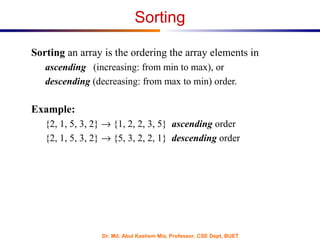
Sorting
Sorting an array is the ordering the array elements in
ascending (increasing: from min to max), or
descending (decreasing: from max to min) order.
Example:
{2, 1, 5, 3, 2} → {1, 2, 2, 3, 5} ascending order
{2, 1, 5, 3, 2} → {5, 3, 2, 2, 1} descending order
Dr. Md. Abul Kashem Mia, Professor, CSE Dept, BUET
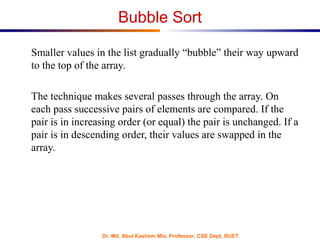
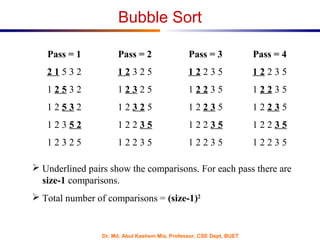
Bubble Sort
Smaller values in the list gradually “bubble” their way upward
to the top of the array.
The technique makes several passes through the array. On
each pass successive pairs of elements are compared. If the
pair is in increasing order (or equal) the pair is unchanged. If a
pair is in descending order, their values are swapped in the
array.
Dr. Md. Abul Kashem Mia, Professor, CSE Dept, BUET
Pass = 1 Pass = 2 Pass = 3 Pass = 4
2 1 5 3 2 1 2 3 2 5 1 2 2 3 5 1 2 2 3 5
1 2 5 3 2 1 2 3 2 5 1 2 2 3 5 1 2 2 3 5
1 2 5 3 2 1 2 3 2 5 1 2 2 3 5 1 2 2 3 5
1 2 3 5 2 1 2 2 3 5 1 2 2 3 5 1 2 2 3 5
1 2 3 2 5 1 2 2 3 5 1 2 2 3 5 1 2 2 3 5
 Underlined pairs show the comparisons. For each pass there are
size-1 comparisons.
 Total number of comparisons = (size-1)2
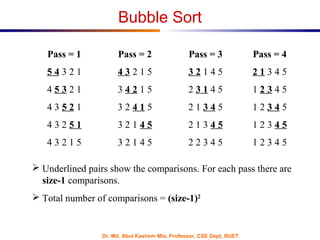
Bubble Sort
Dr. Md. Abul Kashem Mia, Professor, CSE Dept, BUET
Pass = 1 Pass = 2 Pass = 3 Pass = 4
5 4 3 2 1 4 3 2 1 5 3 2 1 4 5 2 1 3 4 5
4 5 3 2 1 3 4 2 1 5 2 3 1 4 5 1 2 3 4 5
4 3 5 2 1 3 2 4 1 5 2 1 3 4 5 1 2 3 4 5
4 3 2 5 1 3 2 1 4 5 2 1 3 4 5 1 2 3 4 5
4 3 2 1 5 3 2 1 4 5 2 2 3 4 5 1 2 3 4 5
 Underlined pairs show the comparisons. For each pass there are
size-1 comparisons.
 Total number of comparisons = (size-1)2
Bubble Sort
Dr. Md. Abul Kashem Mia, Professor, CSE Dept, BUET
Bubble Sort : C Code
/* This program sorts the array elements in the ascending order*/
#include <stdio.h>
#define SIZE 5
void BubbleSort(int [ ]);
int main() {
int a[SIZE]= {2, 1, 5, 3, 2};
int i;
printf(“The elements of the array before sortingn”);
for (i=0; i < SIZE; i++)
printf(“%4d”, a[i]);
BubbleSort(a);
printf(“nnThe elements of the array after sortingn”);
for (i=0; i< SIZE; i++)
printf(“%4d”, a[i]);
return 0;
}
Dr. Md. Abul Kashem Mia, Professor, CSE Dept, BUET
void BubbleSort(int A[ ]) {
int i, pass, temp;
for (pass=1; pass < SIZE; pass++)
for (i=0; i < SIZE-1; i++)
if(A[i] > A[i+1]){
temp = A[i];
A[i] = A[i+1];
A[i+1] = temp;
}
}
Bubble Sort : C Code
Dr. Md. Abul Kashem Mia, Professor, CSE Dept, BUET
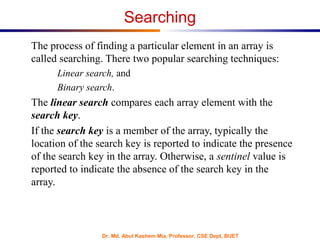
Searching
The process of finding a particular element in an array is
called searching. There two popular searching techniques:
Linear search, and
Binary search.
The linear search compares each array element with the
search key.
If the search key is a member of the array, typically the
location of the search key is reported to indicate the presence
of the search key in the array. Otherwise, a sentinel value is
reported to indicate the absence of the search key in the
array.
Dr. Md. Abul Kashem Mia, Professor, CSE Dept, BUET
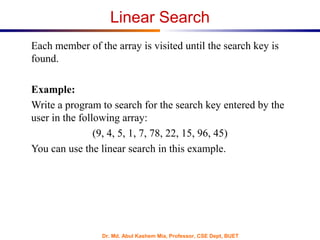
Linear Search
Each member of the array is visited until the search key is
found.
Example:
Write a program to search for the search key entered by the
user in the following array:
(9, 4, 5, 1, 7, 78, 22, 15, 96, 45)
You can use the linear search in this example.
Dr. Md. Abul Kashem Mia, Professor, CSE Dept, BUET
Linear Search
/* This program is an example of the Linear Search*/
#include <stdio.h>
#define SIZE 10
int LinearSearch(int [], int);
int main() {
int a[SIZE]= {9, 4, 5, 1, 7, 78, 22, 15, 96, 45};
int key, pos;
printf(“Enter the Search Keyn”);
scanf(“%d”, &key);
pos = LinearSearch(a, key);
if(pos == −1)
printf(“The search key is not in the arrayn”);
else
printf(“The search key %d is at location %dn”, key, pos);
return 0;
}
Dr. Md. Abul Kashem Mia, Professor, CSE Dept, BUET
int LinearSearch (int b[ ], int skey) {
int i;
for (i=0; i < SIZE; i++)
if(b[i] == skey)
return i;
return −1;
}
Linear Search
Dr. Md. Abul Kashem Mia, Professor, CSE Dept, BUET
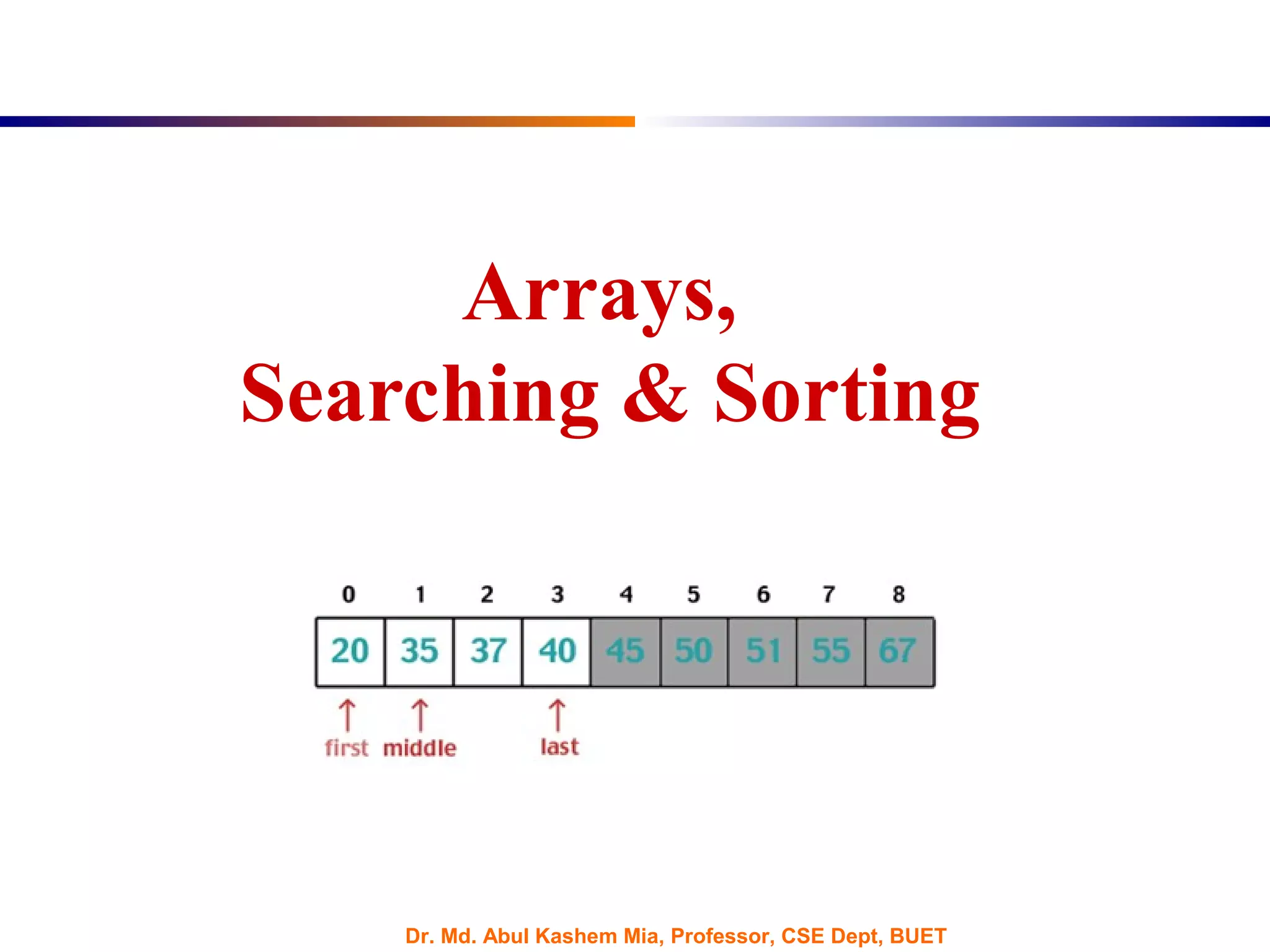
Binary Search
Given a sorted array, Binary Search algorithm can be used to
perform fast searching of a search key on the sorted array.
The following program uses pointer notation to implement the
binary search algorithm for the search key entered by the user
in the following array:
(3, 5, 9, 11, 15, 17, 22, 25, 37, 68)
Dr. Md. Abul Kashem Mia, Professor, CSE Dept, BUET
Binary Search
#include <stdio.h>
#define SIZE 10
int BinarySearch(int [ ], int);
int main(){
int a[SIZE]= {3, 5, 9, 11, 15, 17, 22, 25, 37, 68};
int key, pos;
printf(“Enter the Search Keyn”);
scanf(“%d”,&key);
pos = BinarySearch(a, key);
if(pos == −1)
printf(“The search key is not in the arrayn”);
else
printf(“The search key %d is at location %dn”, key, pos);
return 0;
}
Dr. Md. Abul Kashem Mia, Professor, CSE Dept, BUET
int BinarySearch (int A[], int skey){
int low=0, high=SIZE−1, middle;
while(low <= high){
middle = (low+high)/2;
if(skey == A[middle])
return middle;
else if(skey <A[middle])
high = middle − 1;
else
low = middle + 1;
}
return −1;
}
Binary Search
Dr. Md. Abul Kashem Mia, Professor, CSE Dept, BUET
Computational Complexity
The Computational Complexity of the Binary Search algorithm is
measured by the maximum (worst case) number of comparisons it
performs for searching operations.
The searched array is divided by 2 for each comparison/iteration.
Therefore, the maximum number of comparisons is measured by:
log2(n), where n is the size of the array.
Example:
If a given sorted array 1024 elements, then the maximum number
of comparisons required is:
log2(1024) = 10 (only 10 comparisons is enough)
Dr. Md. Abul Kashem Mia, Professor, CSE Dept, BUET
Computational Complexity
Note that the Computational Complexity of the Linear Search is the
maximum number of comparisons you need to search the array. As
you are visiting all the array elements in the worst case, then, the
number of comparisons required is:
n (n is the size of the array)
Example:
If a given an array of 1024 elements, then the maximum number of
comparisons required is:
n = 1024 (As many as 1024 comparisons may be required)

Arrays searching-sorting

  • 1.
    Dr. Md. AbulKashem Mia, Professor, CSE Dept, BUET Arrays, Searching & Sorting
  • 2.
    Dr. Md. AbulKashem Mia, Professor, CSE Dept, BUET Arrays Arrays are defined to be a sequence/set of data elements of the same type. Having an array, each array element can be accessed by its position in the sequence of the array. Declaration of the Arrays: Any array declaration contains: the array name, the element type the array size and the dimension Examples: int a[20], b[3], c[7]; float f[5][2], d[2]; char m[4], n[20];
  • 3.
    Dr. Md. AbulKashem Mia, Professor, CSE Dept, BUET Arrays Initialization of an array is the process of assigning initial values. Typically declaration and initialization are combined. Examples: int a[4]={1, 3, 5, 2}; float b[3]={2.0, 5.5, 3.14}; char name[5]= {‘N’, ‘a’, ‘o’, ‘m’ , ‘i’};
  • 4.
    Dr. Md. AbulKashem Mia, Professor, CSE Dept, BUET Example Write a program to calculate and print the average of the following array of integers. ( 4, 3, 7, -1, 7, 2, 0, 4, 2, 13) #include<stdio.h> #define SIZE 10 int main() { int x[10] = {4, 3, 7, -1, 7, 2, 0, 4, 2, 13}; int i, sum=0; float av; for(i=0, i<SIZE; i++) sum = sum + x[i]; av = (float)sum / SIZE; printf(“The average of the numbers = %.2fn”, av); return 0; }
  • 5.
    Dr. Md. AbulKashem Mia, Professor, CSE Dept, BUET Sorting Sorting an array is the ordering the array elements in ascending (increasing: from min to max), or descending (decreasing: from max to min) order. Example: {2, 1, 5, 3, 2} → {1, 2, 2, 3, 5} ascending order {2, 1, 5, 3, 2} → {5, 3, 2, 2, 1} descending order
  • 6.
    Dr. Md. AbulKashem Mia, Professor, CSE Dept, BUET Bubble Sort Smaller values in the list gradually “bubble” their way upward to the top of the array. The technique makes several passes through the array. On each pass successive pairs of elements are compared. If the pair is in increasing order (or equal) the pair is unchanged. If a pair is in descending order, their values are swapped in the array.
  • 7.
    Dr. Md. AbulKashem Mia, Professor, CSE Dept, BUET Pass = 1 Pass = 2 Pass = 3 Pass = 4 2 1 5 3 2 1 2 3 2 5 1 2 2 3 5 1 2 2 3 5 1 2 5 3 2 1 2 3 2 5 1 2 2 3 5 1 2 2 3 5 1 2 5 3 2 1 2 3 2 5 1 2 2 3 5 1 2 2 3 5 1 2 3 5 2 1 2 2 3 5 1 2 2 3 5 1 2 2 3 5 1 2 3 2 5 1 2 2 3 5 1 2 2 3 5 1 2 2 3 5  Underlined pairs show the comparisons. For each pass there are size-1 comparisons.  Total number of comparisons = (size-1)2 Bubble Sort
  • 8.
    Dr. Md. AbulKashem Mia, Professor, CSE Dept, BUET Pass = 1 Pass = 2 Pass = 3 Pass = 4 5 4 3 2 1 4 3 2 1 5 3 2 1 4 5 2 1 3 4 5 4 5 3 2 1 3 4 2 1 5 2 3 1 4 5 1 2 3 4 5 4 3 5 2 1 3 2 4 1 5 2 1 3 4 5 1 2 3 4 5 4 3 2 5 1 3 2 1 4 5 2 1 3 4 5 1 2 3 4 5 4 3 2 1 5 3 2 1 4 5 2 2 3 4 5 1 2 3 4 5  Underlined pairs show the comparisons. For each pass there are size-1 comparisons.  Total number of comparisons = (size-1)2 Bubble Sort
  • 9.
    Dr. Md. AbulKashem Mia, Professor, CSE Dept, BUET Bubble Sort : C Code /* This program sorts the array elements in the ascending order*/ #include <stdio.h> #define SIZE 5 void BubbleSort(int [ ]); int main() { int a[SIZE]= {2, 1, 5, 3, 2}; int i; printf(“The elements of the array before sortingn”); for (i=0; i < SIZE; i++) printf(“%4d”, a[i]); BubbleSort(a); printf(“nnThe elements of the array after sortingn”); for (i=0; i< SIZE; i++) printf(“%4d”, a[i]); return 0; }
  • 10.
    Dr. Md. AbulKashem Mia, Professor, CSE Dept, BUET void BubbleSort(int A[ ]) { int i, pass, temp; for (pass=1; pass < SIZE; pass++) for (i=0; i < SIZE-1; i++) if(A[i] > A[i+1]){ temp = A[i]; A[i] = A[i+1]; A[i+1] = temp; } } Bubble Sort : C Code
  • 11.
    Dr. Md. AbulKashem Mia, Professor, CSE Dept, BUET Searching The process of finding a particular element in an array is called searching. There two popular searching techniques: Linear search, and Binary search. The linear search compares each array element with the search key. If the search key is a member of the array, typically the location of the search key is reported to indicate the presence of the search key in the array. Otherwise, a sentinel value is reported to indicate the absence of the search key in the array.
  • 12.
    Dr. Md. AbulKashem Mia, Professor, CSE Dept, BUET Linear Search Each member of the array is visited until the search key is found. Example: Write a program to search for the search key entered by the user in the following array: (9, 4, 5, 1, 7, 78, 22, 15, 96, 45) You can use the linear search in this example.
  • 13.
    Dr. Md. AbulKashem Mia, Professor, CSE Dept, BUET Linear Search /* This program is an example of the Linear Search*/ #include <stdio.h> #define SIZE 10 int LinearSearch(int [], int); int main() { int a[SIZE]= {9, 4, 5, 1, 7, 78, 22, 15, 96, 45}; int key, pos; printf(“Enter the Search Keyn”); scanf(“%d”, &key); pos = LinearSearch(a, key); if(pos == −1) printf(“The search key is not in the arrayn”); else printf(“The search key %d is at location %dn”, key, pos); return 0; }
  • 14.
    Dr. Md. AbulKashem Mia, Professor, CSE Dept, BUET int LinearSearch (int b[ ], int skey) { int i; for (i=0; i < SIZE; i++) if(b[i] == skey) return i; return −1; } Linear Search
  • 15.
    Dr. Md. AbulKashem Mia, Professor, CSE Dept, BUET Binary Search Given a sorted array, Binary Search algorithm can be used to perform fast searching of a search key on the sorted array. The following program uses pointer notation to implement the binary search algorithm for the search key entered by the user in the following array: (3, 5, 9, 11, 15, 17, 22, 25, 37, 68)
  • 16.
    Dr. Md. AbulKashem Mia, Professor, CSE Dept, BUET Binary Search #include <stdio.h> #define SIZE 10 int BinarySearch(int [ ], int); int main(){ int a[SIZE]= {3, 5, 9, 11, 15, 17, 22, 25, 37, 68}; int key, pos; printf(“Enter the Search Keyn”); scanf(“%d”,&key); pos = BinarySearch(a, key); if(pos == −1) printf(“The search key is not in the arrayn”); else printf(“The search key %d is at location %dn”, key, pos); return 0; }
  • 17.
    Dr. Md. AbulKashem Mia, Professor, CSE Dept, BUET int BinarySearch (int A[], int skey){ int low=0, high=SIZE−1, middle; while(low <= high){ middle = (low+high)/2; if(skey == A[middle]) return middle; else if(skey <A[middle]) high = middle − 1; else low = middle + 1; } return −1; } Binary Search
  • 18.
    Dr. Md. AbulKashem Mia, Professor, CSE Dept, BUET Computational Complexity The Computational Complexity of the Binary Search algorithm is measured by the maximum (worst case) number of comparisons it performs for searching operations. The searched array is divided by 2 for each comparison/iteration. Therefore, the maximum number of comparisons is measured by: log2(n), where n is the size of the array. Example: If a given sorted array 1024 elements, then the maximum number of comparisons required is: log2(1024) = 10 (only 10 comparisons is enough)
  • 19.
    Dr. Md. AbulKashem Mia, Professor, CSE Dept, BUET Computational Complexity Note that the Computational Complexity of the Linear Search is the maximum number of comparisons you need to search the array. As you are visiting all the array elements in the worst case, then, the number of comparisons required is: n (n is the size of the array) Example: If a given an array of 1024 elements, then the maximum number of comparisons required is: n = 1024 (As many as 1024 comparisons may be required)