


SQL – A Tutorial
Part I
Gagan Deep
Director, Rozy Computech Services
3rd Gate, Kurukshetra University
Kurukshetra-136119
rozygag@yahoo.com
STRUCTURED QUERY LANGUAGE

• SQL, a Structured Query Language is now available
with most RDBMS (Relational Database
Management System) products as the database
language (which can be used both by end-users
and system programmers). Originally, SQL was
called SEQUEL( for Structured English QUEry
Language). SQL is now standard language for
commercial relational DBMS.
Gagan Deep, Director, Rozy Computech
Services, 3rd Gate, Kurukshetra University,
Kurukshetra, rozygag@yahoo.com
• First reason, a query in relational algebra is
written as a sequence of operations that, after
execution, produce the required result. Hence,
the user must specify how –that is, in what
order – to execute the query operations.
• On the other hand, the SQL provides a highlevel declarative language interface, so the user
only specifies what the result is to be, leaving
the actual optimization and decision on how to
execute the query to the DBMS.

Gagan Deep, Director, Rozy Computech
Services, 3rd Gate, Kurukshetra University,
Kurukshetra, rozygag@yahoo.com
CHARACTERISTICS OF SQL
• User Friendly. The SQL syntax is more userfriendly than other formal languages.
• Comprehensive database language. SQL is a
comprehensive database language (DDL, DML &
DCL);
it
has
statements
for
data
definition, query, and update. Also have a facility
for defining views on the database, for specifying
security and authorization, for defining integrity
constraints, and for specifying transaction
controls.
Gagan Deep, Director, Rozy Computech
Services, 3rd Gate, Kurukshetra
University, Kurukshetra, rozygag@yahoo.co
• Easy to learn. The language while being simple
and easy to learn can cope with complex
situations.
• SQL Applications can be easily ported across
other systems. Such porting could be required
when the underlying DBMS (Data Base
Management System) needs to be upgraded
because of change in transaction volumes or
when a system developed in one environment is
to be used on another DBMS.
• The results to be expected are well defined.
Gagan Deep, Director, Rozy Computech
Services, 3rd Gate, Kurukshetra University,
Kurukshetra, rozygag@yahoo.com
• Allow end-users and systems personnel to deal
with a number of database management
systems where it is available.
• Independent Implementation : As a language its
implementation is independent. A query return
the same result regardless of whether
optimizing has been done with indexes or not.
• Embedded DML. It also has a rules for
embedding SQL statements into a generalpurpose programming language such as Fortran,
Cobol, C and Pascal.
Gagan Deep, Director, Rozy Computech
Services, 3rd Gate, Kurukshetra
University, Kurukshetra, rozygag@yahoo.co
• Allow end-users and systems personnel to deal
with a number of database management systems
where it is available.
• Independent Implementation : As a language its
implementation is independent. A query return
the same result regardless of whether optimizing
has been done with indexes or not.
• Embedded DML. It also has a rules for
embedding SQL statements into a generalpurpose programming language such as
Fortran, Cobol, C and Pascal.
Gagan Deep, Director, Rozy Computech
Services, 3rd Gate, Kurukshetra
University, Kurukshetra, rozygag@yahoo.co
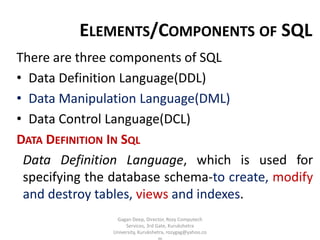
ELEMENTS/COMPONENTS OF SQL
There are three components of SQL
• Data Definition Language(DDL)
• Data Manipulation Language(DML)
• Data Control Language(DCL)
DATA DEFINITION IN SQL
Data Definition Language, which is used for
specifying the database schema-to create, modify
and destroy tables, views and indexes.
Gagan Deep, Director, Rozy Computech
Services, 3rd Gate, Kurukshetra
University, Kurukshetra, rozygag@yahoo.co
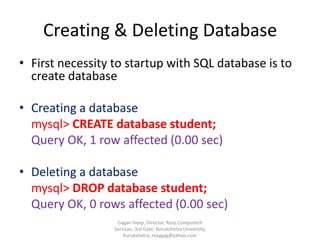
Creating & Deleting Database
• First necessity to startup with SQL database is to
create database
• Creating a database
mysql> CREATE database student;
Query OK, 1 row affected (0.00 sec)
• Deleting a database
mysql> DROP database student;
Query OK, 0 rows affected (0.00 sec)
Gagan Deep, Director, Rozy Computech
Services, 3rd Gate, Kurukshetra University,
Kurukshetra, rozygag@yahoo.com
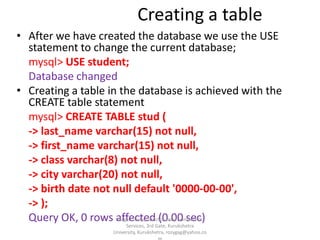
Creating a table
• After we have created the database we use the USE
statement to change the current database;
mysql> USE student;
Database changed
• Creating a table in the database is achieved with the
CREATE table statement
mysql> CREATE TABLE stud (
-> last_name varchar(15) not null,
-> first_name varchar(15) not null,
-> class varchar(8) not null,
-> city varchar(20) not null,
-> birth date not null default '0000-00-00',
-> );
Query OK, 0 rows affected (0.00 sec)
Gagan Deep, Director, Rozy Computech
Services, 3rd Gate, Kurukshetra
University, Kurukshetra, rozygag@yahoo.co
Examining the Result
•

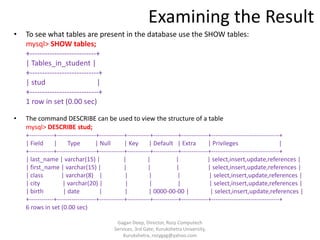
To see what tables are present in the database use the SHOW tables:
mysql> SHOW tables;
+---------------------------+
| Tables_in_student |
+----------------------------+
| stud
|
+----------------------------+
1 row in set (0.00 sec)

•

The command DESCRIBE can be used to view the structure of a table
mysql> DESCRIBE stud;
+------------+-------------------+------------+-----------+------------+-------------+---------------------------------+
| Field
|
Type
| Null
| Key
| Default | Extra
| Privileges
|
+------------+-------------------+------------+-----------+------------+-------------+---------------------------------+
| last_name | varchar(15) |
|
|
|
| select,insert,update,references |
| first_name | varchar(15) |
|
|
|
| select,insert,update,references |
| class
| varchar(8) |
|
|
|
| select,insert,update,references |
| city
| varchar(20) |
|
|
|
| select,insert,update,references |
| birth
| date
|
|
| 0000-00-00 |
| select,insert,update,references |
+------------+-------------------+------------+-----------+------------+-------------+---------------------------------+
6 rows in set (0.00 sec)
Gagan Deep, Director, Rozy Computech
Services, 3rd Gate, Kurukshetra University,
Kurukshetra, rozygag@yahoo.com
Inserting / Retrieving Data into / from Tables
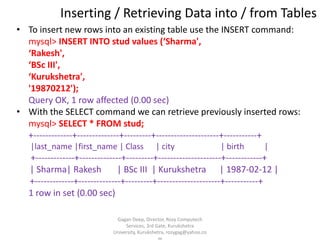
• To insert new rows into an existing table use the INSERT command:
mysql> INSERT INTO stud values (‘Sharma',
‘Rakesh',
‘BSc III',
‘Kurukshetra',
'19870212');
Query OK, 1 row affected (0.00 sec)
• With the SELECT command we can retrieve previously inserted rows:
mysql> SELECT * FROM stud;
+-------------+--------------+---------+---------------------+-----------+
|last_name |first_name | Class

| city

| birth

|

+-------------+--------------+---------+---------------------+------------+
| Sharma| Rakesh
| BSc III | Kurukshetra | 1987-02-12 |
+-------------+--------------+---------+---------------------+-----------+
1 row in set (0.00 sec)
Gagan Deep, Director, Rozy Computech
Services, 3rd Gate, Kurukshetra
University, Kurukshetra, rozygag@yahoo.co
Selecting Specific Rows and Columns
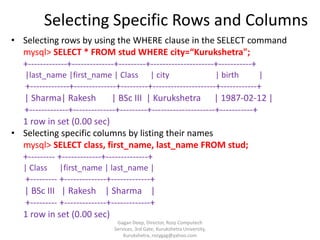
• Selecting rows by using the WHERE clause in the SELECT command
mysql> SELECT * FROM stud WHERE city=“Kurukshetra";
+-------------+--------------+---------+---------------------+-----------+
|last_name |first_name | Class

| city

| birth

|

+-------------+--------------+---------+---------------------+------------+
| Sharma| Rakesh
| BSc III | Kurukshetra | 1987-02-12 |
+-------------+--------------+---------+---------------------+-----------+
1 row in set (0.00 sec)
• Selecting specific columns by listing their names
mysql> SELECT class, first_name, last_name FROM stud;
+--------- +-------------+--------------+
| Class

|first_name | last_name |

+--------- +--------------+-------------+
| BSc III | Rakesh | Sharma |
+--------- +--------------+-------------+
1 row in set (0.00 sec)
Gagan Deep, Director, Rozy Computech
Services, 3rd Gate, Kurukshetra University,
Kurukshetra, rozygag@yahoo.com
Deleting and Updating Rows
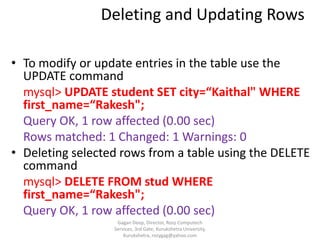
• To modify or update entries in the table use the
UPDATE command
mysql> UPDATE student SET city=“Kaithal" WHERE
first_name=“Rakesh";
Query OK, 1 row affected (0.00 sec)
Rows matched: 1 Changed: 1 Warnings: 0
• Deleting selected rows from a table using the DELETE
command
mysql> DELETE FROM stud WHERE
first_name=“Rakesh";
Query OK, 1 row affected (0.00 sec)
Gagan Deep, Director, Rozy Computech
Services, 3rd Gate, Kurukshetra University,
Kurukshetra, rozygag@yahoo.com
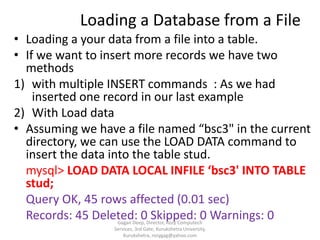
Loading a Database from a File
• Loading a your data from a file into a table.
• If we want to insert more records we have two
methods
1) with multiple INSERT commands : As we had
inserted one record in our last example
2) With Load data
• Assuming we have a file named “bsc3" in the current
directory, we can use the LOAD DATA command to
insert the data into the table stud.
mysql> LOAD DATA LOCAL INFILE ‘bsc3' INTO TABLE
stud;
Query OK, 45 rows affected (0.01 sec)
Records: 45 Deleted: 0 Skipped: 0 Warnings: 0
Gagan Deep, Director, Rozy Computech
Services, 3rd Gate, Kurukshetra University,
Kurukshetra, rozygag@yahoo.com
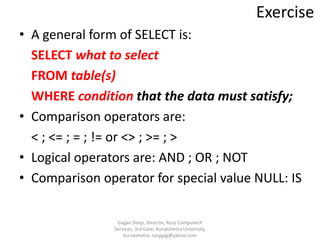
Exercise
• A general form of SELECT is:
SELECT what to select
FROM table(s)
WHERE condition that the data must satisfy;
• Comparison operators are:
< ; <= ; = ; != or <> ; >= ; >
• Logical operators are: AND ; OR ; NOT
• Comparison operator for special value NULL: IS
Gagan Deep, Director, Rozy Computech
Services, 3rd Gate, Kurukshetra University,
Kurukshetra, rozygag@yahoo.com
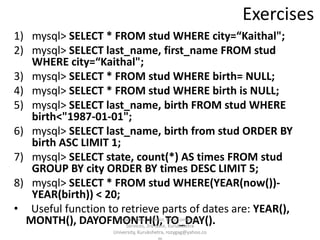
Exercises
1) mysql> SELECT * FROM stud WHERE city=“Kaithal";
2) mysql> SELECT last_name, first_name FROM stud
WHERE city=“Kaithal";
3) mysql> SELECT * FROM stud WHERE birth= NULL;
4) mysql> SELECT * FROM stud WHERE birth is NULL;
5) mysql> SELECT last_name, birth FROM stud WHERE
birth<"1987-01-01";
6) mysql> SELECT last_name, birth from stud ORDER BY
birth ASC LIMIT 1;
7) mysql> SELECT state, count(*) AS times FROM stud
GROUP BY city ORDER BY times DESC LIMIT 5;
8) mysql> SELECT * FROM stud WHERE(YEAR(now())YEAR(birth)) < 20;
• Useful function to retrieve parts of dates are: YEAR(),
Gagan Deep, Director, Rozy Computech
MONTH(), DAYOFMONTH(), TO_DAY().
Services, 3rd Gate, Kurukshetra
University, Kurukshetra, rozygag@yahoo.co
Thanks!

Gagan Deep, Director, Rozy Computech
Services, 3rd Gate, Kurukshetra
University, Kurukshetra, rozygag@yahoo.co

SQL – A Tutorial I

  • 1.
    SQL – ATutorial Part I Gagan Deep Director, Rozy Computech Services 3rd Gate, Kurukshetra University Kurukshetra-136119 rozygag@yahoo.com
  • 2.
    STRUCTURED QUERY LANGUAGE •SQL, a Structured Query Language is now available with most RDBMS (Relational Database Management System) products as the database language (which can be used both by end-users and system programmers). Originally, SQL was called SEQUEL( for Structured English QUEry Language). SQL is now standard language for commercial relational DBMS. Gagan Deep, Director, Rozy Computech Services, 3rd Gate, Kurukshetra University, Kurukshetra, rozygag@yahoo.com
  • 3.
    • First reason,a query in relational algebra is written as a sequence of operations that, after execution, produce the required result. Hence, the user must specify how –that is, in what order – to execute the query operations. • On the other hand, the SQL provides a highlevel declarative language interface, so the user only specifies what the result is to be, leaving the actual optimization and decision on how to execute the query to the DBMS. Gagan Deep, Director, Rozy Computech Services, 3rd Gate, Kurukshetra University, Kurukshetra, rozygag@yahoo.com
  • 4.
    CHARACTERISTICS OF SQL •User Friendly. The SQL syntax is more userfriendly than other formal languages. • Comprehensive database language. SQL is a comprehensive database language (DDL, DML & DCL); it has statements for data definition, query, and update. Also have a facility for defining views on the database, for specifying security and authorization, for defining integrity constraints, and for specifying transaction controls. Gagan Deep, Director, Rozy Computech Services, 3rd Gate, Kurukshetra University, Kurukshetra, rozygag@yahoo.co
  • 5.
    • Easy tolearn. The language while being simple and easy to learn can cope with complex situations. • SQL Applications can be easily ported across other systems. Such porting could be required when the underlying DBMS (Data Base Management System) needs to be upgraded because of change in transaction volumes or when a system developed in one environment is to be used on another DBMS. • The results to be expected are well defined. Gagan Deep, Director, Rozy Computech Services, 3rd Gate, Kurukshetra University, Kurukshetra, rozygag@yahoo.com
  • 6.
    • Allow end-usersand systems personnel to deal with a number of database management systems where it is available. • Independent Implementation : As a language its implementation is independent. A query return the same result regardless of whether optimizing has been done with indexes or not. • Embedded DML. It also has a rules for embedding SQL statements into a generalpurpose programming language such as Fortran, Cobol, C and Pascal. Gagan Deep, Director, Rozy Computech Services, 3rd Gate, Kurukshetra University, Kurukshetra, rozygag@yahoo.co
  • 7.
    • Allow end-usersand systems personnel to deal with a number of database management systems where it is available. • Independent Implementation : As a language its implementation is independent. A query return the same result regardless of whether optimizing has been done with indexes or not. • Embedded DML. It also has a rules for embedding SQL statements into a generalpurpose programming language such as Fortran, Cobol, C and Pascal. Gagan Deep, Director, Rozy Computech Services, 3rd Gate, Kurukshetra University, Kurukshetra, rozygag@yahoo.co
  • 8.
    ELEMENTS/COMPONENTS OF SQL Thereare three components of SQL • Data Definition Language(DDL) • Data Manipulation Language(DML) • Data Control Language(DCL) DATA DEFINITION IN SQL Data Definition Language, which is used for specifying the database schema-to create, modify and destroy tables, views and indexes. Gagan Deep, Director, Rozy Computech Services, 3rd Gate, Kurukshetra University, Kurukshetra, rozygag@yahoo.co
  • 9.
    Creating & DeletingDatabase • First necessity to startup with SQL database is to create database • Creating a database mysql> CREATE database student; Query OK, 1 row affected (0.00 sec) • Deleting a database mysql> DROP database student; Query OK, 0 rows affected (0.00 sec) Gagan Deep, Director, Rozy Computech Services, 3rd Gate, Kurukshetra University, Kurukshetra, rozygag@yahoo.com
  • 10.
    Creating a table •After we have created the database we use the USE statement to change the current database; mysql> USE student; Database changed • Creating a table in the database is achieved with the CREATE table statement mysql> CREATE TABLE stud ( -> last_name varchar(15) not null, -> first_name varchar(15) not null, -> class varchar(8) not null, -> city varchar(20) not null, -> birth date not null default '0000-00-00', -> ); Query OK, 0 rows affected (0.00 sec) Gagan Deep, Director, Rozy Computech Services, 3rd Gate, Kurukshetra University, Kurukshetra, rozygag@yahoo.co
  • 11.
    Examining the Result • Tosee what tables are present in the database use the SHOW tables: mysql> SHOW tables; +---------------------------+ | Tables_in_student | +----------------------------+ | stud | +----------------------------+ 1 row in set (0.00 sec) • The command DESCRIBE can be used to view the structure of a table mysql> DESCRIBE stud; +------------+-------------------+------------+-----------+------------+-------------+---------------------------------+ | Field | Type | Null | Key | Default | Extra | Privileges | +------------+-------------------+------------+-----------+------------+-------------+---------------------------------+ | last_name | varchar(15) | | | | | select,insert,update,references | | first_name | varchar(15) | | | | | select,insert,update,references | | class | varchar(8) | | | | | select,insert,update,references | | city | varchar(20) | | | | | select,insert,update,references | | birth | date | | | 0000-00-00 | | select,insert,update,references | +------------+-------------------+------------+-----------+------------+-------------+---------------------------------+ 6 rows in set (0.00 sec) Gagan Deep, Director, Rozy Computech Services, 3rd Gate, Kurukshetra University, Kurukshetra, rozygag@yahoo.com
  • 12.
    Inserting / RetrievingData into / from Tables • To insert new rows into an existing table use the INSERT command: mysql> INSERT INTO stud values (‘Sharma', ‘Rakesh', ‘BSc III', ‘Kurukshetra', '19870212'); Query OK, 1 row affected (0.00 sec) • With the SELECT command we can retrieve previously inserted rows: mysql> SELECT * FROM stud; +-------------+--------------+---------+---------------------+-----------+ |last_name |first_name | Class | city | birth | +-------------+--------------+---------+---------------------+------------+ | Sharma| Rakesh | BSc III | Kurukshetra | 1987-02-12 | +-------------+--------------+---------+---------------------+-----------+ 1 row in set (0.00 sec) Gagan Deep, Director, Rozy Computech Services, 3rd Gate, Kurukshetra University, Kurukshetra, rozygag@yahoo.co
  • 13.
    Selecting Specific Rowsand Columns • Selecting rows by using the WHERE clause in the SELECT command mysql> SELECT * FROM stud WHERE city=“Kurukshetra"; +-------------+--------------+---------+---------------------+-----------+ |last_name |first_name | Class | city | birth | +-------------+--------------+---------+---------------------+------------+ | Sharma| Rakesh | BSc III | Kurukshetra | 1987-02-12 | +-------------+--------------+---------+---------------------+-----------+ 1 row in set (0.00 sec) • Selecting specific columns by listing their names mysql> SELECT class, first_name, last_name FROM stud; +--------- +-------------+--------------+ | Class |first_name | last_name | +--------- +--------------+-------------+ | BSc III | Rakesh | Sharma | +--------- +--------------+-------------+ 1 row in set (0.00 sec) Gagan Deep, Director, Rozy Computech Services, 3rd Gate, Kurukshetra University, Kurukshetra, rozygag@yahoo.com
  • 14.
    Deleting and UpdatingRows • To modify or update entries in the table use the UPDATE command mysql> UPDATE student SET city=“Kaithal" WHERE first_name=“Rakesh"; Query OK, 1 row affected (0.00 sec) Rows matched: 1 Changed: 1 Warnings: 0 • Deleting selected rows from a table using the DELETE command mysql> DELETE FROM stud WHERE first_name=“Rakesh"; Query OK, 1 row affected (0.00 sec) Gagan Deep, Director, Rozy Computech Services, 3rd Gate, Kurukshetra University, Kurukshetra, rozygag@yahoo.com
  • 15.
    Loading a Databasefrom a File • Loading a your data from a file into a table. • If we want to insert more records we have two methods 1) with multiple INSERT commands : As we had inserted one record in our last example 2) With Load data • Assuming we have a file named “bsc3" in the current directory, we can use the LOAD DATA command to insert the data into the table stud. mysql> LOAD DATA LOCAL INFILE ‘bsc3' INTO TABLE stud; Query OK, 45 rows affected (0.01 sec) Records: 45 Deleted: 0 Skipped: 0 Warnings: 0 Gagan Deep, Director, Rozy Computech Services, 3rd Gate, Kurukshetra University, Kurukshetra, rozygag@yahoo.com
  • 16.
    Exercise • A generalform of SELECT is: SELECT what to select FROM table(s) WHERE condition that the data must satisfy; • Comparison operators are: < ; <= ; = ; != or <> ; >= ; > • Logical operators are: AND ; OR ; NOT • Comparison operator for special value NULL: IS Gagan Deep, Director, Rozy Computech Services, 3rd Gate, Kurukshetra University, Kurukshetra, rozygag@yahoo.com
  • 17.
    Exercises 1) mysql> SELECT* FROM stud WHERE city=“Kaithal"; 2) mysql> SELECT last_name, first_name FROM stud WHERE city=“Kaithal"; 3) mysql> SELECT * FROM stud WHERE birth= NULL; 4) mysql> SELECT * FROM stud WHERE birth is NULL; 5) mysql> SELECT last_name, birth FROM stud WHERE birth<"1987-01-01"; 6) mysql> SELECT last_name, birth from stud ORDER BY birth ASC LIMIT 1; 7) mysql> SELECT state, count(*) AS times FROM stud GROUP BY city ORDER BY times DESC LIMIT 5; 8) mysql> SELECT * FROM stud WHERE(YEAR(now())YEAR(birth)) < 20; • Useful function to retrieve parts of dates are: YEAR(), Gagan Deep, Director, Rozy Computech MONTH(), DAYOFMONTH(), TO_DAY(). Services, 3rd Gate, Kurukshetra University, Kurukshetra, rozygag@yahoo.co
  • 18.
    Thanks! Gagan Deep, Director,Rozy Computech Services, 3rd Gate, Kurukshetra University, Kurukshetra, rozygag@yahoo.co