Topic
SQL, DBMS and Database
ِ‫ن‬ ٰ‫حم‬َّ‫الر‬ ِ‫ہللا‬ ِ‫سم‬ِ‫ب‬
‫يم‬ ِ‫ح‬َّ‫الر‬
Group Members.
1. Muhammad Humza Pirzada Roll no
2k20/ITE/83.
2. Nabeel khan Roll no 2k20/ITE/89.
3. Wasif khan Roll no 2k20/ITE/146.
4. Daniyal Raza Roll no 2k20/ITE/33.
5. Saqlain Roll no 2k20/ITE/115.
What is SQL?
• SQL or Structured Query Language is
simply a computer language that is
used to establish a communication
between the user and the database
i.e. all the database related operations
are performed using this Structured
Query Language.
• All relational database management
system like MySQL, MS Access, Oracle,
and SQL server use SQL as a standard
database language.
What Can SQL do?
• The basic use of SQL for data professionals and SQL users is
to insert, update, and delete the data from the relational
database.
• SQL allows the data professionals and users to retrieve the
data from the relational database management systems.
• It also helps them to describe the structured data.
• It allows SQL users to create, drop, and manipulate the
database and its tables.
• It also helps in creating the view, stored procedure, and
functions in the relational database.
• It allows you to define the data and modify that stored data
in the relational database.
• It also allows SQL users to set the permissions or constraints
on table columns, views, and stored procedures.
SQL Syntax.
• When you want to do some operations on the data in
the database, then you must have to write the query
in the predefined syntax of SQL.
• The syntax of the structured query language is a
unique set of rules and guidelines, which is not case-
sensitive. Its Syntax is defined and maintained by the
ISO and ANSI standards.
Following are some most important points about
the SQL syntax which are to remember:
• You can write the keywords of SQL in both uppercase
and lowercase, but writing the SQL keywords in
uppercase improves the readability of the SQL query.
• SQL statements or syntax are dependent on text
lines. We can place a single SQL statement on one or
multiple text lines.
• You can perform most of the action in a database
with SQL statements.
• SQL syntax depends on relational algebra and tuple
relational calculus.
SQL Statement
• statements tell the database what operation you
want to perform on the structured data and what
information you would like to access from the
database.
• The statements of SQL are very simple and easy to
use and understand. They are like plain English but
with a particular syntax.
Some SQL Commands.
• The SQL commands help in creating and managing
the database. The most common SQL commands
which are highly used are mentioned below:
• CREATE command
• UPDATE command
• DELETE command
• SELECT command
• DROP command
• INSERT command
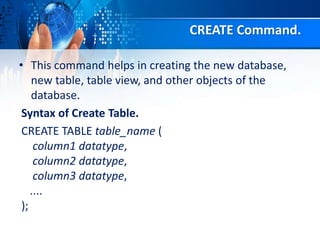
CREATE Command.
• This command helps in creating the new database,
new table, table view, and other objects of the
database.
Syntax of Create Table.
CREATE TABLE table_name (
column1 datatype,
column2 datatype,
column3 datatype,
....
);
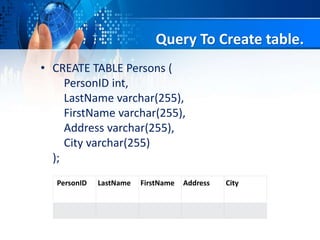
Query To Create table.
• CREATE TABLE Persons (
PersonID int,
LastName varchar(255),
FirstName varchar(255),
Address varchar(255),
City varchar(255)
);
PersonID LastName FirstName Address City
UPDATE Command
• This command helps in updating or changing the
stored data in the database.
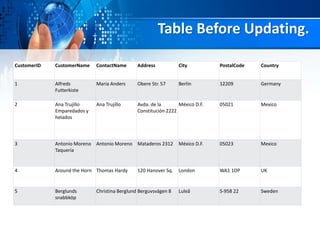
Table Before Updating.
CustomerID CustomerName ContactName Address City PostalCode Country
1 Alfreds
Futterkiste
Maria Anders Obere Str. 57 Berlin 12209 Germany
2 Ana Trujillo
Emparedados y
helados
Ana Trujillo Avda. de la
Constitución 2222
México D.F. 05021 Mexico
3 Antonio Moreno
Taquería
Antonio Moreno Mataderos 2312 México D.F. 05023 Mexico
4 Around the Horn Thomas Hardy 120 Hanover Sq. London WA1 1DP UK
5 Berglunds
snabbköp
Christina Berglund Berguvsvägen 8 Luleå S-958 22 Sweden
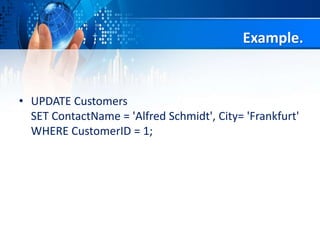
Example.
• UPDATE Customers
SET ContactName = 'Alfred Schmidt', City= 'Frankfurt'
WHERE CustomerID = 1;
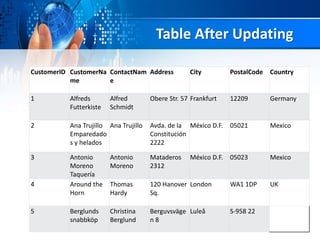
Table After Updating
CustomerID CustomerNa
me
ContactNam
e
Address City PostalCode Country
1 Alfreds
Futterkiste
Alfred
Schmidt
Obere Str. 57 Frankfurt 12209 Germany
2 Ana Trujillo
Emparedado
s y helados
Ana Trujillo Avda. de la
Constitución
2222
México D.F. 05021 Mexico
3 Antonio
Moreno
Taquería
Antonio
Moreno
Mataderos
2312
México D.F. 05023 Mexico
4 Around the
Horn
Thomas
Hardy
120 Hanover
Sq.
London WA1 1DP UK
5 Berglunds
snabbköp
Christina
Berglund
Berguvsväge
n 8
Luleå S-958 22
DELETE Command
• This command helps in removing or erasing the
saved records from the database tables. It erases
single or multiple tuples from the tables of the
database.
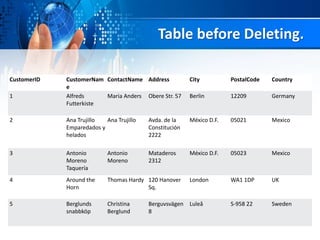
Table before Deleting.
CustomerID CustomerNam
e
ContactName Address City PostalCode Country
1 Alfreds
Futterkiste
Maria Anders Obere Str. 57 Berlin 12209 Germany
2 Ana Trujillo
Emparedados y
helados
Ana Trujillo Avda. de la
Constitución
2222
México D.F. 05021 Mexico
3 Antonio
Moreno
Taquería
Antonio
Moreno
Mataderos
2312
México D.F. 05023 Mexico
4 Around the
Horn
Thomas Hardy 120 Hanover
Sq.
London WA1 1DP UK
5 Berglunds
snabbköp
Christina
Berglund
Berguvsvägen
8
Luleå S-958 22 Sweden
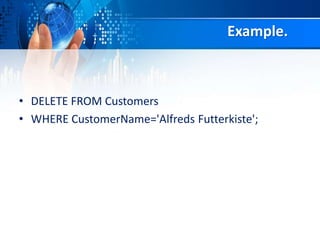
Example.
• DELETE FROM Customers
• WHERE CustomerName='Alfreds Futterkiste';
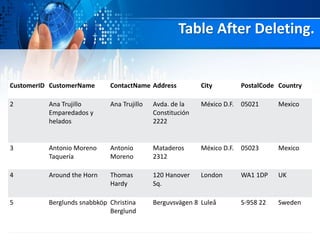
Table After Deleting.
CustomerID CustomerName ContactName Address City PostalCode Country
2 Ana Trujillo
Emparedados y
helados
Ana Trujillo Avda. de la
Constitución
2222
México D.F. 05021 Mexico
3 Antonio Moreno
Taquería
Antonio
Moreno
Mataderos
2312
México D.F. 05023 Mexico
4 Around the Horn Thomas
Hardy
120 Hanover
Sq.
London WA1 1DP UK
5 Berglunds snabbköp Christina
Berglund
Berguvsvägen 8 Luleå S-958 22 Sweden
INSERT Command.
• This command helps in inserting the data or records
into the database tables. We can easily insert the
records in single as well as multiple rows of the table.
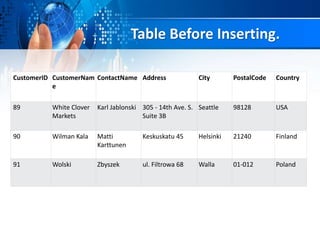
Table Before Inserting.
CustomerID CustomerNam
e
ContactName Address City PostalCode Country
89 White Clover
Markets
Karl Jablonski 305 - 14th Ave. S.
Suite 3B
Seattle 98128 USA
90 Wilman Kala Matti
Karttunen
Keskuskatu 45 Helsinki 21240 Finland
91 Wolski Zbyszek ul. Filtrowa 68 Walla 01-012 Poland
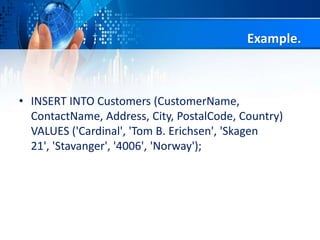
Example.
• INSERT INTO Customers (CustomerName,
ContactName, Address, City, PostalCode, Country)
VALUES ('Cardinal', 'Tom B. Erichsen', 'Skagen
21', 'Stavanger', '4006', 'Norway');
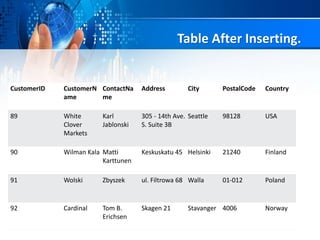
Table After Inserting.
CustomerID CustomerN
ame
ContactNa
me
Address City PostalCode Country
89 White
Clover
Markets
Karl
Jablonski
305 - 14th Ave.
S. Suite 3B
Seattle 98128 USA
90 Wilman Kala Matti
Karttunen
Keskuskatu 45 Helsinki 21240 Finland
91 Wolski Zbyszek ul. Filtrowa 68 Walla 01-012 Poland
92 Cardinal Tom B.
Erichsen
Skagen 21 Stavanger 4006 Norway
Select, where, from
• They will be described by Nabeel.
SQL Select Statement.
• The SELECT statement is used to select
data from a database.
• SELECT Syntax.
• SELECT column1, column2, ...
FROM table_name;
Query of select.
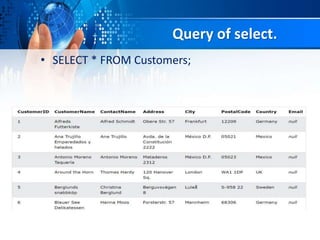
• SELECT * FROM Customers;
Query of Select
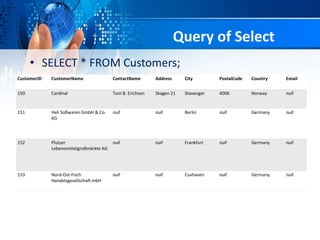
• SELECT * FROM Customers;
CustomerID CustomerName ContactName Address City PostalCode Country Email
150 Cardinal Tom B. Erichsen Skagen 21 Stavanger 4006 Norway null
151 Heli Süßwaren GmbH & Co.
KG
null null Berlin null Germany null
152 Plutzer
Lebensmittelgroßmärkte AG
null null Frankfurt null Germany null
153 Nord-Ost-Fisch
Handelsgesellschaft mbH
null null Cuxhaven null Germany null
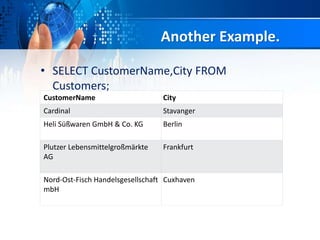
Another Example.
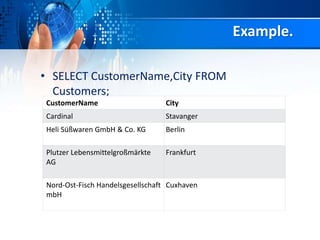
• SELECT CustomerName,City FROM
Customers;
CustomerName City
Cardinal Stavanger
Heli Süßwaren GmbH & Co. KG Berlin
Plutzer Lebensmittelgroßmärkte
AG
Frankfurt
Nord-Ost-Fisch Handelsgesellschaft
mbH
Cuxhaven
SQL WHERE Clause.
• The WHERE clause is used to filter records.
• It is used to extract only those records that
fulfill a specified condition.
• Syntax of Where clause.
• SELECT column1, column2, ...
FROM table_name
WHERE condition;
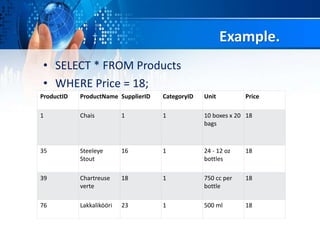
Example.
• SELECT * FROM Products
• WHERE Price = 18;
ProductID ProductName SupplierID CategoryID Unit Price
1 Chais 1 1 10 boxes x 20
bags
18
35 Steeleye
Stout
16 1 24 - 12 oz
bottles
18
39 Chartreuse
verte
18 1 750 cc per
bottle
18
76 Lakkalikööri 23 1 500 ml 18
SQL FROM Keyword.
• The FROM command is used to specify
which table to select or delete data from.
• Syntax of From keyword.
• SELECT CustomerName,City FROM
Customers;
Example.
• SELECT CustomerName,City FROM
Customers;
CustomerName City
Cardinal Stavanger
Heli Süßwaren GmbH & Co. KG Berlin
Plutzer Lebensmittelgroßmärkte
AG
Frankfurt
Nord-Ost-Fisch Handelsgesellschaft
mbH
Cuxhaven
Another Example.
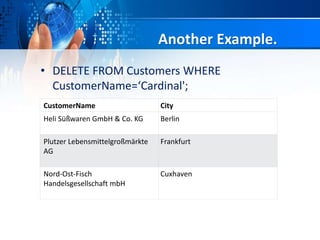
• DELETE FROM Customers WHERE
CustomerName=‘Cardinal';
CustomerName City
Heli Süßwaren GmbH & Co. KG Berlin
Plutzer Lebensmittelgroßmärkte
AG
Frankfurt
Nord-Ost-Fisch
Handelsgesellschaft mbH
Cuxhaven
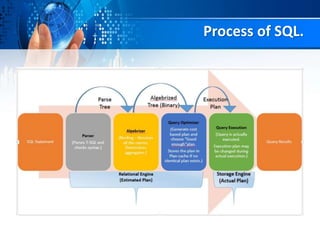
Process of SQL.
SQL Comments.
• Single line comments start with --.
• Any text between -- and the end of the line will be
ignored (will not be executed).
• --Select all:
SELECT * FROM Customers;
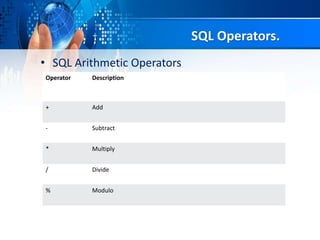
SQL Operators.
• SQL Arithmetic Operators
Operator Description
+ Add
- Subtract
* Multiply
/ Divide
% Modulo
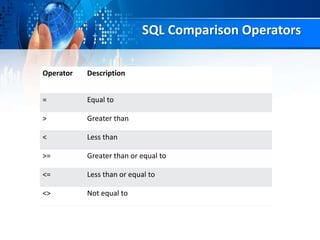
SQL Comparison Operators
Operator Description
= Equal to
> Greater than
< Less than
>= Greater than or equal to
<= Less than or equal to
<> Not equal to
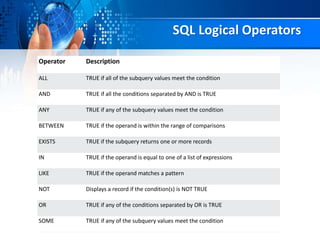
SQL Logical Operators
Operator Description
ALL TRUE if all of the subquery values meet the condition
AND TRUE if all the conditions separated by AND is TRUE
ANY TRUE if any of the subquery values meet the condition
BETWEEN TRUE if the operand is within the range of comparisons
EXISTS TRUE if the subquery returns one or more records
IN TRUE if the operand is equal to one of a list of expressions
LIKE TRUE if the operand matches a pattern
NOT Displays a record if the condition(s) is NOT TRUE
OR TRUE if any of the conditions separated by OR is TRUE
SOME TRUE if any of the subquery values meet the condition
• What is SQL?
• What can do SQL?
• SQL Syntax.
• SQL Statement.
• Some SQL Commands.
• Example of Queries.
• Insert, deletion, create, updtaion queries.
• SQL operators.
• Keyword of SQL.
1. Select.
2. Where.
3. From.
Summary.
Database and DBMS:
IT will be described
By the.
Wasif Khan.
Daniyal and Saqlain.
What is Database?
• Database is collection of information
organized for easy management and
maintenance.
• means that where is a lot of data and
related data means related to
companies’ name and other
department.
Structure of data
• Structured data is that which is stored in
particular structured or particular shape.
• Example:-
• University, Railway, Airport.
Relational Data base
• It is a type of data base that store and provide access
to data point that are relative each other.
1. Base on relation model(data in table)
2. Each row in table with (unique key)
3. Colum of table hold attribute of data
Types of Database Model.
A set of rules and
standard that define
how the data base
store data is called
Data base model
Hierarchical Model
Hierarchical Model
The Hierarchical Model arrange records I Hierarchical
like an organization chart.
2. Hierarchical DBMSs were popular from the late
1969s, with the introduction of IBM’s Information
Management System (IMS) DBMS, through the 197
• A Database Management System (DBMS) or
simply a Database System (DBS) consist of :
• A collection of interrelated and persistent
data (usually referred to as the database(DB)
).
• A set of application program used to access,
update and manage that data (which form
the data management system (MS)).
What is (DBMS) Database Management System?
Why Use a DBMS?
• Data independent and efficient access.
• Reduced application development time.
• Data integrity and security.
• Uniform DAT administration.
• Concurrent access, recovery from
crashes
Brief History.
Early 1960: first general purpose database by Charles
Bachman from GE. Used the network data model.
Late 1960: IBM developed information management
system (IMS). Used the hierarchical data model. Led to
SABRE, the airline reservation system developed by AA
and IBM. Still in use today.
1970: Edgar Code of IBM developed the relational data
model.Led to several DBMS based on relational model,
as well as important theoretical results. Code win
Turing award.
1980: relational model dominant. SQL standard.
Late 1980, 1990s DBMS vendors extend systems,
allowing more complex data types (images,text).
Purpose of DBMS
• 1.Data redundant and inconsistency
• Same information may be duplicated in several place.
• All copies may not be updated properly.
• 2.Difficulty in new program to carry out each new
task.
• 3.Data isolation.
• Data in different formats.
• Difficult to write new application programs
• Files and formats
Security problems
Every user of the system should be able to access only
the data they are permitted to see.
E.g. payroll people only handle employee records, and
cannot see gusto accounts; tellers only access account
data and cannot see payroll data.
Difficult to enforce this with application programs.
Integrity problems
Data may be required to satisfy constraints.
E.g no account balance below $25,00.
Again, difficult to enforce or to change constraints
with the file-processing approach.
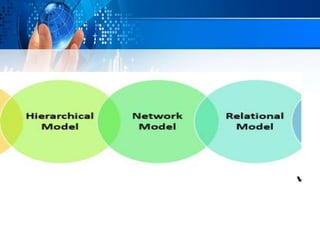
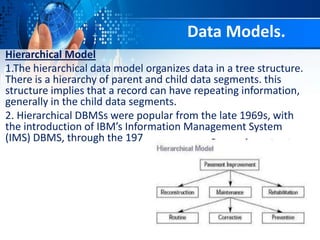
Hierarchical Model
1.The hierarchical data model organizes data in a tree structure.
There is a hierarchy of parent and child data segments. this
structure implies that a record can have repeating information,
generally in the child data segments.
2. Hierarchical DBMSs were popular from the late 1969s, with
the introduction of IBM’s Information Management System
(IMS) DBMS, through the 197
Data Models.
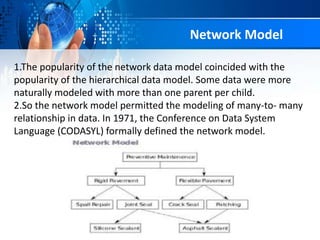
Network Model
1.The popularity of the network data model coincided with the
popularity of the hierarchical data model. Some data were more
naturally modeled with more than one parent per child.
2.So the network model permitted the modeling of many-to- many
relationship in data. In 1971, the Conference on Data System
Language (CODASYL) formally defined the network model.
1.(RDBMS-relational database management system) A
database based on the relational model developed by
E.F.Code.
2. A relational database allows the. Definition of data
structures, storage and retireval operations and integrity
constraints.
3.In such a database the data and relations between
them arw organized in tables. A table is a collection of
records and each record I. A table containa the same
fields.
Relational Model
Properties of Relational Tables
• Values are atomic.
• Each row is unique.
• Column values are of the same kind.
• The sequence of row is insignificant
• Each column has a unique name.
Object-oriented Model
Object DBMSs add database functionality to object
programming languages. They bring much more than
persistent storage of programming language objects.
A major benefit of this approach is the unification of
the application and database development into a
seamless data model and language environment.
In semi structured data model, the information
that is normally associated with a scheme is
contained within the data, which is sometimes
called “self-describing”.
In such database thers is no clear separation
betweem the data and the scheme, and the degree
to which it is structured depends on the application
Semi structured Model
Architecture of DBMS
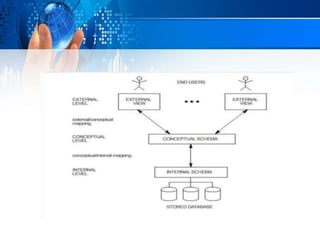
An early proposal for a standard terminology and general
architecture database a system was produced in 1971 by the
DBTG(Data Base Task Group) appointed by the conference on
data system and languages.
The DBTG recognized the need for a two level approach with a
system view called the scheme and user view called subschema.
The American National Standard institute terminology and
architecture in 1975. ANSI-SPARC recognized the need for q three
level approach with a system catalog.
There are following three levels or layer of bDBMS architecture.
1.External level.
2.Conceptual level.
3.Intrrnal level.
Level or layers of DBMS Architecture
External level:-
External level is described by a scheme I.e. it consists of definition
of logical records and relationship in the external view.
Conceptual level:-
Conceptual level represents the entire database. Conceptual
schema describes the records and relationship included in the
conceptual view
Internal level:-
Internal level indicates hoe the data will be stored and described
the data structures and access method to be used by the database.
Component of DBMS
1.Hardware
Can range from a PC to a network of computers.
2.Software.
DBMS, operating system, network software (if necessary) and
also the application programs.
Data.
Used by the organization and a description of this data called the
schema.
People.
Includes database designers, DBAs, application programmer, and
end-users.
Procedure.
Instructions and rules that should be applied to the design and
use of the database and DBMS.
Advantage of DBMS.
• Controlling Redundancy.
• Sharing of Data.
• Data Consistency.
• Integration of Data.
• Integration Constraints.
• Data Security.
• Report security
• Control over concurrency.
• Backup and Recovery Procedures.
• Data independece
Disadvantages of DBMS.
• Cost of Hardware and software.
• Cost of Data Conversi
• Cost of Staff training
• Appointment technical staff
• Database Damage.
Data Definition language-DDL
Data Definition language (DDL) statement are used to define the
database structure or Schema.
Some examples:
CREATE – to create object in the database.
ALTER – alter the structure of the database.
DROP – delete object from the database.
TRUNCATE – remove all records from a table, including all spaces
allocated for the record are removed.
COMMENT – add comments to the data dictionary.
RENAME – rename an object.
DBMS Languages
Data Manipulation language (DML).
Data Manipulation Language (DML) statement are used for
management data within schema objects.
Some examples:
SELECT – Retrieve data from the a database.
INSERT – insert data into a table
UPDATE – update existing data within a table.
DELETE – delete all records from a table, the space for the record
remain.
MERGE – UPSERT operation(insert or update)
CALL–Call a PL/SQL or java subprogram.
EXPLAIN PLAN – explain access path to data.
LOCK TABLE – control concurrency.
SQL NAD DB.pptx

SQL NAD DB.pptx

  • 1.
    Topic SQL, DBMS andDatabase ِ‫ن‬ ٰ‫حم‬َّ‫الر‬ ِ‫ہللا‬ ِ‫سم‬ِ‫ب‬ ‫يم‬ ِ‫ح‬َّ‫الر‬
  • 2.
    Group Members. 1. MuhammadHumza Pirzada Roll no 2k20/ITE/83. 2. Nabeel khan Roll no 2k20/ITE/89. 3. Wasif khan Roll no 2k20/ITE/146. 4. Daniyal Raza Roll no 2k20/ITE/33. 5. Saqlain Roll no 2k20/ITE/115.
  • 3.
    What is SQL? •SQL or Structured Query Language is simply a computer language that is used to establish a communication between the user and the database i.e. all the database related operations are performed using this Structured Query Language. • All relational database management system like MySQL, MS Access, Oracle, and SQL server use SQL as a standard database language.
  • 5.
    What Can SQLdo? • The basic use of SQL for data professionals and SQL users is to insert, update, and delete the data from the relational database. • SQL allows the data professionals and users to retrieve the data from the relational database management systems. • It also helps them to describe the structured data. • It allows SQL users to create, drop, and manipulate the database and its tables. • It also helps in creating the view, stored procedure, and functions in the relational database. • It allows you to define the data and modify that stored data in the relational database. • It also allows SQL users to set the permissions or constraints on table columns, views, and stored procedures.
  • 6.
    SQL Syntax. • Whenyou want to do some operations on the data in the database, then you must have to write the query in the predefined syntax of SQL. • The syntax of the structured query language is a unique set of rules and guidelines, which is not case- sensitive. Its Syntax is defined and maintained by the ISO and ANSI standards.
  • 7.
    Following are somemost important points about the SQL syntax which are to remember: • You can write the keywords of SQL in both uppercase and lowercase, but writing the SQL keywords in uppercase improves the readability of the SQL query. • SQL statements or syntax are dependent on text lines. We can place a single SQL statement on one or multiple text lines. • You can perform most of the action in a database with SQL statements. • SQL syntax depends on relational algebra and tuple relational calculus.
  • 8.
    SQL Statement • statementstell the database what operation you want to perform on the structured data and what information you would like to access from the database. • The statements of SQL are very simple and easy to use and understand. They are like plain English but with a particular syntax.
  • 9.
    Some SQL Commands. •The SQL commands help in creating and managing the database. The most common SQL commands which are highly used are mentioned below: • CREATE command • UPDATE command • DELETE command • SELECT command • DROP command • INSERT command
  • 10.
    CREATE Command. • Thiscommand helps in creating the new database, new table, table view, and other objects of the database. Syntax of Create Table. CREATE TABLE table_name ( column1 datatype, column2 datatype, column3 datatype, .... );
  • 11.
    Query To Createtable. • CREATE TABLE Persons ( PersonID int, LastName varchar(255), FirstName varchar(255), Address varchar(255), City varchar(255) ); PersonID LastName FirstName Address City
  • 12.
    UPDATE Command • Thiscommand helps in updating or changing the stored data in the database.
  • 13.
    Table Before Updating. CustomerIDCustomerName ContactName Address City PostalCode Country 1 Alfreds Futterkiste Maria Anders Obere Str. 57 Berlin 12209 Germany 2 Ana Trujillo Emparedados y helados Ana Trujillo Avda. de la Constitución 2222 México D.F. 05021 Mexico 3 Antonio Moreno Taquería Antonio Moreno Mataderos 2312 México D.F. 05023 Mexico 4 Around the Horn Thomas Hardy 120 Hanover Sq. London WA1 1DP UK 5 Berglunds snabbköp Christina Berglund Berguvsvägen 8 Luleå S-958 22 Sweden
  • 14.
    Example. • UPDATE Customers SETContactName = 'Alfred Schmidt', City= 'Frankfurt' WHERE CustomerID = 1;
  • 15.
    Table After Updating CustomerIDCustomerNa me ContactNam e Address City PostalCode Country 1 Alfreds Futterkiste Alfred Schmidt Obere Str. 57 Frankfurt 12209 Germany 2 Ana Trujillo Emparedado s y helados Ana Trujillo Avda. de la Constitución 2222 México D.F. 05021 Mexico 3 Antonio Moreno Taquería Antonio Moreno Mataderos 2312 México D.F. 05023 Mexico 4 Around the Horn Thomas Hardy 120 Hanover Sq. London WA1 1DP UK 5 Berglunds snabbköp Christina Berglund Berguvsväge n 8 Luleå S-958 22
  • 16.
    DELETE Command • Thiscommand helps in removing or erasing the saved records from the database tables. It erases single or multiple tuples from the tables of the database.
  • 17.
    Table before Deleting. CustomerIDCustomerNam e ContactName Address City PostalCode Country 1 Alfreds Futterkiste Maria Anders Obere Str. 57 Berlin 12209 Germany 2 Ana Trujillo Emparedados y helados Ana Trujillo Avda. de la Constitución 2222 México D.F. 05021 Mexico 3 Antonio Moreno Taquería Antonio Moreno Mataderos 2312 México D.F. 05023 Mexico 4 Around the Horn Thomas Hardy 120 Hanover Sq. London WA1 1DP UK 5 Berglunds snabbköp Christina Berglund Berguvsvägen 8 Luleå S-958 22 Sweden
  • 18.
    Example. • DELETE FROMCustomers • WHERE CustomerName='Alfreds Futterkiste';
  • 19.
    Table After Deleting. CustomerIDCustomerName ContactName Address City PostalCode Country 2 Ana Trujillo Emparedados y helados Ana Trujillo Avda. de la Constitución 2222 México D.F. 05021 Mexico 3 Antonio Moreno Taquería Antonio Moreno Mataderos 2312 México D.F. 05023 Mexico 4 Around the Horn Thomas Hardy 120 Hanover Sq. London WA1 1DP UK 5 Berglunds snabbköp Christina Berglund Berguvsvägen 8 Luleå S-958 22 Sweden
  • 20.
    INSERT Command. • Thiscommand helps in inserting the data or records into the database tables. We can easily insert the records in single as well as multiple rows of the table.
  • 21.
    Table Before Inserting. CustomerIDCustomerNam e ContactName Address City PostalCode Country 89 White Clover Markets Karl Jablonski 305 - 14th Ave. S. Suite 3B Seattle 98128 USA 90 Wilman Kala Matti Karttunen Keskuskatu 45 Helsinki 21240 Finland 91 Wolski Zbyszek ul. Filtrowa 68 Walla 01-012 Poland
  • 22.
    Example. • INSERT INTOCustomers (CustomerName, ContactName, Address, City, PostalCode, Country) VALUES ('Cardinal', 'Tom B. Erichsen', 'Skagen 21', 'Stavanger', '4006', 'Norway');
  • 23.
    Table After Inserting. CustomerIDCustomerN ame ContactNa me Address City PostalCode Country 89 White Clover Markets Karl Jablonski 305 - 14th Ave. S. Suite 3B Seattle 98128 USA 90 Wilman Kala Matti Karttunen Keskuskatu 45 Helsinki 21240 Finland 91 Wolski Zbyszek ul. Filtrowa 68 Walla 01-012 Poland 92 Cardinal Tom B. Erichsen Skagen 21 Stavanger 4006 Norway
  • 24.
    Select, where, from •They will be described by Nabeel.
  • 25.
    SQL Select Statement. •The SELECT statement is used to select data from a database. • SELECT Syntax. • SELECT column1, column2, ... FROM table_name;
  • 26.
    Query of select. •SELECT * FROM Customers;
  • 27.
    Query of Select •SELECT * FROM Customers; CustomerID CustomerName ContactName Address City PostalCode Country Email 150 Cardinal Tom B. Erichsen Skagen 21 Stavanger 4006 Norway null 151 Heli Süßwaren GmbH & Co. KG null null Berlin null Germany null 152 Plutzer Lebensmittelgroßmärkte AG null null Frankfurt null Germany null 153 Nord-Ost-Fisch Handelsgesellschaft mbH null null Cuxhaven null Germany null
  • 28.
    Another Example. • SELECTCustomerName,City FROM Customers; CustomerName City Cardinal Stavanger Heli Süßwaren GmbH & Co. KG Berlin Plutzer Lebensmittelgroßmärkte AG Frankfurt Nord-Ost-Fisch Handelsgesellschaft mbH Cuxhaven
  • 29.
    SQL WHERE Clause. •The WHERE clause is used to filter records. • It is used to extract only those records that fulfill a specified condition. • Syntax of Where clause. • SELECT column1, column2, ... FROM table_name WHERE condition;
  • 30.
    Example. • SELECT *FROM Products • WHERE Price = 18; ProductID ProductName SupplierID CategoryID Unit Price 1 Chais 1 1 10 boxes x 20 bags 18 35 Steeleye Stout 16 1 24 - 12 oz bottles 18 39 Chartreuse verte 18 1 750 cc per bottle 18 76 Lakkalikööri 23 1 500 ml 18
  • 31.
    SQL FROM Keyword. •The FROM command is used to specify which table to select or delete data from. • Syntax of From keyword. • SELECT CustomerName,City FROM Customers;
  • 32.
    Example. • SELECT CustomerName,CityFROM Customers; CustomerName City Cardinal Stavanger Heli Süßwaren GmbH & Co. KG Berlin Plutzer Lebensmittelgroßmärkte AG Frankfurt Nord-Ost-Fisch Handelsgesellschaft mbH Cuxhaven
  • 33.
    Another Example. • DELETEFROM Customers WHERE CustomerName=‘Cardinal'; CustomerName City Heli Süßwaren GmbH & Co. KG Berlin Plutzer Lebensmittelgroßmärkte AG Frankfurt Nord-Ost-Fisch Handelsgesellschaft mbH Cuxhaven
  • 34.
  • 35.
    SQL Comments. • Singleline comments start with --. • Any text between -- and the end of the line will be ignored (will not be executed). • --Select all: SELECT * FROM Customers;
  • 36.
    SQL Operators. • SQLArithmetic Operators Operator Description + Add - Subtract * Multiply / Divide % Modulo
  • 37.
    SQL Comparison Operators OperatorDescription = Equal to > Greater than < Less than >= Greater than or equal to <= Less than or equal to <> Not equal to
  • 38.
    SQL Logical Operators OperatorDescription ALL TRUE if all of the subquery values meet the condition AND TRUE if all the conditions separated by AND is TRUE ANY TRUE if any of the subquery values meet the condition BETWEEN TRUE if the operand is within the range of comparisons EXISTS TRUE if the subquery returns one or more records IN TRUE if the operand is equal to one of a list of expressions LIKE TRUE if the operand matches a pattern NOT Displays a record if the condition(s) is NOT TRUE OR TRUE if any of the conditions separated by OR is TRUE SOME TRUE if any of the subquery values meet the condition
  • 39.
    • What isSQL? • What can do SQL? • SQL Syntax. • SQL Statement. • Some SQL Commands. • Example of Queries. • Insert, deletion, create, updtaion queries. • SQL operators. • Keyword of SQL. 1. Select. 2. Where. 3. From. Summary.
  • 40.
    Database and DBMS: ITwill be described By the. Wasif Khan. Daniyal and Saqlain.
  • 41.
    What is Database? •Database is collection of information organized for easy management and maintenance. • means that where is a lot of data and related data means related to companies’ name and other department.
  • 42.
    Structure of data •Structured data is that which is stored in particular structured or particular shape. • Example:- • University, Railway, Airport.
  • 43.
    Relational Data base •It is a type of data base that store and provide access to data point that are relative each other. 1. Base on relation model(data in table) 2. Each row in table with (unique key) 3. Colum of table hold attribute of data
  • 44.
    Types of DatabaseModel. A set of rules and standard that define how the data base store data is called Data base model
  • 46.
    Hierarchical Model Hierarchical Model TheHierarchical Model arrange records I Hierarchical like an organization chart. 2. Hierarchical DBMSs were popular from the late 1969s, with the introduction of IBM’s Information Management System (IMS) DBMS, through the 197
  • 47.
    • A DatabaseManagement System (DBMS) or simply a Database System (DBS) consist of : • A collection of interrelated and persistent data (usually referred to as the database(DB) ). • A set of application program used to access, update and manage that data (which form the data management system (MS)). What is (DBMS) Database Management System?
  • 48.
    Why Use aDBMS? • Data independent and efficient access. • Reduced application development time. • Data integrity and security. • Uniform DAT administration. • Concurrent access, recovery from crashes
  • 49.
    Brief History. Early 1960:first general purpose database by Charles Bachman from GE. Used the network data model. Late 1960: IBM developed information management system (IMS). Used the hierarchical data model. Led to SABRE, the airline reservation system developed by AA and IBM. Still in use today. 1970: Edgar Code of IBM developed the relational data model.Led to several DBMS based on relational model, as well as important theoretical results. Code win Turing award. 1980: relational model dominant. SQL standard. Late 1980, 1990s DBMS vendors extend systems, allowing more complex data types (images,text).
  • 50.
    Purpose of DBMS •1.Data redundant and inconsistency • Same information may be duplicated in several place. • All copies may not be updated properly. • 2.Difficulty in new program to carry out each new task. • 3.Data isolation. • Data in different formats. • Difficult to write new application programs • Files and formats
  • 51.
    Security problems Every userof the system should be able to access only the data they are permitted to see. E.g. payroll people only handle employee records, and cannot see gusto accounts; tellers only access account data and cannot see payroll data. Difficult to enforce this with application programs.
  • 52.
    Integrity problems Data maybe required to satisfy constraints. E.g no account balance below $25,00. Again, difficult to enforce or to change constraints with the file-processing approach.
  • 53.
    Hierarchical Model 1.The hierarchicaldata model organizes data in a tree structure. There is a hierarchy of parent and child data segments. this structure implies that a record can have repeating information, generally in the child data segments. 2. Hierarchical DBMSs were popular from the late 1969s, with the introduction of IBM’s Information Management System (IMS) DBMS, through the 197 Data Models.
  • 54.
    Network Model 1.The popularityof the network data model coincided with the popularity of the hierarchical data model. Some data were more naturally modeled with more than one parent per child. 2.So the network model permitted the modeling of many-to- many relationship in data. In 1971, the Conference on Data System Language (CODASYL) formally defined the network model.
  • 55.
    1.(RDBMS-relational database managementsystem) A database based on the relational model developed by E.F.Code. 2. A relational database allows the. Definition of data structures, storage and retireval operations and integrity constraints. 3.In such a database the data and relations between them arw organized in tables. A table is a collection of records and each record I. A table containa the same fields. Relational Model
  • 56.
    Properties of RelationalTables • Values are atomic. • Each row is unique. • Column values are of the same kind. • The sequence of row is insignificant • Each column has a unique name.
  • 57.
    Object-oriented Model Object DBMSsadd database functionality to object programming languages. They bring much more than persistent storage of programming language objects. A major benefit of this approach is the unification of the application and database development into a seamless data model and language environment.
  • 58.
    In semi structureddata model, the information that is normally associated with a scheme is contained within the data, which is sometimes called “self-describing”. In such database thers is no clear separation betweem the data and the scheme, and the degree to which it is structured depends on the application Semi structured Model
  • 59.
    Architecture of DBMS Anearly proposal for a standard terminology and general architecture database a system was produced in 1971 by the DBTG(Data Base Task Group) appointed by the conference on data system and languages. The DBTG recognized the need for a two level approach with a system view called the scheme and user view called subschema. The American National Standard institute terminology and architecture in 1975. ANSI-SPARC recognized the need for q three level approach with a system catalog. There are following three levels or layer of bDBMS architecture. 1.External level. 2.Conceptual level. 3.Intrrnal level.
  • 61.
    Level or layersof DBMS Architecture External level:- External level is described by a scheme I.e. it consists of definition of logical records and relationship in the external view. Conceptual level:- Conceptual level represents the entire database. Conceptual schema describes the records and relationship included in the conceptual view Internal level:- Internal level indicates hoe the data will be stored and described the data structures and access method to be used by the database.
  • 62.
    Component of DBMS 1.Hardware Canrange from a PC to a network of computers. 2.Software. DBMS, operating system, network software (if necessary) and also the application programs. Data. Used by the organization and a description of this data called the schema. People. Includes database designers, DBAs, application programmer, and end-users. Procedure. Instructions and rules that should be applied to the design and use of the database and DBMS.
  • 63.
    Advantage of DBMS. •Controlling Redundancy. • Sharing of Data. • Data Consistency. • Integration of Data. • Integration Constraints. • Data Security. • Report security • Control over concurrency. • Backup and Recovery Procedures. • Data independece
  • 64.
    Disadvantages of DBMS. •Cost of Hardware and software. • Cost of Data Conversi • Cost of Staff training • Appointment technical staff • Database Damage.
  • 65.
    Data Definition language-DDL DataDefinition language (DDL) statement are used to define the database structure or Schema. Some examples: CREATE – to create object in the database. ALTER – alter the structure of the database. DROP – delete object from the database. TRUNCATE – remove all records from a table, including all spaces allocated for the record are removed. COMMENT – add comments to the data dictionary. RENAME – rename an object. DBMS Languages
  • 66.
    Data Manipulation language(DML). Data Manipulation Language (DML) statement are used for management data within schema objects. Some examples: SELECT – Retrieve data from the a database. INSERT – insert data into a table UPDATE – update existing data within a table. DELETE – delete all records from a table, the space for the record remain. MERGE – UPSERT operation(insert or update) CALL–Call a PL/SQL or java subprogram. EXPLAIN PLAN – explain access path to data. LOCK TABLE – control concurrency.