STRUCTURED QUERY LANGUAGE(SQL)
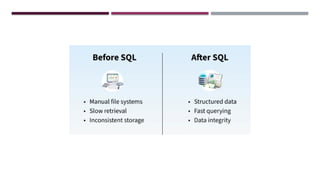
Structured Query Language (SQL) is the standard language used to interact with
relational databases.
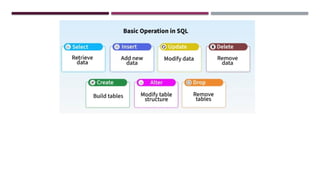
•Mainly used to manage data. Whether you want to create, delete, update or read data,
SQL provides commands to perform these operations.
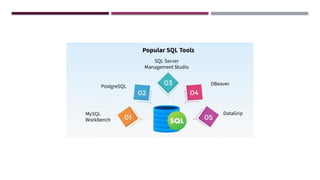
•Widely supported across various database systems like MySQL, Oracle, PostgreSQL, SQL
Server and many others.
•Mainly works with Relational Databases (data is stored in the form of tables)
7.
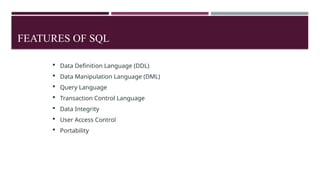
FEATURES OF SQL
Data Definition Language (DDL)
Data Manipulation Language (DML)
Query Language
Transaction Control Language
Data Integrity
User Access Control
Portability
8.
Data DefinitionLanguage (DDL)
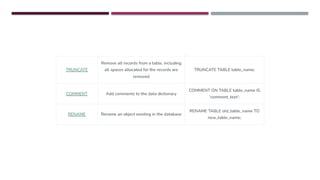
Data Definition Language (DDL): SQL provides a set of commands to define and modify the
structure of a database, including creating tables, modifying table structure, and dropping tables.
create: It is used to create a table.
Syntax:
create table tablename(attribute1 datatype......attributen datatype);
drop: It is used to delete the table including all the attributes.
Syntax:
drop table tablename;
alter: alter is a reserve word which modifies the structure of the table.
Syntax:
alter table tablename add(new column1 datatype......new columnx datatype);
rename: A table name can be changed using the reserver 'rename'
Syntax:
rename old table name to new table name;
9.
Data DefinitionLanguage (DDL)
Data Definition Language (DDL): SQL provides a set of commands to define and modify the
structure of a database, including creating tables, modifying table structure, and dropping tables.
create: It is used to create a table.
Syntax:
create table tablename(attribute1 datatype......attributen datatype);
drop: It is used to delete the table including all the attributes.
Syntax:
drop table tablename;
10.
alter: alter isa reserve word which modifies the structure of the table.
Syntax:
alter table tablename add(new column1 datatype......new columnx datatype);
rename: A table name can be changed using the reserver 'rename'
Syntax:
rename old table name to new table name;
11.
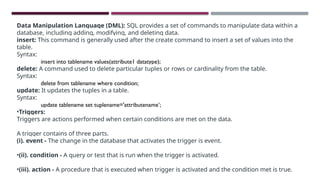
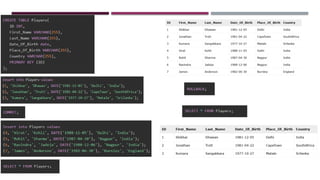
Data Manipulation Language(DML): SQL provides a set of commands to manipulate data within a
database, including adding, modifying, and deleting data.
insert: This command is generally used after the create command to insert a set of values into the
table.
Syntax:
insert into tablename values(attribute1 datatype);
delete: A command used to delete particular tuples or rows or cardinality from the table.
Syntax:
delete from tablename where condition;
update: It updates the tuples in a table.
Syntax:
update tablename set tuplename='attributename’;
•Triggers:
Triggers are actions performed when certain conditions are met on the data.
A trigger contains of three parts.
(i). event - The change in the database that activates the trigger is event.
•(ii). condition - A query or test that is run when the trigger is activated.
•(iii). action - A procedure that is executed when trigger is activated and the condition met is true.
12.
Data Manipulation Language(DML): SQL provides a set of commands to manipulate data within a
database, including adding, modifying, and deleting data.
insert: This command is generally used after the create command to insert a set of values into the
table.
Syntax:
insert into tablename values(attribute1 datatype);
delete: A command used to delete particular tuples or rows or cardinality from the table.
Syntax:
delete from tablename where condition;
update: It updates the tuples in a table.
Syntax:
update tablename set tuplename='attributename’;
13.
•Triggers:
Triggers are actionsperformed when certain conditions are met on the data.
A trigger contains of three parts.
(i). event - The change in the database that activates the trigger is event.
•(ii). condition - A query or test that is run when the trigger is activated.
•(iii). action - A procedure that is executed when trigger is activated and the condition met is true.
14.
Transaction Control: SQLsupports transaction processing, which allows users to group a set of
database operations into a single transaction that can be rolled back in case of failure.
commit: It saves the database at any point whenever database is consistent.
Syntax:
commit;
rollback: It rollbacks/undo to the previous point of the transaction.
Syntax:
rollback;
16.
Query Language: SQLprovides a rich set of commands for querying a database to retrieve data,
including the ability to filter, sort, group, and join data from multiple tables.
Data Integrity: SQL includes features to enforce data integrity, such as the ability to specify
constraints on the values that can be inserted or updated in a table, and to enforce referential
integrity between tables.
User Access Control: SQL provides mechanisms to control user access to a database, including the
ability to grant and revoke privileges to perform certain operations on the database.
Portability: SQL is a standardized language, meaning that SQL code written for one database
management system can be used on another system with minimal modification.
17.
SQL DATATYPES
In SQL,each column must be assigned a data type that defines the kind of data it can store, such as
integers, dates, text, or binary values. Choosing the correct data type is crucial for data integrity,
query performance and efficient indexing.
Benefits of using the right data type:
• Memory-efficient storage
• Accurate operations (e.g., calculations, sorting)
• Consistency in stored values
• Validation of input data
19.
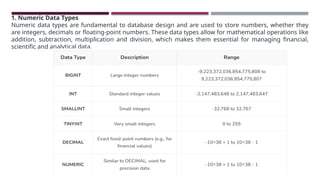
1. Numeric DataTypes
Numeric data types are fundamental to database design and are used to store numbers, whether they
are integers, decimals or floating-point numbers. These data types allow for mathematical operations like
addition, subtraction, multiplication and division, which makes them essential for managing financial,
scientific and analytical data.
20.
Approximate Numeric Datatype
Thesetypes are used to store approximate values, such as scientific measurements or large
ranges of data that don't need exact precision.
21.
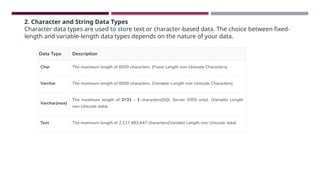
2. Character andString Data Types
Character data types are used to store text or character-based data. The choice between fixed-
length and variable-length data types depends on the nature of your data.
22.
Unicode Character StringData Types
Unicode data types are used to store characters from any language, supporting a wider variety of
characters. These are given in below table.
23.
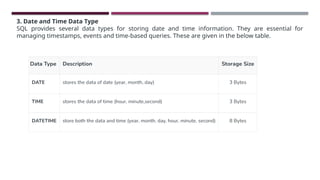
3. Date andTime Data Type
SQL provides several data types for storing date and time information. They are essential for
managing timestamps, events and time-based queries. These are given in the below table.
24.
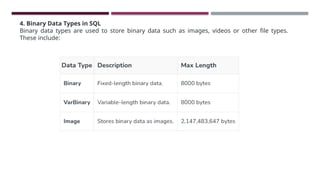
4. Binary DataTypes in SQL
Binary data types are used to store binary data such as images, videos or other file types.
These include:
25.
5. Boolean DataType in SQL
The BOOLEAN data types are used to store logical values, typically TRUE or FALSE. It is commonly used
for flag fields or binary conditions.
6. Special Data Types
SQL also supports some specialized data types for advanced use cases:
•XML Data Type: Used to store XML data and manipulate XML structures in the database
•Spatial Data Type (Geometry): stores planar spatial data, such as points, lines, and polygons, in a
database table.
26.
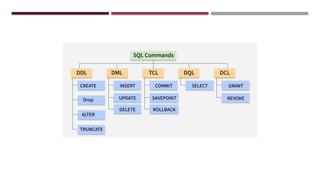
SQL LANGUAGES –DDL, DML, DCL,TCL
SQL commands are fundamental building blocks for communicating with a database management
system (DBMS) used to interact with database with some operations. It is also used to perform
specific tasks, functions and queries of data. SQL can perform various tasks like creating a table,
adding data to tables, dropping the table, modifying the table, set permission for users.
28.
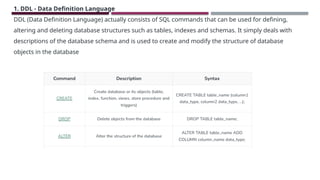
1. DDL -Data Definition Language
DDL (Data Definition Language) actually consists of SQL commands that can be used for defining,
altering and deleting database structures such as tables, indexes and schemas. It simply deals with
descriptions of the database schema and is used to create and modify the structure of database
objects in the database
30.
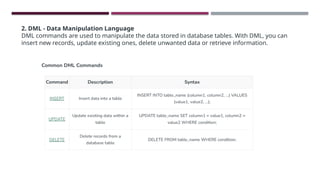
2. DML -Data Manipulation Language
DML commands are used to manipulate the data stored in database tables. With DML, you can
insert new records, update existing ones, delete unwanted data or retrieve information.
31.
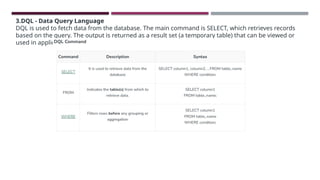
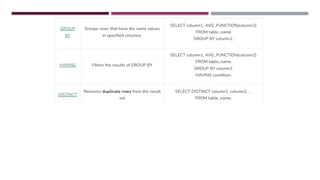
3.DQL - DataQuery Language
DQL is used to fetch data from the database. The main command is SELECT, which retrieves records
based on the query. The output is returned as a result set (a temporary table) that can be viewed or
used in applications.
34.
4. DCL -DATA CONTROL LANGUAGE
DCL (Data Control Language) includes commands such as GRANT and REVOKE which mainly deal
with the rights, permissions and other controls of the database system. These commands are used to
control access to data in the database by granting or revoking permissions.
GRANT STATEMENT INMYSQL
The GRANT statement is used to give specific privileges to a user.
Syntax:
GRANT privileges
ON database.table
TO 'username'@'host'
[WITH GRANT OPTION];
privileges:The operations allowed (e.g., SELECT, INSERT, UPDATE,ALL PRIVILEGES).
database.table:The scope of the privilege (e.g., mydb.users or *.* for all).
'username'@'host':The user and where they are connecting from (e.g., 'john'@'localhost').
WITH GRANT OPTION:Allows this user to grant those same privileges to others.
37.
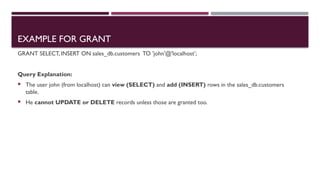
EXAMPLE FOR GRANT
GRANTSELECT, INSERT ON sales_db.customers TO 'john'@'localhost’;
Query Explanation:
The user john (from localhost) can view (SELECT) and add (INSERT) rows in the sales_db.customers
table.
He cannot UPDATE or DELETE records unless those are granted too.
38.
REVOKE STATEMENT INMYSQL
The REVOKE statement removes privileges that were previously granted.
Syntax:
REVOKE privileges
ON database.table
FROM 'username'@'host';
39.
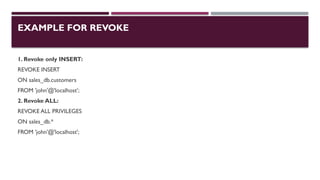
EXAMPLE FOR REVOKE
1.Revoke only INSERT:
REVOKE INSERT
ON sales_db.customers
FROM 'john'@'localhost’;
2. Revoke ALL:
REVOKE ALL PRIVILEGES
ON sales_db.*
FROM 'john'@'localhost';
40.
5.TCL -TRANSACTION CONTROLLANGUAGE
Transactions group a set of tasks into a single execution unit. Each transaction begins
with a specific task and ends when all the tasks in the group are successfully
completed. If any of the tasks fail, transaction fails.Therefore, a transaction has only
two results: success or failure.
Feature COMMIT SAVEPOINT
Definition
Permanentlysaves
all changes made
during the
transaction.
Sets a
checkpoint
inside a
transaction to
which you can
rollback.
Effect
Finalizes the entire
transaction; all
changes become
permanent.
Marks a specific
point in the
transaction; does
not end the
transaction.
Usage
Used when you're
confident that all
operations in the
transaction are
successful.
Used when you
want to protect
part of a
transaction from
being rolled back
later.
Once committed,
You can
ROLLBACKTO
43.
Feature COMMIT SAVEPOINT
Definition
Permanentlysaves all changes
made during the transaction.
Sets a checkpoint inside a
transaction to which you can
rollback.
Effect
Finalizes the entire
transaction; all changes
become permanent.
Marks a specific point in the
transaction; does not end the
transaction.
Usage
Used when you're confident
that all operations in the
transaction are successful.
Used when you want to protect part
of a transaction from being rolled back
later.
Rollback
Capability
Once committed, changes
cannot be rolled back.
You can ROLLBACKTO
SAVEPOINT to undo only part of
the transaction.
44.
Feature COMMIT SAVEPOINT
Definition
Permanently
savesall
changes made
during the
transaction.
Sets a
checkpoint
inside a
transaction to
which you can
rollback.
Effect
Finalizes the
entire
transaction; all
changes
become
permanent.
Marks a
specific point
in the
transaction;
does not end
the
transaction.
Usage
Used when
you're
confident that
all operations
in the
transaction are
Used when
you want to
protect part of
a transaction
from being
rolled back
45.
Create a SAVEPOINT
SAVEPOINT savepoint_name;
2. Roll back to a SAVEPOINT
ROLLBACK TO SAVEPOINT savepoint_name;
46.
VIEWS
A viewis a table whose rows are not explicitly stored, a view is a virtual table based on
the result-set of an SQL statement.
A view can contain all rows of a table or select rows from a table.A view can be created
from one or many tables which depends on the written SQL query to create a view.
You can add SQL statements and functions to a view and present the data as if the data
were coming from one single table.
A view is created with the CREATEVIEW statement.
47.
ADVANTAGES OFVIEW OVERDATABASE TABLES
UsingViews, we can join multiple tables into a single virtual table.
Views hide data complexity.
In the database, views take less space than tables for storing data because the database contains only the view
definition.
Views indicate the subset of that data, which is contained in the tables of the database.
48.
VIEWS
CREATE VIEW Syntax
CREATEVIEW Example
A view is created with the CREATE VIEW statement.
SELECT * FROM [Brazil Customers];
49.
UPDATE VIEW Syntax
UPDATEVIEW Example
Updating a View
A view can be updated with the CREATE OR REPLACE
VIEW statement.
50.
DROP VIEW Syntax
DROPVIEW Example
DROP View
A view is deleted with the DROP VIEW statement.











![GRANT STATEMENT IN MYSQL
The GRANT statement is used to give specific privileges to a user.
Syntax:
GRANT privileges
ON database.table
TO 'username'@'host'
[WITH GRANT OPTION];
privileges:The operations allowed (e.g., SELECT, INSERT, UPDATE,ALL PRIVILEGES).
database.table:The scope of the privilege (e.g., mydb.users or *.* for all).
'username'@'host':The user and where they are connecting from (e.g., 'john'@'localhost').
WITH GRANT OPTION:Allows this user to grant those same privileges to others.](https://image.slidesharecdn.com/unit-3sql-251114120514-7287e41d/85/UNIT-3-Structured-Query-Language-SQL-pptx-36-320.jpg)




![VIEWS
CREATE VIEW Syntax
CREATE VIEW Example
A view is created with the CREATE VIEW statement.
SELECT * FROM [Brazil Customers];](https://image.slidesharecdn.com/unit-3sql-251114120514-7287e41d/85/UNIT-3-Structured-Query-Language-SQL-pptx-48-320.jpg)


