-By Riti Kumari
LET'S LEARN
COMPLETE SQL IN ONE VIDEO
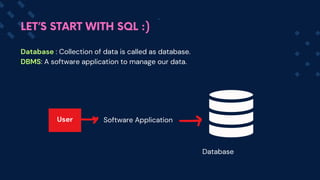
Database : Collection of data is called as database.
DBMS: A software application to manage our data.
Software Application
LET’S START WITH SQL :)
Database
User
LET’S START WITH SQL :)
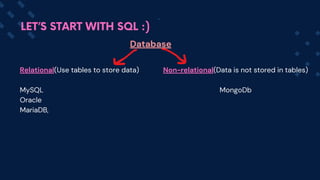
Database
Relational(Use tables to store data)
MySQL
Oracle
MariaDB,
Non-relational(Data is not stored in tables)
MongoDb
Why SQL?
We need a language to interact with databases.
So we use SQL to interact with DB, do some CRUD operations on the data.
Then what is MySQL?
MySQL is a specific Relational Database Management System (RDBMS) that uses
SQL as its querying language.
LET’S START WITH SQL :)
History of SQL ( Structured Query Language)
SQL originated in the 1970s from IBM's research on relational
databases. It started as SEQUEL, later renamed SQL due to
trademark issues.
I
LET’S START WITH SQL :)
SQL ( Structured Query Language)
SQL is a programming language that is used to communicate and
manipulate data in databases.
It helps user in performing CRUD (Create, Read, Update, Delete)
operations in DB.
I
LET’S START WITH SQL :)
How SQL helps us ?
SQL allows users to perform a variety of tasks related to databases
Retrieving Data: Extracting precise information from a database through
queries.
Manipulating Data: Adding, modifying, or removing records within a
database.
Defining Data: Creating and adjusting the structure of a database,
including tables, views, and indexes.
Controlling Data: Managing database access by granting or revoking
permissions.
LET’S START WITH SQL :)
Installation of MySQL
MySQL Server : Database server where data is stored, managed, and
accessed.
MySQL WorkBench : It is a visual tool which is used for database design,
development, administration, and management.
It provides a user interface (UI) to interact with MySQL Server.
LET’S START WITH SQL :)
Lets install the Server first :
Go to the MySQL Official website: https://www.mysql.com/
Go to Downloads
Select MySQL Community (GPL) Downloads at the bottom of the page.
Choose MySQL Community Server, select the version and click on
download
Follow the instructions and set the root password. This password
would be asked while creating a new connection.
LET’S START WITH SQL :)
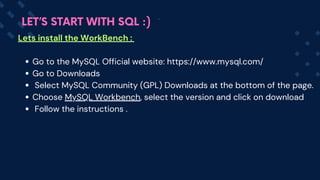
Lets install the WorkBench :
Go to the MySQL Official website: https://www.mysql.com/
Go to Downloads
Select MySQL Community (GPL) Downloads at the bottom of the page.
Choose MySQL Workbench, select the version and click on download
Follow the instructions .
LET’S START WITH SQL :)
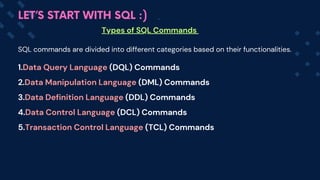
Types of SQL Commands
LET’S START WITH SQL :)
SQL commands are divided into different categories based on their functionalities.
1.Data Query Language (DQL) Commands
2.Data Manipulation Language (DML) Commands
3.Data Definition Language (DDL) Commands
4.Data Control Language (DCL) Commands
5.Transaction Control Language (TCL) Commands
Types of SQL Commands
LET’S START WITH SQL :)
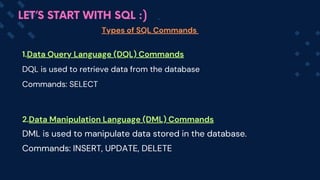
1.Data Query Language (DQL) Commands
DQL is used to retrieve data from the database
Commands: SELECT
2.Data Manipulation Language (DML) Commands
DML is used to manipulate data stored in the database.
Commands: INSERT, UPDATE, DELETE
Types of SQL Commands
LET’S START WITH SQL :)
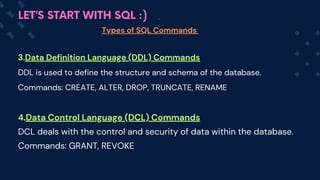
3.Data Definition Language (DDL) Commands
DDL is used to define the structure and schema of the database.
Commands: CREATE, ALTER, DROP, TRUNCATE, RENAME
4.Data Control Language (DCL) Commands
DCL deals with the control and security of data within the database.
Commands: GRANT, REVOKE
Types of SQL Commands
LET’S START WITH SQL :)
5.Transaction Control Language (TCL) Commands
TCL is used to manage transactions within a database.
Commands: COMMIT, ROLLBACK, SAVEPOINT
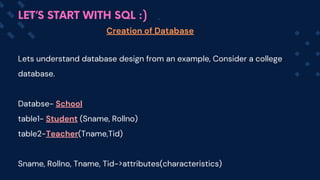
Lets understand database design from an example, Consider a college
database.
Databse- Scho
ol
table1- Student (Sname, Rollno)
table2-Teacher(Tname,Tid)
Sname, Rollno, Tname, Tid->attributes(characteristics)
Creation of Database
LET’S START WITH SQL :)
Creation of Database
LET’S START WITH SQL :)
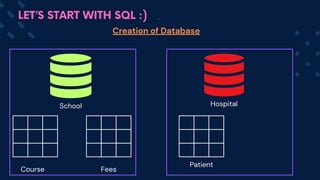
School Hospital
Course Fees
Patient
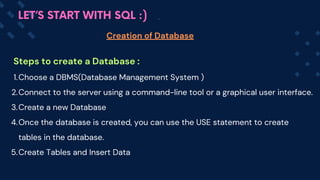
Steps to create a Database :
Choose a DBMS(Database Management System )
1.
Connect to the server using a command-line tool or a graphical user interface.
2.
Create a new Database
3.
Once the database is created, you can use the USE statement to create
tables in the database.
4.
Create Tables and Insert Data
5.
Creation of Database
LET’S START WITH SQL :)
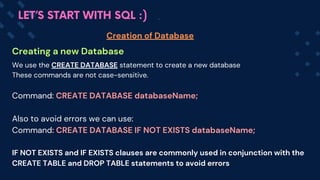
Creating a new Database
Creation of Database
LET’S START WITH SQL :)
We use the CREATE DATABASE statement to create a new database
These commands are not case-sensitive.
Command: CREATE DATABASE databaseName;
Also to avoid errors we can use:
Command: CREATE DATABASE IF NOT EXISTS databaseName;
IF NOT EXISTS and IF EXISTS clauses are commonly used in conjunction with the
CREATE TABLE and DROP TABLE statements to avoid errors
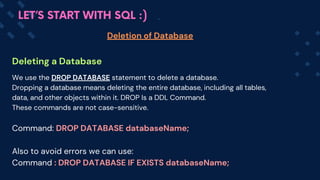
Deleting a Database
Deletion of Database
LET’S START WITH SQL :)
We use the DROP DATABASE statement to delete a database.
Dropping a database means deleting the entire database, including all tables,
data, and other objects within it. DROP Is a DDL Command.
These commands are not case-sensitive.
Command: DROP DATABASE databaseName;
Also to avoid errors we can use:
Command : DROP DATABASE IF EXISTS databaseName;
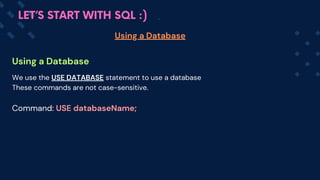
Using a Database
Using a Database
LET’S START WITH SQL :)
We use the USE DATABASE statement to use a database
These commands are not case-sensitive.
Command: USE databaseName;
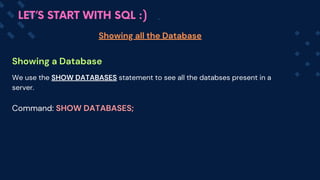
Showing a Database
Showing all the Database
LET’S START WITH SQL :)
We use the SHOW DATABASES statement to see all the databses present in a
server.
Command: SHOW DATABASES;
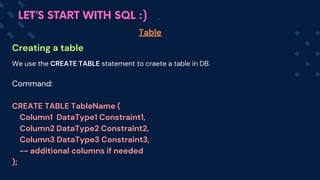
Creating a table
Table
LET’S START WITH SQL :)
We use the CREATE TABLE statement to craete a table in DB.
Command:
CREATE TABLE TableName (
Column1 DataType1 Constraint1,
Column2 DataType2 Constraint2,
Column3 DataType3 Constraint3,
-- additional columns if needed
);
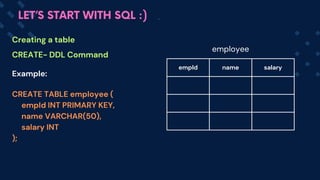
Example:
CREATE TABLE employee (
empId INT PRIMARY KEY,
name VARCHAR(50),
salary INT
);
empId name salary
Creating a table
CREATE- DDL Command
LET’S START WITH SQL :)
employee
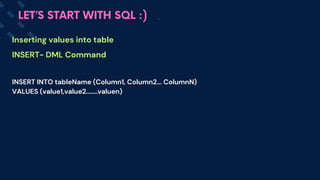
INSERT INTO tableName (Column1, Column2... ColumnN)
VALUES (value1,value2.......valuen)
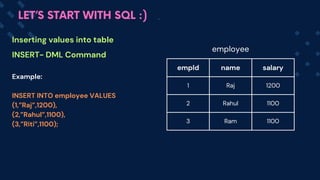
Inserting values into table
INSERT- DML Command
LET’S START WITH SQL :)
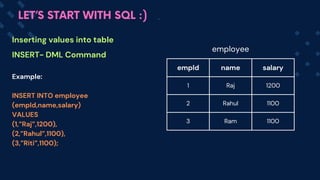
Example:
INSERT INTO employee
(empId,name,salary)
VALUES
(1,”Raj”,1200),
(2,”Rahul”,1100),
(3,”Riti”,1100);
empId name salary
1 Raj 1200
2 Rahul 1100
3 Ram 1100
Inserting values into table
INSERT- DML Command
LET’S START WITH SQL :)
employee
Example:
INSERT INTO employee VALUES
(1,”Raj”,1200),
(2,”Rahul”,1100),
(3,”Riti”,1100);
empId name salary
1 Raj 1200
2 Rahul 1100
3 Ram 1100
Inserting values into table
INSERT- DML Command
LET’S START WITH SQL :)
employee
Example:
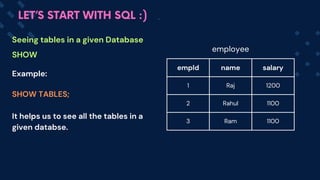
SHOW TABLES;
It helps us to see all the tables in a
given databse.
empId name salary
1 Raj 1200
2 Rahul 1100
3 Ram 1100
Seeing tables in a given Database
SHOW
LET’S START WITH SQL :)
employee
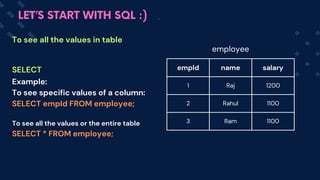
Example:
To see specific values of a column:
SELECT empId FROM employee;
To see all the values or the entire table
SELECT * FROM emplo
yee;
empId name salary
1 Raj 1200
2 Rahul 1100
3 Ram 1100
To see all the values in table
SELECT
LET’S START WITH SQL :)
employee
LET’S START WITH SQL :)
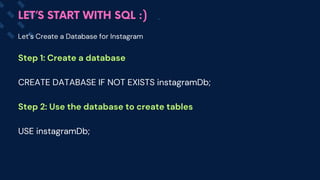
Let’s Create a Database for Instagram
Step 1: Create a database
CREATE DATABASE IF NOT EXISTS instagramDb;
Step 2: Use the database to create tables
USE instagramDb;
LET’S START WITH SQL :)
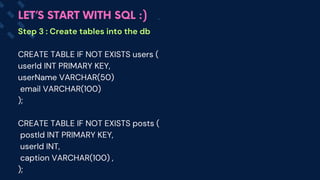
Step 3 : Create tables into the db
CREATE TABLE IF NOT EXISTS users (
userId INT PRIMARY KEY,
userName VARCHAR(50)
email VARCHAR(100)
);
CREATE TABLE IF NOT EXISTS posts (
postId INT PRIMARY KEY,
userId INT,
caption VARCHAR(100) ,
);
LET’S START WITH SQL :)
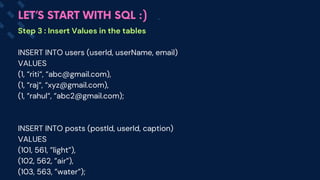
Step 3 : Insert Values in the tables
INSERT INTO users (userId, userName, email)
VALUES
(1, “riti“, “abc@gmail.com),
(1, “raj“, “xyz@gmail.com),
(1, “rahul“, “abc2@gmail.com);
INSERT INTO posts (postI
d, user
Id, capti
on)
VALUES
(101, 561, ”light”),
(102, 562, ”air”),
(103, 563, ”water”);
LET’S START WITH SQL :)
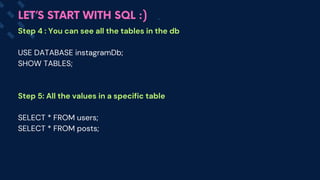
Step 4 : You can see all the tables in the db
USE DATABASE instagramDb;
SHOW TABLES;
Step 5: All the values in a specific table
SELECT * FROM users;
SELECT * FROM posts;
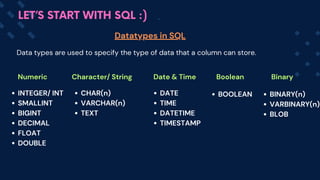
Datatypes in SQL
LET’S START WITH SQL :)
Data types are used to specify the type of data that a column can store.
Numeric Character/ String Date & Time Boolean Binary
INTEGER/ INT
SMALLINT
BIGINT
DECIMAL
FLOAT
DOUBLE
CHAR(n)
VARCHAR(n)
TEXT
DATE
TIME
DATETIME
TIMESTAMP
BOOLEAN BINARY(n)
VARBINARY(n)
BLOB
Numeric Datatypes
Datatypes
LET’S START WITH SQL :)
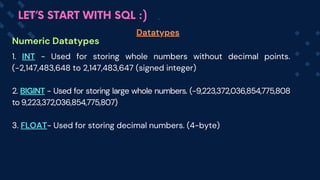
1. INT - Used for storing whole numbers without decimal points.
(-2,147,483,648 to 2,147,483,647 (signed integer)
2. BIGINT - Used for storing large whole numbers. (-9,223,372,036,854,775,808
to 9,223,372,036,854,775,807)
3. FLOAT- Used for storing decimal numbers. (4-byte)
Numeric Datatypes
Datatypes
LET’S START WITH SQL :)
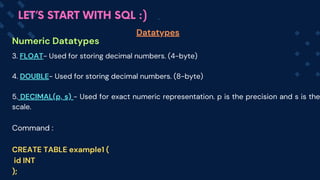
3. FLOAT- Used for storing decimal numbers. (4-byte)
4. DOUBLE- Used for storing decimal numbers. (8-byte)
5. DECIMAL(p, s) - Used for exact numeric representation. p is the precision and s is the
scale.
Command :
CREATE TABLE example1 (
id INT
);
Numeric Datatypes
Datatypes
LET’S START WITH SQL :)
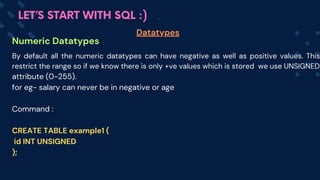
By default all the numeric datatypes can have negative as well as positive values. This
restrict the range so if we know there is only +ve values which is stored we use UNSIGNED
attribute (0-255).
for eg- salary can never be in negative or age
Command :
CREATE TABLE example1 (
id INT UNSIGNED
);
Character Datatypes
Datatypes
LET’S START WITH SQL :)
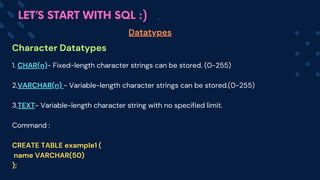
1. CHAR(n)- Fixed-length character strings can be stored. (0-255)
2.VARCHAR(n) - Variable-length character strings can be stored.(0-255)
3.TEXT- Variable-length character string with no specified limit.
Command :
CREATE TABLE example1 (
name VARCHAR(50)
);
Date & Time Datatypes
Datatypes
LET’S START WITH SQL :)
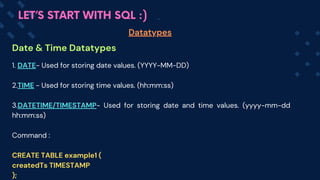
1. DATE- Used for storing date values. (YYYY-MM-DD)
2.TIME - Used for storing time values. (hh:mm:ss)
3.DATETIME/TIMESTAMP- Used for storing date and time values. (yyyy-mm-dd
hh:mm:ss)
Command :
CREATE TABLE example1 (
createdTs TIMESTAMP
);
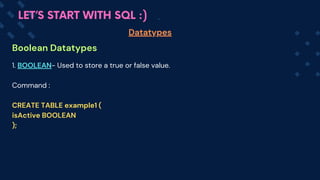
Boolean Datatypes
Datatypes
LET’S START WITH SQL :)
1. BOOLEAN- Used to store a true or false value.
Command :
CREATE TABLE example1 (
isActive BOOLEAN
);
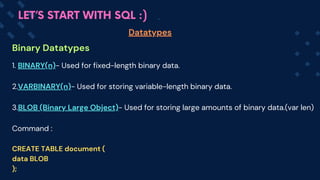
Binary Datatypes
Datatypes
LET’S START WITH SQL :)
1. BINARY(n)- Used for fixed-length binary data.
2.VARBINARY(n)- Used for storing variable-length binary data.
3.BLOB (Binary Large Object)- Used for storing large amounts of binary data.(var len)
Command :
CREATE TABLE document (
data BLOB
);
LET’S START WITH SQL :)
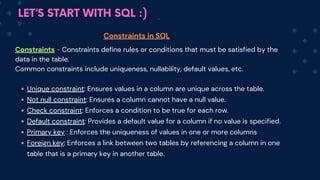
Constraints - Constraints define rules or conditions that must be satisfied by the
data in the table.
Common constraints include uniqueness, nullability, default values, etc.
Unique constraint: Ensures values in a column are unique across the table.
Not null constraint: Ensures a column cannot have a null value.
Check constraint: Enforces a condition to be true for each row.
Default constraint: Provides a default value for a column if no value is specified.
Primary key : Enforces the uniqueness of values in one or more columns
Foreign key: Enforce
s a link between two tables by referencing a column in one
table that is a primary key in another table.
Constraints in SQL
LET’S START WITH SQL :)
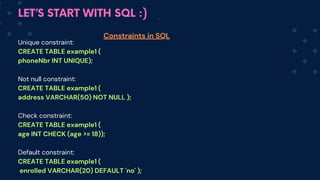
Unique constraint:
CREATE TABLE example1 (
phoneNbr INT UNIQUE);
Not null constraint:
CREATE TABLE example1 (
address VARCHAR(50) NOT NULL );
Check constraint:
CREATE TABLE example1 (
age INT CHECK (age >= 18));
Default constraint:
CREATE TABLE example1 (
enrolled VARCHAR(20) DEFAULT 'no' );
Constraints in SQL
LET’S START WITH SQL :)
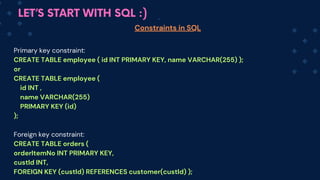
Primary key constraint:
CREATE TABLE employee ( id INT PRIMARY KEY, name VARCHAR(255) );
or
CREATE TABLE employee (
id INT ,
name VARCHAR(255)
PRIMARY KEY (id)
);
Foreign key constraint:
CREATE TABLE orders (
orderItemNo INT PRIMARY KEY,
custId INT,
FOREIGN KEY (custId) REFERENCES customer(custId) );
Constraints in SQL
LET’S START WITH SQL :)
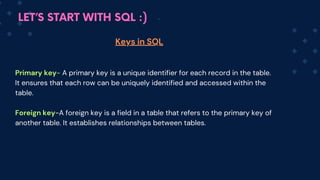
Primary key- A primary key is a unique identifier for each record in the table.
It ensures that each row can be uniquely identified and accessed within the
table.
Foreign key
-A foreign key is a field in a table that refers to the primary key of
another table. It establishes relationships between tables.
Keys in SQL
LET’S START WITH SQL :)
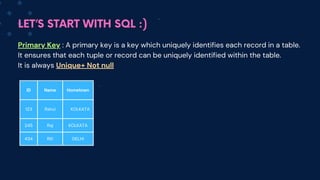
Primary Key : A primary key is a key which uniquely identifies each record in a table.
It ensures that each tuple or record can be uniquely identified within the table.
It is always Unique+ Not null
ID Name Hometown
123 Rahul KOLKATA
245 Raj KOLKATA
434 Riti DELHI
LET’S START WITH SQL :)
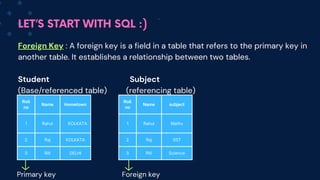
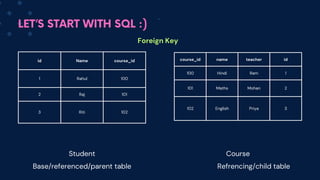
Foreign Key : A foreign key is a field in a table that refers to the primary key in
another table. It establishes a relationship between two tables.
Student Subject
(Base/referenced table) (referencing table)
Roll
no
Name Hometown
1 Rahul KOLKATA
2 Raj KOLKATA
3 Riti DELHI
Roll
no
Name subject
1 Rahul Maths
2 Raj SST
3 Riti Science
Primary key Foreign key
LET’S START WITH SQL :)
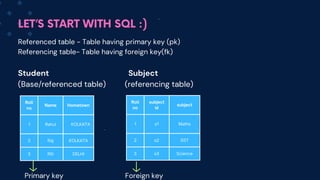
Referenced table - Table having primary key (pk)
Referencing table- Table having foreign key(fk)
Student Subject
(Base/referenced table) (referencing table)
Roll
no
Name Hometown
1 Rahul KOLKATA
2 Raj KOLKATA
3 Riti DELHI
Roll
no
subject
id
subject
1 s1 Maths
2 s2 SST
3 s3 Science
Primary key Foreign key
LET’S START WITH SQL :)
id Name course_id
1 Rahul 100
2 Raj 101
3 Riti 102
course_id name teacher id
100 Hindi Ram 1
101 Maths Mohan 2
102 English Priya 3
Foreign Key
Student Course
Base/referenced/parent table Refrencing/child table
LET’S START WITH SQL :)
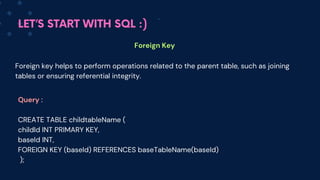
Foreign Key
Query :
CREATE TABLE childtableName (
childId INT PRIMARY KEY,
baseId INT,
FOREIGN KEY (baseId) REFERENCES baseTableName(baseId)
);
Foreign key helps to perform operations related to the parent table, such as joining
tables or ensuring referential integrity.
LET’S START WITH SQL :)
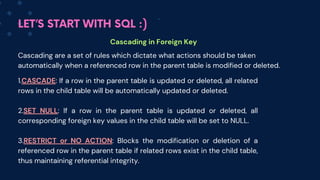
Cascading in Foreign Key
Cascading are a set of rules which dictate what actions should be taken
automatically when a referenced row in the parent table is modified or deleted.
1.CASCADE: If a row in the parent table is updated or deleted, all related
rows in the child table will be automatically updated or deleted.
2.SET NULL: If a row in the parent table is updated or deleted, all
corresponding foreign key values in the child table will be set to NULL.
3.RESTRICT or NO ACTION: Blocks the modification or deletion of a
referenced row in the parent table if related rows exist in the child table,
thus maintaining referential integrity.
LET’S START WITH SQL :)
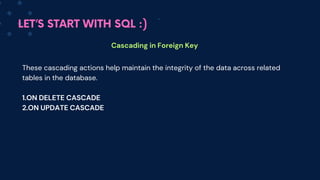
Cascading in Foreign Key
These cascading actions help maintain the integrity of the data across related
tables in the database.
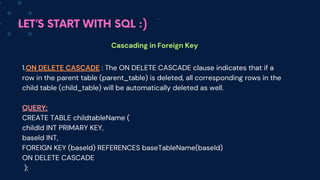
1.ON DELETE CASCADE
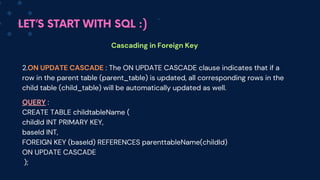
2.ON UPDATE CASCADE
LET’S START WITH SQL :)
Cascading in Foreign Key
1.ON DELETE CASCADE : The ON DELETE CASCADE clause indicates that if a
row in the parent table (parent_table) is deleted, all corresponding rows in the
child table (child_table) will be automatically deleted as well.
QUERY:
CREATE TABLE childtableName (
childId INT PRIMARY KEY,
baseId INT,
FOREIGN KEY (baseId) REFERENCES baseTableName(baseId)
ON DELETE CASCADE
);
LET’S START WITH SQL :)
Cascading in Foreign Key
2.ON UPDATE CASCADE : The ON UPD
ATE CASCADE clause indicates that if a
row in the parent table (parent_table) is updated, all corresponding rows in the
child table (child_table) will be automatically updated as well.
QUERY :
CREATE TABLE childtableName (
childId INT PRIMARY KEY,
baseId INT,
FOREIGN KEY (baseId) REFERENCES parenttableName(childId)
ON UPDATE CASCADE
);
LET’S START WITH SQL :)
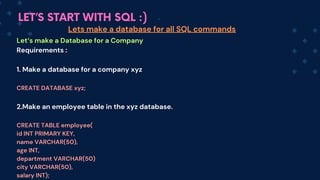
Let‘s make a Database for a Company
Requirements :
1. Make a database for a company xyz
CREATE DATABASE xyz;
2.Make an employee table in the xyz database.
CREATE TABLE employee(
id INT PRIMARY KEY,
name VARCHAR(50),
age INT,
department VARCHAR(50)
city VARCHAR(50),
salary INT);
Lets make a database for all SQL commands
LET’S START WITH SQL :)
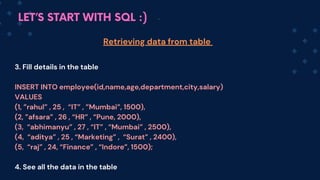
3. Fill details in the table
INSERT INTO employee(id,name,age,department,city,salary)
VALUES
(1, ”rahul” , 25 , “IT” , ”Mumbai”, 1500),
(2, ”afsara” , 26 , “HR” , “Pune, 2000),
(3, “abhimanyu” , 27 , “IT” , “Mumbai” , 2500),
(4, “aditya” , 25 , “Marketing” , “Surat” , 2400),
(5, “raj” , 24, “Finance” , “Indore”, 1500);
4. See all the data in the table
Retrieving data from table
LET’S START WITH SQL :)
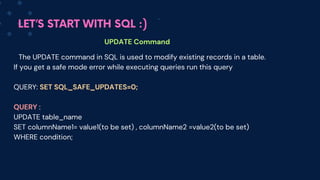
UPDATE Command
The UPDATE command in SQL is used to modify existing records in a table.
If you get a safe mode error while executing queries run this query
QUERY: SET SQL_SAFE_UPDATES=0;
QUERY :
UPDATE table_name
SET columnName1= value1(to be set) , columnName2 =value2(to be set)
WHERE condition;
LET’S START WITH SQL :)
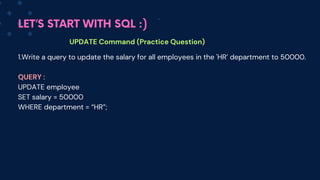
UPDATE Command (Practice Question)
1.Write a query to update the salary for all employees in the 'HR’ department to 50000.
QUERY :
UPDATE employee
SET salary = 50000
WHERE department = “HR”;
LET’S START WITH SQL :)
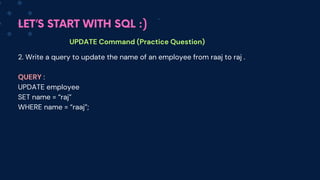
UPDATE Command (Practice Question)
2. Write a query to update the name of an employee from raaj to raj .
QUERY :
UPDATE employee
SET name = “raj”
WHERE name = “raaj”;
LET’S START WITH SQL :)
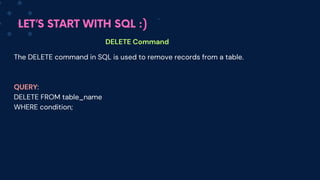
DELETE Command
The DELETE command in SQL is used to remove records from a table.
QUERY:
DELETE FROM table_name
WHERE condition;
LET’S START WITH SQL :)
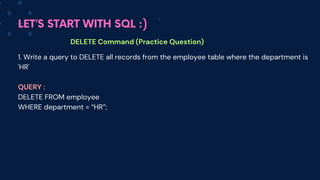
DELETE Command (Practice Question)
1. Write a query to DELETE all records from the employee table where the department is
'HR'
QUERY :
DELETE FROM employee
WHERE department = “HR”;
LET’S START WITH SQL :)
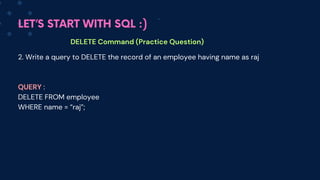
DELETE Command (Practice Question)
2. Write a query to DELETE the record of an employee having name as raj
QUERY :
DELETE FROM employee
WHERE name = “raj”;
LET’S START WITH SQL :)
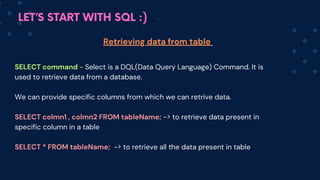
SELECT command - Select is a DQL(Data Query Language) Command. It is
used to retrieve data from a database.
We can provide specific columns from which we can retrive data.
SELECT colmn1 , colmn2 FROM tableName; -> to retrieve data present in
specific column in a table
SELECT * FROM tableName; -> to retrieve all the data present in table
Retrieving data from table
LET’S START WITH SQL :)
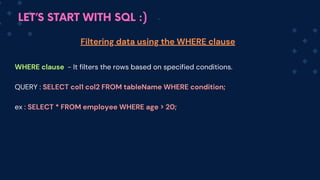
WHERE clause - It filters the rows based on specified conditions.
QUERY : SELECT co
l1 col2 FROM tableName WHERE condition;
ex : SELECT * FROM employee WHERE age > 20;
Filtering data using the WHERE clause
LET’S START WITH SQL :)
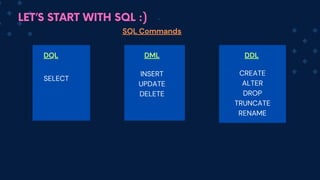
SQL Commands
DQL DML DDL
SELECT
INSERT
UPDATE
DELETE
CREATE
ALTER
DROP
TRUNCATE
RENAME
LET’S START WITH SQL :)
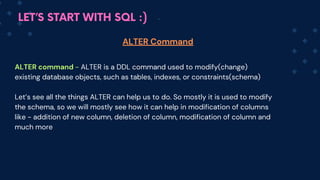
ALTER command - ALTE
R is a DDL command used to modify(change)
existing database objects, such as tables, indexes, or constraints(schema)
Let’s see all the things ALTER can help us to do. So mostly it is used to modify
the schema, so we will mostly see how it can help in modification of columns
like - addition of new column, deletion of column, modification of column and
much more
ALTER Command
LET’S START WITH SQL :)
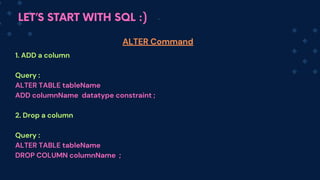
1. ADD a column
Query :
ALTER TABLE tableName
ADD columnName datatype constraint ;
2. Drop a column
Query :
ALTER TABLE tableName
DROP COLUMN columnName ;
ALTER Command
LET’S START WITH SQL :)
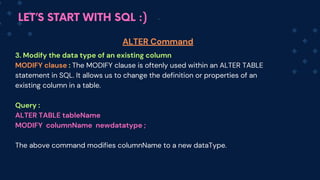
3. Modify the data type of an existing column
MODIFY clause : The MODIFY clause is oftenly used within an ALTER TABLE
statement in SQL. It allows us to change the definition or properties of an
existing column in a table.
Query :
ALTER TABLE tableName
MODIFY columnName newdatatype ;
The above command modifies colum
nName to a new dataType.
ALTER Command
LET’S START WITH SQL :)
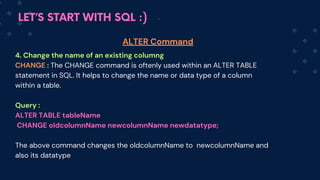
4. Change the name of an existing columng
CHANGE : The CHA
NGE command is oftenly used within an ALTER TABLE
statement in SQL. It helps to change the name or data type of a column
within a table.
Query :
ALTER TABLE table
Name
CHANGE oldcolumnName newc
olumnName newdatatype;
The above command changes the oldcolum
nName to newc
olum
nName and
also its datatype
ALTER Command
LET’S START WITH SQL :)
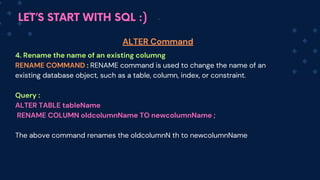
4. Rename the name of an existing columng
RENAME COMMAND : RENA
ME command is used to change the name of an
existing database object, such as a table, column, index, or constraint.
Query :
ALTER TABLE table
Name
RENAME COLUMN oldcolumnName TO newc
olumnName ;
The above command renames the oldcolum
nN th to newc
olum
nName
ALTER Command
LET’S START WITH SQL :)
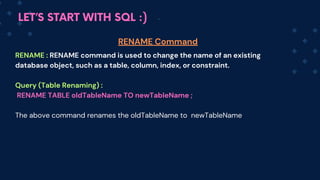
RENAME : RENA
ME command is used to change the name of an existing
database object, such as a table, column, index, or constraint.
Query (Table Renaming) :
RENAME TABLE oldTableName TO newT
ableName ;
The above command renames the oldT
ableName to newT
ableNa
me
RENAME Command
LET’S START WITH SQL :)
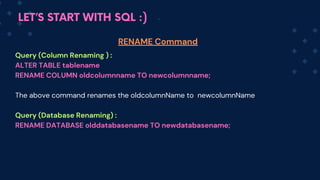
Query (Column Renaming ) :
ALTER TABLE tablename
RENAME COLUMN oldcolumnname TO newcolumnname;
The above command renames the oldcolum
nName to newc
olum
nName
Query (Database Renaming) :
RENAME DATABASE olddatabasename TO newdatabasename;
RENAME Command
LET’S START WITH SQL :)
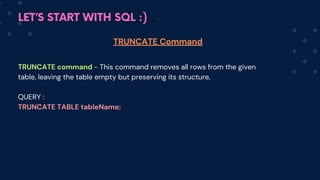
TRUNCATE command - This command removes all rows from the given
table, leaving the table empty but preserving its structure,
QUERY :
TRUNCATE TABLE tableName;
TRUNCATE Command
LET’S START WITH SQL :)
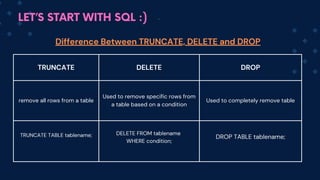
TRUNCATE DELETE DROP
remove all rows from a table
Used to remove specific rows from
a table based on a condition
Used to completely remove table
TRUNCATE TABLE tablename; DELETE FROM tablename
WHERE condition;
DROP TABLE tablename;
Difference Between TRUNCATE, DELETE and DROP
LET’S START WITH SQL :)
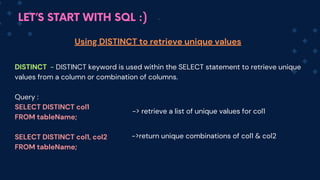
DISTINCT - DISTINCT keyword is used within the SELECT statement to retrieve unique
values from a column or combination of columns.
Query :
SELECT DISTINCT col1
FROM tableName;
SELECT DISTINCT col1, col2
FROM tableName;
Using DISTINCT to retrieve unique values
-> retrieve a list of unique values for col1
->return u
nique combinations of col1 & col2
LET’S START WITH SQL :)
Operators in SQL
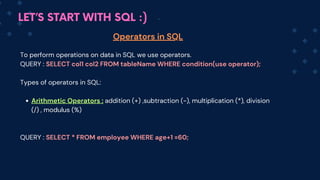
To perform operations on data in SQL we use operators.
QUERY : SELECT col1 col2 FROM tableName WHERE condition(use operator);
Types of operators in SQL:
Arithmetic Operators : addition (+) ,subtraction (-), multiplication (*), division
(/) , modulus (%)
QUERY : SELECT * FROM employee WHERE age+1 =60;
LET’S START WITH SQL :)
Operators in SQL
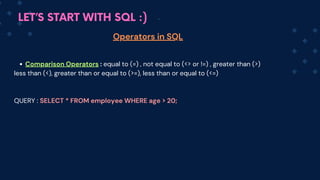
Comparison Operators : equal to (=) , not equal to (<> or !=) , greater than (>)
less than (<), greater than or equal to (>=), less than or equal to (<=)
QUERY : SELECT * FROM employee WHERE age > 20;
LET’S START WITH SQL :)
Operators in SQL
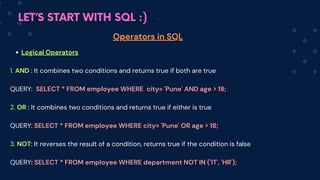
Logical Operators
1. AND : It combines two conditions and returns true if both are true
QUERY: SELECT * FROM employee WHERE city= 'Pune' AND age > 18;
2. OR : It combines two conditions and returns true if either is true
QUERY: SELECT * FROM em
ployee WHERE city= 'Pune' OR age > 18;
3. NOT: It reverses the result of a condition, returns true if the condition is false
QUERY: SELECT * FROM em
ployee WHERE department NOT IN ('IT', 'HR');
LET’S START WITH SQL :)
Operators in SQL
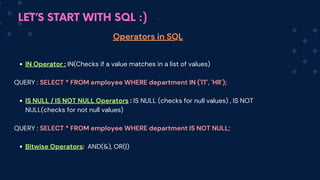
IN Operator : IN(Checks if a value matches in a list of values)
QUERY : SELECT * FROM employee WHERE department IN ('IT', 'HR');
IS NULL / IS NOT NULL Operators : IS NULL (checks for null values) , IS NOT
NULL(checks for not null values)
QUERY : SELECT * FROM employee WHERE department IS NOT NULL;
Bitwise Operators: AND(&), OR(|)
LET’S START WITH SQL :)
Operators in SQL
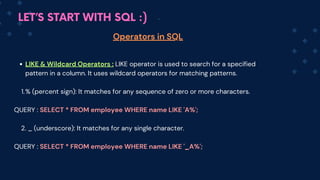
LIKE & Wildcard Operators : LIKE operator is used to search for a specified
pattern in a column. It uses wildcard operators for matching patterns.
% (percent sign): It matches for any sequence of zero or more characters.
1.
QUERY : SELECT * FROM employee WHERE name LIKE 'A%';
2. _ (underscore): It matches for any single character.
QUERY : SELECT * FROM employee WHERE name LIKE '_A%';
LET’S START WITH SQL :)
Operators in SQL
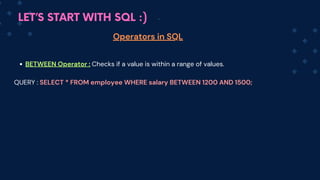
BETWEEN Operator : Checks if a value is within a range of values.
QUERY : SELECT * FROM employee WHERE salary BETWEEN 1200 AND 1500;
LET’S START WITH SQL :)
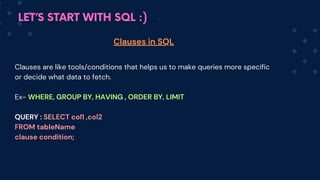
Clauses are like tools/conditions that helps us to make queries more specific
or decide what data to fetch.
Ex- WHERE, GROUP BY, HAVING , ORDER BY, LIMIT
QUERY : SELECT col1 ,co
l2
FROM tableName
clause condition;
Clauses in SQL
LET’S START WITH SQL :)
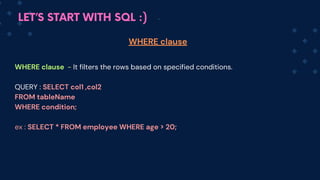
WHERE clause - It filters the rows based on specified conditions.
QUERY : SELECT col1 ,col2
FROM tableName
WHERE condition;
ex : SELECT * FROM employee WHERE age > 20;
WHERE clause
LET’S START WITH SQL :)
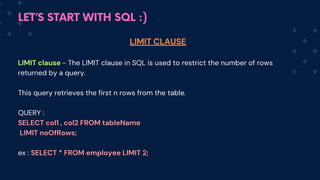
LIMIT clause - The LIMIT clause in SQL is used to restrict the number of rows
returned by a query.
This query retrieves the first n rows from the table.
QUERY :
SELECT col1 , co
l2 FROM tableName
LIMIT noOfRows;
ex : SELECT * FROM employee LIMIT 2;
LIMIT CLAUSE
LET’S START WITH SQL :)
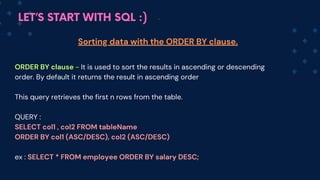
ORDER BY clause - It is used to sort the results in ascending or descending
order. By default it returns the result in ascen
ding order
This query retrieves the first n rows from the table.
QUERY :
SELECT col1 , co
l2 FROM tableName
ORDER BY c
ol1 (ASC/
DESC), co

l2 (ASC/DESC)
ex : SELECT * FROM employee ORDER BY salary DESC;
Sorting data with the ORDER BY clause.
LET’S START WITH SQL :)
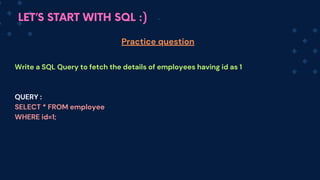
Write a SQL Query to fetch the details of employees having id as 1
QUERY :
SELECT * FROM employee
WHERE id=1;
Practice question
LET’S START WITH SQL :)
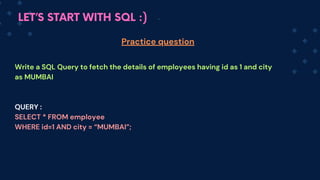
Write a SQL Query to fetch the details of employees having id as 1 and city
as MUMBAI
QUERY :
SELECT * FROM employee
WHERE id=1 AND city = “MUMBAI”;
Practice question
LET’S START WITH SQL :)
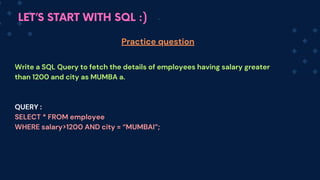
Write a SQL Query to fetch the details of employees having salary greater
than 1200 and city as MUMBA a.
QUERY :
SELECT * FROM employee
WHERE salary>1200 AND city = “MUMBAI”;
Practice question
LET’S START WITH SQL :)
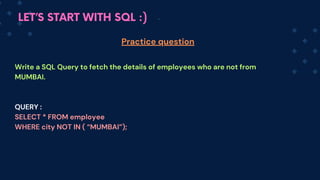
Write a SQL Query to fetch the details of employees who are not from
MUMBAI.
QUERY :
SELECT * FROM employee
WHERE city NOT IN ( “MUMBAI”);
Practice question
LET’S START WITH SQL :)
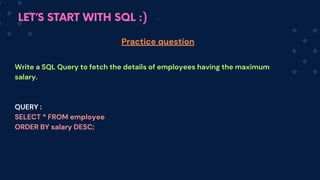
Write a SQL Query to fetch the details of employees having the maximum
salary.
QUERY :
SELECT * FROM employee
ORDER BY salary DESC;
Practice question
LET’S START WITH SQL :)
Write a SQL Query to fetch the details of 2 employees having the
maximum salary.
QUERY :
SELECT * FROM employee
ORDER BY salary DESC
LIMIT 2;
Practice question
LET’S START WITH SQL :)
Aggregate Functions
Aggregate functions performs some operations on a set of rows and then returns a
single value summarizing the data. These are used with SELECT statements to
perform calculations
Types of Aggregate functions :
COUNT()
SUM()
AVG()
MIN()
MAX()
GROUP_CONCAT()
LET’S START WITH SQL :)
Aggregate Functions
COUNT() - It counts the number of rows in a table or the number of non-null values
in a column.
This counts how many things are in a list or a group.
Query : SELECT count(name) FROM employee ; -> this will tell the number of
employees in a company
LET’S START WITH SQL :)
Aggregate Functions
SUM() - It calculates the sum of all values in a numeric column.
This adds up all the numbers in a list.
Query : SELECT SUM(salary) FROM employee ; -> this willl tell the total amount
company is paying to its employees
LET’S START WITH SQL :)
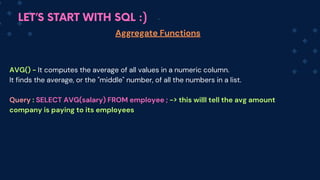
Aggregate Functions
AVG() - It computes the average of all values in a numeric column.
It finds the average, or the "middle" number, of all the numbers in a list.
Q
uery : SELECT AVG(salary) FROM employee ; -> this willl tell the avg amount
company is paying to its employees
LET’S START WITH SQL :)
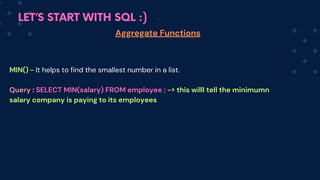
Aggregate Functions
MIN() - It helps to find the smallest number in a list.
Q
uery : SELECT MIN(salary) FROM employee ; -> this willl tell the minimumn
salary company is paying to its employees
LET’S START WITH SQL :)
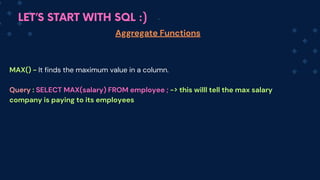
Aggregate Functions
MAX() - It finds the maximum value in a column.
Q
uery : SELECT MAX(salary) FROM employee ; -> this willl tell the max salary
company is paying to its employees
LET’S START WITH SQL :)
GROUP BY clause - This is used to group rows that have the same values into together. It
helps to organize data into groups so that you can do calculations, like finding totals or
averages, for each group
This query retrieves the first n rows from the table.
QUERY :
SELECT col1, aggregateFun(col2)
FROM tableName
GROUP BY col1 ;
ex: SELECT department, AVG(salary) AS avgsal FROM employee
GROUP BY department;
Grouping data with the GROUP BY clause.
LET’S START WITH SQL :)
HAVING clause - The HAVING clause is just like clause but the main
difference is it works on aggregated data. It is used with the GROUP BY
clause. It helps to filter groups based on given con conditions.ditions.
QUERY :
SELECT col1, co
l2 aggregateFun(col3)
FROM tableName
GROUP BY col1 col2
HAVING condition;
ex : SELECT department, AVG(salary) AS avgsal
FROM employe
GROUP BY dep
artment
HAVING a
vgsal>1500;
HAVING clause.
LET’S START WITH SQL :)
These queries demonstrate how to use
a. GROUP BY to categorize data and
b. HAVING to filter grouped data based on specific conditions in SQL.
GROUP BY and HAVING clause.
LET’S START WITH SQL :)
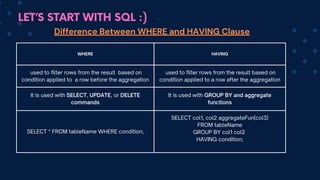
WHERE HAVING
used to filter rows from the result based on
condition applied to a row before the aggregation
used to filter rows from the result based on
condition applied to a row after the aggregation
It is used with SELECT, UPDATE, or DELETE
commands
It is used with GROUP BY and aggregate
functions
SELECT * FROM tableName WHERE condition;
SELECT col1, co
l2 aggregateFun(col3)
FROM tableName
GROUP BY col1 col2
HAVING condition;
Difference Between WHERE and HAVING Clause
LET’S START WITH SQL :)
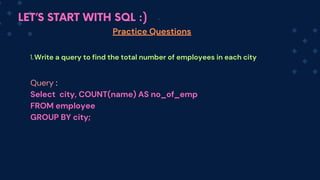
Practice Questions
Write a query to find the total number of employees in each city
1.
Query :
Select city, COUNT(name) AS no_of_emp
FROM em
ployee
GROUP BY city;
LET’S START WITH SQL :)
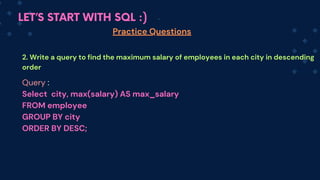
Practice Questions
2. Write a query to find the maximum salary of employees in each city in descending
order
Query :
Select city, max(salary) AS max_salary
FROM em
ployee
GROUP BY city
ORDER BY DESC;
LET’S START WITH SQL :)
Practice Questions
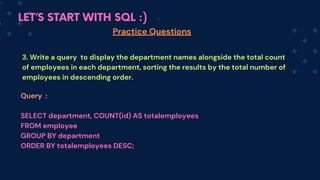
3. Write a query to display the department names alongside the total count
of employees in each department, sorting the results by the total number of
employees in descending order.
Query :
SELECT department, COUNT(id) AS totalemployees
FROM employee
GROUP BY department
ORDER BY totalemployees DESC;
LET’S START WITH SQL :)
Practice Questions
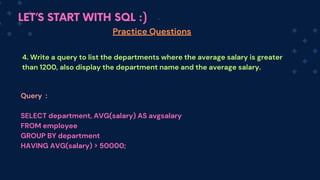
4. Write a query to list the departments where the average salary is greater
than 1200, also display the department name and the average salary.
Query :
SELECT department, AVG(salary) AS avgsalary
FROM employee
GROUP BY department
HAVING AVG(salary) > 50000;
LET’S START WITH SQL :)
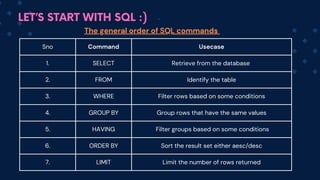
Sno Command Usecase
1. SELECT Retrieve from the database
2. FROM Identify the table
3. WHERE Filter rows based on some conditions
4. GROUP BY Group rows that have the same values
5. HAVING Filter groups based on some conditions
6. ORDER BY Sort the result set either aesc/desc
7. LIMIT Limit the number of rows returned
The general order of SQL commands
LET’S START WITH SQL :)
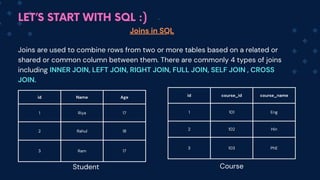
id Name Age
1 Riya 17
2 Rahul 18
3 Ram 17
id course_id course_name
1 101 Eng
2 102 Hin
3 103 PhE
Joins in SQL
Joins are used to combine rows from two or more tables based on a related or
shared or common column between them. There are commonly 4 types of joins
including INNER JOIN, LEFT JOIN, RIGHT JOIN, FULL JOIN, SELF JOIN , CROSS
JOIN.
Student Course
LET’S START WITH SQL :)
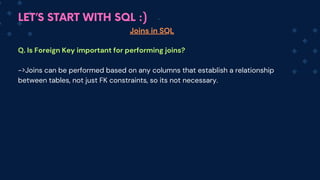
Joins in SQL
Q. Is Foreign Key important for performing joins?
->Joins can be performed based on any columns that establish a relationship
between tables, not just FK constraints, so its not necessary.
LET’S START WITH SQL :)
Right
table
rollno name
1 Ram
2 Rahul
3 Riti
Joins in SQL
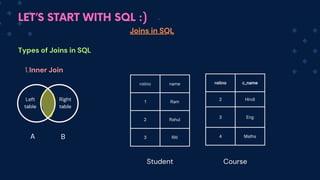
Types of Joins in SQL
Inner Join
1.
Left
table
A B
rollno c_name
2 Hindi
3 Eng
4 Maths
Student Course
LET’S START WITH SQL :)
Joins in SQL
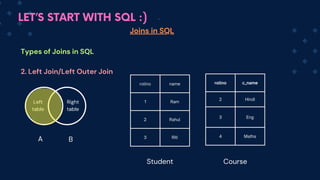
Types of Joins in SQL
2. Left Join/Left Outer Join
Left
table
Right
table
A B
rollno name
1 Ram
2 Rahul
3 Riti
rollno c_name
2 Hindi
3 Eng
4 Maths
Student Course
LET’S START WITH SQL :)
Joins in SQL
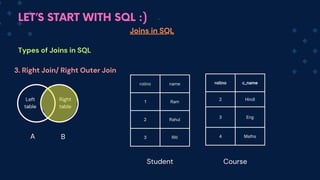
Types of Joins in SQL
3. Right Join/ Right Outer Join
Left
table
Right
table
A B
rollno name
1 Ram
2 Rahul
3 Riti
rollno c_name
2 Hindi
3 Eng
4 Maths
Student Course
LET’S START WITH SQL :)
Joins in SQL
Types of Joins in SQL
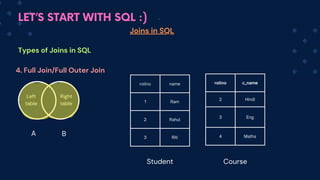
4. Full Join/Full Outer Join
Left
table
Right
table
A B
rollno name
1 Ram
2 Rahul
3 Riti
rollno c_name
2 Hindi
3 Eng
4 Maths
Student Course
LET’S START WITH SQL :)
Joins in SQL
Types of Joins in SQL
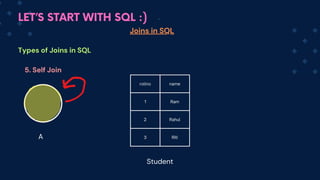
5. Self Join
A
rollno name
1 Ram
2 Rahul
3 Riti
Student
LET’S START WITH SQL :)
Joins in SQL
Types of Joins in SQL
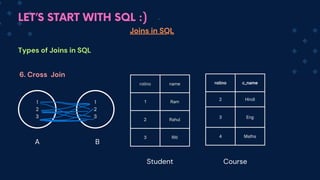
6. Cross Join
1
2
3
1
2
3
A B
rollno name
1 Ram
2 Rahul
3 Riti
rollno c_name
2 Hindi
3 Eng
4 Maths
Student Course
LET’S START WITH SQL :)
id name
101 Ram
102 Rahul
103 Riti
Joins in SQL
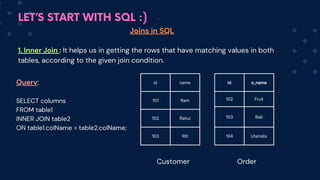
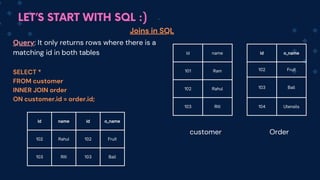
1. Inner Join : It helps us in getting the rows that have matching values in both
tables, according to the given join condition.
id o_name
102 Fruit
103 Ball
104 Utensils
Customer Order
Query:
SELECT columns
FROM table1
INNER JOIN table2
ON table1.colName = table2.colName;
LET’S START WITH SQL :)
id name
101 Ram
102 Rahul
103 Riti
id o_name
102 Fruit
103 Ball
104 Utensils
id name id o_name
102 Rahul 102 Fruit
103 Riti 103 Ball
Joins in SQL
customer Order
Query: It only returns rows where there is a
matching id in both tables
SELECT *
FROM customer
INNER JOIN order
ON customer.id = order.id;
LET’S START WITH SQL :)
Joins in SQL
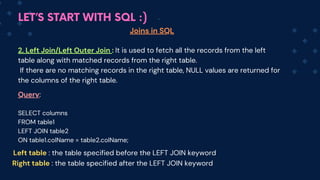
2. Left Join/Left Outer Join : It is used to fetch all the records from the left
table along with matched records from the right table.
If there are no matching records in the right table, NULL values are returned for
the columns of the right table.
Query:
SELECT columns
FROM table1
LEFT JOIN table2
ON table1.colName = table2.colName;
Left table : the table specified before the LEFT JOIN keyword
Right table : the table specified after the LEFT JOIN keyword
LET’S START WITH SQL :)
id name
101 Ram
102 Rahul
103 Riti
id o_name
102 Fruit
103 Ball
104 Utensils
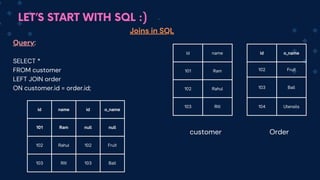
id name id o_name
101 Ram null null
102 Rahul 102 Fruit
103 Riti 103 Ball
Joins in SQL
customer Order
Query:
SELECT *
FROM customer
LEFT JOIN order
ON customer.id = order.id;
LET’S START WITH SQL :)
Joins in SQL
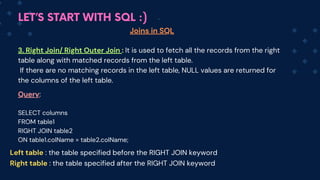
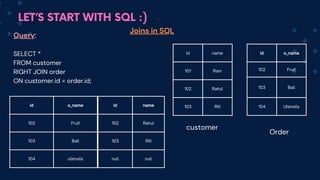
3. Right Join/ Right Outer Join : It is used to fetch all the records from the right
table along with matched records from the left table.
If there are no matching records in the left table, NULL values are returned for
the columns of the left table.
Query:
SELECT columns
FROM table1
RIGHT JOIN table2
ON table1.colName = table2.colName;
Left table : the table specified before the RIGHT JOIN keyword
Right table : the table specified after the RIGHT JOIN keyword
LET’S START WITH SQL :)
id name
101 Ram
102 Rahul
103 Riti
id o_name
102 Fruit
103 Ball
104 Utensils
id o_name
102 Fruit
103 Ball
104 utensils
Joins in SQL
customer
Order
Query:
SELECT *
FROM customer
RIGHT JOIN order
ON customer.id = order.id;
id name
102 Rahul
103 Riti
null null
LET’S START WITH SQL :)
Joins in SQL
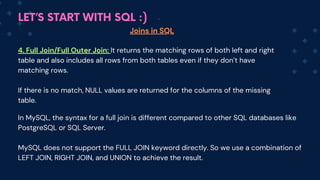
4. Full Join/Full Outer Join: It returns the matching rows of both left and right
table and also includes all rows from both tables even if they don’t have
matching rows.
If there is no match, NULL values are returned for the columns of the missing
table.
In MySQL, the syntax for a full join is different compared to other SQL databases like
PostgreSQL or SQL Server.
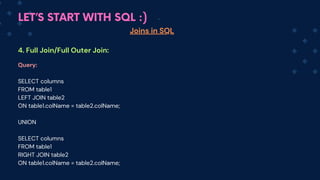
MySQL does not support the FULL JOIN keyword directly. So we use a combination of
LEFT JOIN, RIGHT JOIN, and UNION to achieve the result.
LET’S START WITH SQL :)
Joins in SQL
4. Full Join/Full Outer Join:
Query:
SELECT columns
FROM table1
LEFT JOIN table2
ON table1.colName = table2.colName;
UNION
SELECT columns
FROM table1
RIGHT JOIN table2
ON table1.colName = table2.colName;
LET’S START WITH SQL :)
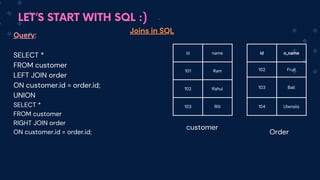
id name
101 Ram
102 Rahul
103 Riti
id o_name
102 Fruit
103 Ball
104 Utensils
Joins in SQL
customer
Order
Query:
SELECT *
FROM customer
LEFT JOIN order
ON customer.id = order.id;
UNION
SELECT *
FROM customer
RIGHT JOIN order
ON customer.id = order.id;
LET’S START WITH SQL :)
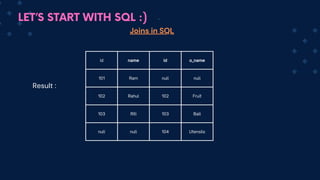
id name id o_name
101 Ram null null
102 Rahul 102 Fruit
103 Riti 103 Ball
null null 104 Utensils
Joins in SQL
Result :
LET’S START WITH SQL :)
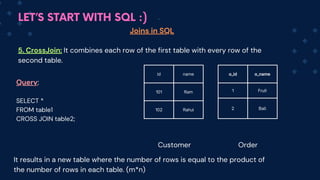
id name
101 Ram
102 Rahul
Joins in SQL
5. CrossJoin: It combines each row of the first table with every row of the
second table.
o_id o_name
1 Fruit
2 Ball
Customer Order
Query:
SELECT *
FROM table1
CROSS JOIN table2;
It results in a new table where the number of rows is equal to the product of
the number of rows in each table. (m*n)
LET’S START WITH SQL :)
Joins in SQL
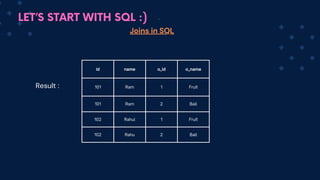
id name o_id o_name
101 Ram 1 Fruit
101 Ram 2 Ball
102 Rahul 1 Fruit
102 Rahu 2 Ball
Result :
LET’S START WITH SQL :)
Joins in SQL
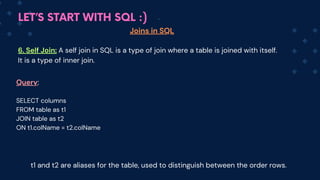
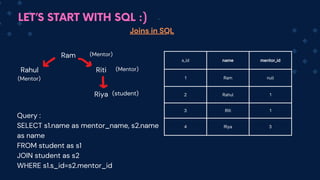
6. Self Join: A self join in SQL is a type of join where a table is joined with itself.
It is a type of inner join.
Query:
SELECT columns
FROM table as t1
JOIN table as t2
ON t1.colName = t2.colName
t1 and t2 are aliases for the table, used to distinguish between the order rows.
LET’S START WITH SQL :)
Joins in SQL
s_id name mentor_id
1 Ram null
2 Rahul 1
3 Riti 1
4 Riya 3
Ram
Rahul Riti
Riya
(Mentor)
(Mentor)
(Mentor)
(student)
Query :
SELECT s1.name as mentor_name, s2.name
as name
FROM student as s1
JOIN student as s2
WHERE s1.s_id=s2.mentor_id
LET’S START WITH SQL :)
Joins in SQL
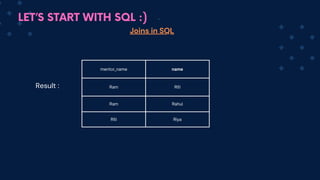
mentor_name name
Ram Riti
Ram Rahul
Riti Riya
Result :
LET’S START WITH SQL :)
Exclusive Joins in SQL
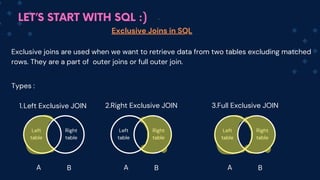
Exclusive joins are used when we want to retrieve data from two tables excluding matched
rows. They are a part of outer joins or full outer join.
Types :
Left Exclusive JOIN
1. 2.Right Exclusive JOIN
Left
table
Right
table
A B
Left
table
Right
table
A B
3.Full Exclusive JOIN
Left
table
Right
table
A B
LET’S START WITH SQL :)
Exclusive Joins in SQL
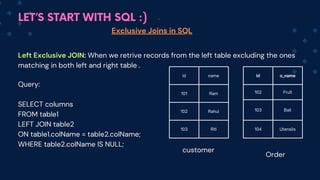
Left Exclusive JOIN: When we retrive records from the left table excluding the ones
matching in both left and right table .
Query:
SELECT columns
FROM table1
LEFT JOIN table2
ON table1.colName = table2.colName;
WHERE table2.colName IS NULL;
id name
101 Ram
102 Rahul
103 Riti
id o_name
102 Fruit
103 Ball
104 Utensils
customer
Order
LET’S START WITH SQL :)
Exclusive Joins in SQL
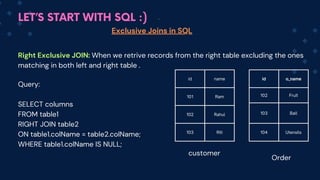
Right Exclusive JOIN: When we retrive records from the right table excluding the ones
matching in both left and right table .
Query:
SELECT columns
FROM table1
RIGHT JOIN table2
ON table1.colName = table2.colName;
WHERE table1.colName IS NULL;
id name
101 Ram
102 Rahul
103 Riti
id o_name
102 Fruit
103 Ball
104 Utensils
customer
Order
LET’S START WITH SQL :)
Exclusive Joins in SQL
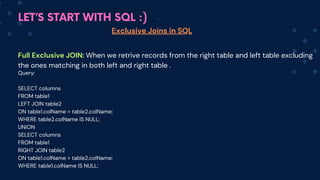
Full Exclusive JOIN: When we retrive records from the right table and left table excluding
the ones matching in both left and right table .
Query:
SELECT columns
FROM table1
LEFT JOIN table2
ON table1.colName = table2.colName;
WHERE table2.colName IS NULL;
UNION
SELECT columns
FROM table1
RIGHT JOIN table2
ON table1.colName = table2.colName;
WHERE table1.colName IS NULL;
LET’S START WITH SQL :)
UNION Operator in SQL
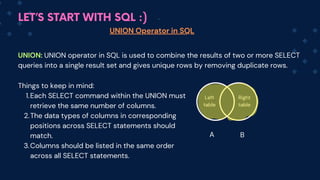
UNION: UNION operator in SQL is used to combine the results of two or more SELECT
queries into a single result set and gives unique rows by removing duplicate rows.
Things to keep in mind:
Each SELECT command within the UNION must
retrieve the same number of columns.
1.
The data types of columns in corresponding
positions across SELECT statements should
match.
2.
Columns should be listed in the same order
across all SELECT statements.
3.
Left
table
Right
table
A B
LET’S START WITH SQL :)
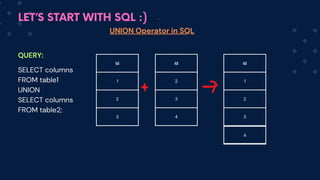
id
1
2
UNION Operator in SQL
QUERY:
SELECT columns
FROM table1
UNION
SELECT columns
FROM table2;
3
id
2
3
4
2
id
2
3
4
1
LET’S START WITH SQL :)
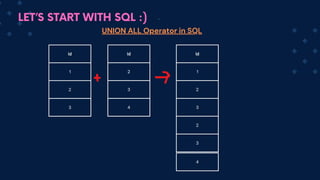
UNION ALL Operator in SQL
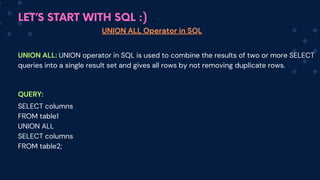
UNION ALL: UNION operator in SQL is used to combine the results of two or more SELECT
queries into a single result set and gives all rows by not removing duplicate rows.
QUERY:
SELECT columns
FROM table1
UNION ALL
SELECT columns
FROM table2;
LET’S START WITH SQL :)
id
1
2
UNION ALL Operator in SQL
3
id
2
3
4
2
id
2
3
2
3
4
1
LET’S START WITH SQL :)
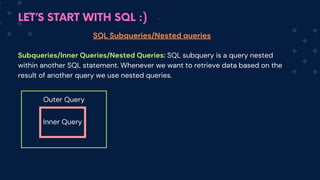
SQL Subqueries/Nested queries
Subqueries/Inner Queries/Nested Queries: SQL subquery is a query nested
within another SQL statement. Whenever we want to retrieve data based on the
result of another query we use nested queries.
Outer Query
Inner Query
LET’S START WITH SQL :)
SQL Subqueries/Nested queries
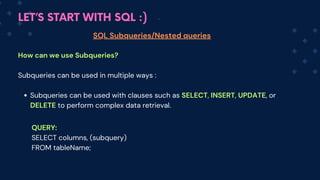
How can we use Subqueries?
Subqueries can be used in multiple ways :
Subqueries can be used with clauses such as SELECT, INSERT, UPDATE, or
DELETE to perform complex data retrieval.
QUERY:
SELECT columns, (subquery)
FROM tableName;
LET’S START WITH SQL :)
SQL Subqueries/Nested queries
How can we use Subqueries?
Subqueries can be used in multiple ways :
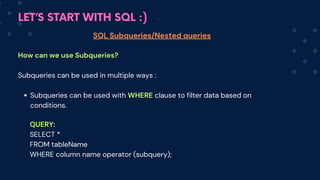
Subqueries can be used with WHERE clause to filter data based on
conditions.
QUERY:
SELECT *
FROM tableName
WHERE column name operator (subquery);
LET’S START WITH SQL :)
SQL Subqueries/Nested queries
How can we use Subqueries?
Subqueries can be used in multiple ways :
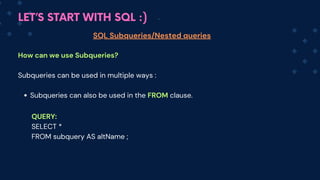
Subqueries can also be used in the FROM clause.
QUERY:
SELECT *
FROM subquery AS altName ;
LET’S START WITH SQL :)
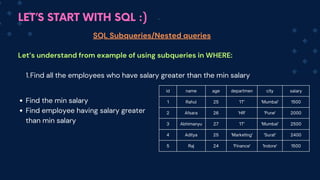
id name age departmen city salary
1 Rahul 25 'IT' 'Mumbai' 1500
2 Afsara 26 'HR' 'Pune' 2000
3 Abhimanyu 27 'IT' 'Mumbai' 2500
4 Aditya 25 'Marketing' 'Surat' 2400
5 Raj 24 'Finance' 'Indore' 1500
SQL Subqueries/Nested queries
Let’s understand from example of using subqueries in WHERE:
Find all the employees who have salary greater than the min salary
1.
Find the min salary
Find employee having salary greater
than min salary
LET’S START WITH SQL :)
SQL Subqueries/Nested queries
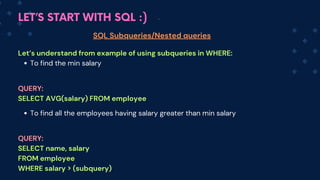
Let’s understand from example of using subqueries in WHERE:
To find the min salary
To find all the employees having salary greater than min salary
QUERY:
SELECT AVG(salary) FROM employee
QUERY:
SELECT name, salary
FROM employee
WHERE salary > (subquery)
LET’S START WITH SQL :)
id name age departmen city salary
1 Rahul 25 'IT' 'Mumbai' 1500
2 Afsara 26 'HR' 'Pune' 2000
3 Abhimanyu 27 'IT' 'Mumbai' 2500
4 Aditya 25 'Marketing' 'Surat' 2400
5 Raj 24 'Finance' 'Indore' 1500
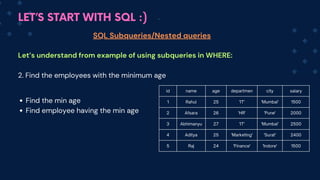
SQL Subqueries/Nested queries
Let’s understand from example of using subqueries in WHERE:
2. Find the employees with the minimum age
Find the min age
Find employee having the min age
LET’S START WITH SQL :)
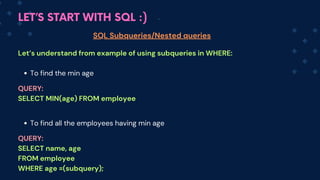
SQL Subqueries/Nested queries
Let’s understand from example of using subqueries in WHERE:
To find the min age
To find all the employees having min age
QUERY:
SELECT MIN(age) FROM employee
QUERY:
SELECT name, age
FROM employee
WHERE age =(subquery);
LET’S START WITH SQL :)
id name age departmen city salary
1 Rahul 25 'IT' 'Mumbai' 1500
2 Afsara 26 'HR' 'Pune' 2000
3 Abhimanyu 27 'IT' 'Mumbai' 2500
4 Aditya 25 'Marketing' 'Surat' 2400
5 Raj 24 'Finance' 'Indore' 1500
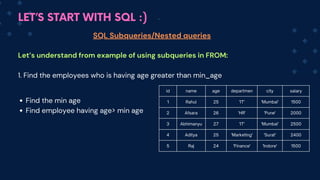
SQL Subqueries/Nested queries
Let’s understand from example of using subqueries in FROM:
1. Find the employees who is having age greater than min_age
Find the min age
Find employee having age> min age
LET’S START WITH SQL :)
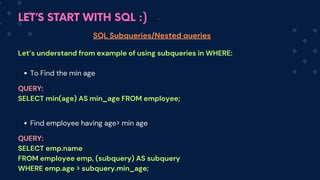
SQL Subqueries/Nested queries
Let’s understand from example of using subqueries in WHERE:
To Find the min age
Find employee having age> min age
QUERY:
SELECT min(age) AS min_age FROM employee;
QUERY:
SELECT emp.name
FROM employee emp, (subquery) AS subquery
WHERE emp.age > subquery.min_age;
LET’S START WITH SQL :)
id name age departmen city salary
1 Rahul 25 'IT' 'Mumbai' 1500
2 Afsara 26 'HR' 'Pune' 2000
3 Abhimanyu 27 'IT' 'Mumbai' 2500
4 Aditya 25 'Marketing' 'Surat' 2400
5 Raj 24 'Finance' 'Indore' 1500
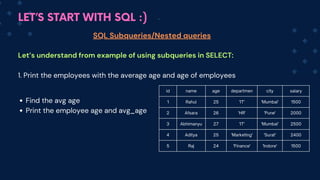
SQL Subqueries/Nested queries
Let’s understand from example of using subqueries in SELECT:
1. Print the employees with the average age and age of employees
Find the avg age
Print the employee age and avg_age
LET’S START WITH SQL :)
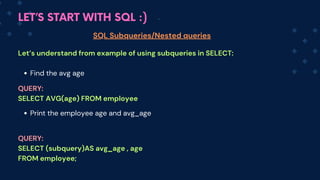
SQL Subqueries/Nested queries
Let’s understand from example of using subqueries in SELECT:
Find the avg age
Print the employee age and avg_age
QUERY:
SELECT AVG(age) FROM employee
QUERY:
SELECT (subquery)AS avg_age , age
FROM employee;
LET’S START WITH SQL :)
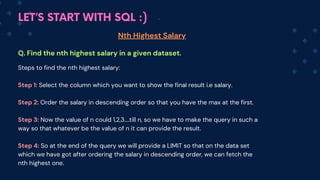
Nth Highest Salary
Q. Find the nth highest salary in a given dataset.
Steps to find the nth highest salary:
Step 1: Select the column which you want to show the final result i.e salary.
Step 2: Order the salary in descending order so that you have the max at the first.
Step 3: Now the value of n could 1,2,3....till n, so we have to make the query in such a
way so that whatever be the value of n it can provide the result.
Step 4: So at the end of the query we will provide a LIMIT so that on the data set
which we have got after ordering the salary in descending order, we can fetch the
nth highest one.
LET’S START WITH SQL :)
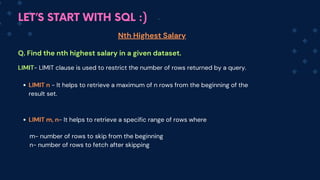
Nth Highest Salary
Q. Find the nth highest salary in a given dataset.
LIMIT- LIMIT clause is used to restrict the number of rows returned by a query.
LIMIT n - It helps to retrieve a maximum of n rows from the beginning of the
result set.
LIMIT m, n- It helps to retrieve a specific range of rows where
m- number of rows to skip from the beginning
n- number of rows to fetch after skipping
LET’S START WITH SQL :)
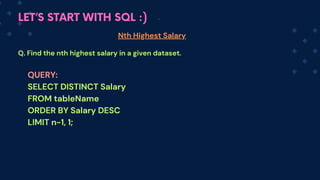
Nth Highest Salary
Q. Find the nth highest salary in a given dataset.
QUERY:
SELECT DISTINCT Salary
FROM tableName
ORDER BY Salary DESC
LIMIT n-1, 1;
LET’S START WITH SQL :)
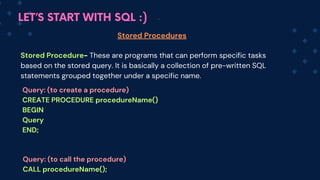
Stored Procedures
Stored Procedure- These are programs that can perform specific tasks
based on the stored query. It is basically a collection of pre-written SQL
statements grouped together under a specific name.
Query: (to create a procedure)
CREATE PROCEDURE procedureName()
BEGIN
Query
END;
Query: (to call the procedure)
CALL procedureName();
LET’S START WITH SQL :)
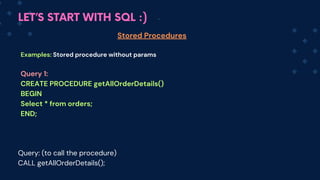
Stored Procedures
Examples: Stored procedure without params
Query 1:
CREATE PROCEDURE getAllOrderDetails()
BEGIN
Select * from orders;
END;
Query: (to call the procedure)
CALL getAllOrderDetails();
LET’S START WITH SQL :)
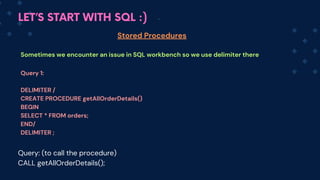
Stored Procedures
Sometimes we encounter an issue in SQL workbench so we use delimiter there
Query 1:
DELIMITER /
CREATE PROCEDURE getAllOrderDetails()
BEGIN
SELECT * FROM orders;
END/
DELIMITER ;
Query: (to call the procedure)
CALL getAllOrderDetails();
LET’S START WITH SQL :)
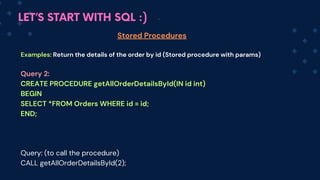
Stored Procedures
Examples: Return the details of the order by id (S
tored procedure with params)
Query 2:
CREATE PROCEDURE getAllOrderDetailsById(IN id int)
BEGIN
SELECT *FROM Orders WHERE id = id;
END;
Query: (to call the procedure)
CALL getAllOrderDetailsById(2);
LET’S START WITH SQL :)
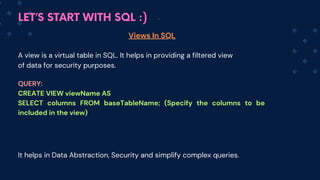
Views In SQL
QUERY:
CREATE VIEW viewName AS
SELECT columns FROM baseTableName; (Specify the columns to be
included in the view)
A view is a virtual table in SQL. It helps in providing a filtered view
of data for security purposes.
It helps in Data Abstraction, Security and simplify complex queries.
LET’S START WITH SQL :)
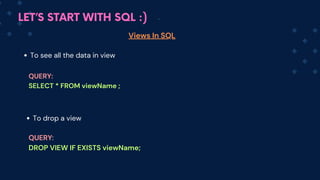
Views In SQL
QUERY:
SELECT * FROM viewName ;
To see all the data in view
To drop a view
QUERY:
DROP VIEW IF EXISTS viewName;
LET’S START WITH SQL :)
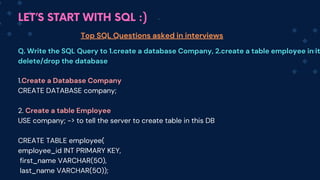
Top SQL Questions asked in interviews
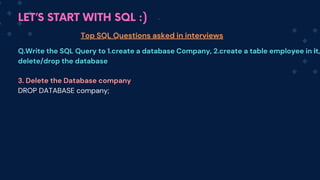
Q. Write the SQL Query to 1.create a database Company, 2.create a table employee in it
delete/drop the database
1.Create a Database Company
CREATE DATABASE company;
2. Create a table Employee
USE company; -> to tell the server to create table in this DB
CREATE TABLE employee(
employee_id INT PRIMARY KEY,
first_name VARCHAR(50),
last_name VARCHAR(50));
LET’S START WITH SQL :)
Top SQL Questions asked in interviews
Q.Write the SQL Query to 1.create a database Company, 2.create a table employee in it,
delete/drop the database
3. Delete the Database company
DROP DATABASE company;
LET’S START WITH SQL :)
Top SQL Questions asked in interviews
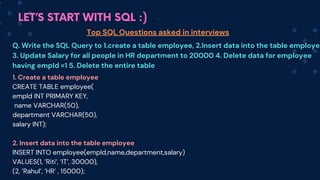
Q. Write the SQL Query to 1.create a table employee, 2.Insert data into the table employe
3. Update Salary for all people in HR department to 20000 4. Delete data for employee
having empId =1 5. Delete the entire table
1. Create a table employee
CREATE TABLE employee(
empId INT PRIMARY KEY,
name VARCHAR(50),
department VARCHAR(50),
salary INT);
2. Insert data into the table employee
INSERT INTO employee(empId,name,department,salary)
VALUES(1, ’Riti’, ’IT’, 30000),
(2, ’Rahul’, ’HR’ , 15000);
LET’S START WITH SQL :)
Top SQL Questions asked in interviews
Q. Write the SQL Query to 1.create a table employee, 2.Insert data into the table employ
3. Update Salary for all people in HR department to 20000 4. Delete data for employee
having empId =1 5. Delete the entire table
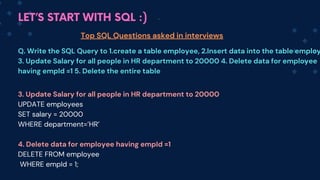
3. Update Salary for all people in HR department to 20000
UPDATE employees
SET salary = 20000
WHERE department=’HR’
4. Delete data for employee having empId =1
DELETE FROM employee
WHERE empId = 1;
LET’S START WITH SQL :)
Top SQL Questions asked in interviews
Q. Write the SQL Query to 1.create a table employee, 2.Insert data into the table employ
3. Update Salary for all people in HR department to 20000 4. Delete data for employee
having empId =1 5. Delete the entire table
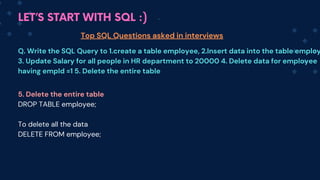
5. Delete the entire table
DROP TABLE employee;
To delete all the data
DELETE FROM employee;
LET’S START WITH SQL :)
Top SQL Questions asked in interviews
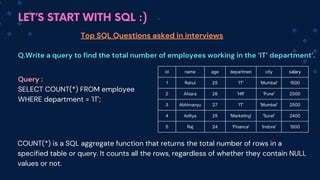
Q.Write a query to find the total number of employees working in the ‘IT’ department’.
id name age departmen city salary
1 Rahul 25 'IT' 'Mumbai' 1500
2 Afsara 26 'HR' 'Pune' 2000
3 Abhimanyu 27 'IT' 'Mumbai' 2500
4 Aditya 25 'Marketing' 'Surat' 2400
5 Raj 24 'Finance' 'Indore' 1500
Query :
SELECT COUNT(*) FROM employee
WHERE department = 'IT';
COUNT(*) is a SQL aggregate function that returns the total number of rows in a
specified table or query. It counts all the rows, regardless of whether they contain NULL
values or not.
LET’S START WITH SQL :)
Top SQL Questions asked in interviews
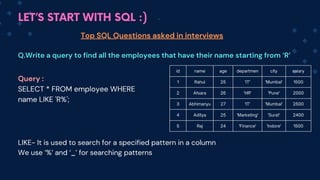
Q.Write a query to find all the employees that have their name starting from ‘R’
id name age departmen city salary
1 Rahul 25 'IT' 'Mumbai' 1500
2 Afsara 26 'HR' 'Pune' 2000
3 Abhimanyu 27 'IT' 'Mumbai' 2500
4 Aditya 25 'Marketing' 'Surat' 2400
5 Raj 24 'Finance' 'Indore' 1500
Query :
SELECT * FROM employee WHERE
name LIKE 'R%';
LIKE- It is used to search for a specified pattern in a column
We use ‘%’ and ‘_’ for searching patterns
LET’S START WITH SQL :)
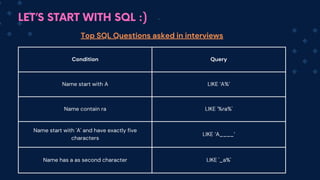
Condition Query
Name start with A LIKE ‘A%’
Name contain ra LIKE '%ra%'
Name start with 'A' and have exactly five
characters
LIKE ‘A____’
Name has a as second character LIKE '_a%'
Top SQL Questions asked in interviews
LET’S START WITH SQL :)
Top SQL Questions asked in interviews
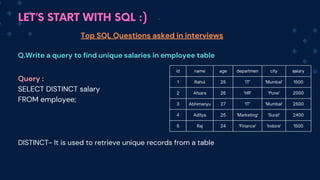
Q.Write a query to find unique salaries in employee table
id name age departmen city salary
1 Rahul 25 'IT' 'Mumbai' 1500
2 Afsara 26 'HR' 'Pune' 2000
3 Abhimanyu 27 'IT' 'Mumbai' 2500
4 Aditya 25 'Marketing' 'Surat' 2400
5 Raj 24 'Finance' 'Indore' 1500
Query :
SELECT DISTINCT salary
FROM employee;
DISTINCT- It is used to retrieve unique records from a table
LET’S START WITH SQL :)
Top SQL Questions asked in interviews
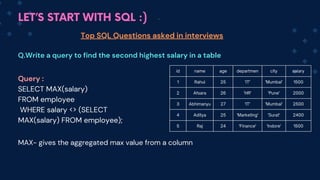
Q.Write a query to find the second highest salary in a table
id name age departmen city salary
1 Rahul 25 'IT' 'Mumbai' 1500
2 Afsara 26 'HR' 'Pune' 2000
3 Abhimanyu 27 'IT' 'Mumbai' 2500
4 Aditya 25 'Marketing' 'Surat' 2400
5 Raj 24 'Finance' 'Indore' 1500
Query :
SELECT MAX(salary)
FROM employee
WHERE salary <> (SELECT
MAX(salary) FROM employee);
MAX- gives the aggregated max value from a column
LET’S START WITH SQL :)
Top SQL Questions asked in interviews
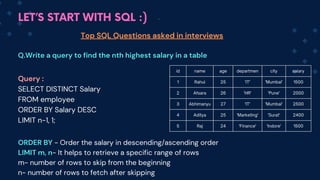
Q.Write a query to find the nth highest salary in a table
id name age departmen city salary
1 Rahul 25 'IT' 'Mumbai' 1500
2 Afsara 26 'HR' 'Pune' 2000
3 Abhimanyu 27 'IT' 'Mumbai' 2500
4 Aditya 25 'Marketing' 'Surat' 2400
5 Raj 24 'Finance' 'Indore' 1500
Query :
SELECT DISTINCT Salary
FROM employee
ORDER BY Salary DESC
LIMIT n-1, 1;
ORDER BY - Order the salary in descending/ascending order
LIMIT m, n- It helps to retrieve a specific range of rows
m- number of rows to skip from the beginning
n- number of rows to fetch after skipping
LET’S START WITH SQL :)
Top SQL Questions asked in interviews
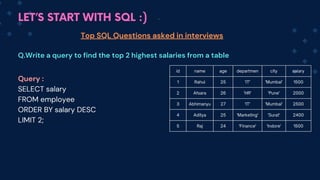
Q.Write a query to find the top 2 highest salaries from a table
id name age departmen city salary
1 Rahul 25 'IT' 'Mumbai' 1500
2 Afsara 26 'HR' 'Pune' 2000
3 Abhimanyu 27 'IT' 'Mumbai' 2500
4 Aditya 25 'Marketing' 'Surat' 2400
5 Raj 24 'Finance' 'Indore' 1500
Query :
SELECT salary
FROM employee
ORDER BY salary DESC
LIMIT 2;
LET’S START WITH SQL :)
Top SQL Questions asked in interviews
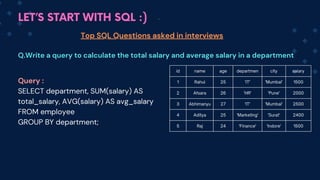
Q.Write a query to calculate the total salary and average salary in a department
id name age departmen city salary
1 Rahul 25 'IT' 'Mumbai' 1500
2 Afsara 26 'HR' 'Pune' 2000
3 Abhimanyu 27 'IT' 'Mumbai' 2500
4 Aditya 25 'Marketing' 'Surat' 2400
5 Raj 24 'Finance' 'Indore' 1500
Query :
SELECT department, SUM(salary) AS
total_salary, AVG(salary) AS avg_salary
FROM employee
GROUP BY department;
LET’S START WITH SQL :)
Top SQL Questions asked in interviews
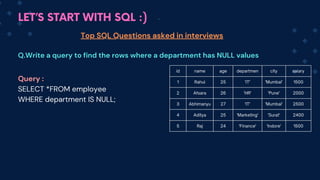
Q.Write a query to find the rows where a department has NULL values
id name age departmen city salary
1 Rahul 25 'IT' 'Mumbai' 1500
2 Afsara 26 'HR' 'Pune' 2000
3 Abhimanyu 27 'IT' 'Mumbai' 2500
4 Aditya 25 'Marketing' 'Surat' 2400
5 Raj 24 'Finance' 'Indore' 1500
Query :
SELECT *FROM employee
WHERE department IS NULL;
LET’S START WITH SQL :)
Top SQL Questions asked in interviews
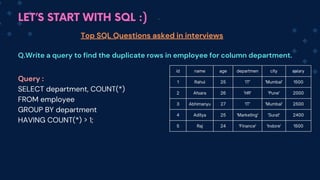
Q.Write a query to find the duplicate rows in employee for column department.
id name age departmen city salary
1 Rahul 25 'IT' 'Mumbai' 1500
2 Afsara 26 'HR' 'Pune' 2000
3 Abhimanyu 27 'IT' 'Mumbai' 2500
4 Aditya 25 'Marketing' 'Surat' 2400
5 Raj 24 'Finance' 'Indore' 1500
Query :
SELECT department, COUNT(*)
FROM employee
GROUP BY department
HAVING COUNT(*) > 1;
LET’S START WITH SQL :)
Top SQL Questions asked in interviews
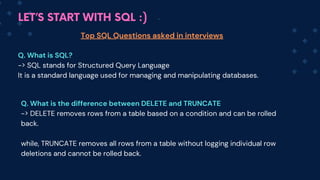
Q. What is SQL?
-> SQL stands for Structured Query Language
It is a standard language used for managing and manipulating databases.
Q. What is the difference between DELETE and TRUNCATE
-> DELETE removes rows from a table based on a condition and can be rolled
back.
while, TRUNCATE removes all rows from a table without logging individual row
deletions and cannot be rolled back.
LET’S START WITH SQL :)
Top SQL Questions asked in interviews
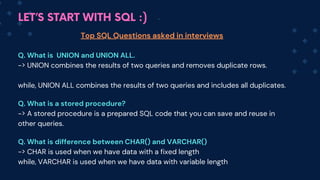
Q. What is UNION and UNION ALL.
-> UNION combines the results of two queries and removes duplicate rows.
while, UNION ALL combines the results of two queries and includes all duplicates.
Q. What is a stored procedure?
-> A stored procedure is a prepared SQL code that you can save and reuse in
other queries.
Q. What is difference between CHAR() and VARCHAR()
-> CHAR is used when we have data with a fixed length
while, VARCHAR is used when we have data with variable length
LET’S START WITH SQL :)
Top SQL Questions asked in interviews
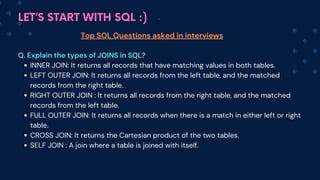
Q. Explain the types of JOINS in SQL?
INNER JOIN: It returns all records that have matching values in both tables.
LEFT OUTER JOIN: It returns all records from the left table, and the matched
records from the right table.
RIGHT OUTER JOIN : It returns all records from the right table, and the matched
records from the left table.
FULL OUTER JOIN: It returns all records when there is a match in either left or right
table.
CROSS JOIN: It returns the Cartesian product of the two tables.
SELF JOIN : A join where a table is joined with itself.
LET’S START WITH SQL :)
Top SQL Questions asked in interviews
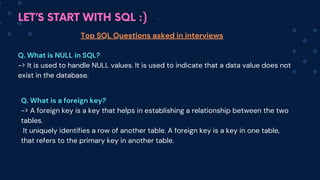
Q. What is NULL in SQL?
-> It is used to handle NULL values. It is used to indicate that a data value does not
exist in the database.
Q. What is a foreign key?
-> A foreign key is a key that helps in establishing a relationship between the two
tables.
It uniquely identifies a row of another table. A foreign key is a key in one table,
that refers to the primary key in another table.
LET’S START WITH SQL :)
Top SQL Questions asked in interviews
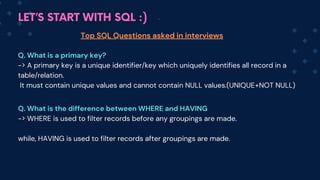
Q. What is a primary key?
-> A primary key is a unique identifier/key which uniquely identifies all record in a
table/relation.
It must contain unique values and cannot contain NULL values.(UNIQUE+NOT NULL)
Q. What is the difference between WHERE and HAVING
-> WHERE is used to filter records before any groupings are made.
while, HAVING is used to filter records after groupings are made.
LET’S START WITH SQL :)
Top SQL Questions asked in interviews
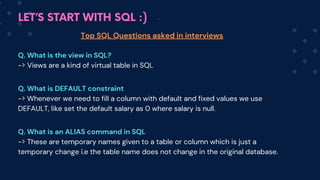
Q. What is the view in SQL?
-> Views are a kind of virtual table in SQL
Q. What is DEFAULT constraint
-> Whenever we need to fill a column with default and fixed values we use
DEFAULT, like set the default salary as 0 where salary is null.
Q. What is an ALIAS command in SQL
-> These are temporary names given to a table or column which is just a
temporary change i.e the table name does not change in the original database.


Complete SQL one shot . One shot for sql

  • 1.
    -By Riti Kumari LET'SLEARN COMPLETE SQL IN ONE VIDEO
  • 2.
    Database : Collectionof data is called as database. DBMS: A software application to manage our data. Software Application LET’S START WITH SQL :) Database User
  • 3.
    LET’S START WITHSQL :) Database Relational(Use tables to store data) MySQL Oracle MariaDB, Non-relational(Data is not stored in tables) MongoDb
  • 4.
    Why SQL? We needa language to interact with databases. So we use SQL to interact with DB, do some CRUD operations on the data. Then what is MySQL? MySQL is a specific Relational Database Management System (RDBMS) that uses SQL as its querying language. LET’S START WITH SQL :)
  • 5.
    History of SQL( Structured Query Language) SQL originated in the 1970s from IBM's research on relational databases. It started as SEQUEL, later renamed SQL due to trademark issues. I LET’S START WITH SQL :)
  • 6.
    SQL ( StructuredQuery Language) SQL is a programming language that is used to communicate and manipulate data in databases. It helps user in performing CRUD (Create, Read, Update, Delete) operations in DB. I LET’S START WITH SQL :)
  • 7.
    How SQL helpsus ? SQL allows users to perform a variety of tasks related to databases Retrieving Data: Extracting precise information from a database through queries. Manipulating Data: Adding, modifying, or removing records within a database. Defining Data: Creating and adjusting the structure of a database, including tables, views, and indexes. Controlling Data: Managing database access by granting or revoking permissions. LET’S START WITH SQL :)
  • 8.
    Installation of MySQL MySQLServer : Database server where data is stored, managed, and accessed. MySQL WorkBench : It is a visual tool which is used for database design, development, administration, and management. It provides a user interface (UI) to interact with MySQL Server. LET’S START WITH SQL :)
  • 9.
    Lets install theServer first : Go to the MySQL Official website: https://www.mysql.com/ Go to Downloads Select MySQL Community (GPL) Downloads at the bottom of the page. Choose MySQL Community Server, select the version and click on download Follow the instructions and set the root password. This password would be asked while creating a new connection. LET’S START WITH SQL :)
  • 10.
    Lets install theWorkBench : Go to the MySQL Official website: https://www.mysql.com/ Go to Downloads Select MySQL Community (GPL) Downloads at the bottom of the page. Choose MySQL Workbench, select the version and click on download Follow the instructions . LET’S START WITH SQL :)
  • 11.
    Types of SQLCommands LET’S START WITH SQL :) SQL commands are divided into different categories based on their functionalities. 1.Data Query Language (DQL) Commands 2.Data Manipulation Language (DML) Commands 3.Data Definition Language (DDL) Commands 4.Data Control Language (DCL) Commands 5.Transaction Control Language (TCL) Commands
  • 12.
    Types of SQLCommands LET’S START WITH SQL :) 1.Data Query Language (DQL) Commands DQL is used to retrieve data from the database Commands: SELECT 2.Data Manipulation Language (DML) Commands DML is used to manipulate data stored in the database. Commands: INSERT, UPDATE, DELETE
  • 13.
    Types of SQLCommands LET’S START WITH SQL :) 3.Data Definition Language (DDL) Commands DDL is used to define the structure and schema of the database. Commands: CREATE, ALTER, DROP, TRUNCATE, RENAME 4.Data Control Language (DCL) Commands DCL deals with the control and security of data within the database. Commands: GRANT, REVOKE
  • 14.
    Types of SQLCommands LET’S START WITH SQL :) 5.Transaction Control Language (TCL) Commands TCL is used to manage transactions within a database. Commands: COMMIT, ROLLBACK, SAVEPOINT
  • 15.
    Lets understand databasedesign from an example, Consider a college database. Databse- Scho ol table1- Student (Sname, Rollno) table2-Teacher(Tname,Tid) Sname, Rollno, Tname, Tid->attributes(characteristics) Creation of Database LET’S START WITH SQL :)
  • 16.
    Creation of Database LET’SSTART WITH SQL :) School Hospital Course Fees Patient
  • 17.
    Steps to createa Database : Choose a DBMS(Database Management System ) 1. Connect to the server using a command-line tool or a graphical user interface. 2. Create a new Database 3. Once the database is created, you can use the USE statement to create tables in the database. 4. Create Tables and Insert Data 5. Creation of Database LET’S START WITH SQL :)
  • 18.
    Creating a newDatabase Creation of Database LET’S START WITH SQL :) We use the CREATE DATABASE statement to create a new database These commands are not case-sensitive. Command: CREATE DATABASE databaseName; Also to avoid errors we can use: Command: CREATE DATABASE IF NOT EXISTS databaseName; IF NOT EXISTS and IF EXISTS clauses are commonly used in conjunction with the CREATE TABLE and DROP TABLE statements to avoid errors
  • 19.
    Deleting a Database Deletionof Database LET’S START WITH SQL :) We use the DROP DATABASE statement to delete a database. Dropping a database means deleting the entire database, including all tables, data, and other objects within it. DROP Is a DDL Command. These commands are not case-sensitive. Command: DROP DATABASE databaseName; Also to avoid errors we can use: Command : DROP DATABASE IF EXISTS databaseName;
  • 20.
    Using a Database Usinga Database LET’S START WITH SQL :) We use the USE DATABASE statement to use a database These commands are not case-sensitive. Command: USE databaseName;
  • 21.
    Showing a Database Showingall the Database LET’S START WITH SQL :) We use the SHOW DATABASES statement to see all the databses present in a server. Command: SHOW DATABASES;
  • 22.
    Creating a table Table LET’SSTART WITH SQL :) We use the CREATE TABLE statement to craete a table in DB. Command: CREATE TABLE TableName ( Column1 DataType1 Constraint1, Column2 DataType2 Constraint2, Column3 DataType3 Constraint3, -- additional columns if needed );
  • 23.
    Example: CREATE TABLE employee( empId INT PRIMARY KEY, name VARCHAR(50), salary INT ); empId name salary Creating a table CREATE- DDL Command LET’S START WITH SQL :) employee
  • 24.
    INSERT INTO tableName(Column1, Column2... ColumnN) VALUES (value1,value2.......valuen) Inserting values into table INSERT- DML Command LET’S START WITH SQL :)
  • 25.
    Example: INSERT INTO employee (empId,name,salary) VALUES (1,”Raj”,1200), (2,”Rahul”,1100), (3,”Riti”,1100); empIdname salary 1 Raj 1200 2 Rahul 1100 3 Ram 1100 Inserting values into table INSERT- DML Command LET’S START WITH SQL :) employee
  • 26.
    Example: INSERT INTO employeeVALUES (1,”Raj”,1200), (2,”Rahul”,1100), (3,”Riti”,1100); empId name salary 1 Raj 1200 2 Rahul 1100 3 Ram 1100 Inserting values into table INSERT- DML Command LET’S START WITH SQL :) employee
  • 27.
    Example: SHOW TABLES; It helpsus to see all the tables in a given databse. empId name salary 1 Raj 1200 2 Rahul 1100 3 Ram 1100 Seeing tables in a given Database SHOW LET’S START WITH SQL :) employee
  • 28.
    Example: To see specificvalues of a column: SELECT empId FROM employee; To see all the values or the entire table SELECT * FROM emplo yee; empId name salary 1 Raj 1200 2 Rahul 1100 3 Ram 1100 To see all the values in table SELECT LET’S START WITH SQL :) employee
  • 29.
    LET’S START WITHSQL :) Let’s Create a Database for Instagram Step 1: Create a database CREATE DATABASE IF NOT EXISTS instagramDb; Step 2: Use the database to create tables USE instagramDb;
  • 30.
    LET’S START WITHSQL :) Step 3 : Create tables into the db CREATE TABLE IF NOT EXISTS users ( userId INT PRIMARY KEY, userName VARCHAR(50) email VARCHAR(100) ); CREATE TABLE IF NOT EXISTS posts ( postId INT PRIMARY KEY, userId INT, caption VARCHAR(100) , );
  • 31.
    LET’S START WITHSQL :) Step 3 : Insert Values in the tables INSERT INTO users (userId, userName, email) VALUES (1, “riti“, “abc@gmail.com), (1, “raj“, “xyz@gmail.com), (1, “rahul“, “abc2@gmail.com); INSERT INTO posts (postI d, user Id, capti on) VALUES (101, 561, ”light”), (102, 562, ”air”), (103, 563, ”water”);
  • 32.
    LET’S START WITHSQL :) Step 4 : You can see all the tables in the db USE DATABASE instagramDb; SHOW TABLES; Step 5: All the values in a specific table SELECT * FROM users; SELECT * FROM posts;
  • 33.
    Datatypes in SQL LET’SSTART WITH SQL :) Data types are used to specify the type of data that a column can store. Numeric Character/ String Date & Time Boolean Binary INTEGER/ INT SMALLINT BIGINT DECIMAL FLOAT DOUBLE CHAR(n) VARCHAR(n) TEXT DATE TIME DATETIME TIMESTAMP BOOLEAN BINARY(n) VARBINARY(n) BLOB
  • 34.
    Numeric Datatypes Datatypes LET’S STARTWITH SQL :) 1. INT - Used for storing whole numbers without decimal points. (-2,147,483,648 to 2,147,483,647 (signed integer) 2. BIGINT - Used for storing large whole numbers. (-9,223,372,036,854,775,808 to 9,223,372,036,854,775,807) 3. FLOAT- Used for storing decimal numbers. (4-byte)
  • 35.
    Numeric Datatypes Datatypes LET’S STARTWITH SQL :) 3. FLOAT- Used for storing decimal numbers. (4-byte) 4. DOUBLE- Used for storing decimal numbers. (8-byte) 5. DECIMAL(p, s) - Used for exact numeric representation. p is the precision and s is the scale. Command : CREATE TABLE example1 ( id INT );
  • 36.
    Numeric Datatypes Datatypes LET’S STARTWITH SQL :) By default all the numeric datatypes can have negative as well as positive values. This restrict the range so if we know there is only +ve values which is stored we use UNSIGNED attribute (0-255). for eg- salary can never be in negative or age Command : CREATE TABLE example1 ( id INT UNSIGNED );
  • 37.
    Character Datatypes Datatypes LET’S STARTWITH SQL :) 1. CHAR(n)- Fixed-length character strings can be stored. (0-255) 2.VARCHAR(n) - Variable-length character strings can be stored.(0-255) 3.TEXT- Variable-length character string with no specified limit. Command : CREATE TABLE example1 ( name VARCHAR(50) );
  • 38.
    Date & TimeDatatypes Datatypes LET’S START WITH SQL :) 1. DATE- Used for storing date values. (YYYY-MM-DD) 2.TIME - Used for storing time values. (hh:mm:ss) 3.DATETIME/TIMESTAMP- Used for storing date and time values. (yyyy-mm-dd hh:mm:ss) Command : CREATE TABLE example1 ( createdTs TIMESTAMP );
  • 39.
    Boolean Datatypes Datatypes LET’S STARTWITH SQL :) 1. BOOLEAN- Used to store a true or false value. Command : CREATE TABLE example1 ( isActive BOOLEAN );
  • 40.
    Binary Datatypes Datatypes LET’S STARTWITH SQL :) 1. BINARY(n)- Used for fixed-length binary data. 2.VARBINARY(n)- Used for storing variable-length binary data. 3.BLOB (Binary Large Object)- Used for storing large amounts of binary data.(var len) Command : CREATE TABLE document ( data BLOB );
  • 41.
    LET’S START WITHSQL :) Constraints - Constraints define rules or conditions that must be satisfied by the data in the table. Common constraints include uniqueness, nullability, default values, etc. Unique constraint: Ensures values in a column are unique across the table. Not null constraint: Ensures a column cannot have a null value. Check constraint: Enforces a condition to be true for each row. Default constraint: Provides a default value for a column if no value is specified. Primary key : Enforces the uniqueness of values in one or more columns Foreign key: Enforce s a link between two tables by referencing a column in one table that is a primary key in another table. Constraints in SQL
  • 42.
    LET’S START WITHSQL :) Unique constraint: CREATE TABLE example1 ( phoneNbr INT UNIQUE); Not null constraint: CREATE TABLE example1 ( address VARCHAR(50) NOT NULL ); Check constraint: CREATE TABLE example1 ( age INT CHECK (age >= 18)); Default constraint: CREATE TABLE example1 ( enrolled VARCHAR(20) DEFAULT 'no' ); Constraints in SQL
  • 43.
    LET’S START WITHSQL :) Primary key constraint: CREATE TABLE employee ( id INT PRIMARY KEY, name VARCHAR(255) ); or CREATE TABLE employee ( id INT , name VARCHAR(255) PRIMARY KEY (id) ); Foreign key constraint: CREATE TABLE orders ( orderItemNo INT PRIMARY KEY, custId INT, FOREIGN KEY (custId) REFERENCES customer(custId) ); Constraints in SQL
  • 44.
    LET’S START WITHSQL :) Primary key- A primary key is a unique identifier for each record in the table. It ensures that each row can be uniquely identified and accessed within the table. Foreign key -A foreign key is a field in a table that refers to the primary key of another table. It establishes relationships between tables. Keys in SQL
  • 45.
    LET’S START WITHSQL :) Primary Key : A primary key is a key which uniquely identifies each record in a table. It ensures that each tuple or record can be uniquely identified within the table. It is always Unique+ Not null ID Name Hometown 123 Rahul KOLKATA 245 Raj KOLKATA 434 Riti DELHI
  • 46.
    LET’S START WITHSQL :) Foreign Key : A foreign key is a field in a table that refers to the primary key in another table. It establishes a relationship between two tables. Student Subject (Base/referenced table) (referencing table) Roll no Name Hometown 1 Rahul KOLKATA 2 Raj KOLKATA 3 Riti DELHI Roll no Name subject 1 Rahul Maths 2 Raj SST 3 Riti Science Primary key Foreign key
  • 47.
    LET’S START WITHSQL :) Referenced table - Table having primary key (pk) Referencing table- Table having foreign key(fk) Student Subject (Base/referenced table) (referencing table) Roll no Name Hometown 1 Rahul KOLKATA 2 Raj KOLKATA 3 Riti DELHI Roll no subject id subject 1 s1 Maths 2 s2 SST 3 s3 Science Primary key Foreign key
  • 48.
    LET’S START WITHSQL :) id Name course_id 1 Rahul 100 2 Raj 101 3 Riti 102 course_id name teacher id 100 Hindi Ram 1 101 Maths Mohan 2 102 English Priya 3 Foreign Key Student Course Base/referenced/parent table Refrencing/child table
  • 49.
    LET’S START WITHSQL :) Foreign Key Query : CREATE TABLE childtableName ( childId INT PRIMARY KEY, baseId INT, FOREIGN KEY (baseId) REFERENCES baseTableName(baseId) ); Foreign key helps to perform operations related to the parent table, such as joining tables or ensuring referential integrity.
  • 50.
    LET’S START WITHSQL :) Cascading in Foreign Key Cascading are a set of rules which dictate what actions should be taken automatically when a referenced row in the parent table is modified or deleted. 1.CASCADE: If a row in the parent table is updated or deleted, all related rows in the child table will be automatically updated or deleted. 2.SET NULL: If a row in the parent table is updated or deleted, all corresponding foreign key values in the child table will be set to NULL. 3.RESTRICT or NO ACTION: Blocks the modification or deletion of a referenced row in the parent table if related rows exist in the child table, thus maintaining referential integrity.
  • 51.
    LET’S START WITHSQL :) Cascading in Foreign Key These cascading actions help maintain the integrity of the data across related tables in the database. 1.ON DELETE CASCADE 2.ON UPDATE CASCADE
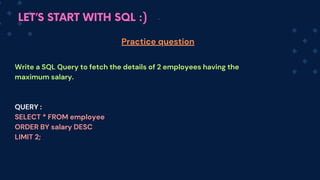
  • 52.
    LET’S START WITHSQL :) Cascading in Foreign Key 1.ON DELETE CASCADE : The ON DELETE CASCADE clause indicates that if a row in the parent table (parent_table) is deleted, all corresponding rows in the child table (child_table) will be automatically deleted as well. QUERY: CREATE TABLE childtableName ( childId INT PRIMARY KEY, baseId INT, FOREIGN KEY (baseId) REFERENCES baseTableName(baseId) ON DELETE CASCADE );
  • 53.
    LET’S START WITHSQL :) Cascading in Foreign Key 2.ON UPDATE CASCADE : The ON UPD ATE CASCADE clause indicates that if a row in the parent table (parent_table) is updated, all corresponding rows in the child table (child_table) will be automatically updated as well. QUERY : CREATE TABLE childtableName ( childId INT PRIMARY KEY, baseId INT, FOREIGN KEY (baseId) REFERENCES parenttableName(childId) ON UPDATE CASCADE );
  • 54.
    LET’S START WITHSQL :) Let‘s make a Database for a Company Requirements : 1. Make a database for a company xyz CREATE DATABASE xyz; 2.Make an employee table in the xyz database. CREATE TABLE employee( id INT PRIMARY KEY, name VARCHAR(50), age INT, department VARCHAR(50) city VARCHAR(50), salary INT); Lets make a database for all SQL commands
  • 55.
    LET’S START WITHSQL :) 3. Fill details in the table INSERT INTO employee(id,name,age,department,city,salary) VALUES (1, ”rahul” , 25 , “IT” , ”Mumbai”, 1500), (2, ”afsara” , 26 , “HR” , “Pune, 2000), (3, “abhimanyu” , 27 , “IT” , “Mumbai” , 2500), (4, “aditya” , 25 , “Marketing” , “Surat” , 2400), (5, “raj” , 24, “Finance” , “Indore”, 1500); 4. See all the data in the table Retrieving data from table
  • 56.
    LET’S START WITHSQL :) UPDATE Command The UPDATE command in SQL is used to modify existing records in a table. If you get a safe mode error while executing queries run this query QUERY: SET SQL_SAFE_UPDATES=0; QUERY : UPDATE table_name SET columnName1= value1(to be set) , columnName2 =value2(to be set) WHERE condition;
  • 57.
    LET’S START WITHSQL :) UPDATE Command (Practice Question) 1.Write a query to update the salary for all employees in the 'HR’ department to 50000. QUERY : UPDATE employee SET salary = 50000 WHERE department = “HR”;
  • 58.
    LET’S START WITHSQL :) UPDATE Command (Practice Question) 2. Write a query to update the name of an employee from raaj to raj . QUERY : UPDATE employee SET name = “raj” WHERE name = “raaj”;
  • 59.
    LET’S START WITHSQL :) DELETE Command The DELETE command in SQL is used to remove records from a table. QUERY: DELETE FROM table_name WHERE condition;
  • 60.
    LET’S START WITHSQL :) DELETE Command (Practice Question) 1. Write a query to DELETE all records from the employee table where the department is 'HR' QUERY : DELETE FROM employee WHERE department = “HR”;
  • 61.
    LET’S START WITHSQL :) DELETE Command (Practice Question) 2. Write a query to DELETE the record of an employee having name as raj QUERY : DELETE FROM employee WHERE name = “raj”;
  • 62.
    LET’S START WITHSQL :) SELECT command - Select is a DQL(Data Query Language) Command. It is used to retrieve data from a database. We can provide specific columns from which we can retrive data. SELECT colmn1 , colmn2 FROM tableName; -> to retrieve data present in specific column in a table SELECT * FROM tableName; -> to retrieve all the data present in table Retrieving data from table
  • 63.
    LET’S START WITHSQL :) WHERE clause - It filters the rows based on specified conditions. QUERY : SELECT co l1 col2 FROM tableName WHERE condition; ex : SELECT * FROM employee WHERE age > 20; Filtering data using the WHERE clause
  • 64.
    LET’S START WITHSQL :) SQL Commands DQL DML DDL SELECT INSERT UPDATE DELETE CREATE ALTER DROP TRUNCATE RENAME
  • 65.
    LET’S START WITHSQL :) ALTER command - ALTE R is a DDL command used to modify(change) existing database objects, such as tables, indexes, or constraints(schema) Let’s see all the things ALTER can help us to do. So mostly it is used to modify the schema, so we will mostly see how it can help in modification of columns like - addition of new column, deletion of column, modification of column and much more ALTER Command
  • 66.
    LET’S START WITHSQL :) 1. ADD a column Query : ALTER TABLE tableName ADD columnName datatype constraint ; 2. Drop a column Query : ALTER TABLE tableName DROP COLUMN columnName ; ALTER Command
  • 67.
    LET’S START WITHSQL :) 3. Modify the data type of an existing column MODIFY clause : The MODIFY clause is oftenly used within an ALTER TABLE statement in SQL. It allows us to change the definition or properties of an existing column in a table. Query : ALTER TABLE tableName MODIFY columnName newdatatype ; The above command modifies colum nName to a new dataType. ALTER Command
  • 68.
    LET’S START WITHSQL :) 4. Change the name of an existing columng CHANGE : The CHA NGE command is oftenly used within an ALTER TABLE statement in SQL. It helps to change the name or data type of a column within a table. Query : ALTER TABLE table Name CHANGE oldcolumnName newc olumnName newdatatype; The above command changes the oldcolum nName to newc olum nName and also its datatype ALTER Command
  • 69.
    LET’S START WITHSQL :) 4. Rename the name of an existing columng RENAME COMMAND : RENA ME command is used to change the name of an existing database object, such as a table, column, index, or constraint. Query : ALTER TABLE table Name RENAME COLUMN oldcolumnName TO newc olumnName ; The above command renames the oldcolum nN th to newc olum nName ALTER Command
  • 70.
    LET’S START WITHSQL :) RENAME : RENA ME command is used to change the name of an existing database object, such as a table, column, index, or constraint. Query (Table Renaming) : RENAME TABLE oldTableName TO newT ableName ; The above command renames the oldT ableName to newT ableNa me RENAME Command
  • 71.
    LET’S START WITHSQL :) Query (Column Renaming ) : ALTER TABLE tablename RENAME COLUMN oldcolumnname TO newcolumnname; The above command renames the oldcolum nName to newc olum nName Query (Database Renaming) : RENAME DATABASE olddatabasename TO newdatabasename; RENAME Command
  • 72.
    LET’S START WITHSQL :) TRUNCATE command - This command removes all rows from the given table, leaving the table empty but preserving its structure, QUERY : TRUNCATE TABLE tableName; TRUNCATE Command
  • 73.
    LET’S START WITHSQL :) TRUNCATE DELETE DROP remove all rows from a table Used to remove specific rows from a table based on a condition Used to completely remove table TRUNCATE TABLE tablename; DELETE FROM tablename WHERE condition; DROP TABLE tablename; Difference Between TRUNCATE, DELETE and DROP
  • 74.
    LET’S START WITHSQL :) DISTINCT - DISTINCT keyword is used within the SELECT statement to retrieve unique values from a column or combination of columns. Query : SELECT DISTINCT col1 FROM tableName; SELECT DISTINCT col1, col2 FROM tableName; Using DISTINCT to retrieve unique values -> retrieve a list of unique values for col1 ->return u nique combinations of col1 & col2
  • 75.
    LET’S START WITHSQL :) Operators in SQL To perform operations on data in SQL we use operators. QUERY : SELECT col1 col2 FROM tableName WHERE condition(use operator); Types of operators in SQL: Arithmetic Operators : addition (+) ,subtraction (-), multiplication (*), division (/) , modulus (%) QUERY : SELECT * FROM employee WHERE age+1 =60;
  • 76.
    LET’S START WITHSQL :) Operators in SQL Comparison Operators : equal to (=) , not equal to (<> or !=) , greater than (>) less than (<), greater than or equal to (>=), less than or equal to (<=) QUERY : SELECT * FROM employee WHERE age > 20;
  • 77.
    LET’S START WITHSQL :) Operators in SQL Logical Operators 1. AND : It combines two conditions and returns true if both are true QUERY: SELECT * FROM employee WHERE city= 'Pune' AND age > 18; 2. OR : It combines two conditions and returns true if either is true QUERY: SELECT * FROM em ployee WHERE city= 'Pune' OR age > 18; 3. NOT: It reverses the result of a condition, returns true if the condition is false QUERY: SELECT * FROM em ployee WHERE department NOT IN ('IT', 'HR');
  • 78.
    LET’S START WITHSQL :) Operators in SQL IN Operator : IN(Checks if a value matches in a list of values) QUERY : SELECT * FROM employee WHERE department IN ('IT', 'HR'); IS NULL / IS NOT NULL Operators : IS NULL (checks for null values) , IS NOT NULL(checks for not null values) QUERY : SELECT * FROM employee WHERE department IS NOT NULL; Bitwise Operators: AND(&), OR(|)
  • 79.
    LET’S START WITHSQL :) Operators in SQL LIKE & Wildcard Operators : LIKE operator is used to search for a specified pattern in a column. It uses wildcard operators for matching patterns. % (percent sign): It matches for any sequence of zero or more characters. 1. QUERY : SELECT * FROM employee WHERE name LIKE 'A%'; 2. _ (underscore): It matches for any single character. QUERY : SELECT * FROM employee WHERE name LIKE '_A%';
  • 80.
    LET’S START WITHSQL :) Operators in SQL BETWEEN Operator : Checks if a value is within a range of values. QUERY : SELECT * FROM employee WHERE salary BETWEEN 1200 AND 1500;
  • 81.
    LET’S START WITHSQL :) Clauses are like tools/conditions that helps us to make queries more specific or decide what data to fetch. Ex- WHERE, GROUP BY, HAVING , ORDER BY, LIMIT QUERY : SELECT col1 ,co l2 FROM tableName clause condition; Clauses in SQL
  • 82.
    LET’S START WITHSQL :) WHERE clause - It filters the rows based on specified conditions. QUERY : SELECT col1 ,col2 FROM tableName WHERE condition; ex : SELECT * FROM employee WHERE age > 20; WHERE clause
  • 83.
    LET’S START WITHSQL :) LIMIT clause - The LIMIT clause in SQL is used to restrict the number of rows returned by a query. This query retrieves the first n rows from the table. QUERY : SELECT col1 , co l2 FROM tableName LIMIT noOfRows; ex : SELECT * FROM employee LIMIT 2; LIMIT CLAUSE
  • 84.
    LET’S START WITHSQL :) ORDER BY clause - It is used to sort the results in ascending or descending order. By default it returns the result in ascen ding order This query retrieves the first n rows from the table. QUERY : SELECT col1 , co l2 FROM tableName ORDER BY c ol1 (ASC/ DESC), co  l2 (ASC/DESC) ex : SELECT * FROM employee ORDER BY salary DESC; Sorting data with the ORDER BY clause.
  • 85.
    LET’S START WITHSQL :) Write a SQL Query to fetch the details of employees having id as 1 QUERY : SELECT * FROM employee WHERE id=1; Practice question
  • 86.
    LET’S START WITHSQL :) Write a SQL Query to fetch the details of employees having id as 1 and city as MUMBAI QUERY : SELECT * FROM employee WHERE id=1 AND city = “MUMBAI”; Practice question
  • 87.
    LET’S START WITHSQL :) Write a SQL Query to fetch the details of employees having salary greater than 1200 and city as MUMBA a. QUERY : SELECT * FROM employee WHERE salary>1200 AND city = “MUMBAI”; Practice question
  • 88.
    LET’S START WITHSQL :) Write a SQL Query to fetch the details of employees who are not from MUMBAI. QUERY : SELECT * FROM employee WHERE city NOT IN ( “MUMBAI”); Practice question
  • 89.
    LET’S START WITHSQL :) Write a SQL Query to fetch the details of employees having the maximum salary. QUERY : SELECT * FROM employee ORDER BY salary DESC; Practice question
  • 90.
    LET’S START WITHSQL :) Write a SQL Query to fetch the details of 2 employees having the maximum salary. QUERY : SELECT * FROM employee ORDER BY salary DESC LIMIT 2; Practice question
  • 91.
    LET’S START WITHSQL :) Aggregate Functions Aggregate functions performs some operations on a set of rows and then returns a single value summarizing the data. These are used with SELECT statements to perform calculations Types of Aggregate functions : COUNT() SUM() AVG() MIN() MAX() GROUP_CONCAT()
  • 92.
    LET’S START WITHSQL :) Aggregate Functions COUNT() - It counts the number of rows in a table or the number of non-null values in a column. This counts how many things are in a list or a group. Query : SELECT count(name) FROM employee ; -> this will tell the number of employees in a company
  • 93.
    LET’S START WITHSQL :) Aggregate Functions SUM() - It calculates the sum of all values in a numeric column. This adds up all the numbers in a list. Query : SELECT SUM(salary) FROM employee ; -> this willl tell the total amount company is paying to its employees
  • 94.
    LET’S START WITHSQL :) Aggregate Functions AVG() - It computes the average of all values in a numeric column. It finds the average, or the "middle" number, of all the numbers in a list. Q uery : SELECT AVG(salary) FROM employee ; -> this willl tell the avg amount company is paying to its employees
  • 95.
    LET’S START WITHSQL :) Aggregate Functions MIN() - It helps to find the smallest number in a list. Q uery : SELECT MIN(salary) FROM employee ; -> this willl tell the minimumn salary company is paying to its employees
  • 96.
    LET’S START WITHSQL :) Aggregate Functions MAX() - It finds the maximum value in a column. Q uery : SELECT MAX(salary) FROM employee ; -> this willl tell the max salary company is paying to its employees
  • 97.
    LET’S START WITHSQL :) GROUP BY clause - This is used to group rows that have the same values into together. It helps to organize data into groups so that you can do calculations, like finding totals or averages, for each group This query retrieves the first n rows from the table. QUERY : SELECT col1, aggregateFun(col2) FROM tableName GROUP BY col1 ; ex: SELECT department, AVG(salary) AS avgsal FROM employee GROUP BY department; Grouping data with the GROUP BY clause.
  • 98.
    LET’S START WITHSQL :) HAVING clause - The HAVING clause is just like clause but the main difference is it works on aggregated data. It is used with the GROUP BY clause. It helps to filter groups based on given con conditions.ditions. QUERY : SELECT col1, co l2 aggregateFun(col3) FROM tableName GROUP BY col1 col2 HAVING condition; ex : SELECT department, AVG(salary) AS avgsal FROM employe GROUP BY dep artment HAVING a vgsal>1500; HAVING clause.
  • 99.
    LET’S START WITHSQL :) These queries demonstrate how to use a. GROUP BY to categorize data and b. HAVING to filter grouped data based on specific conditions in SQL. GROUP BY and HAVING clause.
  • 100.
    LET’S START WITHSQL :) WHERE HAVING used to filter rows from the result based on condition applied to a row before the aggregation used to filter rows from the result based on condition applied to a row after the aggregation It is used with SELECT, UPDATE, or DELETE commands It is used with GROUP BY and aggregate functions SELECT * FROM tableName WHERE condition; SELECT col1, co l2 aggregateFun(col3) FROM tableName GROUP BY col1 col2 HAVING condition; Difference Between WHERE and HAVING Clause
  • 101.
    LET’S START WITHSQL :) Practice Questions Write a query to find the total number of employees in each city 1. Query : Select city, COUNT(name) AS no_of_emp FROM em ployee GROUP BY city;
  • 102.
    LET’S START WITHSQL :) Practice Questions 2. Write a query to find the maximum salary of employees in each city in descending order Query : Select city, max(salary) AS max_salary FROM em ployee GROUP BY city ORDER BY DESC;
  • 103.
    LET’S START WITHSQL :) Practice Questions 3. Write a query to display the department names alongside the total count of employees in each department, sorting the results by the total number of employees in descending order. Query : SELECT department, COUNT(id) AS totalemployees FROM employee GROUP BY department ORDER BY totalemployees DESC;
  • 104.
    LET’S START WITHSQL :) Practice Questions 4. Write a query to list the departments where the average salary is greater than 1200, also display the department name and the average salary. Query : SELECT department, AVG(salary) AS avgsalary FROM employee GROUP BY department HAVING AVG(salary) > 50000;
  • 105.
    LET’S START WITHSQL :) Sno Command Usecase 1. SELECT Retrieve from the database 2. FROM Identify the table 3. WHERE Filter rows based on some conditions 4. GROUP BY Group rows that have the same values 5. HAVING Filter groups based on some conditions 6. ORDER BY Sort the result set either aesc/desc 7. LIMIT Limit the number of rows returned The general order of SQL commands
  • 106.
    LET’S START WITHSQL :) id Name Age 1 Riya 17 2 Rahul 18 3 Ram 17 id course_id course_name 1 101 Eng 2 102 Hin 3 103 PhE Joins in SQL Joins are used to combine rows from two or more tables based on a related or shared or common column between them. There are commonly 4 types of joins including INNER JOIN, LEFT JOIN, RIGHT JOIN, FULL JOIN, SELF JOIN , CROSS JOIN. Student Course
  • 107.
    LET’S START WITHSQL :) Joins in SQL Q. Is Foreign Key important for performing joins? ->Joins can be performed based on any columns that establish a relationship between tables, not just FK constraints, so its not necessary.
  • 108.
    LET’S START WITHSQL :) Right table rollno name 1 Ram 2 Rahul 3 Riti Joins in SQL Types of Joins in SQL Inner Join 1. Left table A B rollno c_name 2 Hindi 3 Eng 4 Maths Student Course
  • 109.
    LET’S START WITHSQL :) Joins in SQL Types of Joins in SQL 2. Left Join/Left Outer Join Left table Right table A B rollno name 1 Ram 2 Rahul 3 Riti rollno c_name 2 Hindi 3 Eng 4 Maths Student Course
  • 110.
    LET’S START WITHSQL :) Joins in SQL Types of Joins in SQL 3. Right Join/ Right Outer Join Left table Right table A B rollno name 1 Ram 2 Rahul 3 Riti rollno c_name 2 Hindi 3 Eng 4 Maths Student Course
  • 111.
    LET’S START WITHSQL :) Joins in SQL Types of Joins in SQL 4. Full Join/Full Outer Join Left table Right table A B rollno name 1 Ram 2 Rahul 3 Riti rollno c_name 2 Hindi 3 Eng 4 Maths Student Course
  • 112.
    LET’S START WITHSQL :) Joins in SQL Types of Joins in SQL 5. Self Join A rollno name 1 Ram 2 Rahul 3 Riti Student
  • 113.
    LET’S START WITHSQL :) Joins in SQL Types of Joins in SQL 6. Cross Join 1 2 3 1 2 3 A B rollno name 1 Ram 2 Rahul 3 Riti rollno c_name 2 Hindi 3 Eng 4 Maths Student Course
  • 114.
    LET’S START WITHSQL :) id name 101 Ram 102 Rahul 103 Riti Joins in SQL 1. Inner Join : It helps us in getting the rows that have matching values in both tables, according to the given join condition. id o_name 102 Fruit 103 Ball 104 Utensils Customer Order Query: SELECT columns FROM table1 INNER JOIN table2 ON table1.colName = table2.colName;
  • 115.
    LET’S START WITHSQL :) id name 101 Ram 102 Rahul 103 Riti id o_name 102 Fruit 103 Ball 104 Utensils id name id o_name 102 Rahul 102 Fruit 103 Riti 103 Ball Joins in SQL customer Order Query: It only returns rows where there is a matching id in both tables SELECT * FROM customer INNER JOIN order ON customer.id = order.id;
  • 116.
    LET’S START WITHSQL :) Joins in SQL 2. Left Join/Left Outer Join : It is used to fetch all the records from the left table along with matched records from the right table. If there are no matching records in the right table, NULL values are returned for the columns of the right table. Query: SELECT columns FROM table1 LEFT JOIN table2 ON table1.colName = table2.colName; Left table : the table specified before the LEFT JOIN keyword Right table : the table specified after the LEFT JOIN keyword
  • 117.
    LET’S START WITHSQL :) id name 101 Ram 102 Rahul 103 Riti id o_name 102 Fruit 103 Ball 104 Utensils id name id o_name 101 Ram null null 102 Rahul 102 Fruit 103 Riti 103 Ball Joins in SQL customer Order Query: SELECT * FROM customer LEFT JOIN order ON customer.id = order.id;
  • 118.
    LET’S START WITHSQL :) Joins in SQL 3. Right Join/ Right Outer Join : It is used to fetch all the records from the right table along with matched records from the left table. If there are no matching records in the left table, NULL values are returned for the columns of the left table. Query: SELECT columns FROM table1 RIGHT JOIN table2 ON table1.colName = table2.colName; Left table : the table specified before the RIGHT JOIN keyword Right table : the table specified after the RIGHT JOIN keyword
  • 119.
    LET’S START WITHSQL :) id name 101 Ram 102 Rahul 103 Riti id o_name 102 Fruit 103 Ball 104 Utensils id o_name 102 Fruit 103 Ball 104 utensils Joins in SQL customer Order Query: SELECT * FROM customer RIGHT JOIN order ON customer.id = order.id; id name 102 Rahul 103 Riti null null
  • 120.
    LET’S START WITHSQL :) Joins in SQL 4. Full Join/Full Outer Join: It returns the matching rows of both left and right table and also includes all rows from both tables even if they don’t have matching rows. If there is no match, NULL values are returned for the columns of the missing table. In MySQL, the syntax for a full join is different compared to other SQL databases like PostgreSQL or SQL Server. MySQL does not support the FULL JOIN keyword directly. So we use a combination of LEFT JOIN, RIGHT JOIN, and UNION to achieve the result.
  • 121.
    LET’S START WITHSQL :) Joins in SQL 4. Full Join/Full Outer Join: Query: SELECT columns FROM table1 LEFT JOIN table2 ON table1.colName = table2.colName; UNION SELECT columns FROM table1 RIGHT JOIN table2 ON table1.colName = table2.colName;
  • 122.
    LET’S START WITHSQL :) id name 101 Ram 102 Rahul 103 Riti id o_name 102 Fruit 103 Ball 104 Utensils Joins in SQL customer Order Query: SELECT * FROM customer LEFT JOIN order ON customer.id = order.id; UNION SELECT * FROM customer RIGHT JOIN order ON customer.id = order.id;
  • 123.
    LET’S START WITHSQL :) id name id o_name 101 Ram null null 102 Rahul 102 Fruit 103 Riti 103 Ball null null 104 Utensils Joins in SQL Result :
  • 124.
    LET’S START WITHSQL :) id name 101 Ram 102 Rahul Joins in SQL 5. CrossJoin: It combines each row of the first table with every row of the second table. o_id o_name 1 Fruit 2 Ball Customer Order Query: SELECT * FROM table1 CROSS JOIN table2; It results in a new table where the number of rows is equal to the product of the number of rows in each table. (m*n)
  • 125.
    LET’S START WITHSQL :) Joins in SQL id name o_id o_name 101 Ram 1 Fruit 101 Ram 2 Ball 102 Rahul 1 Fruit 102 Rahu 2 Ball Result :
  • 126.
    LET’S START WITHSQL :) Joins in SQL 6. Self Join: A self join in SQL is a type of join where a table is joined with itself. It is a type of inner join. Query: SELECT columns FROM table as t1 JOIN table as t2 ON t1.colName = t2.colName t1 and t2 are aliases for the table, used to distinguish between the order rows.
  • 127.
    LET’S START WITHSQL :) Joins in SQL s_id name mentor_id 1 Ram null 2 Rahul 1 3 Riti 1 4 Riya 3 Ram Rahul Riti Riya (Mentor) (Mentor) (Mentor) (student) Query : SELECT s1.name as mentor_name, s2.name as name FROM student as s1 JOIN student as s2 WHERE s1.s_id=s2.mentor_id
  • 128.
    LET’S START WITHSQL :) Joins in SQL mentor_name name Ram Riti Ram Rahul Riti Riya Result :
  • 129.
    LET’S START WITHSQL :) Exclusive Joins in SQL Exclusive joins are used when we want to retrieve data from two tables excluding matched rows. They are a part of outer joins or full outer join. Types : Left Exclusive JOIN 1. 2.Right Exclusive JOIN Left table Right table A B Left table Right table A B 3.Full Exclusive JOIN Left table Right table A B
  • 130.
    LET’S START WITHSQL :) Exclusive Joins in SQL Left Exclusive JOIN: When we retrive records from the left table excluding the ones matching in both left and right table . Query: SELECT columns FROM table1 LEFT JOIN table2 ON table1.colName = table2.colName; WHERE table2.colName IS NULL; id name 101 Ram 102 Rahul 103 Riti id o_name 102 Fruit 103 Ball 104 Utensils customer Order
  • 131.
    LET’S START WITHSQL :) Exclusive Joins in SQL Right Exclusive JOIN: When we retrive records from the right table excluding the ones matching in both left and right table . Query: SELECT columns FROM table1 RIGHT JOIN table2 ON table1.colName = table2.colName; WHERE table1.colName IS NULL; id name 101 Ram 102 Rahul 103 Riti id o_name 102 Fruit 103 Ball 104 Utensils customer Order
  • 132.
    LET’S START WITHSQL :) Exclusive Joins in SQL Full Exclusive JOIN: When we retrive records from the right table and left table excluding the ones matching in both left and right table . Query: SELECT columns FROM table1 LEFT JOIN table2 ON table1.colName = table2.colName; WHERE table2.colName IS NULL; UNION SELECT columns FROM table1 RIGHT JOIN table2 ON table1.colName = table2.colName; WHERE table1.colName IS NULL;
  • 133.
    LET’S START WITHSQL :) UNION Operator in SQL UNION: UNION operator in SQL is used to combine the results of two or more SELECT queries into a single result set and gives unique rows by removing duplicate rows. Things to keep in mind: Each SELECT command within the UNION must retrieve the same number of columns. 1. The data types of columns in corresponding positions across SELECT statements should match. 2. Columns should be listed in the same order across all SELECT statements. 3. Left table Right table A B
  • 134.
    LET’S START WITHSQL :) id 1 2 UNION Operator in SQL QUERY: SELECT columns FROM table1 UNION SELECT columns FROM table2; 3 id 2 3 4 2 id 2 3 4 1
  • 135.
    LET’S START WITHSQL :) UNION ALL Operator in SQL UNION ALL: UNION operator in SQL is used to combine the results of two or more SELECT queries into a single result set and gives all rows by not removing duplicate rows. QUERY: SELECT columns FROM table1 UNION ALL SELECT columns FROM table2;
  • 136.
    LET’S START WITHSQL :) id 1 2 UNION ALL Operator in SQL 3 id 2 3 4 2 id 2 3 2 3 4 1
  • 137.
    LET’S START WITHSQL :) SQL Subqueries/Nested queries Subqueries/Inner Queries/Nested Queries: SQL subquery is a query nested within another SQL statement. Whenever we want to retrieve data based on the result of another query we use nested queries. Outer Query Inner Query
  • 138.
    LET’S START WITHSQL :) SQL Subqueries/Nested queries How can we use Subqueries? Subqueries can be used in multiple ways : Subqueries can be used with clauses such as SELECT, INSERT, UPDATE, or DELETE to perform complex data retrieval. QUERY: SELECT columns, (subquery) FROM tableName;
  • 139.
    LET’S START WITHSQL :) SQL Subqueries/Nested queries How can we use Subqueries? Subqueries can be used in multiple ways : Subqueries can be used with WHERE clause to filter data based on conditions. QUERY: SELECT * FROM tableName WHERE column name operator (subquery);
  • 140.
    LET’S START WITHSQL :) SQL Subqueries/Nested queries How can we use Subqueries? Subqueries can be used in multiple ways : Subqueries can also be used in the FROM clause. QUERY: SELECT * FROM subquery AS altName ;
  • 141.
    LET’S START WITHSQL :) id name age departmen city salary 1 Rahul 25 'IT' 'Mumbai' 1500 2 Afsara 26 'HR' 'Pune' 2000 3 Abhimanyu 27 'IT' 'Mumbai' 2500 4 Aditya 25 'Marketing' 'Surat' 2400 5 Raj 24 'Finance' 'Indore' 1500 SQL Subqueries/Nested queries Let’s understand from example of using subqueries in WHERE: Find all the employees who have salary greater than the min salary 1. Find the min salary Find employee having salary greater than min salary
  • 142.
    LET’S START WITHSQL :) SQL Subqueries/Nested queries Let’s understand from example of using subqueries in WHERE: To find the min salary To find all the employees having salary greater than min salary QUERY: SELECT AVG(salary) FROM employee QUERY: SELECT name, salary FROM employee WHERE salary > (subquery)
  • 143.
    LET’S START WITHSQL :) id name age departmen city salary 1 Rahul 25 'IT' 'Mumbai' 1500 2 Afsara 26 'HR' 'Pune' 2000 3 Abhimanyu 27 'IT' 'Mumbai' 2500 4 Aditya 25 'Marketing' 'Surat' 2400 5 Raj 24 'Finance' 'Indore' 1500 SQL Subqueries/Nested queries Let’s understand from example of using subqueries in WHERE: 2. Find the employees with the minimum age Find the min age Find employee having the min age
  • 144.
    LET’S START WITHSQL :) SQL Subqueries/Nested queries Let’s understand from example of using subqueries in WHERE: To find the min age To find all the employees having min age QUERY: SELECT MIN(age) FROM employee QUERY: SELECT name, age FROM employee WHERE age =(subquery);
  • 145.
    LET’S START WITHSQL :) id name age departmen city salary 1 Rahul 25 'IT' 'Mumbai' 1500 2 Afsara 26 'HR' 'Pune' 2000 3 Abhimanyu 27 'IT' 'Mumbai' 2500 4 Aditya 25 'Marketing' 'Surat' 2400 5 Raj 24 'Finance' 'Indore' 1500 SQL Subqueries/Nested queries Let’s understand from example of using subqueries in FROM: 1. Find the employees who is having age greater than min_age Find the min age Find employee having age> min age
  • 146.
    LET’S START WITHSQL :) SQL Subqueries/Nested queries Let’s understand from example of using subqueries in WHERE: To Find the min age Find employee having age> min age QUERY: SELECT min(age) AS min_age FROM employee; QUERY: SELECT emp.name FROM employee emp, (subquery) AS subquery WHERE emp.age > subquery.min_age;
  • 147.
    LET’S START WITHSQL :) id name age departmen city salary 1 Rahul 25 'IT' 'Mumbai' 1500 2 Afsara 26 'HR' 'Pune' 2000 3 Abhimanyu 27 'IT' 'Mumbai' 2500 4 Aditya 25 'Marketing' 'Surat' 2400 5 Raj 24 'Finance' 'Indore' 1500 SQL Subqueries/Nested queries Let’s understand from example of using subqueries in SELECT: 1. Print the employees with the average age and age of employees Find the avg age Print the employee age and avg_age
  • 148.
    LET’S START WITHSQL :) SQL Subqueries/Nested queries Let’s understand from example of using subqueries in SELECT: Find the avg age Print the employee age and avg_age QUERY: SELECT AVG(age) FROM employee QUERY: SELECT (subquery)AS avg_age , age FROM employee;
  • 149.
    LET’S START WITHSQL :) Nth Highest Salary Q. Find the nth highest salary in a given dataset. Steps to find the nth highest salary: Step 1: Select the column which you want to show the final result i.e salary. Step 2: Order the salary in descending order so that you have the max at the first. Step 3: Now the value of n could 1,2,3....till n, so we have to make the query in such a way so that whatever be the value of n it can provide the result. Step 4: So at the end of the query we will provide a LIMIT so that on the data set which we have got after ordering the salary in descending order, we can fetch the nth highest one.
  • 150.
    LET’S START WITHSQL :) Nth Highest Salary Q. Find the nth highest salary in a given dataset. LIMIT- LIMIT clause is used to restrict the number of rows returned by a query. LIMIT n - It helps to retrieve a maximum of n rows from the beginning of the result set. LIMIT m, n- It helps to retrieve a specific range of rows where m- number of rows to skip from the beginning n- number of rows to fetch after skipping
  • 151.
    LET’S START WITHSQL :) Nth Highest Salary Q. Find the nth highest salary in a given dataset. QUERY: SELECT DISTINCT Salary FROM tableName ORDER BY Salary DESC LIMIT n-1, 1;
  • 152.
    LET’S START WITHSQL :) Stored Procedures Stored Procedure- These are programs that can perform specific tasks based on the stored query. It is basically a collection of pre-written SQL statements grouped together under a specific name. Query: (to create a procedure) CREATE PROCEDURE procedureName() BEGIN Query END; Query: (to call the procedure) CALL procedureName();
  • 153.
    LET’S START WITHSQL :) Stored Procedures Examples: Stored procedure without params Query 1: CREATE PROCEDURE getAllOrderDetails() BEGIN Select * from orders; END; Query: (to call the procedure) CALL getAllOrderDetails();
  • 154.
    LET’S START WITHSQL :) Stored Procedures Sometimes we encounter an issue in SQL workbench so we use delimiter there Query 1: DELIMITER / CREATE PROCEDURE getAllOrderDetails() BEGIN SELECT * FROM orders; END/ DELIMITER ; Query: (to call the procedure) CALL getAllOrderDetails();
  • 155.
    LET’S START WITHSQL :) Stored Procedures Examples: Return the details of the order by id (S tored procedure with params) Query 2: CREATE PROCEDURE getAllOrderDetailsById(IN id int) BEGIN SELECT *FROM Orders WHERE id = id; END; Query: (to call the procedure) CALL getAllOrderDetailsById(2);
  • 156.
    LET’S START WITHSQL :) Views In SQL QUERY: CREATE VIEW viewName AS SELECT columns FROM baseTableName; (Specify the columns to be included in the view) A view is a virtual table in SQL. It helps in providing a filtered view of data for security purposes. It helps in Data Abstraction, Security and simplify complex queries.
  • 157.
    LET’S START WITHSQL :) Views In SQL QUERY: SELECT * FROM viewName ; To see all the data in view To drop a view QUERY: DROP VIEW IF EXISTS viewName;
  • 158.
    LET’S START WITHSQL :) Top SQL Questions asked in interviews Q. Write the SQL Query to 1.create a database Company, 2.create a table employee in it delete/drop the database 1.Create a Database Company CREATE DATABASE company; 2. Create a table Employee USE company; -> to tell the server to create table in this DB CREATE TABLE employee( employee_id INT PRIMARY KEY, first_name VARCHAR(50), last_name VARCHAR(50));
  • 159.
    LET’S START WITHSQL :) Top SQL Questions asked in interviews Q.Write the SQL Query to 1.create a database Company, 2.create a table employee in it, delete/drop the database 3. Delete the Database company DROP DATABASE company;
  • 160.
    LET’S START WITHSQL :) Top SQL Questions asked in interviews Q. Write the SQL Query to 1.create a table employee, 2.Insert data into the table employe 3. Update Salary for all people in HR department to 20000 4. Delete data for employee having empId =1 5. Delete the entire table 1. Create a table employee CREATE TABLE employee( empId INT PRIMARY KEY, name VARCHAR(50), department VARCHAR(50), salary INT); 2. Insert data into the table employee INSERT INTO employee(empId,name,department,salary) VALUES(1, ’Riti’, ’IT’, 30000), (2, ’Rahul’, ’HR’ , 15000);
  • 161.
    LET’S START WITHSQL :) Top SQL Questions asked in interviews Q. Write the SQL Query to 1.create a table employee, 2.Insert data into the table employ 3. Update Salary for all people in HR department to 20000 4. Delete data for employee having empId =1 5. Delete the entire table 3. Update Salary for all people in HR department to 20000 UPDATE employees SET salary = 20000 WHERE department=’HR’ 4. Delete data for employee having empId =1 DELETE FROM employee WHERE empId = 1;
  • 162.
    LET’S START WITHSQL :) Top SQL Questions asked in interviews Q. Write the SQL Query to 1.create a table employee, 2.Insert data into the table employ 3. Update Salary for all people in HR department to 20000 4. Delete data for employee having empId =1 5. Delete the entire table 5. Delete the entire table DROP TABLE employee; To delete all the data DELETE FROM employee;
  • 163.
    LET’S START WITHSQL :) Top SQL Questions asked in interviews Q.Write a query to find the total number of employees working in the ‘IT’ department’. id name age departmen city salary 1 Rahul 25 'IT' 'Mumbai' 1500 2 Afsara 26 'HR' 'Pune' 2000 3 Abhimanyu 27 'IT' 'Mumbai' 2500 4 Aditya 25 'Marketing' 'Surat' 2400 5 Raj 24 'Finance' 'Indore' 1500 Query : SELECT COUNT(*) FROM employee WHERE department = 'IT'; COUNT(*) is a SQL aggregate function that returns the total number of rows in a specified table or query. It counts all the rows, regardless of whether they contain NULL values or not.
  • 164.
    LET’S START WITHSQL :) Top SQL Questions asked in interviews Q.Write a query to find all the employees that have their name starting from ‘R’ id name age departmen city salary 1 Rahul 25 'IT' 'Mumbai' 1500 2 Afsara 26 'HR' 'Pune' 2000 3 Abhimanyu 27 'IT' 'Mumbai' 2500 4 Aditya 25 'Marketing' 'Surat' 2400 5 Raj 24 'Finance' 'Indore' 1500 Query : SELECT * FROM employee WHERE name LIKE 'R%'; LIKE- It is used to search for a specified pattern in a column We use ‘%’ and ‘_’ for searching patterns
  • 165.
    LET’S START WITHSQL :) Condition Query Name start with A LIKE ‘A%’ Name contain ra LIKE '%ra%' Name start with 'A' and have exactly five characters LIKE ‘A____’ Name has a as second character LIKE '_a%' Top SQL Questions asked in interviews
  • 166.
    LET’S START WITHSQL :) Top SQL Questions asked in interviews Q.Write a query to find unique salaries in employee table id name age departmen city salary 1 Rahul 25 'IT' 'Mumbai' 1500 2 Afsara 26 'HR' 'Pune' 2000 3 Abhimanyu 27 'IT' 'Mumbai' 2500 4 Aditya 25 'Marketing' 'Surat' 2400 5 Raj 24 'Finance' 'Indore' 1500 Query : SELECT DISTINCT salary FROM employee; DISTINCT- It is used to retrieve unique records from a table
  • 167.
    LET’S START WITHSQL :) Top SQL Questions asked in interviews Q.Write a query to find the second highest salary in a table id name age departmen city salary 1 Rahul 25 'IT' 'Mumbai' 1500 2 Afsara 26 'HR' 'Pune' 2000 3 Abhimanyu 27 'IT' 'Mumbai' 2500 4 Aditya 25 'Marketing' 'Surat' 2400 5 Raj 24 'Finance' 'Indore' 1500 Query : SELECT MAX(salary) FROM employee WHERE salary <> (SELECT MAX(salary) FROM employee); MAX- gives the aggregated max value from a column
  • 168.
    LET’S START WITHSQL :) Top SQL Questions asked in interviews Q.Write a query to find the nth highest salary in a table id name age departmen city salary 1 Rahul 25 'IT' 'Mumbai' 1500 2 Afsara 26 'HR' 'Pune' 2000 3 Abhimanyu 27 'IT' 'Mumbai' 2500 4 Aditya 25 'Marketing' 'Surat' 2400 5 Raj 24 'Finance' 'Indore' 1500 Query : SELECT DISTINCT Salary FROM employee ORDER BY Salary DESC LIMIT n-1, 1; ORDER BY - Order the salary in descending/ascending order LIMIT m, n- It helps to retrieve a specific range of rows m- number of rows to skip from the beginning n- number of rows to fetch after skipping
  • 169.
    LET’S START WITHSQL :) Top SQL Questions asked in interviews Q.Write a query to find the top 2 highest salaries from a table id name age departmen city salary 1 Rahul 25 'IT' 'Mumbai' 1500 2 Afsara 26 'HR' 'Pune' 2000 3 Abhimanyu 27 'IT' 'Mumbai' 2500 4 Aditya 25 'Marketing' 'Surat' 2400 5 Raj 24 'Finance' 'Indore' 1500 Query : SELECT salary FROM employee ORDER BY salary DESC LIMIT 2;
  • 170.
    LET’S START WITHSQL :) Top SQL Questions asked in interviews Q.Write a query to calculate the total salary and average salary in a department id name age departmen city salary 1 Rahul 25 'IT' 'Mumbai' 1500 2 Afsara 26 'HR' 'Pune' 2000 3 Abhimanyu 27 'IT' 'Mumbai' 2500 4 Aditya 25 'Marketing' 'Surat' 2400 5 Raj 24 'Finance' 'Indore' 1500 Query : SELECT department, SUM(salary) AS total_salary, AVG(salary) AS avg_salary FROM employee GROUP BY department;
  • 171.
    LET’S START WITHSQL :) Top SQL Questions asked in interviews Q.Write a query to find the rows where a department has NULL values id name age departmen city salary 1 Rahul 25 'IT' 'Mumbai' 1500 2 Afsara 26 'HR' 'Pune' 2000 3 Abhimanyu 27 'IT' 'Mumbai' 2500 4 Aditya 25 'Marketing' 'Surat' 2400 5 Raj 24 'Finance' 'Indore' 1500 Query : SELECT *FROM employee WHERE department IS NULL;
  • 172.
    LET’S START WITHSQL :) Top SQL Questions asked in interviews Q.Write a query to find the duplicate rows in employee for column department. id name age departmen city salary 1 Rahul 25 'IT' 'Mumbai' 1500 2 Afsara 26 'HR' 'Pune' 2000 3 Abhimanyu 27 'IT' 'Mumbai' 2500 4 Aditya 25 'Marketing' 'Surat' 2400 5 Raj 24 'Finance' 'Indore' 1500 Query : SELECT department, COUNT(*) FROM employee GROUP BY department HAVING COUNT(*) > 1;
  • 173.
    LET’S START WITHSQL :) Top SQL Questions asked in interviews Q. What is SQL? -> SQL stands for Structured Query Language It is a standard language used for managing and manipulating databases. Q. What is the difference between DELETE and TRUNCATE -> DELETE removes rows from a table based on a condition and can be rolled back. while, TRUNCATE removes all rows from a table without logging individual row deletions and cannot be rolled back.
  • 174.
    LET’S START WITHSQL :) Top SQL Questions asked in interviews Q. What is UNION and UNION ALL. -> UNION combines the results of two queries and removes duplicate rows. while, UNION ALL combines the results of two queries and includes all duplicates. Q. What is a stored procedure? -> A stored procedure is a prepared SQL code that you can save and reuse in other queries. Q. What is difference between CHAR() and VARCHAR() -> CHAR is used when we have data with a fixed length while, VARCHAR is used when we have data with variable length
  • 175.
    LET’S START WITHSQL :) Top SQL Questions asked in interviews Q. Explain the types of JOINS in SQL? INNER JOIN: It returns all records that have matching values in both tables. LEFT OUTER JOIN: It returns all records from the left table, and the matched records from the right table. RIGHT OUTER JOIN : It returns all records from the right table, and the matched records from the left table. FULL OUTER JOIN: It returns all records when there is a match in either left or right table. CROSS JOIN: It returns the Cartesian product of the two tables. SELF JOIN : A join where a table is joined with itself.
  • 176.
    LET’S START WITHSQL :) Top SQL Questions asked in interviews Q. What is NULL in SQL? -> It is used to handle NULL values. It is used to indicate that a data value does not exist in the database. Q. What is a foreign key? -> A foreign key is a key that helps in establishing a relationship between the two tables. It uniquely identifies a row of another table. A foreign key is a key in one table, that refers to the primary key in another table.
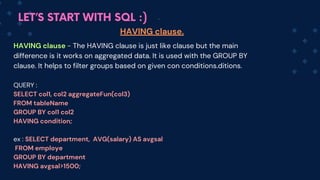
  • 177.
    LET’S START WITHSQL :) Top SQL Questions asked in interviews Q. What is a primary key? -> A primary key is a unique identifier/key which uniquely identifies all record in a table/relation. It must contain unique values and cannot contain NULL values.(UNIQUE+NOT NULL) Q. What is the difference between WHERE and HAVING -> WHERE is used to filter records before any groupings are made. while, HAVING is used to filter records after groupings are made.
  • 178.
    LET’S START WITHSQL :) Top SQL Questions asked in interviews Q. What is the view in SQL? -> Views are a kind of virtual table in SQL Q. What is DEFAULT constraint -> Whenever we need to fill a column with default and fixed values we use DEFAULT, like set the default salary as 0 where salary is null. Q. What is an ALIAS command in SQL -> These are temporary names given to a table or column which is just a temporary change i.e the table name does not change in the original database.