Spring JDBC/DAO
By → Anuj Kumar Singh
What is Spring DAO (Data Access Object)
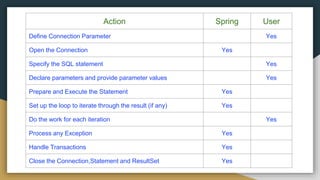
DAO is used to read and write data to and from database
respectively.The table below shows the responsibility of Spring and
User.
Note : The Spring Framework takes care of all the low-level details that
can make JDBC such a tedious API to develop with
Action Spring User
Define Connection Parameter Yes
Open the Connection Yes
Specify the SQL statement Yes
Declare parameters and provide parameter values Yes
Prepare and Execute the Statement Yes
Set up the loop to iterate through the result (if any) Yes
Do the work for each iteration Yes
Process any Exception Yes
Handle Transactions Yes
Close the Connection,Statement and ResultSet Yes
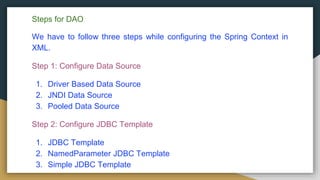
Steps for DAO
We have to follow three steps while configuring the Spring Context in
XML.
Step 1: Configure Data Source
1. Driver Based Data Source
2. JNDI Data Source
3. Pooled Data Source
Step 2: Configure JDBC Template
1. JDBC Template
2. NamedParameter JDBC Template
3. Simple JDBC Template
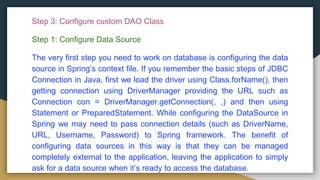
Step 3: Configure custom DAO Class
Step 1: Configure Data Source
The very first step you need to work on database is configuring the data
source in Spring’s context file. If you remember the basic steps of JDBC
Connection in Java, first we load the driver using Class.forName(), then
getting connection using DriverManager providing the URL such as
Connection con = DriverManager.getConnection(, ,) and then using
Statement or PreparedStatement. While configuring the DataSource in
Spring we may need to pass connection details (such as DriverName,
URL, Username, Password) to Spring framework. The benefit of
configuring data sources in this way is that they can be managed
completely external to the application, leaving the application to simply
ask for a data source when it’s ready to access the database.
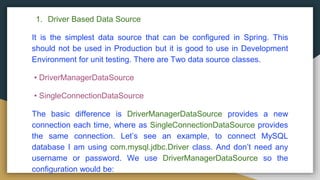
1. Driver Based Data Source
It is the simplest data source that can be configured in Spring. This
should not be used in Production but it is good to use in Development
Environment for unit testing. There are Two data source classes.
• DriverManagerDataSource
• SingleConnectionDataSource
The basic difference is DriverManagerDataSource provides a new
connection each time, where as SingleConnectionDataSource provides
the same connection. Let’s see an example, to connect MySQL
database I am using com.mysql.jdbc.Driver class. And don’t need any
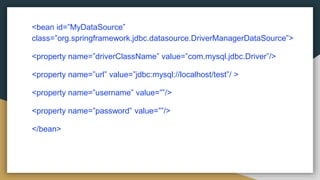
username or password. We use DriverManagerDataSource so the
configuration would be:
<bean id=”MyDataSource”
class=”org.springframework.jdbc.datasource.DriverManagerDataSource”>
<property name=”driverClassName” value=”com.mysql.jdbc.Driver”/>
<property name=”url” value=”jdbc:mysql://localhost/test”/ >
<property name=”username” value=””/>
<property name=”password” value=””/>
</bean>
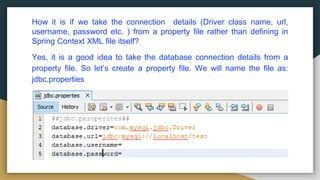
How it is if we take the connection details (Driver class name, url,
username, password etc. ) from a property file rather than defining in
Spring Context XML file itself?
Yes, it is a good idea to take the database connection details from a
property file. So let’s create a property file. We will name the file as:
jdbc.properties
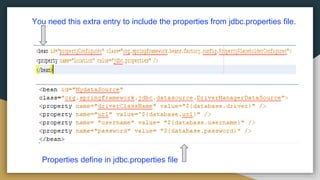
You need this extra entry to include the properties from jdbc.properties file.
Properties define in jdbc.properties file
2. JNDI (Java Naming and Directory Interface) DATA SOURCE
Application server are often pooled for greater performance. The
application servers such as WebSphere, WebLogic, Jboss allow to
configure connection pools. And these connection pools can be
retrieved through a JNDI. The benefit of configuring data sources in this
way is that they can be managed completely external to the application,
leaving the application to simply ask for a data source when it’s ready to
access the database.
In driver based data source, we saw any of the 2 classes
DriverManagerDataSource and SingleConnectionDataSource can be
used to establish the connection. Similarly for JNDI data source, we use
JndiObjectFactoryBean.
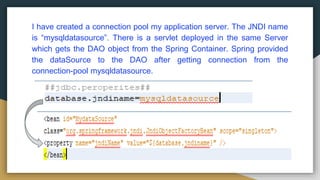
I have created a connection pool my application server. The JNDI name
is “mysqldatasource”. There is a servlet deployed in the same Server
which gets the DAO object from the Spring Container. Spring provided
the dataSource to the DAO after getting connection from the
connection-pool mysqldatasource.
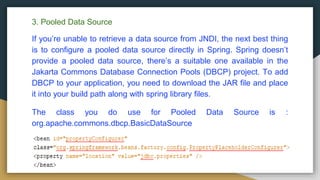
3. Pooled Data Source
If you’re unable to retrieve a data source from JNDI, the next best thing
is to configure a pooled data source directly in Spring. Spring doesn’t
provide a pooled data source, there’s a suitable one available in the
Jakarta Commons Database Connection Pools (DBCP) project. To add
DBCP to your application, you need to download the JAR file and place
it into your build path along with spring library files.
The class you do use for Pooled Data Source is :
org.apache.commons.dbcp.BasicDataSource
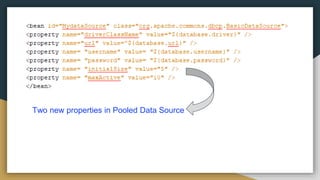
Two new properties in Pooled Data Source
Step 2: Configure JDBC Template
After configuring the DataSource, the next step is configuring the
JDBCTemplate. The JdbcTemplate class is the central class in the
JDBC core package. It simplifies the use of JDBC since it handles the
creation and release of resources. This helps to avoid common errors
such as forgetting to always close the connection. It executes the core
JDBC workflow like statement creation and execution, leaving
application code to provide SQL and extract results. This class executes
SQL queries, update statements or stored procedure calls, imitating
iteration over ResultSets and extraction of returned parameter values. It
also catches JDBC exceptions and translates them to the generic, more
informative, exception hierarchy defined in the org.springframework.dao
package.
Option 1: The JdbcTemplate can be used within a DAO implementation
via direct instantiation with a DataSource reference
OR
Option 2: be configured in a Spring IOC container and given to DAOs as
a bean reference.
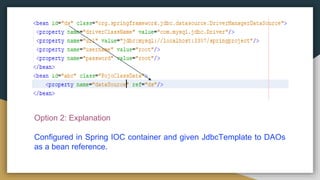
Option 1: Explanation
The JdbcTemplate within a DAO implementation via direct instantiation
with a DataSource reference.
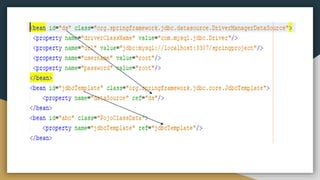
Option 2: Explanation
Configured in Spring IOC container and given JdbcTemplate to DAOs
as a bean reference.
Step 3: Writing DAO Layer
We already discussed that the JdbcTemplate can be used within a DAO
implementation via direct instantiation with a DataSource reference OR
be configured in a Spring IOC container and given to DAOs as a bean
reference. Now we will see how they can be implemented in the DAO
class.
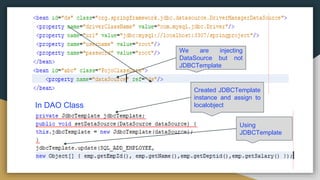
Option 1: The JdbcTemplate within a DAO implementation via direct
instantiation with a DataSource reference.
We are injecting
DataSource but not
JDBCTemplate
In DAO Class
Created JDBCTemplate
instance and assign to
localobject
Using
JDBCTemplate
Option 2:
Configured in Spring IOC container and given JdbcTemplate to DAOs
as a bean reference.
Explanation :
In all our examples, we adopted this option only…
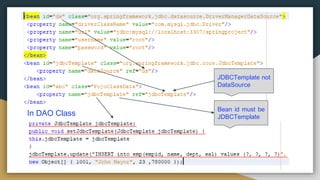
In DAO Class
Bean id must be
JDBCTemplate
JDBCTemplate not
DataSource
Spring jdbc dao

Spring jdbc dao

  • 1.
    Spring JDBC/DAO By →Anuj Kumar Singh
  • 2.
    What is SpringDAO (Data Access Object) DAO is used to read and write data to and from database respectively.The table below shows the responsibility of Spring and User. Note : The Spring Framework takes care of all the low-level details that can make JDBC such a tedious API to develop with
  • 3.
    Action Spring User DefineConnection Parameter Yes Open the Connection Yes Specify the SQL statement Yes Declare parameters and provide parameter values Yes Prepare and Execute the Statement Yes Set up the loop to iterate through the result (if any) Yes Do the work for each iteration Yes Process any Exception Yes Handle Transactions Yes Close the Connection,Statement and ResultSet Yes
  • 4.
    Steps for DAO Wehave to follow three steps while configuring the Spring Context in XML. Step 1: Configure Data Source 1. Driver Based Data Source 2. JNDI Data Source 3. Pooled Data Source Step 2: Configure JDBC Template 1. JDBC Template 2. NamedParameter JDBC Template 3. Simple JDBC Template
  • 5.
    Step 3: Configurecustom DAO Class Step 1: Configure Data Source The very first step you need to work on database is configuring the data source in Spring’s context file. If you remember the basic steps of JDBC Connection in Java, first we load the driver using Class.forName(), then getting connection using DriverManager providing the URL such as Connection con = DriverManager.getConnection(, ,) and then using Statement or PreparedStatement. While configuring the DataSource in Spring we may need to pass connection details (such as DriverName, URL, Username, Password) to Spring framework. The benefit of configuring data sources in this way is that they can be managed completely external to the application, leaving the application to simply ask for a data source when it’s ready to access the database.
  • 6.
    1. Driver BasedData Source It is the simplest data source that can be configured in Spring. This should not be used in Production but it is good to use in Development Environment for unit testing. There are Two data source classes. • DriverManagerDataSource • SingleConnectionDataSource The basic difference is DriverManagerDataSource provides a new connection each time, where as SingleConnectionDataSource provides the same connection. Let’s see an example, to connect MySQL database I am using com.mysql.jdbc.Driver class. And don’t need any username or password. We use DriverManagerDataSource so the configuration would be:
  • 7.
    <bean id=”MyDataSource” class=”org.springframework.jdbc.datasource.DriverManagerDataSource”> <property name=”driverClassName”value=”com.mysql.jdbc.Driver”/> <property name=”url” value=”jdbc:mysql://localhost/test”/ > <property name=”username” value=””/> <property name=”password” value=””/> </bean>
  • 8.
    How it isif we take the connection details (Driver class name, url, username, password etc. ) from a property file rather than defining in Spring Context XML file itself? Yes, it is a good idea to take the database connection details from a property file. So let’s create a property file. We will name the file as: jdbc.properties
  • 9.
    You need thisextra entry to include the properties from jdbc.properties file. Properties define in jdbc.properties file
  • 10.
    2. JNDI (JavaNaming and Directory Interface) DATA SOURCE Application server are often pooled for greater performance. The application servers such as WebSphere, WebLogic, Jboss allow to configure connection pools. And these connection pools can be retrieved through a JNDI. The benefit of configuring data sources in this way is that they can be managed completely external to the application, leaving the application to simply ask for a data source when it’s ready to access the database. In driver based data source, we saw any of the 2 classes DriverManagerDataSource and SingleConnectionDataSource can be used to establish the connection. Similarly for JNDI data source, we use JndiObjectFactoryBean.
  • 11.
    I have createda connection pool my application server. The JNDI name is “mysqldatasource”. There is a servlet deployed in the same Server which gets the DAO object from the Spring Container. Spring provided the dataSource to the DAO after getting connection from the connection-pool mysqldatasource.
  • 12.
    3. Pooled DataSource If you’re unable to retrieve a data source from JNDI, the next best thing is to configure a pooled data source directly in Spring. Spring doesn’t provide a pooled data source, there’s a suitable one available in the Jakarta Commons Database Connection Pools (DBCP) project. To add DBCP to your application, you need to download the JAR file and place it into your build path along with spring library files. The class you do use for Pooled Data Source is : org.apache.commons.dbcp.BasicDataSource
  • 13.
    Two new propertiesin Pooled Data Source
  • 14.
    Step 2: ConfigureJDBC Template After configuring the DataSource, the next step is configuring the JDBCTemplate. The JdbcTemplate class is the central class in the JDBC core package. It simplifies the use of JDBC since it handles the creation and release of resources. This helps to avoid common errors such as forgetting to always close the connection. It executes the core JDBC workflow like statement creation and execution, leaving application code to provide SQL and extract results. This class executes SQL queries, update statements or stored procedure calls, imitating iteration over ResultSets and extraction of returned parameter values. It also catches JDBC exceptions and translates them to the generic, more informative, exception hierarchy defined in the org.springframework.dao package.
  • 15.
    Option 1: TheJdbcTemplate can be used within a DAO implementation via direct instantiation with a DataSource reference OR Option 2: be configured in a Spring IOC container and given to DAOs as a bean reference. Option 1: Explanation The JdbcTemplate within a DAO implementation via direct instantiation with a DataSource reference.
  • 16.
    Option 2: Explanation Configuredin Spring IOC container and given JdbcTemplate to DAOs as a bean reference.
  • 18.
    Step 3: WritingDAO Layer We already discussed that the JdbcTemplate can be used within a DAO implementation via direct instantiation with a DataSource reference OR be configured in a Spring IOC container and given to DAOs as a bean reference. Now we will see how they can be implemented in the DAO class. Option 1: The JdbcTemplate within a DAO implementation via direct instantiation with a DataSource reference.
  • 19.
    We are injecting DataSourcebut not JDBCTemplate In DAO Class Created JDBCTemplate instance and assign to localobject Using JDBCTemplate
  • 20.
    Option 2: Configured inSpring IOC container and given JdbcTemplate to DAOs as a bean reference. Explanation : In all our examples, we adopted this option only…
  • 21.
    In DAO Class Beanid must be JDBCTemplate JDBCTemplate not DataSource