Chapter 2
Database System Concepts
and Architecture
1
Chapter Outline
• Data Models and Their Categories
• History of Data Models
• Schemas, Instances, and States
• Three-Schema Architecture
• Data Independence
• DBMS Languages and Interfaces
• Centralized and Client-Server Architectures
• Classification of DBMSs
2
Data Models
Data Model:
– A set of concepts to describe the structure of a database, the operations for
manipulating these structures, and certain constraints that the database should obey.
Data Model Structure and Constraints:
– Constructs are used to define the database structure.
– Constructs typically include elements (and their data types) as well as groups of
elements (e.g. entity, record, table), and relationships among such groups.
– Constraints specify some restrictions on valid data; these constraints must be
enforced at all times
3
Data Models (continued)
Data Model Operations:
– These operations are used for specifying database retrievals and updates by referring
to the constructs of the data model.
– Operations on the data model may include basic model operations (e.g. generic
insert, delete, update) and user-defined operations (e.g. compute_student_gpa,
update_inventory)
4
Categories of Data Models
Conceptual (high-level, semantic) data models:
– Provide concepts that are close to the way many users perceive data.
– (Also called entity-based or object-based data models.)
Physical (low-level, internal) data models:
– Provide concepts that describe details of how data is stored in the computer. These are usually specified in an
ad-hoc manner through DBMS design and administration manuals
Implementation (representational) data models:
– Provide concepts that fall between the above two, used by many commercial DBMS implementations (e.g.
relational data models used in many commercial systems).
Self-Describing Data Models:
– Combine the description of data with the data values. Examples include XML, key-value stores and some
NOSQL systems.
5
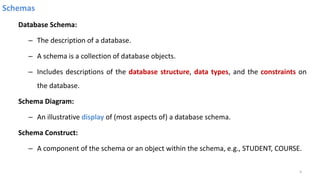
Schemas
Database Schema:
– The description of a database.
– A schema is a collection of database objects.
– Includes descriptions of the database structure, data types, and the constraints on
the database.
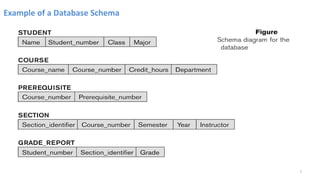
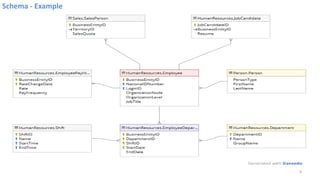
Schema Diagram:
– An illustrative display of (most aspects of) a database schema.
Schema Construct:
– A component of the schema or an object within the schema, e.g., STUDENT, COURSE.
6
Example of a Database Schema
7
8
Schema - Example
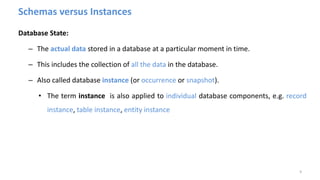
Schemas versus Instances
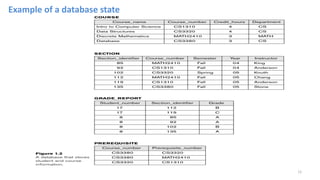
Database State:
– The actual data stored in a database at a particular moment in time.
– This includes the collection of all the data in the database.
– Also called database instance (or occurrence or snapshot).
• The term instance is also applied to individual database components, e.g. record
instance, table instance, entity instance
9
Database Schema vs. Database State
Database State:
– Refers to the content of a database at a moment in time.
Initial Database State:
– Refers to the database state when it is initially loaded into the system.
Valid State:
– A state that satisfies the structure and constraints of the database.
10
Database Schema vs. Database State (continued)
Distinction
– The database schema changes very infrequently.
– The database state changes every time the database is updated.
• Schema is also called intension.
• State is also called extension.
11
Example of a database state
12
Three-Schema Architecture and Data Independence
• Three of the four important characteristics of the database approach:
1. use of a catalogue to store the database description (schema) so as to make it self-
describing,
2. insulation of programs and data (program-data and program-operation independence),
and
3. support of multiple user views.
• Proposed to support DBMS characteristics of:
– Program-data independence.
– Support of multiple views of the data.
13
Three-Schema Architecture
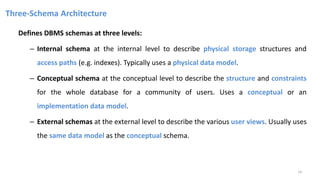
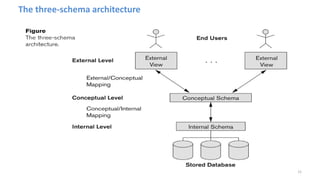
Defines DBMS schemas at three levels:
– Internal schema at the internal level to describe physical storage structures and
access paths (e.g. indexes). Typically uses a physical data model.
– Conceptual schema at the conceptual level to describe the structure and constraints
for the whole database for a community of users. Uses a conceptual or an
implementation data model.
– External schemas at the external level to describe the various user views. Usually uses
the same data model as the conceptual schema.
14
The three-schema architecture
15
Three-Schema Architecture
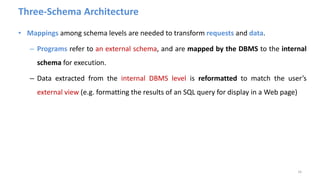
• Mappings among schema levels are needed to transform requests and data.
– Programs refer to an external schema, and are mapped by the DBMS to the internal
schema for execution.
– Data extracted from the internal DBMS level is reformatted to match the user’s
external view (e.g. formatting the results of an SQL query for display in a Web page)
16
Data Independence
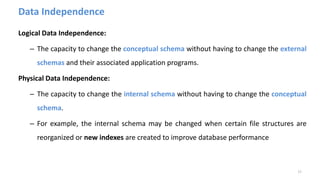
Logical Data Independence:
– The capacity to change the conceptual schema without having to change the external
schemas and their associated application programs.
Physical Data Independence:
– The capacity to change the internal schema without having to change the conceptual
schema.
– For example, the internal schema may be changed when certain file structures are
reorganized or new indexes are created to improve database performance
17
Data Independence (continued)
• When a schema at a lower level is changed, only the mappings between this schema and
higher-level schemas need to be changed in a DBMS that fully supports data
independence.
• The higher-level schemas themselves are unchanged.
– Hence, the application programs need not be changed since they refer to the external
schemas.
18
DBMS Languages
– Data Definition Language (DDL)
– Data Manipulation Language (DML)
• Data Manipulation Language (DML)
– High-Level or Non-procedural Languages: These include the relational language SQL
• May be used in a standalone way or may be embedded in a programming language
– Low Level or Procedural Languages:
• These must be embedded in a programming language
19
DBMS Languages
Data Definition Language (DDL):
– Used by the DBA and database designers to specify the conceptual schema of a
database.
– In many DBMSs, the DDL is also used to define internal and external schemas (views).
– In some DBMSs, separate storage definition language (SDL) and view definition
language (VDL) are used to define internal and external schemas.
• SDL is typically realized via DBMS commands provided to the DBA and database
designers
20
DBMS Languages
Data Manipulation Language (DML):
– Used to specify database retrievals and updates
– DML commands (data sublanguage) can be embedded in a general-purpose
programming language (host language), such as COBOL, C,
C++, or Java.
• A library of functions can also be provided to access the DBMS from a
programming language
– Alternatively, stand-alone DML commands can be applied directly (called a query
language).
21
Types of DML
High Level or Non-procedural Language:
– For example, the SQL relational language
– Are “set”-oriented and specify what data to retrieve rather than how to retrieve it.
– Also called declarative languages.
Low Level or Procedural Language:
– Retrieve data one record-at-a-time;
– Constructs such as looping are needed to retrieve multiple records, along with
positioning pointers.
22
DBMS Interfaces
• Stand-alone query language interfaces
– Example: Entering SQL queries at the DBMS interactive SQL interface (e.g. SQL*Plus in
ORACLE)
• Programmer interfaces for embedding DML in programming languages
• User-friendly interfaces
– Menu-based, forms-based, graphics-based, etc.
• Mobile Interfaces
– interfaces allowing users to perform transactions using mobile apps
23
User-Friendly DBMS Interfaces
• Menu-based (Web-based), popular for browsing on the web
• Forms-based, designed for naïve users used to filling in entries on a form
• Graphics-based
– Point and Click, Drag and Drop, etc.
– Specifying a query on a schema diagram
• Natural language: requests in written English
• Combinations of the above:
– For example, both menus and forms used extensively in Web database interfaces
24
Other DBMS Interfaces
• Natural language: free text as a query
• Speech : Input query and Output response
• Web Browser with keyword search
• Parametric interfaces, e.g., bank tellers using function keys.
• Interfaces for the DBA:
– Creating user accounts, granting authorizations
– Setting system parameters
– Changing schemas or access paths
25
Centralized and Client-Server DBMS Architectures
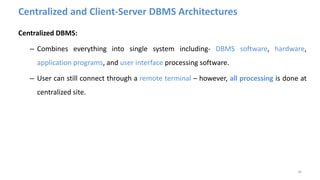
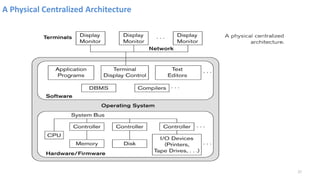
Centralized DBMS:
– Combines everything into single system including- DBMS software, hardware,
application programs, and user interface processing software.
– User can still connect through a remote terminal – however, all processing is done at
centralized site.
26
A Physical Centralized Architecture
27
Basic 2-tier Client-Server Architectures
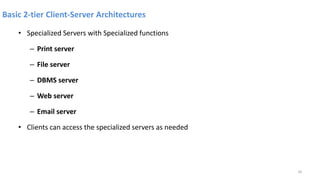
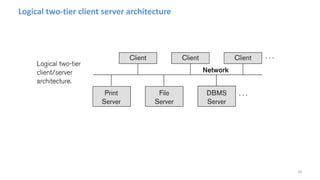
• Specialized Servers with Specialized functions
– Print server
– File server
– DBMS server
– Web server
– Email server
• Clients can access the specialized servers as needed
28
Logical two-tier client server architecture
29
Clients
• Provide appropriate interfaces through a client software module to access and utilize the
various server resources.
• Clients may be diskless machines or PCs or Workstations with disks with only the client
software installed.
• Connected to the servers via some form of a network.
– (LAN: local area network, wireless network, etc.)
30
DBMS Server
• Provides database query and transaction services to the clients
• Relational DBMS servers are often called SQL servers, query servers, or transaction
servers
• Applications running on clients utilize an Application Program Interface (API) to access
server databases via standard interface such as:
– ODBC: Open Database Connectivity standard
– JDBC: for Java programming access
31
Two Tier Client-Server Architecture
• Client and server must install appropriate client module and server module software for
ODBC or JDBC
• A client program may connect to several DBMSs, sometimes called the data sources.
• In general, data sources can be files or other non-DBMS software that manages data.
32
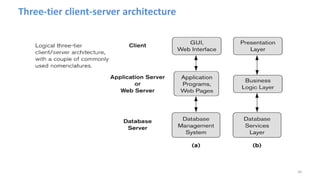
Three Tier Client-Server Architecture
• Common for Web applications
• Intermediate Layer called Application Server or Web Server:
– Stores the web connectivity software and the business logic part of the application used to
access the corresponding data from the database server
– Acts like a conduit for sending partially processed data between the database server and the
client.
• Three-tier Architecture Can Enhance Security:
– Database server only accessible via middle tier
– Clients cannot directly access database server
– Clients contain user interfaces and Web browsers
– The client is typically a PC or a mobile device connected to the Web
33
Three-tier client-server architecture
34
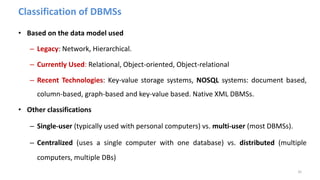
Classification of DBMSs
• Based on the data model used
– Legacy: Network, Hierarchical.
– Currently Used: Relational, Object-oriented, Object-relational
– Recent Technologies: Key-value storage systems, NOSQL systems: document based,
column-based, graph-based and key-value based. Native XML DBMSs.
• Other classifications
– Single-user (typically used with personal computers) vs. multi-user (most DBMSs).
– Centralized (uses a single computer with one database) vs. distributed (multiple
computers, multiple DBs)
35
History of Data Models (Additional Material)
• Network Model
• Hierarchical Model
• Relational Model
• Object-oriented Data Models
• Object-Relational Models
36
History of Data Models (Additional Material)
• Network Model:
– The first network DBMS was implemented by Honeywell in 1964-65 (IDS System).
– Adopted heavily due to the support by CODASYL (Conference on Data Systems
Languages) (CODASYL - DBTG report of 1971).
– Later implemented in a large variety of systems - IDMS (Cullinet - now Computer
Associates), DMS 1100 (Unisys), IMAGE (H.P. (Hewlett-Packard)), VAX -DBMS (Digital
Equipment Corp., next COMPAQ, now H.P.).
37
Network Model
• Advantages:
– Network Model is able to model complex relationships and represents semantics of
add/delete on the relationships.
– Can handle most situations for modelling using record types and relationship types.
– Language is navigational; uses constructs like FIND, FIND member, FIND owner, FIND
NEXT within set, GET, etc.
• Programmers can do optimal navigation through the database.
38
Network Model
Disadvantages:
– Navigational and procedural nature of processing
– Database contains a complex array of pointers that thread through a set of records.
• Little scope for automated “query optimization”
39
Hierarchical Data Model
Hierarchical Data Model:
– Initially implemented in a joint effort by IBM and North American Rockwell around
1965. Resulted in the IMS family of systems.
– IBM’s IMS product had (and still has) a very large customer base worldwide
– Hierarchical model was formalized based on the IMS system
– Other systems based on this model: System 2k (SAS inc.)
40
Hierarchical Data Model
Advantages:
– Simple to construct and operate
– Corresponds to a number of natural hierarchically organized domains, e.g.,
organization (“org”) chart
– Language is simple:
• Uses constructs like GET, GET UNIQUE, GET NEXT, GET NEXT WITHIN PARENT, etc.
Disadvantages:
– Navigational and procedural nature of processing
– Database is visualized as a linear arrangement of records
– Little scope for "query optimization"
41
Relational Model
Relational Model:
– Proposed in 1970 by E.F. Codd (IBM), first commercial system in 1981-82.
– Now in several commercial products (e.g. DB2, ORACLE, MS SQL Server, SYBASE,
INFORMIX).
– Several free open source implementations, e.g. MySQL, PostgreSQL
– Currently most dominant for developing database applications.
– SQL relational standards: SQL-89 (SQL1), SQL-92 (SQL2), SQL-99, SQL3, …
42
Object-oriented Data Models
Object-oriented Data Models:
– Several models have been proposed for implementing in a database system.
– One set comprises models of persistent O-O Programming Languages such as C++
(e.g., in OBJECTSTORE or VERSANT), and Smalltalk (e.g., in GEMSTONE).
– Additionally, systems like O2, ORION (at MCC - then ITASCA), IRIS (at H.P.- used in
Open OODB).
– Object Database Standard: ODMG-93, ODMG-version 2.0, ODMG-version 3.0.
43
Object-Relational Models
Object-Relational Models:
– The trend to mix object models with relational was started with Informix Universal
Server.
– Relational systems incorporated concepts from object databases leading to object-
relational.
– Exemplified in the versions of Oracle, DB2, and SQL Server and other DBMSs.
– Current trend by Relational DBMS vendors is to extend relational DBMSs with
capability to process XML, Text and other data types.
– The term “Object-relational” is receding in the marketplace.
44
Review Questions
1. Define the following terms: data model, database schema, database state, internal schema,
conceptual schema, external schema, data independence, DDL, DML, SDL, VDL, query language,
database utility, catalog, client/server architecture, and n-tier architecture.
2. What is the difference between logical data independence and physical data independence?
Which one is harder to achieve? Why?
3. Describe the three-schema architecture. Why do we need mappings among schema levels? How
do different schema definition languages support this architecture?
4. Discuss the different types of user-friendly interfaces and the types of users who typically use
each.
5. Discuss the main categories of data models. What are the basic differences among the relational
model, the object model, and the XML model?
45

Chapter (Two) The best lecture PowerPoint

  • 1.
    Chapter 2 Database SystemConcepts and Architecture 1
  • 2.
    Chapter Outline • DataModels and Their Categories • History of Data Models • Schemas, Instances, and States • Three-Schema Architecture • Data Independence • DBMS Languages and Interfaces • Centralized and Client-Server Architectures • Classification of DBMSs 2
  • 3.
    Data Models Data Model: –A set of concepts to describe the structure of a database, the operations for manipulating these structures, and certain constraints that the database should obey. Data Model Structure and Constraints: – Constructs are used to define the database structure. – Constructs typically include elements (and their data types) as well as groups of elements (e.g. entity, record, table), and relationships among such groups. – Constraints specify some restrictions on valid data; these constraints must be enforced at all times 3
  • 4.
    Data Models (continued) DataModel Operations: – These operations are used for specifying database retrievals and updates by referring to the constructs of the data model. – Operations on the data model may include basic model operations (e.g. generic insert, delete, update) and user-defined operations (e.g. compute_student_gpa, update_inventory) 4
  • 5.
    Categories of DataModels Conceptual (high-level, semantic) data models: – Provide concepts that are close to the way many users perceive data. – (Also called entity-based or object-based data models.) Physical (low-level, internal) data models: – Provide concepts that describe details of how data is stored in the computer. These are usually specified in an ad-hoc manner through DBMS design and administration manuals Implementation (representational) data models: – Provide concepts that fall between the above two, used by many commercial DBMS implementations (e.g. relational data models used in many commercial systems). Self-Describing Data Models: – Combine the description of data with the data values. Examples include XML, key-value stores and some NOSQL systems. 5
  • 6.
    Schemas Database Schema: – Thedescription of a database. – A schema is a collection of database objects. – Includes descriptions of the database structure, data types, and the constraints on the database. Schema Diagram: – An illustrative display of (most aspects of) a database schema. Schema Construct: – A component of the schema or an object within the schema, e.g., STUDENT, COURSE. 6
  • 7.
    Example of aDatabase Schema 7
  • 8.
  • 9.
    Schemas versus Instances DatabaseState: – The actual data stored in a database at a particular moment in time. – This includes the collection of all the data in the database. – Also called database instance (or occurrence or snapshot). • The term instance is also applied to individual database components, e.g. record instance, table instance, entity instance 9
  • 10.
    Database Schema vs.Database State Database State: – Refers to the content of a database at a moment in time. Initial Database State: – Refers to the database state when it is initially loaded into the system. Valid State: – A state that satisfies the structure and constraints of the database. 10
  • 11.
    Database Schema vs.Database State (continued) Distinction – The database schema changes very infrequently. – The database state changes every time the database is updated. • Schema is also called intension. • State is also called extension. 11
  • 12.
    Example of adatabase state 12
  • 13.
    Three-Schema Architecture andData Independence • Three of the four important characteristics of the database approach: 1. use of a catalogue to store the database description (schema) so as to make it self- describing, 2. insulation of programs and data (program-data and program-operation independence), and 3. support of multiple user views. • Proposed to support DBMS characteristics of: – Program-data independence. – Support of multiple views of the data. 13
  • 14.
    Three-Schema Architecture Defines DBMSschemas at three levels: – Internal schema at the internal level to describe physical storage structures and access paths (e.g. indexes). Typically uses a physical data model. – Conceptual schema at the conceptual level to describe the structure and constraints for the whole database for a community of users. Uses a conceptual or an implementation data model. – External schemas at the external level to describe the various user views. Usually uses the same data model as the conceptual schema. 14
  • 15.
  • 16.
    Three-Schema Architecture • Mappingsamong schema levels are needed to transform requests and data. – Programs refer to an external schema, and are mapped by the DBMS to the internal schema for execution. – Data extracted from the internal DBMS level is reformatted to match the user’s external view (e.g. formatting the results of an SQL query for display in a Web page) 16
  • 17.
    Data Independence Logical DataIndependence: – The capacity to change the conceptual schema without having to change the external schemas and their associated application programs. Physical Data Independence: – The capacity to change the internal schema without having to change the conceptual schema. – For example, the internal schema may be changed when certain file structures are reorganized or new indexes are created to improve database performance 17
  • 18.
    Data Independence (continued) •When a schema at a lower level is changed, only the mappings between this schema and higher-level schemas need to be changed in a DBMS that fully supports data independence. • The higher-level schemas themselves are unchanged. – Hence, the application programs need not be changed since they refer to the external schemas. 18
  • 19.
    DBMS Languages – DataDefinition Language (DDL) – Data Manipulation Language (DML) • Data Manipulation Language (DML) – High-Level or Non-procedural Languages: These include the relational language SQL • May be used in a standalone way or may be embedded in a programming language – Low Level or Procedural Languages: • These must be embedded in a programming language 19
  • 20.
    DBMS Languages Data DefinitionLanguage (DDL): – Used by the DBA and database designers to specify the conceptual schema of a database. – In many DBMSs, the DDL is also used to define internal and external schemas (views). – In some DBMSs, separate storage definition language (SDL) and view definition language (VDL) are used to define internal and external schemas. • SDL is typically realized via DBMS commands provided to the DBA and database designers 20
  • 21.
    DBMS Languages Data ManipulationLanguage (DML): – Used to specify database retrievals and updates – DML commands (data sublanguage) can be embedded in a general-purpose programming language (host language), such as COBOL, C, C++, or Java. • A library of functions can also be provided to access the DBMS from a programming language – Alternatively, stand-alone DML commands can be applied directly (called a query language). 21
  • 22.
    Types of DML HighLevel or Non-procedural Language: – For example, the SQL relational language – Are “set”-oriented and specify what data to retrieve rather than how to retrieve it. – Also called declarative languages. Low Level or Procedural Language: – Retrieve data one record-at-a-time; – Constructs such as looping are needed to retrieve multiple records, along with positioning pointers. 22
  • 23.
    DBMS Interfaces • Stand-alonequery language interfaces – Example: Entering SQL queries at the DBMS interactive SQL interface (e.g. SQL*Plus in ORACLE) • Programmer interfaces for embedding DML in programming languages • User-friendly interfaces – Menu-based, forms-based, graphics-based, etc. • Mobile Interfaces – interfaces allowing users to perform transactions using mobile apps 23
  • 24.
    User-Friendly DBMS Interfaces •Menu-based (Web-based), popular for browsing on the web • Forms-based, designed for naïve users used to filling in entries on a form • Graphics-based – Point and Click, Drag and Drop, etc. – Specifying a query on a schema diagram • Natural language: requests in written English • Combinations of the above: – For example, both menus and forms used extensively in Web database interfaces 24
  • 25.
    Other DBMS Interfaces •Natural language: free text as a query • Speech : Input query and Output response • Web Browser with keyword search • Parametric interfaces, e.g., bank tellers using function keys. • Interfaces for the DBA: – Creating user accounts, granting authorizations – Setting system parameters – Changing schemas or access paths 25
  • 26.
    Centralized and Client-ServerDBMS Architectures Centralized DBMS: – Combines everything into single system including- DBMS software, hardware, application programs, and user interface processing software. – User can still connect through a remote terminal – however, all processing is done at centralized site. 26
  • 27.
    A Physical CentralizedArchitecture 27
  • 28.
    Basic 2-tier Client-ServerArchitectures • Specialized Servers with Specialized functions – Print server – File server – DBMS server – Web server – Email server • Clients can access the specialized servers as needed 28
  • 29.
    Logical two-tier clientserver architecture 29
  • 30.
    Clients • Provide appropriateinterfaces through a client software module to access and utilize the various server resources. • Clients may be diskless machines or PCs or Workstations with disks with only the client software installed. • Connected to the servers via some form of a network. – (LAN: local area network, wireless network, etc.) 30
  • 31.
    DBMS Server • Providesdatabase query and transaction services to the clients • Relational DBMS servers are often called SQL servers, query servers, or transaction servers • Applications running on clients utilize an Application Program Interface (API) to access server databases via standard interface such as: – ODBC: Open Database Connectivity standard – JDBC: for Java programming access 31
  • 32.
    Two Tier Client-ServerArchitecture • Client and server must install appropriate client module and server module software for ODBC or JDBC • A client program may connect to several DBMSs, sometimes called the data sources. • In general, data sources can be files or other non-DBMS software that manages data. 32
  • 33.
    Three Tier Client-ServerArchitecture • Common for Web applications • Intermediate Layer called Application Server or Web Server: – Stores the web connectivity software and the business logic part of the application used to access the corresponding data from the database server – Acts like a conduit for sending partially processed data between the database server and the client. • Three-tier Architecture Can Enhance Security: – Database server only accessible via middle tier – Clients cannot directly access database server – Clients contain user interfaces and Web browsers – The client is typically a PC or a mobile device connected to the Web 33
  • 34.
  • 35.
    Classification of DBMSs •Based on the data model used – Legacy: Network, Hierarchical. – Currently Used: Relational, Object-oriented, Object-relational – Recent Technologies: Key-value storage systems, NOSQL systems: document based, column-based, graph-based and key-value based. Native XML DBMSs. • Other classifications – Single-user (typically used with personal computers) vs. multi-user (most DBMSs). – Centralized (uses a single computer with one database) vs. distributed (multiple computers, multiple DBs) 35
  • 36.
    History of DataModels (Additional Material) • Network Model • Hierarchical Model • Relational Model • Object-oriented Data Models • Object-Relational Models 36
  • 37.
    History of DataModels (Additional Material) • Network Model: – The first network DBMS was implemented by Honeywell in 1964-65 (IDS System). – Adopted heavily due to the support by CODASYL (Conference on Data Systems Languages) (CODASYL - DBTG report of 1971). – Later implemented in a large variety of systems - IDMS (Cullinet - now Computer Associates), DMS 1100 (Unisys), IMAGE (H.P. (Hewlett-Packard)), VAX -DBMS (Digital Equipment Corp., next COMPAQ, now H.P.). 37
  • 38.
    Network Model • Advantages: –Network Model is able to model complex relationships and represents semantics of add/delete on the relationships. – Can handle most situations for modelling using record types and relationship types. – Language is navigational; uses constructs like FIND, FIND member, FIND owner, FIND NEXT within set, GET, etc. • Programmers can do optimal navigation through the database. 38
  • 39.
    Network Model Disadvantages: – Navigationaland procedural nature of processing – Database contains a complex array of pointers that thread through a set of records. • Little scope for automated “query optimization” 39
  • 40.
    Hierarchical Data Model HierarchicalData Model: – Initially implemented in a joint effort by IBM and North American Rockwell around 1965. Resulted in the IMS family of systems. – IBM’s IMS product had (and still has) a very large customer base worldwide – Hierarchical model was formalized based on the IMS system – Other systems based on this model: System 2k (SAS inc.) 40
  • 41.
    Hierarchical Data Model Advantages: –Simple to construct and operate – Corresponds to a number of natural hierarchically organized domains, e.g., organization (“org”) chart – Language is simple: • Uses constructs like GET, GET UNIQUE, GET NEXT, GET NEXT WITHIN PARENT, etc. Disadvantages: – Navigational and procedural nature of processing – Database is visualized as a linear arrangement of records – Little scope for "query optimization" 41
  • 42.
    Relational Model Relational Model: –Proposed in 1970 by E.F. Codd (IBM), first commercial system in 1981-82. – Now in several commercial products (e.g. DB2, ORACLE, MS SQL Server, SYBASE, INFORMIX). – Several free open source implementations, e.g. MySQL, PostgreSQL – Currently most dominant for developing database applications. – SQL relational standards: SQL-89 (SQL1), SQL-92 (SQL2), SQL-99, SQL3, … 42
  • 43.
    Object-oriented Data Models Object-orientedData Models: – Several models have been proposed for implementing in a database system. – One set comprises models of persistent O-O Programming Languages such as C++ (e.g., in OBJECTSTORE or VERSANT), and Smalltalk (e.g., in GEMSTONE). – Additionally, systems like O2, ORION (at MCC - then ITASCA), IRIS (at H.P.- used in Open OODB). – Object Database Standard: ODMG-93, ODMG-version 2.0, ODMG-version 3.0. 43
  • 44.
    Object-Relational Models Object-Relational Models: –The trend to mix object models with relational was started with Informix Universal Server. – Relational systems incorporated concepts from object databases leading to object- relational. – Exemplified in the versions of Oracle, DB2, and SQL Server and other DBMSs. – Current trend by Relational DBMS vendors is to extend relational DBMSs with capability to process XML, Text and other data types. – The term “Object-relational” is receding in the marketplace. 44
  • 45.
    Review Questions 1. Definethe following terms: data model, database schema, database state, internal schema, conceptual schema, external schema, data independence, DDL, DML, SDL, VDL, query language, database utility, catalog, client/server architecture, and n-tier architecture. 2. What is the difference between logical data independence and physical data independence? Which one is harder to achieve? Why? 3. Describe the three-schema architecture. Why do we need mappings among schema levels? How do different schema definition languages support this architecture? 4. Discuss the different types of user-friendly interfaces and the types of users who typically use each. 5. Discuss the main categories of data models. What are the basic differences among the relational model, the object model, and the XML model? 45