M.C. Kang
   Redis Overview
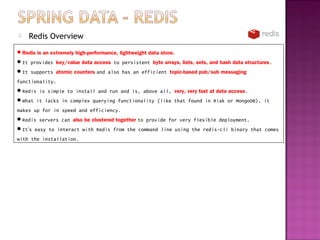
Redis is an extremely high-performance, lightweight data store.
It provides key/value data access to persistent byte arrays, lists, sets, and hash data structures.
It supports atomic counters and also has an efficient topic-based pub/sub messaging
functionality.
Redis is simple to install and run and is, above all, very, very fast at data access.
What it lacks in complex querying functionality (like that found in Riak or MongoDB), it
makes up for in speed and efficiency.
Redis servers can also be clustered together to provide for very flexible deployment.
It’s easy to interact with Redis from the command line using the redis-cli binary that comes
with the installation.
   ConnectionFactory
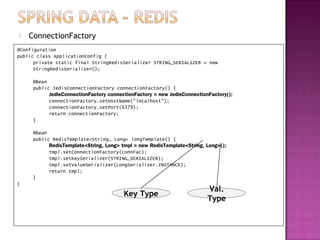
@Configuration
public class ApplicationConfig {
      private static final StringRedisSerializer STRING_SERIALIZER = new
      StringRedisSerializer();

     @Bean
     public JedisConnectionFactory connectionFactory() {
           JedisConnectionFactory connectionFactory = new JedisConnectionFactory();
           connectionFactory.setHostName("localhost");
           connectionFactory.setPort(6379);
           return connectionFactory;
     }

     @Bean
     public RedisTemplate<String, Long> longTemplate() {
           RedisTemplate<String, Long> tmpl = new RedisTemplate<String, Long>();
           tmpl.setConnectionFactory(connFac);
           tmpl.setKeySerializer(STRING_SERIALIZER);
           tmpl.setValueSerializer(LongSerializer.INSTANCE);
           return tmpl;
     }
}
                                                                         Val.
                                        Key Type
                                                                         Type
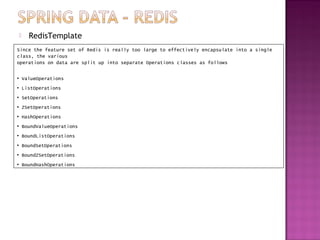
   RedisTemplate
Since the feature set of Redis is really too large to effectively encapsulate into a single
class, the various
operations on data are split up into separate Operations classes as follows

• ValueOperations
• ListOperations
• SetOperations
• ZSetOperations
• HashOperations
• BoundValueOperations
• BoundListOperations
• BoundSetOperations
• BoundZSetOperations
• BoundHashOperations
   Object Conversion
Because Redis deals directly with byte arrays and doesn’t natively perform Object to byte[] translation, the
Spring Data Redis project provides some helper classes to make it easier to read and write
data from Java code.
By default, all keys and values are stored as serialized Java objects.

public enum LongSerializer implements RedisSerializer<Long> {
      INSTANCE;
      @Override
      public byte[] serialize(Long aLong) throws SerializationException {
            if (null != aLong) {
                       return aLong.toString().getBytes();
            } else {
                       return new byte[0];
            }
      }
      @Override
      public Long deserialize(byte[] bytes) throws SerializationException {
            if (bytes.length > 0) {
                       return Long.parseLong(new String(bytes));
            } else {
                       return null;
            }
      }
}
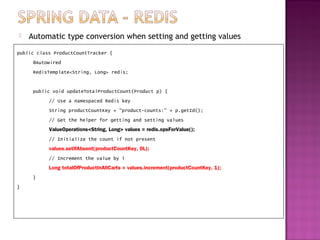
   Automatic type conversion when setting and getting values
public class ProductCountTracker {
     @Autowired
     RedisTemplate<String, Long> redis;


     public void updateTotalProductCount(Product p) {
           // Use a namespaced Redis key
           String productCountKey = "product-counts:" + p.getId();
           // Get the helper for getting and setting values
           ValueOperations<String, Long> values = redis.opsForValue();
           // Initialize the count if not present
           values.setIfAbsent(productCountKey, 0L);
           // Increment the value by 1
           Long totalOfProductInAllCarts = values.increment(productCountKey, 1);
     }
}
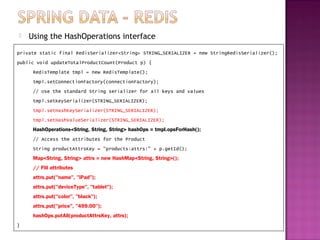
   Using the HashOperations interface
private static final RedisSerializer<String> STRING_SERIALIZER = new StringRedisSerializer();
public void updateTotalProductCount(Product p) {
     RedisTemplate tmpl = new RedisTemplate();
     tmpl.setConnectionFactory(connectionFactory);
     // Use the standard String serializer for all keys and values
     tmpl.setKeySerializer(STRING_SERIALIZER);
     tmpl.setHashKeySerializer(STRING_SERIALIZER);
     tmpl.setHashValueSerializer(STRING_SERIALIZER);
     HashOperations<String, String, String> hashOps = tmpl.opsForHash();
     // Access the attributes for the Product
     String productAttrsKey = "products:attrs:" + p.getId();
     Map<String, String> attrs = new HashMap<String, String>();
     // Fill attributes
     attrs.put("name", "iPad");
     attrs.put("deviceType", "tablet");
     attrs.put("color", "black");
     attrs.put("price", "499.00");
     hashOps.putAll(productAttrsKey, attrs);
}
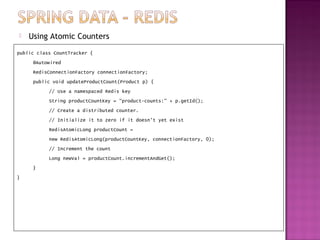
   Using Atomic Counters
public class CountTracker {
     @Autowired
     RedisConnectionFactory connectionFactory;
     public void updateProductCount(Product p) {
           // Use a namespaced Redis key
           String productCountKey = "product-counts:" + p.getId();
           // Create a distributed counter.
           // Initialize it to zero if it doesn't yet exist
           RedisAtomicLong productCount =
           new RedisAtomicLong(productCountKey, connectionFactory, 0);
           // Increment the count
           Long newVal = productCount.incrementAndGet();
     }
}
   Pub/Sub Functionality
Important benefit of using Redis is the simple and fast publish/subscribe functionality.
Although it doesn’t have the advanced features of a full-blown message broker, Redis’ pub/sub
capability can be used to create a lightweight and flexible event bus.
Spring Data Redis exposes a couple of helper classes that make working with this
functionality extremely easy.

Following the pattern of the JMS MessageListenerAdapter, Spring Data Redis has a
MessageListenerAdapter abstraction that works in basically the same way

@Bean
public MessageListener dumpToConsoleListener() {
       return new MessageListener() {
              @Override
              public void onMessage(Message message, byte[] pattern) {
                            System.out.println("FROM MESSAGE: " + new String(message.getBody()));
              }
       };
}

@Bean
MessageListenerAdapter beanMessageListener() {
       MessageListenerAdapter listener = new MessageListenerAdapter( new BeanMessageListener());
       listener.setSerializer( new BeanMessageSerializer() );
       return listener;
}

@Bean
RedisMessageListenerContainer container() {
       RedisMessageListenerContainer container = new RedisMessageListenerContainer();
       container.setConnectionFactory(redisConnectionFactory());
       // Assign our BeanMessageListener to a specific channel
       container.addMessageListener(beanMessageListener(),new ChannelTopic("spring-data-book:pubsub-test:dump"));
       return container;
}
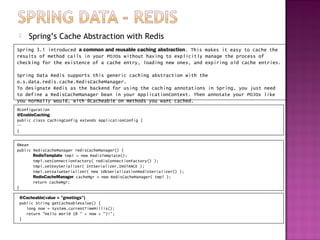
    Spring’s Cache Abstraction with Redis
Spring 3.1 introduced a common and reusable caching abstraction. This makes it easy to cache the
results of method calls in your POJOs without having to explicitly manage the process of
checking for the existence of a cache entry, loading new ones, and expiring old cache entries.

Spring Data Redis supports this generic caching abstraction with the
o.s.data.redis.cache.RedisCacheManager.
To designate Redis as the backend for using the caching annotations in Spring, you just need
to define a RedisCacheManager bean in your ApplicationContext. Then annotate your POJOs like
you normally would, with @Cacheable on methods you want cached.
@Configuration
@EnableCaching
public class CachingConfig extends ApplicationConfig {
…
}


@Bean
public RedisCacheManager redisCacheManager() {
       RedisTemplate tmpl = new RedisTemplate();
       tmpl.setConnectionFactory( redisConnectionFactory() );
       tmpl.setKeySerializer( IntSerializer.INSTANCE );
       tmpl.setValueSerializer( new JdkSerializationRedisSerializer() );
       RedisCacheManager cacheMgr = new RedisCacheManager( tmpl );
       return cacheMgr;
}

 @Cacheable(value = "greetings")
 public String getCacheableValue() {
    long now = System.currentTimeMillis();
    return "Hello World (@ " + now + ")!";
 }

Spring data ii

  • 1.
  • 2.
    Redis Overview Redis is an extremely high-performance, lightweight data store. It provides key/value data access to persistent byte arrays, lists, sets, and hash data structures. It supports atomic counters and also has an efficient topic-based pub/sub messaging functionality. Redis is simple to install and run and is, above all, very, very fast at data access. What it lacks in complex querying functionality (like that found in Riak or MongoDB), it makes up for in speed and efficiency. Redis servers can also be clustered together to provide for very flexible deployment. It’s easy to interact with Redis from the command line using the redis-cli binary that comes with the installation.
  • 3.
    ConnectionFactory @Configuration public class ApplicationConfig { private static final StringRedisSerializer STRING_SERIALIZER = new StringRedisSerializer(); @Bean public JedisConnectionFactory connectionFactory() { JedisConnectionFactory connectionFactory = new JedisConnectionFactory(); connectionFactory.setHostName("localhost"); connectionFactory.setPort(6379); return connectionFactory; } @Bean public RedisTemplate<String, Long> longTemplate() { RedisTemplate<String, Long> tmpl = new RedisTemplate<String, Long>(); tmpl.setConnectionFactory(connFac); tmpl.setKeySerializer(STRING_SERIALIZER); tmpl.setValueSerializer(LongSerializer.INSTANCE); return tmpl; } } Val. Key Type Type
  • 4.
    RedisTemplate Since the feature set of Redis is really too large to effectively encapsulate into a single class, the various operations on data are split up into separate Operations classes as follows • ValueOperations • ListOperations • SetOperations • ZSetOperations • HashOperations • BoundValueOperations • BoundListOperations • BoundSetOperations • BoundZSetOperations • BoundHashOperations
  • 5.
    Object Conversion Because Redis deals directly with byte arrays and doesn’t natively perform Object to byte[] translation, the Spring Data Redis project provides some helper classes to make it easier to read and write data from Java code. By default, all keys and values are stored as serialized Java objects. public enum LongSerializer implements RedisSerializer<Long> { INSTANCE; @Override public byte[] serialize(Long aLong) throws SerializationException { if (null != aLong) { return aLong.toString().getBytes(); } else { return new byte[0]; } } @Override public Long deserialize(byte[] bytes) throws SerializationException { if (bytes.length > 0) { return Long.parseLong(new String(bytes)); } else { return null; } } }
  • 6.
    Automatic type conversion when setting and getting values public class ProductCountTracker { @Autowired RedisTemplate<String, Long> redis; public void updateTotalProductCount(Product p) { // Use a namespaced Redis key String productCountKey = "product-counts:" + p.getId(); // Get the helper for getting and setting values ValueOperations<String, Long> values = redis.opsForValue(); // Initialize the count if not present values.setIfAbsent(productCountKey, 0L); // Increment the value by 1 Long totalOfProductInAllCarts = values.increment(productCountKey, 1); } }
  • 7.
    Using the HashOperations interface private static final RedisSerializer<String> STRING_SERIALIZER = new StringRedisSerializer(); public void updateTotalProductCount(Product p) { RedisTemplate tmpl = new RedisTemplate(); tmpl.setConnectionFactory(connectionFactory); // Use the standard String serializer for all keys and values tmpl.setKeySerializer(STRING_SERIALIZER); tmpl.setHashKeySerializer(STRING_SERIALIZER); tmpl.setHashValueSerializer(STRING_SERIALIZER); HashOperations<String, String, String> hashOps = tmpl.opsForHash(); // Access the attributes for the Product String productAttrsKey = "products:attrs:" + p.getId(); Map<String, String> attrs = new HashMap<String, String>(); // Fill attributes attrs.put("name", "iPad"); attrs.put("deviceType", "tablet"); attrs.put("color", "black"); attrs.put("price", "499.00"); hashOps.putAll(productAttrsKey, attrs); }
  • 8.
    Using Atomic Counters public class CountTracker { @Autowired RedisConnectionFactory connectionFactory; public void updateProductCount(Product p) { // Use a namespaced Redis key String productCountKey = "product-counts:" + p.getId(); // Create a distributed counter. // Initialize it to zero if it doesn't yet exist RedisAtomicLong productCount = new RedisAtomicLong(productCountKey, connectionFactory, 0); // Increment the count Long newVal = productCount.incrementAndGet(); } }
  • 9.
    Pub/Sub Functionality Important benefit of using Redis is the simple and fast publish/subscribe functionality. Although it doesn’t have the advanced features of a full-blown message broker, Redis’ pub/sub capability can be used to create a lightweight and flexible event bus. Spring Data Redis exposes a couple of helper classes that make working with this functionality extremely easy. Following the pattern of the JMS MessageListenerAdapter, Spring Data Redis has a MessageListenerAdapter abstraction that works in basically the same way @Bean public MessageListener dumpToConsoleListener() { return new MessageListener() { @Override public void onMessage(Message message, byte[] pattern) { System.out.println("FROM MESSAGE: " + new String(message.getBody())); } }; } @Bean MessageListenerAdapter beanMessageListener() { MessageListenerAdapter listener = new MessageListenerAdapter( new BeanMessageListener()); listener.setSerializer( new BeanMessageSerializer() ); return listener; } @Bean RedisMessageListenerContainer container() { RedisMessageListenerContainer container = new RedisMessageListenerContainer(); container.setConnectionFactory(redisConnectionFactory()); // Assign our BeanMessageListener to a specific channel container.addMessageListener(beanMessageListener(),new ChannelTopic("spring-data-book:pubsub-test:dump")); return container; }
  • 10.
    Spring’s Cache Abstraction with Redis Spring 3.1 introduced a common and reusable caching abstraction. This makes it easy to cache the results of method calls in your POJOs without having to explicitly manage the process of checking for the existence of a cache entry, loading new ones, and expiring old cache entries. Spring Data Redis supports this generic caching abstraction with the o.s.data.redis.cache.RedisCacheManager. To designate Redis as the backend for using the caching annotations in Spring, you just need to define a RedisCacheManager bean in your ApplicationContext. Then annotate your POJOs like you normally would, with @Cacheable on methods you want cached. @Configuration @EnableCaching public class CachingConfig extends ApplicationConfig { … } @Bean public RedisCacheManager redisCacheManager() { RedisTemplate tmpl = new RedisTemplate(); tmpl.setConnectionFactory( redisConnectionFactory() ); tmpl.setKeySerializer( IntSerializer.INSTANCE ); tmpl.setValueSerializer( new JdkSerializationRedisSerializer() ); RedisCacheManager cacheMgr = new RedisCacheManager( tmpl ); return cacheMgr; } @Cacheable(value = "greetings") public String getCacheableValue() { long now = System.currentTimeMillis(); return "Hello World (@ " + now + ")!"; }