Store and Process Big Data
with Hadoop and Cassandra
     Apache BarCamp
              By
      Deependra Ariyadewa
          WSO2, Inc.
Store Data with

 ● Project site : http://cassandra.apache.org

 ● The latest release version is 1.0.7

 ● Cassandra is in use at Netflix, Twitter, Urban Airship, Constant
  Contact, Reddit, Cisco, OpenX, Digg, CloudKick and Ooyala

 ● Cassandra Users : http://www.datastax.com/cassandrausers

 ● The largest known Cassandra cluster has over 300 TB of data in over
   400 machines.

 ● Commercial support http://wiki.apache.org/cassandra/ThirdPartySupport
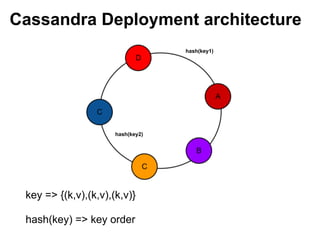
Cassandra Deployment architecture
                                   hash(key1)


                      hash(key2)


 key => {(k,v),(k,v),(k,v)}

 hash(key) => key order
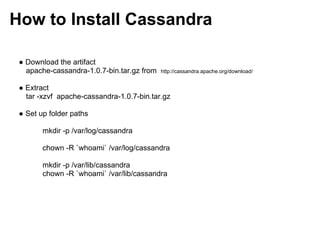
How to Install Cassandra

 ● Download the artifact
   apache-cassandra-1.0.7-bin.tar.gz from   http://cassandra.apache.org/download/


 ● Extract
   tar -xzvf apache-cassandra-1.0.7-bin.tar.gz

 ● Set up folder paths

        mkdir -p /var/log/cassandra

        chown -R `whoami` /var/log/cassandra

        mkdir -p /var/lib/cassandra
        chown -R `whoami` /var/lib/cassandra
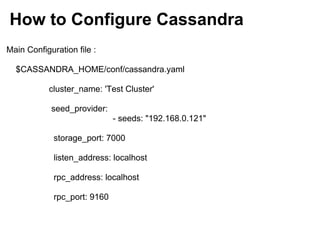
How to Configure Cassandra
Main Configuration file :

  $CASSANDRA_HOME/conf/cassandra.yaml

           cluster_name: 'Test Cluster'

            seed_provider:
                              - seeds: "192.168.0.121"

             storage_port: 7000

             listen_address: localhost

             rpc_address: localhost

             rpc_port: 9160
Cassandra Clustering

 initial_token:

 partitioner: org.apache.cassandra.dht.RandomPartitioner


 http://wiki.apache.org/cassandra/Operations
Cassandra DevOps

$CASSANDRA_HOME/bin$ ./cassandra-cli --host localhost

   [default@unknown] show keyspaces;
   Keyspace: system:
    Replication Strategy: org.apache.cassandra.locator.LocalStrategy
    Durable Writes: true
     Options: [replication_factor:1]
    Column Families:
     ColumnFamily: HintsColumnFamily (Super)
     "hinted handoff data"
       Key Validation Class: org.apache.cassandra.db.marshal.BytesType
       Default column value validator: org.apache.cassandra.db.marshal.BytesType
       Columns sorted by: org.apache.cassandra.db.marshal.BytesType/org.apache.cassandra.db.
   marshal.BytesType
       Row cache size / save period in seconds / keys to save : 0.0/0/all
       Row Cache Provider: org.apache.cassandra.cache.ConcurrentLinkedHashCacheProvider
       Key cache size / save period in seconds: 0.01/0
       GC grace seconds: 0
       Compaction min/max thresholds: 4/32
       Read repair chance: 0.0
       Replicate on write: true
       Bloom Filter FP chance: default
       Built indexes: []
       Compaction Strategy: org.apache.cassandra.db.compaction.SizeTieredCompactionStrategy
Cassandra CLI

[default@apache] create column family Location with comparator=UTF8Type and
default_validation_class=UTF8Type and key_validation_class=UTF8Type;
f04561a0-60ed-11e1-0000-242d50cf1fbf
Waiting for schema agreement...
... schemas agree across the cluster


[default@apache] set Location[00001][City]='Colombo';
Value inserted.
Elapsed time: 140 msec(s).


[default@apache] list Location;
Using default limit of 100
-------------------
RowKey: 00001
=> (column=City, value=Colombo, timestamp=1330311097464000)

1 Row Returned.
Elapsed time: 122 msec(s).
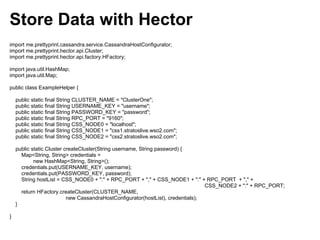
Store Data with Hector
import me.prettyprint.cassandra.service.CassandraHostConfigurator;
import me.prettyprint.hector.api.Cluster;
import me.prettyprint.hector.api.factory.HFactory;

import java.util.HashMap;
import java.util.Map;

public class ExampleHelper {

    public static final String CLUSTER_NAME = "ClusterOne";
    public static final String USERNAME_KEY = "username";
    public static final String PASSWORD_KEY = "password";
    public static final String RPC_PORT = "9160";
    public static final String CSS_NODE0 = "localhost";
    public static final String CSS_NODE1 = "css1.stratoslive.wso2.com";
    public static final String CSS_NODE2 = "css2.stratoslive.wso2.com";

    public static Cluster createCluster(String username, String password) {
      Map<String, String> credentials =
            new HashMap<String, String>();
      credentials.put(USERNAME_KEY, username);
      credentials.put(PASSWORD_KEY, password);
      String hostList = CSS_NODE0 + ":" + RPC_PORT + "," + CSS_NODE1 + ":" + RPC_PORT + "," +
                                                                                  CSS_NODE2 + ":" + RPC_PORT;
      return HFactory.createCluster(CLUSTER_NAME,
                           new CassandraHostConfigurator(hostList), credentials);
    }

}
Store Data with Hector
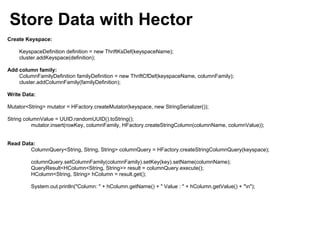
Create Keyspace:

    KeyspaceDefinition definition = new ThriftKsDef(keyspaceName);
    cluster.addKeyspace(definition);

Add column family:
    ColumnFamilyDefinition familyDefinition = new ThriftCfDef(keyspaceName, columnFamily);
    cluster.addColumnFamily(familyDefinition);

Write Data:

Mutator<String> mutator = HFactory.createMutator(keyspace, new StringSerializer());

String columnValue = UUID.randomUUID().toString();
          mutator.insert(rowKey, columnFamily, HFactory.createStringColumn(columnName, columnValue));


Read Data:
        ColumnQuery<String, String, String> columnQuery = HFactory.createStringColumnQuery(keyspace);

         columnQuery.setColumnFamily(columnFamily).setKey(key).setName(columnName);
         QueryResult<HColumn<String, String>> result = columnQuery.execute();
         HColumn<String, String> hColumn = result.get();

         System.out.println("Column: " + hColumn.getName() + " Value : " + hColumn.getValue() + "n");
Variable Consistency
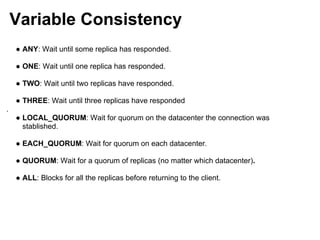
    ● ANY: Wait until some replica has responded.

    ● ONE: Wait until one replica has responded.

    ● TWO: Wait until two replicas have responded.

    ● THREE: Wait until three replicas have responded
.
    ● LOCAL_QUORUM: Wait for quorum on the datacenter the connection was
      stablished.

    ● EACH_QUORUM: Wait for quorum on each datacenter.

    ● QUORUM: Wait for a quorum of replicas (no matter which datacenter).

    ● ALL: Blocks for all the replicas before returning to the client.
Variable Consistency

Create a customized Consistency Level:

ConfigurableConsistencyLevel configurableConsistencyLevel = new ConfigurableConsistencyLevel();
Map<String, HConsistencyLevel> clmap = new HashMap<String, HConsistencyLevel>();


clmap.put("MyColumnFamily", HConsistencyLevel.ONE);

configurableConsistencyLevel.setReadCfConsistencyLevels(clmap);
configurableConsistencyLevel.setWriteCfConsistencyLevels(clmap);


HFactory.createKeyspace("MyKeyspace", myCluster, configurableConsistencyLevel);
CQL

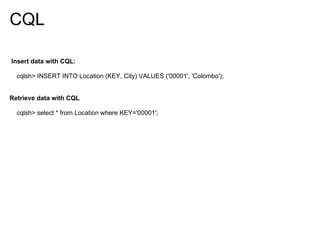
Insert data with CQL:

  cqlsh> INSERT INTO Location (KEY, City) VALUES ('00001', 'Colombo');


Retrieve data with CQL

  cqlsh> select * from Location where KEY='00001';
Apache


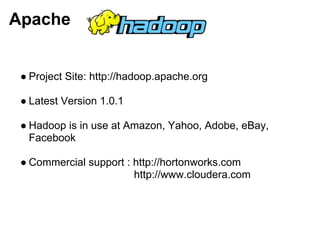
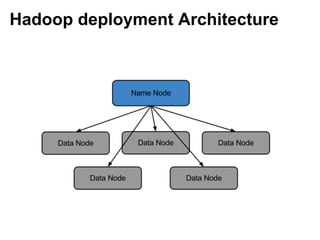
 ● Project Site: http://hadoop.apache.org

 ● Latest Version 1.0.1

 ● Hadoop is in use at Amazon, Yahoo, Adobe, eBay,
   Facebook

 ● Commercial support : http://hortonworks.com
                        http://www.cloudera.com
Hadoop deployment Architecture
How to install Hadoop

 ● Download the artifact from:

                      http://hadoop.apache.org/common/releases.
html

 ● Extract : tar -xzvf hadoop-1.0.1.tar.gz


 ● Copy and extract installation to each data node.


       scp hadoop-1.0.1.tar.gz user@datanode01:/home/hadoop

 ● Start Hadoop : $HADOOP_HOME:/bin/start-all
Hadoop CLI - HDFS


Format Namenode :

  $HADOOP_HOME:/bin/hadoop namenode -format

File operations on HDFS:

  $HADOOP_HOME:/bin/hadoop dfs -lsr /

  $HADOOP_HOME:/bin/hadoop dfs -mkdir /users/deep/wso2
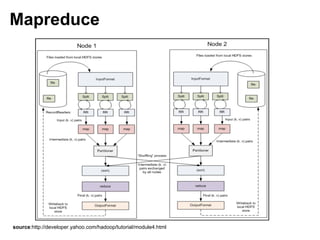
Mapreduce


source:http://developer.yahoo.com/hadoop/tutorial/module4.html
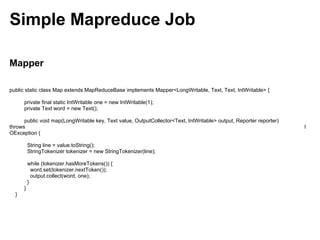
Simple Mapreduce Job

Mapper

public static class Map extends MapReduceBase implements Mapper<LongWritable, Text, Text, IntWritable> {

      private final static IntWritable one = new IntWritable(1);
      private Text word = new Text();

      public void map(LongWritable key, Text value, OutputCollector<Text, IntWritable> output, Reporter reporter)
throws                                                                                                              I
OException {

          String line = value.toString();
          StringTokenizer tokenizer = new StringTokenizer(line);

          while (tokenizer.hasMoreTokens()) {
            word.set(tokenizer.nextToken());
            output.collect(word, one);
          }
      }
  }
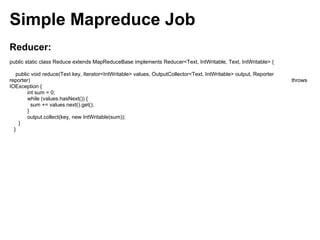
Simple Mapreduce Job
Reducer:
public static class Reduce extends MapReduceBase implements Reducer<Text, IntWritable, Text, IntWritable> {

   public void reduce(Text key, Iterator<IntWritable> values, OutputCollector<Text, IntWritable> output, Reporter
reporter)                                                                                                           throws
IOException {
        int sum = 0;
        while (values.hasNext()) {
          sum += values.next().get();
        }
        output.collect(key, new IntWritable(sum));
    }
  }
Simple Mapreduce Job

Job Runner:

     JobConf conf = new JobConf(WordCount.class);
     conf.setJobName("wordcount");

     conf.setOutputKeyClass(Text.class);
     conf.setOutputValueClass(IntWritable.class);

     conf.setMapperClass(Map.class);
     conf.setCombinerClass(Reduce.class);
     conf.setReducerClass(Reduce.class);

     conf.setInputFormat(TextInputFormat.class);
     conf.setOutputFormat(TextOutputFormat.class);

     FileInputFormat.setInputPaths(conf, new Path(args[0]));
     FileOutputFormat.setOutputPath(conf, new Path(args[1]));

     JobClient.runJob(conf);
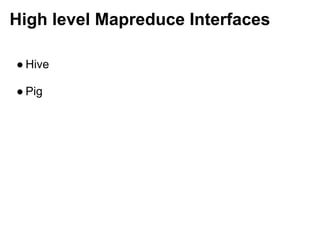
High level Mapreduce Interfaces

● Hive

● Pig
Q&A

Store and Process Big Data with Hadoop and Cassandra

  • 1.
    Store and ProcessBig Data with Hadoop and Cassandra Apache BarCamp By Deependra Ariyadewa WSO2, Inc.
  • 2.
    Store Data with ● Project site : http://cassandra.apache.org ● The latest release version is 1.0.7 ● Cassandra is in use at Netflix, Twitter, Urban Airship, Constant Contact, Reddit, Cisco, OpenX, Digg, CloudKick and Ooyala ● Cassandra Users : http://www.datastax.com/cassandrausers ● The largest known Cassandra cluster has over 300 TB of data in over 400 machines. ● Commercial support http://wiki.apache.org/cassandra/ThirdPartySupport
  • 3.
    Cassandra Deployment architecture hash(key1) hash(key2) key => {(k,v),(k,v),(k,v)} hash(key) => key order
  • 4.
    How to InstallCassandra ● Download the artifact apache-cassandra-1.0.7-bin.tar.gz from http://cassandra.apache.org/download/ ● Extract tar -xzvf apache-cassandra-1.0.7-bin.tar.gz ● Set up folder paths mkdir -p /var/log/cassandra chown -R `whoami` /var/log/cassandra mkdir -p /var/lib/cassandra chown -R `whoami` /var/lib/cassandra
  • 5.
    How to ConfigureCassandra Main Configuration file : $CASSANDRA_HOME/conf/cassandra.yaml cluster_name: 'Test Cluster' seed_provider: - seeds: "192.168.0.121" storage_port: 7000 listen_address: localhost rpc_address: localhost rpc_port: 9160
  • 6.
    Cassandra Clustering initial_token: partitioner: org.apache.cassandra.dht.RandomPartitioner http://wiki.apache.org/cassandra/Operations
  • 7.
    Cassandra DevOps $CASSANDRA_HOME/bin$ ./cassandra-cli--host localhost [default@unknown] show keyspaces; Keyspace: system: Replication Strategy: org.apache.cassandra.locator.LocalStrategy Durable Writes: true Options: [replication_factor:1] Column Families: ColumnFamily: HintsColumnFamily (Super) "hinted handoff data" Key Validation Class: org.apache.cassandra.db.marshal.BytesType Default column value validator: org.apache.cassandra.db.marshal.BytesType Columns sorted by: org.apache.cassandra.db.marshal.BytesType/org.apache.cassandra.db. marshal.BytesType Row cache size / save period in seconds / keys to save : 0.0/0/all Row Cache Provider: org.apache.cassandra.cache.ConcurrentLinkedHashCacheProvider Key cache size / save period in seconds: 0.01/0 GC grace seconds: 0 Compaction min/max thresholds: 4/32 Read repair chance: 0.0 Replicate on write: true Bloom Filter FP chance: default Built indexes: [] Compaction Strategy: org.apache.cassandra.db.compaction.SizeTieredCompactionStrategy
  • 8.
    Cassandra CLI [default@apache] createcolumn family Location with comparator=UTF8Type and default_validation_class=UTF8Type and key_validation_class=UTF8Type; f04561a0-60ed-11e1-0000-242d50cf1fbf Waiting for schema agreement... ... schemas agree across the cluster [default@apache] set Location[00001][City]='Colombo'; Value inserted. Elapsed time: 140 msec(s). [default@apache] list Location; Using default limit of 100 ------------------- RowKey: 00001 => (column=City, value=Colombo, timestamp=1330311097464000) 1 Row Returned. Elapsed time: 122 msec(s).
  • 9.
    Store Data withHector import me.prettyprint.cassandra.service.CassandraHostConfigurator; import me.prettyprint.hector.api.Cluster; import me.prettyprint.hector.api.factory.HFactory; import java.util.HashMap; import java.util.Map; public class ExampleHelper { public static final String CLUSTER_NAME = "ClusterOne"; public static final String USERNAME_KEY = "username"; public static final String PASSWORD_KEY = "password"; public static final String RPC_PORT = "9160"; public static final String CSS_NODE0 = "localhost"; public static final String CSS_NODE1 = "css1.stratoslive.wso2.com"; public static final String CSS_NODE2 = "css2.stratoslive.wso2.com"; public static Cluster createCluster(String username, String password) { Map<String, String> credentials = new HashMap<String, String>(); credentials.put(USERNAME_KEY, username); credentials.put(PASSWORD_KEY, password); String hostList = CSS_NODE0 + ":" + RPC_PORT + "," + CSS_NODE1 + ":" + RPC_PORT + "," + CSS_NODE2 + ":" + RPC_PORT; return HFactory.createCluster(CLUSTER_NAME, new CassandraHostConfigurator(hostList), credentials); } }
  • 10.
    Store Data withHector Create Keyspace: KeyspaceDefinition definition = new ThriftKsDef(keyspaceName); cluster.addKeyspace(definition); Add column family: ColumnFamilyDefinition familyDefinition = new ThriftCfDef(keyspaceName, columnFamily); cluster.addColumnFamily(familyDefinition); Write Data: Mutator<String> mutator = HFactory.createMutator(keyspace, new StringSerializer()); String columnValue = UUID.randomUUID().toString(); mutator.insert(rowKey, columnFamily, HFactory.createStringColumn(columnName, columnValue)); Read Data: ColumnQuery<String, String, String> columnQuery = HFactory.createStringColumnQuery(keyspace); columnQuery.setColumnFamily(columnFamily).setKey(key).setName(columnName); QueryResult<HColumn<String, String>> result = columnQuery.execute(); HColumn<String, String> hColumn = result.get(); System.out.println("Column: " + hColumn.getName() + " Value : " + hColumn.getValue() + "n");
  • 11.
    Variable Consistency ● ANY: Wait until some replica has responded. ● ONE: Wait until one replica has responded. ● TWO: Wait until two replicas have responded. ● THREE: Wait until three replicas have responded . ● LOCAL_QUORUM: Wait for quorum on the datacenter the connection was stablished. ● EACH_QUORUM: Wait for quorum on each datacenter. ● QUORUM: Wait for a quorum of replicas (no matter which datacenter). ● ALL: Blocks for all the replicas before returning to the client.
  • 12.
    Variable Consistency Create acustomized Consistency Level: ConfigurableConsistencyLevel configurableConsistencyLevel = new ConfigurableConsistencyLevel(); Map<String, HConsistencyLevel> clmap = new HashMap<String, HConsistencyLevel>(); clmap.put("MyColumnFamily", HConsistencyLevel.ONE); configurableConsistencyLevel.setReadCfConsistencyLevels(clmap); configurableConsistencyLevel.setWriteCfConsistencyLevels(clmap); HFactory.createKeyspace("MyKeyspace", myCluster, configurableConsistencyLevel);
  • 13.
    CQL Insert data withCQL: cqlsh> INSERT INTO Location (KEY, City) VALUES ('00001', 'Colombo'); Retrieve data with CQL cqlsh> select * from Location where KEY='00001';
  • 14.
    Apache ● ProjectSite: http://hadoop.apache.org ● Latest Version 1.0.1 ● Hadoop is in use at Amazon, Yahoo, Adobe, eBay, Facebook ● Commercial support : http://hortonworks.com http://www.cloudera.com
  • 15.
  • 16.
    How to installHadoop ● Download the artifact from: http://hadoop.apache.org/common/releases. html ● Extract : tar -xzvf hadoop-1.0.1.tar.gz ● Copy and extract installation to each data node. scp hadoop-1.0.1.tar.gz user@datanode01:/home/hadoop ● Start Hadoop : $HADOOP_HOME:/bin/start-all
  • 17.
    Hadoop CLI -HDFS Format Namenode : $HADOOP_HOME:/bin/hadoop namenode -format File operations on HDFS: $HADOOP_HOME:/bin/hadoop dfs -lsr / $HADOOP_HOME:/bin/hadoop dfs -mkdir /users/deep/wso2
  • 18.
  • 19.
    Simple Mapreduce Job Mapper publicstatic class Map extends MapReduceBase implements Mapper<LongWritable, Text, Text, IntWritable> { private final static IntWritable one = new IntWritable(1); private Text word = new Text(); public void map(LongWritable key, Text value, OutputCollector<Text, IntWritable> output, Reporter reporter) throws I OException { String line = value.toString(); StringTokenizer tokenizer = new StringTokenizer(line); while (tokenizer.hasMoreTokens()) { word.set(tokenizer.nextToken()); output.collect(word, one); } } }
  • 20.
    Simple Mapreduce Job Reducer: publicstatic class Reduce extends MapReduceBase implements Reducer<Text, IntWritable, Text, IntWritable> { public void reduce(Text key, Iterator<IntWritable> values, OutputCollector<Text, IntWritable> output, Reporter reporter) throws IOException { int sum = 0; while (values.hasNext()) { sum += values.next().get(); } output.collect(key, new IntWritable(sum)); } }
  • 21.
    Simple Mapreduce Job JobRunner: JobConf conf = new JobConf(WordCount.class); conf.setJobName("wordcount"); conf.setOutputKeyClass(Text.class); conf.setOutputValueClass(IntWritable.class); conf.setMapperClass(Map.class); conf.setCombinerClass(Reduce.class); conf.setReducerClass(Reduce.class); conf.setInputFormat(TextInputFormat.class); conf.setOutputFormat(TextOutputFormat.class); FileInputFormat.setInputPaths(conf, new Path(args[0])); FileOutputFormat.setOutputPath(conf, new Path(args[1])); JobClient.runJob(conf);
  • 22.
    High level MapreduceInterfaces ● Hive ● Pig
  • 23.