Step Wise:
An
approach to planning software
projects
1
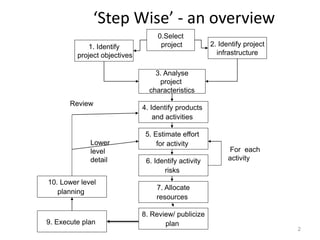
‘Step Wise’ - an overview
2
0.Select
project
1. Identify
project objectives
2. Identify project
infrastructure
3. Analyse
project
characteristics
4. Identify products
and activities
5. Estimate effort
for activity
8. Review/ publicize
plan
6. Identify activity
risks
7. Allocate
resources
9. Execute plan
10. Lower level
planning
Review
Lower
level
detail
For each
activity
Step 0:Select Project
• It is called 0 step
– It is outside main project planning process
• Here we do feasibility study
• Priority of projects
• Merits of project
3
Step:1-Project scope and objectives
 1.1 Identify objectives and measures of effectiveness in
meeting those objectives
 1.2 Establish a project authority
◦ ‘who is the boss?’
◦ Project steering committee
◦ Setting, monitoring and modifying objective
 1.3 Identify all stakeholders in the project and their
interests
◦ ‘who will be affected/involved in the project?’
4
Step:1-Cont…
• 1.4 Modify objectives in the light of
stakeholder analysis
– ‘do we need to do things to win over
stakeholders?’
– Add new features for stakeholder’s benefit
• Drawback is size(work and finance) may increase
• 1.5 Establish methods of communication with
all parties
– ‘how do we keep in contact?’
5
Step:1-Cont…
• Project Scope
• Identify the objectives
• Defining goals
6
Step:2- Establish project
infrastructure
• Projects are rarely carried in vacuum
• 2.1 Establish link between project and any
strategic plan
– Identify projects to be carried out
– Order of projects
– Identify and prioritize the projects
– Establish framework for project
– ‘why did they want the project?’
– What h/w and s/w part needed
7
Tentative Priority steps
• The selection process—must select
• Proposals screening
• The priority Team
• Selection criteria
• Assessing results
8
9
10
11
Step:2-Cont…
• 2.2 Identify installation standards and
procedures
– What are the development procedures?
– ‘What standards do we have to follow?’
– Change control and management
• Changes to requirements are implemented in safe and
orderly manner.
– Quality standards
• Establish quality checks at each phase of SDLC.
12
Change control
• Change control is a systematic approach
to managing all changes made to a product or
system. The purpose is to ensure that no
unnecessary changes are made, that
all changes are documented, that services are
not unnecessarily disrupted and that
resources are used efficiently
13
Step:2-Cont…
• 2.3. Identify project team organization
– Identify your requirement of team
– Choose best people
– ‘where do I fit in?’
– Divide the activities
– Create groups
– There should be a project leader
– Restrict some groups to be combined
14
Step:3-Analysis of project
characteristics
• 3.1 Distinguish the project as either objective
or product-based
– Object v/s Product
– Project can be distinguished by their aim whether
it is to produce a product or to meet certain
objective.
– Is there more than one way of achieving success?
– Mostly in earlier stage projects are objective and in
later stage it become product driven
15
Step:3-Cont…
• 3.2 Analyze other project characteristics
(including quality based ones)
– what is different about this project?
– Whether it is a information system or embedded
system?
• Stock control system-Info. Sys.
• AC equipment- Embedded system
– What are the critical issues?
– Malfunctioning threatened human life?
16
Step:3-Cont…
• 3.3 Identify high level project risks
– ‘what could go wrong?’
– ‘what can we do to stop it?’
• 3.4 Take into account user requirements
concerning implementation
– For example customer want the product in java
• 3.5 Select development methodology and life
cycle approach
– waterfall? Increments? Prototypes?
– Generally Company use the same method or SDLC as
they were using in past
– It also depends on project need.
17
Step:3-Cont…
• 3.6 Review overall resource estimates
– When it is clear that what are the risks and what
approach we are going to use
• Its good to re-estimate efforts and resources.
– Does all this increase the cost?’
18
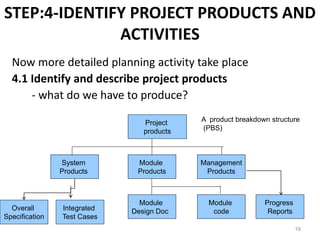
STEP:4-IDENTIFY PROJECT PRODUCTS AND
ACTIVITIES
Now more detailed planning activity take place
4.1 Identify and describe project products
- what do we have to produce?
19
Project
products
Management
Products
Module
Products
System
Products
Module
code
Module
Design Doc
Progress
Reports
A product breakdown structure
(PBS)
Overall
Specification
Integrated
Test Cases
Products
• The result of an activity
• Could be-
– physical thing
• installed pc
– a document
• logical data structure
– a person
• trained user
– a new version of an old product
• updated software
20
Products
• The following are NOT normally products:
– activities
• training
– events
• interviews completed
– resources and actors
• software developer
• Products CAN BE deliverable or
intermediate
21
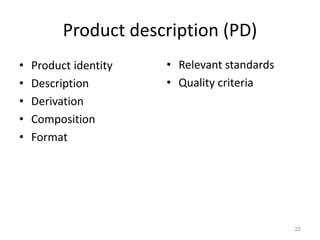
Product description (PD)
• Product identity
• Description
• Derivation
• Composition
• Format
• Relevant standards
• Quality criteria
22
23
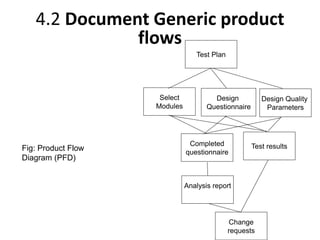
Test Plan
Select
Modules
Design
Questionnaire
Design Quality
Parameters
Completed
questionnaire
Analysis report
Test results
Change
requests
Fig: Product Flow
Diagram (PFD)
4.2 Document Generic product
flows
Step 4.3 Recognize product instances
• The PBS and PFD will probably have identified
generic products e.g. ‘software modules’
• It might be possible to identify specific
instances e.g. ‘module A’, ‘module B’ …
• But in many cases this will have to be left to
later, more detailed, planning
24
4.4. Produce ideal activity network
• Identify the activities needed to create each
product in the PFD
• More than one activity might be needed to
create a single product
• Draw up activity network
25
Step 5:Estimate effort for each
activity
• 5.1 Carry out bottom-up estimates
– In Step3.6 we have done top-down estimation
– Top down v/s Bottom-Up
– distinguish carefully between effort and
elapsed time
– Effort is amount of work that needs to be done
– Calculate effort:
– Elapsed time is the time between start and the
end of the task
26
Step 5:Estimate effort for each activity
• 5.2. Revise plan to create controllable
activities
– It is very difficult to judge the progress of a Long
activity
– With long activity it is difficult to monitor and
control the activity.
– break up very long activities into a series of
smaller ones
– bundle up very short activities (create check lists?)
27
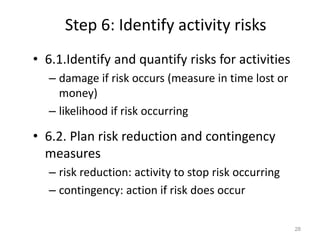
Step 6: Identify activity risks
• 6.1.Identify and quantify risks for activities
– damage if risk occurs (measure in time lost or
money)
– likelihood if risk occurring
• 6.2. Plan risk reduction and contingency
measures
– risk reduction: activity to stop risk occurring
– contingency: action if risk does occur
28
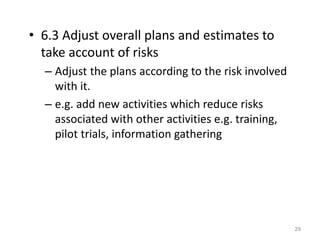
• 6.3 Adjust overall plans and estimates to
take account of risks
– Adjust the plans according to the risk involved
with it.
– e.g. add new activities which reduce risks
associated with other activities e.g. training,
pilot trials, information gathering
29
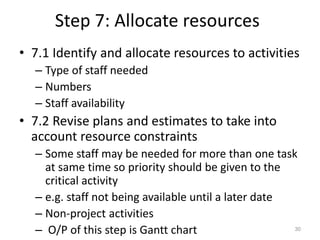
Step 7: Allocate resources
• 7.1 Identify and allocate resources to activities
– Type of staff needed
– Numbers
– Staff availability
• 7.2 Revise plans and estimates to take into
account resource constraints
– Some staff may be needed for more than one task
at same time so priority should be given to the
critical activity
– e.g. staff not being available until a later date
– Non-project activities
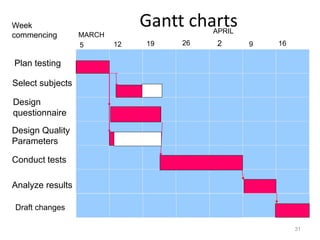
– O/P of this step is Gantt chart 30
Gantt charts
31
Select subjects
Design
questionnaire
Design Quality
Parameters
Conduct tests
Analyze results
Week
commencing
5 12 19 26
MARCH
APRIL
9 16
Plan testing
2
Draft changes
Step 8: Review/publicise plan
• 8.1 Review quality aspects of project plan
– When task is reported complete it is important
to review its quality
– There should be some quality criteria
• 8.2 Document plan and obtain agreement
32
Step 9 and 10: Execute plan
and create lower level plans
Thank You
33

SPM-Lecture 2.pptx

  • 1.
    Step Wise: An approach toplanning software projects 1
  • 2.
    ‘Step Wise’ -an overview 2 0.Select project 1. Identify project objectives 2. Identify project infrastructure 3. Analyse project characteristics 4. Identify products and activities 5. Estimate effort for activity 8. Review/ publicize plan 6. Identify activity risks 7. Allocate resources 9. Execute plan 10. Lower level planning Review Lower level detail For each activity
  • 3.
    Step 0:Select Project •It is called 0 step – It is outside main project planning process • Here we do feasibility study • Priority of projects • Merits of project 3
  • 4.
    Step:1-Project scope andobjectives  1.1 Identify objectives and measures of effectiveness in meeting those objectives  1.2 Establish a project authority ◦ ‘who is the boss?’ ◦ Project steering committee ◦ Setting, monitoring and modifying objective  1.3 Identify all stakeholders in the project and their interests ◦ ‘who will be affected/involved in the project?’ 4
  • 5.
    Step:1-Cont… • 1.4 Modifyobjectives in the light of stakeholder analysis – ‘do we need to do things to win over stakeholders?’ – Add new features for stakeholder’s benefit • Drawback is size(work and finance) may increase • 1.5 Establish methods of communication with all parties – ‘how do we keep in contact?’ 5
  • 6.
    Step:1-Cont… • Project Scope •Identify the objectives • Defining goals 6
  • 7.
    Step:2- Establish project infrastructure •Projects are rarely carried in vacuum • 2.1 Establish link between project and any strategic plan – Identify projects to be carried out – Order of projects – Identify and prioritize the projects – Establish framework for project – ‘why did they want the project?’ – What h/w and s/w part needed 7
  • 8.
    Tentative Priority steps •The selection process—must select • Proposals screening • The priority Team • Selection criteria • Assessing results 8
  • 9.
  • 10.
  • 11.
  • 12.
    Step:2-Cont… • 2.2 Identifyinstallation standards and procedures – What are the development procedures? – ‘What standards do we have to follow?’ – Change control and management • Changes to requirements are implemented in safe and orderly manner. – Quality standards • Establish quality checks at each phase of SDLC. 12
  • 13.
    Change control • Changecontrol is a systematic approach to managing all changes made to a product or system. The purpose is to ensure that no unnecessary changes are made, that all changes are documented, that services are not unnecessarily disrupted and that resources are used efficiently 13
  • 14.
    Step:2-Cont… • 2.3. Identifyproject team organization – Identify your requirement of team – Choose best people – ‘where do I fit in?’ – Divide the activities – Create groups – There should be a project leader – Restrict some groups to be combined 14
  • 15.
    Step:3-Analysis of project characteristics •3.1 Distinguish the project as either objective or product-based – Object v/s Product – Project can be distinguished by their aim whether it is to produce a product or to meet certain objective. – Is there more than one way of achieving success? – Mostly in earlier stage projects are objective and in later stage it become product driven 15
  • 16.
    Step:3-Cont… • 3.2 Analyzeother project characteristics (including quality based ones) – what is different about this project? – Whether it is a information system or embedded system? • Stock control system-Info. Sys. • AC equipment- Embedded system – What are the critical issues? – Malfunctioning threatened human life? 16
  • 17.
    Step:3-Cont… • 3.3 Identifyhigh level project risks – ‘what could go wrong?’ – ‘what can we do to stop it?’ • 3.4 Take into account user requirements concerning implementation – For example customer want the product in java • 3.5 Select development methodology and life cycle approach – waterfall? Increments? Prototypes? – Generally Company use the same method or SDLC as they were using in past – It also depends on project need. 17
  • 18.
    Step:3-Cont… • 3.6 Reviewoverall resource estimates – When it is clear that what are the risks and what approach we are going to use • Its good to re-estimate efforts and resources. – Does all this increase the cost?’ 18
  • 19.
    STEP:4-IDENTIFY PROJECT PRODUCTSAND ACTIVITIES Now more detailed planning activity take place 4.1 Identify and describe project products - what do we have to produce? 19 Project products Management Products Module Products System Products Module code Module Design Doc Progress Reports A product breakdown structure (PBS) Overall Specification Integrated Test Cases
  • 20.
    Products • The resultof an activity • Could be- – physical thing • installed pc – a document • logical data structure – a person • trained user – a new version of an old product • updated software 20
  • 21.
    Products • The followingare NOT normally products: – activities • training – events • interviews completed – resources and actors • software developer • Products CAN BE deliverable or intermediate 21
  • 22.
    Product description (PD) •Product identity • Description • Derivation • Composition • Format • Relevant standards • Quality criteria 22
  • 23.
    23 Test Plan Select Modules Design Questionnaire Design Quality Parameters Completed questionnaire Analysisreport Test results Change requests Fig: Product Flow Diagram (PFD) 4.2 Document Generic product flows
  • 24.
    Step 4.3 Recognizeproduct instances • The PBS and PFD will probably have identified generic products e.g. ‘software modules’ • It might be possible to identify specific instances e.g. ‘module A’, ‘module B’ … • But in many cases this will have to be left to later, more detailed, planning 24
  • 25.
    4.4. Produce idealactivity network • Identify the activities needed to create each product in the PFD • More than one activity might be needed to create a single product • Draw up activity network 25
  • 26.
    Step 5:Estimate effortfor each activity • 5.1 Carry out bottom-up estimates – In Step3.6 we have done top-down estimation – Top down v/s Bottom-Up – distinguish carefully between effort and elapsed time – Effort is amount of work that needs to be done – Calculate effort: – Elapsed time is the time between start and the end of the task 26
  • 27.
    Step 5:Estimate effortfor each activity • 5.2. Revise plan to create controllable activities – It is very difficult to judge the progress of a Long activity – With long activity it is difficult to monitor and control the activity. – break up very long activities into a series of smaller ones – bundle up very short activities (create check lists?) 27
  • 28.
    Step 6: Identifyactivity risks • 6.1.Identify and quantify risks for activities – damage if risk occurs (measure in time lost or money) – likelihood if risk occurring • 6.2. Plan risk reduction and contingency measures – risk reduction: activity to stop risk occurring – contingency: action if risk does occur 28
  • 29.
    • 6.3 Adjustoverall plans and estimates to take account of risks – Adjust the plans according to the risk involved with it. – e.g. add new activities which reduce risks associated with other activities e.g. training, pilot trials, information gathering 29
  • 30.
    Step 7: Allocateresources • 7.1 Identify and allocate resources to activities – Type of staff needed – Numbers – Staff availability • 7.2 Revise plans and estimates to take into account resource constraints – Some staff may be needed for more than one task at same time so priority should be given to the critical activity – e.g. staff not being available until a later date – Non-project activities – O/P of this step is Gantt chart 30
  • 31.
    Gantt charts 31 Select subjects Design questionnaire DesignQuality Parameters Conduct tests Analyze results Week commencing 5 12 19 26 MARCH APRIL 9 16 Plan testing 2 Draft changes
  • 32.
    Step 8: Review/publiciseplan • 8.1 Review quality aspects of project plan – When task is reported complete it is important to review its quality – There should be some quality criteria • 8.2 Document plan and obtain agreement 32 Step 9 and 10: Execute plan and create lower level plans
  • 33.