Planning a Software
Project
UNIT-4
Project Planning 2
Agenda
Background
Effort estimation
Schedule and resource estimation
Quality Planning
Risk management
Project monitoring plans
Project Planning 3
Software Project
Goal: Build a software system to meet
commitments on cost, schedule, quality
Worldwide - many projects fail
one-third are runaways with cost or schedule
overrun of more than 125%
Project Planning 4
Project Failures
Major reasons for project runaways
unclear objectives
bad planning
no project management methodology
new technology
insufficient staff
All of these relate to project management
Effective project management is key to
successfully executing a project
Project Planning 5
Why improve PM?
Better predictability leading to
commitments that can be met
Lower cost through reduced rework,
better resource mgmt, better planning,..
Improved quality through proper quality
planning and control
Better control through change control,
CM, monitoring etc.
Project Planning 6
Why improve PM ….
Better visibility into project health and
state leading to timely intervention
Better handling of risks reducing the
chances of failure
All this leads to higher customer
satisfaction
And organization improvement
Project Planning 7
The Project Mgmt Process
Has three phases - planning, monitoring
and control, and closure
Planning is done before the much of the
engineering process (life cycle, LC) and
closure after the process
Monitoring phase is in parallel with LC
We focus on planning; monitoring covered
through its planning
Project Planning 8
Project Planning
Basic objective: To create a plan to meet
the commitments of the project, I.e.
create a path that, if followed, will lead to
a successful project
Planning involves defining the LC process
to be followed, estimates, detailed
schedule, plan for quality, etc.
Main output - a project management plan
and the project schedule
Project Planning 9
Key Planning Tasks
Estimate effort
Define project milestones and create a schedule
Define quality objectives and a quality plan
Identify risks and make plans to mitigate them
Define measurement plan, project-tracking
procedures, training plan, team organization, etc.
Effort Estimation
Project Planning 11
Effort Estimation
For a project total cost and duration has
to be committed in start
Requires effort estimation, often in terms
of person-months
Effort estimate is key to planning -
schedule, cost, resources depend on it
Many problems in project execution stem
from improper estimation
Project Planning 12
Estimation..
No easy way, no silver bullet
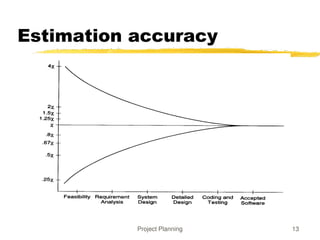
Estimation accuracy can improve with more
information about the project
Early estimates are more likely to be
inaccurate than later
More uncertainties in the start
With more info, estimation becomes easier
Project Planning 13
Estimation accuracy
Project Planning 14
Effort Estimation Models..
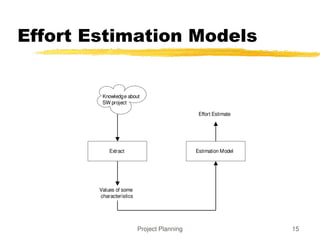
A model tries to determine the effort
estimate from some parameter values
A model also requires input about the
project, and cannot work in vacuum
So to apply a model, we should be able to
extract properties about the system
Two types of models - top-down and
bottom-up
Project Planning 15
Effort Estimation Models
Extract Estimation Model
Values of some
characteristics
Effort Estimate
Knowledge about
SW project
Project Planning 16
Top down estimation
First determines the total effort, then effort for
components
Simple approach – estimate effort from size and
productivity
Get the estimate of the total size of the software
Estimate project productivity using past data and project
characteristics
Obtain the overall effort estimate from productivity and
size estimates
Effort distribution data from similar project are
used to estimate effort for different phases
Project Planning 17
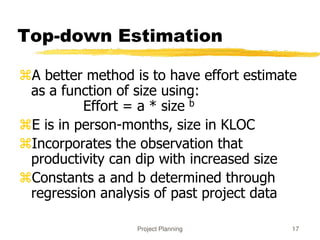
Top-down Estimation
A better method is to have effort estimate
as a function of size using:
Effort = a * size b
E is in person-months, size in KLOC
Incorporates the observation that
productivity can dip with increased size
Constants a and b determined through
regression analysis of past project data
Project Planning 18
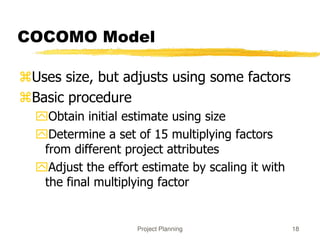
COCOMO Model
Uses size, but adjusts using some factors
Basic procedure
Obtain initial estimate using size
Determine a set of 15 multiplying factors
from different project attributes
Adjust the effort estimate by scaling it with
the final multiplying factor
Project Planning 19
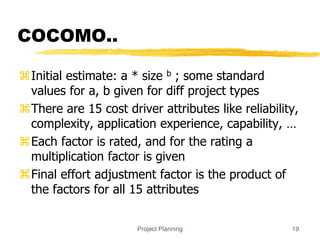
COCOMO..
Initial estimate: a * size b ; some standard
values for a, b given for diff project types
There are 15 cost driver attributes like reliability,
complexity, application experience, capability, …
Each factor is rated, and for the rating a
multiplication factor is given
Final effort adjustment factor is the product of
the factors for all 15 attributes
Project Planning 20
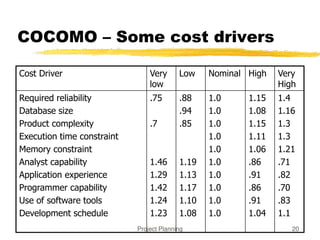
COCOMO – Some cost drivers
Cost Driver Very
low
Low Nominal High Very
High
Required reliability
Database size
Product complexity
Execution time constraint
Memory constraint
Analyst capability
Application experience
Programmer capability
Use of software tools
Development schedule
.75
.7
1.46
1.29
1.42
1.24
1.23
.88
.94
.85
1.19
1.13
1.17
1.10
1.08
1.0
1.0
1.0
1.0
1.0
1.0
1.0
1.0
1.0
1.0
1.15
1.08
1.15
1.11
1.06
.86
.91
.86
.91
1.04
1.4
1.16
1.3
1.3
1.21
.71
.82
.70
.83
1.1
Project Planning 21
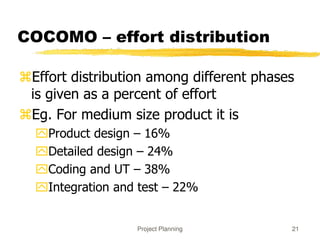
COCOMO – effort distribution
Effort distribution among different phases
is given as a percent of effort
Eg. For medium size product it is
Product design – 16%
Detailed design – 24%
Coding and UT – 38%
Integration and test – 22%
Project Planning 22
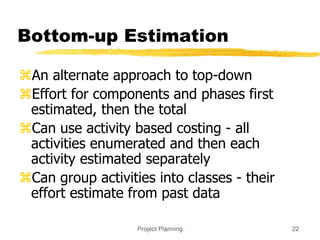
Bottom-up Estimation
An alternate approach to top-down
Effort for components and phases first
estimated, then the total
Can use activity based costing - all
activities enumerated and then each
activity estimated separately
Can group activities into classes - their
effort estimate from past data
Project Planning 23
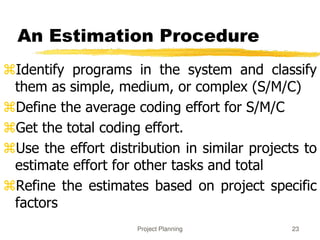
An Estimation Procedure
Identify programs in the system and classify
them as simple, medium, or complex (S/M/C)
Define the average coding effort for S/M/C
Get the total coding effort.
Use the effort distribution in similar projects to
estimate effort for other tasks and total
Refine the estimates based on project specific
factors
Scheduling and Staffing
Project Planning 25
Project Schedule
A project Schedule is at two levels -
overall schedule and detailed schedule
Overall schedule comprises of major
milestones and final date
Detailed schedule is the assignment of
lowest level tasks to resources
Project Planning 26
Overall Schedule
Depends heavily on the effort estimate
For an effort estimate, some flexibility
exists depending on resources assigned
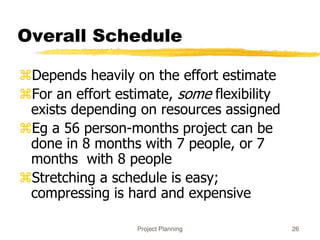
Eg a 56 person-months project can be
done in 8 months with 7 people, or 7
months with 8 people
Stretching a schedule is easy;
compressing is hard and expensive
Project Planning 27
Overall Scheduling...
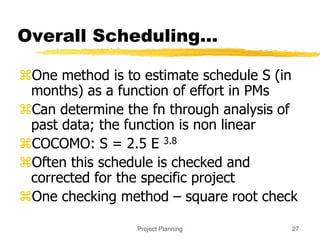
One method is to estimate schedule S (in
months) as a function of effort in PMs
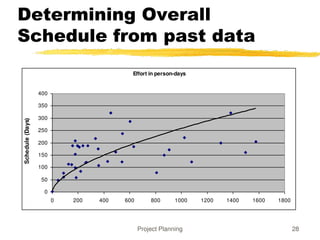
Can determine the fn through analysis of
past data; the function is non linear
COCOMO: S = 2.5 E 3.8
Often this schedule is checked and
corrected for the specific project
One checking method – square root check
Project Planning 28
Determining Overall
Schedule from past data
Effort in person-days
0
50
100
150
200
250
300
350
400
0 200 400 600 800 1000 1200 1400 1600 1800
Schedule
(Days)
Project Planning 29
Determining Milestones
With effort and overall schedule decided,
avg project resources are fixed
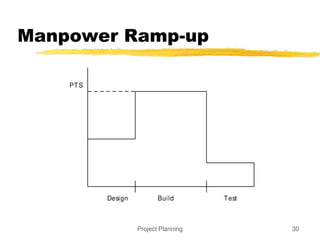
Manpower ramp-up in a project decides
the milestones
Manpower ramp-up in a project follows a
Rayleigh curve - like a normal curve
In reality manpower build-up is a step
function
Project Planning 30
Manpower Ramp-up
Design Build Test
PTS
Project Planning 31
Milestones ...
With manpower ramp-up and effort distribution,
milestones can be decided
Effort distribution and schedule distribution in
phases are different
Generally, the build has larger effort but not
correspondingly large schedule
COCOMO specifies distr of overall sched. Design
– 19%, programming – 62%, integration – 18%
Project Planning 32
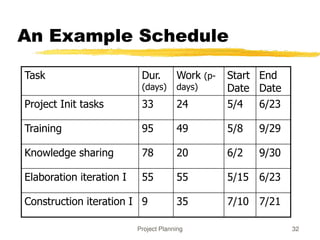
An Example Schedule
Task Dur.
(days)
Work (p-
days)
Start
Date
End
Date
Project Init tasks 33 24 5/4 6/23
Training 95 49 5/8 9/29
Knowledge sharing 78 20 6/2 9/30
Elaboration iteration I 55 55 5/15 6/23
Construction iteration I 9 35 7/10 7/21
Project Planning 33
Detailed Scheduling
To reach a milestone, many tasks have to
be performed
Lowest level tasks - those that can be done
by a person (in less than 2-3 days)
Scheduling - decide the tasks, assign them
while preserving high-level schedule
Is an iterative task - if cannot “fit” all tasks,
must revisit high level schedule
Project Planning 34
Detailed Scheduling
Detailed schedule not done completely in
the start - it evolves
Can use Microsoft Project for keeping it
Detailed Schedule is the most live
document for managing the project
Any activity to be done must get reflected
in the detailed schedule
Project Planning 35
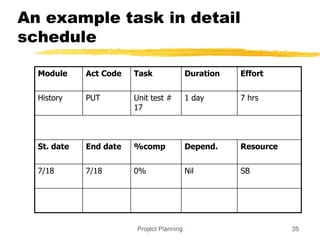
An example task in detail
schedule
Module Act Code Task Duration Effort
History PUT Unit test #
17
1 day 7 hrs
St. date End date %comp Depend. Resource
7/18 7/18 0% Nil SB
Project Planning 36
Detail schedule
Each task has name, date, duration,
resource etc assigned
% done is for tracking (tools use it)
The detailed schedule has to be
consistent with milestones
Tasks are sub-activities of milestone level
activities, so effort should add up, total
schedule should be preserved
Quality Planning
Project Planning 38
Quality Planning
Delivering high quality is a basic goal
Quality can be defined in many ways
Current industry standard - delivered
defect density (e.g. #defects/KLOC)
Defect - something that causes software
to behave in an inconsistent manner
Aim of a project - deliver software with
low delivered defect density
Project Planning 39
Defect Injection and
Removal
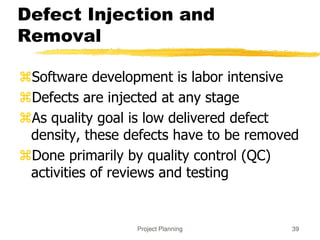
Software development is labor intensive
Defects are injected at any stage
As quality goal is low delivered defect
density, these defects have to be removed
Done primarily by quality control (QC)
activities of reviews and testing
Project Planning 40
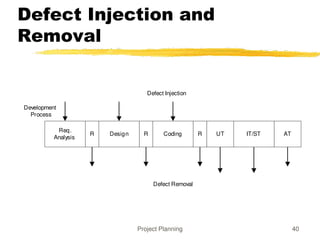
Defect Injection and
Removal
Req.
Analysis
Design R Coding R UT IT/ST AT
Development
Process
Defect Injection
R
Defect Removal
Project Planning 41
Approaches to Quality
Management
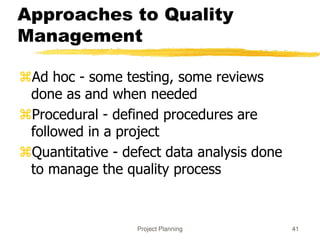
Ad hoc - some testing, some reviews
done as and when needed
Procedural - defined procedures are
followed in a project
Quantitative - defect data analysis done
to manage the quality process
Project Planning 42
Procedural Approach
A quality plan defines what QC tasks will
be undertaken and when
Main QC tasks - reviews and testing
Guidelines and procedures for reviews
and testing are provided
During project execution, adherence to
the plan and procedures ensured
Project Planning 43
Quantitative Approach
Goes beyond asking “has the procedure
been executed”
Analyzes defect data to make judgements
about quality
Past data is very important
Key parameters - defect injection and
removal rates, defect removal efficiency
(DRE)
Project Planning 44
Quality Plan
The quality plan drives the quality
activities in the project
Level of plan depends on models available
Must define QC tasks that have to be
performed in the project
Can specify defect levels for each QC
tasks (if models and data available)
Risk Management
Project Planning 46
Risk Management
Any project can fail - reasons can be
technical, managerial, etc.
Project management aims to tackle the
project management aspect
Engineering life cycles aim to tackle the
engineering issues
A project may fail due to unforeseen events
- risk management aims to tackle this
Project Planning 47
Risk Management
Risk: any condition or event whose
occurrence is not certain but which can
cause the project to fail
Aim of risk management: minimize the
effect of risks on a project
Risk management has two basic aspects
Risk assessment
Risk control
Project Planning 48
Risk Assessment
To identify possible risks to a project, i.e.
to those events that might occur and
which might cause the project to fail
No “algorithm” possible, done by “what
ifs”, checklists, past experience
Can have a list of “top 10” risks that
projects have seen in past
Project Planning 49
Top Risk Examples
Shortage of technically trained manpower
Too many requirement changes
Unclear requirements
Not meeting performance requirements
Unrealistic schedules
Insufficient business knowledge
Working on new technology
Project Planning 50
Risk Prioritization
The number of risks might be large
Must prioritize them to focus attention on
the “high risk” areas
For prioritization, impact of each risk must
be understood
In addition, probability of the risk
occurring should also be understood
Project Planning 51
Risk Prioritization ...
Risk exposure (RE) = probability of risk
occurring * risk impact
RE is the expected value of loss for a risk
Prioritization can be done based on risk
exposure value
Plans can be made to handle high RE risks
Project Planning 52
A Simple approach to Risk
Prioritization
Classify risk occurrence probabilities as:
Low, Medium, High
Classify risk impact as: Low, Medium, High
Identify those that are HH, or HM/MH
Focus on these for risk mitigation
Will work for most small and medium sized
projects
Project Planning 53
Risk Control
Can the risk be avoided?
E.g. if new hardware is a risk, it can be
avoided by working with proven hardware
For others, risk mitigation steps need to
be planned and executed
Actions taken in the project such that if the
risk materializes, its impact is minimal
Involves extra cost
Project Planning 54
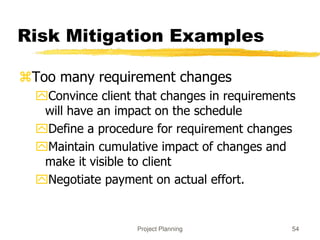
Risk Mitigation Examples
Too many requirement changes
Convince client that changes in requirements
will have an impact on the schedule
Define a procedure for requirement changes
Maintain cumulative impact of changes and
make it visible to client
Negotiate payment on actual effort.
Project Planning 55
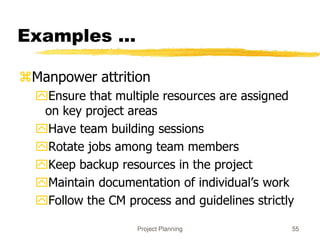
Examples ...
Manpower attrition
Ensure that multiple resources are assigned
on key project areas
Have team building sessions
Rotate jobs among team members
Keep backup resources in the project
Maintain documentation of individual’s work
Follow the CM process and guidelines strictly
Project Planning 56
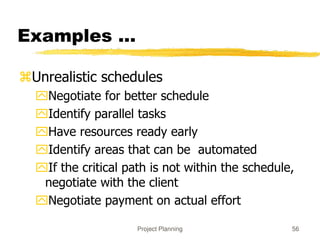
Examples ...
Unrealistic schedules
Negotiate for better schedule
Identify parallel tasks
Have resources ready early
Identify areas that can be automated
If the critical path is not within the schedule,
negotiate with the client
Negotiate payment on actual effort
Project Planning 57
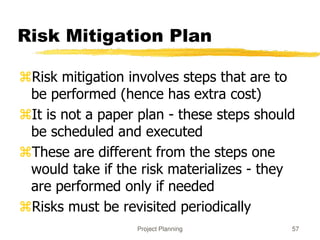
Risk Mitigation Plan
Risk mitigation involves steps that are to
be performed (hence has extra cost)
It is not a paper plan - these steps should
be scheduled and executed
These are different from the steps one
would take if the risk materializes - they
are performed only if needed
Risks must be revisited periodically
Project Planning 58
A Practical Risk Mgmt
Approach
 Based on methods of some orgs
1. List risks; for each risk rate probability as
Low, Medium, High
2. For each risk assess impact on the project
as Low, medium, High
3. Rank the risks based on probability and
impact – HH is the highest
4. Select top few items for mitigation
Project Planning 59
A risk mgmt plan
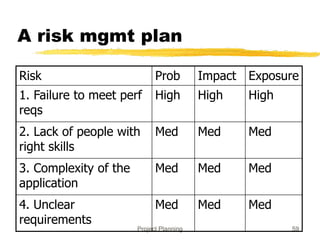
Risk Prob Impact Exposure
1. Failure to meet perf
reqs
High High High
2. Lack of people with
right skills
Med Med Med
3. Complexity of the
application
Med Med Med
4. Unclear
requirements
Med Med Med
Project Planning 60
Risk Mgmt plan…
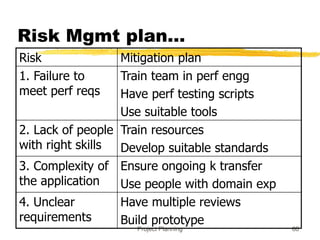
Risk Mitigation plan
1. Failure to
meet perf reqs
Train team in perf engg
Have perf testing scripts
Use suitable tools
2. Lack of people
with right skills
Train resources
Develop suitable standards
3. Complexity of
the application
Ensure ongoing k transfer
Use people with domain exp
4. Unclear
requirements
Have multiple reviews
Build prototype
Project Monitoring Plans
Project Planning 62
Background
A plan is a mere document that can guide
It must be executed
To ensure execution goes as per plan, it
must be monitored and controlled
Monitoring requires measurements
And methods for interpreting them
Monitoring plan has to plan for all the
tasks related to monitoring
Project Planning 63
Measurements
Must plan for measurements in a project
Without planning, measurements will not be
done
Main measurements – effort, size, schedule, and
defects
Effort – as this is the main resource; often tracked
through effort reporting tools
Defects – as they determine quality; often defect
logging and tracking systems used
During planning – what will be measured, how,
tool support, and data management
Project Planning 64
Project Tracking
Goal: To get visibility in project execution
so corrective actions can be taken when
needed to ensure project succeeds
Diff types of monitoring done at projects;
measurements provide data for it
Project Planning 65
Tracking…
Activity-level monitoring
Each activity in detailed schd is getting done
Often done daily by managers
A task done marked 100%; tools can determine
status of higher level tasks
Status reports
Generally done weekly to take stock
Summary of activities completed, pending
Issues to be resolved
Project Planning 66
Tracking…
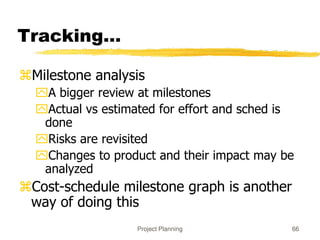
Milestone analysis
A bigger review at milestones
Actual vs estimated for effort and sched is
done
Risks are revisited
Changes to product and their impact may be
analyzed
Cost-schedule milestone graph is another
way of doing this
Project Planning 67
Project Management Plan
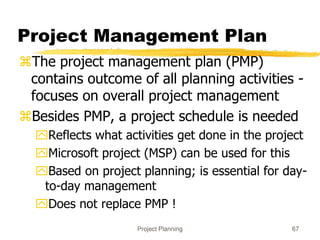
The project management plan (PMP)
contains outcome of all planning activities -
focuses on overall project management
Besides PMP, a project schedule is needed
Reflects what activities get done in the project
Microsoft project (MSP) can be used for this
Based on project planning; is essential for day-
to-day management
Does not replace PMP !
Project Planning 68
PMP Structure - Example
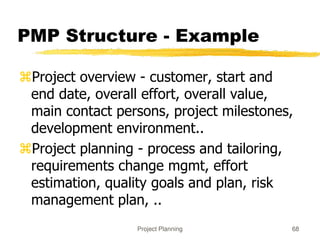
Project overview - customer, start and
end date, overall effort, overall value,
main contact persons, project milestones,
development environment..
Project planning - process and tailoring,
requirements change mgmt, effort
estimation, quality goals and plan, risk
management plan, ..
Project Planning 69
PMP Example ...
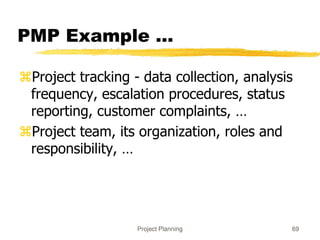
Project tracking - data collection, analysis
frequency, escalation procedures, status
reporting, customer complaints, …
Project team, its organization, roles and
responsibility, …
Project Planning 70
Project Planning -
Summary
Project planning forms the foundation of
project management
Key aspects: effort and schedule estimation,
quality planning, risk mgmt., …
Outputs of all can be documented in a PMP,
which carries all relevant info about project
Besides PMP, a detailed project schedule
maintains tasks to be done in the project
Design
Software Design
 Design activity begins with a set of requirements, and
maybe an architecture
 Design done before the system is implemented
 Design focuses on module view – i.e. what modules
should be in the system
 Module view may have easy or complex relationship
with the C&C view
 Design of a system is a blue print for implementation
 Often has two levels – high level (modules are defined),
and detailed design (logic specified)
Design…
 Design is a creative activity
 Goal: to create a plan to satisfy requirements
 Perhaps the most critical activity during system
development
 Design determines the major characteristics of a system
 Has great impact on testing and maintenance
 Design document forms reference for later phases
 Design methodology – systematic approach for creating
a design
Design Concepts
Design is correct, if it will satisfy all the
requirements and is consistent with
architecture
Of the correct designs, we want best
design
We focus on modularity as the main
criteria (besides correctness)
Modularity
 Modular system – in which modules can be built
separately and changes in one have minimum
impact on others
 Modularity supports independence of models
 Modularity enhances design clarity, eases
implementation
 Reduces cost of testing, debugging and
maintenance
 Cannot simply chop a program into modules to get
modularly
 Need some criteria for decomposition – coupling
and cohesion are such criteria
Coupling
 Independent modules: if one can function
completely without the presence of other
 Independence between modules is desirable
Modules can be modified separately
Can be implemented and tested separately
Programming cost decreases
 In a system all modules cannot be independent
 Modules must cooperate with each other
 More connections between modules
More dependent they are
 More knowledge about one module is required to
understand the other module.
 Coupling captures the notion of dependence
Coupling…
Coupling between modules is the strength of
interconnections between modules
In general, the more we must know about
module A in order to understand module B the
more closely connected is A to B
"Highly coupled" modules are joined by strong
interconnection
"Loosely coupled" modules have weak
interconnections
Coupling…
Goal: modules as loosely coupled as possible
Where possible, have independent modules
Coupling is decided during high level design
Cannot be reduced during implementation
Coupling is inter-module concept
Major factors influencing coupling
 Type of connection between modules
Complexity of the interface
Type of information flow between modules
Coupling – Type of
connection
 Complexity and obscurity of interfaces increase coupling
 Minimize the number of interfaces per module
 Minimize the complexity of each interface
 Coupling is minimized if
Only defined entry of a module is used by others
 Information is passed exclusively through parameters
 Coupling increases if
Indirect and obscure interface are used
 Internals of a module are directly used
Shared variables employed for communication
Coupling – interface
complexity
Coupling increases with complexity of interfaces
eg. number and complexity of parms
Interfaces are needed to support required
communication
Often more than needed is used eg. passing
entire record when only a field is needed
Keep the interface of a module as simple as
possible
Coupling – Type of Info
flow
Coupling depends on type of information flow
Two kinds of information: data or control.
Transfer of control information
 Action of module depends on the information
 Makes modules more difficult to understand
Transfer of data information
Module can be treated as input-output function
Lowest coupling: interfaces with only data
communication
 Highest: hybrid interfaces
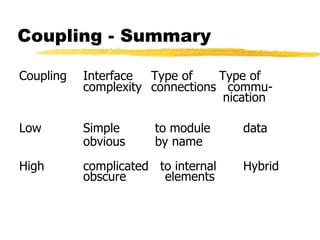
Coupling - Summary
Coupling Interface Type of Type of
complexity connections commu-
nication
Low Simple to module data
obvious by name
High complicated to internal Hybrid
obscure elements
Coupling in OO Systems
In OO systems, basic modules are classes,
which are richer than fns
OO Systems have three types of coupling
Interaction coupling
Component coupling
Inheritance coupling
Coupling in OO -
Interaction
Interaction coupling occurs due to
methods of a class invoking methods of
other classes
Like calling of functions
Worst form if methods directly access
internal parts of other methods
Still bad if methods directly manipulate
variables of other classes
Passing info through tmp vars is also bad
Coupling in OO …
Least interaction coupling if methods
communicate directly with parameters
With least number of parameters
With least amount of info being passed
With only data being passed
I.e. methods should pass the least
amount of data, with least no of parms
Coupling in OO -
Component
Component coupling – when a class A has
variables of another class C
A has instance vars of C
A has some parms of type C
A has a method with a local var of type C
When A is coupled with C, it is coupled with all
subclasses of C as well
Component coupling will generally imply the
presence of interaction coupling also
Coupling in OO -
Inheritance
Inheritance coupling – two classes are coupled if
one is a subclass of other
Worst form – when subclass modifies a
signature of a method or deletes a method
Coupling is bad even when same signature but
a changed implementation
Least, when subclass only adds instance vars
and methods but does not modify any
Cohesion
 Coupling characterized the inter-module bond
 Reduced by minimizing relationship between elts of
different modules
 Another method of achieving this is by maximizing
relationship between elts of same module
 Cohesion considers this relationship
 Interested in determining how closely the elements
of a module are related to each other
 In practice both are used
Cohesion…
Cohesion of a module represents how tightly
bound are the elements of the module
Gives a handle about whether the different
elements of a module belong together
High cohesion is the goal
Cohesion and coupling are interrelated
Greater cohesion of modules, lower coupling
between module
Correlation is not perfect.
Levels of Cohesion
 There are many levels of cohesion.
Coincidental
Logical
Temporal
Communicational
Sequential
Functional
 Coincidental is lowest, functional is highest
 Scale is not linear
 Functional is considered very strong
Determining Cohesion
 Describe the purpose of a module in a sentence
 Perform the following tests
1. If the sentence has to be a compound sentence, contains
more than one verbs, the module is probably performing
more than one function. Probably has sequential or
communicational cohesion.
2. If the sentence contains words relating to time, like "first",
"next", "after", "start" etc., the module probably has
sequential or temporal cohesion.
3. If the predicate of the sentence does not contain a
single specific object following the verb, the module
is probably logically cohesive. Eg "edit all data", while
"edit source data" may have functional cohesion.
4. Words like "initialize", "clean-up" often imply
temporal cohesion.
 Functionally cohesive module can always be
described by a simple statement
Cohesion in OO Systems
In OO, different types of cohesion is possible as
classes are the modules
Method cohesion
Class cohesion
Inheritance cohesion
Method cohesion – why diff code elts are
together in a method
Like cohesion in functional modules; highest form is
if each method implements a clearly defined function
with all elts contributing to implementing this
function
Cohesion in OO…
Class cohesion – why diff attributes and
methods are together in a class
A class should represent a single concept
with all elts contributing towards it
Whenever multiple concepts encapsulated,
cohesion is not as high
A symptom of multiple concepts – diff gps of
methods accessing diff subsets of attributes
Cohesion in OO…
Inheritance cohesion – focuses on why
classes are together in a hierarchy
Two reasons for subclassing – generalization-
specialization and reuse
Cohesion is higher if the hierarchy is for
providing generalization-specialization
Open-closed Principle
 Besides cohesion and coupling, open closed principle
also helps in achieving modularity
 Principle: A module should be open for extension but
closed for modification
Behavior can be extended to accommodate new requirements,
but existing code is not modified
I.e. allows addition of code, but not modification of existing
code
Minimizes risk of having existing functionality stop working due
to changes – a very important consideration while changing
code
Good for programmers as they like writing new code
Open-closed Principle…
In OO this principle is satisfied by using
inheritance and polymorphism
Inheritance allows creating a new class to
extend behavior without changing the original
class
This can be used to support the open-closed
principle
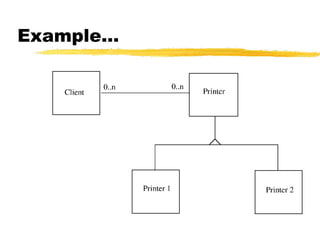
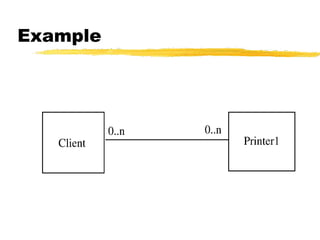
Consider example of a client object which
interacts with a printer object for printing
Example
Example..
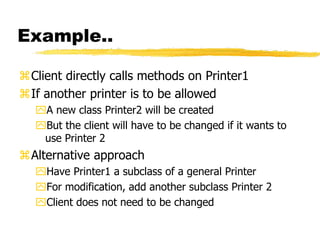
Client directly calls methods on Printer1
If another printer is to be allowed
A new class Printer2 will be created
But the client will have to be changed if it wants to
use Printer 2
Alternative approach
Have Printer1 a subclass of a general Printer
For modification, add another subclass Printer 2
Client does not need to be changed
Example…
Liskov’s Substitution
Principle
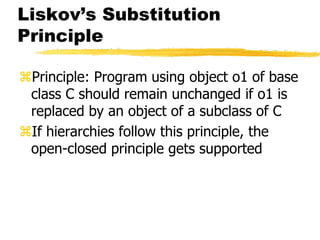
Principle: Program using object o1 of base
class C should remain unchanged if o1 is
replaced by an object of a subclass of C
If hierarchies follow this principle, the
open-closed principle gets supported
Summary
Goal of designing is to find the best
possible correct design
Modularity is the criteria for deciding
quality of the design
Modularity enhanced by low coupling,
high cohesion, and following open-
closed principle
Function Oriented Design
and Structured Design
Methodology
Program Structure and Structure
Charts
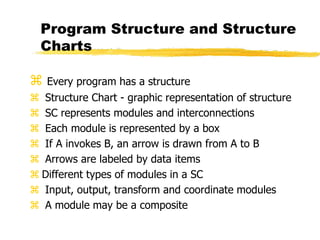
 Every program has a structure
 Structure Chart - graphic representation of structure
 SC represents modules and interconnections
 Each module is represented by a box
 If A invokes B, an arrow is drawn from A to B
 Arrows are labeled by data items
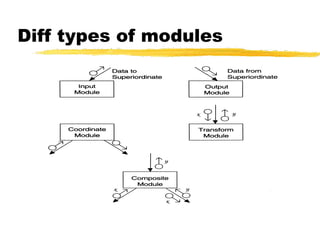
 Different types of modules in a SC
 Input, output, transform and coordinate modules
 A module may be a composite
Structure charts…
SC shows the static structure, not the logic
Different from flow charts
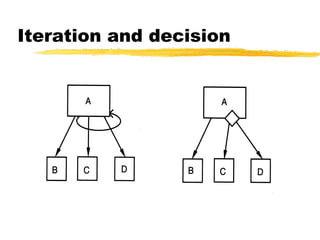
Major decisions and loops can be shown
Structure is decided during design
Implementation does not change structure
Structure effects maintainability
SDM aims to control the structure
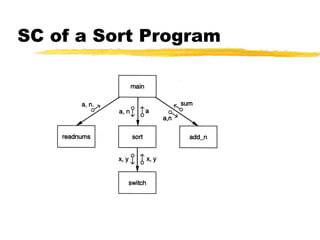
SC of a Sort Program
Diff types of modules
Iteration and decision
STRUCTURED DESIGN
METHODOLOGY
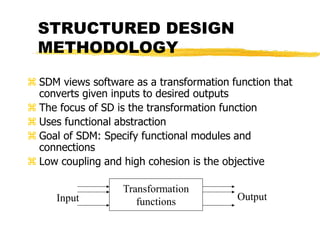
 SDM views software as a transformation function that
converts given inputs to desired outputs
 The focus of SD is the transformation function
 Uses functional abstraction
 Goal of SDM: Specify functional modules and
connections
 Low coupling and high cohesion is the objective
Transformation
functions
Input Output
Steps in SD
1. Draw a DFD of the system
2. Identify most abstract inputs and most
abstract outputs
3. First level factoring
4. Factoring of input, output, transform
modules
5. Improving the structure
1. Data Flow Diagrams
SD starts with a DFD to capture flow of data
in the proposed system
DFD is an important representation; provides
a high level view of the system
Emphasizes the flow of data through the
system
Ignores procedural aspects
(Purpose here is different from DFDs used in
requirements analysis, thought notation is the
same)
Drawing a DFG
 Start with identifying the inputs and outputs
 Work your way from inputs to outputs, or vice versa
If stuck, reverse direction
Ask: "What transformations will convert the inputs to
outputs"
 Never try to show control logic.
If thinking about loops, if-then-else, start again
 Label each arrow carefully
 Make use of * and +, and show sufficient detail
 Ignore minor functions in the start
 For complex systems, make dfg hierarchical
 Never settle for the 1st dfg
Step 2 of SD Methodology
Generally a system performs a basic function
 Often cannot be performed on inputs directly
 First inputs must be converted into a suitable
form
 Similarly for outputs - the outputs produced
 by main transforms need further processing
 Many transforms needed for processing inputs
and outputs
Goal of step 2 is to separate such transforms
from the basic transform centers
Step 2…
Most abstract inputs: data elements in dfg that
are furthest from the actual inputs, but can still
be considered as incoming
These are logical data items for the
transformation
May have little similarity with actual inputs.
Often data items obtained after error checking,
formatting, data validation, conversion etc.
Step 2…
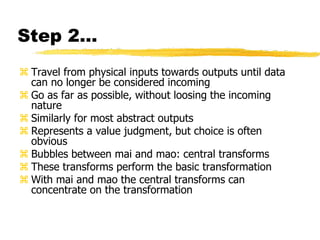
 Travel from physical inputs towards outputs until data
can no longer be considered incoming
 Go as far as possible, without loosing the incoming
nature
 Similarly for most abstract outputs
 Represents a value judgment, but choice is often
obvious
 Bubbles between mai and mao: central transforms
 These transforms perform the basic transformation
 With mai and mao the central transforms can
concentrate on the transformation
Step 2…
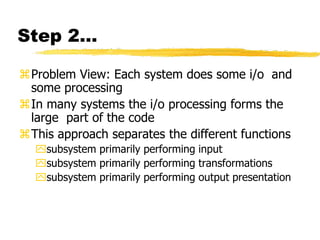
Problem View: Each system does some i/o and
some processing
In many systems the i/o processing forms the
large part of the code
This approach separates the different functions
subsystem primarily performing input
subsystem primarily performing transformations
subsystem primarily performing output presentation
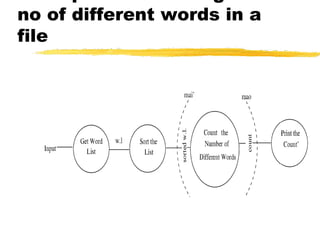
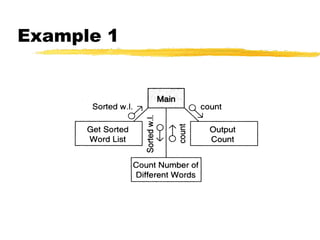
no of different words in a
file
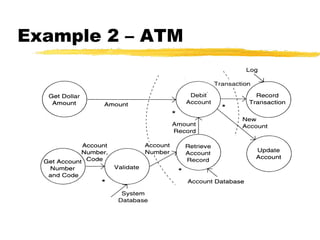
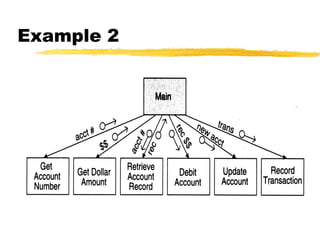
Example 2 – ATM
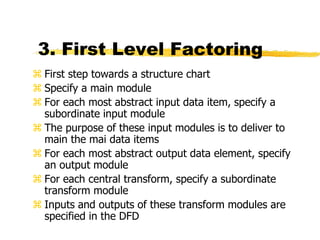
3. First Level Factoring
 First step towards a structure chart
 Specify a main module
 For each most abstract input data item, specify a
subordinate input module
 The purpose of these input modules is to deliver to
main the mai data items
 For each most abstract output data element, specify
an output module
 For each central transform, specify a subordinate
transform module
 Inputs and outputs of these transform modules are
specified in the DFD
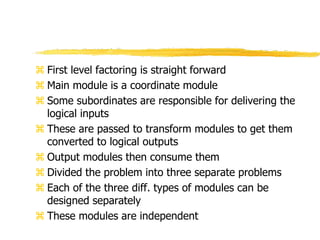
 First level factoring is straight forward
 Main module is a coordinate module
 Some subordinates are responsible for delivering the
logical inputs
 These are passed to transform modules to get them
converted to logical outputs
 Output modules then consume them
 Divided the problem into three separate problems
 Each of the three diff. types of modules can be
designed separately
 These modules are independent
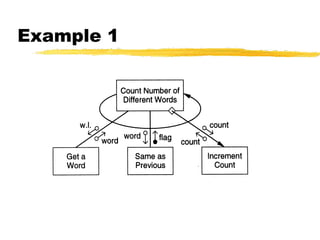
Example 1
Example 2
4. Factoring Input modules
 The transform that produced the mai data is treated
as the central transform
 Then repeat the process of first level factoring
 Input module being factored becomes the main
module
 A subordinate input module is created for each data
item coming in this new central transform
 A subordinate module is created for the new central
transform
 Generally there will be no output modules
 The new input modules are factored similarly Till the
physical inputs are reached
 Factoring of the output modules is symmetrical
 Subordinates - a transform and output modules
 Usually no input modules
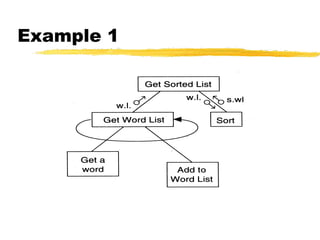
Example 1
Factoring Central
Transforms
 Factoring i/o modules is straight forward if the DFD is
detailed
 No rules for factoring the transform modules
 Top-down refinement process can be used
 Goal: determine sub-transforms that will together
compose the transform
 Then repeat the process for newly found transforms
 Treat the transform as a problem in its own right
 Draw a data flow graph
 Then repeat the process of factoring
 Repeat this till atomic modules are reached
Example 1
5. Improving Design
through Heuristics
 The above steps should not be followed blindly
 The structure obtained should be modified if needed
 Low coupling, high cohesion being the goal
 Design heuristics used to modify the initial design
 Design heuristics - A set of thumb rules that are
generally useful
 Module Size: Indication of module complexity
Carefully examine modules less than a few lines or
greater than about 100 lines
 Fan out and fan in
 A high fan out is not desired, should not be increased
beyond 5 or 6
 Fan in should be maximized
 Scope of effect of a module: the modules affected by
a decision inside the module
 Scope of control: All subordinates of the module
 Good thumb rule:
For each module scope of effect should be a subset
of scope of control
 Ideally a decision should only effect immediate
subordinates
 Moving up the decision, moving the module down
can be utilized to achieve this
Summary
 Structured design methodology is one way to create
modular design
 It partitions the system into input subsystems, output
subsystems & transform subsystems
 Idea: Many systems use a lot of code for handling
inputs & outputs
 SDM separates these concerns
 Then each of the subsystems is factored using the
DFD
 The design is finally documented & verified before
proceeding
Object Oriented Design
and UML
OO Concepts
OO Concepts
Information hiding – use encapsulation to
restrict external visibility
OO encapsulates the data, provides
limited access, visibility
Info hiding can be provided without OO –
is an old concept
OO Concepts…
State retention – fns, procedures do not
retain state; an object is aware of its past
and maintains state
Identity – each object can be identified
and treated as a distinct entity
Behavior – state and services together
define the behavior of an object, or how
an object responds
OO Concepts..
Messages – through which a sender obj
conveys to a target obj a request
For requesting O1 must have – a handle
for O2, name of the op, info on ops that
O2 requires
General format O2.method(args)
OO Concepts..
Classes – a class is a stencil from which objects
are created; defines the structure and services.
A class has
An interface which defines which parts of an object
can be accessed from outside
Body that implements the operations
Instance variables to hold object state
Objects and classes are different; class is a
type, object is an instance
State and identity is of objects
Relationship among
objects
 An object has some capability – for other
services it interacts with other objects
 Some different ways for interaction:
1. Supplier object is global to client
2. Supplier obj is a parm to some op of the client
3. Supplier obj is part of the client obj
4. Supplier obj is locally declared in some op
 Relationship can be either aggregation (whole-
part relationship), or just client server
relationship
Inheritance
Inheritance is unique to OO and not there in
function-oriented languages/models
Inheritance by class B from class A is the facility
by which B implicitly gets the attributes and ops
of A as part of itself
Attributes and methods of A are reused by B
When B inherits from A, B is the subclass or
derived class and A is the base class or
superclass
Inheritance..
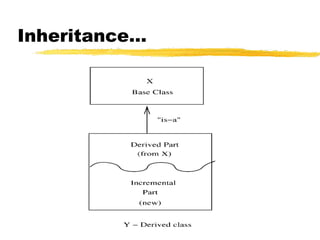
A subclass B generally has a derived part
(inherited from A) and an incremental
part (is new)
Hence, B needs to define only the
incremental part
Creates an “is-a” relationship – objects of
type B are also objects of type A
Inheritance…
Inheritance…
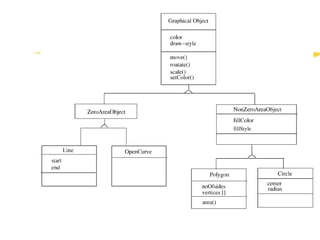
The inheritance relationship between classes
forms a class hierarchy
In models, hierarchy should represent the
natural relationships present in the problem
domain
In a hierarchy, all the common features can be
accumulated in a superclass
An existing class can be a specialization of an
existing general class – is also called
generalization-specialization relationships
Inheritance…
Strict inheritance – a subclass takes all
features of parent class
Only adds features to specialize it
Non-strict: when some of the features
have been redefined
Strict inheritance supports “is-a” cleanly
and has fewer side effects
Inheritance…
Single inheritance – a subclass inherits
from only one superclass
Class hierarchy is a tree
Multiple inheritance – a class inherits from
more than one class
Can cause runtime conflicts
Repeated inheritance - a class inherits from a
class but from two separate paths
Inheritance and
Polymorphism
Inheritance brings polymorphism, i.e. an object
can be of different types
An object of type B is also an object of type A
Hence an object has a static type and a dynamic
type
Implications on type checking
Also brings dynamic binding of operations which
allows writing of general code where operations do
different things depending on the type
Unified Modeling Language
(UML) and Modeling
UML is a graphical notation useful for OO
analysis and design
Allows representing various aspects of the
system
Various notations are used to build
different models for the system
OOAD methodologies use UML to
represent the models they create
Modeling
Modeling is used in many disciplines –
architecture, aircraft building, …
A model is a simplification of reality
“All models are wrong, some are useful”
A good model includes those elts that
have broad effect and omits minor elts
A model of a system is not the system!
Why build models?
Models help us visualize a system
Help specify the system structure
Gives us a template that can guide the
construction
Document the decisions taken and their
rationale
Modeling
Every complex system requires multiple
models, representing diff aspects
These models are related but can be
studied in isolation
Eg. Arch view, electrical view, plumbing
view of a building
Model can be structural, or behavioral
Views in an UML
A use case view
A design view
A process view
Implementation view
Deployment view
We will focus primarily on models for design –
class diagram, interaction diagram, etc.
Class Diagrams
Classes are the basic building blocks of an
OO system as classes are the
implementation units also
Class diagram is the central piece in an
OO design. It specifies
Classes in the system
Association between classes
Subtype, supertype relationship
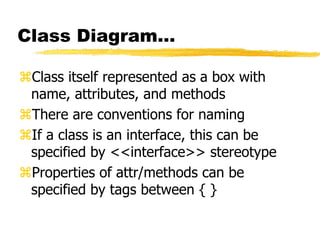
Class Diagram…
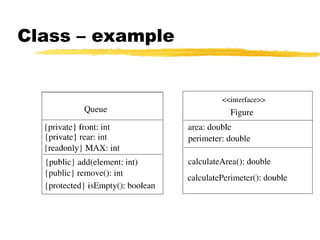
Class itself represented as a box with
name, attributes, and methods
There are conventions for naming
If a class is an interface, this can be
specified by <<interface>> stereotype
Properties of attr/methods can be
specified by tags between { }
Class – example
Generalization-
Specialization
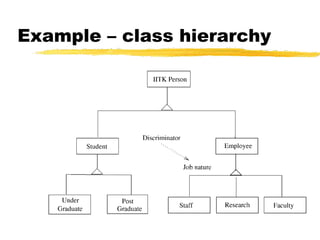
This relationship leads to class hierarchy
Can be captured in a class diagram
Arrows coming from the subclass to the
superclass with head touching super
Allows multiple subclasses
If specialization is done on the basis of some
discriminator, arrow can be labeled
Example – class hierarchy
Association/aggregation
Classes have other relationships
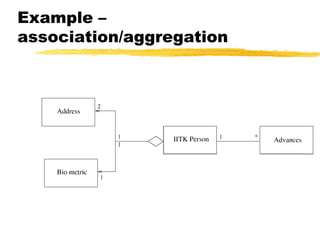
Association: when objects of a class need
services from other objects
Shown by a line joining classes
Multiplicity can be represented
Aggregation: when an object is composed of
other objects
Captures part-whole relationship
Shown with a diamond connecting classes
Example –
association/aggregation
Interaction Diagrams
Class diagram represent static structure of the
system (classes and their rel)
Do not model the behavior of system
Behavioral view – shows how objects interact
for performing actions (typically a use case)
Interaction is between objects, not classes
Interaction diagram in two styles
Collaboration diagram
Sequence diagram
Two are equivalent in power
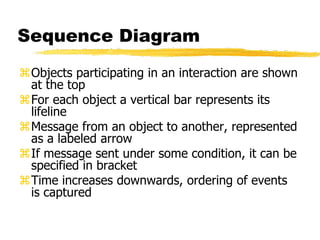
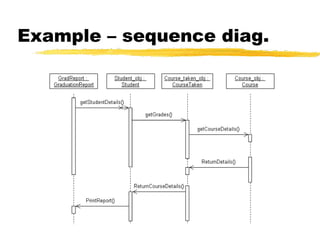
Sequence Diagram
Objects participating in an interaction are shown
at the top
For each object a vertical bar represents its
lifeline
Message from an object to another, represented
as a labeled arrow
If message sent under some condition, it can be
specified in bracket
Time increases downwards, ordering of events
is captured
Example – sequence diag.
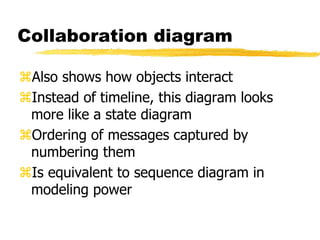
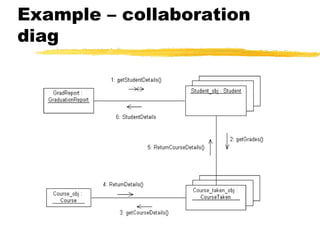
Collaboration diagram
Also shows how objects interact
Instead of timeline, this diagram looks
more like a state diagram
Ordering of messages captured by
numbering them
Is equivalent to sequence diagram in
modeling power
Example – collaboration
diag
Other Diagrams
Class diagram and interaction diagrams
most commonly used during design
There are other diagrams used to build
different types of models
Other Diagrams
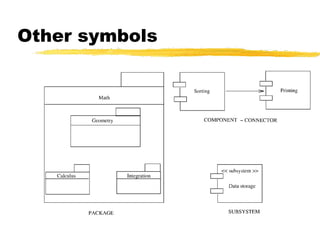
Instead of objects/classes, can represent
components, packages, subsystems
These are useful for developing architecture
structures
UML is extensible – can model a new but similar
concept by using stereotypes (by adding
<<name>>)
Tagged values can be used to specify additional
properties, e.g. private, readonly..
Notes can be added
Other symbols
Design using UML
Many OOAD methodologies have been proposed
They provide some guidelines on the steps to be
performed
Basic goal is to identify classes, understand their
behavior, and relationships
Different UML models are used for this
Often UML is used, methodologies are not
followed strictly
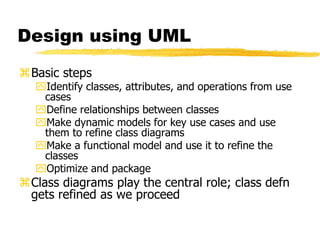
Design using UML
Basic steps
Identify classes, attributes, and operations from use
cases
Define relationships between classes
Make dynamic models for key use cases and use
them to refine class diagrams
Make a functional model and use it to refine the
classes
Optimize and package
Class diagrams play the central role; class defn
gets refined as we proceed
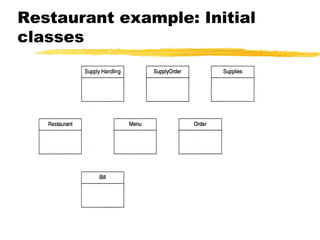
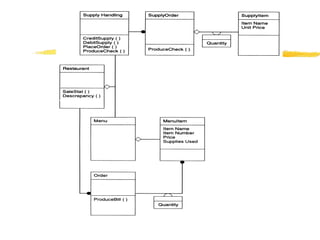
Restaurant example: Initial
classes
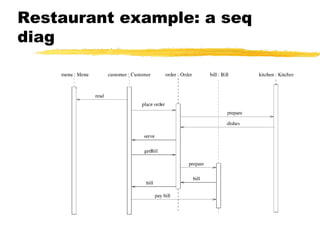
Restaurant example: a seq
diag
Detailed Design
 HLD does not specify module logic; this is done during
detailed design
 One way to communicate the logic design: use natural
language
 Is imprecise and can lead to misunderstanding
 Other extreme is to use a formal language
 Generally a semi-formal language is used – has formal
outer structures but informal inside
Logic/Algorithm Design
Once the functional module (function or
methods in a class) are specified, the algo
to implement it is designed
Various techniques possible for designing
algorithm – in algos course
Stepwise refinements technique is useful
here
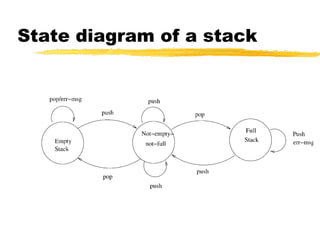
State Modeling of Classes
Dynamic model to represent behavior of
an individual object or a system
Shows the states of an object and
transitions between them
Helps understand the object – focus only
on the important logical states
State diagrams can be very useful for
automated and systematic testing
State diagram of a stack
Design Verification
Main objective: does the design
implement the requirements
Analysis for performance, efficiency, etc
may also be done
If formal languages used for design
representation, tools can help
Design reviews remain the most common
approach for verification
Metrics
Background
Basic purpose to provide a quantitative
evaluation of the design (so the final product
can be better)
Size is always a metric – after design it can be
more accurately estimated
Number of modules and estimated size of each is
one approach
Complexity is another metric of interest – will
discuss a few metrics
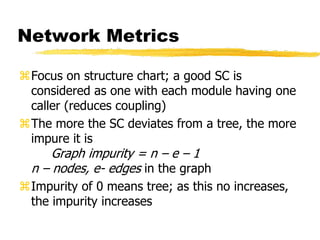
Network Metrics
Focus on structure chart; a good SC is
considered as one with each module having one
caller (reduces coupling)
The more the SC deviates from a tree, the more
impure it is
Graph impurity = n – e – 1
n – nodes, e- edges in the graph
Impurity of 0 means tree; as this no increases,
the impurity increases
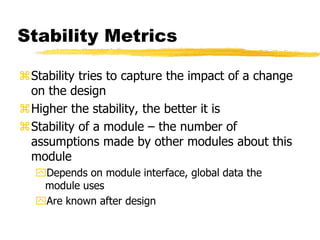
Stability Metrics
Stability tries to capture the impact of a change
on the design
Higher the stability, the better it is
Stability of a module – the number of
assumptions made by other modules about this
module
Depends on module interface, global data the
module uses
Are known after design
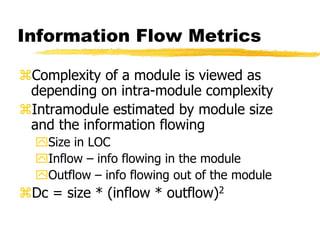
Information Flow Metrics
Complexity of a module is viewed as
depending on intra-module complexity
Intramodule estimated by module size
and the information flowing
Size in LOC
Inflow – info flowing in the module
Outflow – info flowing out of the module
Dc = size * (inflow * outflow)2
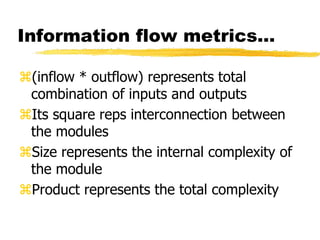
Information flow metrics…
(inflow * outflow) represents total
combination of inputs and outputs
Its square reps interconnection between
the modules
Size represents the internal complexity of
the module
Product represents the total complexity
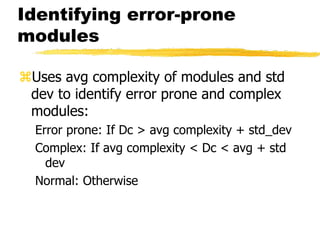
Identifying error-prone
modules
Uses avg complexity of modules and std
dev to identify error prone and complex
modules:
Error prone: If Dc > avg complexity + std_dev
Complex: If avg complexity < Dc < avg + std
dev
Normal: Otherwise
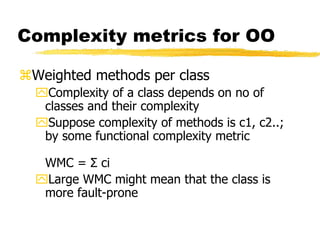
Complexity metrics for OO
Weighted methods per class
Complexity of a class depends on no of
classes and their complexity
Suppose complexity of methods is c1, c2..;
by some functional complexity metric
WMC = Σ ci
Large WMC might mean that the class is
more fault-prone
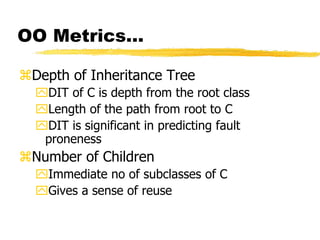
OO Metrics…
Depth of Inheritance Tree
DIT of C is depth from the root class
Length of the path from root to C
DIT is significant in predicting fault
proneness
Number of Children
Immediate no of subclasses of C
Gives a sense of reuse
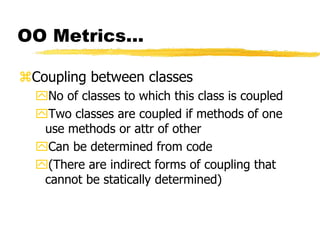
OO Metrics…
Coupling between classes
No of classes to which this class is coupled
Two classes are coupled if methods of one
use methods or attr of other
Can be determined from code
(There are indirect forms of coupling that
cannot be statically determined)
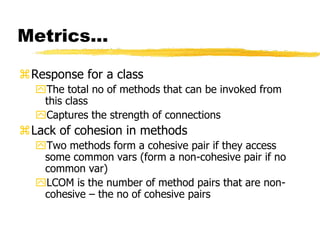
Metrics…
Response for a class
The total no of methods that can be invoked from
this class
Captures the strength of connections
Lack of cohesion in methods
Two methods form a cohesive pair if they access
some common vars (form a non-cohesive pair if no
common var)
LCOM is the number of method pairs that are non-
cohesive – the no of cohesive pairs
Metrics with detailed
design
When logic is known, internal complexity
metrics can be determined
We will cover all detailed design based
metrics along with code metrics
Summary
Design for a system is a plan for a solution –
want correct and modular
Cohesion and coupling key concepts to ensure
modularity
Structure charts and structured design
methodology can be used for function-oriented
design
UML can be used for OO design
Various complexity metrics exist to evaluate a
design complexity

unit plan for project building in s/w.pdf

  • 1.
  • 2.
    Project Planning 2 Agenda Background Effortestimation Schedule and resource estimation Quality Planning Risk management Project monitoring plans
  • 3.
    Project Planning 3 SoftwareProject Goal: Build a software system to meet commitments on cost, schedule, quality Worldwide - many projects fail one-third are runaways with cost or schedule overrun of more than 125%
  • 4.
    Project Planning 4 ProjectFailures Major reasons for project runaways unclear objectives bad planning no project management methodology new technology insufficient staff All of these relate to project management Effective project management is key to successfully executing a project
  • 5.
    Project Planning 5 Whyimprove PM? Better predictability leading to commitments that can be met Lower cost through reduced rework, better resource mgmt, better planning,.. Improved quality through proper quality planning and control Better control through change control, CM, monitoring etc.
  • 6.
    Project Planning 6 Whyimprove PM …. Better visibility into project health and state leading to timely intervention Better handling of risks reducing the chances of failure All this leads to higher customer satisfaction And organization improvement
  • 7.
    Project Planning 7 TheProject Mgmt Process Has three phases - planning, monitoring and control, and closure Planning is done before the much of the engineering process (life cycle, LC) and closure after the process Monitoring phase is in parallel with LC We focus on planning; monitoring covered through its planning
  • 8.
    Project Planning 8 ProjectPlanning Basic objective: To create a plan to meet the commitments of the project, I.e. create a path that, if followed, will lead to a successful project Planning involves defining the LC process to be followed, estimates, detailed schedule, plan for quality, etc. Main output - a project management plan and the project schedule
  • 9.
    Project Planning 9 KeyPlanning Tasks Estimate effort Define project milestones and create a schedule Define quality objectives and a quality plan Identify risks and make plans to mitigate them Define measurement plan, project-tracking procedures, training plan, team organization, etc.
  • 10.
  • 11.
    Project Planning 11 EffortEstimation For a project total cost and duration has to be committed in start Requires effort estimation, often in terms of person-months Effort estimate is key to planning - schedule, cost, resources depend on it Many problems in project execution stem from improper estimation
  • 12.
    Project Planning 12 Estimation.. Noeasy way, no silver bullet Estimation accuracy can improve with more information about the project Early estimates are more likely to be inaccurate than later More uncertainties in the start With more info, estimation becomes easier
  • 13.
  • 14.
    Project Planning 14 EffortEstimation Models.. A model tries to determine the effort estimate from some parameter values A model also requires input about the project, and cannot work in vacuum So to apply a model, we should be able to extract properties about the system Two types of models - top-down and bottom-up
  • 15.
    Project Planning 15 EffortEstimation Models Extract Estimation Model Values of some characteristics Effort Estimate Knowledge about SW project
  • 16.
    Project Planning 16 Topdown estimation First determines the total effort, then effort for components Simple approach – estimate effort from size and productivity Get the estimate of the total size of the software Estimate project productivity using past data and project characteristics Obtain the overall effort estimate from productivity and size estimates Effort distribution data from similar project are used to estimate effort for different phases
  • 17.
    Project Planning 17 Top-downEstimation A better method is to have effort estimate as a function of size using: Effort = a * size b E is in person-months, size in KLOC Incorporates the observation that productivity can dip with increased size Constants a and b determined through regression analysis of past project data
  • 18.
    Project Planning 18 COCOMOModel Uses size, but adjusts using some factors Basic procedure Obtain initial estimate using size Determine a set of 15 multiplying factors from different project attributes Adjust the effort estimate by scaling it with the final multiplying factor
  • 19.
    Project Planning 19 COCOMO.. Initialestimate: a * size b ; some standard values for a, b given for diff project types There are 15 cost driver attributes like reliability, complexity, application experience, capability, … Each factor is rated, and for the rating a multiplication factor is given Final effort adjustment factor is the product of the factors for all 15 attributes
  • 20.
    Project Planning 20 COCOMO– Some cost drivers Cost Driver Very low Low Nominal High Very High Required reliability Database size Product complexity Execution time constraint Memory constraint Analyst capability Application experience Programmer capability Use of software tools Development schedule .75 .7 1.46 1.29 1.42 1.24 1.23 .88 .94 .85 1.19 1.13 1.17 1.10 1.08 1.0 1.0 1.0 1.0 1.0 1.0 1.0 1.0 1.0 1.0 1.15 1.08 1.15 1.11 1.06 .86 .91 .86 .91 1.04 1.4 1.16 1.3 1.3 1.21 .71 .82 .70 .83 1.1
  • 21.
    Project Planning 21 COCOMO– effort distribution Effort distribution among different phases is given as a percent of effort Eg. For medium size product it is Product design – 16% Detailed design – 24% Coding and UT – 38% Integration and test – 22%
  • 22.
    Project Planning 22 Bottom-upEstimation An alternate approach to top-down Effort for components and phases first estimated, then the total Can use activity based costing - all activities enumerated and then each activity estimated separately Can group activities into classes - their effort estimate from past data
  • 23.
    Project Planning 23 AnEstimation Procedure Identify programs in the system and classify them as simple, medium, or complex (S/M/C) Define the average coding effort for S/M/C Get the total coding effort. Use the effort distribution in similar projects to estimate effort for other tasks and total Refine the estimates based on project specific factors
  • 24.
  • 25.
    Project Planning 25 ProjectSchedule A project Schedule is at two levels - overall schedule and detailed schedule Overall schedule comprises of major milestones and final date Detailed schedule is the assignment of lowest level tasks to resources
  • 26.
    Project Planning 26 OverallSchedule Depends heavily on the effort estimate For an effort estimate, some flexibility exists depending on resources assigned Eg a 56 person-months project can be done in 8 months with 7 people, or 7 months with 8 people Stretching a schedule is easy; compressing is hard and expensive
  • 27.
    Project Planning 27 OverallScheduling... One method is to estimate schedule S (in months) as a function of effort in PMs Can determine the fn through analysis of past data; the function is non linear COCOMO: S = 2.5 E 3.8 Often this schedule is checked and corrected for the specific project One checking method – square root check
  • 28.
    Project Planning 28 DeterminingOverall Schedule from past data Effort in person-days 0 50 100 150 200 250 300 350 400 0 200 400 600 800 1000 1200 1400 1600 1800 Schedule (Days)
  • 29.
    Project Planning 29 DeterminingMilestones With effort and overall schedule decided, avg project resources are fixed Manpower ramp-up in a project decides the milestones Manpower ramp-up in a project follows a Rayleigh curve - like a normal curve In reality manpower build-up is a step function
  • 30.
    Project Planning 30 ManpowerRamp-up Design Build Test PTS
  • 31.
    Project Planning 31 Milestones... With manpower ramp-up and effort distribution, milestones can be decided Effort distribution and schedule distribution in phases are different Generally, the build has larger effort but not correspondingly large schedule COCOMO specifies distr of overall sched. Design – 19%, programming – 62%, integration – 18%
  • 32.
    Project Planning 32 AnExample Schedule Task Dur. (days) Work (p- days) Start Date End Date Project Init tasks 33 24 5/4 6/23 Training 95 49 5/8 9/29 Knowledge sharing 78 20 6/2 9/30 Elaboration iteration I 55 55 5/15 6/23 Construction iteration I 9 35 7/10 7/21
  • 33.
    Project Planning 33 DetailedScheduling To reach a milestone, many tasks have to be performed Lowest level tasks - those that can be done by a person (in less than 2-3 days) Scheduling - decide the tasks, assign them while preserving high-level schedule Is an iterative task - if cannot “fit” all tasks, must revisit high level schedule
  • 34.
    Project Planning 34 DetailedScheduling Detailed schedule not done completely in the start - it evolves Can use Microsoft Project for keeping it Detailed Schedule is the most live document for managing the project Any activity to be done must get reflected in the detailed schedule
  • 35.
    Project Planning 35 Anexample task in detail schedule Module Act Code Task Duration Effort History PUT Unit test # 17 1 day 7 hrs St. date End date %comp Depend. Resource 7/18 7/18 0% Nil SB
  • 36.
    Project Planning 36 Detailschedule Each task has name, date, duration, resource etc assigned % done is for tracking (tools use it) The detailed schedule has to be consistent with milestones Tasks are sub-activities of milestone level activities, so effort should add up, total schedule should be preserved
  • 37.
  • 38.
    Project Planning 38 QualityPlanning Delivering high quality is a basic goal Quality can be defined in many ways Current industry standard - delivered defect density (e.g. #defects/KLOC) Defect - something that causes software to behave in an inconsistent manner Aim of a project - deliver software with low delivered defect density
  • 39.
    Project Planning 39 DefectInjection and Removal Software development is labor intensive Defects are injected at any stage As quality goal is low delivered defect density, these defects have to be removed Done primarily by quality control (QC) activities of reviews and testing
  • 40.
    Project Planning 40 DefectInjection and Removal Req. Analysis Design R Coding R UT IT/ST AT Development Process Defect Injection R Defect Removal
  • 41.
    Project Planning 41 Approachesto Quality Management Ad hoc - some testing, some reviews done as and when needed Procedural - defined procedures are followed in a project Quantitative - defect data analysis done to manage the quality process
  • 42.
    Project Planning 42 ProceduralApproach A quality plan defines what QC tasks will be undertaken and when Main QC tasks - reviews and testing Guidelines and procedures for reviews and testing are provided During project execution, adherence to the plan and procedures ensured
  • 43.
    Project Planning 43 QuantitativeApproach Goes beyond asking “has the procedure been executed” Analyzes defect data to make judgements about quality Past data is very important Key parameters - defect injection and removal rates, defect removal efficiency (DRE)
  • 44.
    Project Planning 44 QualityPlan The quality plan drives the quality activities in the project Level of plan depends on models available Must define QC tasks that have to be performed in the project Can specify defect levels for each QC tasks (if models and data available)
  • 45.
  • 46.
    Project Planning 46 RiskManagement Any project can fail - reasons can be technical, managerial, etc. Project management aims to tackle the project management aspect Engineering life cycles aim to tackle the engineering issues A project may fail due to unforeseen events - risk management aims to tackle this
  • 47.
    Project Planning 47 RiskManagement Risk: any condition or event whose occurrence is not certain but which can cause the project to fail Aim of risk management: minimize the effect of risks on a project Risk management has two basic aspects Risk assessment Risk control
  • 48.
    Project Planning 48 RiskAssessment To identify possible risks to a project, i.e. to those events that might occur and which might cause the project to fail No “algorithm” possible, done by “what ifs”, checklists, past experience Can have a list of “top 10” risks that projects have seen in past
  • 49.
    Project Planning 49 TopRisk Examples Shortage of technically trained manpower Too many requirement changes Unclear requirements Not meeting performance requirements Unrealistic schedules Insufficient business knowledge Working on new technology
  • 50.
    Project Planning 50 RiskPrioritization The number of risks might be large Must prioritize them to focus attention on the “high risk” areas For prioritization, impact of each risk must be understood In addition, probability of the risk occurring should also be understood
  • 51.
    Project Planning 51 RiskPrioritization ... Risk exposure (RE) = probability of risk occurring * risk impact RE is the expected value of loss for a risk Prioritization can be done based on risk exposure value Plans can be made to handle high RE risks
  • 52.
    Project Planning 52 ASimple approach to Risk Prioritization Classify risk occurrence probabilities as: Low, Medium, High Classify risk impact as: Low, Medium, High Identify those that are HH, or HM/MH Focus on these for risk mitigation Will work for most small and medium sized projects
  • 53.
    Project Planning 53 RiskControl Can the risk be avoided? E.g. if new hardware is a risk, it can be avoided by working with proven hardware For others, risk mitigation steps need to be planned and executed Actions taken in the project such that if the risk materializes, its impact is minimal Involves extra cost
  • 54.
    Project Planning 54 RiskMitigation Examples Too many requirement changes Convince client that changes in requirements will have an impact on the schedule Define a procedure for requirement changes Maintain cumulative impact of changes and make it visible to client Negotiate payment on actual effort.
  • 55.
    Project Planning 55 Examples... Manpower attrition Ensure that multiple resources are assigned on key project areas Have team building sessions Rotate jobs among team members Keep backup resources in the project Maintain documentation of individual’s work Follow the CM process and guidelines strictly
  • 56.
    Project Planning 56 Examples... Unrealistic schedules Negotiate for better schedule Identify parallel tasks Have resources ready early Identify areas that can be automated If the critical path is not within the schedule, negotiate with the client Negotiate payment on actual effort
  • 57.
    Project Planning 57 RiskMitigation Plan Risk mitigation involves steps that are to be performed (hence has extra cost) It is not a paper plan - these steps should be scheduled and executed These are different from the steps one would take if the risk materializes - they are performed only if needed Risks must be revisited periodically
  • 58.
    Project Planning 58 APractical Risk Mgmt Approach  Based on methods of some orgs 1. List risks; for each risk rate probability as Low, Medium, High 2. For each risk assess impact on the project as Low, medium, High 3. Rank the risks based on probability and impact – HH is the highest 4. Select top few items for mitigation
  • 59.
    Project Planning 59 Arisk mgmt plan Risk Prob Impact Exposure 1. Failure to meet perf reqs High High High 2. Lack of people with right skills Med Med Med 3. Complexity of the application Med Med Med 4. Unclear requirements Med Med Med
  • 60.
    Project Planning 60 RiskMgmt plan… Risk Mitigation plan 1. Failure to meet perf reqs Train team in perf engg Have perf testing scripts Use suitable tools 2. Lack of people with right skills Train resources Develop suitable standards 3. Complexity of the application Ensure ongoing k transfer Use people with domain exp 4. Unclear requirements Have multiple reviews Build prototype
  • 61.
  • 62.
    Project Planning 62 Background Aplan is a mere document that can guide It must be executed To ensure execution goes as per plan, it must be monitored and controlled Monitoring requires measurements And methods for interpreting them Monitoring plan has to plan for all the tasks related to monitoring
  • 63.
    Project Planning 63 Measurements Mustplan for measurements in a project Without planning, measurements will not be done Main measurements – effort, size, schedule, and defects Effort – as this is the main resource; often tracked through effort reporting tools Defects – as they determine quality; often defect logging and tracking systems used During planning – what will be measured, how, tool support, and data management
  • 64.
    Project Planning 64 ProjectTracking Goal: To get visibility in project execution so corrective actions can be taken when needed to ensure project succeeds Diff types of monitoring done at projects; measurements provide data for it
  • 65.
    Project Planning 65 Tracking… Activity-levelmonitoring Each activity in detailed schd is getting done Often done daily by managers A task done marked 100%; tools can determine status of higher level tasks Status reports Generally done weekly to take stock Summary of activities completed, pending Issues to be resolved
  • 66.
    Project Planning 66 Tracking… Milestoneanalysis A bigger review at milestones Actual vs estimated for effort and sched is done Risks are revisited Changes to product and their impact may be analyzed Cost-schedule milestone graph is another way of doing this
  • 67.
    Project Planning 67 ProjectManagement Plan The project management plan (PMP) contains outcome of all planning activities - focuses on overall project management Besides PMP, a project schedule is needed Reflects what activities get done in the project Microsoft project (MSP) can be used for this Based on project planning; is essential for day- to-day management Does not replace PMP !
  • 68.
    Project Planning 68 PMPStructure - Example Project overview - customer, start and end date, overall effort, overall value, main contact persons, project milestones, development environment.. Project planning - process and tailoring, requirements change mgmt, effort estimation, quality goals and plan, risk management plan, ..
  • 69.
    Project Planning 69 PMPExample ... Project tracking - data collection, analysis frequency, escalation procedures, status reporting, customer complaints, … Project team, its organization, roles and responsibility, …
  • 70.
    Project Planning 70 ProjectPlanning - Summary Project planning forms the foundation of project management Key aspects: effort and schedule estimation, quality planning, risk mgmt., … Outputs of all can be documented in a PMP, which carries all relevant info about project Besides PMP, a detailed project schedule maintains tasks to be done in the project
  • 71.
  • 72.
    Software Design  Designactivity begins with a set of requirements, and maybe an architecture  Design done before the system is implemented  Design focuses on module view – i.e. what modules should be in the system  Module view may have easy or complex relationship with the C&C view  Design of a system is a blue print for implementation  Often has two levels – high level (modules are defined), and detailed design (logic specified)
  • 73.
    Design…  Design isa creative activity  Goal: to create a plan to satisfy requirements  Perhaps the most critical activity during system development  Design determines the major characteristics of a system  Has great impact on testing and maintenance  Design document forms reference for later phases  Design methodology – systematic approach for creating a design
  • 74.
    Design Concepts Design iscorrect, if it will satisfy all the requirements and is consistent with architecture Of the correct designs, we want best design We focus on modularity as the main criteria (besides correctness)
  • 75.
    Modularity  Modular system– in which modules can be built separately and changes in one have minimum impact on others  Modularity supports independence of models  Modularity enhances design clarity, eases implementation  Reduces cost of testing, debugging and maintenance  Cannot simply chop a program into modules to get modularly  Need some criteria for decomposition – coupling and cohesion are such criteria
  • 76.
    Coupling  Independent modules:if one can function completely without the presence of other  Independence between modules is desirable Modules can be modified separately Can be implemented and tested separately Programming cost decreases  In a system all modules cannot be independent  Modules must cooperate with each other  More connections between modules More dependent they are  More knowledge about one module is required to understand the other module.  Coupling captures the notion of dependence
  • 77.
    Coupling… Coupling between modulesis the strength of interconnections between modules In general, the more we must know about module A in order to understand module B the more closely connected is A to B "Highly coupled" modules are joined by strong interconnection "Loosely coupled" modules have weak interconnections
  • 78.
    Coupling… Goal: modules asloosely coupled as possible Where possible, have independent modules Coupling is decided during high level design Cannot be reduced during implementation Coupling is inter-module concept Major factors influencing coupling  Type of connection between modules Complexity of the interface Type of information flow between modules
  • 79.
    Coupling – Typeof connection  Complexity and obscurity of interfaces increase coupling  Minimize the number of interfaces per module  Minimize the complexity of each interface  Coupling is minimized if Only defined entry of a module is used by others  Information is passed exclusively through parameters  Coupling increases if Indirect and obscure interface are used  Internals of a module are directly used Shared variables employed for communication
  • 80.
    Coupling – interface complexity Couplingincreases with complexity of interfaces eg. number and complexity of parms Interfaces are needed to support required communication Often more than needed is used eg. passing entire record when only a field is needed Keep the interface of a module as simple as possible
  • 81.
    Coupling – Typeof Info flow Coupling depends on type of information flow Two kinds of information: data or control. Transfer of control information  Action of module depends on the information  Makes modules more difficult to understand Transfer of data information Module can be treated as input-output function Lowest coupling: interfaces with only data communication  Highest: hybrid interfaces
  • 82.
    Coupling - Summary CouplingInterface Type of Type of complexity connections commu- nication Low Simple to module data obvious by name High complicated to internal Hybrid obscure elements
  • 83.
    Coupling in OOSystems In OO systems, basic modules are classes, which are richer than fns OO Systems have three types of coupling Interaction coupling Component coupling Inheritance coupling
  • 84.
    Coupling in OO- Interaction Interaction coupling occurs due to methods of a class invoking methods of other classes Like calling of functions Worst form if methods directly access internal parts of other methods Still bad if methods directly manipulate variables of other classes Passing info through tmp vars is also bad
  • 85.
    Coupling in OO… Least interaction coupling if methods communicate directly with parameters With least number of parameters With least amount of info being passed With only data being passed I.e. methods should pass the least amount of data, with least no of parms
  • 86.
    Coupling in OO- Component Component coupling – when a class A has variables of another class C A has instance vars of C A has some parms of type C A has a method with a local var of type C When A is coupled with C, it is coupled with all subclasses of C as well Component coupling will generally imply the presence of interaction coupling also
  • 87.
    Coupling in OO- Inheritance Inheritance coupling – two classes are coupled if one is a subclass of other Worst form – when subclass modifies a signature of a method or deletes a method Coupling is bad even when same signature but a changed implementation Least, when subclass only adds instance vars and methods but does not modify any
  • 88.
    Cohesion  Coupling characterizedthe inter-module bond  Reduced by minimizing relationship between elts of different modules  Another method of achieving this is by maximizing relationship between elts of same module  Cohesion considers this relationship  Interested in determining how closely the elements of a module are related to each other  In practice both are used
  • 89.
    Cohesion… Cohesion of amodule represents how tightly bound are the elements of the module Gives a handle about whether the different elements of a module belong together High cohesion is the goal Cohesion and coupling are interrelated Greater cohesion of modules, lower coupling between module Correlation is not perfect.
  • 90.
    Levels of Cohesion There are many levels of cohesion. Coincidental Logical Temporal Communicational Sequential Functional  Coincidental is lowest, functional is highest  Scale is not linear  Functional is considered very strong
  • 91.
    Determining Cohesion  Describethe purpose of a module in a sentence  Perform the following tests 1. If the sentence has to be a compound sentence, contains more than one verbs, the module is probably performing more than one function. Probably has sequential or communicational cohesion. 2. If the sentence contains words relating to time, like "first", "next", "after", "start" etc., the module probably has sequential or temporal cohesion.
  • 92.
    3. If thepredicate of the sentence does not contain a single specific object following the verb, the module is probably logically cohesive. Eg "edit all data", while "edit source data" may have functional cohesion. 4. Words like "initialize", "clean-up" often imply temporal cohesion.  Functionally cohesive module can always be described by a simple statement
  • 93.
    Cohesion in OOSystems In OO, different types of cohesion is possible as classes are the modules Method cohesion Class cohesion Inheritance cohesion Method cohesion – why diff code elts are together in a method Like cohesion in functional modules; highest form is if each method implements a clearly defined function with all elts contributing to implementing this function
  • 94.
    Cohesion in OO… Classcohesion – why diff attributes and methods are together in a class A class should represent a single concept with all elts contributing towards it Whenever multiple concepts encapsulated, cohesion is not as high A symptom of multiple concepts – diff gps of methods accessing diff subsets of attributes
  • 95.
    Cohesion in OO… Inheritancecohesion – focuses on why classes are together in a hierarchy Two reasons for subclassing – generalization- specialization and reuse Cohesion is higher if the hierarchy is for providing generalization-specialization
  • 96.
    Open-closed Principle  Besidescohesion and coupling, open closed principle also helps in achieving modularity  Principle: A module should be open for extension but closed for modification Behavior can be extended to accommodate new requirements, but existing code is not modified I.e. allows addition of code, but not modification of existing code Minimizes risk of having existing functionality stop working due to changes – a very important consideration while changing code Good for programmers as they like writing new code
  • 97.
    Open-closed Principle… In OOthis principle is satisfied by using inheritance and polymorphism Inheritance allows creating a new class to extend behavior without changing the original class This can be used to support the open-closed principle Consider example of a client object which interacts with a printer object for printing
  • 98.
  • 99.
    Example.. Client directly callsmethods on Printer1 If another printer is to be allowed A new class Printer2 will be created But the client will have to be changed if it wants to use Printer 2 Alternative approach Have Printer1 a subclass of a general Printer For modification, add another subclass Printer 2 Client does not need to be changed
  • 100.
  • 101.
    Liskov’s Substitution Principle Principle: Programusing object o1 of base class C should remain unchanged if o1 is replaced by an object of a subclass of C If hierarchies follow this principle, the open-closed principle gets supported
  • 102.
    Summary Goal of designingis to find the best possible correct design Modularity is the criteria for deciding quality of the design Modularity enhanced by low coupling, high cohesion, and following open- closed principle
  • 103.
    Function Oriented Design andStructured Design Methodology
  • 104.
    Program Structure andStructure Charts  Every program has a structure  Structure Chart - graphic representation of structure  SC represents modules and interconnections  Each module is represented by a box  If A invokes B, an arrow is drawn from A to B  Arrows are labeled by data items  Different types of modules in a SC  Input, output, transform and coordinate modules  A module may be a composite
  • 105.
    Structure charts… SC showsthe static structure, not the logic Different from flow charts Major decisions and loops can be shown Structure is decided during design Implementation does not change structure Structure effects maintainability SDM aims to control the structure
  • 106.
    SC of aSort Program
  • 107.
  • 108.
  • 109.
    STRUCTURED DESIGN METHODOLOGY  SDMviews software as a transformation function that converts given inputs to desired outputs  The focus of SD is the transformation function  Uses functional abstraction  Goal of SDM: Specify functional modules and connections  Low coupling and high cohesion is the objective Transformation functions Input Output
  • 110.
    Steps in SD 1.Draw a DFD of the system 2. Identify most abstract inputs and most abstract outputs 3. First level factoring 4. Factoring of input, output, transform modules 5. Improving the structure
  • 111.
    1. Data FlowDiagrams SD starts with a DFD to capture flow of data in the proposed system DFD is an important representation; provides a high level view of the system Emphasizes the flow of data through the system Ignores procedural aspects (Purpose here is different from DFDs used in requirements analysis, thought notation is the same)
  • 112.
    Drawing a DFG Start with identifying the inputs and outputs  Work your way from inputs to outputs, or vice versa If stuck, reverse direction Ask: "What transformations will convert the inputs to outputs"  Never try to show control logic. If thinking about loops, if-then-else, start again  Label each arrow carefully  Make use of * and +, and show sufficient detail  Ignore minor functions in the start  For complex systems, make dfg hierarchical  Never settle for the 1st dfg
  • 113.
    Step 2 ofSD Methodology Generally a system performs a basic function  Often cannot be performed on inputs directly  First inputs must be converted into a suitable form  Similarly for outputs - the outputs produced  by main transforms need further processing  Many transforms needed for processing inputs and outputs Goal of step 2 is to separate such transforms from the basic transform centers
  • 114.
    Step 2… Most abstractinputs: data elements in dfg that are furthest from the actual inputs, but can still be considered as incoming These are logical data items for the transformation May have little similarity with actual inputs. Often data items obtained after error checking, formatting, data validation, conversion etc.
  • 115.
    Step 2…  Travelfrom physical inputs towards outputs until data can no longer be considered incoming  Go as far as possible, without loosing the incoming nature  Similarly for most abstract outputs  Represents a value judgment, but choice is often obvious  Bubbles between mai and mao: central transforms  These transforms perform the basic transformation  With mai and mao the central transforms can concentrate on the transformation
  • 116.
    Step 2… Problem View:Each system does some i/o and some processing In many systems the i/o processing forms the large part of the code This approach separates the different functions subsystem primarily performing input subsystem primarily performing transformations subsystem primarily performing output presentation
  • 117.
    no of differentwords in a file
  • 118.
  • 119.
    3. First LevelFactoring  First step towards a structure chart  Specify a main module  For each most abstract input data item, specify a subordinate input module  The purpose of these input modules is to deliver to main the mai data items  For each most abstract output data element, specify an output module  For each central transform, specify a subordinate transform module  Inputs and outputs of these transform modules are specified in the DFD
  • 120.
     First levelfactoring is straight forward  Main module is a coordinate module  Some subordinates are responsible for delivering the logical inputs  These are passed to transform modules to get them converted to logical outputs  Output modules then consume them  Divided the problem into three separate problems  Each of the three diff. types of modules can be designed separately  These modules are independent
  • 121.
  • 122.
  • 123.
    4. Factoring Inputmodules  The transform that produced the mai data is treated as the central transform  Then repeat the process of first level factoring  Input module being factored becomes the main module  A subordinate input module is created for each data item coming in this new central transform  A subordinate module is created for the new central transform  Generally there will be no output modules
  • 124.
     The newinput modules are factored similarly Till the physical inputs are reached  Factoring of the output modules is symmetrical  Subordinates - a transform and output modules  Usually no input modules
  • 125.
  • 126.
    Factoring Central Transforms  Factoringi/o modules is straight forward if the DFD is detailed  No rules for factoring the transform modules  Top-down refinement process can be used  Goal: determine sub-transforms that will together compose the transform  Then repeat the process for newly found transforms  Treat the transform as a problem in its own right  Draw a data flow graph  Then repeat the process of factoring  Repeat this till atomic modules are reached
  • 127.
  • 128.
    5. Improving Design throughHeuristics  The above steps should not be followed blindly  The structure obtained should be modified if needed  Low coupling, high cohesion being the goal  Design heuristics used to modify the initial design  Design heuristics - A set of thumb rules that are generally useful  Module Size: Indication of module complexity Carefully examine modules less than a few lines or greater than about 100 lines  Fan out and fan in  A high fan out is not desired, should not be increased beyond 5 or 6  Fan in should be maximized
  • 129.
     Scope ofeffect of a module: the modules affected by a decision inside the module  Scope of control: All subordinates of the module  Good thumb rule: For each module scope of effect should be a subset of scope of control  Ideally a decision should only effect immediate subordinates  Moving up the decision, moving the module down can be utilized to achieve this
  • 130.
    Summary  Structured designmethodology is one way to create modular design  It partitions the system into input subsystems, output subsystems & transform subsystems  Idea: Many systems use a lot of code for handling inputs & outputs  SDM separates these concerns  Then each of the subsystems is factored using the DFD  The design is finally documented & verified before proceeding
  • 131.
  • 132.
  • 133.
    OO Concepts Information hiding– use encapsulation to restrict external visibility OO encapsulates the data, provides limited access, visibility Info hiding can be provided without OO – is an old concept
  • 134.
    OO Concepts… State retention– fns, procedures do not retain state; an object is aware of its past and maintains state Identity – each object can be identified and treated as a distinct entity Behavior – state and services together define the behavior of an object, or how an object responds
  • 135.
    OO Concepts.. Messages –through which a sender obj conveys to a target obj a request For requesting O1 must have – a handle for O2, name of the op, info on ops that O2 requires General format O2.method(args)
  • 136.
    OO Concepts.. Classes –a class is a stencil from which objects are created; defines the structure and services. A class has An interface which defines which parts of an object can be accessed from outside Body that implements the operations Instance variables to hold object state Objects and classes are different; class is a type, object is an instance State and identity is of objects
  • 137.
    Relationship among objects  Anobject has some capability – for other services it interacts with other objects  Some different ways for interaction: 1. Supplier object is global to client 2. Supplier obj is a parm to some op of the client 3. Supplier obj is part of the client obj 4. Supplier obj is locally declared in some op  Relationship can be either aggregation (whole- part relationship), or just client server relationship
  • 138.
    Inheritance Inheritance is uniqueto OO and not there in function-oriented languages/models Inheritance by class B from class A is the facility by which B implicitly gets the attributes and ops of A as part of itself Attributes and methods of A are reused by B When B inherits from A, B is the subclass or derived class and A is the base class or superclass
  • 139.
    Inheritance.. A subclass Bgenerally has a derived part (inherited from A) and an incremental part (is new) Hence, B needs to define only the incremental part Creates an “is-a” relationship – objects of type B are also objects of type A
  • 140.
  • 141.
    Inheritance… The inheritance relationshipbetween classes forms a class hierarchy In models, hierarchy should represent the natural relationships present in the problem domain In a hierarchy, all the common features can be accumulated in a superclass An existing class can be a specialization of an existing general class – is also called generalization-specialization relationships
  • 143.
    Inheritance… Strict inheritance –a subclass takes all features of parent class Only adds features to specialize it Non-strict: when some of the features have been redefined Strict inheritance supports “is-a” cleanly and has fewer side effects
  • 144.
    Inheritance… Single inheritance –a subclass inherits from only one superclass Class hierarchy is a tree Multiple inheritance – a class inherits from more than one class Can cause runtime conflicts Repeated inheritance - a class inherits from a class but from two separate paths
  • 145.
    Inheritance and Polymorphism Inheritance bringspolymorphism, i.e. an object can be of different types An object of type B is also an object of type A Hence an object has a static type and a dynamic type Implications on type checking Also brings dynamic binding of operations which allows writing of general code where operations do different things depending on the type
  • 146.
    Unified Modeling Language (UML)and Modeling UML is a graphical notation useful for OO analysis and design Allows representing various aspects of the system Various notations are used to build different models for the system OOAD methodologies use UML to represent the models they create
  • 147.
    Modeling Modeling is usedin many disciplines – architecture, aircraft building, … A model is a simplification of reality “All models are wrong, some are useful” A good model includes those elts that have broad effect and omits minor elts A model of a system is not the system!
  • 148.
    Why build models? Modelshelp us visualize a system Help specify the system structure Gives us a template that can guide the construction Document the decisions taken and their rationale
  • 149.
    Modeling Every complex systemrequires multiple models, representing diff aspects These models are related but can be studied in isolation Eg. Arch view, electrical view, plumbing view of a building Model can be structural, or behavioral
  • 150.
    Views in anUML A use case view A design view A process view Implementation view Deployment view We will focus primarily on models for design – class diagram, interaction diagram, etc.
  • 151.
    Class Diagrams Classes arethe basic building blocks of an OO system as classes are the implementation units also Class diagram is the central piece in an OO design. It specifies Classes in the system Association between classes Subtype, supertype relationship
  • 152.
    Class Diagram… Class itselfrepresented as a box with name, attributes, and methods There are conventions for naming If a class is an interface, this can be specified by <<interface>> stereotype Properties of attr/methods can be specified by tags between { }
  • 153.
  • 154.
    Generalization- Specialization This relationship leadsto class hierarchy Can be captured in a class diagram Arrows coming from the subclass to the superclass with head touching super Allows multiple subclasses If specialization is done on the basis of some discriminator, arrow can be labeled
  • 155.
  • 156.
    Association/aggregation Classes have otherrelationships Association: when objects of a class need services from other objects Shown by a line joining classes Multiplicity can be represented Aggregation: when an object is composed of other objects Captures part-whole relationship Shown with a diamond connecting classes
  • 157.
  • 158.
    Interaction Diagrams Class diagramrepresent static structure of the system (classes and their rel) Do not model the behavior of system Behavioral view – shows how objects interact for performing actions (typically a use case) Interaction is between objects, not classes Interaction diagram in two styles Collaboration diagram Sequence diagram Two are equivalent in power
  • 159.
    Sequence Diagram Objects participatingin an interaction are shown at the top For each object a vertical bar represents its lifeline Message from an object to another, represented as a labeled arrow If message sent under some condition, it can be specified in bracket Time increases downwards, ordering of events is captured
  • 160.
  • 161.
    Collaboration diagram Also showshow objects interact Instead of timeline, this diagram looks more like a state diagram Ordering of messages captured by numbering them Is equivalent to sequence diagram in modeling power
  • 162.
  • 163.
    Other Diagrams Class diagramand interaction diagrams most commonly used during design There are other diagrams used to build different types of models
  • 164.
    Other Diagrams Instead ofobjects/classes, can represent components, packages, subsystems These are useful for developing architecture structures UML is extensible – can model a new but similar concept by using stereotypes (by adding <<name>>) Tagged values can be used to specify additional properties, e.g. private, readonly.. Notes can be added
  • 165.
  • 166.
    Design using UML ManyOOAD methodologies have been proposed They provide some guidelines on the steps to be performed Basic goal is to identify classes, understand their behavior, and relationships Different UML models are used for this Often UML is used, methodologies are not followed strictly
  • 167.
    Design using UML Basicsteps Identify classes, attributes, and operations from use cases Define relationships between classes Make dynamic models for key use cases and use them to refine class diagrams Make a functional model and use it to refine the classes Optimize and package Class diagrams play the central role; class defn gets refined as we proceed
  • 168.
  • 170.
  • 171.
    Detailed Design  HLDdoes not specify module logic; this is done during detailed design  One way to communicate the logic design: use natural language  Is imprecise and can lead to misunderstanding  Other extreme is to use a formal language  Generally a semi-formal language is used – has formal outer structures but informal inside
  • 172.
    Logic/Algorithm Design Once thefunctional module (function or methods in a class) are specified, the algo to implement it is designed Various techniques possible for designing algorithm – in algos course Stepwise refinements technique is useful here
  • 173.
    State Modeling ofClasses Dynamic model to represent behavior of an individual object or a system Shows the states of an object and transitions between them Helps understand the object – focus only on the important logical states State diagrams can be very useful for automated and systematic testing
  • 174.
  • 175.
    Design Verification Main objective:does the design implement the requirements Analysis for performance, efficiency, etc may also be done If formal languages used for design representation, tools can help Design reviews remain the most common approach for verification
  • 176.
  • 177.
    Background Basic purpose toprovide a quantitative evaluation of the design (so the final product can be better) Size is always a metric – after design it can be more accurately estimated Number of modules and estimated size of each is one approach Complexity is another metric of interest – will discuss a few metrics
  • 178.
    Network Metrics Focus onstructure chart; a good SC is considered as one with each module having one caller (reduces coupling) The more the SC deviates from a tree, the more impure it is Graph impurity = n – e – 1 n – nodes, e- edges in the graph Impurity of 0 means tree; as this no increases, the impurity increases
  • 179.
    Stability Metrics Stability triesto capture the impact of a change on the design Higher the stability, the better it is Stability of a module – the number of assumptions made by other modules about this module Depends on module interface, global data the module uses Are known after design
  • 180.
    Information Flow Metrics Complexityof a module is viewed as depending on intra-module complexity Intramodule estimated by module size and the information flowing Size in LOC Inflow – info flowing in the module Outflow – info flowing out of the module Dc = size * (inflow * outflow)2
  • 181.
    Information flow metrics… (inflow* outflow) represents total combination of inputs and outputs Its square reps interconnection between the modules Size represents the internal complexity of the module Product represents the total complexity
  • 182.
    Identifying error-prone modules Uses avgcomplexity of modules and std dev to identify error prone and complex modules: Error prone: If Dc > avg complexity + std_dev Complex: If avg complexity < Dc < avg + std dev Normal: Otherwise
  • 183.
    Complexity metrics forOO Weighted methods per class Complexity of a class depends on no of classes and their complexity Suppose complexity of methods is c1, c2..; by some functional complexity metric WMC = Σ ci Large WMC might mean that the class is more fault-prone
  • 184.
    OO Metrics… Depth ofInheritance Tree DIT of C is depth from the root class Length of the path from root to C DIT is significant in predicting fault proneness Number of Children Immediate no of subclasses of C Gives a sense of reuse
  • 185.
    OO Metrics… Coupling betweenclasses No of classes to which this class is coupled Two classes are coupled if methods of one use methods or attr of other Can be determined from code (There are indirect forms of coupling that cannot be statically determined)
  • 186.
    Metrics… Response for aclass The total no of methods that can be invoked from this class Captures the strength of connections Lack of cohesion in methods Two methods form a cohesive pair if they access some common vars (form a non-cohesive pair if no common var) LCOM is the number of method pairs that are non- cohesive – the no of cohesive pairs
  • 187.
    Metrics with detailed design Whenlogic is known, internal complexity metrics can be determined We will cover all detailed design based metrics along with code metrics
  • 188.
    Summary Design for asystem is a plan for a solution – want correct and modular Cohesion and coupling key concepts to ensure modularity Structure charts and structured design methodology can be used for function-oriented design UML can be used for OO design Various complexity metrics exist to evaluate a design complexity