

Copyright © 2013 Splunk Inc.

Hunk:
Technical Deep Dive
Legal Notices
During the course of this presentation, we may make forward-looking statements regarding future events or the
expected performance of the company. We caution you that such statements reflect our current
expectations and estimates based on factors currently known to us and that actual events or results could differ
materially. For important factors that may cause actual results to differ from those contained in our forward-looking
statements, please review our filings with the SEC. The forward-looking statements made in this presentation are
being made as of the time and date of its live presentation. If reviewed after its live presentation, this presentation
may not contain current or accurate information. We do not assume any obligation to update any forward-looking
statements we may make. In addition, any information about our roadmap outlines our general product direction
and is subject to change at any time without notice. It is for informational purposes only and shall not, be
incorporated into any contract or other commitment. Splunk undertakes no obligation either to develop the
features or functionality described or to include any such feature or functionality in a future release.
Splunk, Splunk>, Splunk Storm, Listen to Your Data, SPL and The Engine for Machine Data are trademarks and registered trademarks of
Splunk Inc. in the United States and other countries. All other brand names, product names, or trademarks belong to their respective
owners.

©2013 Splunk Inc. All rights reserved.

2
The Problem
•

Large amounts of data in Hadoop
– Relatively easy to get the data in
– Hard & time-consuming to get value out

•

Splunk has solved this problem before
– Primarily for event time series

•

Wouldn’t if be great if Splunk could be used to analyze
Hadoop data?

Hadoop + Splunk = Hunk
3
The Goals
•

A viable solution must:
–
–
–
–
–

Process the data in place
Maintain support for Splunk Processing Language (SPL)
True schema on read
Report previews
Ease of setup & use

4
GOALS

Support SPL

•

Naturally suitable for MapReduce

•

Reduces adoption time

•

Challenge: Hadoop “apps” written in Java & all SPL code is in C++

•

Porting SPL to Java would be a daunting task

•

Reuse the C++ code somehow
– Use “splunkd” (the binary) to process the data
– JNI is not easy nor stable

5
GOALS
•

Schema on Read

Apply Splunk’s index-time schema at search time
– Event breaking, time stamping etc.

•

Anything else would be brittle & maintenance nightmare

•

Extremely flexible

•

Runtime overhead (manpower >>$ computation)

•

Challenge: Hadoop “apps” written in Java & all index-time schema
logic is implemented in C++

6
GOALS

Previews

•

No one likes to stare at a blank screen!

•

Challenge: Hadoop is designed for batch-like jobs

7
GOALS
•

Ease of Setup and Use

Users should just specify:
– Hadoop cluster they want to use
– Data within the cluster they want to process

•

Immediately be able to explore and analyze their data

8
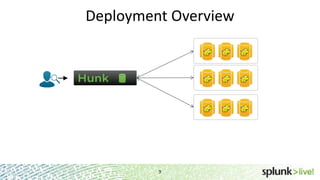
Deployment Overview

9
Move Data to Computation (stream)
•

Move data from HDFS to SH

•

Process it in a streaming fashion

•

Visualize the results

•

Problem?

10
Move Computation to Data (MR)
•

Create and start a MapReduce job to do the processing

•

Monitor MR job and collect its results

•

Merge the results and visualize

•

Problem?

11
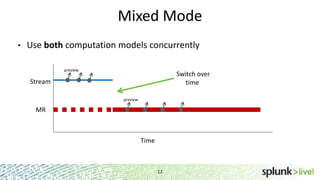
Mixed Mode
•

Use both computation models concurrently
preview

Switch over
time

Stream
preview

MR

Time

12
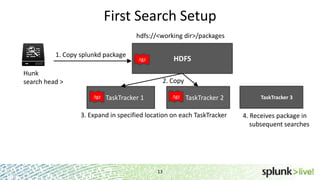
First Search Setup
hdfs://<working dir>/packages
1. Copy splunkd package

HDFS

.tgz

Hunk
search head >

2. Copy
.tgz

.tgz

TaskTracker 1

TaskTracker 2

3. Expand in specified location on each TaskTracker

13

TaskTracker 3

4. Receives package in
subsequent searches
Data Flow

14
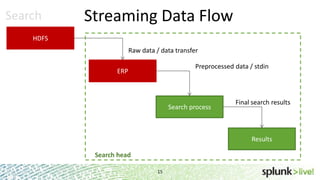
Search

Streaming Data Flow

HDFS

Raw data / data transfer
Preprocessed data / stdin

ERP

Search process

Final search results

Results

Search head
15
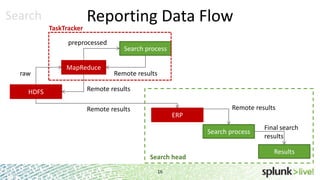
Search
TaskTracker

Reporting Data Flow

preprocessed

raw

HDFS

MapReduce

Search process
Remote results

Remote results
Remote results

Remote results

ERP
Search process

Search head
16

Final search
results
Results
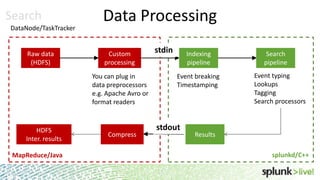
Search
DataNode/TaskTracker

Raw data
(HDFS)

Data Processing
Custom
processing

stdin

You can plug in
data preprocessors
e.g. Apache Avro or
format readers

HDFS
Inter. results

Compress

Indexing
pipeline
Event breaking
Timestamping

stdout

Search
pipeline
Event typing
Lookups
Tagging
Search processors

Results
splunkd/C++

MapReduce/Java
17

17
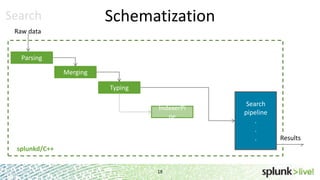
Schematization

Search
Raw data

Parsing
Merging
Typing
IndexerPi
pe

splunkd/C++
18

Search
pipeline
.
.
.

Results
Search – Search Head
•

Responsible for:
– Orchestrating everything
– Submitting MR jobs (optionally splitting bigger jobs into smaller ones)
– Merging the results of MR jobs
 Potentially with results from other VIXes or native indexes
– Handling high level optimizations

19
Optimization

Partition Pruning

Data is usually organized into hierarchical dirs, eg.
/<base_path>/<date>/<hour>/<hostname>/somefile.log
• Hunk can be instructed to extract fields and time ranges
from a path
• Ignores directories that cannot possibly contain search results
•

20
Optimization

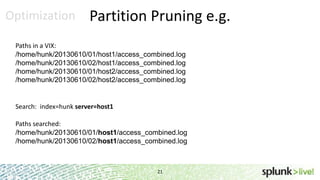
Partition Pruning e.g.

Paths in a VIX:
/home/hunk/20130610/01/host1/access_combined.log
/home/hunk/20130610/02/host1/access_combined.log
/home/hunk/20130610/01/host2/access_combined.log
/home/hunk/20130610/02/host2/access_combined.log

Search: index=hunk server=host1
Paths searched:
/home/hunk/20130610/01/host1/access_combined.log
/home/hunk/20130610/02/host1/access_combined.log

21
Optimization

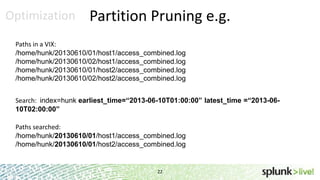
Partition Pruning e.g.

Paths in a VIX:
/home/hunk/20130610/01/host1/access_combined.log
/home/hunk/20130610/02/host1/access_combined.log
/home/hunk/20130610/01/host2/access_combined.log
/home/hunk/20130610/02/host2/access_combined.log
Search: index=hunk earliest_time=“2013-06-10T01:00:00” latest_time =“2013-0610T02:00:00”
Paths searched:
/home/hunk/20130610/01/host1/access_combined.log
/home/hunk/20130610/01/host2/access_combined.log

22
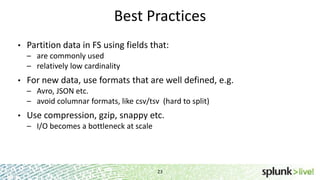
Best Practices
•

Partition data in FS using fields that:
– are commonly used
– relatively low cardinality

•

For new data, use formats that are well defined, e.g.
– Avro, JSON etc.
– avoid columnar formats, like csv/tsv (hard to split)

•

Use compression, gzip, snappy etc.
– I/O becomes a bottleneck at scale

23
Troubleshooting

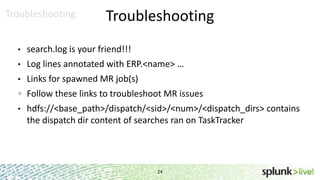
Troubleshooting

•

search.log is your friend!!!

•

Log lines annotated with ERP.<name> …

•

Links for spawned MR job(s)
Follow these links to troubleshoot MR issues

•

hdfs://<base_path>/dispatch/<sid>/<num>/<dispatch_dirs> contains
the dispatch dir content of searches ran on TaskTracker

24
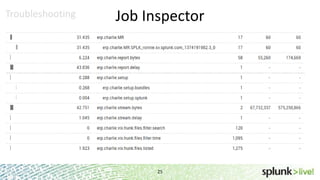
Troubleshooting

Job Inspector

25
Troubleshooting

Common Problems

•

User running Splunk does not have permission to write to HDFS or run
MapReduce jobs

•

HDFS SPLUNK_HOME not writable

•

DN/TT SPLUNK_HOME not writable, out of disk

•

Data reading permission issues

26
Helpful Resources
•

Download
– http://www.splunk.com/bigdata

•

Help & docs
– http://docs.splunk.com/Documentation/Hunk/6.0/Hunk/MeetHunk

•

Resource
– http://answers.splunk.com

27
Thank You

SplunkLive! Hunk Technical Deep Dive

  • 1.
    Copyright © 2013Splunk Inc. Hunk: Technical Deep Dive
  • 2.
    Legal Notices During thecourse of this presentation, we may make forward-looking statements regarding future events or the expected performance of the company. We caution you that such statements reflect our current expectations and estimates based on factors currently known to us and that actual events or results could differ materially. For important factors that may cause actual results to differ from those contained in our forward-looking statements, please review our filings with the SEC. The forward-looking statements made in this presentation are being made as of the time and date of its live presentation. If reviewed after its live presentation, this presentation may not contain current or accurate information. We do not assume any obligation to update any forward-looking statements we may make. In addition, any information about our roadmap outlines our general product direction and is subject to change at any time without notice. It is for informational purposes only and shall not, be incorporated into any contract or other commitment. Splunk undertakes no obligation either to develop the features or functionality described or to include any such feature or functionality in a future release. Splunk, Splunk>, Splunk Storm, Listen to Your Data, SPL and The Engine for Machine Data are trademarks and registered trademarks of Splunk Inc. in the United States and other countries. All other brand names, product names, or trademarks belong to their respective owners. ©2013 Splunk Inc. All rights reserved. 2
  • 3.
    The Problem • Large amountsof data in Hadoop – Relatively easy to get the data in – Hard & time-consuming to get value out • Splunk has solved this problem before – Primarily for event time series • Wouldn’t if be great if Splunk could be used to analyze Hadoop data? Hadoop + Splunk = Hunk 3
  • 4.
    The Goals • A viablesolution must: – – – – – Process the data in place Maintain support for Splunk Processing Language (SPL) True schema on read Report previews Ease of setup & use 4
  • 5.
    GOALS Support SPL • Naturally suitablefor MapReduce • Reduces adoption time • Challenge: Hadoop “apps” written in Java & all SPL code is in C++ • Porting SPL to Java would be a daunting task • Reuse the C++ code somehow – Use “splunkd” (the binary) to process the data – JNI is not easy nor stable 5
  • 6.
    GOALS • Schema on Read ApplySplunk’s index-time schema at search time – Event breaking, time stamping etc. • Anything else would be brittle & maintenance nightmare • Extremely flexible • Runtime overhead (manpower >>$ computation) • Challenge: Hadoop “apps” written in Java & all index-time schema logic is implemented in C++ 6
  • 7.
    GOALS Previews • No one likesto stare at a blank screen! • Challenge: Hadoop is designed for batch-like jobs 7
  • 8.
    GOALS • Ease of Setupand Use Users should just specify: – Hadoop cluster they want to use – Data within the cluster they want to process • Immediately be able to explore and analyze their data 8
  • 9.
  • 10.
    Move Data toComputation (stream) • Move data from HDFS to SH • Process it in a streaming fashion • Visualize the results • Problem? 10
  • 11.
    Move Computation toData (MR) • Create and start a MapReduce job to do the processing • Monitor MR job and collect its results • Merge the results and visualize • Problem? 11
  • 12.
    Mixed Mode • Use bothcomputation models concurrently preview Switch over time Stream preview MR Time 12
  • 13.
    First Search Setup hdfs://<workingdir>/packages 1. Copy splunkd package HDFS .tgz Hunk search head > 2. Copy .tgz .tgz TaskTracker 1 TaskTracker 2 3. Expand in specified location on each TaskTracker 13 TaskTracker 3 4. Receives package in subsequent searches
  • 14.
  • 15.
    Search Streaming Data Flow HDFS Rawdata / data transfer Preprocessed data / stdin ERP Search process Final search results Results Search head 15
  • 16.
    Search TaskTracker Reporting Data Flow preprocessed raw HDFS MapReduce Searchprocess Remote results Remote results Remote results Remote results ERP Search process Search head 16 Final search results Results
  • 17.
    Search DataNode/TaskTracker Raw data (HDFS) Data Processing Custom processing stdin Youcan plug in data preprocessors e.g. Apache Avro or format readers HDFS Inter. results Compress Indexing pipeline Event breaking Timestamping stdout Search pipeline Event typing Lookups Tagging Search processors Results splunkd/C++ MapReduce/Java 17 17
  • 18.
  • 19.
    Search – SearchHead • Responsible for: – Orchestrating everything – Submitting MR jobs (optionally splitting bigger jobs into smaller ones) – Merging the results of MR jobs  Potentially with results from other VIXes or native indexes – Handling high level optimizations 19
  • 20.
    Optimization Partition Pruning Data isusually organized into hierarchical dirs, eg. /<base_path>/<date>/<hour>/<hostname>/somefile.log • Hunk can be instructed to extract fields and time ranges from a path • Ignores directories that cannot possibly contain search results • 20
  • 21.
    Optimization Partition Pruning e.g. Pathsin a VIX: /home/hunk/20130610/01/host1/access_combined.log /home/hunk/20130610/02/host1/access_combined.log /home/hunk/20130610/01/host2/access_combined.log /home/hunk/20130610/02/host2/access_combined.log Search: index=hunk server=host1 Paths searched: /home/hunk/20130610/01/host1/access_combined.log /home/hunk/20130610/02/host1/access_combined.log 21
  • 22.
    Optimization Partition Pruning e.g. Pathsin a VIX: /home/hunk/20130610/01/host1/access_combined.log /home/hunk/20130610/02/host1/access_combined.log /home/hunk/20130610/01/host2/access_combined.log /home/hunk/20130610/02/host2/access_combined.log Search: index=hunk earliest_time=“2013-06-10T01:00:00” latest_time =“2013-0610T02:00:00” Paths searched: /home/hunk/20130610/01/host1/access_combined.log /home/hunk/20130610/01/host2/access_combined.log 22
  • 23.
    Best Practices • Partition datain FS using fields that: – are commonly used – relatively low cardinality • For new data, use formats that are well defined, e.g. – Avro, JSON etc. – avoid columnar formats, like csv/tsv (hard to split) • Use compression, gzip, snappy etc. – I/O becomes a bottleneck at scale 23
  • 24.
    Troubleshooting Troubleshooting • search.log is yourfriend!!! • Log lines annotated with ERP.<name> … • Links for spawned MR job(s) Follow these links to troubleshoot MR issues • hdfs://<base_path>/dispatch/<sid>/<num>/<dispatch_dirs> contains the dispatch dir content of searches ran on TaskTracker 24
  • 25.
  • 26.
    Troubleshooting Common Problems • User runningSplunk does not have permission to write to HDFS or run MapReduce jobs • HDFS SPLUNK_HOME not writable • DN/TT SPLUNK_HOME not writable, out of disk • Data reading permission issues 26
  • 27.
    Helpful Resources • Download – http://www.splunk.com/bigdata • Help& docs – http://docs.splunk.com/Documentation/Hunk/6.0/Hunk/MeetHunk • Resource – http://answers.splunk.com 27
  • 28.

Editor's Notes

  • #14 On the first search, MapReduce auto-populates the Splunk binaries. The orchestration process begins by copying the Hunk binary .tgz file to HDFS. Hunk supports both the MapReduce JobTracker and the YARN MapReduce Resource Manager.Each TaskTracker (called ApplicationContainer in YARN) fetches the binary.TaskTrackers not involved in the 1st search will receive the Hunk binary in a subsequent search that involves those TaskTrackers. This process is one example of why Hunk needs some scratch space in HDFS and in the local file system (TaskTrackers / DataNodes). Hadoop NotesTypically a Hadoop cluster has a single master and multiple worker nodes. The master node (also referred to as NameNode) coordinates the reads and writes to worker nodes (also referred to as DataNodes). HDFS reliability is achieved by replicating the data across multiple machines. By default the replication value is 3 and chunk size is 64MB.The JobTracker dispatches tasks to worker nodes (TaskTracker) in the cluster. Priority is given to nodes that host the data upon which said task will operate on. If the task cannot be run on that node, next priority is given to neighboring nodes (in order to minimize network traffic). Upon job completion, each worker node writes own results locally and the HDFS ensures replication across the cluster.HDFS = NameNode + DataNodes
MapReduce Engine = JobTracker + TaskTracker
  • #15  HDFS -&gt; MapReduce -&gt; (preprocess) -&gt; Splunkd/TT -&gt; MapReduce -&gt; HDFS -&gt; SH
  • #18 Before data is processed by Hunk you can plug in your own data preprocessor. The preprocessors have to be written in Java and can transform the data in some way before Hunk gets a chance to. Data preprocessors can vary in complexity from simple translators (say Avro to JSON) to as complex as doing image/video/document processing.Hunk translates Avro to JSON. These translations happen on the fly and are not persisted.