
Copyright © 2013 Splunk Inc.

Hunk: Technical Overview
Agenda
What is Hunk?
2. Powerful Developer Platform
3. Preparation
4. Connect Hunk to HDFS and MapReduce
5. Create Virtual Indexes
6. MapReduce as the Orchestration Framework
7. Search Data in Hadoop
8. Flexible, Iterative Workflow for Business Users
1.

2
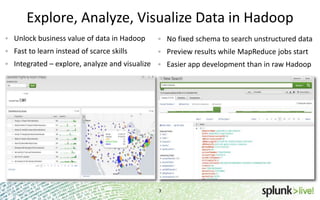
Explore, Analyze, Visualize Data in Hadoop
Unlock business value of data in Hadoop

No fixed schema to search unstructured data

Fast to learn instead of scarce skills

Preview results while MapReduce jobs start

Integrated – explore, analyze and visualize

Easier app development than in raw Hadoop

3
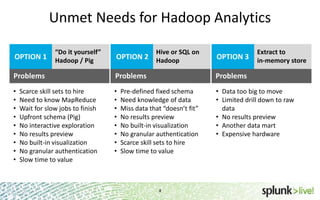
Unmet Needs for Hadoop Analytics
OPTION 1

“Do it yourself”
Hadoop / Pig

Hive or SQL on

Extract to
in-memory store

OPTION 2 Hadoop

OPTION 3

Problems

Problems

Problems

•
•
•
•
•
•
•
•
•

•
•
•
•
•
•
•
•

• Data too big to move
• Limited drill down to raw
data
• No results preview
• Another data mart
• Expensive hardware

Scarce skill sets to hire
Need to know MapReduce
Wait for slow jobs to finish
Upfront schema (Pig)
No interactive exploration
No results preview
No built-in visualization
No granular authentication
Slow time to value

Pre-defined fixed schema
Need knowledge of data
Miss data that “doesn’t fit”
No results preview
No built-in visualization
No granular authentication
Scarce skill sets to hire
Slow time to value

4
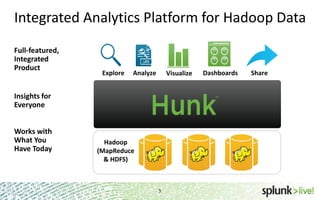
Integrated Analytics Platform for Hadoop Data
Full-featured,
Integrated
Product

Explore

Analyze

Visualize

Insights for
Everyone
Works with
What You
Have Today

Hadoop
(MapReduce
& HDFS)
5

5

Dashboards

Share
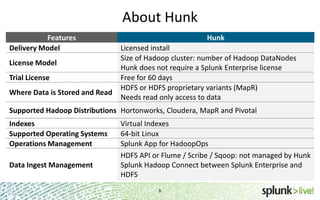
About Hunk
Features
Delivery Model
License Model

Trial License
Where Data is Stored and Read

Hunk
Licensed install
Size of Hadoop cluster: number of Hadoop DataNodes
Hunk does not require a Splunk Enterprise license
Free for 60 days
HDFS or HDFS proprietary variants (MapR)
Needs read only access to data

Supported Hadoop Distributions Hortonworks, Cloudera, MapR and Pivotal
Indexes
Supported Operating Systems
Operations Management
Data Ingest Management

Virtual Indexes
64-bit Linux
Splunk App for HadoopOps
HDFS API or Flume / Scribe / Sqoop: not managed by Hunk
Splunk Hadoop Connect between Splunk Enterprise and
HDFS
6
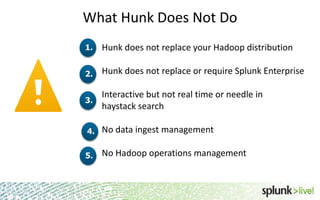
What Hunk Does Not Do
1.

Hunk does not replace your Hadoop distribution

2.

Hunk does not replace or require Splunk Enterprise

3.

Interactive but not real time or needle in
haystack search

4.

No data ingest management

5.

No Hadoop operations management

7
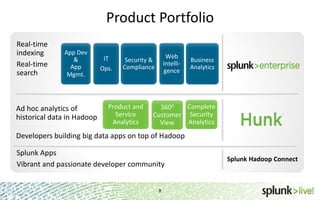
Product Portfolio
Real-time
indexing
Real-time
search

App Dev
&
App
Mgmt.

Ad hoc analytics of
historical data in Hadoop

IT
Ops.

Web
Intelligence

Security &
Compliance

Product and
Service
Analytics

Business
Analytics

Complete
3600
Customer Security
Analytics
View

Developers building big data apps on top of Hadoop
Splunk Apps
Vibrant and passionate developer community
8

Splunk Hadoop Connect
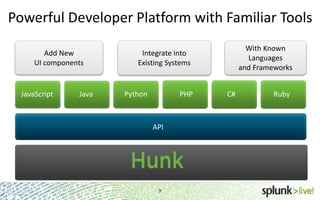
Powerful Developer Platform with Familiar Tools
Add New
UI components

JavaScript

Java

With Known
Languages
and Frameworks

Integrate into
Existing Systems

Python

PHP

API

9

C#

Ruby
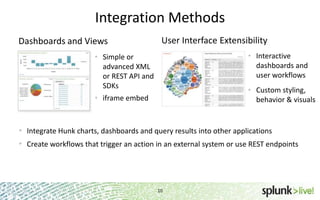
Integration Methods
Dashboards and Views

User Interface Extensibility
• Interactive
dashboards and
user workflows

• Simple or
advanced XML
or REST API and
SDKs

• Custom styling,
behavior & visuals

• iframe embed

• Integrate Hunk charts, dashboards and query results into other applications
• Create workflows that trigger an action in an external system or use REST endpoints

10
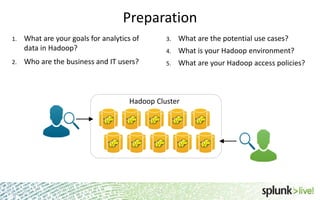
Preparation
1.

2.

What are your goals for analytics of
data in Hadoop?

3.

What are the potential use cases?

4.

What is your Hadoop environment?

Who are the business and IT users?

5.

What are your Hadoop access policies?

Hadoop Cluster

11
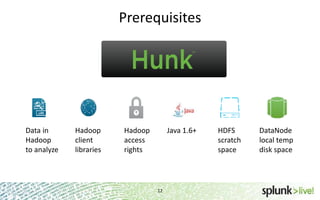
Prerequisites

Data in
Hadoop
to analyze

Hadoop
client
libraries

Hadoop
access
rights

Java 1.6+

12

HDFS
scratch
space

DataNode
local temp
disk space
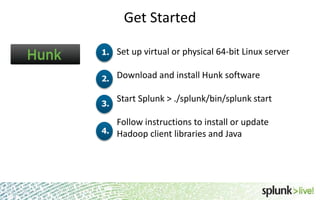
Get Started
1.

Set up virtual or physical 64-bit Linux server

2.

Download and install Hunk software

3.

Start Splunk > ./splunk/bin/splunk start

Follow instructions to install or update
4. Hadoop client libraries and Java

13
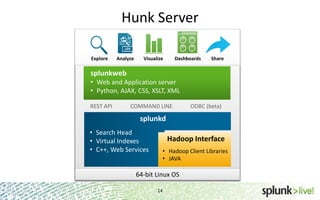
Hunk Server
Explore

Analyze

Visualize

Dashboards

Share

splunkweb
• Web and Application server
• Python, AJAX, CSS, XSLT, XML
REST API

COMMAND LINE

ODBC (beta)

splunkd
• Search Head
• Virtual Indexes
• C++, Web Services

Hadoop Interface
• Hadoop Client Libraries
• JAVA

64-bit Linux OS
14
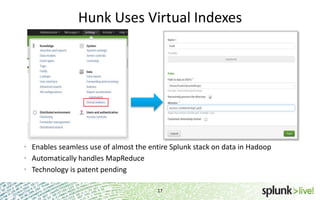
Hunk Uses Virtual Indexes

• Enables seamless use of almost the entire Splunk stack on data in Hadoop
• Automatically handles MapReduce
• Technology is patent pending
17
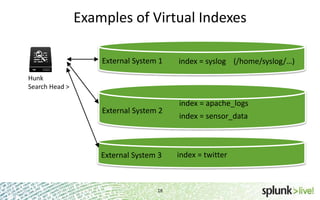
Examples of Virtual Indexes
External System 1

index = syslog (/home/syslog/…)

Hunk
Search Head >

External System 2

External System 3

18

index = apache_logs

index = sensor_data

index = twitter
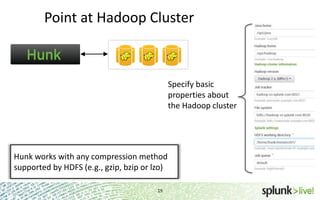
Point at Hadoop Cluster

Specify basic
properties about
the Hadoop cluster

Hunk works with any compression method
supported by HDFS (e.g., gzip, bzip or lzo)
19
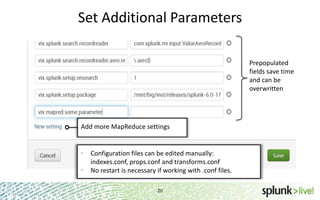
Set Additional Parameters
Prepopulated
fields save time
and can be
overwritten

Add more MapReduce settings

•
•

Configuration files can be edited manually:
indexes.conf, props.conf and transforms.conf
No restart is necessary if working with .conf files.
20
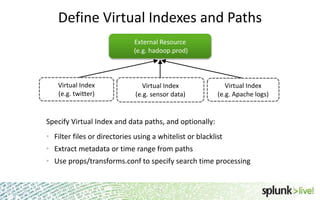
Define Virtual Indexes and Paths
External Resource
(e.g. hadoop.prod)

Virtual Index
(e.g. twitter)

Virtual Index
(e.g. sensor data)

Virtual Index
(e.g. Apache logs)

Specify Virtual Index and data paths, and optionally:

• Filter files or directories using a whitelist or blacklist
• Extract metadata or time range from paths
• Use props/transforms.conf to specify search time processing

21

21
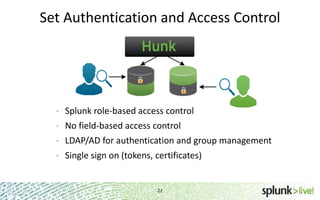
Set Authentication and Access Control

•

Splunk role-based access control

•

No field-based access control

•

LDAP/AD for authentication and group management

•

Single sign on (tokens, certificates)

22
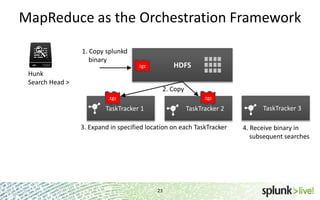
MapReduce as the Orchestration Framework
1. Copy splunkd
binary

HDFS

.tgz

Hunk
Search Head >

2. Copy
.tgz

.tgz

TaskTracker 1

TaskTracker 2

3. Expand in specified location on each TaskTracker

23

TaskTracker 3
4. Receive binary in
subsequent searches
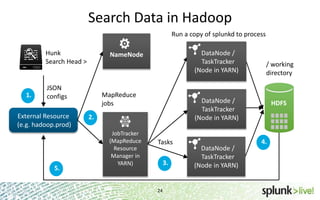
Search Data in Hadoop
Run a copy of splunkd to process
Hunk
Search Head >

1.

JSON
configs

External Resource
(e.g. hadoop.prod)

5.

DataNode /
TaskTracker
(Node in YARN)

NameNode

MapReduce
jobs

DataNode /
TaskTracker
(Node in YARN)

2.
JobTracker
(MapReduce
Resource
Manager in
YARN)

/ working
directory

Tasks
3.

24

DataNode /
TaskTracker
(Node in YARN)

HDFS

4.
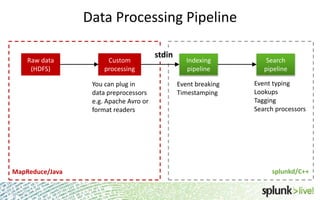
Data Processing Pipeline
Raw data
(HDFS)

Custom
processing

stdin

You can plug in
data preprocessors
e.g. Apache Avro or
format readers

Indexing
pipeline
Event breaking
Timestamping

Search
pipeline
Event typing
Lookups
Tagging
Search processors

splunkd/C++

MapReduce/Java
25

25
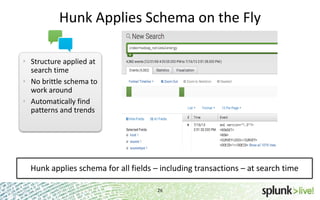
Hunk Applies Schema on the Fly
• Structure applied at
search time
• No brittle schema to
work around
• Automatically find
patterns and trends

Hunk applies schema for all fields – including transactions – at search time
26
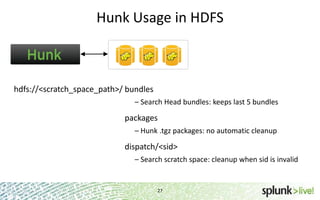
Hunk Usage in HDFS

hdfs://<scratch_space_path>/ bundles
– Search Head bundles: keeps last 5 bundles

packages
– Hunk .tgz packages: no automatic cleanup

dispatch/<sid>
– Search scratch space: cleanup when sid is invalid

27
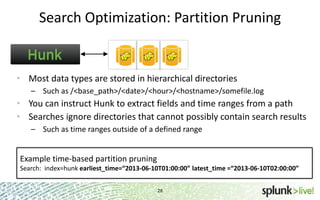
Search Optimization: Partition Pruning

• Most data types are stored in hierarchical directories
– Such as /<base_path>/<date>/<hour>/<hostname>/somefile.log

• You can instruct Hunk to extract fields and time ranges from a path
• Searches ignore directories that cannot possibly contain search results
– Such as time ranges outside of a defined range

Example time-based partition pruning
Search: index=hunk earliest_time=“2013-06-10T01:00:00” latest_time =“2013-06-10T02:00:00”
28
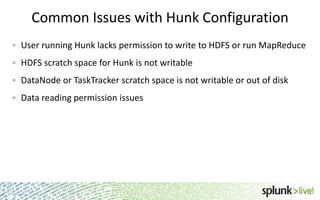
Common Issues with Hunk Configuration
User running Hunk lacks permission to write to HDFS or run MapReduce
HDFS scratch space for Hunk is not writable
DataNode or TaskTracker scratch space is not writable or out of disk
Data reading permission issues

29
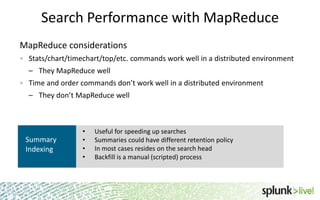
Search Performance with MapReduce
MapReduce considerations
Stats/chart/timechart/top/etc. commands work well in a distributed environment

– They MapReduce well
Time and order commands don’t work well in a distributed environment
– They don’t MapReduce well

Summary
Indexing

•
•
•
•

Useful for speeding up searches
Summaries could have different retention policy
In most cases resides on the search head
Backfill is a manual (scripted) process

30
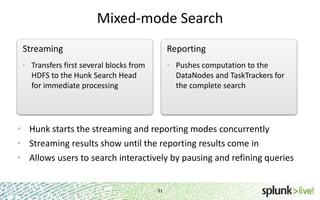
Mixed-mode Search
Streaming

Reporting

• Transfers first several blocks from

• Pushes computation to the

HDFS to the Hunk Search Head
for immediate processing

DataNodes and TaskTrackers for
the complete search

• Hunk starts the streaming and reporting modes concurrently
• Streaming results show until the reporting results come in
• Allows users to search interactively by pausing and refining queries

31
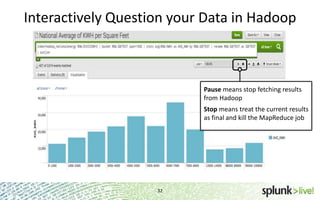
Interactively Question your Data in Hadoop

Pause means stop fetching results
from Hadoop
Stop means treat the current results
as final and kill the MapReduce job

32
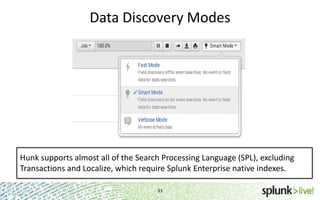
Data Discovery Modes

Hunk supports almost all of the Search Processing Language (SPL), excluding
Transactions and Localize, which require Splunk Enterprise native indexes.
33
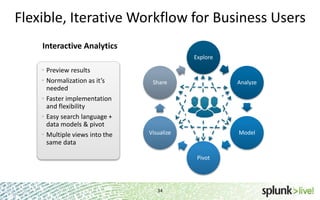
Flexible, Iterative Workflow for Business Users
Interactive Analytics
Explore

• Preview results
• Normalization as it’s
needed
• Faster implementation
and flexibility
• Easy search language +
data models & pivot
• Multiple views into the
same data

Share

Analyze

Visualize

Model

Pivot

34
Thank You

SplunkLive! Hunk Technical Overview

  • 1.
    Copyright © 2013Splunk Inc. Hunk: Technical Overview
  • 2.
    Agenda What is Hunk? 2.Powerful Developer Platform 3. Preparation 4. Connect Hunk to HDFS and MapReduce 5. Create Virtual Indexes 6. MapReduce as the Orchestration Framework 7. Search Data in Hadoop 8. Flexible, Iterative Workflow for Business Users 1. 2
  • 3.
    Explore, Analyze, VisualizeData in Hadoop Unlock business value of data in Hadoop No fixed schema to search unstructured data Fast to learn instead of scarce skills Preview results while MapReduce jobs start Integrated – explore, analyze and visualize Easier app development than in raw Hadoop 3
  • 4.
    Unmet Needs forHadoop Analytics OPTION 1 “Do it yourself” Hadoop / Pig Hive or SQL on Extract to in-memory store OPTION 2 Hadoop OPTION 3 Problems Problems Problems • • • • • • • • • • • • • • • • • • Data too big to move • Limited drill down to raw data • No results preview • Another data mart • Expensive hardware Scarce skill sets to hire Need to know MapReduce Wait for slow jobs to finish Upfront schema (Pig) No interactive exploration No results preview No built-in visualization No granular authentication Slow time to value Pre-defined fixed schema Need knowledge of data Miss data that “doesn’t fit” No results preview No built-in visualization No granular authentication Scarce skill sets to hire Slow time to value 4
  • 5.
    Integrated Analytics Platformfor Hadoop Data Full-featured, Integrated Product Explore Analyze Visualize Insights for Everyone Works with What You Have Today Hadoop (MapReduce & HDFS) 5 5 Dashboards Share
  • 6.
    About Hunk Features Delivery Model LicenseModel Trial License Where Data is Stored and Read Hunk Licensed install Size of Hadoop cluster: number of Hadoop DataNodes Hunk does not require a Splunk Enterprise license Free for 60 days HDFS or HDFS proprietary variants (MapR) Needs read only access to data Supported Hadoop Distributions Hortonworks, Cloudera, MapR and Pivotal Indexes Supported Operating Systems Operations Management Data Ingest Management Virtual Indexes 64-bit Linux Splunk App for HadoopOps HDFS API or Flume / Scribe / Sqoop: not managed by Hunk Splunk Hadoop Connect between Splunk Enterprise and HDFS 6
  • 7.
    What Hunk DoesNot Do 1. Hunk does not replace your Hadoop distribution 2. Hunk does not replace or require Splunk Enterprise 3. Interactive but not real time or needle in haystack search 4. No data ingest management 5. No Hadoop operations management 7
  • 8.
    Product Portfolio Real-time indexing Real-time search App Dev & App Mgmt. Adhoc analytics of historical data in Hadoop IT Ops. Web Intelligence Security & Compliance Product and Service Analytics Business Analytics Complete 3600 Customer Security Analytics View Developers building big data apps on top of Hadoop Splunk Apps Vibrant and passionate developer community 8 Splunk Hadoop Connect
  • 9.
    Powerful Developer Platformwith Familiar Tools Add New UI components JavaScript Java With Known Languages and Frameworks Integrate into Existing Systems Python PHP API 9 C# Ruby
  • 10.
    Integration Methods Dashboards andViews User Interface Extensibility • Interactive dashboards and user workflows • Simple or advanced XML or REST API and SDKs • Custom styling, behavior & visuals • iframe embed • Integrate Hunk charts, dashboards and query results into other applications • Create workflows that trigger an action in an external system or use REST endpoints 10
  • 11.
    Preparation 1. 2. What are yourgoals for analytics of data in Hadoop? 3. What are the potential use cases? 4. What is your Hadoop environment? Who are the business and IT users? 5. What are your Hadoop access policies? Hadoop Cluster 11
  • 12.
  • 13.
    Get Started 1. Set upvirtual or physical 64-bit Linux server 2. Download and install Hunk software 3. Start Splunk > ./splunk/bin/splunk start Follow instructions to install or update 4. Hadoop client libraries and Java 13
  • 14.
    Hunk Server Explore Analyze Visualize Dashboards Share splunkweb • Weband Application server • Python, AJAX, CSS, XSLT, XML REST API COMMAND LINE ODBC (beta) splunkd • Search Head • Virtual Indexes • C++, Web Services Hadoop Interface • Hadoop Client Libraries • JAVA 64-bit Linux OS 14
  • 15.
    Hunk Uses VirtualIndexes • Enables seamless use of almost the entire Splunk stack on data in Hadoop • Automatically handles MapReduce • Technology is patent pending 17
  • 16.
    Examples of VirtualIndexes External System 1 index = syslog (/home/syslog/…) Hunk Search Head > External System 2 External System 3 18 index = apache_logs index = sensor_data index = twitter
  • 17.
    Point at HadoopCluster Specify basic properties about the Hadoop cluster Hunk works with any compression method supported by HDFS (e.g., gzip, bzip or lzo) 19
  • 18.
    Set Additional Parameters Prepopulated fieldssave time and can be overwritten Add more MapReduce settings • • Configuration files can be edited manually: indexes.conf, props.conf and transforms.conf No restart is necessary if working with .conf files. 20
  • 19.
    Define Virtual Indexesand Paths External Resource (e.g. hadoop.prod) Virtual Index (e.g. twitter) Virtual Index (e.g. sensor data) Virtual Index (e.g. Apache logs) Specify Virtual Index and data paths, and optionally: • Filter files or directories using a whitelist or blacklist • Extract metadata or time range from paths • Use props/transforms.conf to specify search time processing 21 21
  • 20.
    Set Authentication andAccess Control • Splunk role-based access control • No field-based access control • LDAP/AD for authentication and group management • Single sign on (tokens, certificates) 22
  • 21.
    MapReduce as theOrchestration Framework 1. Copy splunkd binary HDFS .tgz Hunk Search Head > 2. Copy .tgz .tgz TaskTracker 1 TaskTracker 2 3. Expand in specified location on each TaskTracker 23 TaskTracker 3 4. Receive binary in subsequent searches
  • 22.
    Search Data inHadoop Run a copy of splunkd to process Hunk Search Head > 1. JSON configs External Resource (e.g. hadoop.prod) 5. DataNode / TaskTracker (Node in YARN) NameNode MapReduce jobs DataNode / TaskTracker (Node in YARN) 2. JobTracker (MapReduce Resource Manager in YARN) / working directory Tasks 3. 24 DataNode / TaskTracker (Node in YARN) HDFS 4.
  • 23.
    Data Processing Pipeline Rawdata (HDFS) Custom processing stdin You can plug in data preprocessors e.g. Apache Avro or format readers Indexing pipeline Event breaking Timestamping Search pipeline Event typing Lookups Tagging Search processors splunkd/C++ MapReduce/Java 25 25
  • 24.
    Hunk Applies Schemaon the Fly • Structure applied at search time • No brittle schema to work around • Automatically find patterns and trends Hunk applies schema for all fields – including transactions – at search time 26
  • 25.
    Hunk Usage inHDFS hdfs://<scratch_space_path>/ bundles – Search Head bundles: keeps last 5 bundles packages – Hunk .tgz packages: no automatic cleanup dispatch/<sid> – Search scratch space: cleanup when sid is invalid 27
  • 26.
    Search Optimization: PartitionPruning • Most data types are stored in hierarchical directories – Such as /<base_path>/<date>/<hour>/<hostname>/somefile.log • You can instruct Hunk to extract fields and time ranges from a path • Searches ignore directories that cannot possibly contain search results – Such as time ranges outside of a defined range Example time-based partition pruning Search: index=hunk earliest_time=“2013-06-10T01:00:00” latest_time =“2013-06-10T02:00:00” 28
  • 27.
    Common Issues withHunk Configuration User running Hunk lacks permission to write to HDFS or run MapReduce HDFS scratch space for Hunk is not writable DataNode or TaskTracker scratch space is not writable or out of disk Data reading permission issues 29
  • 28.
    Search Performance withMapReduce MapReduce considerations Stats/chart/timechart/top/etc. commands work well in a distributed environment – They MapReduce well Time and order commands don’t work well in a distributed environment – They don’t MapReduce well Summary Indexing • • • • Useful for speeding up searches Summaries could have different retention policy In most cases resides on the search head Backfill is a manual (scripted) process 30
  • 29.
    Mixed-mode Search Streaming Reporting • Transfersfirst several blocks from • Pushes computation to the HDFS to the Hunk Search Head for immediate processing DataNodes and TaskTrackers for the complete search • Hunk starts the streaming and reporting modes concurrently • Streaming results show until the reporting results come in • Allows users to search interactively by pausing and refining queries 31
  • 30.
    Interactively Question yourData in Hadoop Pause means stop fetching results from Hadoop Stop means treat the current results as final and kill the MapReduce job 32
  • 31.
    Data Discovery Modes Hunksupports almost all of the Search Processing Language (SPL), excluding Transactions and Localize, which require Splunk Enterprise native indexes. 33
  • 32.
    Flexible, Iterative Workflowfor Business Users Interactive Analytics Explore • Preview results • Normalization as it’s needed • Faster implementation and flexibility • Easy search language + data models & pivot • Multiple views into the same data Share Analyze Visualize Model Pivot 34
  • 33.