Copyright	
  ©	
  2016	
  Splunk	
  Inc.	
  
Splunk	
  Enterprise	
  
Technical	
  Overview	
  
Raff	
  Schirripa	
  
Agenda	
  
What	
  is	
  Splunk	
  Enterprise?	
  	
  
Deployment	
  &	
  IntegraIon	
  
Real-­‐Time	
  Search,	
  Alert	
  &	
  ReporIng	
  
Universal	
  Indexing	
  Explained	
  
Splunk	
  Developer	
  PlaOorm	
  
Make	
  machine	
  data	
  accessible,	
  	
  
usable	
  and	
  valuable	
  to	
  everyone.	
  	
  
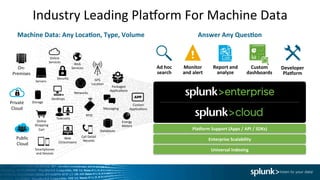
Industry	
  Leading	
  PlaOorm	
  For	
  Machine	
  Data	
  
	
  Machine	
  Data:	
  Any	
  Loca0on,	
  Type,	
  Volume	
  
Pla9orm	
  Support	
  (Apps	
  /	
  API	
  /	
  SDKs)	
  
Enterprise	
  Scalability	
  
Universal	
  Indexing	
  
Answer	
  Any	
  Ques0on	
  
Custom	
  	
  
dashboards	
  
Report	
  and	
  	
  
analyze	
  
Monitor	
  	
  
and	
  alert	
  
Developer	
  
Pla9orm	
  
Ad	
  hoc	
  	
  
search	
  
Online	
  
Services	
  
Web	
  
Services	
  
Servers	
  
Security	
   GPS	
  
LocaIon	
  
Storage	
  
Desktops	
  
Networks	
  
Packaged	
  
ApplicaIons	
  
Custom	
  
ApplicaIons	
  Messaging	
  
Telecoms	
  
Online	
  
Shopping	
  
Cart	
  
Web	
  
Clickstreams	
  
Databases	
  
Energy	
  
Meters	
  
Call	
  Detail	
  
Records	
  
Smartphones	
  
and	
  Devices	
  
RFID	
  
On-­‐	
  
Premises	
  
Private	
  	
  
Cloud	
  
Public	
  	
  
Cloud	
  
Industry	
  Leading	
  PlaOorm	
  For	
  Machine	
  Data	
  
	
  Machine	
  Data:	
  Any	
  Loca0on,	
  Type,	
  Volume	
  
Pla9orm	
  Support	
  (Apps	
  /	
  API	
  /	
  SDKs)	
  
Enterprise	
  Scalability	
  
Universal	
  Indexing	
  
Answer	
  Any	
  Ques0on	
  
Custom	
  	
  
dashboards	
  
Report	
  and	
  	
  
analyze	
  
Monitor	
  	
  
and	
  alert	
  
Developer	
  
Pla9orm	
  
Ad	
  hoc	
  	
  
search	
  
Online	
  
Services	
  
Web	
  
Services	
  
Servers	
  
Security	
   GPS	
  
LocaIon	
  
Storage	
  
Desktops	
  
Networks	
  
Packaged	
  
ApplicaIons	
  
Custom	
  
ApplicaIons	
  Messaging	
  
Telecoms	
  
Online	
  
Shopping	
  
Cart	
  
Web	
  
Clickstreams	
  
Databases	
  
Energy	
  
Meters	
  
Call	
  Detail	
  
Records	
  
Smartphones	
  
and	
  Devices	
  
RFID	
  
On-­‐	
  
Premises	
  
Private	
  	
  
Cloud	
  
Public	
  	
  
Cloud	
  
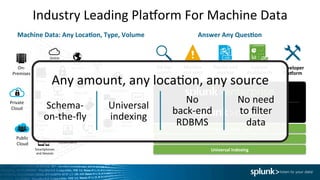
Any	
  amount,	
  any	
  locaIon,	
  any	
  source	
  
Schema-­‐
on-­‐the-­‐fly	
  
Universal	
  
indexing	
  
No	
  	
  
back-­‐end	
  
RDBMS	
  
No	
  need	
  	
  
to	
  filter	
  
data	
  
Splunk	
  SoYware	
  
Deployment	
  and	
  
IntegraIon	
  
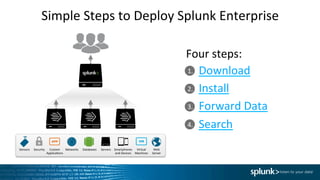
1.	
  
2.	
  
3.	
  
4.	
  
Simple	
  Steps	
  to	
  Deploy	
  Splunk	
  Enterprise	
  
Download	
  
Install	
  
Forward	
  Data	
  
Search	
  
Four	
  steps:	
  
Databases	
  Networks	
   Servers	
   Virtual	
  
Machines	
  
Smartphones	
  
and	
  Devices	
  
Custom	
  
ApplicaIons	
  
Security	
   Web	
  
Server	
  
Sensors	
  
link	
  
8	
  
h_ps://splunk.box.com/v/splunklivetoronto	
  
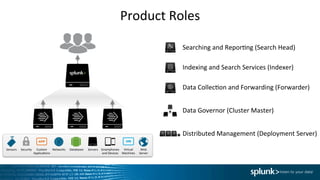
Product	
  Roles	
  
Searching	
  and	
  ReporIng	
  (Search	
  Head)	


Indexing	
  and	
  Search	
  Services	
  (Indexer)	


Data	
  CollecIon	
  and	
  Forwarding	
  (Forwarder)	


Data	
  Governor	
  (Cluster	
  Master)	


Distributed	
  Management	
  (Deployment	
  Server)	
  
Databases	
  Networks	
   Servers	
   Virtual	
  
Machines	
  
Smartphones	
  
and	
  Devices	
  
Custom	
  
ApplicaIons	
  
Security	
   Web	
  
Server	
  
Sensors	
  
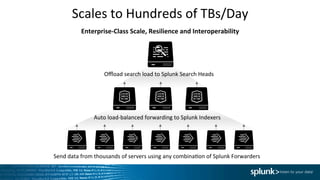
Scales	
  to	
  Hundreds	
  of	
  TBs/Day	
  
Enterprise-­‐Class	
  Scale,	
  Resilience	
  and	
  Interoperability	
  
Send	
  data	
  from	
  thousands	
  of	
  servers	
  using	
  any	
  combinaIon	
  of	
  Splunk	
  Forwarders	


Auto	
  load-­‐balanced	
  forwarding	
  to	
  Splunk	
  Indexers	
  
Offload	
  search	
  load	
  to	
  Splunk	
  Search	
  Heads	
  
1.	
  
2.	
  
3.	
  
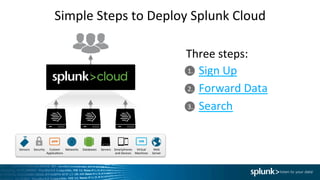
Simple	
  Steps	
  to	
  Deploy	
  Splunk	
  Cloud	
  
Sign	
  Up	
  
Forward	
  Data	
  
Search	
  
Three	
  steps:	
  
Databases	
  Networks	
   Servers	
   Virtual	
  
Machines	
  
Smartphones	
  
and	
  Devices	
  
Custom	
  
ApplicaIons	
  
Security	
   Web	
  
Server	
  
Sensors	
  
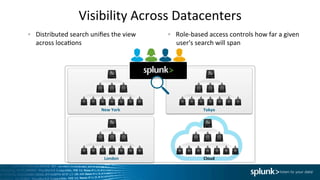
Visibility	
  Across	
  Datacenters	
  
  Distributed	
  search	
  unifies	
  the	
  view	
  	
  
across	
  locaIons	


  Role-­‐based	
  access	
  controls	
  how	
  far	
  a	
  given	
  
user's	
  search	
  will	
  span	
  
New	
  York	
   Tokyo	
  
London	
   Cloud	
  
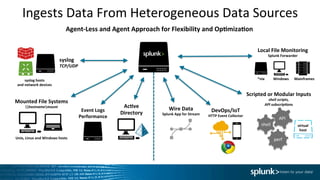
Ingests	
  Data	
  From	
  Heterogeneous	
  Data	
  Sources	
  
Agent-­‐Less	
  and	
  Agent	
  Approach	
  for	
  Flexibility	
  and	
  Op0miza0on	
  
perf	
  
shell	
  
API	
  
Mounted	
  File	
  Systems	
  
hostnamemount	
  
syslog	
  
TCP/UDP	
  
Event	
  Logs	
  	
  
Performance	
  
Ac0ve	
  	
  
Directory	
  
syslog	
  hosts	
  
and	
  network	
  devices	
  
Unix,	
  Linux	
  and	
  Windows	
  hosts	
  
Local	
  File	
  Monitoring	
  
Splunk	
  Forwarder	


virtual	
  
host	
  
Windows	
  
Scripted	
  or	
  Modular	
  Inputs	
  
shell	
  scripts,	
  
API	
  subscrip;ons	


Mainframes	
  *nix	
  
Wire	
  Data	
  
Splunk	
  App	
  for	
  Stream	
  
DevOps/IoT	
  
HTTP	
  Event	
  Collector	
  
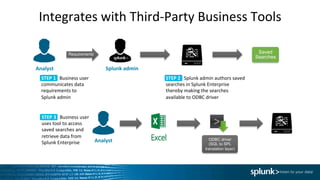
Integrates	
  with	
  Third-­‐Party	
  Business	
  Tools	
  
Analyst	
   Splunk	
  admin	
  
Requirements
STEP	
  1	
  	
  	
  Business	
  user	
  
communicates	
  data	
  
requirements	
  to	
  
Splunk	
  admin	
  
STEP	
  2	
  	
  	
  Splunk	
  admin	
  authors	
  saved	
  
searches	
  in	
  Splunk	
  Enterprise	
  
thereby	
  making	
  the	
  searches	
  
available	
  to	
  ODBC	
  driver	
  
STEP	
  3	
  	
  	
  Business	
  user	
  
uses	
  tool	
  to	
  access	
  
saved	
  searches	
  and	
  
retrieve	
  data	
  from	
  
Splunk	
  Enterprise	
  
ODBC driver
(SQL to SPL
translation layer)
Analyst	
  
Saved
Searches
Real-­‐Time	
  Search,	
  
AlerIng	
  &	
  ReporIng	
  
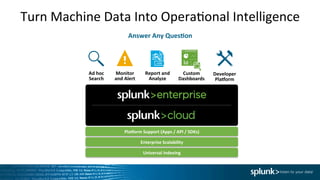
Turn	
  Machine	
  Data	
  Into	
  OperaIonal	
  Intelligence	
  
Answer	
  Any	
  Ques0on	
  
Pla9orm	
  Support	
  (Apps	
  /	
  API	
  /	
  SDKs)	
  
Enterprise	
  Scalability	
  
Universal	
  Indexing	
  
Custom	
  	
  
Dashboards	
  
Report	
  and	
  	
  
Analyze	
  
Monitor	
  	
  
and	
  Alert	
  
Developer	
  
Pla9orm	
  
Ad	
  hoc	
  	
  
Search	
  
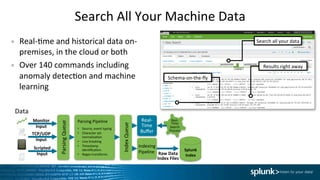
Search	
  All	
  Your	
  Machine	
  Data	
  	
  
•  Real-­‐Ime	
  and	
  historical	
  data	
  on-­‐
premises,	
  in	
  the	
  cloud	
  or	
  both	
  
•  Over	
  140	
  commands	
  including	
  
anomaly	
  detecIon	
  and	
  machine	
  
learning	
  
Data	
  
Parsing	
  Queue	
  
Parsing	
  Pipeline	
  
•  Source,	
  event	
  typing	
  
•  Character	
  set	
  
normalizaIon	
  
•  Line	
  breaking	
  
•  Timestamp	
  
idenIficaIon	
  
•  Regex	
  transforms	
  
Indexing	
  
Pipeline	
  
Real-­‐
Time	
  
Buffer	
  
Raw	
  Data	
  
Index	
  Files	
  
Real-­‐
Time	
  
Search	
  
Process	
  
Monitor	
  
Input	
   Index	
  Queue	
  
TCP/UDP	
  
Input	
  
Scripted	
  
Input	
  
Splunk	
  
Index	
  
Search	
  all	
  your	
  data	
  
Results	
  right	
  away	
  
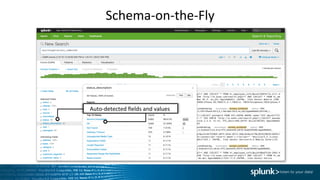
Schema-­‐on-­‐the-­‐fly	
  
Schema-­‐on-­‐the-­‐Fly	
  
Raw	
  events	
  
Auto-­‐detected	
  fields	
  and	
  values	
  
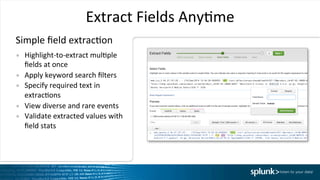
Extract	
  Fields	
  AnyIme	
  
•  Highlight-­‐to-­‐extract	
  mulIple	
  
fields	
  at	
  once	
  
•  Apply	
  keyword	
  search	
  filters	
  
•  Specify	
  required	
  text	
  in	
  
extracIons	
  
•  View	
  diverse	
  and	
  rare	
  events	
  
•  Validate	
  extracted	
  values	
  with	
  
field	
  stats	
  
Simple	
  field	
  extracIon	
  
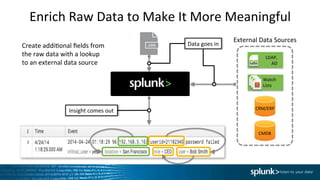
Enrich	
  Raw	
  Data	
  to	
  Make	
  It	
  More	
  Meaningful	
  
Create	
  addiIonal	
  fields	
  from	
  
the	
  raw	
  data	
  with	
  a	
  lookup	
  	
  
to	
  an	
  external	
  data	
  source	
  
LDAP,	
  
AD	
  
Watch	
  
Lists	
  
CRM/ERP	
  
CMDB	
  
External	
  Data	
  Sources	
  
Insight	
  comes	
  out	
  
Data	
  goes	
  in	
  
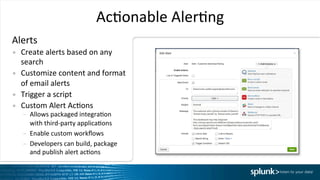
AcIonable	
  AlerIng	
  
Alerts	
  
•  Create	
  alerts	
  based	
  on	
  any	
  
search	
  
•  Customize	
  content	
  and	
  format	
  
of	
  email	
  alerts	
  
•  Trigger	
  a	
  script	
  
•  Custom	
  Alert	
  AcIons	
  
–  Allows	
  packaged	
  integraIon	
  	
  
with	
  third-­‐party	
  applicaIons	
  	
  
–  Enable	
  custom	
  workflows	
  
–  Developers	
  can	
  build,	
  package	
  	
  
and	
  publish	
  alert	
  acIons	
  
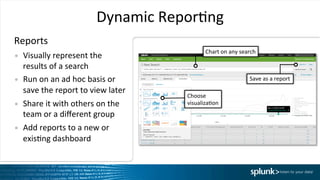
Reports	
  
Dynamic	
  ReporIng	
  
Chart	
  on	
  any	
  search	
  
Choose	
  
visualizaIon	
  
Save	
  as	
  a	
  report	
  
•  Visually	
  represent	
  the	
  
results	
  of	
  a	
  search	
  
•  Run	
  on	
  an	
  ad	
  hoc	
  basis	
  or	
  
save	
  the	
  report	
  to	
  view	
  later	
  
•  Share	
  it	
  with	
  others	
  on	
  the	
  
team	
  or	
  a	
  different	
  group	
  
•  Add	
  reports	
  to	
  a	
  new	
  or	
  
exisIng	
  dashboard	


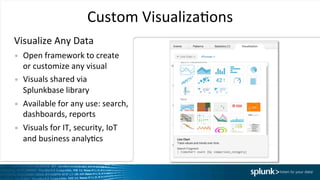
Custom	
  VisualizaIons	
  
•  Open	
  framework	
  to	
  create	
  
or	
  customize	
  any	
  visual	
  
•  Visuals	
  shared	
  via	
  
Splunkbase	
  library	
  
•  Available	
  for	
  any	
  use:	
  search,	
  
dashboards,	
  reports	
  
•  Visuals	
  for	
  IT,	
  security,	
  IoT	
  
and	
  business	
  analyIcs	
  
Visualize	
  Any	
  Data	
  
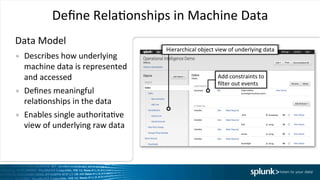
Define	
  RelaIonships	
  in	
  Machine	
  Data	
  
Data	
  Model	
  
•  Describes	
  how	
  underlying	
  
machine	
  data	
  is	
  represented	
  
and	
  accessed	
  
•  Defines	
  meaningful	
  
relaIonships	
  in	
  the	
  data	
  	
  
•  Enables	
  single	
  authoritaIve	
  
view	
  of	
  underlying	
  raw	
  data	
  
Hierarchical	
  object	
  view	
  of	
  underlying	
  data	
  
Add	
  constraints	
  to	
  
filter	
  out	
  events	
  	
  
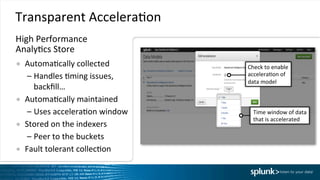
Transparent	
  AcceleraIon	
  
●  AutomaIcally	
  collected	
  
– Handles	
  Iming	
  issues,	
  
backfill…	
  
●  AutomaIcally	
  maintained	
  
– Uses	
  acceleraIon	
  window	
  
●  Stored	
  on	
  the	
  indexers	
  
– Peer	
  to	
  the	
  buckets	
  
●  Fault	
  tolerant	
  collecIon	
  
Time	
  window	
  of	
  data	
  
that	
  is	
  accelerated	
  
Check	
  to	
  enable	
  
acceleraIon	
  of	
  
data	
  model	
  	
  
High	
  Performance	
  	
  
AnalyIcs	
  Store	
  
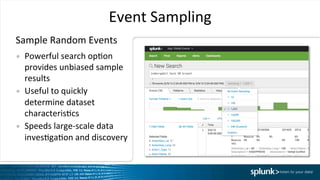
Event	
  Sampling	
  
•  Powerful	
  search	
  opIon	
  
provides	
  unbiased	
  sample	
  
results	
  
•  Useful	
  to	
  quickly	
  
determine	
  dataset	
  
characterisIcs	
  
•  Speeds	
  large-­‐scale	
  data	
  
invesIgaIon	
  and	
  discovery	
  
Sample	
  Random	
  Events	
  
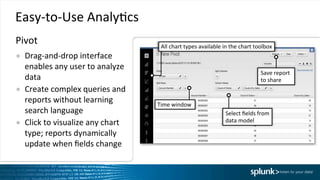
Easy-­‐to-­‐Use	
  AnalyIcs	
  
●  Drag-­‐and-­‐drop	
  interface	
  
enables	
  any	
  user	
  to	
  analyze	
  
data	
  	
  
●  Create	
  complex	
  queries	
  and	
  
reports	
  without	
  learning	
  
search	
  language	
  
●  Click	
  to	
  visualize	
  any	
  chart	
  
type;	
  reports	
  dynamically	
  
update	
  when	
  fields	
  change	
  
Select	
  fields	
  from	
  	
  
data	
  model	
  
Time	
  window	
  
All	
  chart	
  types	
  available	
  in	
  the	
  chart	
  toolbox	
  
Save	
  report	
  	
  
to	
  share	
  
Pivot	
  	
  
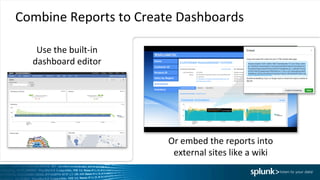
Combine	
  Reports	
  to	
  Create	
  Dashboards	
  
Use	
  the	
  built-­‐in	
  	
  
dashboard	
  editor	
  
Or	
  embed	
  the	
  reports	
  into	
  
external	
  sites	
  like	
  a	
  wiki	
  
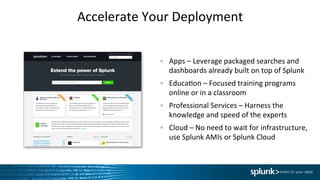
Accelerate	
  Your	
  Deployment	
  
Apps	
  –	
  Leverage	
  packaged	
  searches	
  and	
  
dashboards	
  already	
  built	
  on	
  top	
  of	
  Splunk	
  
EducaIon	
  –	
  Focused	
  training	
  programs	
  
online	
  or	
  in	
  a	
  classroom	
  
Professional	
  Services	
  –	
  Harness	
  the	
  
knowledge	
  and	
  speed	
  of	
  the	
  experts	
  
Cloud	
  –	
  No	
  need	
  to	
  wait	
  for	
  infrastructure,	
  
use	
  Splunk	
  AMIs	
  or	
  Splunk	
  Cloud	
  
Summary	
  
●  Real-­‐Time	
  Architecture	
  	
  
●  Schema-­‐on-­‐the-­‐fly	
  
●  Massive	
  Scalability	
  
●  Easy	
  ReporIng	
  and	
  AnalyIcs	
  
●  PlaOorm	
  for	
  All	
  Machine	
  Data	
  
Thank	
  You	
  

Getting Started with Splunk Enterprise

  • 1.
    Copyright  ©  2016  Splunk  Inc.   Splunk  Enterprise   Technical  Overview   Raff  Schirripa  
  • 2.
    Agenda   What  is  Splunk  Enterprise?     Deployment  &  IntegraIon   Real-­‐Time  Search,  Alert  &  ReporIng   Universal  Indexing  Explained   Splunk  Developer  PlaOorm  
  • 3.
    Make  machine  data  accessible,     usable  and  valuable  to  everyone.    
  • 4.
    Industry  Leading  PlaOorm  For  Machine  Data    Machine  Data:  Any  Loca0on,  Type,  Volume   Pla9orm  Support  (Apps  /  API  /  SDKs)   Enterprise  Scalability   Universal  Indexing   Answer  Any  Ques0on   Custom     dashboards   Report  and     analyze   Monitor     and  alert   Developer   Pla9orm   Ad  hoc     search   Online   Services   Web   Services   Servers   Security   GPS   LocaIon   Storage   Desktops   Networks   Packaged   ApplicaIons   Custom   ApplicaIons  Messaging   Telecoms   Online   Shopping   Cart   Web   Clickstreams   Databases   Energy   Meters   Call  Detail   Records   Smartphones   and  Devices   RFID   On-­‐   Premises   Private     Cloud   Public     Cloud  
  • 5.
    Industry  Leading  PlaOorm  For  Machine  Data    Machine  Data:  Any  Loca0on,  Type,  Volume   Pla9orm  Support  (Apps  /  API  /  SDKs)   Enterprise  Scalability   Universal  Indexing   Answer  Any  Ques0on   Custom     dashboards   Report  and     analyze   Monitor     and  alert   Developer   Pla9orm   Ad  hoc     search   Online   Services   Web   Services   Servers   Security   GPS   LocaIon   Storage   Desktops   Networks   Packaged   ApplicaIons   Custom   ApplicaIons  Messaging   Telecoms   Online   Shopping   Cart   Web   Clickstreams   Databases   Energy   Meters   Call  Detail   Records   Smartphones   and  Devices   RFID   On-­‐   Premises   Private     Cloud   Public     Cloud   Any  amount,  any  locaIon,  any  source   Schema-­‐ on-­‐the-­‐fly   Universal   indexing   No     back-­‐end   RDBMS   No  need     to  filter   data  
  • 6.
    Splunk  SoYware   Deployment  and   IntegraIon  
  • 7.
    1.   2.   3.   4.   Simple  Steps  to  Deploy  Splunk  Enterprise   Download   Install   Forward  Data   Search   Four  steps:   Databases  Networks   Servers   Virtual   Machines   Smartphones   and  Devices   Custom   ApplicaIons   Security   Web   Server   Sensors  
  • 8.
  • 9.
    Product  Roles   Searching  and  ReporIng  (Search  Head)     Indexing  and  Search  Services  (Indexer)     Data  CollecIon  and  Forwarding  (Forwarder)     Data  Governor  (Cluster  Master)     Distributed  Management  (Deployment  Server)   Databases  Networks   Servers   Virtual   Machines   Smartphones   and  Devices   Custom   ApplicaIons   Security   Web   Server   Sensors  
  • 10.
    Scales  to  Hundreds  of  TBs/Day   Enterprise-­‐Class  Scale,  Resilience  and  Interoperability   Send  data  from  thousands  of  servers  using  any  combinaIon  of  Splunk  Forwarders       Auto  load-­‐balanced  forwarding  to  Splunk  Indexers   Offload  search  load  to  Splunk  Search  Heads  
  • 11.
    1.   2.   3.   Simple  Steps  to  Deploy  Splunk  Cloud   Sign  Up   Forward  Data   Search   Three  steps:   Databases  Networks   Servers   Virtual   Machines   Smartphones   and  Devices   Custom   ApplicaIons   Security   Web   Server   Sensors  
  • 12.
    Visibility  Across  Datacenters     Distributed  search  unifies  the  view     across  locaIons       Role-­‐based  access  controls  how  far  a  given   user's  search  will  span   New  York   Tokyo   London   Cloud  
  • 13.
    Ingests  Data  From  Heterogeneous  Data  Sources   Agent-­‐Less  and  Agent  Approach  for  Flexibility  and  Op0miza0on   perf   shell   API   Mounted  File  Systems   hostnamemount   syslog   TCP/UDP   Event  Logs     Performance   Ac0ve     Directory   syslog  hosts   and  network  devices   Unix,  Linux  and  Windows  hosts   Local  File  Monitoring   Splunk  Forwarder     virtual   host   Windows   Scripted  or  Modular  Inputs   shell  scripts,   API  subscrip;ons     Mainframes  *nix   Wire  Data   Splunk  App  for  Stream   DevOps/IoT   HTTP  Event  Collector  
  • 14.
    Integrates  with  Third-­‐Party  Business  Tools   Analyst   Splunk  admin   Requirements STEP  1      Business  user   communicates  data   requirements  to   Splunk  admin   STEP  2      Splunk  admin  authors  saved   searches  in  Splunk  Enterprise   thereby  making  the  searches   available  to  ODBC  driver   STEP  3      Business  user   uses  tool  to  access   saved  searches  and   retrieve  data  from   Splunk  Enterprise   ODBC driver (SQL to SPL translation layer) Analyst   Saved Searches
  • 15.
  • 16.
    Turn  Machine  Data  Into  OperaIonal  Intelligence   Answer  Any  Ques0on   Pla9orm  Support  (Apps  /  API  /  SDKs)   Enterprise  Scalability   Universal  Indexing   Custom     Dashboards   Report  and     Analyze   Monitor     and  Alert   Developer   Pla9orm   Ad  hoc     Search  
  • 17.
    Search  All  Your  Machine  Data     •  Real-­‐Ime  and  historical  data  on-­‐ premises,  in  the  cloud  or  both   •  Over  140  commands  including   anomaly  detecIon  and  machine   learning   Data   Parsing  Queue   Parsing  Pipeline   •  Source,  event  typing   •  Character  set   normalizaIon   •  Line  breaking   •  Timestamp   idenIficaIon   •  Regex  transforms   Indexing   Pipeline   Real-­‐ Time   Buffer   Raw  Data   Index  Files   Real-­‐ Time   Search   Process   Monitor   Input   Index  Queue   TCP/UDP   Input   Scripted   Input   Splunk   Index   Search  all  your  data   Results  right  away   Schema-­‐on-­‐the-­‐fly  
  • 18.
    Schema-­‐on-­‐the-­‐Fly   Raw  events   Auto-­‐detected  fields  and  values  
  • 19.
    Extract  Fields  AnyIme   •  Highlight-­‐to-­‐extract  mulIple   fields  at  once   •  Apply  keyword  search  filters   •  Specify  required  text  in   extracIons   •  View  diverse  and  rare  events   •  Validate  extracted  values  with   field  stats   Simple  field  extracIon  
  • 20.
    Enrich  Raw  Data  to  Make  It  More  Meaningful   Create  addiIonal  fields  from   the  raw  data  with  a  lookup     to  an  external  data  source   LDAP,   AD   Watch   Lists   CRM/ERP   CMDB   External  Data  Sources   Insight  comes  out   Data  goes  in  
  • 21.
    AcIonable  AlerIng   Alerts   •  Create  alerts  based  on  any   search   •  Customize  content  and  format   of  email  alerts   •  Trigger  a  script   •  Custom  Alert  AcIons   –  Allows  packaged  integraIon     with  third-­‐party  applicaIons     –  Enable  custom  workflows   –  Developers  can  build,  package     and  publish  alert  acIons  
  • 22.
    Reports   Dynamic  ReporIng   Chart  on  any  search   Choose   visualizaIon   Save  as  a  report   •  Visually  represent  the   results  of  a  search   •  Run  on  an  ad  hoc  basis  or   save  the  report  to  view  later   •  Share  it  with  others  on  the   team  or  a  different  group   •  Add  reports  to  a  new  or   exisIng  dashboard    
  • 23.
    Custom  VisualizaIons   • Open  framework  to  create   or  customize  any  visual   •  Visuals  shared  via   Splunkbase  library   •  Available  for  any  use:  search,   dashboards,  reports   •  Visuals  for  IT,  security,  IoT   and  business  analyIcs   Visualize  Any  Data  
  • 24.
    Define  RelaIonships  in  Machine  Data   Data  Model   •  Describes  how  underlying   machine  data  is  represented   and  accessed   •  Defines  meaningful   relaIonships  in  the  data     •  Enables  single  authoritaIve   view  of  underlying  raw  data   Hierarchical  object  view  of  underlying  data   Add  constraints  to   filter  out  events    
  • 25.
    Transparent  AcceleraIon   ● AutomaIcally  collected   – Handles  Iming  issues,   backfill…   ●  AutomaIcally  maintained   – Uses  acceleraIon  window   ●  Stored  on  the  indexers   – Peer  to  the  buckets   ●  Fault  tolerant  collecIon   Time  window  of  data   that  is  accelerated   Check  to  enable   acceleraIon  of   data  model     High  Performance     AnalyIcs  Store  
  • 26.
    Event  Sampling   • Powerful  search  opIon   provides  unbiased  sample   results   •  Useful  to  quickly   determine  dataset   characterisIcs   •  Speeds  large-­‐scale  data   invesIgaIon  and  discovery   Sample  Random  Events  
  • 27.
    Easy-­‐to-­‐Use  AnalyIcs   ● Drag-­‐and-­‐drop  interface   enables  any  user  to  analyze   data     ●  Create  complex  queries  and   reports  without  learning   search  language   ●  Click  to  visualize  any  chart   type;  reports  dynamically   update  when  fields  change   Select  fields  from     data  model   Time  window   All  chart  types  available  in  the  chart  toolbox   Save  report     to  share   Pivot    
  • 28.
    Combine  Reports  to  Create  Dashboards   Use  the  built-­‐in     dashboard  editor   Or  embed  the  reports  into   external  sites  like  a  wiki  
  • 29.
    Accelerate  Your  Deployment   Apps  –  Leverage  packaged  searches  and   dashboards  already  built  on  top  of  Splunk   EducaIon  –  Focused  training  programs   online  or  in  a  classroom   Professional  Services  –  Harness  the   knowledge  and  speed  of  the  experts   Cloud  –  No  need  to  wait  for  infrastructure,   use  Splunk  AMIs  or  Splunk  Cloud  
  • 30.
    Summary   ●  Real-­‐Time  Architecture     ●  Schema-­‐on-­‐the-­‐fly   ●  Massive  Scalability   ●  Easy  ReporIng  and  AnalyIcs   ●  PlaOorm  for  All  Machine  Data  
  • 31.